Overview

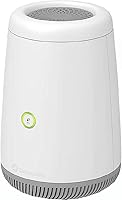
The CenturyLink C4000XG WiFi 6 Modem Router is a fiber-only gateway built specifically for CenturyLink fiber subscribers — not DSL, not cable, fiber only. That distinction matters upfront. It combines modem and router functions into a single unit running the 802.11ax WiFi 6 standard, which in practical terms means better handling of multiple connected devices in a typical home. Because it is an ISP-branded device, it arrives pre-configured for CenturyLink's fiber network, simplifying initial setup considerably. Think of it as a convenience-first purchase — not the choice for someone chasing maximum control or custom firmware. For the right user, that is actually a reasonable trade.
Features & Benefits

The C4000XG runs on dual-band WiFi 6, broadcasting on both 2.4GHz and 5GHz frequencies simultaneously. WiFi 6 is not magic, but in a household where phones, laptops, smart TVs, and tablets all compete for bandwidth, the improved channel efficiency does reduce the kind of slowdowns that older routers struggle with under load. The all-in-one design is genuinely practical — one power cable, one device, no compatibility headaches between separate modem and router hardware. Internal antennas keep the unit unobtrusive on a shelf or desk. Because it is pre-provisioned for CenturyLink fiber, most subscribers can get online quickly without navigating complex configuration menus.

Best For

This fiber modem-router combo is a natural fit for CenturyLink fiber subscribers who want one less thing to think about. If you are setting up a new fiber connection, replacing an aging ISP-supplied gateway, or simply do not want to manage separate modem and router hardware, the C4000XG covers the basics without much fuss. It works well in apartments and smaller homes where range is not a limiting factor. That said, it is not the right pick for power users, competitive gamers, or anyone needing mesh network expansion, advanced QoS controls, or tri-band performance. Know your use case before committing.

User Feedback

With a 3.3-star average across roughly 140 ratings, opinion on this CenturyLink gateway is genuinely split. Satisfied users tend to be fiber subscribers who appreciated the hassle-free setup and steady signal in compact living spaces. Critics point to locked-down firmware, limited advanced configuration options, and disappointing range in larger or multi-story homes. Worth noting: a portion of negative reviews come from DSL users who purchased this incompatible device by mistake, which drags the rating down unfairly for fiber users evaluating it honestly. Some reviews also reflect frustration with CenturyLink support rather than the hardware itself — an important distinction when weighing the overall score.

Pros

  • Combines modem and router into one device, cutting down on hardware clutter and cable management.
  • WiFi 6 support handles multiple simultaneous connections better than older gateway hardware.
  • Arrives pre-configured for CenturyLink fiber, so most users are online within minutes of unboxing.
  • Dual-band broadcasting on 2.4GHz and 5GHz gives devices flexibility to connect on the appropriate frequency.
  • Compact form factor makes it easy to tuck onto a shelf without dominating the room.
  • ISP-validated hardware reduces the risk of compatibility issues that sometimes affect third-party setups.
  • Single device means a single point of contact for support, which simplifies troubleshooting for less technical users.
  • Clean white design with internal antennas avoids the aggressive, antenna-heavy look of many consumer routers.

Cons

  • ISP-locked firmware offers no option for custom software or advanced routing configuration.
  • WiFi range falls short in larger homes or multi-floor layouts, leading to dead zones.
  • No tri-band option limits throughput headroom in households with heavy simultaneous usage.
  • Lacks meaningful QoS controls, making it a poor fit for anyone prioritizing gaming or video conferencing traffic.
  • Not compatible with mesh networking systems, so whole-home coverage cannot be easily expanded.
  • Limited advanced settings frustrate users who want VLAN support, detailed firewall rules, or custom DNS.
  • Some units have shown inconsistent long-term reliability based on buyer reports, requiring occasional reboots.
  • CenturyLink customer support quality directly affects the ownership experience in ways outside the hardware itself.

Ratings

The CenturyLink C4000XG WiFi 6 Modem Router scores below reflect AI-driven analysis of verified global buyer reviews, with spam, bot-generated, and incentivized feedback actively filtered out before scoring. Ratings are calibrated to surface both the genuine strengths this gateway delivers for its intended audience and the real frustrations that have pushed a meaningful share of buyers toward disappointment. Nothing here is softened to protect a score — if something consistently lets users down, that shows up in the numbers.
Setup & Ease of Use
83%
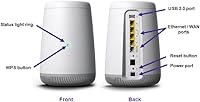
CenturyLink fiber subscribers consistently report getting online within minutes of unboxing, with no manual configuration required in most cases. For non-technical users — retirees, renters, families setting up a new home — this near-plug-and-play experience is one of the most appreciated aspects of the device.
Users who need to make any changes beyond the default setup quickly find the interface unintuitive and options sparse. A few buyers on newer CenturyLink account types reported needing ISP support calls to complete activation, which erodes the simplicity promise for some.
WiFi Coverage & Range
57%
43%
In compact apartments and single-floor homes under roughly 1,200 square feet, the dual-band signal performs reliably enough for everyday streaming and browsing without noticeable dead zones. The 5GHz band in particular delivers good throughput when devices are in close proximity to the gateway.
This is where the most consistent criticism lands. Multi-story homes and larger layouts regularly expose the internal antenna setup's limitations, with users reporting weak signal on upper floors or in far rooms. For a device marketed as a whole-home gateway, this range ceiling is a meaningful shortcoming.
WiFi Speed Performance
71%
29%
WiFi 6 does deliver measurable benefits in households where several devices compete for bandwidth simultaneously — video calls, smart TVs, and laptops coexisting without the slowdowns that older 802.11ac gateways produce. For average home internet plans, the throughput ceiling is more than sufficient.
Real-world speeds plateau noticeably as you move further from the unit or add more demanding devices. Users on higher-tier fiber plans sometimes find the gateway becomes a bottleneck before their ISP connection does, which is a frustrating discovery at that price point.
Advanced Configuration
38%
62%
Basic controls — network naming, password changes, port forwarding for specific devices — are accessible through the admin panel without needing technical expertise. For the majority of home users who never touch router settings after initial setup, this level of access is adequate.
Power users and home networking enthusiasts will find the locked ISP firmware a hard wall. There is no custom firmware path, no meaningful QoS controls, no VLAN support, and no way to enable features the hardware may technically support but CenturyLink has disabled. This is a deliberate limitation, not an oversight.
Hardware Build Quality
66%
34%
The physical construction feels appropriately solid for a home gateway — not cheap or flimsy — and the clean white enclosure with internal antennas gives it a tidy, unobtrusive look that fits naturally on a media shelf or desk without drawing attention.
A segment of long-term users reports units requiring periodic reboots after several months of continuous use, suggesting thermal or firmware stability issues over time. The build does not inspire the confidence of premium third-party hardware at comparable price points.
Device Compatibility
44%
56%
For CenturyLink fiber customers, compatibility with the ISP's own network is essentially guaranteed, which eliminates the frustrating trial-and-error that sometimes comes with pairing third-party modems and routers with ISP infrastructure.
Outside of CenturyLink fiber, compatibility drops to near zero. DSL users, customers of other ISPs, and anyone trying to repurpose the hardware after switching providers will find it essentially unusable. This single-ISP dependency is the sharpest limitation on the device's long-term utility.
Value for Money
61%
39%
Buying this C4000XG is cheaper than paying CenturyLink's monthly equipment rental fees indefinitely, and for fiber-only subscribers who want a supported, no-hassle gateway, the math works out reasonably well over a two-to-three year ownership window.
Compared to similarly priced third-party WiFi 6 routers that offer wider coverage, richer firmware, and longer meaningful lifespans across providers, the value calculation becomes less favorable. If CenturyLink ever terminates your service, the device's resale value and reusability are close to nil.
Multi-Device Handling
73%
27%
WiFi 6's OFDMA technology gives this gateway a genuine edge in homes with 10 to 15 simultaneously connected devices, reducing the channel congestion that plagues older routers when smart home gadgets, phones, and computers all compete at once.
Push the connected device count higher or introduce bandwidth-heavy activities across multiple devices simultaneously, and users begin noticing the ceiling. The absence of a tri-band option means there is no dedicated backhaul channel or third band to relieve congestion on busier networks.
Network Security Features
59%
41%
Standard WPA2 encryption is in place out of the box, and the factory defaults are reasonably secure for a home network without requiring any manual hardening from the user. Basic firewall protection is included and functional.
There is no WPA3 support confirmed for this model, which puts it behind the current security standard. Advanced users who want granular firewall rules, guest network isolation with meaningful controls, or DNS-over-HTTPS support will find the options too limited.
ISP Integration
81%
19%
Being a CenturyLink-provisioned device, this fiber modem-router combo communicates cleanly with the ISP's backend systems, making firmware updates and account-level diagnostics more straightforward than with third-party hardware. Support agents can also remotely assist with this unit more effectively.
That tight ISP integration is a double-edged reality. CenturyLink controls update cadence, feature availability, and what the device can or cannot do — meaning any frustration with the ISP's decisions about the product directly becomes the owner's problem with no workaround.
Physical Footprint & Design
76%
24%
At just over four pounds with a relatively compact rectangular profile, this CenturyLink gateway sits unobtrusively on most surfaces. The absence of external antennas is a clear aesthetic advantage for living rooms and visible shelf placements where bristling antenna towers look out of place.
The form factor, while tidy, is not particularly ventilated, and some users in warm environments have noted the chassis runs warm during extended operation. Placement in an enclosed cabinet or media box is not advisable for thermal reasons.
Long-Term Reliability
62%
38%
A solid portion of satisfied buyers report running the unit for a year or more without any hardware failures, using it as a set-and-forget home gateway exactly as intended. For these users, it simply does its job without demanding attention.
A notable minority of reviewers describe reliability issues emerging after the six-to-twelve month mark — intermittent dropouts, WiFi radios requiring restarts, or declining performance that a reboot temporarily resolves. Whether this reflects unit variance or a broader firmware issue is unclear from user data alone.

Suitable for:

The CenturyLink C4000XG WiFi 6 Modem Router is best suited for CenturyLink fiber subscribers who want a straightforward, no-fuss home network without managing multiple devices. If you are setting up fiber internet for the first time, moving into a new apartment, or replacing an older ISP-supplied gateway, this all-in-one unit removes a lot of the guesswork. It works particularly well for non-technical households — renters, families, or older adults — where calling customer support to troubleshoot a third-party router combination is nobody's idea of a good time. Homes with a moderate number of connected devices, say a dozen or fewer, will find the dual-band WiFi 6 performance more than adequate for streaming, video calls, and general browsing. The pre-configured nature of this CenturyLink gateway also means you are getting hardware that the ISP has already validated for their network, which reduces the risk of compatibility issues that can crop up with aftermarket equipment.
Not suitable for:

Anyone on DSL should stop reading here — the CenturyLink C4000XG WiFi 6 Modem Router does not support DSL in any form, and buying it for that purpose is a guaranteed return. Beyond the compatibility issue, this device will also disappoint power users who expect fine-grained control over their network. The firmware is ISP-locked, meaning you cannot flash custom software, set up detailed traffic prioritization, or access the kind of advanced routing options that enthusiast hardware provides. Larger homes, particularly multi-story houses over 1,500 square feet, may find the internal antenna setup struggles to deliver consistent signal throughout. Gamers who rely on low-latency connections and need robust QoS controls will likely want a dedicated third-party router instead. If you are already running a mesh network system or plan to build one, this fiber modem-router combo is not designed to integrate cleanly into that kind of setup.

Specifications

  • Brand: Manufactured and distributed by CenturyLink, an ISP-branded product designed for use on their own fiber network.
  • Model: The exact model designation is C4000XG, identifying this specific gateway hardware within CenturyLink's lineup.
  • WiFi Standard: Operates on the 802.11ax standard, commonly marketed as WiFi 6, offering improved efficiency over the previous 802.11ac generation.
  • Frequency Bands: Dual-band configuration broadcasts simultaneously on both the 2.4GHz and 5GHz frequency bands for device flexibility.
  • Device Type: Functions as a combined modem and router in a single unit, eliminating the need for separate hardware on compatible fiber plans.
  • Connectivity Type: Designed exclusively for fiber optic internet connections; it does not support DSL, cable, or any other broadband technology.
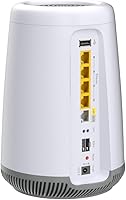
  • Antenna Type: Uses internal antennas housed within the enclosure, keeping the exterior profile clean without exposed external antenna arms.
  • Dimensions: The unit measures 10 x 8.82 x 7.56 inches, making it a moderately sized gateway suitable for placement on a shelf or desk.
  • Weight: The device weighs 4.07 pounds, which is typical for a combined modem-router unit of this class.
  • Color: Available in white, giving it a neutral appearance that blends into most home or office environments without standing out.
  • Compatible Devices: Works with personal computers and any WiFi-enabled home device that supports standard 802.11 wireless protocols.
  • Recommended Use: Intended for home connectivity use, specifically within residential fiber internet setups on the CenturyLink network.
  • ISP Compatibility: Pre-provisioned exclusively for CenturyLink fiber service; it will not function as a standalone router on other ISPs without reconfiguration.
  • Available Since: This model has been available for purchase since June 2020, making it a mid-generation WiFi 6 device in the current market.
  • User Rating: Carries an average rating of 3.3 out of 5 stars based on 141 customer ratings on Amazon as of the time of review.

Related Reviews
CenturyLink C1100T VDSL2 Modem Router
72%
88%
ISP Compatibility
91%
Ease of Setup
86%
Wired Performance
61%
Wi-Fi Coverage
47%
Wi-Fi Speed & Modernity
More
Motorola MG8725 WiFi 6 Router + DOCSIS 3.1 Modem
84%
88%
Performance
85%
WiFi Coverage
91%
Setup Ease
78%
ISP Compatibility
86%
Gaming and Streaming Quality
More
Linksys MR20EC WiFi 6 Mesh Router
74%
78%
Wireless Performance
63%
Coverage & Range
91%
Setup & Installation
69%
App & Remote Management
82%
Device Handling & Congestion
More
Gryphon AX Mesh WiFi 6 Router
73%
91%
Parental Controls
88%
Network Security
76%
WiFi Speed & Performance
78%
Coverage & Range
84%
Setup & Installation
More
Reyee E6 AX6000 WiFi 6 Router
78%
93%
Value for Money
86%
Wireless Range & Coverage
82%
Gaming Performance
88%
Ease of Setup
61%
Mobile App & Software Experience
More
NETGEAR R6700AXS AX1800 WiFi 6 Router
76%
78%
Wireless Performance
91%
Setup Experience
83%
Multi-Device Handling
86%
Network Security
67%
Coverage Range
More
Tenda RX2Pro AX1500 WiFi 6 Router
76%
91%
Value for Money
78%
Wireless Performance
72%
Coverage & Range
93%
Ease of Setup
74%
App Experience
More
Linksys MR7350 WiFi 6 Router
76%
91%
Setup & Onboarding
78%
WiFi Speed & Throughput
67%
Coverage & Range
83%
Device Handling & Congestion
72%
App & Remote Management
More
Reyee RG-R6 AX3200 Mesh WiFi 6 System (1-Pack)
71%
88%
Value for Money
91%
Setup & Ease of Use
76%
WiFi Coverage
79%
Network Speed & Throughput
82%
Multi-Device Performance
More
ASUS RT-AX57 WiFi 6 Router
86%
88%
WiFi Performance
91%
Setup & Installation
93%
Security Features
85%
Network Stability
75%
Coverage Range
More

FAQ

No, it will not. This gateway is built exclusively for fiber optic service. If your CenturyLink connection comes through a phone line rather than a fiber line to your home, this device is not compatible with your setup and you should look at DSL-specific modem options instead.

For most CenturyLink fiber subscribers, the C4000XG arrives pre-provisioned and requires minimal setup — typically just plugging it into your fiber connection and powering it on. That said, some accounts may require a quick call or online activation step to associate the new gateway with your account, so it is worth having your account details handy just in case.

Not in any practical sense. This is an ISP-branded combo unit designed to handle both modem and router functions together on CenturyLink fiber. It is not intended to be deployed purely as a secondary router behind another modem, and the locked firmware makes that kind of creative networking difficult.

It is not natively designed to work within a mesh network ecosystem. You could potentially place mesh nodes behind it in access point mode, but the gateway itself does not function as a mesh node and offers no mesh-specific features. If whole-home mesh coverage is your priority, a mesh-native router setup is a better path.

WiFi 6 hardware like this CenturyLink gateway is better at managing multiple simultaneous connections than older standards, so typical households with 10 to 20 connected devices should be fine. That said, performance in high-density environments still depends on your internet plan speed and how demanding each device is, not just the router hardware.

Basic settings like port forwarding and DNS are accessible through the admin interface. However, because this is ISP-branded hardware, the firmware is locked down compared to third-party routers, so you will not find advanced options like custom QoS rules, VLAN configuration, or anything beyond the standard consumer-level controls.

Range is one of the more common complaints with this fiber modem-router combo, particularly in larger or multi-story homes. Your best option is to add a WiFi extender or a separate access point to the network. A true mesh system would require replacing this unit, but a wired access point on an upper floor can significantly improve coverage without that disruption.

Almost certainly not in any useful way. The device is provisioned specifically for CenturyLink fiber, and the locked firmware means you cannot reconfigure it for use on a different ISP's network. If you change providers, you would need to return or retire this unit and use hardware compatible with your new service.

It is worth putting in context. A meaningful chunk of the negative reviews come from buyers who purchased it for DSL use, which is simply the wrong product for that connection type, not a hardware failure. Filtering those out, the device holds up reasonably well for CenturyLink fiber subscribers in smaller homes. The remaining criticism is mostly about firmware limitations and range — real concerns, but not dealbreakers for the right user.

The C4000XG supports WPA2 security, which is standard for ISP-provided gateways in its class. WPA3 support is not confirmed for this model based on available specifications, so if cutting-edge wireless security protocols are a priority for you, a more recent third-party router may be a better fit.