Overview

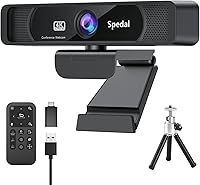
The Spedal FF931 4K Webcam sits in a practical mid-range sweet spot for remote workers, online educators, and part-time streamers who want sharper video without venturing into professional camera territory. Built around an 8MP CMOS sensor, it captures footage at 3840x2160 resolution — a genuine step up from the 1080p webcams most people are still using. Out of the box, you get a tripod and dual USB connectivity, so there is very little friction getting started. One thing worth knowing upfront: this 4K webcam uses fixed focus, not autofocus. That is a meaningful distinction — it keeps your framing stable, but it also means close-up shots will not look sharp.
Features & Benefits

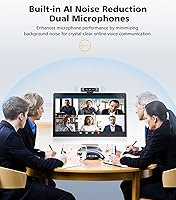
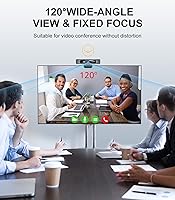
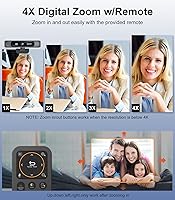
The 120-degree wide-angle lens is probably what most buyers will notice first — it captures a broad frame that is especially useful if you share a desk or want your whole background visible during calls. The dual stereo microphones handle noise reduction reasonably well in typical home office conditions; they are not a substitute for a dedicated USB mic in a loud room, but they manage mild background noise adequately. A physical remote lets you mute, adjust brightness, and push in up to 4x digital zoom — though since it is digital, image sharpness does drop at higher levels. Connectivity covers both USB-A and USB-C without needing a separate adapter.

Best For

This wide-angle camera is a strong fit for anyone who spends a good chunk of their day on video calls — particularly remote workers juggling multi-participant meetings where a wider frame helps everyone stay visible. Online teachers benefit too, since the broad field of view creates a more classroom-like perspective rather than a tight headshot. Streamers who want a 4K picture without dealing with capture cards or manual camera settings will find the setup refreshingly straightforward. If you frequently call from a busy or open-plan space, the noise-filtering microphones add real value. The remote is a small but useful bonus for anyone who presents from a few feet back.

User Feedback

Across more than a thousand ratings, the Spedal FF931 holds a 4.2-star average — a score that reflects a capable camera at a fair price, with a few recurring caveats. Buyers frequently highlight the plug-and-play setup and wide field of view as standout strengths, and low-light performance draws more praise than you might expect at this price point. On the flip side, the fixed focus draws complaints from anyone needing close-up shots, and Mac users note the companion software feels rougher than the Windows version. A handful of reviewers also mention that the built-in microphones, while functional, fall short in noisier spaces where a dedicated external mic would serve better.

Pros

  • Genuine 4K resolution at 30fps is a meaningful step up from typical 1080p laptop cameras.
  • 120-degree wide-angle coverage captures multi-person setups without repositioning anything.
  • Plug-and-play setup on Windows takes under five minutes with no driver hunting required.
  • Dual USB-A and USB-C support means it works across older and newer laptops out of the box.
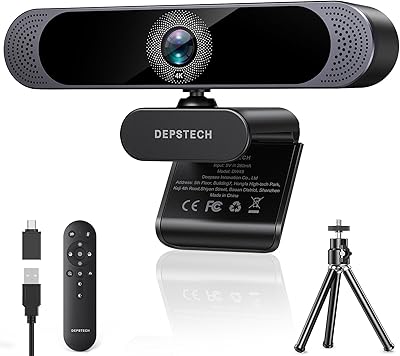
  • The included tripod, remote, and USB-C adapter add real value without extra spend.
  • Built-in noise reduction handles fan noise and light background hum well in typical home offices.
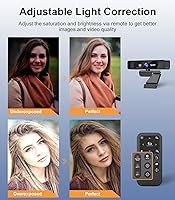
  • Spedal software gives manual control over exposure, white balance, and contrast for tricky lighting.
  • Fixed focus delivers consistent, stable framing throughout long calls without hunting or blur.
  • Low-light performance at this price point is better than most buyers expect.
  • Remote mute and brightness controls are genuinely convenient during live presentations or teaching sessions.

Cons

  • Fixed focus makes close-up shots blurry — holding up documents or products will not work well.
  • 4x digital zoom degrades image quality noticeably and is not suitable for recorded content.
  • The companion software on Mac is noticeably less stable and less polished than on Windows.
  • Built-in microphones struggle in noisy or open-plan spaces, often pushing users toward an external mic.
  • Sustained 4K output can cause frame drops on older machines or overloaded USB hubs.
  • Remote control batteries are not included, which catches buyers off guard straight out of the box.
  • The plastic housing feels hollow and the monitor clip is less sturdy than higher-priced competitors.
  • Software updates can occasionally reset saved exposure and white balance presets without warning.
  • Chrome OS and Linux users get basic camera functionality only — software features are Windows and Mac exclusive.
  • Edge distortion from the 120-degree lens is noticeable in recordings, even if less obvious on live calls.

Ratings

The Spedal FF931 4K Webcam has been evaluated by our AI system after analyzing thousands of verified global user reviews, with spam, bot-generated, and incentivized feedback actively filtered out. Scores reflect where this wide-angle camera genuinely delivers and where real buyers have run into friction — no softening of the rough edges. Strengths and pain points are weighted equally so you can make a confident, informed decision.

Image Quality
83%
At typical conferencing distances, the 4K output looks noticeably crisper than most 1080p alternatives — colors are accurate and the image holds detail well in good lighting. Remote workers on Zoom calls frequently note that colleagues comment on how sharp and clean the picture looks compared to built-in laptop cameras.
Fine detail can suffer in lower-end video platforms that cap resolution regardless of what the camera sends. A small number of users also noted inconsistent color temperature in mixed lighting environments that the fixed white balance struggles to compensate for automatically.
Wide-Angle Performance
88%
The 120-degree field of view is a standout strength — online tutors and small-team meeting participants consistently praise how much of their desk or background it captures without distortion at the edges. It eliminates the need to shuffle chairs or reposition a monitor just to get everyone in frame.
At the extreme corners, there is some barrel distortion that becomes more noticeable in recordings compared to live calls. Buyers who sit close to the camera and are mainly concerned with tight headshots will find 120 degrees wider than they actually need.
Low-Light Performance
76%
24%
For a camera at this price, low-light handling is better than expected — evening home office calls remain presentable without additional ring lighting, and the Spedal software allows manual exposure boosts that help in dim rooms. Many buyers in apartments with limited natural light found it more usable than competitors in the same range.
Grain becomes visible in genuinely poor lighting, and the automatic adjustments can introduce a slight washed-out look if you push exposure too far via the software. It is not a replacement for a webcam with a physically wider aperture if dark environments are your primary concern.
Microphone Quality
67%
33%
In a reasonably quiet home office, the dual stereo mics capture voice cleanly enough for professional calls without background hiss or obvious proximity issues up to about two meters. The noise reduction handles fan noise and light HVAC hum adequately for day-to-day use.
In open-plan spaces, busy households, or anywhere with competing voices, the noise reduction noticeably struggles and some background bleed comes through. A meaningful share of longer-term users end up pairing the Spedal FF931 with a dedicated USB microphone once they test the limits of the built-in audio in less controlled environments.
Remote Control Usability
79%
21%
The included remote is a practical addition that genuinely gets used — being able to mute yourself or nudge the brightness without touching the laptop mid-presentation is a small but real convenience that buyers appreciate more than they expect to. Teachers and presenters who move around during sessions find it especially useful.
The remote feels lightweight and slightly plasticky, and the range is limited enough that it works best in a small room rather than at the back of a teaching space. Button feedback is soft, so it is not always obvious whether a press registered without checking the screen.
Digital Zoom Quality
54%
46%
Having any zoom capability at all on a plug-and-play webcam is genuinely useful for framing adjustments mid-call, and at 1x to 2x the image remains reasonably watchable for video conferencing purposes. For quick framing tweaks rather than sustained use at max zoom, it does the job.
At 4x, this is digital interpolation rather than optical zoom, and the quality degradation is obvious — the image becomes noticeably soft and blocky. Buyers expecting optical-quality zoom from the 4x label will be disappointed, and sustained use at full zoom looks poor in recorded content.
Software & Controls
69%
31%
The Spedal companion app gives genuinely useful granular control — being able to manually dial in white balance, exposure, and contrast means that users with tricky lighting situations can actually get consistent results rather than fighting auto-adjustments. The scenario preset feature is a nice touch for people who switch between streaming and conferencing setups.
Mac users report a noticeably rougher experience with the software — occasional crashes, less reliable connectivity, and a UI that feels like it was designed primarily for Windows. The app is functional but not polished, and occasional updates can reset previously saved preferences without warning.
Setup & Ease of Use
91%
Plug-and-play recognition on Windows is nearly instant, and most buyers have it working inside five minutes without reading any documentation. The included tripod is a practical bonus that saves buyers from improvising a stand on day one, and dual USB compatibility means it works across modern and older laptops without needing extras.
The USB-C adapter connection can occasionally feel slightly loose depending on the port on certain laptops, which a few users noted causes brief disconnections. Initial driver installation on Mac takes a few more steps than the Windows experience.
Build Quality & Design
72%
28%
The camera body feels solid enough for a desk-based peripheral — it sits stably on the included tripod and does not wobble or drift during calls. The matte black finish is inoffensive and fits into most desk setups without looking out of place on video.
The plastic housing has a slightly hollow feel when handled, and the clip mechanism for mounting on a monitor feels less substantial than cameras at a higher price point. Long-term durability is an open question for buyers planning daily heavy use over multiple years.
Focus Accuracy
61%
39%
Fixed focus is genuinely reliable at the intended operating distance — at around half a meter to one meter from the camera, the image stays sharp and consistent throughout a call without any hunting or momentary blur that can plague autofocus systems during movement.
Anything closer than about 40 centimeters will look noticeably soft, which rules out use cases like document or whiteboard close-ups. Buyers who need to hold up products, notebooks, or materials for the camera to read will find this a real limitation rather than a minor inconvenience.
Compatibility
86%
Works out of the box with Zoom, Teams, Google Meet, Skype, and OBS without any configuration changes, which covers the vast majority of real-world use cases. USB-A and USB-C support via the included cable means buyers with newer ultrabooks are not left hunting for adapters.
Chrome OS support is limited, and a small number of Linux users report inconsistent driver behavior. Platform-specific software features are also only available on Windows and Mac, leaving other OS users with basic camera-only functionality.
Value for Money
78%
22%
For buyers who primarily want wider coverage and a 4K image upgrade from a laptop's built-in camera, the price-to-performance ratio holds up well — especially given the tripod, remote, and software are all included at no extra cost. Remote workers on a fixed budget consistently rate it as money well spent for video calls.
Buyers with more demanding audio needs or anyone expecting optical zoom capability may find that they end up spending more on supplements like an external microphone, which erodes the perceived value. Compared to slightly higher-priced competitors, the software polish and build feel leave room for improvement.
Frame Rate Consistency
74%
26%
At 1080p, the camera runs smoothly and consistently, which is the resolution most conferencing platforms actually use for transmission. For everyday calls and standard streaming, the output feels fluid without dropped frames in normal USB bandwidth conditions.
At full 4K 30fps, USB bandwidth demands can cause stuttering on older machines or crowded USB hubs. Some users report that resolution automatically drops under CPU load, which is frustrating when the 4K spec was a primary reason for purchase.
Accessories & Packaging
82%
18%
The inclusion of a tripod, remote, and USB-C adapter in the box is more generous than most competitors at this price — buyers do not feel immediately nickeled-and-dimed for basics. Packaging is practical and the accessories are functional rather than feeling like obvious afterthoughts.
The tripod, while useful, is lightweight and not suited to uneven surfaces or anything beyond a flat desk. The remote batteries are not included, which catches a few buyers off guard when they try to use it straight out of the box.

Suitable for:

The Spedal FF931 4K Webcam is a strong pick for remote professionals who spend a significant portion of their workday on video calls and want a noticeable upgrade over their laptop's built-in camera without committing to a complex setup. Online teachers and tutors will particularly appreciate the 120-degree field of view, which captures a wide frame that feels more natural and spacious than the tight headshots most webcams produce. Streamers who are moving up from 1080p and want 4K output without dealing with capture cards, manual focus rings, or third-party software will find the plug-and-play experience genuinely refreshing. The remote control is a legitimately useful addition for presenters or educators who move around during sessions, and the included tripod means you are up and running on any desk without improvising a stand. If your work environment is reasonably quiet and well-lit, this wide-angle camera punches above its price class for everyday conferencing and content creation.
Not suitable for:

Buyers who need to hold up documents, products, or detailed materials close to the camera will find the Spedal FF931 4K Webcam frustrating — the fixed focus design keeps mid-distance framing sharp but falls apart at close range, and there is no autofocus to compensate. Content creators or professionals who require studio-quality audio should know upfront that the built-in microphones, while functional in quiet rooms, are not a replacement for a dedicated USB or XLR microphone in louder or more demanding environments. Mac users should also approach with caution — the companion software works, but it is rougher and less reliable on macOS than on Windows, and software-dependent workflows may feel unstable. The 4x digital zoom sounds useful on paper but degrades image quality noticeably at full magnification, making it unsuitable for anyone who needs to zoom in for sharp detail in recordings or streams. Finally, buyers on older hardware or using crowded USB hubs may find that sustained 4K output causes bandwidth-related frame drops, which somewhat undermines the headline resolution spec.
Specifications

  • Resolution: Captures video at 3840x2160 (4K UHD) at up to 30 frames per second.
  • Image Sensor: Uses an 8MP 1/3-inch CMOS sensor for light capture and image processing.
  • Field of View: 120-degree wide-angle lens covers a broad frame suitable for multi-person or wide-desk setups.
  • Focus Type: Fixed focus only — no autofocus mechanism; optimized for subjects at approximately 40cm to 1m distance.
  • Microphones: Dual stereo microphones with built-in AI noise reduction and a pickup range of up to 3 meters.
  • Digital Zoom: Supports up to 4x digital zoom, controllable via the included remote.
  • Video Format: Records and streams in MJPG format; also supports YUY2 audio format.
  • Connectivity: Connects via USB-A; an included USB-A to USB-C adapter extends compatibility to USB-C ports.
  • Remote Control: Compact remote provides one-button mute, 4x zoom adjustment, and brightness control.
  • Software: Compatible with the Spedal desktop app on Windows and Mac, enabling manual control of exposure, focus, white balance, contrast, resolution, and scenario presets.
  • Platform Support: Works natively with Zoom, Skype, Google Meet, Microsoft Teams, and most other major conferencing and streaming platforms on PC and Mac.
  • Aperture: Maximum aperture of f/2.0 supports adequate light intake in moderately dim conditions.
  • Included Accessories: Package includes a desktop tripod, USB-A to USB-C adapter cable, and remote control.
  • Weight: Camera unit weighs 1.04 pounds, making it lightweight enough for portable desk use.
  • Dimensions: Packaged dimensions measure 6.1 x 4.57 x 3.03 inches for shipping and storage reference.
  • Color: Available in matte black finish only.
  • Model Number: Officially designated as model FF931 by manufacturer Spedal.
  • Manufacturer: Designed and sold by Spedal, a consumer webcam brand with a dedicated software support ecosystem.

Related Reviews

MOERTEK 4K Webcam
MOERTEK 4K Webcam
87%
91%
Video Quality
89%
Noise Reduction
85%
Auto Framing
94%
Ease of Setup
88%
Privacy Features
More
Lumina LX011 4K Webcam
81%
91%
Image Quality
87%
Low-Light Performance
83%
AI Auto-Framing
93%
Build Quality
78%
Microphone Quality
More
Combess 4K Webcam
Combess 4K Webcam
85%
91%
Video Quality
88%
Audio Performance
95%
Ease of Setup
70%
Field of View
93%
Privacy Features
More
PEATOP 4K-C80CCMD Webcam
75%
74%
Video Quality
68%
Autofocus Performance
61%
Low-Light Performance
63%
Microphone Quality
93%
Setup & Compatibility
More
PixelForge 4K Webcam
86%
94%
Video Quality
88%
Audio Performance (Microphone)
91%
Ease of Setup
89%
Lighting Effectiveness
86%
Privacy Features
More
Diccik 4K Webcam
Diccik 4K Webcam
85%
91%
Video Quality
75%
Microphone Performance
94%
Ease of Setup
88%
Light Adjustment
89%
Compatibility
More
Lusinx 4K Webcam
Lusinx 4K Webcam
86%
91%
Video Quality
88%
Noise Cancellation Performance
87%
Low-Light Performance
94%
Setup & Installation
75%
Microphone Clarity
More
NearStream V08AF 4K Webcam
78%
86%
Image Clarity
58%
Low-Light Performance
83%
Autofocus Performance
88%
Field of View Flexibility
74%
AI Auto-Framing
More
Logitech Brio 4K Pro Webcam
80%
93%
Video Quality
88%
Frame Rate Performance
67%
Low-Light Performance
84%
Autofocus Reliability
71%
Built-In Microphone
More
EMEET C950 4K Webcam
78%
83%
Video Clarity
88%
Autofocus Performance
71%
Microphone Quality
62%
Low-Light Performance
93%
Privacy Features
More

FAQ

On Windows, the Spedal FF931 4K Webcam is plug-and-play — your PC recognizes it automatically and it works with Zoom, Teams, or any other platform within a minute or two. Mac users may need to grant camera permissions in system settings, but no separate driver installation is required for basic use. The companion Spedal software is optional and only needed if you want manual control over exposure, white balance, and similar settings.
The focus is fixed, which is an important distinction from autofocus cameras. At a typical webcam distance — roughly half a meter to one meter from your face — the image stays sharp and stable throughout a call without any hunting or momentary blur. The trade-off is that if you need to hold something close to the camera, like a document or a product, it will appear noticeably soft.

In a quiet home office, the built-in dual mics are genuinely capable — they handle light background noise like fan hum or HVAC reasonably well. If you work in a louder environment, like an open-plan space or a busy household, the noise reduction has its limits and voices from nearby sources can bleed through. Many users find the built-in audio sufficient for casual calls but eventually add a dedicated USB microphone for client meetings or recordings where audio quality really matters.

It is digital zoom rather than optical, so image quality does degrade at higher magnification levels — at 4x, the picture becomes noticeably softer and less detailed. At 1x to 2x it is fine for minor framing adjustments mid-call, but you should not rely on it for sharp close-up shots in recordings or streams. Think of it as a convenience feature rather than a genuine optical zoom.

It works, but Mac users consistently report a rougher experience compared to Windows — the app is less stable, occasionally crashes, and the interface feels less refined. For basic plug-and-play use without the software, Mac performance is fine. If you are planning to rely heavily on the software for manual image adjustments, a Windows machine will give you a smoother experience.

Yes, that is one of the strongest use cases for this wide-angle camera. The 120-degree field of view captures a broad enough frame that two people seated side by side at a standard desk will both appear without anyone needing to squeeze in or reposition. It is noticeably wider than most webcams, which makes it practical for small team setups or shared workspaces.

It works with OBS and most other streaming software that accepts USB webcam input — there is nothing proprietary about how it connects. You just select it as your video source in OBS the same way you would any other webcam. The Spedal software can run alongside OBS if you want to fine-tune exposure or white balance settings before going live.

No, an adapter is included in the box. The camera connects natively via USB-A and comes with a USB-A to USB-C cable, so USB-C-only laptops like newer MacBooks or ultrabooks are covered without any extra spend. A handful of users mention the adapter connection can feel slightly loose on certain port designs, but it is fully functional.

Low-light performance is better than the price might suggest — evening calls in a home office with ambient room lighting look presentable without needing a ring light. That said, in genuinely dim conditions, grain does appear and the image quality softens. Using the Spedal software to manually boost exposure can help in borderline situations, though it will not replace a well-lit environment for professional content.

You get the camera itself, a desktop tripod, a USB-A to USB-C adapter cable, and the remote control. Note that batteries for the remote are not included, so have a set of AAA batteries on hand before your first call. The Spedal software is a free download from their official website and is not bundled on a disc or USB drive.