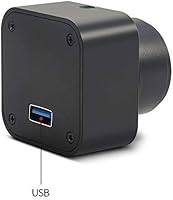
Overview

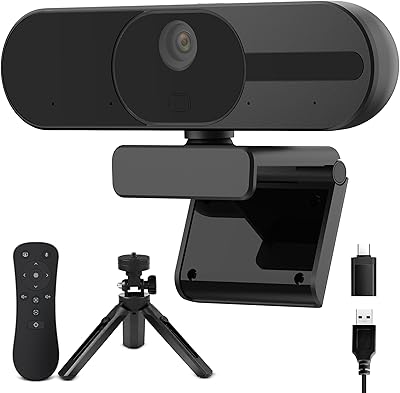
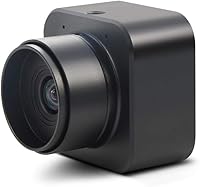
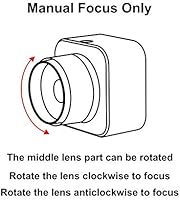
The MOKOSE 4K USB Webcam is a high-definition camera designed for seamless video calls and streaming. This USB webcam is compatible with a wide range of operating systems including Windows, Mac, Linux, and Android, making it a versatile option for both personal and professional use. With a manual focus system, it allows users to fine-tune image clarity, ensuring crisp visuals in various environments. Whether you’re attending meetings or streaming content, this webcam delivers exceptional performance for all your video communication needs.

Features & Benefits

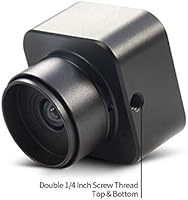
This 4K webcam captures stunning 3840x2160 resolution at 30 frames per second, providing sharp, high-quality video for streaming and calls. Its 8MP CMOS sensor enhances color reproduction and reduces noise, ensuring vibrant, accurate images. The double screw threads make it easy to mount the webcam securely, offering flexible positioning options. With a user-friendly design, this webcam is not only functional but also adaptable to various setups, ensuring that you get the best possible angle for your video sessions.

Best For

This webcam is ideal for content creators and streamers who require clear, high-definition video for their broadcasts. Professionals working remotely will find it perfect for video calls, offering reliable quality for online meetings and presentations. Additionally, anyone looking for a versatile USB camera that works seamlessly across multiple platforms—including Windows, Mac, and Android—will appreciate its broad compatibility and easy setup. Its manual focus feature also appeals to those who need more control over image precision.

User Feedback

Users have praised this webcam for its sharp image quality and excellent performance in both well-lit and low-light environments. The manual focus option is a hit, allowing for precise adjustments that suit various settings. However, some reviewers noted that achieving optimal performance in dim lighting might require additional lighting setup. Overall, customers appreciate its versatility and ease of use, though a few have suggested improvements for even better low-light performance.

Pros

  • Offers high-definition 4K resolution at 30 FPS, ideal for streaming and video calls.
  • Manual focus gives users full control over image clarity, especially in varying lighting conditions.
  • Wide compatibility with multiple platforms, including Windows, Mac, Linux, and Android.
  • Compact and lightweight design makes it easy to set up and transport for remote work or travel.
  • Built-in microphone adds convenience for users who don't want to use an external mic.
  • Versatile mounting options with double 1/4-inch screw threads for a variety of setups.

Cons

  • Requires additional lighting for optimal low-light performance, which may be inconvenient for some users.
  • Lack of autofocus can make it less ideal for users who prefer a more automated experience.
  • Some users reported that the image quality could suffer without proper lighting, especially in darker rooms.
  • The built-in microphone quality is average and may not meet the needs of those seeking professional-grade audio.
  • Not suitable for users who need a webcam with advanced features or better low-light capabilities.
  • May not provide the best performance for users with very high-end streaming setups or special requirements.

Ratings

After analyzing verified user reviews worldwide from multiple languages and platforms, we've compiled a comprehensive assessment of this device. Only high-quality, authentic feedback has been considered, excluding spam, bot-generated, incentivized, and duplicated reviews. Both strengths and areas for improvement are reflected in the scores, providing an honest look at what users have experienced with this webcam across various use cases.

Video Quality
91%
Many users praise the crisp, clear video quality provided by this device. The 4K resolution offers sharp, vibrant visuals, making it an excellent choice for both streaming and professional video calls. The colors are accurate, and the clarity remains strong in various lighting conditions.
Some buyers have noted that while the video quality is great in well-lit environments, it can be less impressive in low-light situations. A few users also mentioned that additional lighting might be necessary for optimal performance in darker settings.
Manual Focus Precision
88%
The manual focus is a standout feature for those seeking precise control over their video. Users appreciate the ability to adjust the focus easily, ensuring sharp and clear visuals even in varying environments. This level of control is especially beneficial for content creators who require consistent quality.
A few users found the manual focus to be a bit tricky to adjust during live streaming or video calls, especially when on the move. Some mention that it takes a bit of practice to get the focus just right and keep it stable during use.
Low-Light Performance
72%
28%
When properly lit, this webcam provides decent low-light performance, offering users a reliable option for calls or streams in dimly lit rooms. Many buyers report satisfactory results when paired with some supplementary lighting.
The low-light performance doesn’t always meet expectations. Several users pointed out that in dim environments, the image quality suffers noticeably, often leading to grainy or overly dark video. Additional lighting is often recommended to achieve the best results.
Ease of Setup
95%
Setting up this USB webcam is effortless, with no complicated installation steps. Users appreciate the plug-and-play functionality that works well across multiple platforms, including Windows, Mac, and Linux. It’s an ideal choice for anyone looking for a quick and easy solution without technical hassle.
A small number of users experienced issues with initial recognition on certain devices, particularly when using older operating systems. While the installation is generally straightforward, there were a few reports of minor connectivity hiccups during the first setup.
Compatibility Across Platforms
94%
Users love the broad compatibility with various operating systems, making this webcam a versatile option for those who use different devices. Whether it's Windows, Mac, Linux, or Android, this camera works seamlessly without the need for additional drivers or software.
Some users have encountered occasional issues with compatibility on certain Android devices. A few noted that while the webcam works well on most systems, certain configurations required manual troubleshooting for optimal performance.
Build Quality
86%
The webcam is praised for its solid build quality, with a compact, lightweight design that feels durable yet easy to transport. Many users find it sturdy enough for regular use and appreciate the premium materials that ensure longevity.
However, a few users have mentioned that the build could feel a little more robust, especially the mounting threads, which might not seem as sturdy under heavy usage. Some buyers also reported that it’s not as “premium” as other higher-end models.
Design and Portability
89%
This webcam’s sleek and compact design makes it highly portable, which users appreciate for travel or frequent relocations. Its lightweight nature ensures that it’s easy to carry and set up wherever needed, making it perfect for both professional and personal use.
While the design is portable, a few users found that the webcam's small form factor limited its adjustability on certain mounts or tripods. Some felt that a larger base or more flexible positioning options could improve the overall user experience.
Customer Support
78%
22%
Several users have mentioned that the customer support team is responsive and helpful when issues arise. Many felt that their questions were addressed in a timely manner, which is always a plus for those needing assistance with technical setup or troubleshooting.
Despite the generally positive feedback, some users had difficulty getting quick resolutions. A few mentioned that responses from support could be slow or not as detailed as expected, leading to frustrations during troubleshooting.
Price to Performance Ratio
90%
Most users find that this webcam offers an excellent balance between performance and price. The 4K resolution, manual focus, and broad compatibility make it a strong contender in its price range, delivering quality that exceeds expectations for the cost.
While the price is reasonable for the features offered, some users feel that the webcam could have a few more premium features at this price point, like autofocus or enhanced low-light capabilities. For those seeking top-tier quality, a few argue that there are higher-end models worth considering.
Mic Quality
80%
20%
The built-in microphone is appreciated for its decent sound quality during video calls or streams, offering clear and intelligible audio without the need for an external mic. Users find it sufficient for casual use and informal meetings.
However, some users found the microphone's sound quality to be lacking for professional streams or podcasts. It’s often described as mediocre, with occasional distortion or muffling, especially in noisier environments.
Stability During Use
92%
Users often report that the webcam performs consistently well during extended use. There are few instances of lag or freezing, and the video feed remains stable even for long-duration streams or calls.
A small group of users have reported occasional glitches or freezing during video calls. These instances tend to happen with high-demand applications, though they are not widespread enough to be considered a major flaw.
Color Accuracy
83%
The color accuracy on this webcam is generally well-received. Users appreciate that skin tones and other colors look natural and vivid, even when compared to more expensive models. This makes it a good choice for personal or professional video conferencing.
A few buyers felt that the colors could be more accurate, especially in complex lighting situations. While it performs well overall, some users noted a slight shift in color temperature, which can sometimes require manual adjustment.

Suitable for:

The MOKOSE 4K USB Webcam is an excellent choice for content creators, streamers, and professionals who require high-definition video for their work. Its 4K resolution at 30 FPS makes it ideal for those who need clear, vibrant visuals during live streaming or video calls. Remote workers and office professionals who rely on crisp video quality for virtual meetings will also benefit from its sharp image and wide compatibility with multiple operating systems, including Windows, Mac, Linux, and Android. Additionally, the manual focus feature provides users with precise control, making it well-suited for environments where fine adjustments are necessary, such as content creation or virtual presentations.

Not suitable for:

However, the MOKOSE 4K USB Webcam may not be the best choice for those who regularly work in low-light environments. Despite its solid overall performance, some users noted that additional lighting is required for optimal results in darker settings, which could be a limitation for those without access to consistent lighting. Additionally, those seeking a webcam with autofocus capabilities or more advanced features may find this model lacking. While it provides a solid experience for most, users who prioritize premium features or perfect low-light performance might want to explore other options in higher price ranges.

Specifications

  • Resolution: Captures video at 3840x2160 (4K) resolution for high-definition clarity.
  • Frame Rate: Records video at 30 frames per second (FPS), providing smooth streaming and video calls.
  • Sensor: Equipped with an 8MP CMOS sensor for improved image quality and color reproduction.
  • Focus: Manual focus allows users to adjust the image sharpness for greater precision in various environments.
  • Compatibility: Works with Windows, Mac, Linux, and Android devices, providing versatile platform support.
  • Interface: Uses a USB 2.0 interface for easy plug-and-play functionality.
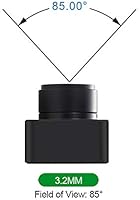
  • Field of View: Offers a wide-angle field of view to capture more of the surroundings in the video frame.
  • Microphone: Includes a built-in microphone for audio capture during video calls and streams.
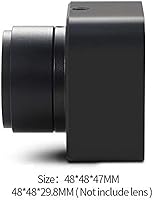
  • Mounting: Features double 1/4-inch screw threads, allowing for flexible mounting on tripods or stands.
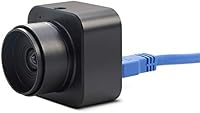
  • Design: Compact and lightweight design makes the webcam easy to transport and set up.
  • Color: Comes in a sleek black color, complementing most setups and environments.
  • Lighting Performance: Performs well in a variety of lighting conditions, though additional lighting may be required in low-light settings.
  • USB Port: Requires a USB 2.0 port for connection to compatible devices.
  • Use Case: Ideal for content creators, streamers, and remote professionals seeking high-quality video calling or streaming.
  • Build Material: Constructed from durable materials for everyday use while maintaining a lightweight profile.
  • Video Quality: Delivers clear and sharp video quality with high definition and accurate color reproduction.
  • Audio Quality: The built-in microphone captures clear audio but may not match the quality of external microphones for professional use.
  • Mounting Options: Supports a variety of mounting options with versatile screw thread placements.
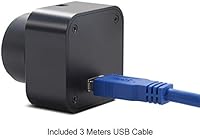
  • Power Supply: Powered directly through the USB connection, requiring no additional external power source.

FAQ

The MOKOSE 4K USB Webcam offers 3840x2160 resolution at 30 FPS, providing crisp, high-definition video that's ideal for streaming. The manual focus allows users to fine-tune image clarity, and it has wide compatibility with various platforms like Windows, Mac, Linux, and Android.

Setting up this webcam is simple. Plug it into a USB 2.0 port on your computer, and it should be automatically recognized. You may need to adjust the settings in your video call or streaming software to optimize the image. No additional software is required for basic use.

Yes, the webcam is compatible with Windows, Mac, Linux, and Android. It’s designed for seamless use across a variety of devices, making it a versatile option for different users, whether on a laptop, desktop, or Android-based system.

While the webcam performs well in well-lit settings, user feedback suggests that additional lighting may be necessary for optimal performance in low-light environments. The camera’s 8MP CMOS sensor does offer noise reduction and improved color reproduction, but strong lighting ensures the best results.

The manual focus feature allows users to adjust the image clarity precisely. This is particularly helpful for content creators or streamers who need sharp, focused images, even in environments with varying lighting or distance from the webcam.

Yes, this webcam is a great choice for professionals who need high-quality video calls. It provides clear, sharp video with noise reduction and accurate color reproduction, making it a strong option for remote work or virtual meetings.

Yes, this webcam comes with double 1/4-inch screw threads, allowing for easy mounting on tripods or other stands. This feature makes it versatile for different setup needs, whether you’re using it on a desk or for more dynamic shots during streams.

If your webcam is not being recognized, try plugging it into a different USB port or restarting your computer. Ensure that your operating system is up to date and that any necessary drivers or software are installed. In most cases, it should work automatically without additional setup.

The built-in microphone is convenient for basic video calls and streaming but may not provide the same quality as an external microphone. It works well for casual use but may not meet the needs of professional streamers or podcasters who require higher audio fidelity.

Yes, the compact and lightweight design makes it easy to pack and set up quickly, which is ideal for users who need to do live streaming or video calls on the go. Whether you’re working remotely or traveling for work, this webcam can be set up in just a few minutes.