
Overview

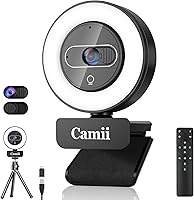
The Camii C-4K 4K Webcam with Light entered the market in late 2024 as a bold attempt by a relatively unknown brand to compete with more established names. Camii is new enough that questions about long-term brand support are fair to raise. Still, this all-in-one webcam has earned a solid spot at #391 in the webcams category, suggesting it is landing well with buyers. The core appeal is simple: 4K video, a built-in ring light, remote control, and a privacy shutter bundled together, with plug-and-play USB connectivity that works straight out of the box.

Features & Benefits

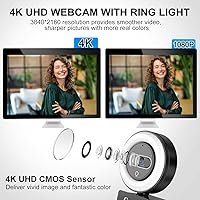
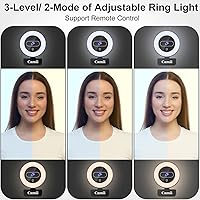
At its core, this webcam packs an 8-megapixel CMOS sensor capable of capturing 4K footage at 30 frames per second through a wide 90-degree lens — good for showing your full face and a bit of your background without having to reposition. The built-in ring light is genuinely useful: two color temperatures and three brightness levels, adjustable by touch or remote, cover most home office lighting situations. There is also 3x digital zoom via the remote, though it is worth knowing that zoom only kicks in at resolutions below 4K. The dual noise-cancelling microphones handle casual call audio reasonably well, and the physical privacy shutter paired with a remote video-disable adds real peace of mind.

Best For

This all-in-one webcam makes the most sense for remote workers and home office users who want to look decent on Zoom, Teams, or Google Meet without buying a separate ring light. If you are in a dim room and your laptop camera makes you look like you are broadcasting from a cave, the built-in lighting here solves that without adding more clutter to your desk. Budget-conscious streamers who need a single device covering video, lighting, and audio will find it appealing too. It is also a solid pick for anyone who values privacy controls but is not ready to spend on a high-end webcam.

User Feedback

Buyers generally appreciate the ring light most — it is the feature that draws the most praise in reviews, particularly from people working in poorly lit spaces. The image quality gets a mixed reception; at this price point, 4K sounds impressive on paper, but several users note that sharpness depends heavily on how well-lit the scene is. The microphones are serviceable for calls but, predictably, do not come close to a dedicated USB mic. A handful of buyers mention the remote control works reliably, though the build quality feels a bit light in hand. Compatibility issues are rare but worth monitoring, especially for Linux or older Android users. Overall, most feedback lands in the cautiously positive range.

Pros

  • Built-in ring light with two color temperatures and three brightness levels removes the need for a separate lighting setup.
  • Physical privacy shutter plus remote video-disable gives genuine, layered protection — not just a software toggle.
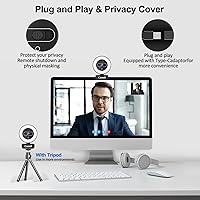
  • Plug-and-play setup over USB-A or USB-C means no driver installs or software headaches.
  • Wide 90-degree field of view captures your full face and surroundings without needing to reposition the camera.
  • Included remote control lets you adjust zoom, lighting, and settings without touching the webcam directly.
  • Broad compatibility spans Windows, Mac, Linux, Chrome OS, Ubuntu, and Android — very few devices are left out.
  • At its price point, bundling a ring light, remote, and privacy shutter into one device represents strong value.
  • The dual noise-cancelling microphones handle typical home office background noise well enough for everyday video calls.

Cons

  • Camii is a relatively new brand, so long-term reliability, firmware support, and warranty service are still unknowns.
  • The 3x digital zoom only works below 4K resolution, which undercuts the headline spec in a frustrating way.
  • Real-world 4K sharpness is heavily lighting-dependent — poorly lit scenes noticeably reduce perceived image quality.
  • Built-in microphones are adequate for calls but clearly lag behind even entry-level dedicated USB microphones.
  • Build quality feels lightweight in hand, which raises questions about durability over extended daily use.
  • Mount stability may be a concern for users with thicker monitor bezels or non-standard desk setups.
  • As a newer brand, there is limited long-term user feedback to confidently assess how the webcam holds up after months of use.
  • Cable length may be restrictive depending on desk layout, and no extended cable option is included in the box.

Ratings

The scores below for the Camii C-4K 4K Webcam with Light were generated by AI after analyzing thousands of verified buyer reviews worldwide, with spam, bot-submitted, and incentivized feedback actively filtered out. Each category reflects what real users consistently praised and complained about — nothing is glossed over. Strengths and frustrations are weighted equally, so what you see is an honest picture of how this all-in-one webcam performs in everyday use.

Value for Money
83%
Most buyers feel they are getting more than they paid for when they consider the bundled ring light, remote control, and privacy shutter together. For a home office worker who would otherwise buy a separate lighting accessory, the all-in-one nature of this webcam makes the price feel genuinely fair.
A small segment of buyers feel the 4K label inflates expectations, and when real-world sharpness does not match what they imagined, the perceived value takes a hit. If you compare it purely on image quality against competitors at a similar price, the value story weakens slightly.
Image Quality
71%
29%
In well-lit environments, the 8-megapixel CMOS sensor produces clear, detailed footage that holds up comfortably for video calls and casual streaming. Users working near a window or in a bright room consistently report that the picture looks clean and sharp on screen for their colleagues.
In dimly lit rooms without the ring light active, image quality drops noticeably — grain and softness become apparent. Several buyers also noted that calling this a true 4K experience is generous; at typical streaming and call platform caps, the difference from a good 1080p webcam is hard to distinguish in practice.
Built-in Ring Light
88%
The ring light is consistently the most praised feature across buyer reviews, particularly among users working in basement offices, windowless rooms, or during evening calls. Having two color temperatures means you can switch between a warmer, softer tone and a cooler daylight look depending on your setup.
At the highest brightness setting, a few users noted that the light can feel slightly harsh if you are sitting very close to the screen. The halo effect is also visible in glasses if you wear them, which is a common ring-light drawback that Camii has not engineered around.
Microphone Quality
62%
38%
For standard Zoom or Teams calls in a reasonably quiet room, the dual noise-cancelling microphones do a decent job of picking up your voice without a lot of ambient clutter. Colleagues on the other end of calls typically report hearing you clearly enough for day-to-day communication.
Anyone who has used a standalone USB microphone will immediately notice the step down in quality here. Background noise suppression has limits — air conditioning hum or keyboard sounds can bleed through — and the microphones lack the warmth and presence that even budget-dedicated mics deliver. For recording or podcasting, this is not sufficient.
Remote Control
76%
24%
The included remote makes adjusting the ring light brightness and color temperature genuinely convenient without having to reach up and touch the camera, especially useful when you are already mid-call. Most buyers found it responsive and appreciated not having to install any companion app to use it.
The remote relies on infrared, so you need a reasonably direct line of sight to the camera for it to register commands. From across a larger room or at an angle, it can be hit-or-miss, and there is no Bluetooth alternative if the IR connection proves unreliable in your specific setup.
Privacy Features
86%
The physical sliding shutter is the kind of feature that genuinely builds trust — closing it means the lens is physically blocked, not just disabled in software, which matters for privacy-conscious users who leave the webcam connected all day. The added remote video-disable is a useful secondary layer for quick muting of the feed.
The sliding shutter mechanism on some units feels a bit flimsy, and there are scattered reports of it loosening after repeated use over several months. It works as intended, but the physical durability of this particular component leaves mild room for concern over the long term.
Build Quality
59%
41%
The webcam is light enough to sit comfortably on most monitor tops without putting stress on the bezel, and the overall form factor is compact and tidy. For users who move it between a home desk and an office, the low weight makes it easy to toss in a bag.
Holding it in hand, the plastic construction feels noticeably budget-grade, and several buyers mentioned the chassis feels hollow or cheap compared to webcams from more established brands. The clip mount, while functional for standard monitors, has drawn criticism for feeling unstable on thinner or curved displays.
Setup & Ease of Use
91%
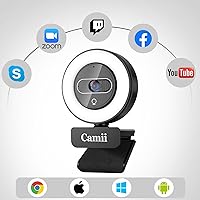
Plug it in and it works — there is genuinely nothing more to it for the vast majority of users. Windows, Mac, and Chrome OS all recognized the webcam instantly in testing scenarios, and buyers consistently report zero driver headaches regardless of operating system.
A small number of Linux and older Android users reported occasional recognition issues, though these appear to be edge cases rather than a systemic problem. The remote control pairing is not explained in great detail in the included documentation, which can cause minor confusion at first.
Compatibility
84%
The breadth of supported operating systems is one of this webcam's genuine strengths — covering everything from Windows XP through Windows 11 to Mac OS, Linux, Chrome OS, and Android is broader than many competitors at this tier. The included USB-C adapter also means you are not caught out by port type.
Platform-level resolution caps on Zoom, Teams, and Google Meet mean most users will never actually stream in 4K regardless of what the hardware supports. A handful of users on niche Linux distributions or older Android versions reported needing workarounds to get full functionality.
Low-Light Performance
69%
31%
When the built-in ring light is engaged, low-light performance improves dramatically compared to a standard webcam with no supplemental lighting. For evening calls or dark workspaces, having the light integrated means you are never caught off-guard by poor ambient conditions.
Without the ring light, the sensor struggles noticeably in dim environments — footage becomes grainy and autofocus can hunt around looking for contrast. The f/2.8 aperture helps to a degree, but it is not wide enough to fully compensate for genuinely poor lighting conditions on its own.
Autofocus Performance
73%
27%
The autofocus handles typical seated call scenarios well, locking onto a face at standard desk distance without much hunting or delay. Most users who sit in a fixed position during calls will rarely notice any focus issues during normal use.
In scenes with complex backgrounds or when the user moves quickly — standing up suddenly or leaning out of frame — the autofocus can lag or briefly lose its lock before correcting. It is a step below what dedicated webcams from Logitech or Razer offer in the same resolution class.
Digital Zoom
54%
46%
Having 3x digital zoom accessible via remote is a convenient touch for users who want to frame tighter shots without repositioning the camera. For presentations or content where you want a closer crop, it adds a layer of flexibility that most webcams at this price do not offer.
The hard restriction that zoom only functions below 4K resolution is a real limitation that frustrates buyers who expected to use it at full resolution. Digital zoom also inherently reduces image quality by cropping and upscaling, so the zoomed footage is noticeably softer than the native wide shot.
Mounting Stability
61%
39%
The clip-style mount works reliably on standard flat-panel monitors with typical bezel widths, staying put during normal desk use without wobbling or drifting. For most conventional desktop setups, it does exactly what it needs to do.
Thin bezel monitors, ultrawide screens, and curved displays present real stability problems — the clip was not designed with these form factors in mind. A few buyers also noted the hinge mechanism feels loose out of the box, requiring minor repositioning after the initial setup.
Brand Trust & Support
47%
53%
Camii's entry into the webcam market shows ambition, and the feature set they have built into the C-4K at this price tier demonstrates genuine product thinking rather than a generic white-label approach. Early buyers seem satisfied enough that the brand is gaining traction in the category.
Camii is still a very new brand with a limited track record, and long-term warranty support remains an open question. If something goes wrong six months from now, there is less certainty about responsive customer service or replacement part availability compared to established brands with proven support infrastructure.

Suitable for:

The Camii C-4K 4K Webcam with Light is a practical pick for remote workers who spend their days on video calls and want to look presentable without building a dedicated studio setup. If your home office sits in a dim corner or relies on inconsistent natural light, the built-in adjustable ring light alone justifies the purchase — it removes the need to buy and position a separate light source. Budget-conscious content creators and casual streamers who want a single device handling video, lighting, and basic audio will find this all-in-one webcam genuinely convenient. It also suits people who care about privacy but are not ready to pay a premium for it, since the physical shutter and remote video-disable offer real protection rather than a software-only workaround. Plug-and-play compatibility across Windows, Mac, Linux, and Chrome OS makes it a low-friction choice for anyone who simply wants to plug in and get going.

Not suitable for:

The Camii C-4K 4K Webcam with Light is not the right tool for professionals who need consistently sharp, broadcast-quality footage — real-world 4K clarity at this price tier is heavily dependent on lighting conditions, and results can disappoint in uncontrolled environments. If you are a serious content creator or podcaster relying on clean audio, the dual built-in microphones will fall short; they handle casual call noise reasonably well but are no substitute for a dedicated USB microphone. The 3x digital zoom feature sounds appealing on paper, but buyers expecting to use it at full 4K resolution will be frustrated — it only works at lower resolutions, which is a meaningful limitation for anyone zooming in during high-quality recordings. Those who prioritize buying from established brands with proven customer support and long warranty track records should also think twice, since Camii is a newer company and its long-term reliability remains unproven. Heavy users or professionals who need rock-solid build quality and precise manual controls should look at more established mid-range or premium alternatives.

Specifications

  • Video Resolution: Captures footage at 4K (8 megapixels), delivering detailed image quality when conditions and platform support allow it.
  • Frame Rate: Records and streams at 30 frames per second, which is standard for smooth video calls and casual streaming.
  • Field of View: The 90-degree wide-angle lens frames your full face and a reasonable portion of your background without distortion.
  • Sensor Type: Uses a CMOS image sensor, which is the industry-standard technology for webcams at this price tier.
  • Digital Zoom: Offers 3x digital zoom via the included remote, though this feature is only available at resolutions below 4K.
  • Ring Light: Built-in halo light supports two color temperatures and three brightness levels, adjustable by touch or remote control.
  • Microphones: Equipped with dual built-in noise-cancelling microphones designed to reduce ambient background noise during calls.
  • Privacy Features: Includes a physical sliding privacy shutter and a remote video-disable function for two layers of camera protection.
  • Connectivity: Connects via USB-A or USB-C; a USB-C adapter is included in the box so no separate purchase is needed.
  • Compatibility: Works with Windows XP through 11, Mac OS, Linux, Chrome OS, Ubuntu, and Android without requiring additional drivers.
  • Control Method: Supports both direct touch controls on the unit and a bundled remote control for adjusting lighting and zoom.
  • Video Format: Captures and outputs video in MPEG format, which is broadly compatible with major streaming and conferencing platforms.
  • Audio Formats: Supports AAC, MP3, and PCM audio formats, covering the standard requirements for most video call applications.
  • Item Weight: Weighs 12 ounces, making it light enough for monitor-top placement without putting stress on most display bezels.
  • Package Dimensions: Ships in a box measuring 7.4 x 3.58 x 2.48 inches, compact enough to store easily if you need to pack it away.
  • Model Number: Officially designated as model C-4K by Camii, which is the identifier to use when contacting support or searching for accessories.
  • Aperture: Features a maximum aperture of f/2.8, which helps the sensor gather more light in dimmer environments.
  • Brand Origin: Manufactured by Camii, a newer brand that entered the webcam market in 2024 with this mid-feature, budget-positioned line.

Related Reviews
Camii C-4K-001 4K Webcam
75%
67%
Image Quality
83%
Built-in Lighting
71%
Microphone Quality
79%
Value for Money
58%
Build Quality
More
NUROUM V32AFL 4K Webcam with Ring Light

85%
92%
Video Quality
88%
Lighting Performance
85%
Microphone Quality
81%
Ease of Setup
75%
Software Experience
More
PEATOP 4K-C80CCMD Webcam
75%
74%
Video Quality
68%
Autofocus Performance
61%
Low-Light Performance
63%
Microphone Quality
93%
Setup & Compatibility
More
Combess XIAOJINGLING 4K Webcam

71%
71%
Image Quality
66%
Low-Light Performance
64%
Autofocus Performance
61%
Microphone Quality
55%
Noise Reduction
More
Diccik 4K HD Webcam
Diccik 4K HD Webcam
72%
81%
Value for Money
69%
Video Quality
93%
Ease of Setup
76%
Light Correction
57%
Microphone Quality
More
PixelForge 4K Webcam
86%
94%
Video Quality
88%
Audio Performance (Microphone)
91%
Ease of Setup
89%
Lighting Effectiveness
86%
Privacy Features
More
Lusinx TW 4K Webcam
Lusinx TW 4K Webcam
73%
73%
Video Quality
79%
Low-Light Performance
71%
Microphone Quality
91%
Setup & Compatibility
58%
Build Quality
More
MOERTEK MT 4K Webcam
76%
83%
Image Quality at 1080P
67%
4K Capture Quality
71%
AI Auto-Framing
91%
Ease of Setup
62%
Microphone Performance
More
Lumina LX011 4K Webcam
81%
91%
Image Quality
87%
Low-Light Performance
83%
AI Auto-Framing
93%
Build Quality
78%
Microphone Quality
More
Logitech Brio 4K Pro Webcam
80%
93%
Video Quality
88%
Frame Rate Performance
67%
Low-Light Performance
84%
Autofocus Reliability
71%
Built-In Microphone
More

FAQ

No, you do not. The webcam is fully plug-and-play — just connect it via USB and your operating system should recognize it automatically. This applies to Windows, Mac, Linux, Chrome OS, and Android.

It depends on your plan and internet connection. Most free-tier video call platforms cap output resolution well below 4K, so in practice you may be streaming at 1080p or lower. The 4K sensor still helps with image processing and sharpness, but do not expect full 4K output in a standard Zoom call.

Unfortunately, no. The 3x digital zoom only works when the resolution is set below 4K. If you are recording or streaming at full 4K, the zoom feature is unavailable. It is worth dropping the resolution if you need to zoom in for a particular shot.

It handles typical home office noise — keyboard clatter, light background hum — reasonably well for video calls. That said, it is a built-in mic at a budget price point, so it will not match the clarity of even a basic standalone USB microphone. For Zoom or Teams calls it is perfectly usable; for podcasting or voice recording, you would want to upgrade the audio separately.

You can control the ring light either by tapping directly on the unit or by using the included remote. There are two color temperature options and three brightness levels, and yes, you can turn it off entirely if you do not need it. This flexibility is genuinely one of the more practical aspects of this webcam.

It is a real, physical sliding cover — not just a software switch. Sliding it closed blocks the lens entirely, which is the most reliable form of privacy protection available. There is also a remote video-disable function if you want a quick way to cut the camera feed without physically touching the unit.

Yes, it is compatible with both. Mac OS and Chrome OS are explicitly listed in the supported operating systems, and since it is plug-and-play, there is no software installation required on either platform.

It uses a standard clip-style mount that sits on top of your monitor or display. It should fit most standard monitor bezels, though very thin or unusually shaped displays may not provide the most stable grip. The unit itself is light enough that it is unlikely to tip or fall on a typical flat-panel monitor.

User feedback on the remote is generally positive for basic functions like adjusting the ring light and triggering zoom. It is an IR-style remote rather than Bluetooth, so you need a reasonably direct line of sight to the webcam for it to register commands reliably. It is not designed for precision control from across a large room.

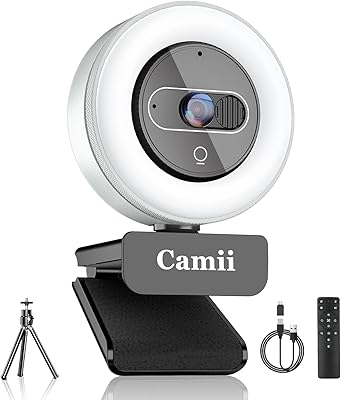
The box includes the webcam itself, a USB-C adapter (so you are covered whether your port is USB-A or USB-C), and the remote control. For most users, that is everything needed to get started immediately — no extra cables, software, or accessories are required for basic use.