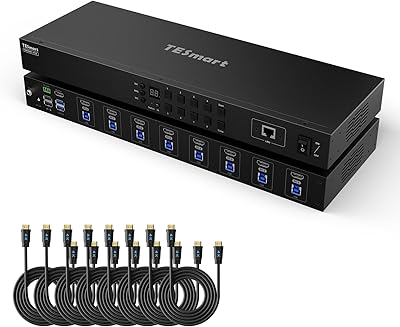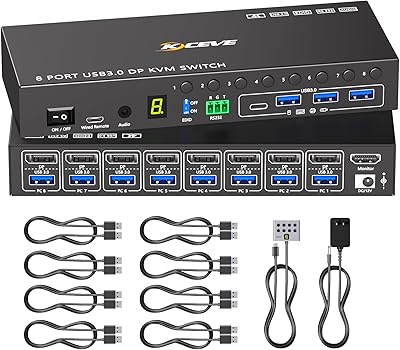
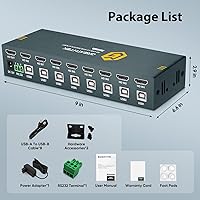
Overview

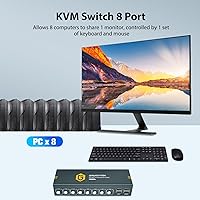
The GREATHTEK 8-Port HDMI KVM Switch sits in an interesting spot in the market — capable enough for serious multi-machine setups, yet approachable enough that you don't need an IT background to get it running. The core idea is simple: one monitor, one keyboard, one mouse, and up to eight computers all managed from a single desk. It isn't a flashy brand name, but this 8-port KVM switch has been climbing the charts among home lab builders and small office administrators who need more ports than a typical 2- or 4-port unit offers. No drivers required — just plug in and go.

Features & Benefits

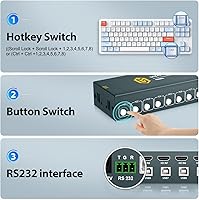
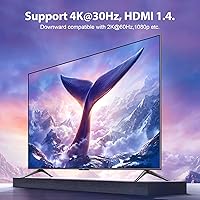
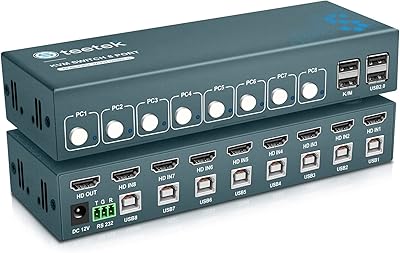
Three ways to switch between machines sets this GREATHTEK unit apart from bare-bones competitors. You can tap the front-panel button directly, use hotkey combinations on your keyboard, or — if you're running a more automated environment — issue RS232 serial commands. The video side tops out at 4K@30Hz over HDMI 1.4, which covers the vast majority of office displays without issue, though if you're running a high-refresh 4K monitor, that 30Hz ceiling is worth knowing upfront. Adaptive EDID keeps the monitor handshake stable across all eight inputs, and shared USB 2.0 ports let every connected PC access peripherals like a scanner or flash drive without physically swapping cables.

Best For

This multi-PC switcher hits a sweet spot for IT admins managing a small server cluster or test lab, developers who regularly jump between a Linux build machine, a Windows workstation, and a Mac, and home lab enthusiasts who've outgrown the 4-port options. It's also genuinely practical for a small business that needs to consolidate desk space without investing in a full IP-based remote KVM setup. The RS232 support makes it quietly useful for anyone scripting automated machine-switching routines, though that's a narrow audience. The broader appeal is simply having eight machines on one desk without the cable chaos.

User Feedback

Buyers consistently point to the easy initial setup as a high point — most report having all eight machines running through the unit within minutes of unboxing. The hotkey switching works reliably for the majority of users, though a handful note a short learning curve with the key combinations. Build quality draws more mixed reactions: the enclosure feels solid enough for a desk environment, but a few reviewers expected something sturdier at this price tier. The 4K@30Hz cap surprises some buyers upgrading from older setups, and USB peripheral compatibility is occasionally hit-or-miss with less common devices. RS232 configuration rarely comes up in reviews, which reflects just how niche that feature really is.

Pros

  • Supports up to eight computers on one monitor, keyboard, and mouse with no software installation required.
  • Three switching methods — front-panel button, hotkey, and RS232 — give you flexibility depending on your workflow.
  • Adaptive EDID keeps the monitor signal stable when switching between machines, avoiding blank-screen handshake issues.
  • Works across Windows, macOS, and Linux right out of the box without driver headaches.
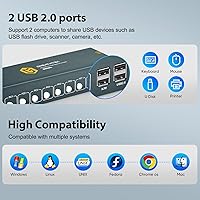
  • Shared USB 2.0 ports let all connected PCs access common peripherals like scanners or USB drives.
  • The box includes all eight USB-B cables, so you can connect every machine without a separate accessories run.
  • RS232 command support is a quiet but useful bonus for IT users who want scripted or automated switching.
  • Backward compatible with 1080p and 2K displays, so older monitors in a mixed setup are not left out.
  • Ranks among the top sellers in its category, suggesting reliable real-world adoption beyond marketing claims.
  • Setup is fast — most users report having all machines running through this multi-PC switcher within minutes of unboxing.

Cons

  • The 4K@30Hz ceiling is a hard limit; users with high-refresh 4K monitors will notice the compromise immediately.
  • USB 2.0 shared ports cap transfer speeds, making this a poor fit for fast external storage or USB 3.0 devices.
  • No built-in audio switching means you need a separate solution if sound routing between PCs matters to you.
  • Hotkey combinations have a learning curve, and a few users report inconsistent recognition depending on keyboard brand.
  • Build quality draws mixed reactions — the enclosure works fine on a desk but feels less robust than the price might suggest.
  • Only one HDMI output means you cannot span across multiple monitors even if your workstation setup demands it.
  • RS232 setup is poorly documented for new users; getting serial commands working often requires contacting support directly.
  • USB peripheral compatibility is not universal — less common devices occasionally fail to register reliably across all ports.
  • No DisplayPort or USB-C video input, limiting compatibility with newer laptops that have dropped full-size HDMI.

Ratings

The scores below for the GREATHTEK 8-Port HDMI KVM Switch were generated by our AI engine after analyzing verified purchase reviews from buyers worldwide, with spam, bot-generated, and incentivized feedback actively filtered out before scoring. Each category reflects the full spread of real user experiences — not just the positives — so both the strengths and the friction points are honestly represented. Whether this multi-PC switcher is the right call for your setup depends heavily on the use case, and these scores are designed to help you figure that out quickly.

Ease of Setup
91%
The vast majority of buyers report having all eight machines running through the unit within minutes of opening the box, with no driver downloads or software configuration involved. IT admins and home lab users alike praised the straightforward cable connections and clear port labeling, which made initial deployment far less painful than competing units at this tier.
A small but consistent group of users found that getting hotkey switching to work required carefully re-reading the manual to locate the correct K/M port for keyboard connection — a detail that is easy to miss during a quick setup. RS232 configuration adds another layer of complexity that trips up anyone venturing beyond the basics.
Switching Reliability
78%
22%
Front-panel button switching is consistently praised as fast and dependable — press the button, the input changes, done. Hotkey switching works well for most users once they have the key combinations memorized, and the transition time between machines is short enough that it rarely interrupts a working rhythm.
Hotkey recognition is not rock-solid across all keyboard brands, and a subset of users report occasional missed inputs or delayed responses when switching rapidly. Some reviewers note that the unit can take a moment to fully re-establish the USB handshake after switching, causing a brief lag before peripherals become active on the new machine.
Video Quality
74%
26%
For users running 1080p or 2K displays, the picture quality coming through is clean and stable with no visible signal degradation during normal use. The Adaptive EDID implementation does a solid job of preserving monitor settings across switching events, which many users appreciated after dealing with handshake failures on older or cheaper KVMs.
The HDMI 1.4 interface is a firm ceiling at 4K@30Hz, and buyers who assumed this unit would drive a 4K@60Hz monitor were genuinely caught off guard. Anyone using a modern high-refresh display for creative work or productivity at full resolution will find this a meaningful limitation that cannot be worked around.
Build Quality
63%
37%
The unit feels adequately solid for a desk environment — ports are firmly mounted, buttons have a satisfying click, and nothing rattles during normal daily use. For users tucking it into a home lab or small office corner, the physical construction is perfectly functional and holds up under routine switching activity.
A notable portion of buyers describe the enclosure as feeling lighter and more plastic-forward than they expected at this price point, especially when comparing it to older enterprise KVM hardware they have used before. A few reviewers reported concerns about long-term port wear if cables are frequently connected and disconnected.
USB Peripheral Sharing
67%
33%
Standard USB 2.0 devices — office printers, document scanners, flash drives — work reliably across all eight connected computers once the active input is switched. Users in shared office environments appreciated being able to route a single scanner to whichever machine needed it at the time, reducing the need for duplicate peripherals.
USB 2.0 bandwidth is a real constraint for anyone hoping to share modern high-speed devices like external SSDs or USB 3.0 webcams. Compatibility with less common USB peripherals is inconsistent, with occasional reports of devices failing to register or dropping connection after switching between computers.
Resolution Support
58%
42%
For mixed-monitor environments where some screens are 1080p and others are 2K or 4K at standard refresh rates, the backward compatibility works cleanly without needing manual resolution adjustments each time. Most office and productivity display setups fall well within what this GREATHTEK unit handles without complaint.
The 4K@30Hz cap is a hard technical limit imposed by HDMI 1.4, not a firmware issue, so there is no update path to higher refresh rates. Buyers hoping to use this with a 144Hz or 4K@60Hz monitor will need a different product entirely — this unit simply cannot deliver those specs.
OS Compatibility
88%
Running a mixed-OS environment — say, a Linux server, a Windows workstation, and a Mac — all through a single set of peripherals is precisely where this multi-PC switcher earns its keep. No special configuration is required when switching between operating systems, which saves meaningful time compared to KVMs that need per-OS adjustments.
A handful of macOS users note that the keyboard hotkey sequences conflict with system-level shortcuts on certain Mac configurations, requiring some manual remapping to avoid interference. Linux users on niche distributions occasionally report USB recognition quirks, though these are the exception rather than the rule.
Hotkey Functionality
69%
31%
Once the hotkey combinations are learned, switching between machines without touching the front panel becomes a natural part of the workflow — particularly useful for developers or sysadmins who spend hours in keyboard-driven environments. Most standard keyboards trigger the combinations reliably when the keyboard is connected to the correct port.
The learning curve for hotkey sequences is steeper than it should be, and the manual documentation leaves some buyers piecing together the correct key combinations through trial and error. Mechanical keyboard users and those with non-standard layouts occasionally encounter recognition failures that force them to fall back on the physical buttons.
RS232 Integration
61%
39%
For IT administrators and lab managers who need scripted or automated machine-switching, the RS232 support is a genuine bonus that most competing units at this price omit entirely. When configured correctly, serial command switching adds a layer of workflow automation that desk-side buttons simply cannot match.
Documentation for the RS232 command set is not included in the box — users have to request it from GREATHTEK through Amazon, which adds unnecessary friction for a feature that should be self-contained. For the overwhelming majority of buyers, RS232 will never be used, making its setup complexity a non-issue but its documentation gap still noteworthy.
Value for Money
76%
24%
At its price tier, an 8-port HDMI KVM with three switching methods, Adaptive EDID, and broad OS compatibility represents a reasonable deal compared to the steep jump in cost for enterprise-grade alternatives. The inclusion of all eight USB-B cables in the box removes a common hidden cost that other manufacturers skip.
Buyers who compare this 8-port KVM switch directly to 4- or 2-port competitors will notice that the per-port price is higher, and those considering the limitations — USB 2.0 only, no audio switching, HDMI 1.4 ceiling — may feel the value equation gets tighter depending on their specific requirements.
Package Contents
83%
Including eight USB-B cables out of the box is a practical touch that most users appreciate — there is no scramble to find the right cables before you can get started. The power adapter and RS232 terminal are also included, covering everything you need for a full initial deployment.
HDMI cables are not included, which means buyers connecting eight computers will need to source those separately — a cost that can add up. The manual is functional but thin on detail, particularly for hotkey sequences and RS232 commands, leaving some users wishing for more thorough printed documentation.
Audio Switching
31%
69%
There is no audio routing feature built into this unit, which is worth acknowledging upfront: for users who only need video and USB peripheral sharing, the absence of audio switching is a non-issue and keeps the device simpler to configure.
Buyers expecting to share speakers or a headset across multiple computers will be disappointed — audio switching is entirely absent, requiring a separate hardware solution or manual cable swapping. This is a notable gap for anyone building a consolidated workstation where both video and audio need to follow the active machine.
Signal Stability
82%
18%
Adaptive EDID helps maintain a consistent signal profile across all eight inputs, which means monitors are far less likely to reset their brightness, color calibration, or resolution settings after each switch. Users who had previously dealt with blank screens and resolution drops on simpler KVMs found this noticeably more stable in day-to-day use.
Signal stability is occasionally cable-dependent — users running long or lower-quality HDMI cables reported intermittent handshake delays that the EDID handling could not fully compensate for. Keeping cable runs short and using cables rated for the target resolution resolves most of these edge cases.
Desk Footprint
79%
21%
The physical size strikes a reasonable balance for an 8-port unit — compact enough to sit unobtrusively on a desk or shelf without dominating the workspace. Home lab users consolidating multiple machines into a single desk setup found the form factor easy to position alongside other hardware.
With eight computers, a monitor, keyboard, and mouse all cabled in simultaneously, the cable density around the unit can become visually overwhelming regardless of the device's own footprint. Cable management planning is essentially required to keep the workspace looking organized.

Suitable for:

The GREATHTEK 8-Port HDMI KVM Switch is a practical fit for anyone managing more machines than a standard 2- or 4-port switch can handle. IT administrators running a small server lab, developers who bounce daily between a Linux build box, a Windows workstation, and a Mac, and home lab enthusiasts who have accumulated machines over the years will all find real value here. Small businesses that want to reduce desk clutter without committing to the cost and complexity of a full IP-based KVM solution will also appreciate what this multi-PC switcher offers at its price tier. The plug-and-play design means there is no software to maintain and no compatibility headaches when adding a new machine to the mix. If your monitor runs at 1080p or 2K, or even 4K at standard 30Hz refresh rates, this unit covers your setup cleanly across Windows, macOS, and Linux without a second thought.

Not suitable for:

The GREATHTEK 8-Port HDMI KVM Switch is the wrong tool if your monitor runs at 4K@60Hz or higher — the HDMI 1.4 interface hard-caps output at 4K@30Hz, and no configuration change will get you past that ceiling. Content creators, gamers, or anyone who relies on smooth high-refresh visuals should look elsewhere. If you need to share a single USB hub across machines for high-speed devices like external SSDs or modern webcams, the USB 2.0 shared ports will feel limiting compared to USB 3.0-capable alternatives. This GREATHTEK unit also lacks any built-in audio switching, so if audio routing matters to your workflow, you will need a separate solution. Finally, buyers expecting premium build quality comparable to enterprise-grade KVM hardware may find the enclosure underwhelming — this is a desk-tier device priced accordingly, not a rack-mount workhorse.

Specifications

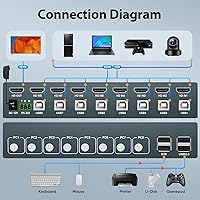
  • PC Ports: The unit provides 8 computer input ports, allowing a single workstation setup to control up to 8 machines simultaneously.
  • Video Output: One HDMI output port connects to a single monitor, routing video from whichever computer is currently selected.
  • Max Resolution: Video output tops out at 4K@30Hz, with full backward compatibility for 2K and 1080p displays.
  • HDMI Standard: The switch uses the HDMI 1.4 specification, which supports 4K resolution but is limited to a 30Hz refresh rate at that resolution.
  • Switching Methods: Three input methods are supported: physical front-panel buttons, keyboard hotkey combinations, and RS232 serial commands.
  • USB Standard: Shared USB 2.0 ports are available across all 8 computer inputs for connecting peripherals such as scanners, printers, or flash drives.
  • EDID Support: Adaptive EDID technology is built in to maintain a stable monitor handshake when the active input is switched between connected computers.
  • OS Compatibility: The switch works with Windows, macOS, and Linux operating systems without requiring any driver installation.
  • Driver Requirement: No software or drivers are needed; the device is fully plug-and-play across all supported operating systems.
  • Included Cables: Eight USB-B cables are included in the package, one for each computer input port.
  • Included Accessories: The package also contains one power adapter and one RS232 terminal for serial command connectivity.
  • Package Weight: The complete package weighs 2.35 pounds, inclusive of all included accessories and cables.
  • Dimensions: The package measures 9 × 6.56 × 2.93 inches, giving a sense of the unit footprint on a desk or in a rack space.
  • Brand: The device is manufactured and sold by GREATHTEK, a brand focused on KVM and peripheral-sharing hardware.
  • Market Rank: At the time of publication, this unit holds a Best Sellers Rank of #452 in the KVM Switches category on Amazon.
  • Audio Switching: There is no built-in audio switching capability; audio routing between computers must be handled separately.
  • Video Inputs: Each of the 8 computer ports accepts a standard HDMI connection, requiring an HDMI-capable output on each connected machine.
  • Power Supply: The unit requires an external power adapter, which is included in the box, and does not operate on USB bus power alone.

Related Reviews
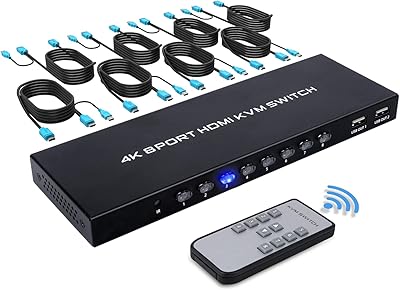
TCNEWCL KS-801 8-Port HDMI KVM Switch
78%
88%
Ease of Setup
91%
Port Capacity & Scalability
74%
Video Quality & Resolution
69%
Switching Speed & Reliability
83%
IR Remote Control
More
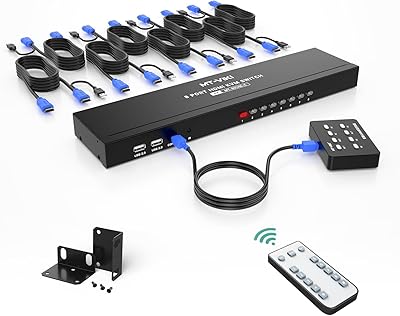
MT-VIKI MT-801HK-C 8-Port HDMI KVM Switch
78%
83%
Value for Money
88%
Ease of Setup
76%
Build Quality
69%
Switching Performance
71%
Display Quality
More
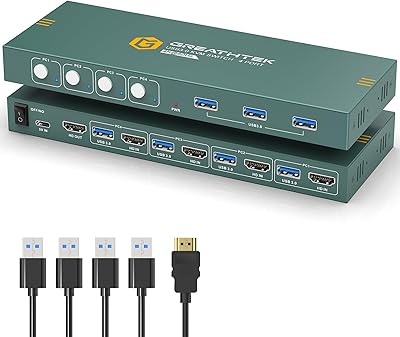
GREATHTEK 4-Port HDMI KVM Switch
66%
89%
Video Signal Quality
74%
Switching Performance
83%
USB Peripheral Sharing
92%
Setup Experience
71%
Build Quality
More
Steetek USB 2.0 HDMI KVM Switch 8 Port
84%
91%
Ease of Switching
87%
4K Video Quality
84%
Build Quality
93%
Setup and Installation
65%
Hotkey Functionality
More
TESmart HKS801-P23 USB 3.0 HDMI KVM Switch 8 Port 4K@60Hz
87%
91%
Ease of Setup
95%
Video Quality
88%
Switching Reliability
85%
Build Quality
92%
Value for Money
More
MLEEDA 8-Port DisplayPort KVM Switch

86%
88%
Performance
85%
Video Quality (4K Support)
90%
USB 3.0 Data Transfer
92%
Ease of Installation
80%
Switching Modes (Panel/Remote/RS232)
More
DGODRT KS604H 4-Port HDMI KVM Switch

80%
91%
Ease of Setup
74%
Switching Reliability
78%
Video Quality
79%
USB Peripheral Sharing
84%
Wired Remote Control
More
DiamondTiger 4K801 8-Port HDMI Switch
72%
93%
Ease of Setup
88%
Remote Control Usability
79%
Build Quality
67%
Video Resolution Performance
41%
PS5 Compatibility
More
StarTech SV431HDU3A2 4-Port HDMI KVM Switch
73%
74%
Switching Reliability
69%
Video Quality
66%
USB 3.0 Hub Performance
71%
Audio Switching
83%
Setup & Installation
More
IOGEAR GCS32HU 2-Port HDMI KVM Switch

72%
93%
Ease of Setup
88%
Switching Reliability
91%
Value for Money
74%
Build Quality
67%
Cable Length & Reach
More

FAQ

No, the GREATHTEK 8-Port HDMI KVM Switch is fully plug-and-play. Just connect your computers and monitor using the included cables, power the unit on, and it is ready to use. No driver downloads or software configuration are required on Windows, macOS, or Linux.

Unfortunately, no. This multi-PC switcher uses HDMI 1.4, which caps 4K output at 30Hz. If your workflow or display depends on 4K@60Hz — for video editing, high-frame-rate content, or gaming — you will need to look at a KVM that supports HDMI 2.0 or DisplayPort instead.

You can switch inputs using hotkey combinations on your keyboard, but there is an important detail: your keyboard must be connected to the dedicated K/M port on the unit for hotkey switching to work. The specific hotkey sequences are outlined in the included manual, and there is a short learning curve to memorize the combinations for each port.

Yes, the shared USB 2.0 ports on this 8-port KVM switch allow connected peripherals like printers, scanners, and USB drives to be accessed by all 8 computers. Keep in mind that only the currently active machine controls the shared USB devices at any given time, so you still switch access rather than sharing simultaneously.

RS232 is a serial interface that lets you send switching commands programmatically — useful if you are running automated scripts or integrating the unit into a larger IT management setup. For most home users and small offices, you will never need it. If you do want to use RS232 commands, GREATHTEK advises contacting them through Amazon to obtain the command set.

A brief black screen during switching is common with KVM devices, but this unit includes Adaptive EDID technology specifically to minimize those handshake delays. Most users report a quick and stable transition. If you are seeing prolonged blank screens, check that your HDMI cables support the resolution you are running and that the monitor's input settings are not causing additional negotiation delays.

Yes, that is actually one of the more practical strengths of this GREATHTEK unit. You can have Windows, macOS, and Linux machines all connected at the same time and switch between them freely. No special configuration is needed for mixed-OS environments.

The included USB-B cables are standard length and work for typical desktop arrangements where the KVM sits on the desk near the machines. If your computers are further away — in a rack or under a deep desk — you may need longer USB-B cables, which are inexpensive and widely available.

Technically you can plug a USB hub into the shared USB 2.0 ports, but results can be inconsistent depending on the hub and connected devices. The USB 2.0 bandwidth is shared across the port, so adding a hub with multiple active devices may cause reliability issues. For straightforward peripherals like a scanner or flash drive, it generally works fine.

Buyer opinions on build quality are genuinely mixed. The enclosure is solid enough for a desk environment and handles daily switching without issue for most users. That said, it does not feel as heavy-duty as enterprise-grade KVM hardware, and a portion of buyers note that the casing feels more lightweight than expected at this price point. For a desk or home lab setup, it holds up well under normal use.