Overview

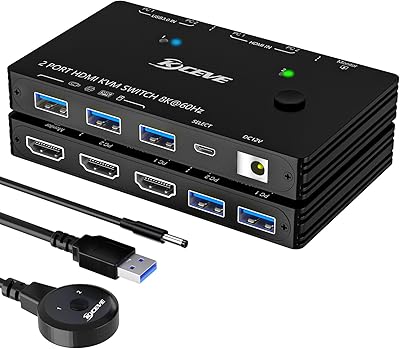
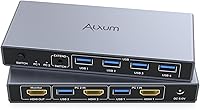
The Alxum SJW-KM201B 2-Port HDMI KVM Switch is a compact desktop unit built for anyone juggling two computers on a single monitor — no cable-swapping, no mess. It sits in a practical mid-range bracket, competing with similar two-port switchers from brands like TESmart and UGREEN. The footprint is genuinely small — just over five inches long — and the aluminum construction gives it a sturdier feel than you'd expect at this price point. No drivers required: plug the cables in, connect the power adapter, and you're switching between machines in under a minute. For a home office or studio desk, that kind of friction-free setup matters quite a bit.
Features & Benefits

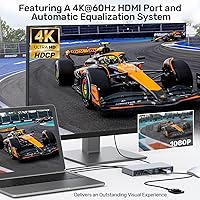
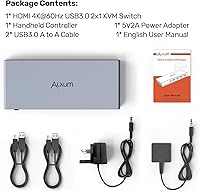
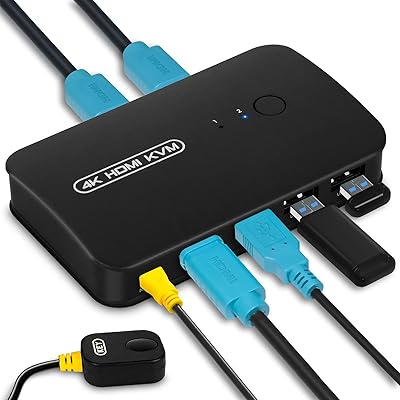
The headline capability here is 4K at 60Hz over HDMI 2.0, which translates to sharp, fluid visuals for spreadsheets, video editing timelines, or media playback — though competitive gamers should note that KVM switching latency isn't optimized for fast-paced titles. Switching itself works two ways: a physical button on the unit or the included desktop remote, which is more useful than it sounds when the box is tucked behind a monitor. Four USB-A ports run at full USB 3.0 speeds, fast enough to transfer large files from an external drive without much waiting. Built-in ESD protection and automatic signal calibration keep the picture stable between switches.

Best For

This dual-computer switcher makes most sense for professionals who keep a personal laptop and a work desktop running simultaneously and don't want two sets of keyboards, mice, and cables cluttering the desk. It's also a solid pick for light creative work — photo editing, writing, content review — where 4K clarity is appreciated but a top-tier KVM price tag isn't justified. Shared peripherals like a printer or external hard drive become much less of a headache. That said, there are real gaps: no audio switching, no USB-C host port, and a strict two-computer limit. If your setup involves more machines or you rely on digital audio routing, look elsewhere.

User Feedback

Buyers who picked up the Alxum switch tend to highlight how painless the initial setup is and how consistent the 4K output looks day-to-day. The remote controller gets mentioned as a genuine convenience, particularly for users whose switch sits out of arm's reach. On the downside, a handful of reviewers report a brief black screen during switching — typically one to two seconds — which is normal for this category but worth knowing upfront. A few users noted cable compatibility quirks, especially with older HDMI leads that didn't fully support 2.0 bandwidth. Long-term durability reports are mostly positive, though the pool of extended-use reviews is still growing given the product's recent arrival.

Pros

  • Plug-and-play setup takes under two minutes with zero driver installation required.
  • Delivers genuine 4K clarity at 60Hz — sharp enough for detailed creative and productivity work.
  • The included desktop remote is a practical bonus, especially when the switch sits out of easy reach.
  • Four USB-A ports handle a full peripheral set — keyboard, mouse, and external storage — without crowding.
  • Compatible with Windows, macOS, and Linux out of the box, covering most mixed-machine setups.
  • HDCP support means streaming services play back at full quality without handshake errors.
  • The Alxum switch is compact enough to tuck behind a monitor without eating into usable desk space.
  • Aluminum construction gives it a more substantial feel than comparably priced plastic alternatives.
  • Built-in ESD protection adds a layer of reliability that cheaper switches in this category often skip.
  • USB 3.0 speeds mean large file transfers from a shared external drive are fast rather than frustrating.

Cons

  • No audio switching at all — speakers and headsets must be manually reconnected or managed via software.
  • The one-to-two-second black screen during each switch is noticeable and can interrupt focus mid-task.
  • No USB-C host port makes modern ultrabooks and MacBooks an awkward fit without adapters.
  • Bus-powered USB devices with higher power demands, like some portable hard drives, can behave inconsistently.
  • The remote controller cable is short enough to limit placement flexibility on larger desks.
  • Strictly limited to two computers — there is no upgrade path or daisy-chain option if your setup grows.
  • Older or lower-grade HDMI cables can silently drop the connection to 1080p without a clear error message.
  • LED status indicators are small and dim, making them hard to read clearly in bright office lighting.
  • Requires an external power adapter at all times — there is no bus-powered fallback mode.
  • Long-term durability data is thin given the product's recent market entry, making multi-year reliability hard to assess.

Ratings

The scores below reflect an AI-driven analysis of verified buyer reviews for the Alxum SJW-KM201B 2-Port HDMI KVM Switch, collected from global marketplaces and filtered to remove incentivized, duplicate, and bot-generated submissions. Each category is scored independently to give you an honest, granular picture of where this dual-computer switcher genuinely delivers — and where it falls short.

Ease of Setup
93%
Buyers consistently describe getting the switch up and running in under two minutes — cables in, power adapter connected, done. No driver downloads, no configuration menus. For non-technical users sharing a monitor between a home PC and a work laptop, this kind of zero-friction start is genuinely appreciated.
A small number of users encountered confusion around which HDMI cable version to use, particularly when their existing cables didn't fully support the bandwidth needed for 4K output. The packaging instructions could do a better job flagging this upfront.
Video Output Quality
88%
At 4K and 60 frames per second, the image quality holds up well for everyday work — crisp text rendering, accurate colors for photo review, and smooth enough playback for streaming or video editing previews. Users switching from older 1080p KVM units noticed a clear, tangible improvement.
A few reviewers reported occasional signal flicker during the first second or two after switching, though this typically resolved on its own. Those using very long or older HDMI cables sometimes saw resolution drop to 1080p until they swapped to a certified high-speed cable.
Switching Speed & Reliability
79%
21%
For most office and creative workflows, the switch between computers is clean and predictable. Press the button or the remote, wait a brief moment, and the monitor and peripherals are live on the other machine. Users in dual-desktop home office setups find this reliable enough for daily back-and-forth.
The black-screen gap during switching — typically one to two seconds — is noticeable and can be disruptive if you're mid-task. Competitive or fast-reaction use cases are not well served here, and a handful of users reported occasional switching failures that required a power cycle to resolve.
Remote Controller Usefulness
74%
26%
The desktop remote is a genuinely thoughtful inclusion, particularly for setups where the KVM box is mounted behind a monitor or tucked under a desk. Users who placed the switch out of easy reach found themselves relying on it daily rather than treating it as a novelty.
The remote is basic — a single button with no feedback indicator of its own. A few buyers found the cable connecting it to the switch too short for their desk arrangement, and the remote itself feels lightweight, which some interpreted as fragile even if it functioned fine.
USB Hub Performance
76%
24%
Four USB-A ports running at USB 3.0 speeds handle the everyday peripheral load well — keyboard, mouse, and an external drive all running simultaneously without bottlenecks. Transferring large files from a USB drive felt noticeably faster compared to older USB 2.0 KVM experiences.
The ports are not independently powered, which means bus-powered devices that draw more current — like some external hard drives — can behave inconsistently. Users trying to run more than two or three high-demand USB devices at once occasionally encountered dropped connections or slow transfer speeds.
Build Quality & Durability
71%
29%
The aluminum casing and compact form factor give it a sturdier feel than the typical plastic KVM at this price range. It sits solidly on a desk without sliding around, and the ports have a firm, secure feel when cables are inserted.
The internal components are not premium-grade, and long-term durability data is limited given how recently the product launched. A handful of early buyers flagged that the button mechanism felt slightly loose after several months of daily pressing, raising questions about multi-year longevity.
Compatibility (OS & Devices)
82%
18%
Works without issue across Windows, macOS, and Linux machines in most configurations. Users running a MacBook alongside a Windows desktop — one of the most common dual-computer scenarios — reported no pairing or recognition problems out of the box.
A minority of users experienced issues with specific monitor brands not correctly re-detecting the signal after a switch, requiring a manual input toggle on the display. USB device re-enumeration times after switching also varied noticeably between operating systems.
Cable Management & Desk Footprint
84%
The compact dimensions mean it doesn't dominate the desk, and having one central hub for peripherals does reduce cable clutter meaningfully compared to manually swapping connections. Users who prioritized a clean workspace cited this as a primary reason for the purchase.
With two HDMI inputs, two USB-A host connections, and four peripheral ports all routed through a single small box, the cable bundle at the back can still become untidy. A cable management cutout or a recessed port layout would have helped considerably.
Value for Money
81%
19%
For a mid-range price, buyers get 4K output, a remote controller, USB 3.0 hub functionality, and reliable day-to-day switching. Compared to premium KVM brands that charge significantly more for two-port HDMI units, the Alxum switch offers a practical feature set at a fair entry point.
The missing audio switching is a real deduction in perceived value for users who run speakers or headsets through their monitor. Those who expected the USB 3.0 ports to behave like a fully powered hub felt slightly shortchanged when bus-powered drives underperformed.
Audio Switching Support
31%
69%
For users who rely entirely on monitor-integrated speakers or manage audio through software settings, the absence of dedicated audio switching may be a non-issue. A small subset of buyers noted workarounds using software audio routing tools effectively.
There is no audio switching capability at all — this is a genuine limitation for anyone using external speakers, a DAC, or a headset plugged into their computer. Users with audio-centric setups either have to manually replug their audio device or use a separate audio switcher, which adds cost and cables.
USB-C & Modern Port Support
28%
72%
The USB-A host ports work without issue for computers that still use traditional USB-A connections, which covers a wide range of desktop PCs and older laptops still in active use.
There is no USB-C host port, which is a notable gap for modern laptops that rely on USB-C or Thunderbolt for display and data. Users with a MacBook or a newer ultrabook expecting to connect via a single USB-C cable will be disappointed — an adapter chain is required and is not always stable.
Power Delivery & Stability
77%
23%
The included DC 5V adapter powers the unit reliably in standard configurations, and users generally reported consistent operation without spontaneous reboots or power-related signal drops during regular workdays.
The switch does not function without the external adapter — there is no bus-powered mode — which adds one more plug to manage. A couple of users in regions with variable power reported occasional instability, though it is unclear if this was adapter-related or a broader compatibility issue.
HDCP & Content Playback
83%
HDCP support means streaming services like Netflix or Disney Plus play back at full quality without HDCP handshake errors, which has historically been a pain point with cheaper KVM switches. Users watching protected content on one machine while keeping work open on the other had no reported issues.
A small number of users noted occasional HDCP negotiation delays when switching to a computer actively running a DRM-protected stream, requiring the app to be paused and restarted. This is a fairly common industry limitation rather than a specific flaw, but it still causes friction.
LED Indicators & Status Clarity
68%
32%
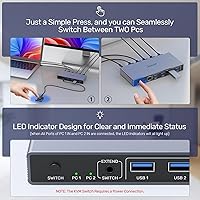
The LED indicators do their basic job of showing which computer is currently active, which is helpful at a glance when you have a busy desk with multiple devices. Users appreciated not having to guess which machine currently controls the monitor.
The indicator lights are small and somewhat dim, making them hard to read in bright environments or from an angle. Several users wanted more granular status feedback — such as USB connection state or signal type — that the current LED setup simply does not provide.
Multi-Computer Scalability
22%
78%
For users who genuinely only operate two computers, the two-port design is clean, focused, and exactly what is needed without unnecessary complexity or higher cost from a four-port unit.
The hard ceiling of two computers is a real constraint. Users who later added a third machine — a home server, a second laptop, or a gaming rig — found themselves having to replace the switch entirely rather than expand it. There is no daisy-chaining support or upgrade path within the Alxum lineup at this tier.

Suitable for:

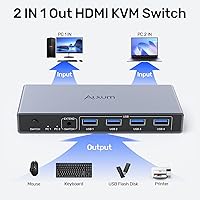
The Alxum SJW-KM201B 2-Port HDMI KVM Switch is a strong fit for anyone who regularly works across two computers and is tired of manually swapping cables or squinting at a cluttered desk. The most natural buyer is a home office professional who keeps a personal desktop and a work-issued laptop running simultaneously — one monitor, one keyboard, one mouse, zero cable chaos. It also works well for light creative professionals: photographers culling images, writers toggling between a writing machine and a reference system, or small studio operators who share a single 4K display between two editing rigs. Students running a personal machine alongside a school-provided device will find the plug-and-play setup refreshingly straightforward. If your peripheral load is reasonable — a keyboard, mouse, and maybe an external drive — and you are comfortable with HDMI-only video connections, this dual-computer switcher covers the daily workflow without unnecessary complexity.
Not suitable for:

The Alxum SJW-KM201B 2-Port HDMI KVM Switch has enough gaps that certain buyers should genuinely look elsewhere before purchasing. If you manage three or more computers, this switch offers no expansion path — you will hit its hard two-machine ceiling immediately. Users who depend on USB-C or Thunderbolt connections for their laptops will find no native support here, and adapter workarounds are not always reliable enough for professional use. Anyone running external speakers, a DAC, or a headset through their computer rather than through the monitor will be frustrated by the complete absence of audio switching — sound does not follow the video signal, full stop. Competitive gamers should also be cautious: the brief black-screen delay during switching and the general latency profile of this category make it unsuitable for fast-reflex titles. Finally, power users expecting a fully independent, bus-powered USB hub from the peripheral ports will likely encounter inconsistency with high-draw devices like larger external hard drives.

Specifications

  • Model Number: The unit is manufactured under model designation SJW-KM201B by Shenzhen Saijiwei Technology Co., Ltd., marketed under the Alxum brand.
  • Host Ports: Two host computer ports are provided, each consisting of one USB-A connector and one HDMI input for a complete keyboard, video, and mouse connection per machine.
  • Monitor Output: One HDMI output port connects to a single display, serving as the shared monitor for both connected computers.
  • Max Resolution: The switch supports video output up to 3840x2160 at 60Hz, commonly referred to as 4K Ultra HD, via HDMI 2.0.
  • HDMI Standard: Compatible with both HDMI 2.0 and HDMI 1.4 signals, allowing connection to a range of monitors and source devices across generations.
  • USB Peripheral Ports: Four USB-A peripheral ports are available for shared devices such as keyboards, mice, external drives, and printers.
  • USB Transfer Speed: Peripheral ports operate at USB 3.0 speeds with a maximum data transfer rate of 5Gbps, and are backward compatible with USB 2.0 devices.
  • Switching Method: The active computer can be changed using either the physical push button on the front panel of the unit or the included wired desktop remote controller.
  • Power Supply: The switch requires a DC 5V external power adapter, which is included in the box; it does not support bus-powered or adapter-free operation.
  • Dimensions: The unit measures 5.51 x 2.36 x 0.79 inches, making it compact enough to place flat on a desk or position behind a monitor stand.
  • Weight: The switch weighs approximately 1.01 pounds, which includes the main unit but not cables or the power adapter.
  • Contact Material: The outer casing and contact components use aluminum construction, contributing to a more robust feel compared to all-plastic alternatives in this category.
  • OS Compatibility: The switch is compatible with Windows, macOS, and Linux operating systems without requiring any driver installation on any of these platforms.
  • HDCP Support: HDCP (High-bandwidth Digital Content Protection) is supported, enabling playback of DRM-protected content such as streaming video at full quality.
  • ESD Protection: Built-in electrostatic discharge protection is included to help prevent damage to connected devices from static electricity during normal use.
  • Signal Optimization: The unit includes automatic signal optimization that adjusts the HDMI output for stable, consistent display quality after each computer switch.
  • LED Indicators: Status LED indicators on the unit show which computer input is currently active, providing a quick visual reference during use.
  • Audio Switching: The switch does not include audio switching capability; audio signals are not routed through the device and must be managed separately.
  • USB-C Support: There are no USB-C host or peripheral ports on the unit; all host and peripheral connections use USB-A connectors only.
  • Max Connected PCs: The switch is strictly a two-computer device with no daisy-chain or expansion capability to support additional host machines.

Related Reviews

BolAAzuL 2-Port HDMI 2.1 KVM Switch
84%
91%
Value for Money
94%
Video Quality
88%
Ease of Setup
85%
Build Quality
80%
Usability and Controls
More
Seiryruc 2-in-3-Out 4K HDMI KVM Switch
71%
88%
Setup & Installation
83%
Video Signal Quality
57%
Switching Method & Speed
81%
USB Peripheral Sharing
76%
Display Mode Flexibility
More
ANXQQ HDMI 2.1 KVM Switch 8K@60Hz 2 Port with Wired Control
86%
92%
Video Quality
89%
Ease of Use
87%
Value for Money
85%
Compatibility
91%
USB Support
More
IOGEAR GCS32HU 2-Port HDMI KVM Switch
72%
93%
Ease of Setup
88%
Switching Reliability
91%
Value for Money
74%
Build Quality
67%
Cable Length & Reach
More
Camgeet 10-Port HDMI KVM Switch
78%
88%
EDID Emulation Reliability
91%
Video Output Quality
93%
Port Count & Input Flexibility
82%
USB Sharing Performance
84%
Switching Methods & Remote Control
More
ATEN CS22HF 2-Port HDMI KVM Switch
78%
93%
Ease of Setup
91%
Switching Convenience
84%
Video Quality
78%
Build Quality
66%
Cable Length & Management
More
DGODRT HDMI USB KVM Switch 2 Port Selector Box
85%
88%
Overall Performance
95%
Ease of Setup
90%
Video Quality (4K Support)
85%
Switching Speed and Reliability
92%
Compatibility with Operating Systems
More
Steetek USB 2.0 HDMI KVM Switch 8 Port
84%
91%
Ease of Switching
87%
4K Video Quality
84%
Build Quality
93%
Setup and Installation
65%
Hotkey Functionality
More
TESmart HKS201-P23 2-Port HDMI KVM Switch
77%
83%
Ease of Setup
88%
Video Quality & Resolution
67%
Switching Reliability
71%
Audio & Microphone Performance
79%
USB Hub Performance
More
SUIDEK SJW-KM202B Dual Monitor KVM Switch
73%
83%
Ease of Setup
71%
Switching Reliability
79%
Display Quality
91%
Desktop Controller Usability
77%
USB Peripheral Sharing
More

FAQ

No, the Alxum SJW-KM201B 2-Port HDMI KVM Switch is fully plug-and-play. You connect the cables, plug in the power adapter, and it works immediately across Windows, macOS, and Linux without any driver downloads or configuration steps.
The switch supports up to 3840x2160 at 60Hz over HDMI 2.0, so it can pass through a full 4K signal — but you need to make sure all three links in the chain support it: the cable from your computer, the switch itself, and the cable going to your monitor. Using an older HDMI 1.4 cable anywhere in that chain will silently cap the output at a lower resolution.

Yes, there is a brief black-screen moment — typically one to two seconds — while the switch hands off the signal and the monitor re-syncs. For office work or creative tasks, this is a minor interruption. If you need instant, zero-lag switching for competitive gaming or live broadcasting, this category of switch generally is not designed for that use case.

Not directly. The switch only has USB-A host ports, so a MacBook or any modern laptop that uses USB-C or Thunderbolt exclusively will need a USB-C to USB-A adapter for the data connection, plus a separate USB-C to HDMI cable or adapter for the video side. It can work, but the adapter chain adds complexity and is not always perfectly stable.

No, audio switching is not supported at all. The switch only passes video and USB signals. If your speakers or headset are connected directly to a computer rather than to the monitor, they will not follow when you switch. You would need to manually replug your audio device or use a separate audio switcher alongside it.

The remote is wired, not wireless — it connects to the switch via a short cable. It functions as a single-button controller that triggers the same switch action as pressing the button on the unit itself. It is most useful when the switch is tucked behind a monitor or on a shelf out of easy reach, which is actually a fairly common setup.

Yes, that is one of the more practical use cases. Any USB device plugged into the four peripheral ports — including a printer, external hard drive, or USB hub — becomes accessible to whichever computer is currently active. Just keep in mind that only one computer can access those devices at a time, and switching requires that the other computer is not actively writing to the drive.

Unfortunately, no. This dual-computer switcher is a closed two-port system with no expansion capability or daisy-chain support. If you later need to manage three or more computers, you would need to replace it entirely with a four-port KVM switch. It is worth planning ahead if your setup might grow.

The DC 5V power adapter is included in the box. The switch does require it to operate — there is no way to run it without external power, even if all connected devices could theoretically supply enough current through their USB ports. Just make sure you do not lose the adapter, since the switch will not function without it.

Mixed OS setups like that are exactly what this switch is designed for. Most users report smooth operation across different operating systems, since the switch itself is OS-agnostic and requires no software on either machine. The one thing to watch is USB device re-enumeration time — some Linux distributions take a few extra seconds to recognize the switched peripherals compared to Windows, but this is a normal OS behavior rather than a switch defect.