Overview

The Blackmagic Design DaVinci Resolve Mini Panel is a dedicated color grading controller built for professionals who take color work seriously. It fits into a grading workflow as a tactile interface for DaVinci Resolve — replacing mouse-driven adjustments with physical trackballs, knobs, and buttons that respond the way a colorist actually thinks. At its premium price, this color grading panel targets working professionals, not hobbyists dabbling in post-production. It works with both the free and Studio versions of DaVinci Resolve, but make no mistake: this is a single-purpose tool. If you are not primarily grading in Resolve, there is simply no use case here.
Features & Benefits

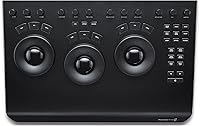
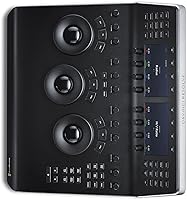
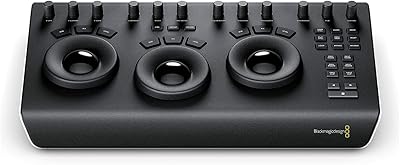
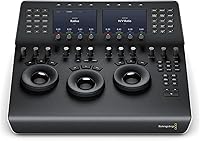
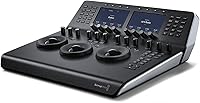
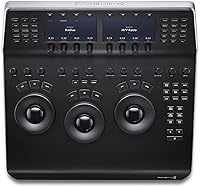
The three weighted trackballs are the heart of this color grading panel — each one controlling lift, gamma, or gain with a resistance and weight that genuinely improves precision compared to a mouse. Above that, the dual 5-inch displays show parameter values, metadata, and node information in real time, reducing how often you need to glance at your main monitor. The 12 primary color correction keys and 18 navigation buttons keep common actions within reach of your fingers. Eight soft-knobs and assignable keys on the upper deck let you customize the workflow to suit your habits. USB-C connectivity and dual power inputs — AC or 4-pin XLR — add flexibility for both studio and on-location work.

Best For

The Resolve Mini Panel is squarely aimed at freelance colorists who move between facilities. It fits into a large bag — but realistically, at 16 by 8 by 14 inches, you are carrying it in a dedicated case, not a backpack pocket. That said, it is genuinely more portable than Blackmagic's larger Advanced Panel, and professionals grading on-set will appreciate the XLR power option for locations where clean AC power is unavailable. Small post-production studios that lack desk space or budget for the full-size panel will find the Mini Panel a practical compromise. Editors shifting into serious color work will also benefit — provided DaVinci Resolve is their primary grading environment.

User Feedback

Users who have spent time with the Mini Panel tend to highlight the trackball quality and overall build as strong points — the physical feel holds up well even after regular transport. The learning curve is a common theme for those coming from keyboard-only workflows; the layout takes time to internalize, but most report that productivity improves noticeably once it clicks. On the downside, first-time setup can be frustrating, with occasional driver or software version mismatches depending on your operating system. Those familiar with Blackmagic's larger panels note that some features are absent, though most accept the trade-off given the size difference. Long-term durability appears solid based on available feedback, though the pool of reviews remains relatively limited.

Pros

  • Weighted trackballs deliver precise, tactile lift, gamma, and gain control that a mouse simply cannot replicate.
  • Dual 5-inch displays keep parameter values and metadata visible without constantly switching focus to the main monitor.
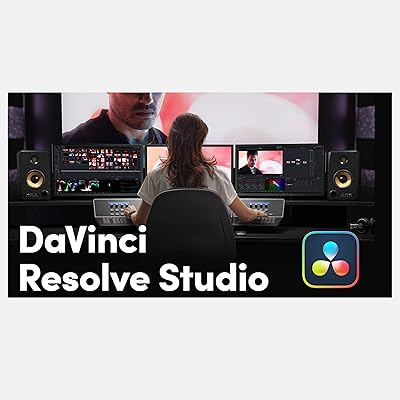
  • The Mini Panel works with both the free and Studio versions of DaVinci Resolve, adding flexibility for different budget setups.
  • 4-pin XLR power input makes it genuinely viable for on-set grading and mobile edit bays without clean AC access.
  • Thirty dedicated hardware controls reduce reliance on keyboard shortcuts and speed up repetitive grading tasks.
  • Build quality is solid and holds up well to the regular handling and transport that freelancers put it through.
  • USB-C connectivity keeps it compatible with modern workstations, and the included adapter covers older USB 3.0 setups.
  • Significantly smaller footprint than the full Advanced Panel, freeing up desk space in compact studio environments.
  • Eight assignable soft-knobs on the upper deck allow meaningful workflow customization beyond the factory defaults.

Cons

  • Completely non-functional outside of DaVinci Resolve, making it a single-software investment with no fallback utility.
  • First-time setup can involve driver issues or software version conflicts that require troubleshooting before the panel works reliably.
  • The learning curve is steep for colorists transitioning from keyboard-only workflows — productivity may dip before it improves.
  • Requires a dedicated hard case for safe transport; it is not the kind of kit you toss into a shoulder bag.
  • Some controls and features present on the full-size Advanced Panel are absent, which experienced users will notice.
  • The premium price point is difficult to justify unless color grading is a core and regular part of your professional work.
  • Limited volume of verified user reviews makes it harder to assess long-term reliability with full confidence.
  • Linux compatibility is listed as selective, which may create friction for users on non-standard or custom workstation builds.
  • No built-in scopes or waveform monitoring — the panel displays parameters but does not replace dedicated scope hardware.

Ratings

Our AI scoring system analyzed verified buyer reviews from professional colorists, freelancers, and post-production studios worldwide for the Blackmagic Design DaVinci Resolve Mini Panel, actively filtering out incentivized, bot-generated, and low-signal feedback to surface what real users actually experience. The scores below reflect both the genuine strengths that earned this panel its reputation and the recurring pain points that buyers consistently flagged. Nothing has been smoothed over — the numbers tell the honest story.

Trackball Precision
91%
Colorists consistently describe the three weighted trackballs as the standout physical feature — the resistance and weight make subtle lift and gamma pushes feel controlled rather than jumpy. In long grading sessions, the tactile feedback genuinely reduces fatigue compared to fine mouse movements.
A small number of users noted the trackballs can feel slightly stiff out of the box and benefit from a break-in period. Those upgrading from higher-end dedicated grading suites occasionally find the resistance calibration less refined than what they are accustomed to.
Build Quality
86%
The overall construction feels deliberate and solid for a panel in this size category — buttons have consistent travel, the chassis does not flex under pressure, and the upper deck displays are firmly mounted. Freelancers who transport it regularly report it holds up well over time without the buttons or knobs developing significant play.
A few users noted the panel does not feel quite as tank-like as the full-size Advanced Panel, which has a heavier, more reassuring heft. The plastic components on the side panels attract scuffs during regular travel even with careful handling.
Workflow Speed
84%
Once muscle memory develops, having 30 dedicated hardware controls means colorists spend far less time hunting for keyboard shortcuts or context menus during a session. Users grading feature-length projects reported measurable time savings per scene compared to their previous mouse-only workflow.
The speed gains do not arrive immediately — the first several weeks with this color grading panel often involve slower sessions while the layout becomes second nature. Colorists who only grade a few projects per month may never fully close that gap.
Software Integration
88%
When the panel and DaVinci Resolve are in sync, the integration feels purpose-built rather than adapted — controls map logically to on-screen tools, the soft-knobs reflect parameter changes in real time, and the upper displays pull genuinely useful contextual information without cluttering the main monitor.
The integration is entirely contingent on keeping DaVinci Resolve up to date — users on older software versions have encountered mapping inconsistencies or non-responsive controls. The panel offers zero integration with any other application, which limits its utility if your workflow spans multiple tools.
Portability
67%
33%
Relative to the full Advanced Panel, the Mini Panel is a genuine step down in size and considerably easier to bring between facilities. Freelancers working across a handful of regular studios find the form factor manageable with the right carry case.
At 16 by 8 by 14 inches, this is not a grab-and-go device — it demands a dedicated padded case and intentional packing. Buyers expecting something closer to laptop-bag portability will be caught off guard by the actual physical footprint.
Setup Experience
63%
37%
On a freshly updated system running a current version of DaVinci Resolve, the panel typically connects and registers without any manual driver installation, which makes initial setup reasonably straightforward for users on mainstream macOS or Windows builds.
A recurring complaint across user feedback involves version mismatches between the panel firmware and the installed Resolve version, particularly after software updates. Linux users face additional friction, with compatibility limited to select distributions and less community support available when issues arise.
Upper Deck Displays
79%
21%
Having two 5-inch screens showing parameter values and metadata directly on the panel reduces how often colorists need to glance away from their primary monitor, which meaningfully improves focus during dense node-based grades. The real-time refresh keeps the data relevant even during rapid adjustment passes.
The displays are informational rather than visual — they show text and numeric values, not waveforms or scopes, so they do not replace external monitoring hardware. Some users found the screen brightness insufficient in brightly lit on-set environments.
Value for Money
71%
29%
For a working colorist who grades client projects daily, the panel justifies its cost through genuine efficiency gains and a more professional workflow. Studios that bill by the hour often recoup the investment within months if grading volume is high.
For part-time users or editors who color grade occasionally, the price-to-use ratio is difficult to defend — the per-session value simply does not add up at this price tier. The fact that it is locked to a single software ecosystem makes the investment feel riskier for those considering a potential switch away from DaVinci Resolve.
Control Layout
82%
18%
The physical grouping of correction keys, transport buttons, and soft-knobs follows a logic that aligns with how colorists actually move through a grade — primary corrections are front and center, navigation is within thumb reach, and the upper deck handles secondary adjustments without crowding the lower panel.
Users coming from the full Advanced Panel will immediately notice the absence of several dedicated controls, and remapping those functions to the assignable keys requires upfront configuration time. The layout rewards Resolve-native colorists but can feel arbitrary to newcomers still learning the software.
Durability Over Time
77%
23%
Users who have owned the Resolve Mini Panel for a year or more generally report that the trackballs and buttons retain their original feel without noticeable degradation, which is reassuring at this price point. The knobs remain smooth and free from the wobble that can develop in lesser control surfaces.
The long-term dataset is somewhat limited given the panel's release date, so durability assessments should be treated with appropriate caution. A small number of users reported button contacts becoming inconsistent after heavy daily use in high-volume commercial grading environments.
Power Flexibility
83%
The inclusion of a 4-pin XLR 12V DC input alongside standard AC is a practical feature that on-set colorists genuinely appreciate — it opens up compatibility with portable battery systems and production power rigs that are already standard on film sets.
The panel has no battery of its own, so it always requires an external power source, which adds one more cable and adapter to manage in mobile setups. The XLR power cable is not included in the box, requiring a separate purchase for those planning on-location use.
Learning Curve
58%
42%
Users who commit to the panel consistently and grade regularly do report a genuine turning point where the hardware feels natural — after that adjustment, most describe the panel as indispensable. Blackmagic Design provides documentation and DaVinci Resolve itself has training resources that help accelerate the process.
This is one of the more frequently cited frustrations — colorists who grade infrequently or who switch between mouse and panel mid-project find the muscle memory never fully solidifies. The learning curve is steeper than marketing language around the product tends to suggest.
Connectivity Reliability
80%
20%
USB-C connectivity is a sensible choice for modern workstations, and the included USB 3.0 Type-A adapter means users with older machines are not immediately stranded. In normal studio use, the connection is stable and does not drop or require re-pairing between sessions.
Some users have experienced the panel dropping its connection after their computer wakes from sleep, requiring a cable reconnect or Resolve restart to re-establish communication. This is a minor but recurring nuisance in day-to-day studio workflows.

Suitable for:

The Blackmagic Design DaVinci Resolve Mini Panel is built for working colorists who spend serious hours inside DaVinci Resolve and want physical control over their grade rather than relying entirely on a mouse. Freelancers who travel between color suites will find it genuinely practical — it is compact enough to transport in a dedicated carry case and flexible enough to run on AC or 4-pin XLR power in nearly any environment. Small post-production studios that cannot justify the footprint or cost of the full Advanced Panel will get most of the core grading functionality in a significantly smaller form factor. Professional editors who are making a deliberate shift into dedicated color work will also benefit, since the weighted trackballs and dedicated correction keys accelerate the muscle memory that separates efficient colorists from slow ones. If DaVinci Resolve is your daily driver and you grade for clients, this color grading panel is a meaningful investment in both speed and precision.
Not suitable for:

The Blackmagic Design DaVinci Resolve Mini Panel is a poor fit for anyone who does not work exclusively or primarily within DaVinci Resolve — it has no meaningful function outside that software ecosystem, and no amount of creative workarounds changes that. Hobbyists, YouTubers, or part-time editors who grade occasionally will struggle to justify the premium price against the actual hours of use they will realistically put in. Those expecting a portable panel in the backpack sense will be disappointed; at 16 by 8 by 14 inches, it requires a purpose-built case and deliberate planning to move between locations. Buyers hoping to use it as a general MIDI controller or editing surface for other applications should look elsewhere entirely. Anyone on the fence about committing to DaVinci Resolve as their primary color tool should resolve that question before spending this kind of money on hardware that is useless without it.
Specifications

  • Brand: Manufactured by Blackmagic Design, a professional audio-visual hardware company based in Australia.
  • Model Number: The official manufacturer part number for this panel is OB02405.
  • Trackballs: Equipped with three high-resolution weighted trackballs dedicated to lift, gamma, and gain color adjustments.
  • Upper Displays: Features two 5-inch LCD screens on the upper deck showing real-time parameter values, metadata, and node information.
  • Control Buttons: Includes 12 dedicated primary color correction keys and 18 navigation and transport buttons for grading workflow control.
  • Soft-Knobs: Eight smooth assignable soft-knobs on the upper deck allow customizable parameter adjustment within DaVinci Resolve.
  • Assignable Keys: Eight additional assignable keys on the upper deck support custom workflow shortcuts and tool switching.
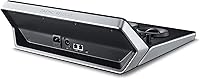
  • Connectivity: Connects via USB-C; a USB 3.0 Type-A to USB-C adapter cable is included for compatibility with older computer ports.
  • Power Input: Supports both standard AC mains power and a 4-pin XLR 12V DC connection for on-location or mobile use.
  • Compatibility: Works with macOS, Windows, and select Linux distributions running DaVinci Resolve in either its free or Studio version.
  • Dimensions: Physical footprint measures 16 by 8 by 14 inches, requiring a purpose-built case for safe transport between locations.
  • Weight: The panel weighs approximately 1 pound, keeping it relatively light despite its professional-grade construction.
  • Display Type: Upper deck screens use LCD technology to render interface data with clear legibility during active grading sessions.
  • Software: Designed exclusively for use with DaVinci Resolve and offers no standalone or cross-application functionality.
  • Operating Temp: Rated for operation at 20 degrees Celsius, consistent with controlled studio or indoor on-set environments.
  • Release Date: This product configuration was officially released on July 28, 2022.
  • UPC: Universal Product Code for retail identification is 642892809103.
  • Manufacturer Status: The product is not discontinued by the manufacturer as of the current listing date.

Related Reviews

Blackmagic Design DaVinci Resolve Micro Color Panel
80%
92%
Build Quality
89%
Trackball Precision
86%
Knob Responsiveness
91%
Workflow Speed Improvement
74%
Portability
More
Blackmagic Design DaVinci Resolve Studio Software License
76%
96%
Color Grading Depth
91%
Value for Money
93%
Feature Completeness
44%
Hardware Demands
51%
Learning Curve
More
Blackmagic Design UltraStudio Mini Recorder Capture Device
71%
91%
Signal Reliability
88%
Build Quality
67%
macOS Compatibility
89%
Capture Quality
38%
Windows Support
More
Blackmagic Design DeckLink Mini Recorder 4K
87%
95%
Video Quality
78%
Ease of Setup
89%
Build Quality
90%
Compatibility with Systems
85%
Value for Money
More
Blackmagic Design ATEM Mini Extreme ISO
83%
94%
ISO Recording Capability
91%
Audio Mixing & Fairlight Integration
89%
Video Input Flexibility
87%
SuperSource & Compositing
61%
Software Learning Curve
More
Blackmagic Design DeckLink Mini Monitor 4K
84%
89%
Performance
91%
Color Accuracy
88%
Compatibility with Software
75%
Installation/Setup
93%
Power Efficiency
More
Blackmagic Design ATEM Mini Pro
82%
91%
Build Quality
93%
Streaming Performance
89%
Video Quality
86%
Audio Mixing
74%
Ease of Setup
More
Blackmagic Design Web Presenter HD Streaming Encoder
78%
93%
Streaming Reliability
58%
Ease of Setup
88%
Build Quality
86%
Video Output Quality
71%
Mobile Tethering
More
Blackmagic Design UltraStudio Recorder 3G
86%
88%
Performance
91%
Ease of Setup
93%
Portability
89%
Build Quality
85%
Compatibility with Software
More
Blackmagic Design UltraStudio Monitor 3G
80%
93%
Portability & Form Factor
81%
Setup & Installation
89%
SDI Output Quality
76%
HDMI Output Quality
84%
Software Integration
More

FAQ

The Blackmagic Design DaVinci Resolve Mini Panel works with both the free and paid Studio versions of DaVinci Resolve. That said, if you want access to the full range of color tools and features that the panel is designed to complement, DaVinci Resolve Studio unlocks considerably more capability.
No. This color grading panel is built exclusively for DaVinci Resolve and has no functionality in other applications. If you are working primarily in Premiere Pro, Final Cut Pro, or any other NLE, this panel will not help you — it is a Resolve-specific hardware controller, full stop.

In most cases, the panel connects via USB-C and is recognized by DaVinci Resolve without requiring manual driver installation. However, some users have reported version compatibility issues, particularly if their Resolve installation is not up to date. It is worth ensuring your software is on the latest stable release before connecting the panel for the first time.

It depends on how you define portable. At 16 by 8 by 14 inches, the Mini Panel is not something you slip into a laptop bag. You will need a dedicated carry case — ideally a padded hard case — to transport it safely. That said, compared to the full Advanced Panel, it is meaningfully smaller and manageable for a colorist who travels between a handful of regular locations.

The Advanced Panel is significantly larger, adds a dedicated T-bar, more transport controls, and a third display row, making it better suited to a fixed high-volume grading suite. The Mini Panel trades some of those controls for a smaller footprint and lower cost, while still covering the core lift, gamma, and gain workflow through its three trackballs and primary correction keys. For most freelancers and smaller studios, the Mini Panel covers the majority of what they actually need.

General feedback from users suggests the trackballs are a strong point of this color grading panel. They have a weighted resistance that gives you real tactile feedback as you push your corrections, which is a noticeable step up from mouse-driven grading. They are not identical to the feel of a six-figure dedicated suite, but for the price and size category, most working colorists find them satisfying.

The panel supports standard AC power and 4-pin XLR 12V DC input. There is no built-in battery. For mobile use, you would need an external 12V DC power supply compatible with the 4-pin XLR connector, which is a standard format widely used in broadcast and film production.

Blackmagic Design lists compatibility with select Linux distributions, but this is more limited than macOS or Windows support. Before purchasing, it is worth checking the current DaVinci Resolve release notes for your specific Linux distribution to confirm compatibility, as not all Linux builds are officially supported.

Most users report a learning period of one to several weeks before the panel feels intuitive. The physical layout takes time to internalize, and muscle memory for the trackballs develops gradually. The good news is that once you are past that initial adjustment period, most colorists find they grade noticeably faster than they did with a mouse.

Based on available user feedback, the Resolve Mini Panel holds up reasonably well to the wear of regular transport when properly cased. The construction feels professional rather than fragile, and there are no widespread reports of hardware failure from frequent use. As with any precision electronics, investing in a proper protective case is essential if you are moving it often.