Overview

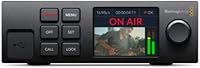
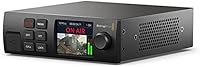
The Blackmagic Design Web Presenter HD Streaming Encoder is a purpose-built appliance that sits between professional broadcast cameras and the internet, handling the entire streaming pipeline without a dedicated computer in the chain. That self-contained approach is what separates it from a laptop running OBS — no driver conflicts, no background updates killing your stream mid-broadcast. Blackmagic built this for AV professionals, houses of worship, corporate production teams, and live event broadcasters who need consistency over flexibility. The Web Presenter HD sits at a premium price point, but for organizations where a dropped stream is simply not acceptable, that cost reflects the reliability of purpose-built hardware.
Features & Benefits

At the heart of the Web Presenter HD is a dedicated hardware encoder that processes H.264 compression independently of any host computer — which means no CPU spikes, no frame drops when something else demands system resources. SDI and HDMI inputs connect directly to professional broadcast cameras and switchers at up to 1080p. One genuinely useful trick: plug it into any laptop via USB and it registers as a standard webcam, giving it instant compatibility with Zoom, Teams, or any streaming software without installing drivers. For connectivity, wired Ethernet is the primary path, but front and rear USB ports let you tether a 4G or 5G phone as a backup internet source — handy when venue Wi-Fi is unreliable.

Best For

This streaming encoder is clearly aimed at professionals, not hobbyists. If you run weekly live services at a house of worship and your camera connects via SDI, this Blackmagic unit removes the need to assign a volunteer to babysit a laptop stream every week. Corporate AV teams deploying it for recurring town halls or hybrid conferences will appreciate that once configured, it works the same way every time. Remote broadcasters covering outdoor events where Ethernet is unavailable will find the mobile tethering option genuinely practical. If you are already using Blackmagic cameras or an ATEM switcher, this fits naturally into that ecosystem. It is not, however, the right call for a solo creator who streams occasionally from home.

User Feedback

With around 70 reviews from a clearly specialized user base, the Web Presenter HD holds a 4.2-star rating that reflects cautious satisfaction rather than widespread enthusiasm. Professionals who praise it consistently point to rock-solid reliability and build quality — once streaming keys and network settings are configured, the unit rarely demands attention. The criticisms worth noting: first-time setup can be genuinely frustrating, particularly for users without broadcast backgrounds, and the small onboard display offers limited diagnostic feedback mid-broadcast. A handful of users have compared this Blackmagic unit to running OBS on a capable PC, noting that the hardware-based approach wins on stability but gives up the flexibility software encoders provide. For a niche appliance, that trade-off is the whole point.

Pros

  • Hardware H.264 encoding runs independently of any computer, eliminating dropped frames caused by CPU overload.
  • Connects directly to professional SDI and HDMI camera sources without adapters or converters.
  • Tether a 4G or 5G phone via USB as a live internet source when Ethernet is unavailable.
  • Dual USB ports on both the front and rear panels make phone tethering genuinely convenient on location.
  • The USB webcam output lets this streaming encoder work with any video software without installing drivers.
  • Once configured, the unit runs consistently with minimal ongoing maintenance or technical oversight.
  • Solid, professional build quality designed to hold up in real production environments.
  • Supports all major streaming platforms through standard streaming key entry.
  • Compatible with both professional and consumer audio formats, covering a wide range of input sources.
  • Compact and light enough at 2.1 pounds to pack easily for on-location broadcast work.

Cons

  • Initial setup is not intuitive and will frustrate anyone without a broadcast or AV background.
  • The 3.5-inch onboard display offers limited diagnostic information during a live broadcast.
  • No built-in scene switching or overlay capabilities, unlike software encoders that offer full production control.
  • Mobile tethering compatibility can vary depending on the phone model and carrier, which some users have flagged.
  • The Web Presenter HD tops out at 1080p, with no upgrade path to 4K for future-proofing.
  • The proprietary operating system means you are locked into Blackmagic's own software ecosystem for configuration.
  • With a relatively small number of published user reviews, edge-case reliability data is limited.
  • No Wi-Fi connectivity built in; wired Ethernet or USB tethering are the only native internet options.
  • Premium pricing is difficult to justify for low-frequency or one-off streaming scenarios.
  • Support documentation can be dense and assumes familiarity with professional broadcast terminology.

Ratings

The scores below reflect an AI-driven analysis of verified global user reviews for the Blackmagic Design Web Presenter HD Streaming Encoder, with spam, incentivized, and bot-generated feedback actively filtered out to ensure only genuine buyer experiences inform each category. This unit draws a specialized, technically literate audience, so the feedback pool is smaller than typical consumer products — but notably candid and detailed. Both the strengths that make professionals rely on it week after week and the friction points that frustrate newcomers are transparently reflected in every score.

Streaming Reliability
93%
This is where the Web Presenter HD consistently earns its place in professional workflows. AV teams running weekly church services or recurring corporate events repeatedly report zero dropped frames once the unit is properly configured, which is the core promise of a dedicated hardware encoder over a software-based setup.
A small number of users have reported occasional stream interruptions tied specifically to mobile tethering rather than the encoder itself, suggesting the reliability advantage is strongest when using a wired Ethernet connection. In genuinely unstable network environments, even dedicated hardware cannot fully compensate.
Ease of Setup
58%
42%
Users who work in broadcast environments generally describe the configuration process as logical once they understand the Web Presenter Utility software, and many note that after the initial setup, the unit runs identically every subsequent time without needing reconfiguration.
For anyone without an AV or broadcast background, the initial setup is a genuine stumbling block. Entering streaming keys, navigating the proprietary interface, and troubleshooting network settings without intuitive onscreen guidance has frustrated a notable portion of first-time users, particularly those expecting a consumer-level plug-and-play experience.
Build Quality
88%
The physical construction earns consistent praise from professionals who transport it regularly to event venues. The chassis feels dense and well-assembled, and users who have deployed it across dozens of live events report no structural wear or port degradation over extended use.
A few users note the unit runs noticeably warm during extended broadcasts, which raises questions about long-term thermal management in environments without good airflow. The cooling fan, while functional, is audible enough to be a consideration in quiet production spaces.
Video Output Quality
86%
Broadcast professionals consistently report that 1080p streams produced by this Blackmagic unit look clean and consistent, with none of the compression artifacts or frame-rate instability that appear when encoding is handled by an overtaxed laptop CPU under load.
The hard ceiling of 1080p is a genuine limitation for organizations beginning to plan 4K production pipelines. There is no upgrade path within this unit, so buyers with near-future 4K requirements will eventually outgrow it regardless of how well it performs today.
Mobile Tethering
71%
29%
The dual USB ports — front and rear — make it practical to tether a smartphone in a variety of physical setups, and users who have relied on 5G phone connections for remote outdoor broadcasts report it as a genuinely workable solution when Ethernet access is impossible.
Compatibility with specific phone models and carriers is inconsistent enough that some users have encountered connection issues that required troubleshooting on-site before a broadcast. This makes it a capable backup option but a risky primary connection without prior testing at each location.
USB Webcam Output
82%
18%
The ability to plug this streaming encoder into a laptop and have it appear as a webcam source in Zoom or Teams has proven surprisingly practical for corporate teams who want broadcast-quality SDI camera feeds in video calls without investing in a separate capture card.
While compatibility is broad, a handful of users have noted that certain enterprise video conferencing platforms with stricter device policies occasionally require additional settings adjustments before the unit is recognized correctly as a webcam input.
Value for Money
74%
26%
For organizations running weekly or bi-weekly live productions where stream failure has real consequences — lost congregation members, missed corporate communications — the premium over a software encoder setup is widely viewed as justified by the reliability and reduced human oversight required.
For lower-frequency users or those still building their production workflows, the cost is difficult to justify given that a capable PC running OBS can replicate much of the functionality at a fraction of the investment. The value proposition is real, but only for buyers whose use case demands it.
Platform Compatibility
83%
Support for all major streaming platforms via standard streaming key entry means there is virtually no destination platform that this Blackmagic unit cannot reach, covering YouTube Live, Facebook Live, Twitch, and custom RTMP endpoints used by enterprise broadcast systems.
The single-destination streaming limitation means organizations that want simultaneous multi-platform output must route through a secondary software encoder, which partially undermines the appeal of a standalone hardware solution for more complex broadcast operations.
Onboard Monitoring
62%
38%
The technical monitoring output gives broadcast operators a real-time confidence check on signal integrity during live productions, which is more than most competing hardware encoders at this tier provide and genuinely useful when managing a live stream without a dedicated engineer.
The 3.5-inch display is limited in the diagnostic detail it surfaces during a live broadcast, and several users have noted they wished for clearer real-time feedback on bitrate, connection status, and encoding health without having to reconnect a laptop to check the utility software.
Portability
84%
At 2.1 pounds and with a compact footprint, this streaming encoder fits easily into a standard production bag alongside other broadcast gear, and event AV teams frequently cite its size as a practical advantage for multi-venue deployments where equipment consolidation matters.
While the unit itself is compact, the combination of Ethernet cable, power supply, and USB tethering cables required for a full deployment adds up quickly in terms of cable management, and there is no integrated cable routing or securing system on the chassis.
Audio Handling
77%
23%
Compatibility with both professional and consumer audio formats means the unit works cleanly with the mixing boards and audio interfaces already present in most church AV racks and corporate conference room setups, requiring no additional audio conversion hardware in typical deployments.
Users with more advanced audio routing needs have noted that the audio monitoring and control options accessible on the unit itself are limited, and fine-tuning audio levels for stream output generally requires working through the companion software rather than direct hardware controls.
Ecosystem Integration
89%
For teams already running Blackmagic ATEM switchers or cameras, the Web Presenter HD slots in as a natural extension of the existing workflow, with consistent interface conventions and compatible signal standards that reduce the learning overhead of adding another piece of hardware.
Outside the Blackmagic ecosystem, the proprietary operating system and utility software create a degree of vendor dependency that some AV teams find limiting, particularly those managing mixed-brand production environments where standardized cross-brand workflows are a priority.
Documentation & Support
66%
34%
Blackmagic Design provides reasonably detailed technical documentation, and the online professional community around their products means that most common configuration questions have been answered in forums or community threads by experienced users who have solved the same problems in real deployments.
Official documentation assumes a level of broadcast technical knowledge that many newer users lack, and direct customer support from Blackmagic has been described by some reviewers as slow to respond for non-critical configuration issues, which can be frustrating during time-sensitive event preparation.

Suitable for:

The Blackmagic Design Web Presenter HD Streaming Encoder is the right tool for professionals who need a dedicated, always-ready streaming appliance that does not depend on a computer to function. Houses of worship running weekly services, corporate AV teams producing recurring hybrid events, and live event broadcasters working in unpredictable venues are all strong candidates. If your camera setup already uses SDI or HDMI outputs and you need a stream that simply works the same way every single time, this Blackmagic unit fills that role reliably. Organizations that have already standardized on Blackmagic cameras or ATEM switchers will find it integrates naturally into their existing workflow. For broadcasters operating in remote locations where wired internet is unavailable, the ability to tether a 4G or 5G phone as a live internet source makes this streaming encoder genuinely practical in the field.
Not suitable for:

The Blackmagic Design Web Presenter HD Streaming Encoder is not a good match for casual or first-time streamers who expect a plug-and-play experience out of the box. The initial configuration — entering streaming keys, setting up network preferences, and understanding the monitoring output — requires a baseline of AV or broadcast knowledge that hobbyists or solo content creators are unlikely to have. If you are streaming from a home studio using a webcam or consumer mirrorless camera, the price premium buys you capabilities you will never use. Users who want the flexibility to quickly switch platforms, add overlays, or manage multiple scenes dynamically will find that a software-based setup like OBS on a capable PC offers far more control for less money. This Blackmagic unit is purpose-built for reliable, repeatable production environments, not creative or experimental streaming workflows.

Specifications

  • Brand: Manufactured by Blackmagic Design, a professional broadcast hardware company known for its production and post-production equipment.
  • Model Number: The unit carries the official model designation OB02476, released in February 2021.
  • Video Inputs: Accepts both SDI and HDMI video sources, making it compatible with a wide range of professional broadcast cameras and switchers.
  • Max Resolution: Encodes and streams video at up to 1080p HD, covering the standard requirement for most professional live streaming platforms.
  • Encoding Engine: Uses a dedicated hardware H.264 encoder, processing video compression independently of any connected computer.
  • Internet Connectivity: Connects to the internet via built-in Ethernet port or through USB tethering with a connected 4G or 5G mobile phone.
  • USB Ports: Features USB connections on both the front and rear panels, supporting phone tethering and webcam output simultaneously if needed.
  • Webcam Output: When connected to a computer via USB, the unit registers as a standard webcam source, requiring no additional drivers for compatibility with any video software.
  • Audio Support: Accepts both professional and consumer audio formats, accommodating a broad range of microphones, mixers, and audio interfaces.
  • Streaming Platforms: Compatible with all major streaming platforms including YouTube Live, Facebook Live, Twitch, and others through standard streaming key entry.
  • Onboard Display: Includes a 3.5-inch monitoring screen for technical signal confirmation during live broadcasts.
  • Operating System: Runs on a proprietary Blackmagic operating system, configured and updated via the companion Web Presenter Utility software on a connected computer.
  • Dimensions: The unit measures 9.06 x 8.27 x 2.36 inches, sized for desktop use or easy packing in a production case.
  • Weight: Weighs 2.1 pounds, light enough to transport comfortably for on-location broadcast work.
  • Mobile Tethering: Supports both Apple and Android phones connected via USB for mobile data access, compatible with 4G and the latest 5G devices.

Related Reviews
Blackmagic Design ATEM Mini Pro
82%
91%
Build Quality
93%
Streaming Performance
89%
Video Quality
86%
Audio Mixing
74%
Ease of Setup
More
Blackmagic Design Intensity Pro 4K
83%
94%
Video Capture Quality
68%
Setup & Installation
82%
Software Performance
89%
System Compatibility
90%
Reliability & Durability
More
Blackmagic Design UltraStudio Mini Recorder Capture Device
71%
91%
Signal Reliability
88%
Build Quality
67%
macOS Compatibility
89%
Capture Quality
38%
Windows Support
More
Blackmagic Design DeckLink SDI 4K
87%
94%
Video Capture Quality
83%
Software Compatibility
89%
Build Quality
91%
Performance & Speed
87%
Cross-Platform Compatibility
More
Blackmagic Design UltraStudio Monitor 3G
80%
93%
Portability & Form Factor
81%
Setup & Installation
89%
SDI Output Quality
76%
HDMI Output Quality
84%
Software Integration
More
Blackmagic Design UltraStudio Recorder 3G
86%
88%
Performance
91%
Ease of Setup
93%
Portability
89%
Build Quality
85%
Compatibility with Software
More
Roku Streaming Stick HD 2025
84%
94%
Ease of Setup
91%
Interface & Navigation
86%
Streaming Performance
88%
Remote Quality
78%
Picture Quality
More
Blackmagic Design DaVinci Resolve Micro Color Panel
80%
92%
Build Quality
89%
Trackball Precision
86%
Knob Responsiveness
91%
Workflow Speed Improvement
74%
Portability
More
Blackmagic Design ATEM Mini Extreme ISO
83%
94%
ISO Recording Capability
91%
Audio Mixing & Fairlight Integration
89%
Video Input Flexibility
87%
SuperSource & Compositing
61%
Software Learning Curve
More
Blackmagic Design DeckLink Mini Monitor 4K
84%
89%
Performance
91%
Color Accuracy
88%
Compatibility with Software
75%
Installation/Setup
93%
Power Efficiency
More

FAQ

No, and that is actually one of the main reasons professionals choose this unit. Once you have configured your streaming platform and entered your streaming key using the Web Presenter Utility software, you can disconnect the computer entirely. The Web Presenter HD handles encoding and streaming on its own from that point forward.

Yes. The unit accepts both HDMI and SDI inputs, so any camera with a standard HDMI output will connect directly without an adapter. Just make sure your camera is outputting a clean HDMI signal, as some cameras overlay menus or status information on the HDMI feed by default.

You do not need any special app. You plug your phone into one of the USB ports on the unit and enable the mobile hotspot or USB tethering option in your phone's settings, the same way you would share data with a laptop. The Blackmagic unit then uses that mobile connection as its internet source automatically.

Honestly, there is a real learning curve here if you are coming from a consumer streaming background. You will need to download the Web Presenter Utility software, configure network settings, and enter your platform streaming keys before anything works. Blackmagic provides documentation, but the process assumes some familiarity with broadcast workflows. If you set aside time to work through it carefully, most users get there — but do not expect it to be ready out of the box in ten minutes.

The Blackmagic Design Web Presenter HD Streaming Encoder is designed to stream to one destination at a time via its built-in engine. If you need simultaneous multiplatform streaming, you would typically route the USB webcam output into a computer running a software encoder that supports multi-destination streaming, using this unit as the reliable video source.

The unit supports using a tethered phone as a backup or primary connection, but automatic failover switching is not a documented built-in feature. It is best used as a planned primary or secondary connection rather than a seamless automatic fallback. If you need true automatic failover, you would want to plan your connectivity setup carefully before going live.

Yes, it works well for this. When you plug it into a computer via USB, the operating system sees it as a standard webcam. You then select it as your camera source in Zoom, Teams, or any other video conferencing software. This is a genuinely useful feature for organizations that want broadcast-quality SDI camera feeds in their video calls without complex capture card setups.

The maximum streaming resolution is 1080p HD. If you connect a 4K source, the unit will downscale it to 1080p for encoding and streaming. There is no 4K streaming output on this model, so if 4K live streaming is a current or near-future requirement, you would need to look at a different solution.

The Web Presenter HD does have an internal cooling fan, which is worth considering if you are placing it near an open microphone in a quiet room. In typical production environments with background noise it is not an issue, but in very quiet spaces like a small chapel or conference room you may want to position it away from your audio pickup area.

Yes, as of its current production status, the unit is not discontinued and Blackmagic Design continues to provide firmware updates through the Web Presenter Utility software. Blackmagic has a reasonable track record of supporting its hardware with updates over time, which is one reason its products tend to have long useful lives in professional environments.