Overview

The Blackmagic Design DaVinci Resolve Micro Color Panel is the entry point into Blackmagic's hardware grading lineup, sitting below the Mini and Advanced panels in both footprint and cost. For colorists who find mouse-based grading slow and imprecise but don't need a full console dominating their desk, this grading panel hits a practical middle ground. It connects over USB with no drivers or external power brick required — just plug it into a machine running DaVinci Resolve, free or Studio edition, and you're working. It ships as hardware only, so if you don't already own Resolve, factor that in before purchasing.
Features & Benefits

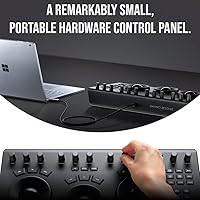
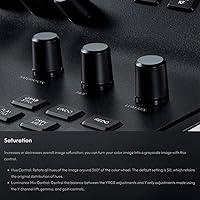
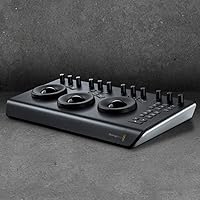
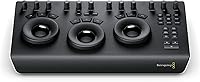
The three trackballs — covering lift, gamma, and gain — are the core of this color control surface. Each sits beside a master ring that adjusts overall luminance for that tonal range, giving you precise, independent control without hunting through menus. Alongside those, 12 knobs handle contrast, saturation, hue, and other primary parameters with tactile feedback a mouse simply cannot replicate. The panel is genuinely low-profile; it fits beside a keyboard without crowding your workspace. Because it runs entirely off USB bus power, you can bring it on set with a laptop and grade footage right there, no power outlet needed.

Best For

This grading panel makes the most sense for freelance colorists, DIT operators, and working editors who spend serious time on DaVinci Resolve's color page. If you're grading short films, commercial spots, or high-volume content and want a faster workflow than dragging nodes with a mouse, this is a logical step up. That said, the trade-offs are real: there's no jog wheel, no transport controls, and no built-in scopes. If you're cutting long-form projects where timeline navigation is constant, those omissions will frustrate you. This is a focused primary correction tool, not a full grading console replacement.

User Feedback

Owners of the Micro Panel are largely satisfied, with most praise landing on build quality and the physical feel of the trackballs and knobs — described as genuinely professional, not cheap or toy-like. A recurring observation is that grading speed improves noticeably once muscle memory kicks in. On the critical side, the most common complaints aren't about defects but omissions: the missing jog wheel and transport controls caught some buyers off guard. A few reviewers also noted an initial adjustment period mapping knobs to their workflow habits. Overall the rating trends strongly positive, and most dissatisfaction comes from buyers who needed more than this panel was designed to offer.

Pros

  • Three precision trackballs give you independent lift, gamma, and gain control that a mouse simply cannot replicate.
  • USB bus power means you can grade on a laptop on set with zero additional gear.
  • Build quality feels professional and durable, not like an entry-level compromise.
  • Dedicated still store keys let you grab and compare reference grades without breaking your rhythm.
  • The Micro Panel fits on a standard desk alongside a keyboard without a major workspace overhaul.
  • Grading speed improves substantially once muscle memory develops, especially on primary correction passes.
  • Works with both the free and Studio versions of DaVinci Resolve, removing a common compatibility concern.
  • 12 machined knobs cover all essential primary parameters with tactile feedback that encourages precise adjustments.
  • The low-profile form factor makes it genuinely portable for working colorists who travel between locations.

Cons

  • No jog wheel or transport controls means keyboard dependency never fully goes away, even mid-session.
  • At 11 pounds and over 20 inches wide, calling it truly portable requires some generous interpretation.
  • Exclusively locked to DaVinci Resolve — useless if your pipeline involves other grading or editing applications.
  • Secondary corrections, node management, and qualifier work still require the mouse, limiting how much the panel owns your workflow.
  • New colorists may find the learning curve steeper than expected without prior familiarity with Resolve's color page layout.
  • Fingerprints and dust accumulate visibly on the surface finish during regular use.
  • No built-in scopes or display output — you are fully reliant on your software monitoring setup.
  • Buyers doing long-form narrative work will feel the missing transport controls as a daily friction point, not an occasional one.

Ratings

The scores below were generated by AI after systematically analyzing verified buyer reviews from around the world for the Blackmagic Design DaVinci Resolve Micro Color Panel, with spam, bot activity, and incentivized feedback actively filtered out. Both what users genuinely love and what frustrates them in real grading sessions are transparently reflected here. The result is an honest picture of where this color control surface excels and where it asks for compromise.

Build Quality
92%
Reviewers consistently describe the chassis and controls as feeling far more substantial than the price tier might suggest. The trackballs move with satisfying resistance and the knobs have a precision feel that holds up through long grading sessions without wobbling or degrading.
A small number of users noted that the panel feels dense and heavy for something marketed as portable, which can be a mild inconvenience when packing for on-set work. The surface finish also attracts fingerprints noticeably over time.
Trackball Precision
89%
The three trackballs deliver smooth, responsive RGB balance control across lift, gamma, and gain with enough resolution to make subtle adjustments confidently. Colorists coming from mouse-based grading typically report a significant improvement in control accuracy within the first few sessions.
At very fine adjustment levels, a few users found the trackballs slightly over-sensitive, requiring deliberate technique to avoid overshooting a target value. This is mostly a learning curve issue rather than a hardware defect, but it does affect early sessions.
Knob Responsiveness
86%
The 12 machined knobs cover primary correction parameters in a logical layout that becomes second nature quickly. The tactile feedback is firm and consistent, making it easy to feel incremental changes without looking away from the monitor.
Some reviewers noted that without transport controls nearby, constantly switching between the panel and a keyboard to move through a timeline breaks concentration. The knob layout also takes time to internalize if you are new to hardware grading.
Workflow Speed Improvement
91%
Once muscle memory kicks in, the speed advantage over mouse-only grading is substantial. Colorists working through commercial or short-film projects report moving through grades noticeably faster, particularly during primary correction passes where every parameter has a dedicated physical control.
The efficiency gains are almost entirely limited to primary correction work. Without a jog wheel or transport controls, navigating long timelines still requires a keyboard or mouse, which interrupts the flow for editors grading their own cuts.
Portability
74%
26%
USB bus power is a genuine practical advantage — plug it into a laptop on set and you are grading without hunting for an outlet. The low-profile form factor does fit into a carry bag alongside a laptop, making travel feasible if not exactly convenient.
At 11 pounds and over 20 inches wide, this is not something you toss casually into a backpack. Several DIT operators noted that it occupies a meaningful portion of a mobile workstation setup, and the weight adds up on longer travel days.
Setup & Compatibility
93%
Plug-and-play USB connectivity means there are no driver installations, no configuration headaches, and virtually no setup time. It works with both the free and Studio versions of DaVinci Resolve, which removes a common compatibility concern for users who have not yet upgraded.
The panel is exclusively designed for DaVinci Resolve — it does not function as a controller in any other application. Users who work across multiple NLEs or grading platforms will find this a hard limitation with no workaround.
Value for Money
77%
23%
For professionals who bill by the project and need to recoup equipment costs, the productivity gains from switching off mouse-only grading are real and relatively quick to justify. The hardware quality reinforces the sense that this is a lasting investment rather than a disposable tool.
At this price point, the absence of transport controls and a jog wheel is a recurring frustration that makes some buyers feel they are paying a premium for an incomplete workflow solution. Those features are available on the next tier up, which complicates the value calculation.
Still Store Functionality
83%
Dedicated still store keys for saving and recalling reference grades are a genuinely useful addition for colorists who regularly compare shots against a hero grade. The ability to grab and recall a still without touching a mouse keeps the grading rhythm intact.
The still store controls are functional but minimal — there is no expanded gallery navigation on the panel itself, so deeper management of stills still requires interaction with the software interface. For high-volume work, this becomes a mild but consistent interruption.
Learning Curve
68%
32%
Users already comfortable with DaVinci Resolve's color page tend to orient themselves on the panel within a couple of sessions. The logical grouping of trackballs and knobs mirrors how the software itself organizes primary tools, which helps experienced colorists adapt quickly.
For editors who are newer to dedicated color work, the panel introduces a layer of complexity that can slow initial progress rather than accelerating it. Several reviewers emphasized that this tool rewards existing knowledge of Resolve and is not an ideal starting point for beginners.
Desk Footprint
79%
21%
The low-profile design genuinely allows the panel to coexist with a keyboard and mouse on a standard desk without forcing a major reorganization. Colorists working in small home studios or shared editing suites appreciated that it does not demand a dedicated surface.
The width of just over 20 inches means it does push other items aside on a compact desk. Users with dual-monitor setups or existing peripheral-heavy workstations noted that positioning required some compromise.
Transport Controls
31%
69%
There is little positive to say here — a handful of buyers noted that the absence of transport controls kept expectations appropriately grounded and pointed them toward using a keyboard shortcut layer alongside the panel, which works adequately for short-form content.
The missing jog wheel and transport controls are the single most cited drawback across user reviews. For anyone grading longer pieces or doing client review sessions where timeline scrubbing is constant, this omission meaningfully limits how much of the workflow the panel can actually own.
Software Integration Depth
88%
The panel maps directly and completely to DaVinci Resolve's primary correction controls with no configuration required. Every knob and trackball corresponds to an onscreen parameter in a predictable way, which is exactly what colorists want from dedicated hardware.
Integration does not extend meaningfully beyond primary correction. Secondary tools, qualifier controls, and node management remain purely software-driven, so the panel covers only a portion of a full grading session even for experienced users.
Durability & Longevity
84%
The machined aluminum knobs and solid construction suggest a panel built to last through years of professional use. Long-term owners report no degradation in trackball response or knob accuracy even after extended daily use.
There are limited long-term reviews given the product's market position, so extended lifespan data is thinner than for more widely owned tools. A few users mentioned concern about trackball cleaning access, as dust accumulation can eventually affect smoothness.

Suitable for:

The Blackmagic Design DaVinci Resolve Micro Color Panel is a strong fit for freelance colorists and DIT operators who spend the majority of their working hours on DaVinci Resolve's color page and want tactile control without committing to a large, expensive console. If you grade short films, commercials, music videos, or high-volume content work and you already know your way around Resolve's primary correction tools, this grading panel will genuinely accelerate your workflow. It makes particular sense for professionals who move between locations — the USB bus power means you can plug it into a laptop on set and start grading without an outlet or adapter. Content creators who have outgrown mouse-based grading but cannot justify the footprint or cost of the Mini or Advanced panels will find it hits a practical sweet spot. The low-profile chassis fits on a real working desk alongside your keyboard without requiring a dedicated surface or studio reconfiguration.

Not suitable for:

If your work regularly involves long-form editing where you need to scrub through timelines, trigger playback, or navigate clips without touching a keyboard, the Blackmagic Design DaVinci Resolve Micro Color Panel will frustrate you — there is no jog wheel, no transport controls, and no shuttle dial anywhere on it. Editors who split their time across multiple NLEs or grading applications should also look elsewhere, since this color control surface is built exclusively for DaVinci Resolve and offers no value outside of it. Buyers who are still learning color grading fundamentals should be cautious — this panel rewards existing knowledge of Resolve's color page rather than teaching it, and the investment may feel premature if you are still developing your grading instincts. Anyone expecting a complete grading station experience at this price tier will likely end up looking at the Mini Panel sooner than expected, since secondary corrections, node management, and gallery navigation all still require the mouse and keyboard. Finally, if desk space is genuinely tight, the 20-plus-inch width is wider than it looks in product photos.

Specifications

  • Manufacturer: Designed and manufactured by Blackmagic Design, an Australian professional video technology company.
  • Model Number: The official model identifier is BMD-DV/RES/BBPNLMIC.
  • Dimensions: The panel measures 20.51″ x 14.49″ x 5.12″, giving it a wide, low-profile footprint suited for desk use.
  • Weight: The unit weighs 11 pounds, which is substantial for a portable device but consistent with its metal construction.
  • Trackballs: Three high-resolution trackballs provide independent RGB balance control for lift, gamma, and gain tonal ranges.
  • Master Rings: Each trackball is surrounded by a dedicated master ring that adjusts the overall luminance level for its respective tonal range.
  • Control Knobs: Twelve precision-machined knobs give direct physical access to all primary color correction parameters including contrast, saturation, and hue.
  • Still Store Keys: Dedicated hardware keys allow colorists to save and instantly recall reference stills during an active grading session.
  • Power Source: The panel is fully powered via USB, requiring no external power adapter or wall outlet to operate.
  • Connection Type: A single USB cable handles both data communication and power delivery between the panel and the host computer.
  • Compatible Software: The panel is designed exclusively for use with DaVinci Resolve, compatible with both the free and Studio paid versions.
  • Transport Controls: No transport controls, jog wheel, or shuttle dial are included; timeline navigation requires a keyboard or mouse.
  • Form Factor: The low-profile chassis is designed to sit flat on a desk alongside a standard keyboard and mouse without dominating the workspace.
  • Panel Tier: This is the entry-level hardware panel in Blackmagic Design's lineup, positioned below the Mini Panel and Advanced Panel.
  • Operating System: Compatible with macOS and Windows systems that meet DaVinci Resolve's minimum system requirements.
  • Included Accessories: The panel ships with a USB cable; no software license, dongle, or additional accessories are included in the box.
  • Scopes & Display: No built-in scopes or output display are present; all monitoring relies on the DaVinci Resolve software interface.
  • Availability Status: The product has not been discontinued by the manufacturer and remains in active production as of the latest available information.

Related Reviews
Blackmagic Design DaVinci Resolve Mini Panel
87%
94%
Build Quality
91%
Portability
88%
Ease of Use
93%
Performance in Color Grading
89%
Compatibility
More
Blackmagic Design DaVinci Resolve Studio Software License
76%
96%
Color Grading Depth
91%
Value for Money
93%
Feature Completeness
44%
Hardware Demands
51%
Learning Curve
More
Blackmagic Design UltraStudio Monitor 3G
80%
93%
Portability & Form Factor
81%
Setup & Installation
89%
SDI Output Quality
76%
HDMI Output Quality
84%
Software Integration
More
Blackmagic Design UltraStudio Mini Recorder
87%
88%
Performance
90%
Build Quality
92%
Video Quality
85%
Audio Quality
94%
Connectivity
More
Blackmagic Design Web Presenter HD
86%
91%
Ease of Use
88%
Streaming Quality
68%
Mobile Data Connectivity
85%
Portability
94%
Setup Process
More
Blackmagic Design UltraStudio Recorder 3G
86%
88%
Performance
91%
Ease of Setup
93%
Portability
89%
Build Quality
85%
Compatibility with Software
More
Blackmagic Design DeckLink SDI 4K
87%
94%
Video Capture Quality
83%
Software Compatibility
89%
Build Quality
91%
Performance & Speed
87%
Cross-Platform Compatibility
More
Blackmagic Design Intensity Pro 4K
83%
94%
Video Capture Quality
68%
Setup & Installation
82%
Software Performance
89%
System Compatibility
90%
Reliability & Durability
More
Blackmagic Design DeckLink Mini Recorder 4K
87%
95%
Video Quality
78%
Ease of Setup
89%
Build Quality
90%
Compatibility with Systems
85%
Value for Money
More
Blackmagic Design DeckLink Mini Monitor 4K
84%
89%
Performance
91%
Color Accuracy
88%
Compatibility with Software
75%
Installation/Setup
93%
Power Efficiency
More

FAQ

The panel does not include any software license. You will need DaVinci Resolve installed on your computer separately. The good news is that the free version of Resolve works with this grading panel, so you are not forced to purchase the Studio edition just to get started.

No — this color control surface is built exclusively for DaVinci Resolve and has no functionality in any other application. If your workflow involves Premiere Pro, Final Cut Pro, or other NLEs, this panel will not operate as a controller in those environments.

It works perfectly with a laptop. The panel draws all its power through USB, so no wall outlet is needed. Many colorists use it on set connected to a MacBook or Windows laptop, which is exactly the use case Blackmagic had in mind when designing it.

There is some adjustment involved, yes. If you already know DaVinci Resolve's color page well, you will orient yourself within a few sessions. If you are still learning Resolve itself, expect the panel to add a layer of complexity initially rather than simplifying things right away.

This is a deliberate design choice that separates the Micro Panel from the larger Mini Panel. Blackmagic focused this panel purely on primary color correction controls and left timeline navigation to the keyboard. It keeps the form factor compact and the cost lower, but it is a genuine trade-off you should weigh before buying.

Setup is straightforward. Plug the panel into your computer via USB, open DaVinci Resolve, and it should be recognized automatically. There are no third-party drivers to install, and no configuration utility is required.

The build quality is solid — machined knobs and substantial construction mean it can handle regular professional use. That said, at 11 pounds and over 20 inches wide, you will want a proper case or padded bag if you are transporting it frequently. It is portable in principle, but it is not a lightweight travel accessory.

The free version of DaVinci Resolve is fully compatible with this grading panel. You do not need to purchase the Studio license to use the hardware. Studio adds features like noise reduction, certain plugins, and collaboration tools, but the panel itself works regardless of which edition you run.

Most users find that the trackballs can be carefully lifted out for cleaning, though the exact process depends on dust accumulation over time. Using a soft, dry cloth around the trackball housing regularly can prevent buildup. Avoid liquid cleaners directly on or around the trackball mechanism.

It depends. If you are already comfortable navigating DaVinci Resolve and understand the basics of primary color correction, this grading panel will accelerate your workflow. If you are completely new to color work, it is worth spending time grading with just the software first so you understand what each control does before adding hardware into the mix.

Where to Buy