
Overview

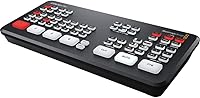
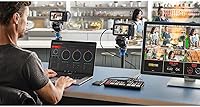
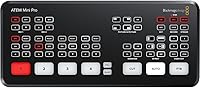
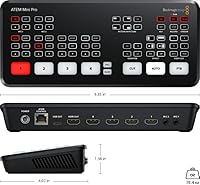
The Blackmagic Design ATEM Mini Pro is a compact hardware switcher that brought broadcast-grade live production to independent creators and small teams when it arrived in 2020. Unlike software-based alternatives, this live stream switcher performs real hardware switching — no latency surprises, no dropped frames when your CPU spikes under pressure. It sits comfortably in the mid-range professional tier, meaning you get genuine production tools without a full broadcast budget. Its most underappreciated quality is direct Ethernet streaming — plug it into your router and push live to YouTube or Facebook Live without a capture card or a dedicated streaming PC running in the background.

Features & Benefits

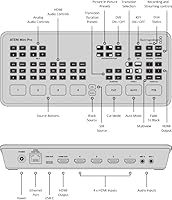
Four HDMI inputs handle up to 1080p60, so whether you are connecting mirrorless cameras, DSLRs, or a laptop presentation, the ATEM Mini Pro covers them without fuss. The built-in Ethernet streaming engine deserves real attention: the switcher itself connects to your network and pushes a stream directly to platforms, freeing your laptop from the workflow entirely. The USB-C port doubles as a webcam output, showing up instantly as a camera source in Zoom or OBS. Add a Fairlight audio mixer with EQ, compression, and gating per channel, plus direct H.264 recording to a USB drive, and you have a genuinely self-contained production unit in a very small footprint.

Best For

This hardware switcher is not for everyone, and that is actually a point in its favor. It is built for people who run live productions regularly — solo streamers managing multiple camera angles for YouTube, corporate AV teams running weekly webinars, or educators who need a reliable plug-and-play setup that does not depend on a laptop staying stable under load. eSports event producers needing low-latency source switching will also find it fits naturally. If you stream occasionally and handle everything in OBS, this is probably more than you need. But if live production is a consistent part of your work, dedicated hardware pays off quickly.

User Feedback

Across a broad range of buyer reviews, a few consistent patterns emerge. Build quality and reliability come up repeatedly — users describe a level of confidence during live events that software setups rarely match. The volume of professional features packed into something this compact also draws frequent praise. On the flip side, the ATEM Software Control app has a real learning curve, particularly around keyers and macro programming; newcomers often need several practice sessions before things click. A smaller number of buyers flag the absence of analog audio outputs on the program channel as a genuine limitation. Overall, though, sentiment skews strongly positive across the board.

Pros

  • Streams directly to YouTube or Facebook Live over Ethernet with no PC required in the chain.
  • Four HDMI inputs handle most real-world multicamera setups right out of the box.
  • Built-in Fairlight audio mixer includes EQ, compression, and gating — genuinely broadcast-quality tools.
  • Records clean H.264 MP4 files directly to a USB drive during every live production.
  • USB-C output works immediately as a webcam source in Zoom, Teams, and OBS without drivers.
  • 10-source multiview on a single monitor makes solo operation dramatically less stressful.
  • Compact and light enough to pack with your camera bag for location productions.
  • Hardware switching means no dropped frames or stutter when your computer is under load.
  • Build quality inspires confidence for regular use in demanding event environments.
  • Strong value relative to assembling a comparable multi-device workflow from separate components.

Cons

  • Hard 1080p output ceiling is a real limitation as 4K content expectations continue to grow.
  • No analog audio output on the program channel makes routing to PA systems unnecessarily complicated.
  • ATEM Software Control app has a steep learning curve, especially for keying and macro setup.
  • Recording captures program output only — no per-input ISO recording for post-production flexibility.
  • External power brick is required at all times, with no battery or bus-power option available.
  • SDI camera users must budget for additional converters, adding cost and cable management.
  • Official customer support has a reputation for slow response times when hardware issues arise.
  • The software control interface feels dated compared to modern production tools at a similar price.
  • Runs warm under extended use, which needs consideration in enclosed or rack-mounted setups.

Ratings

The Blackmagic Design ATEM Mini Pro has been stress-tested by thousands of verified buyers worldwide — from solo YouTube streamers and corporate AV teams to educators running weekly virtual classes — and our AI-driven scoring system has analyzed that feedback in depth, actively filtering out incentivized and bot-generated reviews to surface what real users actually experience. The scores below reflect both the genuine strengths and the friction points that come up consistently, giving you a transparent, balanced picture before you commit.

Build Quality
91%
Users repeatedly describe the chassis as feeling solid and professional, with a metal shell that holds up well in regular transport and event use. For operators carrying gear to corporate venues or weekend live events, the durability inspires real confidence that it will not fail mid-broadcast.
A small number of users note the unit runs noticeably warm during extended streaming sessions, which is worth keeping in mind for enclosed rack or bag setups. The physical buttons, while tactile, have drawn occasional comments about feeling slightly plasticky relative to the premium price point.
Streaming Performance
93%
The built-in Ethernet streaming engine is where this hardware switcher genuinely stands apart from the competition. Users consistently praise the ability to push a clean stream directly to YouTube or Facebook Live without a capture card or a PC in the chain, dramatically simplifying their setup on event day.
Platform-specific streaming configurations, particularly RTMP server strings and stream keys, can trip up first-time users who expect a more guided setup experience. A handful of reviewers also noted occasional dropped connections when using lower-quality network switches, though this is rarely attributed to the unit itself.
Video Quality
89%
Ten-bit 4:2:2 color sampling at up to 1080p60 produces output that holds up well even on large screens, and users switching from webcam-based setups frequently comment on the visible jump in production quality. The Rec 709 color space handling keeps footage looking accurate across sources without manual correction.
There is no 4K support, which is a real limitation for creators whose audience or platform increasingly expects higher-resolution output. Users shooting on 4K cameras are forced to downscale, and while the result is still sharp, it feels like a ceiling that competitors are beginning to push past.
Audio Mixing
86%
The Fairlight-based audio mixer punches well above what you would expect at this price tier, with per-channel EQ, compression, gating, and limiting available directly from the software control panel. Livestreamers who previously relied on separate audio interfaces have called it a meaningful simplification of their audio chain.
The absence of a physical analog audio output on the program channel is a recurring frustration, especially for users who need to feed a PA system or external recorder simultaneously. Managing audio entirely through embedded HDMI works in many setups, but it is a genuine constraint when routing to live sound equipment.
Ease of Setup
74%
26%
Basic switching — plugging in cameras and going live — is genuinely straightforward, and most users report being up and running within an hour of unboxing. The hardware-first design means the core workflow does not require a computer at all once the streaming destination is configured.
The ATEM Software Control app, required for anything beyond basic cuts and transitions, has a steep learning curve that catches many buyers off guard. Keying, macros, and advanced audio routing in particular require dedicated study time, and the documentation, while thorough, is dense and not beginner-friendly.
Portability
88%
At just 1.2 pounds and roughly the footprint of a hardcover book, this hardware switcher fits easily into a laptop bag alongside other gear. Educators and traveling presenters frequently highlight how little space it takes up compared to the production capability it delivers.
The external power brick, while small, adds an extra cable and power point to manage in the field, which can be mildly inconvenient in tight setup environments. There is no battery or bus-power option, so you are always tethered to mains power.
Multiview Monitoring
83%
The 10-source multiview output — showing all four HDMI inputs, program, preview, audio meters, and status windows simultaneously on a single monitor — is a feature users come to rely on heavily once they have used it in a real production. It genuinely reduces the stress of managing multiple sources solo.
The multiview is output-only via HDMI, meaning you need a dedicated external monitor to take advantage of it, which adds cost and desk space. Some users feel the layout customization options are more limited than they would expect for a unit at this level.
Recording Capability
81%
19%
Direct H.264 MP4 recording to a USB drive means you walk away from every live production with a clean program recording, no second machine required. For event producers who need a replay copy or archival footage, it removes an entire device from the workflow.
Recording is program-only, so there is no option to capture individual input feeds or an ISO recording for post-production flexibility. Users coming from higher-end switchers or expecting a multi-track recording solution will find this limiting fairly quickly.
Software Control App
67%
33%
The ATEM Software Control application is genuinely powerful once mastered, offering macro programming, fine-grained keyer controls, and detailed audio management that would be impossible to replicate with physical buttons alone. Power users consistently describe it as well-thought-out after the initial adjustment period.
The interface design feels dated and unintuitive compared to modern software tools, and new users frequently describe a frustrating first few sessions. Updates have improved stability over the years, but the app still draws consistent criticism for its learning curve and occasional connectivity hiccups over USB.
Transition Options
84%
Cut, mix, dip, wipe, and DVE transitions give operators genuine creative flexibility during live productions. The ability to assign transitions to dedicated hardware buttons makes execution reliable under pressure, which live operators consistently appreciate.
The DVE transition options, while functional, are more limited compared to higher-end switchers in the Blackmagic lineup. Users wanting complex stinger transitions or extensive custom wipe patterns will quickly hit the ceiling of what the hardware supports.
Input Flexibility
78%
22%
Four HDMI inputs cover most practical multicamera scenarios, and the two 3.5mm analog audio inputs allow microphones or mixers to be integrated without an adapter. For education and corporate use cases, this combination handles the majority of real-world source combinations neatly.
The HDMI-only input design means users with SDI cameras or legacy composite sources need additional converters, adding cost and complexity. Four inputs is also a hard ceiling — productions that regularly use five or more sources will need to look at a larger switcher in the ATEM family.
Value for Money
87%
For the breadth of professional functionality it delivers — hardware switching, built-in streaming, direct recording, and a serious audio mixer — the ATEM Mini Pro represents strong value relative to assembling an equivalent workflow from separate components. Buyers regularly describe it as one of the higher-return purchases in their production kit.
The price puts it out of reach for casual or occasional streamers who could achieve similar results with a software-only setup and a basic capture card. If your live production needs are infrequent or simple, the investment is harder to justify on pure cost grounds.
Compatibility
82%
18%
The USB-C webcam output works reliably with Zoom, Teams, OBS, and most major conferencing and streaming software without driver installation, which users in corporate and education settings highlight as a meaningful convenience. The Ethernet streaming port is similarly platform-agnostic.
macOS users have occasionally reported compatibility hiccups with specific OS versions following major Apple updates, requiring firmware or app updates before things stabilize. Blackmagic has generally been responsive with patches, but it can cause stress in time-sensitive production environments.
Documentation & Support
63%
37%
The official Blackmagic Design manual is comprehensive and technically detailed, covering every function the unit offers. An active user community on forums and YouTube has also produced a substantial library of tutorials that fill in the gaps the manual leaves.
The official documentation assumes a degree of AV and broadcast knowledge that many of the target buyers — independent creators, educators — simply do not have. Customer support response times have drawn persistent criticism, with users reporting slow turnaround on technical queries and hardware issues.

Suitable for:

The Blackmagic Design ATEM Mini Pro is built for people who live-stream regularly and need a production setup that holds up under real pressure. If you run a YouTube channel with multiple camera angles, host weekly corporate webinars, or teach online classes where a polished, multi-source presentation matters, this hardware switcher is a natural fit. Corporate AV teams will particularly appreciate the ability to push a live stream directly from the unit over Ethernet, removing a laptop from the critical path on event day — one less thing to crash mid-broadcast. eSports producers and gaming event organizers who need fast, low-latency switching between sources will find it handles that workflow cleanly. It is also a strong choice for anyone who has been managing everything inside OBS or similar software and is ready to move to dedicated hardware that gives them more physical control and reliability.

Not suitable for:

The Blackmagic Design ATEM Mini Pro is a poor match for anyone who streams casually or infrequently, because the investment in both money and learning time only makes sense if you are producing live content on a consistent basis. If your cameras shoot in 4K and that resolution matters to your audience or deliverables, you will hit a hard ceiling here — the unit tops out at 1080p and there is no upgrade path on that front. Users who need to feed a PA system or external recorder from an analog audio output will find the lack of a dedicated program audio output genuinely limiting, not just mildly inconvenient. Buyers who expect everything to be intuitive out of the box should also be cautious: the ATEM Software Control app takes real time to learn, especially for anything beyond basic cuts and transitions. Finally, productions regularly requiring five or more simultaneous video sources will need to look at a larger switcher, because four HDMI inputs is a firm limit with no workaround on this model.

Specifications

  • HDMI Inputs: Four HDMI Type A inputs accept 10-bit 4:2:2 YUV signals with 2-channel embedded audio.
  • Video Output: One HDMI Type A program output delivers 10-bit 4:2:2 YUV video with embedded audio and full multiview monitoring capability.
  • USB-C Port: One USB Type-C 3.1 Gen 1 port functions as a webcam output for conferencing software, a panel connection point, and an external drive recording interface.
  • Audio Inputs: Two 3.5mm stereo analog audio inputs allow direct connection of microphones, mixers, or other line-level audio sources.
  • Network Port: One RJ45 Ethernet port enables direct live streaming to platforms such as YouTube and Facebook Live without a host computer.
  • Max Resolution: Supports input and output video standards up to 1080p60, including 1080i and 720p variants across multiple frame rates.
  • Color Precision: All video processing is handled at 10-bit color depth in the Rec 709 color space using 4:2:2 YUV sampling.
  • Audio Mixer: A 6-input, 2-channel Fairlight audio mixer provides per-channel EQ, compression, gating, limiting, and master gain control.
  • Multiview: The HDMI output supports a 10-source multiview layout displaying program, preview, all four inputs, media player, streaming status, recording status, and audio meters.
  • Keyers: Includes one upstream keyer supporting chroma, luma, linear, and pattern modes, plus one downstream keyer for graphics overlay.
  • Transitions: Supports cut, mix, dip, wipe, and DVE transition types, assignable to dedicated hardware buttons on the front panel.
  • Recording: Direct recording to an external USB drive saves program output as H.264 MP4 with AAC audio at the native ATEM video standard.
  • Dimensions: The unit measures 4.07 x 9.35 x 1.38 inches, making it compact enough to fit in most laptop bags alongside other production gear.
  • Weight: The unit weighs 1.2 pounds without the power supply, keeping the total carry weight low for location and travel use.
  • Power Supply: Powered by an external 12V DC adapter included in the box, with international socket adapters for use across different regions.
  • Color Generators: Two independent color generators and one pattern generator are available as internal sources for test signals or background fills.
  • Software Control: Full parameter control is available via the free ATEM Software Control application for macOS and Windows, enabling macro programming and advanced keyer configuration.
  • First Available: The product was first made available on April 5, 2020, and has remained in active production without discontinuation since launch.

Related Reviews
Blackmagic Design ATEM Mini Extreme ISO
83%
94%
ISO Recording Capability
91%
Audio Mixing & Fairlight Integration
89%
Video Input Flexibility
87%
SuperSource & Compositing
61%
Software Learning Curve
More
Blackmagic Design Intensity Pro 4K
83%
94%
Video Capture Quality
68%
Setup & Installation
82%
Software Performance
89%
System Compatibility
90%
Reliability & Durability
More
Blackmagic Design UltraStudio Mini Recorder
87%
88%
Performance
90%
Build Quality
92%
Video Quality
85%
Audio Quality
94%
Connectivity
More
Blackmagic Design DeckLink Mini Monitor 4K
84%
89%
Performance
91%
Color Accuracy
88%
Compatibility with Software
75%
Installation/Setup
93%
Power Efficiency
More
Blackmagic Design DeckLink Mini Recorder 4K
87%
95%
Video Quality
78%
Ease of Setup
89%
Build Quality
90%
Compatibility with Systems
85%
Value for Money
More
Blackmagic Design DaVinci Resolve Mini Panel
87%
94%
Build Quality
91%
Portability
88%
Ease of Use
93%
Performance in Color Grading
89%
Compatibility
More
Blackmagic Design Pocket Cinema Camera 6K Pro

83%
94%
Image Quality
92%
Low-Light Performance
87%
Portability/Size/Weight
78%
Ease of Use
70%
Battery Life
More
Beelink Mini S12 Pro (N100, 16GB, 500GB)

83%
83%
Everyday Performance
91%
Value for Money
76%
Build Quality & Design
84%
Thermal Management & Noise
88%
Connectivity & Ports
More
Gigi Mini Pro Kit
Gigi Mini Pro Kit
83%
88%
Ease of Use
85%
Effectiveness
90%
Suitability for Sensitive Skin
87%
Portability
84%
Waxing Results
More
Blackmagic Design UltraStudio Recorder 3G
86%
88%
Performance
91%
Ease of Setup
93%
Portability
89%
Build Quality
85%
Compatibility with Software
More

FAQ

Yes, and this is one of the most practical things about it. Once you configure your streaming destination — the RTMP server address and stream key — through the ATEM Software Control app, the unit stores that setting and can push your live stream over Ethernet entirely on its own. Your laptop does not need to be in the room.

It does. The USB-C port shows up as a standard webcam source in Zoom, Teams, Google Meet, and most other conferencing tools without any driver installation. Whatever is on your program output appears as the camera feed in the call, which is a clean way to run a professional multi-camera setup for virtual meetings or webinars.

You get four HDMI inputs, so four cameras simultaneously. That covers the majority of small-to-medium live production scenarios. If you regularly need five or more sources, you would need to look at a larger model in the ATEM family, as there is no way to expand the input count on this unit.

Yes, the Blackmagic Design ATEM Mini Pro handles simultaneous streaming and recording without issue. You stream over Ethernet while the USB-C port records H.264 MP4 footage to an external drive. Just make sure you are using a fast USB drive — slow storage can cause recording interruptions.

It depends on what you want to do. Basic switching, transitions, and streaming setup are genuinely approachable and most people get comfortable within a session or two. Where it gets more involved is the ATEM Software Control app — keying, macros, and advanced audio routing take real time to learn. The payoff is significant once you are past that initial friction, and there is no shortage of good tutorial content online to help.

You need a USB drive formatted as exFAT or a compatible format, and speed matters more than most people expect. A fast USB 3.0 flash drive or a portable SSD works reliably; slower USB 2.0 drives or certain budget flash drives can struggle and cause recording drops. It is worth testing your drive before a live event.

Yes, there are two 3.5mm stereo analog audio inputs on the unit for exactly this purpose. You can connect a microphone with the appropriate adapter or feed a line-level output from an external audio mixer directly. The built-in Fairlight audio processing — EQ, compression, and gating — applies to those inputs as well.

No, it does not. The maximum output and streaming resolution is 1080p60. If your cameras shoot in 4K, the unit will accept the signal on some cameras but will process and output at 1080p. For productions where 4K delivery is a firm requirement, this is a genuine limitation to factor into your decision.

Almost certainly yes, as long as your camera has an HDMI output — which most mirrorless and DSLR cameras from those brands do. The key thing to check is whether your camera can output a clean HDMI signal with the on-screen display turned off, since on-screen overlays from the camera will appear in your stream. Most modern cameras support clean HDMI out, but it is worth confirming for your specific model.

Not really. The app is relatively lightweight and runs comfortably on most modern laptops and desktops. It connects to the switcher over USB or the local network, and the heavy lifting is all done inside the hardware itself. The computer is just the interface for configuration and control, not the processing engine.