BenQ SW272U 27-Inch 4K Photo Editing Monitor
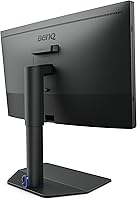
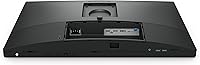
Overview
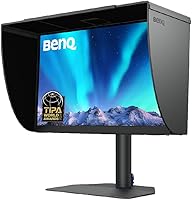
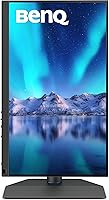
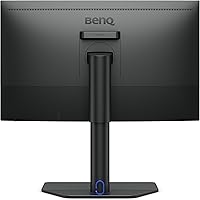
The BenQ SW272U 27-Inch 4K Photo Editing Monitor is built for one specific kind of person: the creative professional who cannot afford to guess at color. Built around a 27-inch IPS panel with a nano matte coating, it targets photographers, retouchers, and anyone whose work lives and dies by accurate color reproduction. A single USB-C cable delivers 90W of power while handling data, making it genuinely practical for both MacBook and Windows workflows. This is not a display you buy because it looks good on a desk. It is a precision instrument, and its price reflects exactly that.
Features & Benefits
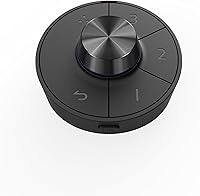
What separates the SW272U from most wide-gamut displays is how its features work together in actual use. Covering 99% Adobe RGB alongside full sRGB and 99% P3, it handles color-critical work across print, web, and video delivery without switching hardware. The 16-bit 3D LUT processes over a billion color values, which means gradients in complex edits stay smooth rather than banding. Hardware calibration through Palette Master Ultimate has been noticeably improved in speed, and the wireless Hotkey Puck lets you flip between color modes in seconds, right from your desk. Paper Color Sync rounds things out for anyone managing a print workflow.
Best For
This wide-gamut display is squarely aimed at professionals who treat color accuracy as non-negotiable. Portrait and landscape photographers who regularly deliver prints will benefit most from the print-to-screen matching capabilities, especially when dialing in specific paper profiles. Studio retouchers who work across Mac and Windows in the same space will appreciate the 90W USB-C single-cable setup. Colorists and videographers delivering to P3-standard platforms also fit comfortably here. Casual users or anyone shopping for a general home display will likely find both the feature set and the price point overwhelming. This is a specialist tool designed for people who already know what they need.
User Feedback
Among owners of this BenQ photo monitor, the prevailing sentiment is strong satisfaction, particularly around out-of-box color accuracy, which many describe as remarkably close to calibrated without any adjustment. Print-focused users consistently highlight how much confidence Paper Color Sync gives them when prepping files for specific media. On the critical side, some find Palette Master Ultimate has a learning curve, and a handful note that the stand feels less premium than expected at this price. Mac users, by contrast, rarely complain — the single-cable USB-C experience is frequently called out as a genuine workflow improvement. Overall, negative feedback tends to reflect heightened expectations rather than fundamental flaws.
Pros
- Color accuracy out of the box is strong enough that many users report needing minimal calibration from day one.
- The 90W USB-C single-cable setup genuinely simplifies Mac-based workflows, keeping desks clean and switching effortless.
- Wide gamut coverage across Adobe RGB, sRGB, and P3 means this wide-gamut display handles nearly any professional color standard without compromise.
- Paper Color Sync gives print-focused photographers a practical tool for matching screen output to specific paper and printer profiles.
- The wireless Hotkey Puck is a small but meaningful convenience, letting you switch color modes without touching monitor menus.
- Hardware calibration through Palette Master Ultimate produces measurable, repeatable results that hold up over time.
- The nano matte IPS panel cuts glare effectively in mixed-light studio environments without introducing distracting haze.
- 4K resolution at 27 inches provides sharp, detailed rendering that holds up well during close-up retouching work.
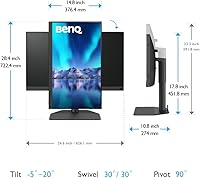
- Ergonomic range is solid, with full pivot, swivel, tilt, and 140mm height adjustment covering most professional desk setups.
- Owners upgrading from mid-range monitors consistently report a clear, tangible improvement in color confidence and editing precision.
Cons
- Palette Master Ultimate has a noticeable learning curve that can frustrate users expecting a straightforward setup process.
- The stand feels less premium than the panel quality suggests, which is a letdown given the overall investment.
- At this price tier, any minor flaw, such as firmware quirks or software hiccups, tends to feel disproportionately significant.
- The display is heavy at nearly 19 pounds, which makes repositioning or mounting it on lighter third-party arms worth planning carefully.
- Buyers who primarily need a general-purpose or multi-use display will find the feature set narrowly specialized and hard to justify financially.
- The nano matte coating, while effective at reducing glare, can make the panel look slightly flat compared to glossy alternatives when viewed casually.
- There is no built-in KVM switch, which limits convenience for users managing multiple computers beyond what USB-C alone can handle.
- New owners unfamiliar with color management concepts may struggle to extract full value from the calibration and gamut features without some prior knowledge.
Ratings
Our AI-generated scores for the BenQ SW272U 27-Inch 4K Photo Editing Monitor are based on analysis of verified global user reviews, with spam, bot-generated, and incentivized feedback actively filtered out before scoring. Each category reflects a balanced synthesis of what real owners praised and where they ran into friction. Both the strengths that make this wide-gamut display stand out and the pain points that matter at this price level are transparently represented below.
Color Accuracy
Color Gamut Coverage
Calibration System
Panel Coating
USB-C Connectivity
Paper Color Sync
Ergonomics & Stand
Hotkey Puck Usability
Build Quality
Out-of-Box Setup
Value for Money
Glare & Reflection Control
Multi-Platform Compatibility
Connectivity Range
Suitable for:
The BenQ SW272U 27-Inch 4K Photo Editing Monitor was designed with a clear professional in mind, and it shows. Photographers who regularly deliver fine art prints or client albums will find the combination of wide Adobe RGB coverage and Paper Color Sync genuinely useful for closing the gap between what they see on screen and what comes off the printer. Studio retouchers who split time between Mac and Windows setups will value the 90W USB-C connection, which simplifies a dual-platform desk considerably. Videographers and colorists working on P3-standard deliverables also fit squarely in the target audience, since the display handles that gamut without compromise. Anyone seriously upgrading from a consumer-grade monitor and wanting verifiable, hardware-level calibration accountability will feel the difference almost immediately.
Not suitable for:
If your work does not depend on color accuracy, the BenQ SW272U 27-Inch 4K Photo Editing Monitor is hard to justify. Gamers, general office workers, and casual content consumers will find nothing in its feature set that addresses their actual needs, and the price reflects a professional tool rather than a versatile everyday display. The nano matte panel, optimized to reduce reflections in studio conditions, can appear slightly less vivid to viewers accustomed to glossy consumer screens. Buyers expecting plug-and-play simplicity may also find Palette Master Ultimate software more involved than anticipated. Those sensitive to stand quality at premium price points have noted the build feels less substantial than the panel itself deserves, which may be a frustration for buyers expecting a fully premium physical package.
Specifications
- Panel Type: The display uses an IPS panel, which provides consistent color and contrast when viewed from wide angles, making it reliable for collaborative review sessions.
- Screen Size: The viewable screen measures 27 inches diagonally, offering enough workspace for detailed retouching without requiring a large desk footprint.
- Resolution: Native resolution is 3840x2160 (4K UHD), delivering sharp detail at the pixel level that holds up well during close-up editing work.
- Color Gamut: The panel covers 99% of the Adobe RGB color space, 100% sRGB, and 99% of the DCI-P3 gamut, supporting professional workflows across print, web, and video.
- Color Depth: Supports 1.07 billion colors rendered through a 16-bit 3D LUT, which helps maintain smooth tonal transitions across complex gradients.
- Screen Coating: The nano matte panel surface carries a TUV anti-reflection certification, reducing glare and diffuse reflections in mixed ambient lighting environments.
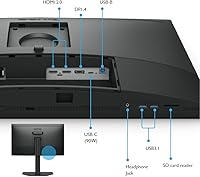
- USB-C Power: The USB-C port delivers up to 90W of power delivery, enough to charge most modern laptops while simultaneously handling display output and data transfer.
- Connectivity: Port selection includes one USB-C, four USB 3.0 ports, and four USB 2.0 ports, providing ample connectivity for peripherals and storage devices.
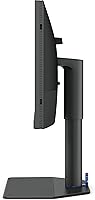
- Ergonomics: The stand supports 140mm of height adjustment, 90-degree pivot, 30-degree left and right swivel, and a tilt range of -5 to 20 degrees.
- Dimensions: The monitor measures 10.78 x 24.17 x 17.78 inches with the stand attached and weighs 18.95 pounds, so VESA arm compatibility is worth confirming before mounting.
- Aspect Ratio: The display uses a standard 16:9 aspect ratio, which aligns with most photo editing, video production, and general professional software layouts.
- Calibration Tool: Hardware calibration is handled through BenQ's Palette Master Ultimate software, which works directly with the display hardware rather than relying solely on GPU color profiles.
- Hotkey Puck: The included wireless Hotkey Puck allows direct switching between saved color modes from the desktop without accessing the on-screen display menu.
- Paper Color Sync: Paper Color Sync technology lets users select a printer model and paper type to generate an on-screen simulation of how a printed output will appear.
- Launch Year: The SW272U was introduced in 2023, making it a current-generation model with up-to-date firmware and ongoing software support from BenQ.
Related Reviews
BenQ SW321C 32-inch Photo Editing Monitor
BenQ PD2706U 27-inch 4K Monitor
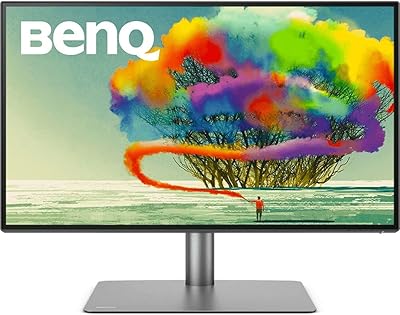
BenQ PD2725U 27″ 4K Monitor

ViewSonic VP2768a-4K 27-Inch 4K Monitor

ViewSonic VA2756-4K-MHD 27-inch 4K Monitor

ViewSonic VG2756-4K 27-Inch 4K Docking Monitor

ViewSonic VX2776-4K-MHDU 27-inch 4K IPS Monitor

Dell S2725QC 27-inch 4K USB-C Monitor
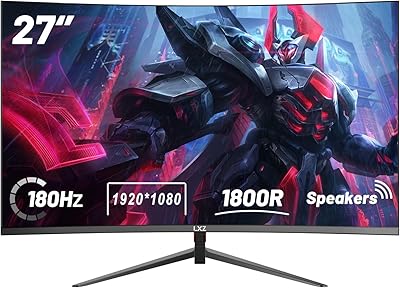
LXZ LX270ZC 27-inch Curved Gaming Monitor