

Overview

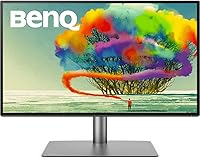
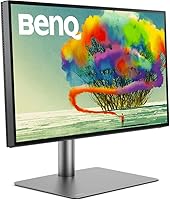
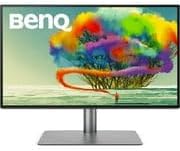
The BenQ PD2725U 27″ 4K Monitor is built with one audience in mind: creative professionals working on a Mac who care deeply about color accuracy and don't want to compromise on display quality. BenQ has spent years earning credibility in the professional monitor segment, and this model sits in the same competitive tier as the Apple Studio Display and LG UltraFine 4K — priced accordingly. The Thunderbolt 3 connection is arguably the headline feature for MacBook users, collapsing video, data, and charging into a single cable. Just know what this display isn't: it won't satisfy gamers chasing high refresh rates, and its brightness ceiling trails some rivals.

Features & Benefits

The color accuracy story here is substantive rather than marketing fluff. The PD2725U covers 100% sRGB and Rec.709 alongside 95% DCI-P3, with a Delta E at or below 3 — meaning what you proof on screen is genuinely close to what comes off a calibrated printer or appears on a client's display. The M-Book mode and ICC Sync in BenQ's Display Pilot software let Mac users lock in color profiles in under a second, which saves real time when switching between color-managed applications. One Thunderbolt 3 cable handles video, data, and 65W laptop charging simultaneously, and daisy-chaining a second monitor requires no dock. Four USB 3.0 ports trim the dongle sprawl considerably.

Best For

This Thunderbolt 3 monitor makes the most sense for graphic designers, photographers, and video editors who need their display to hold up against a calibration report, not just look sharp. If you're running a MacBook Pro or Mac mini and want a single-cable docking setup that doesn't require a separate hub, this BenQ designer display solves that cleanly. It also suits anyone building a dual-monitor workstation via daisy-chain without the cable clutter. One caveat: if your workflow includes gaming, HDR movie watching, or anything needing a fast panel refresh rate, this display will feel limiting. It's a color-fidelity tool, not an all-rounder.

User Feedback

With a 4.3 out of 5 across more than 550 ratings, this BenQ designer display earns its score mostly on the strength of out-of-box color accuracy and build quality — two things buyers mention repeatedly in positive reviews. The stand draws genuine praise from designers who work long sessions and need to reposition frequently. On the critical side, the Display Pilot software has frustrated some Mac users with occasional glitches and inconsistent behavior after macOS updates. Several reviewers flag the brightness ceiling as noticeably lower than competing displays at this price point. The 60Hz refresh cap and absence of VESA HDR certification also surface as pain points for buyers who dabble in media consumption or light gaming.

Pros

  • Pantone Validated and Calman Verified color accuracy comes backed by an included calibration report, not just a marketing claim.
  • 100% sRGB and Rec.709 coverage keeps web, print, and broadcast color targets consistently within reach.
  • A single Thunderbolt 3 cable handles video output, data transfer, and 65W laptop charging all at once.
  • M-Book mode and ICC Sync match Mac color profiles in under a second, cutting out a tedious manual step.
  • Daisy-chain support means a dual-monitor setup requires no additional dock, hub, or extra cable runs.
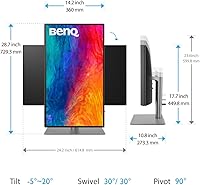
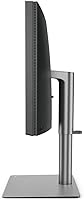
  • The stand's 150mm height range, 90-degree portrait pivot, and wide swivel genuinely accommodate varied working positions.
  • Four USB 3.0 ports plus a USB-C input meaningfully reduce the dongle load on a working desk.
  • The matte anti-glare coating manages reflections well across mixed indoor lighting conditions.
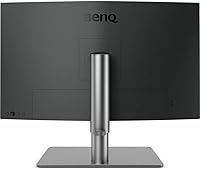
  • Build quality is consistently praised by long-term owners — this does not feel like a monitor that will wobble or creak after a year.
  • 95% DCI-P3 coverage is broad enough to hold up for video projects targeting wide-gamut streaming platforms.

Cons

  • Display Pilot software has a track record of behaving unpredictably after macOS updates, which is a genuine frustration for daily users.
  • The brightness ceiling falls noticeably short of several competing monitors in the same price bracket.
  • No VESA DisplayHDR certification means HDR content renders without the contrast depth certified panels can deliver.
  • The 60Hz refresh rate cap becomes a real annoyance for anyone who occasionally games or works with fast-moving UI.
  • The price is hard to defend if certified color accuracy isn't actually central to your day-to-day workflow.
  • At 65W, power delivery may charge larger MacBook Pro configurations more slowly than a dedicated wall adapter.
  • Weighing in at 18.3 pounds, shifting this display around a desk requires noticeably more effort than lighter alternatives.
  • The Thunderbolt 3 advantage essentially disappears for Windows users or anyone without a compatible port on their machine.
  • The PD2725U has no meaningful HDR or high-brightness mode for users who double their workstation as a media display in the evenings.

Ratings

The BenQ PD2725U 27″ 4K Monitor was scored by our AI system after systematically analyzing hundreds of verified purchaser reviews across global marketplaces, with bot-generated, incentivized, and unverified submissions actively filtered out before any score was calculated. The results transparently reflect both what this display does exceptionally well for its intended audience and where real owners ran into friction in daily use. Scores are anchored in majority experience — not in marketing claims or isolated outlier complaints.

Color Accuracy
93%
Pantone validation and Calman verification are not just certification badges — owners consistently report that print proofing and web color matching feel reliable straight out of the box without additional calibration. For photographers and designers delivering to exacting client standards, the Delta E ≤ 3 accuracy translates into fewer correction rounds and more confident screen-to-output decisions.
A small subset of users noticed subtle color shift toward screen edges at wide viewing angles, a known characteristic of IPS panels at this price tier. Workflows targeting very high P3 saturation levels may also expose the 5% coverage gap relative to the most color-saturated competing displays.
Mac Compatibility
88%
The single Thunderbolt 3 cable unifying video, data, and 65W charging is a genuine desk-cleanup moment for MacBook users tired of docks and adapters. M-Book mode makes color matching between the MacBook Retina panel and this external display nearly instant, which is a real time-saver in dual-screen color-managed workflows.
Display Pilot has shown reliability issues following major macOS updates, with some M-series users reporting that M-Book mode reverts to default or ICC profiles fail to apply automatically until the software is reinstalled. For professionals depending on consistent color every morning, this represents a frustrating periodic maintenance burden.
Connectivity
91%
One Thunderbolt 3 cable simultaneously handles 4K video output, high-speed data transfer for external drives, and MacBook charging — the single-cable desk setup this promises is one that owners say actually delivers in practice. The four USB 3.0 ports on the monitor body further reduce desktop dongle sprawl in meaningful, everyday ways.
The Thunderbolt 3 advantage shrinks considerably for Windows users or anyone on a machine with USB-C but without full Thunderbolt bandwidth, where daisy-chaining and maximum throughput may be unavailable. Buyers coming from PC workstations should confirm full Thunderbolt 3 support on their machine before committing to this display.
Value for Money
67%
33%
For a working designer whose income depends on accurate color proof, the combination of certified accuracy, a built-in peripheral hub, and Thunderbolt 3 docking genuinely offsets the cost of a separate dock and calibration service. Buyers who regularly deliver print work see the value proposition far more clearly than generalist users.
For users whose work does not hinge on certified color accuracy, the premium is hard to justify against 27-inch 4K alternatives that match resolution and ergonomics at lower price points. The moderate brightness ceiling and absent HDR certification make the value case harder still for buyers seeking a display that covers both professional and media use.
Display Brightness
57%
43%
In controlled studio lighting — which is where accurate color work should happen anyway — the brightness output is adequate and consistent without washing out shadow detail or distorting perceived color. Users operating in dim or moderately lit rooms reported no eye-fatigue complaints attributable to maximum brightness levels.
In home offices near windows or under strong ambient lighting, multiple owners reported that the luminance ceiling falls noticeably short compared to rivals including the Apple Studio Display and several LG UltraFine configurations at comparable prices. The absence of any VESA HDR certification compounds this limitation for users who expected more headroom.
Build Quality
86%
The chassis feels dense and well-assembled, with no flex in the panel bezel or rattling from the stand mechanism that reviewers often accept in budget displays. Long-session users repeatedly commend the stand stability — it holds its adjusted position without gradually creeping downward, a common failure mode in lighter monitor stands.
At 18.3 pounds, the overall assembly is heavier than several competing 27-inch displays, making desk repositioning or VESA arm swaps a more physical undertaking than expected. A small number of buyers flagged minor cosmetic blemishes near the cable routing channels on arrival, though structural defects were uncommon across the wider review sample.
Ergonomics
84%
The 150mm height travel, full 90-degree portrait pivot, 30-degree swivel range in both directions, and broad tilt adjustment give this display more positional freedom than most monitors at this tier. Designers alternating between sitting and standing sessions will find the range genuinely adequate without needing to budget for a third-party arm.
The stand footprint is notably large and deep, which can feel space-hungry on narrower studio desks already crowded with peripherals. Some users also noted that the height adjustment requires slightly more physical effort than spring-assisted alternatives, making repeated height changes throughout a workday mildly inconvenient over time.
Out-of-Box Setup
87%
The factory calibration report included in the packaging is a tangible differentiator — having documented Delta E performance data on arrival is reassuring in a way generic monitor unboxing rarely delivers. Most Mac users report the Thunderbolt 3 connection operating at full 4K resolution immediately, without manual driver configuration or resolution overrides.
A small number of buyers noted minor protective film residue around the bezel edges and found the included cable selection modest relative to the overall price tier. Stand assembly, while manageable, involves more steps than some competitors' tool-free designs and caught a few first-time BenQ owners off guard.
Display Software
63%
37%
When Display Pilot behaves as intended, ICC Sync and M-Book mode are genuinely useful workflow tools — color profiles apply in a single action and the visual alignment between a MacBook screen and this external panel is noticeably tighter than without it. Initial setup on a fresh macOS installation is generally quick and trouble-free.
The software's track record across major macOS version updates is inconsistent enough to appear regularly in negative reviews, with users reporting profile resets, unresponsive color mode switching, and occasional crashes post-update. For a display in this price bracket, software reliability of this nature represents an unresolved gap that BenQ has been slow to close.
Refresh Rate
52%
48%
For design, photo editing, and video color work, 60Hz is entirely sufficient — cursor movement is smooth, UI animation is clean, and daily productivity tasks produce no perceptible lag or stutter in standard Mac workflows where frame rate is not a performance-critical variable.
Anyone who splits time between design work and gaming, or who has grown accustomed to 120Hz on an Apple device screen, will find the 60Hz cap a tangible downgrade in perceived motion fluidity and scroll smoothness. This is a hard hardware ceiling with no software workaround available.
HDR Performance
44%
56%
The display accepts an HDR signal and HDR-tagged content from streaming applications plays without color profile conflicts or application errors. Photographers working across hybrid SDR and HDR output pipelines can preview HDR-flagged material on this panel without needing to switch displays or manually remap profiles between sessions.
Without a dedicated high-brightness backlight, local dimming, or a VESA DisplayHDR certification, the visible impact of HDR content is negligible — dark scenes lack depth and highlights fall short of the lifted luminance that defines the format. Video professionals needing to grade or approve HDR masters should treat this display as unsuitable for that specific task.
Peripheral Hub
79%
21%
Four USB 3.0 ports on the monitor body replace a basic desk hub for users running a keyboard, mouse, external drive, and a secondary peripheral simultaneously, reducing cable management complexity without adding equipment cost. Port speeds are consistent for standard peripherals and typical storage devices in everyday creative work.
The absence of an SD or CFexpress card reader is a gap that photographers and videographers will notice immediately, requiring a separate dongle that partially defeats the hub's purpose. Users connecting multiple high-bandwidth storage devices concurrently may also encounter shared USB 3.0 bandwidth limitations under heavy simultaneous transfer loads.
Daisy Chain
82%
18%
Building a two-display workstation from a single MacBook Thunderbolt port is a genuine desk-simplification win for creatives who want a clean setup without a dedicated docking station. The configuration is recognized reliably by compatible Mac models and requires no additional software installation beyond what the standard Thunderbolt connection already provides.
The daisy-chain capability depends entirely on both the laptop and the secondary monitor supporting Thunderbolt 3 at full bandwidth — it does not extend to USB-C-only connections or Windows machines with partial Thunderbolt implementation. Users pairing this display with an incompatible second monitor will find the daisy-chain feature simply non-functional in their setup.

Suitable for:

The BenQ PD2725U 27″ 4K Monitor is purpose-built for creative professionals who live and die by color accuracy — think graphic designers prepping print-ready files, photographers editing RAW images for client galleries, or video editors grading footage destined for digital distribution. If you're running a MacBook Pro or MacBook Air and tired of juggling a dock, a power brick, and a tangle of cables, the single Thunderbolt 3 connection handles video, data, and 65W charging simultaneously. The calibration credentials — Pantone Validated, Calman Verified, Delta E at or below 3 — are the kind of third-party sign-off that matters when a client questions whether the colors in your proof match what will actually be printed. It also suits professionals who want to expand to a two-monitor setup without buying a hub, thanks to Thunderbolt daisy-chaining. And if long hours at a desk are part of your reality, the ergonomic stand — with 150mm of height travel, full pivot to portrait mode, and generous swivel — means you can dial in a genuinely comfortable position rather than just accepting whatever the factory default happens to be.

Not suitable for:

The BenQ PD2725U 27″ 4K Monitor is not the right call if gaming or immersive media consumption is a meaningful part of your daily routine. The panel tops out at 60Hz, which becomes noticeably limiting once you have spent time on a 120Hz or 144Hz display, and there is no VESA DisplayHDR certification to speak of — so HDR content simply won't deliver the contrast punch you might expect. If you're a Windows user or working from a machine without a Thunderbolt 3 port, the headline connectivity feature loses most of its appeal, and you'd likely find stronger value in competing displays designed for broader compatibility. The brightness ceiling is also a concern in sun-drenched home offices or studios with large windows, where several rival monitors at a similar price point produce meaningfully more nits. And if your work doesn't genuinely depend on certified, repeatable color accuracy, the premium you're paying for those credentials is difficult to rationalize against more versatile options on the market.

Specifications

  • Screen Size: The display measures 27 inches diagonally, providing ample working area for multi-window creative workflows without requiring a dual-monitor setup.
  • Resolution: Native resolution is 3840×2160 (4K UHD), delivering fine pixel density at standard viewing distances for precise image editing and detailed typography work.
  • Panel Type: An IPS (In-Plane Switching) panel is used, offering wide viewing angles and consistent color reproduction across the full screen surface.
  • Screen Coating: The matte anti-glare coating diffuses ambient light reflections, making the display more practical in mixed-lighting studio and home-office environments than a glossy-panel alternative.
  • Aspect Ratio: The panel uses a standard 16:9 aspect ratio, compatible with the vast majority of professional creative application layouts and common video delivery formats.
  • Color Gamut: The display covers 100% sRGB, 100% Rec.709, and 95% DCI-P3, supporting accurate color rendering across web, broadcast, and wide-gamut video production workflows.
  • Delta E Rating: Factory-calibrated Delta E is ≤ 3, meaning the deviation between displayed and target colors is small enough for reliable professional color judgment straight out of the box.
  • Certifications: The monitor carries both Pantone Validated and Calman Verified certifications, each confirmed by independent third-party testing, with an individual calibration report included in the packaging.
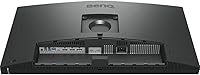
  • Main Connection: Thunderbolt 3 serves as the primary connection, transmitting video signal, peripheral data, and charging power simultaneously through a single cable.
  • Power Delivery: The Thunderbolt 3 port delivers up to 65W of power, sufficient to charge most MacBook Air and 14-inch MacBook Pro models at a steady rate during typical use.
  • USB Ports: Four USB 3.0 Type-A ports are integrated into the monitor body, functioning as a peripheral hub for keyboards, mice, storage drives, and other desk accessories.
  • Daisy Chain: Thunderbolt 3 daisy-chaining is supported, allowing a second monitor to be connected from the downstream port without requiring an additional hub or a second laptop Thunderbolt port.
  • Height Adjustment: The included stand provides 150mm of vertical height travel, accommodating a wide range of desk heights and both seated and standing work postures.
  • Tilt Range: The panel tilts from -5° forward to 20° backward, allowing comfortable screen angle adjustment to suit different seating positions and viewing distances.
  • Swivel Range: The stand swivels 30° left and 30° right, making it easy to reposition or share the screen without physically moving the base across the desk.
  • Pivot: The monitor rotates 90° into portrait orientation, which benefits long-document editing, vertical video review, and coding workflows that gain from additional vertical screen space.
  • Weight: The monitor with stand weighs 18.3 pounds, which is notably heavy and should be factored into desk placement planning and monitor arm weight-rating checks.
  • Dimensions: Physical dimensions with stand measure 10.8 × 24.2 × 17.7 inches (depth × width × height), representing a moderately deep footprint on a standard studio or home-office desk.

Related Reviews
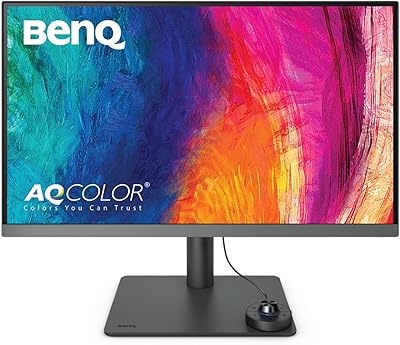
BenQ PD2706U 27-inch 4K Monitor
78%
93%
Color Accuracy
91%
Color Gamut Coverage
88%
USB-C Connectivity
79%
KVM Functionality
89%
Build Quality
More
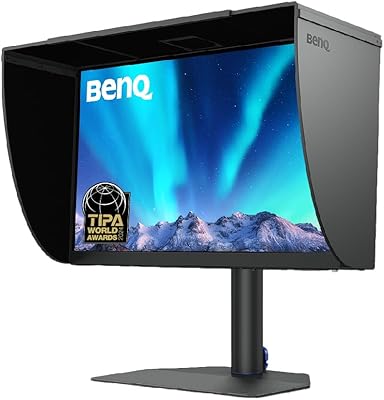
BenQ SW272U 27-Inch 4K Photo Editing Monitor

83%
94%
Color Accuracy
92%
Color Gamut Coverage
88%
Calibration System
86%
Panel Coating
91%
USB-C Connectivity
More
ViewSonic VP2768a-4K 27-Inch 4K Monitor

86%
94%
Color Accuracy
88%
Ergonomics & Comfort
91%
Value for Money
89%
Build Quality
85%
Ease of Setup
More
ViewSonic VG2756-4K 27-Inch 4K Docking Monitor

80%
91%
USB-C Docking Performance
88%
Display Clarity
74%
Connectivity & Port Selection
86%
Ergonomics & Stand Quality
71%
Color Accuracy
More
ViewSonic VA2756-4K-MHD 27-Inch 4K Monitor
84%
92%
Display Quality
90%
Color Accuracy
88%
Design & Build Quality
85%
Ease of Setup
89%
Connectivity Options
More
ViewSonic VX2776-4K-MHDU 27-inch 4K IPS Monitor

75%
91%
Image Clarity
93%
USB-C Convenience
78%
Color Accuracy
54%
HDR Performance
46%
Stand & Ergonomics
More
Dell S2725QC 27-inch 4K USB-C Monitor
81%
93%
Image Clarity
88%
Color Accuracy
91%
USB-C Connectivity
86%
Refresh Rate & Smoothness
89%
Build Quality & Design
More
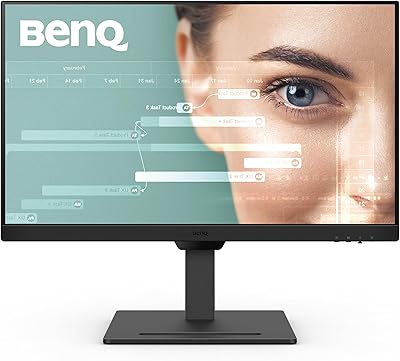
BenQ GW2790T 27-inch Monitor
79%
93%
Ergonomics & Stand
86%
Eye-Care Performance
67%
Image Sharpness
83%
Color Accuracy
84%
Brightness & Glare Control
More
LXZ 27-inch 4K Monitor
82%
92%
Value for Money
88%
Display Quality
91%
Ease of Setup
85%
Connectivity Options
76%
Build Quality
More
KOORUI N07 27-inch 4K IPS Monitor
76%
93%
Image Sharpness
89%
Color Accuracy
88%
Color Gamut Coverage
91%
Value for Money
82%
Eye Comfort
More

FAQ

The Thunderbolt 3 port delivers up to 65W, which is enough to charge a MacBook Air or 14-inch MacBook Pro at a reasonable pace during normal use. On a 16-inch MacBook Pro under heavy CPU or GPU load, charging may be slower than a dedicated wall adapter, but in most cases it will hold or gradually build battery level rather than drain it.

Connecting via Thunderbolt 3 is recognized immediately on M-series MacBooks without any driver installation required. The monitor outputs at full 4K resolution right away. BenQ's Display Pilot software is optional but worth installing if you want M-Book mode and one-click ICC color profile syncing — those features make a real difference in color-managed workflows.

The daisy-chain setup lets you connect a second Thunderbolt 3 monitor to the downstream port on the first, so you only use one laptop port for both screens. Whether your MacBook can actually drive two external 4K displays simultaneously depends on the chip — M1 Pro, M2 Pro, M3 Pro, and higher support it, but base M1 and M2 chips are limited to one external display regardless of how they are connected.

It is genuinely strong for a factory-calibrated display — Delta E at or below 3 is verified before shipping and each unit comes with its own calibration report. For the majority of design and photography work, the out-of-box accuracy is reliable enough to use immediately without additional profiling. Running ICC Sync through Display Pilot can refine things further for Mac users, but it is not a prerequisite.

The BenQ PD2725U 27″ 4K Monitor holds up well on color accuracy and significantly outpaces the Apple Studio Display on ergonomic flexibility — the Apple option has no height, swivel, or tilt adjustment on its standard mount. The Apple Studio Display offers considerably higher peak brightness and includes a 12MP webcam, neither of which this BenQ provides. If third-party color certification and a fully adjustable stand matter more to you than brightness headroom or a built-in camera, the PD2725U is a compelling alternative at a lower entry point.

For the workflows this display targets — graphic design, photography, video editing, and standard office use — 60Hz is completely smooth and the limitation is unlikely to surface. It only becomes a tangible issue if you also play fast-paced games or have spent time on a 120Hz or higher display, where the difference in cursor fluidity and UI animation is perceptible once you have experienced it.

It works as a standard 4K display over USB-C or Thunderbolt 3 from a compatible Windows machine — the core image quality and port hub are fully functional. However, M-Book mode and several Display Pilot integrations are designed around macOS, so Windows users miss out on some of the software-driven value. The hardware itself is platform-agnostic; the ecosystem benefits skew toward Mac.

M-Book mode adjusts the monitor's color output to closely match the color profile of Apple's built-in Retina displays, eliminating the jarring color shift that normally appears when you glance between a MacBook screen and an external monitor. For designers who reference both screens simultaneously — checking a layout on the laptop panel before exporting, for example — this consistency is genuinely useful rather than a gimmick. It takes seconds to enable in Display Pilot and is worth turning on if you keep your MacBook lid open beside this display.

The display can accept an HDR signal, but without a VESA DisplayHDR certification, a high-brightness backlight, or local dimming, the visible HDR effect is minimal compared to a certified HDR panel. For color-grading HDR deliverables in a professional context, this is a significant limitation. For general creative work where HDR is not a deliverable format, it is largely irrelevant.

Yes, the display is compatible with the standard 100×100mm VESA mounting pattern. Since the monitor weighs around 18 pounds without the stand, it is worth confirming that your chosen arm is rated to handle that load before buying. Removing the included stand is a straightforward process that does not require any specialized tools.

Where to Buy

Newegg.com
In stock $598.99
B&H Photo-Video-Audio
In stock $599.99
SHI International
In stock $657.00
Reebelo USA
In stock $532.98
Back Market
In stock $567.99
BenQ America
In stock $599.99
Enervee NY
In stock $599.99