Overview

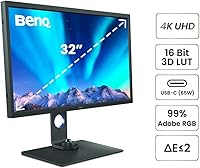
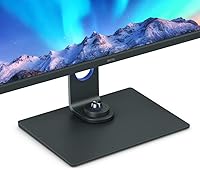
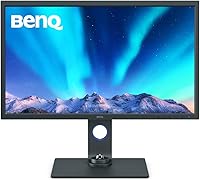
The BenQ SW321C 32-inch Photo Editing Monitor sits at the top of BenQ's SW series — a line built specifically for color-critical work, not casual browsing or gaming. What sets it apart from consumer displays is the factory calibration report that ships with every unit, confirming that your panel meets its stated specs before it even leaves the box. Physically, the SW321C is unapologetically utilitarian: matte black, solidly built, with a stand that means business. This is a specialized professional tool, priced accordingly, and it makes no attempt to appeal to anyone outside its target audience of photographers, colorists, and video editors.

Features & Benefits

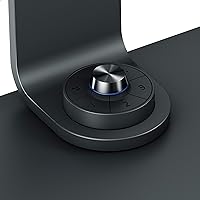
Color coverage is where this photo editing display makes its case most forcefully. Hitting 99% Adobe RGB matters when you are editing for print; 95% DCI-P3 keeps you covered for cinema and video deliverables; and 100% sRGB ensures web-bound work looks exactly as intended. The hardware calibration system — built around a 3D lookup table — handles color blending at the display level rather than through software workarounds, which means accuracy holds up even as the panel ages. Paper Color Sync lets you simulate how an image will look on a specific paper stock before sending it to print. The HotKey Puck and USB-C connectivity keep the desk tidy and the workflow efficient.

Best For

The SW321C earns its place in studios and agency environments where color consistency across units is non-negotiable. Photographers who regularly send work to print will find the screen-to-print matching genuinely useful — it is not a gimmick. Video editors and colorists working in Adobe RGB or P3 pipelines get a display that holds up to professional delivery requirements. That said, this BenQ professional monitor is not for everyone. Gamers, general office workers, or anyone looking for punchy HDR entertainment performance will be paying a premium for capabilities they will never actually need. It rewards professionals who live and work inside color-managed workflows.

User Feedback

With a 4.6-star average across a relatively modest number of ratings, feedback on this photo editing display skews toward buyers who knew exactly what they were purchasing. The dominant themes are out-of-box color accuracy and the ergonomic stand — both consistently praised. The HotKey Puck gets mentioned repeatedly as a small but practical addition to daily workflow. On the critical side, some buyers flagged confusion around panel coating options, and a few noted that the USB-C power delivery spec appears inconsistently across official materials. Long-term color stability earns mostly positive marks, though a handful of users recommend periodic recalibration after sustained heavy use to maintain peak accuracy.

Pros

  • Factory calibration report ships in the box, so you can trust the color accuracy before your first edit.
  • 99% Adobe RGB coverage is among the best available in this display size for print-focused photographers.
  • Hardware-level 3D LUT calibration maintains color accuracy over time without relying on software patches.
  • The HotKey Puck is a small but genuinely useful tool for switching color modes without digging through menus.
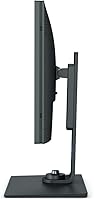
  • Full ergonomic range — height, tilt, swivel, and pivot — makes long editing sessions significantly more comfortable.
  • Paper Color Sync helps bridge the gap between screen color and printed output in a practical, usable way.
  • CalMan verification and Pantone SkinTone validation add credible third-party backing to the color accuracy claims.
  • The Nano Matte Pro coating handles ambient light well in studio environments without introducing distracting glare.
  • USB-C connectivity with power delivery keeps cable clutter minimal for laptop-based editing setups.
  • Build quality is consistently praised by buyers as solid and durable for demanding studio use.

Cons

  • The USB-C power delivery spec is listed inconsistently across official materials, which creates unnecessary confusion before purchase.
  • At 26 pounds, this photo editing display is heavy and not easy to reposition once set up on a desk.
  • The 3D LUT bit-depth spec appears differently in different parts of the product listing — buyers should verify with BenQ directly before purchasing.
  • With just over 100 ratings, the review pool is small, making it harder to assess long-term reliability patterns with confidence.
  • No high refresh rate or adaptive sync makes the SW321C a poor choice if you occasionally want one monitor to handle gaming as well.
  • The premium price point is difficult to absorb for freelancers or early-career photographers who are still building their client base.
  • Some buyers report confusion around panel coating options when ordering, suggesting the product listing could be clearer on variants.
  • Periodic recalibration is recommended for maintaining peak accuracy over time, which adds an ongoing cost if you use external calibration hardware.
  • The stand, while ergonomically capable, does not detach easily for VESA mounting without purchasing a separate adapter solution.

Ratings

The BenQ SW321C 32-inch Photo Editing Monitor has been scored by our AI system after analyzing verified buyer reviews from global markets, with spam, bot activity, and incentivized feedback actively filtered out. The scores below reflect real-world usage patterns from working photographers, colorists, and video editors — strengths and frustrations weighted equally. Where buyers consistently agreed, the scores reflect that consensus; where opinions diverged, the ratings land in the middle ground honestly.
Color Accuracy
94%
Out-of-box color accuracy is the single most praised aspect of this display across all reviewer segments. Working photographers report that skin tones, neutrals, and saturated hues hold up reliably without requiring immediate post-purchase calibration, which is rare at any price point.
A small number of users noted minor color drift after extended use — typically six months or more of daily operation — and found that recalibration was necessary to restore the original Delta E performance. This is expected behavior for any professional panel but worth factoring in.
Factory Calibration
91%
The included per-unit calibration report is one of the most practically valued features among buyers. Professionals working with client deliverables appreciate having documented proof of accuracy, and most report that the calibration held up accurately against their own colorimeter measurements when cross-checked.
A handful of technically experienced users found minor disagreements between the factory report values and their own measurements, suggesting some unit-to-unit variance exists. It is not a widespread issue, but it reinforces that periodic independent verification is still advisable for mission-critical work.
Color Gamut Coverage
93%
Coverage across Adobe RGB, sRGB, and DCI-P3 is consistently described as class-leading for this display size. Photographers preparing files for wide-gamut print workflows and colorists grading for cinema deliverables both report that the gamut holds up against more expensive reference monitors costed significantly higher.
While the gamut coverage numbers are strong, a few video professionals noted that the panel's peak luminance limits its usefulness for HDR grading workflows that require sustained high-brightness performance. This is a deliberate design trade-off rather than a flaw, but it narrows the monitor's scope for certain post-production pipelines.
Build Quality
88%
The all-matte-black construction earns consistent praise for feeling robust and purposeful. The stand in particular is frequently called out as stable and well-engineered — it does not wobble, flex, or creep out of position during long sessions, which matters when you are making precise tonal adjustments on-screen.
At 26 pounds, the monitor is notably heavy, and a few users found the overall bulk made repositioning it on a desk more effort than expected. The aesthetic is purely functional, which suits studio environments but leaves buyers who want a more visually refined workspace feeling underwhelmed.
Ergonomics
86%
The full ergonomic range — height, tilt, swivel, and portrait pivot — is well-executed and covers most real-world setup variations without needing a third-party arm. Photographers who switch between landscape editing and reviewing vertical compositions in portrait mode specifically appreciate how smooth and secure the pivot mechanism feels.
VESA mounting requires a separate adapter that does not ship in the box, which frustrates buyers who want to use the monitor on an articulating arm from day one. The stand's footprint is also substantial, consuming more desk real estate than some compact workstation setups can comfortably accommodate.
Screen Coating
83%
The Nano Matte Pro coating performs well in mixed ambient lighting conditions, controlling reflections without the hazy, washed-out quality that cheaper matte coatings can introduce. Studio photographers working near windows or softboxes consistently report that glare management does not compromise their color evaluation work.
Some product listing confusion around panel coating options — glossy versus matte — caused frustration at the point of purchase for a subset of buyers. While the standard shipping unit has the matte coating, the ambiguity in product descriptions led to returns and reorders that could have been avoided with clearer documentation.
HotKey Puck Utility
81%
19%
The HotKey Puck accessory receives disproportionately positive feedback relative to how small a feature it is. Editors who regularly switch between sRGB for web delivery and Adobe RGB for print output describe it as one of those workflow tools that becomes invisible once integrated — you just reach for it without thinking.
A small number of users found the HotKey Puck software integration finicky to set up initially, particularly on Windows systems with multiple monitors. Once configured it works reliably, but the out-of-box experience could be smoother for users who are not technically inclined.
USB-C Connectivity
72%
28%
The USB-C port is genuinely useful for laptop-based editing setups, allowing a single-cable connection that carries both video signal and charges the connected device simultaneously. MacBook and Dell XPS users in particular mention this as a meaningful desk-tidying convenience during long editing sessions.
The power delivery wattage is listed inconsistently across BenQ's own official materials, creating legitimate pre-purchase confusion. Buyers with higher-wattage laptops have reported that the USB-C connection does not always deliver enough power to fully charge under sustained load, which undermines confidence in a feature that should be straightforward.
Paper Color Sync
77%
23%
For photographers who regularly prepare files for physical print output, Paper Color Sync provides a practical shortcut for previewing how an image will render on a specific paper and ink combination. It does not replace a fully managed soft-proofing workflow, but it reduces the number of test prints needed during the proofing stage.
The feature requires setup and access to compatible printer profiles, which means less technically oriented photographers may not use it at all. A few users also noted that the simulated output does not always match their final print as closely as they expected, particularly with specialty fine-art papers not included in the default profile library.
Value for Money
63%
37%
For working professionals whose income depends on accurate color output, the hardware calibration, factory report, and gamut coverage represent a defensible investment. Agency buyers and studio owners who need multiple matched units often report that the consistency across units justifies the cost compared to cheaper displays that require significant post-purchase calibration work.
For anyone outside a strict professional color workflow, the price is very difficult to defend. Enthusiast photographers and early-career editors frequently note that competing monitors offer most of the visible performance at a considerably lower outlay, making the SW321C feel like a premium paid partly for features that most buyers will rarely access.
Setup Experience
79%
21%
Physical assembly is straightforward, and most users report the monitor is ready for basic use within minutes of unboxing. The included calibration report means there is no mandatory software installation or calibration session required before starting work, which is a genuine convenience compared to monitors that ship uncalibrated.
Configuring the full feature set — hardware calibration software, color mode profiles, and HotKey Puck mapping — takes considerably more time and requires comfort with BenQ's Palette Master software. Users unfamiliar with color management workflows have described the initial configuration as steep and occasionally confusing.
Long-Term Reliability
82%
18%
Buyers who have owned the SW321C for a year or more generally report that build quality holds up and the panel does not develop significant uniformity issues or backlight problems within normal professional use cycles. BenQ's three-year warranty on the SW series adds meaningful reassurance for studio investments.
Color stability over time requires active maintenance through periodic recalibration, and a small number of long-term owners have noted gradual shifts in white point accuracy after 18 months or more of daily use. This is manageable with proper calibration tools but adds an ongoing maintenance consideration to the total cost of ownership.
Connectivity Range
78%
22%
Having HDMI, DisplayPort, and USB-C inputs alongside a three-port USB 3.0 hub covers the majority of professional workstation configurations without requiring a separate hub or dock. Video editors who connect multiple source devices simultaneously find the input range practical and well-organized.
The absence of Thunderbolt 4 support is noticeable given the target audience and price tier — some high-end Mac Pro and MacBook Pro users would prefer a Thunderbolt connection for maximum bandwidth and device compatibility. The USB hub speed also tops out at USB 3.0, which limits transfer rates for users working with large raw image files directly from the hub.

Suitable for:

The BenQ SW321C 32-inch Photo Editing Monitor was built for one kind of buyer: someone whose livelihood depends on color accuracy. Professional photographers who deliver work to print clients will appreciate the screen-to-print simulation tools and the factory-verified Delta E ≤2 rating — that calibration report in the box is not a marketing touch, it is a working document. Video editors and colorists operating in P3 or Adobe RGB pipelines will find the wide gamut coverage genuinely reliable rather than aspirational. Studio and agency environments that need multiple displays to match each other across workstations will also find the SW321C a strong candidate, since its hardware-level calibration holds up more consistently over time than software-dependent alternatives. If your workflow runs through Lightroom, Capture One, DaVinci Resolve, or any color-managed application where what you see must match what you output, this display is built precisely for that pressure.
Not suitable for:

The BenQ SW321C 32-inch Photo Editing Monitor is a hard sell for anyone outside a professional color-managed workflow. Gamers will find no high refresh rate, no adaptive sync, and no HDR performance worth writing home about — the hardware is simply not designed for those priorities. General office workers or students looking for a large 4K display for productivity and media consumption are paying a steep premium for calibration tools they will never open. Even enthusiast photographers who shoot casually and only share work on social media are unlikely to extract enough value to justify the cost. The matte black industrial design and no-frills aesthetic may also disappoint buyers who want a visually striking setup. If your editing work does not involve print delivery, professional client handoffs, or color-graded video production, the money is better spent elsewhere.
Specifications

  • Screen Size: The panel measures 32 inches diagonally, offering ample working space for detailed retouching and multi-window editing layouts.
  • Resolution: Native resolution is 3840×2160 (4K UHD), delivering sharp detail rendering at pixel densities suitable for fine print preparation work.
  • Panel Type: An IPS (In-Plane Switching) panel provides wide viewing angles and consistent color representation across the full screen surface.
  • Color Gamut: The display covers 99% Adobe RGB, 100% sRGB, and 95% DCI-P3, making it viable across print, web, and cinema color workflows.
  • Color Accuracy: Average Delta E is rated at ≤2 out of the box, verified by CalMan software and validated for Pantone SkinTone accuracy.
  • 3D LUT: A hardware-based 3D lookup table handles color blending at the display processor level, independent of the connected computer's GPU or software environment.
  • Calibration: Every unit ships factory calibrated with an individual calibration report, and the display supports external hardware calibration tools for ongoing maintenance.
  • Screen Coating: The Nano Matte Pro coating reduces ambient light reflections while preserving color fidelity, making it practical in mixed-lighting studio environments.
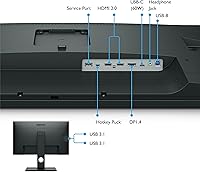
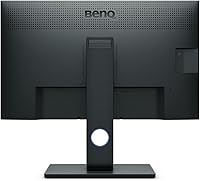
  • Connectivity: Ports include USB-C (with power delivery), DisplayPort, HDMI, and three USB 3.0 ports, plus a dedicated input for the HotKey Puck accessory.
  • USB-C Power Delivery: The USB-C port provides power delivery to connected laptops or devices; buyers should confirm the exact wattage with BenQ directly, as official materials list this inconsistently.
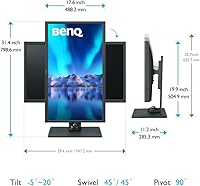
  • Ergonomics: The stand supports tilt (-5° to +20°), swivel (±45°), 90° pivot for portrait orientation, and 150mm of height adjustment.
  • Aspect Ratio: Standard 16:9 aspect ratio aligns with the majority of photography, video, and web content production formats.
  • Special Features: Bundled accessories include the HotKey Puck for quick mode switching and Paper Color Sync software for simulating print output on-screen.
  • Dimensions: The monitor body measures approximately 20 × 32 × 4 inches, and the full unit weighs 26 pounds including the stand.
  • Manufacturer: Designed and manufactured by BenQ under the professional SW series lineup, model designation SW321C.

Related Reviews
BenQ PD3225U 32-inch 4K Monitor
88%
94%
Color Accuracy
90%
Ergonomics & Comfort
89%
Thunderbolt 3 Connectivity
88%
Setup & Installation
87%
Build Quality
More
BenQ PD3226G 32-inch 4K Designer Monitor
81%
93%
Color Accuracy
91%
Connectivity
88%
Anti-Glare Performance
79%
Refresh Rate Utility
82%
KVM Switch
More
BenQ MA320U 32-inch 4K Monitor
81%
94%
Mac Ecosystem Integration
91%
Color Accuracy
88%
Connectivity & USB Hub
83%
Stand Ergonomics
92%
Display Sharpness
More
BenQ EW3280U 32-inch 4K UHD Monitor
83%
94%
Display Quality
91%
Color Accuracy
78%
Ease of Setup
70%
Audio Performance
89%
Connectivity
More
BenQ EX3210U 32-inch 4K Gaming Monitor
78%
93%
Image Quality
89%
Color Accuracy
88%
Gaming Performance
67%
HDR Performance
86%
Build Quality
More
FOSITAN 32×32 Inch Bi-Color Dimmable Photo Light Box Kit
84%
88%
Lighting Performance
93%
Ease of Setup
85%
Portability
81%
Build Quality
90%
Color Accuracy
More
BenQ RD320U 32” 4K Monitor
87%
94%
Display Quality
89%
Ergonomics & Comfort
91%
Eye-care Features
93%
Color Accuracy
80%
Size & Desk Compatibility
More
BenQ GW2490 24-inch IPS Monitor
81%
93%
Eye Care Performance
88%
Color Accuracy
82%
Refresh Rate & Motion Clarity
96%
Value for Money
54%
Ergonomics & Stand
More
BenQ EW2790Q 27-inch 2K Monitor
84%
91%
Display Quality
87%
Ergonomics and Comfort
89%
Value for Money
93%
Color Accuracy
85%
Connectivity Options
More
KOORUI 32-inch Curved Gaming Monitor
84%
89%
Display Quality
92%
Gaming Performance
78%
Build Quality
85%
Color Accuracy
82%
Ergonomics & Comfort
More

FAQ

It ships with a factory calibration already applied, and BenQ includes an individual calibration report in the box specific to your unit. You can use it right out of the box for color-critical work. That said, like any panel, recalibration every few months with an external colorimeter is good practice for maintaining peak accuracy over time.

Yes, the USB-C connection handles both video signal and power delivery in a single cable, which works well with modern MacBooks. Just be aware that the power delivery wattage spec appears inconsistently across BenQ's own materials, so if your laptop draws a lot of power under load, it is worth checking with BenQ directly to confirm compatibility with your specific model.

The HotKey Puck is a small dial-and-button controller that sits on your desk and lets you switch between color modes — sRGB, Adobe RGB, DCI-P3, and others — without going into the on-screen display menu. For photographers or editors who regularly switch between deliverable formats, it saves a surprising amount of time and becomes second nature quickly.

Yes, the SW321C supports hardware calibration through compatible colorimeters, and BenQ's own Palette Master Element software facilitates the process. Using an external calibration device is the recommended way to maintain color accuracy as the panel ages.

Paper Color Sync is a software feature that simulates how your image will look when printed on a specific paper type and printer combination. You select your printer model, ink, and paper profile, and the display adjusts to show a reasonable approximation of the output. It is not a replacement for a full soft-proofing workflow in Photoshop, but it gives you a quick, practical reference without printing test sheets constantly.

Yes, the stand supports a full 90° pivot, so rotating to portrait mode is straightforward. The 4K resolution holds up well in portrait orientation, keeping detail sharp whether you are reviewing vertical compositions or working in a dual-monitor setup where one screen is rotated.

The production unit uses a Nano Matte Pro coating, which is an anti-glare matte finish. Some early listing confusion around a glossy panel option has led to buyer uncertainty, but the standard SW321C ships with the matte coating. If you are ordering and want to be certain, it is worth confirming with the retailer before purchase.

It handles them fine technically, but it is a lot of monitor to spend on general office work. The 4K resolution at 32 inches is comfortable to read, and the IPS panel is pleasant for long hours at a desk. The issue is purely about value — you are paying for professional color tools that sit completely idle during non-editing tasks.

This photo editing display is not designed around HDR performance or high refresh rates. It will display HDR-tagged content, but without the brightness headroom or local dimming needed for a compelling HDR viewing experience. The refresh rate tops out at 60Hz, which is fine for editing but not suited to gaming or high-frame-rate playback.

BenQ typically offers a three-year warranty on their professional SW series monitors, though warranty terms can vary by region, so verify at the point of purchase. BenQ's support for the SW line has a generally solid reputation among professional users, partly because the monitor's target audience tends to be vocal and technically informed, which keeps support accountability relatively high.

Where to Buy