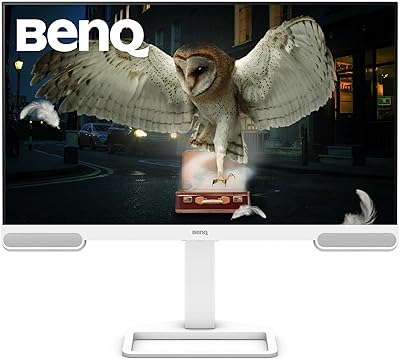
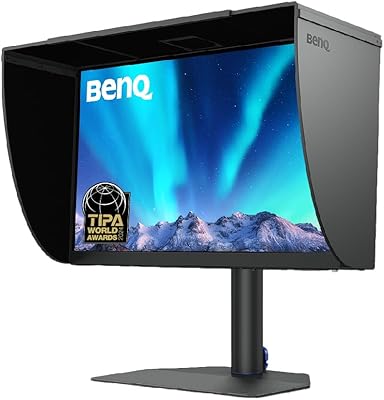
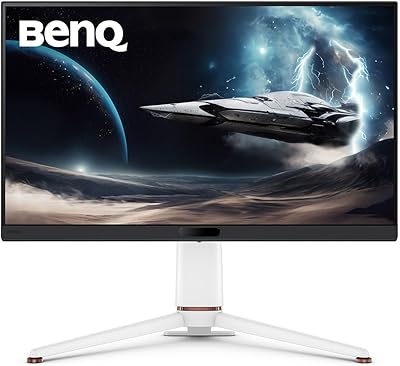
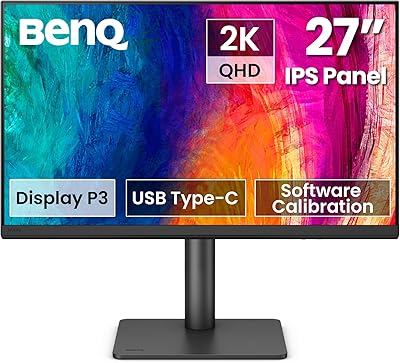
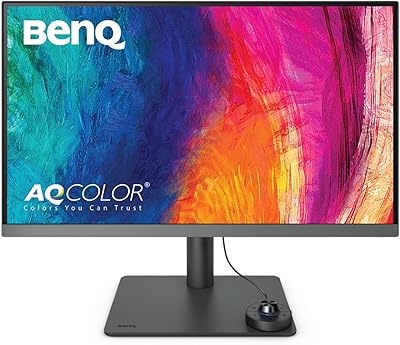
BenQ SW272Q 27-inch 2K Photographer Monitor


BenQ SW272Q 27-inch 2K Photographer Monitor — image 1
BenQ SW272Q 27-inch 2K Photographer Monitor — image 2
BenQ SW272Q 27-inch 2K Photographer Monitor — image 3
BenQ SW272Q 27-inch 2K Photographer Monitor — image 4
BenQ SW272Q 27-inch 2K Photographer Monitor — image 5
BenQ SW272Q 27-inch 2K Photographer Monitor — image 6
BenQ SW272Q 27-inch 2K Photographer Monitor — image 7
BenQ SW272Q 27-inch 2K Photographer Monitor — image 8
88%

Overview

The BenQ SW272Q 27-inch 2K Photographer Monitor is a high-performance display built for professionals who demand precision. This monitor offers 99% Adobe RGB and 98% DCI-P3 color accuracy, ensuring your photos and designs are shown with true-to-life colors. With a nano matte panel and TUV anti-reflection certification, it provides a glare-free experience, even in brightly lit environments. The inclusion of USB-C connectivity with 90W power delivery makes setup seamless, while maintaining a sleek, minimalistic design that complements any creative workspace.

Features & Benefits

This 27-inch monitor boasts a sharp 2560x1440 (2K) resolution, which provides crisp, detailed visuals for all your photo editing and design work. The Palette Master Ultimate calibration software ensures color consistency across all devices. Its wide color gamut support—including Adobe RGB, sRGB, and DCI-P3—makes it ideal for users who require diverse and accurate color profiles. The TUV-certified anti-reflection coating helps reduce distractions, letting you focus on your work without annoying glare. This monitor truly excels in providing a professional-grade viewing experience for creative tasks.

Best For

This BenQ monitor is designed for professional photographers, graphic designers, and content creators who prioritize color accuracy. It's ideal for individuals working on photo and video editing projects where precise and consistent colors are crucial. Whether you're creating content for print or digital media, this 27-inch 2K display offers an exceptional balance of sharpness and color fidelity. It's also a perfect choice for anyone seeking a high-quality, ergonomic monitor that reduces eye strain during long hours of work, thanks to its customizable stand and anti-reflection features.

User Feedback

Users generally praise this monitor's color accuracy and image sharpness, particularly for photo editing tasks. Many appreciate the ease of setup, with the included calibration software making it simple to achieve the desired color profiles. The adjustable stand and ergonomic design also receive positive feedback, offering comfort during extended work sessions. However, some users feel the price point is a bit high, especially for those just starting out in creative fields. Despite this, most agree that the investment is worthwhile for professionals who need top-tier performance and reliability.

Pros

  • This monitor offers excellent color accuracy, making it ideal for professional photographers and designers.
  • The 27-inch 2K resolution provides sharp, detailed visuals, perfect for precise photo and video editing.
  • USB-C connectivity with 90W power delivery makes setup quick and convenient, reducing cable clutter.
  • The TUV-certified anti-reflection coating helps reduce distractions in bright environments, improving focus during editing.
  • Hardware calibration with Palette Master Ultimate ensures consistent color output over time.
  • The adjustable stand allows users to customize the height, tilt, and swivel for ergonomic comfort during long editing sessions.

Cons

  • The 250-nit brightness might be insufficient for users working in very bright rooms or studios.
  • Some users find the monitor's price to be on the higher side, especially for those not needing advanced color calibration.
  • The large size may not be ideal for users with limited desk space or those who prefer a more compact display.
  • While setup is generally straightforward, beginners may find the calibration process a bit daunting without prior experience.
  • The weight of the monitor could be an issue for those needing portability or quick, on-the-go setups.
  • Not all users may need the full color gamut coverage, making this monitor overkill for casual or non-professional use.

Ratings

After analyzing verified user feedback from multiple countries, languages, and platforms, we have gathered insights on the BenQ SW272Q 27-inch 2K Photographer Monitor. The following scores reflect authentic, high-quality feedback from users across different regions, with spam, bot, and incentivized reviews filtered out. Both the strengths and pain points highlighted in the reviews contribute to the overall ratings, ensuring a balanced perspective on this professional-grade monitor.

Color Accuracy
96%
Users consistently praise the exceptional color accuracy of this device, noting that it delivers vibrant, true-to-life colors. The 99% Adobe RGB and 98% DCI-P3 coverage ensures professional-level editing, making it ideal for photographers and designers who demand precise color reproduction for their projects.
A few users mention that the color accuracy may require additional calibration out of the box for optimal results, which could be a drawback for those seeking immediate out-of-the-box perfection. However, this is generally addressed by the included calibration software.
Display Quality
92%
The high-resolution 2560x1440 display provides incredibly sharp, crisp visuals, which is highly appreciated by creative professionals. The anti-reflection coating ensures a glare-free experience, making it perfect for editing in bright environments. The IPS panel also contributes to wide viewing angles and vibrant colors.
Some users report that the display’s brightness, while adequate at 250 nits, may not be sufficient for those working in very bright rooms or environments with direct sunlight. A few would have preferred a higher peak brightness for optimal performance in all lighting conditions.
Build Quality
88%
The solid build quality of this monitor gives it a premium feel. Its robust design with an adjustable stand adds both functionality and style, making it easy to set up and use for extended periods. The materials used are durable, ensuring that the monitor can withstand regular use in demanding environments.
While the overall build is solid, some users feel that the monitor could be a bit heavier for added stability. Additionally, the stand, although adjustable, doesn't have full height adjustment for some users' ergonomic needs, leading to some discomfort during long editing sessions.
Ease of Setup
90%
Several users have highlighted how easy it is to set up this monitor, with plug-and-play USB-C connectivity making the process seamless. The included Palette Master Ultimate software simplifies color calibration, and the monitor’s intuitive controls make it user-friendly even for those who aren't tech-savvy.
While the setup process is straightforward for most, a small number of users experienced issues with getting the software to work on specific operating systems. There were also mentions that users looking for more detailed configuration options might find the software a bit limiting.
Connectivity
91%
The USB-C connectivity with 90W power delivery is a standout feature, allowing for a tidy and efficient setup. This makes it especially convenient for laptop users, reducing the need for multiple cables and improving overall workspace organization. The monitor supports various inputs, offering versatility for different devices.
A few users expressed frustration with limited port options, particularly for those who rely on older or more specialized connections. While USB-C is excellent for modern setups, some may need additional adapters for compatibility with older devices or other peripherals.
Ergonomics
85%
The monitor’s adjustable stand provides flexibility, allowing users to tilt, swivel, and pivot the screen for a comfortable viewing experience. Many users found the height adjustment particularly useful for creating a custom setup that suits their workspace.
Despite the adjustable stand, some users feel the range of movement could be improved, particularly with height adjustments. A few have noted that the stand could be a bit sturdier for users who frequently adjust the monitor’s position.
Calibration Software
93%
The Palette Master Ultimate calibration software receives high praise for its ability to maintain consistent color accuracy across different working environments. This feature is particularly useful for professional photographers and designers who rely on precise color representation for their work.
While the software is appreciated, a few users have mentioned that it can be tricky to use for beginners. Some find the setup process a bit intimidating, and the software’s interface could be more streamlined for ease of use.
Value for Money
80%
20%
Despite the relatively high price, users feel that the monitor offers good value considering its color accuracy, display quality, and professional features. For those who need precise color reproduction and high-quality visuals, it provides excellent performance in a variety of creative tasks.
A few buyers felt that the price was a bit steep compared to similar monitors on the market. While the monitor offers great features for professionals, casual users might not see the same level of value due to the premium price tag.
Brightness & Viewing Angles
89%
The wide viewing angles and consistent brightness are ideal for collaborative work, as users can view the display from various angles without color distortion. The monitor’s brightness is adequate for most indoor environments, providing clear visibility for detailed editing tasks.
Some users feel the 250-nit brightness might not be bright enough for those working in very well-lit environments. While it’s suitable for most indoor settings, users in extremely bright rooms might find the display slightly dimmer than expected.
Design & Aesthetics
87%
The sleek design of this monitor adds a touch of modern elegance to any workspace. Its thin bezels and minimalist aesthetic make it a great choice for those who value both style and functionality. Many users appreciate its clean, professional look.
While the design is appealing, a few users have pointed out that the monitor’s relatively large size might not be ideal for smaller desks or more compact workspaces. Additionally, some feel the aesthetic is a bit too minimalist, leaving out features like RGB lighting that might appeal to other users.
Customer Support
82%
18%
Customer support has been noted as helpful by many users, particularly when it comes to resolving connectivity or software-related issues. The support team is generally responsive and offers clear troubleshooting advice for users facing setup difficulties.
Some users have experienced delays in response time when reaching out to support, which can be frustrating for those facing urgent issues. Additionally, a few felt that the support team could benefit from more in-depth technical knowledge in some cases.
Durability
84%
The monitor is built to last, with a solid construction that holds up well even with frequent adjustments. Users report that the materials used in the frame and screen are durable, ensuring longevity with regular use in demanding environments.
A few users have noted that, while generally durable, the monitor’s stand could be more robust to avoid wobbling, especially during frequent adjustments. Additionally, the monitor's weight may make it slightly harder to transport for those needing portability.

Suitable for:

The BenQ SW272Q 27-inch 2K Photographer Monitor is ideal for professional photographers, graphic designers, and content creators who prioritize color accuracy and sharp visuals. Its 99% Adobe RGB and 98% DCI-P3 color coverage makes it an excellent choice for those who need precise color reproduction for photo and video editing. Creatives working on projects that require detailed color work, such as product photography, fine art, or cinematic video editing, will appreciate the high-resolution display and the included calibration software. This device is also well-suited for users who require seamless USB-C connectivity, offering a clean, efficient setup with the added bonus of 90W power delivery, which is great for those with limited desk space or for creators on the go.

Not suitable for:

This monitor may not be the best fit for casual users or those with budget constraints, given its higher price point. While its color accuracy is top-notch, its 250-nit brightness may not be sufficient for users working in very bright environments or those who need a display with more intense luminosity. Additionally, users who don’t need the advanced color calibration features might find the price disproportionate to their needs. This monitor is also on the larger side, so it may not suit individuals with limited desk space or those who prefer more compact setups. Those who work in environments requiring frequent portability or quick adjustments may find the weight and size cumbersome.

Specifications

  • Screen Size: 27-inch display providing ample screen real estate for detailed editing and multitasking.
  • Resolution: 2560x1440 (2K QHD) resolution for crisp, sharp visuals with high clarity.
  • Color Accuracy: 99% Adobe RGB and 98% DCI-P3 color coverage ensures precise color reproduction for professional tasks.
  • Panel Type: IPS (In-Plane Switching) panel for consistent color and wide viewing angles.
  • Anti-Reflection Coating: TUV-certified anti-reflection coating reduces glare and enhances visibility in bright environments.
  • Brightness: 250 nits of peak brightness, ideal for most indoor environments.
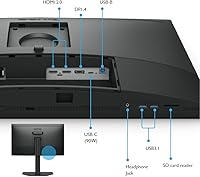
  • USB-C Connectivity: Equipped with USB-C port that supports 90W power delivery for seamless connection and charging.
  • Calibration Software: Includes Palette Master Ultimate software for hardware calibration to maintain color consistency.
  • Color Gamut Support: Supports multiple color spaces, including Adobe RGB, sRGB, and DCI-P3 for versatile use in creative work.
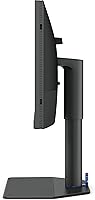
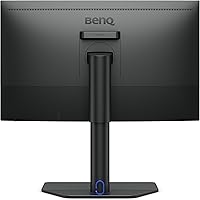
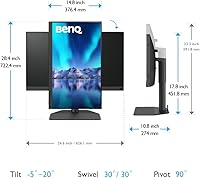
  • Height Adjustment: Height adjustable stand allows a range of 140mm for ergonomic positioning.
  • Tilt Adjustment: Tilt range from -5° to 20° for customizable viewing angles.
  • Swivel Adjustment: Swivel functionality allows a 30° left/right rotation for flexible monitor positioning.
  • Pivot Adjustment: Supports 90° pivot for portrait or landscape orientation.
  • Weight: Weighs 18.29 pounds, offering a solid build without excessive heaviness.
  • Design: Sleek and modern design with a professional look suitable for creative professionals.
  • Power Supply: Supports USB-C with 90W power delivery for a single cable connection for both power and data.
  • Warranty: Includes a standard warranty for quality assurance and support.
  • Mounting Compatibility: VESA 100mm x 100mm mounting compatibility for flexible installation on arms or wall mounts.
  • Connectivity: Includes HDMI, DisplayPort, and USB-C for multiple connectivity options.

FAQ

This monitor offers outstanding color accuracy with 99% Adobe RGB and 98% DCI-P3, ensuring precise editing for professional photographers and designers. It also features a high 2560x1440 resolution and hardware calibration, making it perfect for detailed, accurate visual work.

Setting up this monitor is straightforward, especially with the included Palette Master Ultimate software for calibration. The monitor connects easily via USB-C, which also delivers 90W power, minimizing cable clutter and simplifying the process for both Mac and Windows users.

The TUV-certified anti-reflection coating reduces glare, making it easier to view the screen in well-lit rooms or direct sunlight. This feature is particularly helpful for professionals working in brightly lit offices or studios where glare can distract from the work.

The BenQ SW272Q supports multiple color gamuts, including Adobe RGB, sRGB, and DCI-P3. This wide color range ensures that the monitor is versatile for a variety of creative tasks, allowing for true-to-life color reproduction in both print and digital media.

The monitor stand offers height adjustment up to 140mm, providing flexibility for users to set the screen at a comfortable level for ergonomic use. It also includes tilt, swivel, and pivot adjustments, ensuring that you can customize the monitor's position to suit your workspace.

Yes, this monitor is well-suited for video editing, thanks to its accurate color reproduction, sharp 2K resolution, and wide color gamut. Its performance in color-critical tasks makes it a great choice for video editors who require precise and consistent visuals.

The USB-C port with 90W power delivery streamlines your setup by allowing both data transfer and power to flow through a single cable. This is especially beneficial for users who want to minimize cable clutter and have a quick, hassle-free connection for laptops and other devices.

The monitor has a maximum brightness of 250 nits, which is suitable for most indoor environments. However, it may not be bright enough for very bright rooms or outdoor use, so users in such conditions might want to consider a monitor with higher brightness.

While the BenQ SW272Q excels in color accuracy and visual detail, it is designed primarily for professional photo and video editing. It is not optimized for gaming, as it may not offer the refresh rate or response time typically preferred by gamers.

In its price range, this monitor stands out due to its high color accuracy and professional-grade features like hardware calibration. While it might be more expensive than some consumer-grade monitors, it offers significant value for professionals who require precise color work and ergonomic features.