Overview

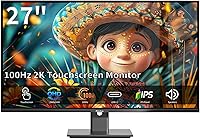
The Pisichen 27-Inch 2K QHD Touchscreen Monitor arrives as an interesting proposition in a crowded mid-range market — a display that pairs sharp QHD resolution with genuine 10-point touch capability at a price tier where that combination is still relatively rare. The brand behind it, Shenzhen Konowa Electronics, only launched this model in late 2024, so it carries the uncertainty that comes with any newer market entrant. What anchors the buying case is the 27-inch frameless IPS panel — it looks clean on a desk, and the QHD sharpness is a real, noticeable step up from a standard 1080p screen. Go in with realistic expectations about brand longevity, and there is genuinely strong value here.
Features & Benefits

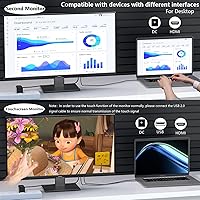
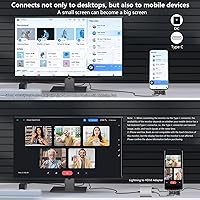
At 27 inches, the jump from 1080p to QHD is not subtle — text gets crisper, spreadsheets are easier to read at a glance, and image detail actually shows up. The 10-point multi-touch layer works well for Windows touch gestures, PDF annotation, and light sketching with a passive stylus; it is not pressure-sensitive like a Wacom, but responsive enough for practical daily use. The 100Hz refresh rate keeps scrolling smooth, though it is firmly casual-gaming territory. One connectivity note worth flagging early: USB-C video input requires an external DC power adapter alongside it — an extra step many buyers do not expect. The dual speakers are handy for calls, and flicker-free eye-care mode genuinely helps during long sessions.

Best For

This QHD touch display hits a sweet spot for remote workers and students who want to annotate documents, sign PDFs, or use Windows ink tools without a separate tablet. It also suits anyone who sketches or does light design work and wants touch input without the cost of a dedicated drawing display. Casual gamers upgrading from a 1080p screen will appreciate the sharper image; just do not expect 144Hz competitive performance. Home office users will value the built-in speakers and VESA compatibility for wall mounting. Where it falls short is for serious HDR work or fast-paced FPS gaming — the hardware simply is not tuned for those use cases.

User Feedback

Because the Pisichen 27-inch display only launched in late 2024, the pool of long-term user reviews is still relatively small — worth keeping in mind when weighing the feedback. That said, early buyers consistently point to image clarity and touch responsiveness as genuine strengths, with most finding the value-for-money ratio favorable at this tier. The recurring frustration is the stand: the tilt range tops out at 15 degrees with no height or pivot adjustment, and a few users have noted it feels less sturdy than expected. The USB-C adapter requirement also catches people off guard. Build quality impressions are generally positive, though long-term durability of the frameless design remains to be seen.

Pros

  • QHD resolution at 27 inches makes text and fine detail noticeably sharper than a comparable 1080p display.
  • 10-point multi-touch is genuinely responsive and practical for annotation, Windows gestures, and light sketching.
  • Passive stylus support adds flexibility for users who prefer a pen-like feel without extra hardware costs.
  • The frameless design looks clean and modern on any desk setup.
  • Connectivity is broad — HDMI, DisplayPort, USB-C 3.1, and VGA cover virtually every device scenario.
  • Built-in dual speakers eliminate the need for a separate desktop audio solution for calls and casual media.
  • Eye-care features including flicker-free backlight and low blue light mode reduce fatigue during extended sessions.
  • VESA 100x100mm compatibility makes wall mounting or arm installation straightforward.
  • 100% sRGB coverage delivers accurate, consistent color for everyday creative and office work.
  • The anti-glare coating handles ambient light well, keeping the image readable in typical room conditions.

Cons

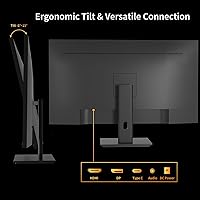
  • The stock stand offers only basic tilt (-5° to 15°) with no height, swivel, or pivot adjustment.
  • USB-C video input requires a separate DC power adapter, which undermines the convenience of a single-cable setup.
  • The brand launched in late 2024, so long-term durability and after-sales support remain unproven.
  • HDR is listed as a feature, but panel specs are not strong enough to deliver a meaningful HDR experience.
  • At nearly 15 pounds, the monitor is heavier than many slim competitors at this screen size.
  • Stand stability has drawn criticism from some buyers, particularly when using the touch screen with any real pressure.
  • 100Hz is solid for casual use but falls short for competitive gaming, where 144Hz or higher is the practical baseline.
  • Touch functionality is limited to Windows environments — macOS touch support is not available.
  • The external power adapter adds desk clutter that buyers expecting a cleaner cable setup may find frustrating.

Ratings

The scores below for the Pisichen 27-Inch 2K QHD Touchscreen Monitor were generated by our AI rating engine after analyzing verified purchase reviews from buyers worldwide, with spam, incentivized, and bot-flagged submissions actively filtered out before scoring. Each category reflects the honest balance of genuine praise and real frustration that surfaces when everyday users live with this display over time. Where the picture is still developing — given this model only launched in late 2024 — we have weighted confidence accordingly rather than inflating scores prematurely.

Image Clarity
88%
Buyers consistently describe the jump to QHD at 27 inches as immediately noticeable — text in documents and spreadsheets looks crisp without any squinting, and fine detail in photos holds up well at normal viewing distances. For home office users staring at a screen all day, this sharpness improvement over a standard 1080p display is the single most appreciated upgrade.
A small number of users expected more punch from the contrast and black depth, finding that the IPS panel produces grays that look slightly washed out in darker scenes. HDR content in particular does not land with the impact some buyers anticipated based on the listed feature.
Touch Responsiveness
83%
For annotation tasks — marking up PDFs, signing documents, or sketching rough layouts — the 10-point touch layer registers input reliably without obvious lag under normal use. Multiple reviewers noted that writing with a passive stylus felt natural enough for handwritten notes and light illustration work.
Users coming from dedicated drawing tablets notice that the touch latency and lack of pressure sensitivity create a ceiling for detailed artistic work. A few buyers also reported occasional missed touches near the panel edges, particularly when using finger input at steep angles.
Value for Money
81%
19%
The combination of QHD resolution, 10-point touch, built-in speakers, and a broad connectivity set at this price point is genuinely uncommon — most competing displays either drop the touch layer or the resolution to hit a similar number. Buyers who needed a versatile all-in-one display for a home office or small studio found the feature density hard to match elsewhere.
The value equation shifts if you factor in buying a monitor arm separately to compensate for the limited stand, or if the USB-C adapter requirement means sourcing additional accessories. A handful of buyers felt the overall package was good but not exceptional once those extra costs were considered.
Build Quality
69%
31%
The frameless panel looks noticeably sleek out of the box, and the slim bezel design holds up well in normal desk use. Several buyers commented that the display itself feels solid and the screen surface does not flex or creak under gentle touch input.
The stand is the weak point that draws the most criticism — it feels lighter and less planted than the monitor itself, and applying the kind of pressure needed for active touch use can cause the whole assembly to rock slightly. Long-term durability of the frameless edges has also raised some early concerns among buyers who handle their setup frequently.
Ergonomics & Adjustability
52%
48%
VESA 100x100mm compatibility means buyers who invest in a quality monitor arm can fully customize height, angle, and reach — and several reviewers noted that a third-party arm transformed the usability of the display for touch input at a comfortable angle.
Out of the box, the tilt range of -5 to 15 degrees is the only adjustment available — no height change, no swivel, no portrait pivot. For a touchscreen monitor where physical interaction is part of the point, this stand limitation frustrates a meaningful share of buyers right out of the packaging.
Connectivity
76%
24%
The port selection covers a wide range of real-world scenarios — HDMI for consoles or desktop PCs, DisplayPort for higher-end setups, USB-C for modern laptops, and VGA for older devices or presentation equipment. Most buyers found they could connect their existing hardware without buying additional adapters.
The USB-C input requiring a separate DC power adapter is the recurring pain point — buyers expecting a clean single-cable connection from their laptop are caught off guard when they realize the monitor needs its power brick regardless. This undermines what should be the most convenient input option on the display.
Gaming Performance
67%
33%
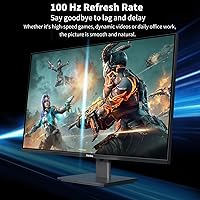
Casual and mid-paced gaming benefits visibly from the 100Hz refresh rate and QHD resolution together — titles like strategy games, RPGs, and open-world games look noticeably smoother and sharper than on a typical 60Hz 1080p screen, and buyers in this use case generally came away satisfied.
Buyers who game competitively quickly hit the ceiling — 100Hz and a 3-5ms response time are not tuned for fast-paced shooters where 144Hz or higher is the practical minimum. A few reviewers also noted some ghosting in high-contrast fast-motion sequences that would not be acceptable for serious competitive play.
Eye Comfort
79%
21%
The combination of flicker-free backlight and a dedicated low blue light mode made a noticeable difference for buyers who spend six or more hours a day in front of the screen — several specifically mentioned reduced end-of-day headaches after switching from a non-eye-care display.
The anti-glare coating, while effective at diffusing reflections, adds a slight matte haze that some users find mildly softening on an otherwise sharp panel. Buyers sensitive to this trade-off may prefer a glossy display, though that would make ambient light reflections far more intrusive during daytime use.
Speaker Quality
58%
42%
For the specific task of video conferencing and casual YouTube or podcast playback, the built-in speakers deliver clear enough audio at moderate volumes without any external setup. Buyers who mainly use them for calls appreciated not needing a separate speaker on an already crowded desk.
Bass is essentially absent, and at higher volumes the speakers produce a thinness that makes music and cinematic content feel flat. Buyers who expected anything beyond functional background-level audio were consistently disappointed, and most who use the display for media eventually added a soundbar or headphones.
Setup & Installation
74%
26%
On Windows, touch functionality activates automatically without driver installation, which most buyers appreciated — plug in the USB cable alongside your video connection and the display is ready to use within minutes. Physical assembly of the stand is similarly straightforward.
The dual-cable requirement for USB-C use (video cable plus DC adapter) causes genuine confusion at first setup, and the instructions could be clearer about this. A small number of buyers also reported needing to adjust display settings manually to get accurate colors out of the box.
Color Accuracy
77%
23%
For sRGB-targeted work — web design, social media content, and general photo editing — the 100% sRGB coverage delivers colors that look accurate and consistent across the wide IPS viewing angle. Buyers doing everyday creative work found the out-of-box calibration acceptable without manual adjustment.
The display does not cover DCI-P3 or Adobe RGB, which limits its usefulness for print-targeted design or professional color grading. HDR mode, while present, does not significantly extend the color volume, leaving buyers who expected a richer HDR palette somewhat underwhelmed.
Brightness & Glare Control
72%
28%
At 400 cd/m², the display holds up well in typical indoor office lighting and the anti-glare coating handles overhead fluorescent or LED environments without heavy reflection interference. Most buyers working in controlled indoor spaces did not find brightness a limiting factor during the day.
In bright rooms with direct sunlight or large windows, the maximum brightness starts to feel insufficient and the anti-glare coating cannot fully neutralize strong light sources. Buyers who positioned the display near a sunny window reported the image looking washed out during peak daylight hours.
Brand Reliability
54%
46%
Early buyers have not reported widespread hardware failures, and those who have needed support describe the manufacturer response as adequate for basic issue resolution. For buyers purchasing through Amazon, the platform return process provides a safety net that reduces the risk of buying from a less established brand.
Pisichen and parent company Shenzhen Konowa Electronics have virtually no long-term track record in the monitor category, having launched this model only in late 2024. Buyers who prioritize brand longevity, established warranty programs, or proven after-sales infrastructure will find the uncertainty here genuinely harder to accept than the hardware itself.

Suitable for:

The Pisichen 27-Inch 2K QHD Touchscreen Monitor is a practical pick for remote workers, students, and anyone who spends long hours reading, writing, or annotating documents on screen — the QHD resolution makes a real difference at 27 inches, where 1080p can start to look soft up close. If you regularly sign PDFs, mark up presentations, or want to sketch rough ideas directly on the display without buying a separate drawing tablet, the 10-point touch layer handles those tasks capably. Home office users who want to wall-mount their display and skip a dedicated speaker will find the VESA compatibility and built-in audio a convenient combination. Casual gamers upgrading from a standard 1080p monitor will notice the sharper image immediately, and the 100Hz refresh rate keeps gameplay smooth for most genres. It also works well as a secondary display in a creative workflow where touch interaction adds genuine utility.
Not suitable for:

Buyers who prioritize ergonomics should know upfront that this touchscreen monitor offers only basic tilt adjustment, with no height, swivel, or pivot options on the stock stand — a real limitation if you work long hours at a fixed desk. Competitive gamers who rely on high refresh rates for an edge will find 100Hz limiting, and the response time is not tuned for fast-paced esports titles. The USB-C input requires a separate DC power adapter to function, which undercuts the simplicity that most USB-C users expect from a single-cable connection. Anyone hoping for serious HDR performance should also look elsewhere — HDR support is listed, but the panel brightness and contrast specs are not built for a true HDR experience. Finally, buyers who value brand pedigree and want proven long-term support should consider that Pisichen is a very recent market entrant with a limited reliability track record.

Specifications

  • Screen Size: The display measures 27 inches diagonally, using a frameless IPS panel with a 16:9 aspect ratio.
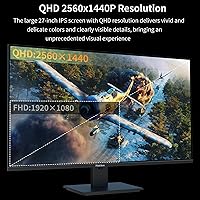
  • Resolution: Native resolution is 2560x1440 (QHD), delivering noticeably sharper text and image detail compared to standard 1080p at this screen size.
  • Panel Type: IPS technology provides wide 178-degree viewing angles both horizontally and vertically, keeping colors consistent even when viewed off-axis.
  • Refresh Rate: The panel runs at 100Hz, which produces smooth scrolling and fluid casual gameplay without reaching competitive esports-grade performance.
  • Response Time: Rated at 3–5ms, the response time is adequate for general gaming and everyday use, though not optimized for fast-paced competitive titles.
  • Touch Input: Capacitive 10-point multi-touch supports simultaneous finger and passive stylus input, compatible with Windows touch and ink features.
  • Brightness: Peak brightness is rated at 400 cd/m², which is sufficient for typical indoor environments and well-lit office settings.
  • Contrast Ratio: Static contrast ratio is 1500:1, delivering a reasonable depth between dark and light areas for an IPS panel in this category.
  • Color Gamut: Covers 100% of the sRGB color space, making it suitable for accurate color work in standard digital design and office applications.
  • Ports: Connectivity includes one HDMI port, one DisplayPort, one USB-C 3.1 port, one VGA port, and a 3.5mm audio output jack.
  • Power Supply: Requires a DC 12V 3A external power adapter, which must be connected separately when using the USB-C port for video input.
  • Speakers: Two built-in speakers are integrated into the display, providing basic stereo audio for video calls, media playback, and system sounds.
  • HDR Support: The monitor lists HDR support, though the brightness ceiling means the HDR effect will be modest rather than a full high-dynamic-range experience.
  • Eye Care: Includes flicker-free backlight technology and a low blue light mode to reduce eye fatigue during extended viewing sessions.
  • VESA Mount: Supports standard VESA 100x100mm mounting, compatible with most third-party monitor arms and wall-mount brackets using M4 fine-thread screws.
  • Tilt Adjustment: The included stand supports tilt adjustment from -5 degrees to 15 degrees only, with no height, swivel, or pivot range available.
  • Dimensions: The monitor body measures approximately 24.02 inches wide by 14.17 inches tall with a depth of 0.71 inches at its thinnest point.
  • Weight: Total unit weight is 14.97 pounds, which is on the heavier side for a 27-inch display and worth considering for wall or arm mounting.
  • Compatibility: Touch functionality is supported on Windows 7 and later operating systems; macOS does not natively support the touch input layer.
  • Anti-Glare: The panel surface features an anti-glare coating that diffuses ambient light reflections, improving readability in typical indoor lighting conditions.

Related Reviews

ViewSonic VG2748A-2K 27-Inch QHD Monitor
85%
93%
Display Quality
90%
Ergonomics/Comfort
89%
Connectivity Options
85%
Ease of Setup
87%
Value for Money
More
ViewSonic VS2725-2K 27-inch QHD Monitor
80%
91%
Image Sharpness
93%
Value for Money
82%
Refresh Rate & Smoothness
78%
Variable Refresh Rate
86%
Eye Comfort
More
Gawfolk GF270L 27-inch 2K QHD Gaming Monitor
86%
91%
Display Quality
88%
Gaming Performance
94%
Color Accuracy
83%
Build Quality
87%
Value for Money
More
ViewSonic VG2756A-2K 27-inch QHD IPS Docking Monitor
88%
90%
Display Quality
92%
Ergonomics and Comfort
88%
Connectivity and Ports
85%
Ease of Setup
89%
Build Quality
More
Pisichen HD-215TS 21.5-inch Touchscreen Monitor
69%
74%
Touch Responsiveness
79%
Display Clarity
51%
Viewing Angle
88%
Setup & Plug-and-Play
62%
Build Quality
More
BenQ PD2706QN 27” 2K QHD Monitor
87%
95%
Color Accuracy
88%
Ergonomics
90%
Display Quality
91%
USB-C Integration
75%
Brightness in Bright Environments
More
memzuoix 27-inch QHD 165Hz Gaming Monitor
70%
88%
Image Clarity
84%
Refresh Rate Performance
91%
Value for Money
82%
Adaptive Sync (FreeSync/G-Sync)
77%
Color Accuracy
More
ViewSonic VP2756-2K 27-inch QHD IPS Monitor
81%
93%
Color Accuracy
88%
Panel Sharpness
91%
USB-C Connectivity
54%
Refresh Rate
86%
Ergonomics
More
BenQ EW2790Q 27-inch 2K Monitor
84%
91%
Display Quality
87%
Ergonomics and Comfort
89%
Value for Money
93%
Color Accuracy
85%
Connectivity Options
More
KTC H27T13 27-inch QHD IPS Monitor
75%
88%
Image Clarity & Sharpness
83%
Color Accuracy & Vibrancy
91%
Value for Money
79%
Eye Comfort & Anti-Blue Light
74%
Refresh Rate & Smoothness
More

FAQ

Touch input on this display is limited to Windows. macOS does not have native driver support for external USB touch screens, so while you can use the Pisichen 27-Inch 2K QHD Touchscreen Monitor as a regular monitor with a Mac, the touch layer simply will not respond. If you are on Windows 10 or 11, it should be recognized automatically without any additional driver installation.
Partially — but not quite. The USB-C port handles video and data transmission, but the display also needs its external DC power adapter plugged in at the same time to function. So you cannot run it from a single USB-C cable the way you might with a fully bus-powered monitor. You will always need both the USB-C cable and the included DC adapter connected.

No stylus is included in the box. The touchscreen monitor supports passive styluses — meaning any basic capacitive stylus will work, since the screen does not require an active pen with Bluetooth or a battery. You do not need to buy anything branded or proprietary. A generic capacitive stylus from any accessories store will do the job.

For everyday design tasks and photo retouching, the 100% sRGB coverage and QHD resolution make it a capable option. Colors are accurate enough for web-focused work and general creative projects. That said, if you need to match prints or work in wide-gamut color spaces like DCI-P3 or Adobe RGB, this display does not cover those profiles, so dedicated color-critical work would benefit from a specialized panel.

Yes, noticeably so — especially in fast-moving scenes and even just navigating menus. The jump from 60Hz to 100Hz feels smoother in practice. That said, if you are used to 144Hz or higher, 100Hz may feel like a step down. Think of this display as a good upgrade for casual and mid-paced gaming, rather than something suited for competitive shooters where every frame counts.

Yes, the display supports standard VESA 100x100mm mounting, so it is compatible with the vast majority of monitor arms on the market. Given that the included stand lacks height and pivot adjustment, many users actually find a monitor arm improves the setup considerably, especially when the display is being used for touch input at an angle.

They are serviceable — good enough for video calls, YouTube, and background music at moderate volume. Do not expect strong bass or high-fidelity audio. If you watch a lot of movies or listen to music seriously at your desk, an external speaker or headphones will be a noticeable improvement. For the convenience of not needing a separate audio device during calls, though, they do the job.

Touch response is generally rated well by users for annotation, handwriting, and basic sketching. It is a capacitive panel rather than an EMR drawing surface, so there is a small amount of inherent latency compared to a dedicated drawing tablet like a Wacom. For signing documents, taking handwritten notes, or casual illustration, it feels natural. For precision linework or professional illustration, a purpose-built drawing display would still be preferable.

There is a very slight trade-off, as anti-glare coatings can add a faint haze compared to a fully glossy surface. In practice, most users find the coating reduces distracting reflections enough to make it worthwhile, particularly in offices with overhead lighting or windows behind the user. For a touchscreen used in typical working conditions, anti-glare is generally the more practical choice.

Pisichen is a relatively new brand from Shenzhen Konowa Electronics, having launched this model only in late 2024. That means there is limited long-term reliability data available yet. If something goes wrong, your primary recourse will likely be through Amazon's return and claims process or direct contact with the manufacturer. It is worth keeping your purchase receipt and registering the product if the brand offers that option — just to have a clear paper trail if you ever need support.