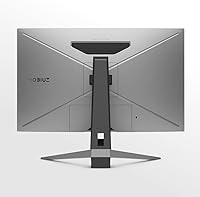
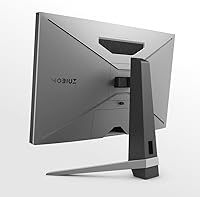
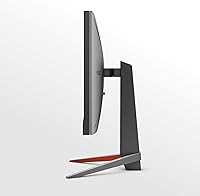
Overview

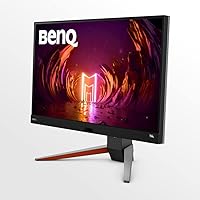
The BenQ MOBIUZ EX270M 27-inch Gaming Monitor arrived in mid-2022 and has held its ground in a crowded mid-range market ever since. At its core, this is a competitive gaming display built around a 27-inch IPS panel running at 240Hz — a pairing that sits squarely where serious performance meets reasonable cost. What separates this BenQ gaming monitor from similarly priced rivals is its inclusion of a built-in 2.1 speaker system, making it a more self-contained desk setup than most options at this tier. It is not the flashiest monitor on the shelf, but its staying power in buyer rankings suggests it delivers where it counts.

Features & Benefits

The 240Hz IPS panel is where the EX270M earns its keep. At 1ms MPRT, fast-moving scenes stay sharp rather than turning into a blurry mess — a difference you notice immediately when switching from a slower display. Color accuracy is strong out of the box, with 99% sRGB coverage, and BenQ's HDRi alongside the Black eQualizer tool helps pull detail from dark scenes without destroying highlights. The 2.1 speaker system with a 5W subwoofer handles game audio competently — it is not audiophile-grade, but it is a genuine bonus. The fully adjustable ergonomic stand, HDMI, DisplayPort, USB hub, and AMD FreeSync Premium round out a capable, well-connected package.

Best For

This 27-inch MOBIUZ panel is an especially strong fit for competitive FPS players who push high frame rates and need motion clarity above all else. It also works well for console gamers who want a single display for both a PS5 and an Xbox Series console without adding a separate speaker. Anyone upgrading from a 60Hz or 144Hz monitor will feel the jump to 240Hz immediately — the difference is not subtle. The eye-care tech and adjustable stand make it a sensible pick for people who log long sessions at the desk, and the all-in-one nature of this BenQ gaming monitor suits tighter desk setups particularly well.

User Feedback

Across nearly 290 ratings, the EX270M holds a 4.5-star average — a score that reflects consistent satisfaction rather than a spike of early enthusiasm. Buyers frequently praise display clarity and motion handling, noting colors look accurate with minimal calibration needed. The speaker system draws mixed but fair reactions: most treat it as a welcome convenience for casual gaming, though no one is retiring their headset because of it. The most common criticism centers on 1080p pixel density feeling slightly soft at 27 inches — a legitimate trade-off buyers should weigh before purchasing. On the positive side, the build quality and ergonomic stand draw steady praise across verified purchases.

Pros

  • 240Hz IPS panel delivers genuinely smooth, tear-free motion that competitive gamers will notice immediately.
  • Out-of-box color accuracy is strong, with 99% sRGB coverage requiring minimal manual calibration.
  • Black eQualizer helps reveal shadow detail in dark game environments without washing out highlights.
  • The built-in 2.1 speaker system with a 5W subwoofer is a practical bonus for desk setups short on space.
  • Fully adjustable stand with height, tilt, and swivel makes ergonomic positioning straightforward.
  • AMD FreeSync Premium keeps gameplay smooth across a wide frame rate range without screen tearing.
  • Compatible out of the box with PS5 and Xbox Series X and S, making it a solid shared console and PC display.
  • USB hub adds everyday convenience without needing a separate dock for peripherals.
  • Consistent 4.5-star buyer sentiment across nearly 290 ratings suggests reliable real-world satisfaction.
  • BenQ Eye-Care tech reduces strain during long gaming or work sessions in a way that is easy to notice over time.

Cons

  • 1080p resolution on a 27-inch panel produces noticeably lower pixel density than a comparable 1440p display.
  • The EX270M is heavier than many competitors at over 20 pounds, which can complicate desk arm mounting.
  • HDRi implementation, while functional, does not approach the contrast or brightness of true HDR monitors.
  • Built-in speakers are a convenience feature only — they cannot replace even a basic dedicated audio setup.
  • No USB-C connectivity limits options for modern laptops and devices that rely on it as a primary port.
  • The glossy screen surface increases glare in brightly lit rooms compared to matte-finish alternatives.
  • Only one USB 3.0 hub port is included, which feels limited for users with multiple peripherals.
  • Buyers who game at resolutions or use cases beyond 1080p will find this panel holds back their hardware.
  • At this price tier, some rival monitors offer 1440p resolution, making the 1080p cap harder to justify for certain buyers.
  • No built-in KVM switch, which would have been a natural fit given the dual-console and PC compatibility.

Ratings

The scores below were generated by AI after analyzing verified buyer reviews for the BenQ MOBIUZ EX270M 27-inch Gaming Monitor from global sources, with spam, bot activity, and incentivized feedback actively filtered out. Each category reflects the genuine consensus across hundreds of real-world users — strengths and frustrations alike are represented without favoritism. Where opinion was divided, the score and commentary reflect that split honestly.

Motion Performance
93%
The 240Hz refresh rate with 1ms MPRT is where this panel genuinely earns its reputation. Gamers coming from 144Hz displays consistently describe the difference as immediately noticeable in fast shooters, with fluid tracking and almost no ghosting during rapid movement.
A small number of users noted that the motion clarity advantage becomes harder to perceive unless your GPU can consistently deliver high frame counts, meaning budget PC setups may not fully unlock what the panel offers.
Color Accuracy
86%
Out-of-box color calibration impressed most buyers, with the 99% sRGB coverage producing rich, consistent tones without needing to dig into settings. Casual content creators and gamers who do not own a colorimeter found the default profile genuinely usable.
A portion of users found that the glossy panel surface introduces reflections in bright rooms, which can skew perceived color accuracy depending on ambient lighting conditions.
Display Sharpness
67%
33%
For competitive gaming at typical desk distances, the 1080p panel looks clean and responsive, and fast-moving gameplay tends to mask pixel density concerns during actual use.
At 27 inches, 1080p resolution produces noticeably lower pixel density than a 1440p panel of the same size — text edges look softer, and users who switch from a smaller 1080p display often find the difference jarring, especially during web browsing or document work.
Built-in Audio
71%
29%
The 2.1 speaker system with a dedicated 5W subwoofer surprised a lot of buyers who expected near-silence from monitor speakers. For casual gaming sessions, background music, or video calls, the audio quality comfortably exceeds what most monitors at this tier offer.
Anyone who plays competitive games relying on directional audio cues, or who genuinely enjoys music while working, will outgrow these speakers quickly. They handle volume reasonably well but lack the spatial precision and clarity that even a modest external speaker setup provides.
Ergonomics & Stand
84%
Height, tilt, and swivel adjustment all work smoothly, and reviewers noted that finding a comfortable viewing position was quick without tools or hassle. Long-session gamers appreciated being able to tweak the angle mid-use without the stand creaking or slipping.
At over 20 pounds, the assembled monitor is heavy for its class, which matters if you need to reposition it frequently or plan to mount it on a desk arm — not all mid-range arms are rated for this weight.
Build Quality
82%
18%
The chassis feels solid and well-assembled, with no reports of panel flex or loose bezels from the bulk of verified buyers. The stand in particular drew positive comments for feeling sturdy rather than the plasticky wobble common in cheaper monitors.
A few buyers flagged that the matte plastic finish on the rear casing picks up scratches and smudges more visibly than expected, which may bother users who keep their desk setups clean and tidy.
HDR Implementation
59%
41%
BenQ HDRi adds a practical ambient light adjustment layer that helps the image look reasonably balanced in different room lighting conditions, and some users found it genuinely useful for evening gaming sessions.
This is not true hardware HDR — there is no local dimming and peak brightness falls short of what dedicated HDR panels produce. Buyers expecting HDR to transform dark scenes will be disappointed; it functions more like a smart brightness assist than a full HDR experience.
Connectivity
78%
22%
Having both HDMI and DisplayPort available alongside a USB hub covers the essentials for a shared PC and console setup without needing a switch box or adapter. Console compatibility with PS5 and Xbox Series worked reliably for buyers who tested it.
The absence of USB-C is a genuine gap for users with modern laptops, and the USB hub being limited to a single USB 3.0 downstream port feels underpowered for desk setups with multiple peripherals.
Eye-Care Performance
81%
19%
BenQ Eye-Care tech — combining low blue light and flicker-free output — was mentioned positively by users who game or work for four or more hours at a stretch. Several noted reduced eye fatigue compared to their previous monitors over the course of a week.
Low blue light mode shifts the white balance slightly warm, which bothers color-sensitive users and requires toggling off during any color-accurate work. It is also not a substitute for general screen break habits.
Image Optimization Tools
79%
21%
Black eQualizer proved popular among FPS gamers who found it genuinely easier to spot enemies in shadowed areas without overexposing the rest of the image. Light Tuner and the Quick OSD software make adjustments accessible without navigating deep hardware menus.
New users reported a learning curve with the Scenario Mapping system, and some felt that certain presets needed further manual tweaking to avoid looking artificially processed rather than naturally enhanced.
FreeSync & Tear Reduction
88%
AMD FreeSync Premium worked as expected across a wide frame rate range, and Nvidia GPU owners using G-Sync Compatible mode reported equally smooth results over DisplayPort. Tearing was essentially eliminated in everyday gaming conditions.
At very low frame rates — below the FreeSync range during particularly demanding game scenes — occasional stuttering was noted by a small number of users with mid-range GPUs, which is a general FreeSync limitation rather than a flaw specific to this panel.
Setup & Out-of-Box Experience
87%
Assembly was quick and straightforward for almost all reviewers, with the stand clicking into place without tools in most configurations. Default settings were praised for being immediately usable, with minimal calibration needed before the first gaming session.
The instruction manual was described as sparse by some buyers who wanted guidance on BenQ software installation and Scenario Mapping setup, leaving first-time BenQ users to rely on online resources.
Value for Money
76%
24%
For buyers coming from a 60Hz or 144Hz display who want 240Hz IPS performance plus built-in audio without spending flagship-monitor prices, the EX270M offers a genuinely competitive proposition that buyers broadly acknowledged in their reviews.
The 1080p resolution becomes harder to justify against similarly priced 1440p competitors, and as the monitor ages, that trade-off grows more noticeable. Buyers who are resolution-conscious may feel they are paying for audio features they did not need.

Suitable for:

The BenQ MOBIUZ EX270M 27-inch Gaming Monitor is a strong match for competitive PC gamers who regularly play fast-paced titles like first-person shooters or battle royale games and want a high-refresh-rate IPS display without spending flagship money. If you are upgrading from a 60Hz or 144Hz panel, the jump to 240Hz will feel immediately and meaningfully different — this is not a marginal improvement. Console players who own both a PS5 and an Xbox Series console will appreciate having a single display that handles both without needing an external speaker setup, since the built-in 2.1 system covers casual gaming audio adequately. The ergonomic stand and BenQ Eye-Care features make it a practical choice for anyone who spends several hours a day at their desk, whether gaming or mixing in some productivity work. Compact desk setups benefit especially, since the all-in-one design keeps cable clutter and peripheral count low.

Not suitable for:

Buyers who prioritize visual fidelity over raw speed should think carefully before choosing the BenQ MOBIUZ EX270M 27-inch Gaming Monitor — at 1080p stretched across a 27-inch panel, pixel density is noticeably lower than on a 1440p display of the same size, which can make text and fine detail look softer than expected. If your primary use is content creation, photo editing, or watching films where image sharpness and color precision are paramount, a higher-resolution panel would serve you better. Serious audiophiles or anyone who listens critically to music while working will find the built-in speakers fall well short of even a modest dedicated soundbar. Ultrawide or curved display enthusiasts will not find what they are looking for here either, as this is a conventional flat 16:9 panel. Lastly, if your GPU regularly pushes above 240 frames per second, you have likely already outgrown this monitor's ceiling and would benefit from looking at higher-tier options.

Specifications

  • Panel Type: The display uses an IPS (In-Plane Switching) panel, which provides wide viewing angles and consistent color reproduction across the screen.
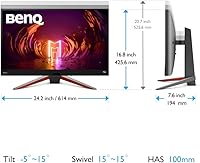
  • Screen Size: The viewable screen measures 27 inches diagonally, housed in a physical chassis spanning 32.28 x 19.88 inches with a depth of 6.3 inches.
  • Resolution: Native resolution is 1920x1080 pixels (Full HD), with a 16:9 aspect ratio and a glossy screen surface finish.
  • Refresh Rate: The panel runs at a maximum 240Hz refresh rate, enabling up to 240 unique frames per second to be displayed for smoother motion.
  • Response Time: Motion blur is rated at 1ms MPRT (Moving Picture Response Time), which describes how quickly pixels transition to reduce ghosting in fast scenes.
  • Color Coverage: The panel covers 99% of the sRGB color space, delivering accurate and consistent color without requiring manual calibration for most users.
  • HDR Support: BenQ HDRi technology adjusts brightness and contrast dynamically based on ambient light conditions using a built-in light sensor.
  • Sync Technology: AMD FreeSync Premium is supported, synchronizing the monitor's refresh rate with compatible AMD GPU output to reduce tearing and stuttering.
  • Audio System: A built-in 2.1 channel speaker system includes two drivers and a 5W subwoofer, with five treVolo sound mode presets for different content types.
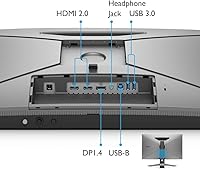
  • Connectivity: Ports include one DisplayPort, one HDMI, and a USB hub with at least one USB 3.0 downstream port for peripheral connections.
  • Console Support: The monitor is compatible with PlayStation 5, Xbox Series X, and Xbox Series S via HDMI without requiring additional adapters.
  • Ergonomics: The stand supports height adjustment, tilt, and swivel, allowing users to position the screen precisely for comfort during extended use.
  • Eye-Care Tech: BenQ Eye-Care features are built in, including low blue light and flicker-free technology designed to reduce visual fatigue over long sessions.
  • Weight: The monitor with stand weighs approximately 20.3 pounds, which is heavier than many comparable models and worth considering for VESA arm mounting.
  • VESA Compatibility: The display supports standard VESA mounting, allowing the stand to be removed and replaced with a compatible third-party wall or desk arm.
  • Image Tools: BenQ Black eQualizer and Light Tuner are included as on-screen tools to manually adjust shadow detail and overall brightness for different game genres.
  • OSD Control: The Quick OSD and Scenario Mapping system allows monitor settings to be adjusted and saved through BenQ software, reducing reliance on physical buttons.
  • Model Number: The official model identifier is EX270M, manufactured by BenQ and first made available in August 2022.

Related Reviews
BenQ MOBIUZ EX271Q 27-inch Gaming Monitor
79%
88%
Color Accuracy
91%
Refresh Rate & Motion
93%
Connectivity & Versatility
86%
KVM Functionality
54%
HDR Performance
More
BenQ EX2710 27-inch Gaming Monitor
80%
91%
Motion Performance
88%
Color Accuracy
93%
Refresh Rate & Sync
89%
Console Compatibility
58%
HDR Quality
More
BenQ EX3210U 32-inch 4K Gaming Monitor

78%
93%
Image Quality
89%
Color Accuracy
88%
Gaming Performance
67%
HDR Performance
86%
Build Quality
More
Skytech Gaming Moonshadow 27-inch Curved Gaming Monitor

83%
88%
Image Quality
91%
Refresh Rate Performance
86%
Adaptive-Sync
83%
VA Panel Contrast
84%
Stand & Ergonomics
More
Raywego Z270B13 27-inch Gaming Monitor
70%
88%
Value for Money
83%
Picture Quality
84%
Refresh Rate Performance
62%
Build Quality
81%
Eye Comfort
More
Amazon Basics 27-inch 1080p Gaming Monitor
76%
88%
Value for Money
79%
Display Quality
91%
Refresh Rate Performance
86%
Response Time
67%
Build Quality
More
Alienware AW2723DF 27-inch Gaming Monitor
80%
93%
Motion Clarity
88%
Color Accuracy
91%
Refresh Rate Performance
54%
HDR Quality
89%
Build Quality
More
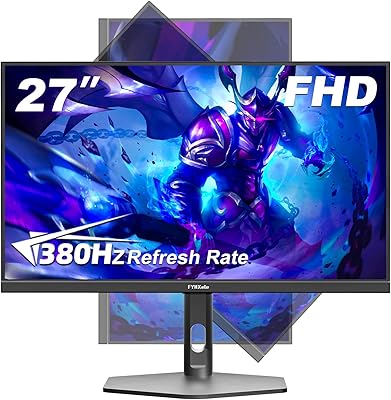
FYHXele 27-inch 380Hz Gaming Monitor
87%
91%
Display Quality
94%
Gaming Performance
88%
Build Quality
85%
Ergonomics & Adjustability
90%
Ease of Setup
More
Sealan 27-inch Curved Gaming Monitor
82%
85%
Display Quality
90%
Ease of Setup
91%
Value for Money
87%
Performance in Gaming
83%
Color Accuracy
More
memzuoix 27-inch QHD 165Hz Gaming Monitor
70%
88%
Image Clarity
84%
Refresh Rate Performance
91%
Value for Money
82%
Adaptive Sync (FreeSync/G-Sync)
77%
Color Accuracy
More

FAQ

Yes, both consoles connect via HDMI and are recognized without any special configuration. The EX270M does not support 4K input, so your console will output at 1080p, but the 240Hz panel makes fast-paced console gameplay look very fluid.

This is the most common concern buyers have, and it is worth being honest about: pixel density at 1080p on a 27-inch panel is lower than on a 24-inch display or a 1440p screen of the same size. If you sit fairly close to your desk — typical for a gaming setup — most people find it acceptable. If you are particularly sensitive to pixel sharpness or plan to use it for detailed work like graphic design, a 1440p monitor may serve you better.

They work fine for casual gaming or background audio while you work, and the 5W subwoofer adds more body than you would expect from monitor speakers. That said, anyone who cares about positional audio in competitive games or simply enjoys good sound quality will still want a headset or external speakers. Think of them as a solid convenience rather than a primary audio solution.

The stand provides a meaningful range of height adjustment along with tilt and swivel, which covers most sitting positions without needing a separate arm. If you use a standing desk or need very precise positioning, a VESA arm is an option since the monitor does support standard VESA mounting.

FreeSync Premium works natively with AMD GPUs, but Nvidia cards also support FreeSync over DisplayPort via Nvidia G-Sync Compatible mode. You should be able to enable adaptive sync regardless of which brand GPU you use, though results can vary slightly between setups.

Rather than passively displaying HDR content, HDRi uses the monitor's built-in ambient light sensor to adjust brightness and contrast in real time based on your room lighting. It is a practical approach for mixed-use environments, though it does not produce the dramatic contrast of a display with true local dimming.

It handles productivity tasks comfortably. The 99% sRGB color coverage means documents, photos, and video content look accurate, and the ergonomic stand makes it easy to set up for long work sessions. It is not a color-critical professional display, but for typical office work, video calls, or casual photo browsing alongside gaming, it performs well.

Black eQualizer brightens shadow areas in the image without affecting midtones or highlights, so dark corners in games like tactical shooters become more visible without the whole picture looking washed out. It is a simple slider in the on-screen menu, and most competitive gamers who try it tend to keep it enabled.

The EX270M does support VESA mounting, so you can remove the stand and attach a compatible arm. The catch is the weight — at over 20 pounds, you will want to make sure your desk arm is rated to handle it, as some budget arms are not designed for monitors this heavy.

The built-in USB hub includes one USB 3.0 downstream port, which is enough for a mouse, keyboard, or USB drive, but limited if you have multiple peripherals. If you rely heavily on USB accessories at your desk, you may want to pair this monitor with a separate hub.