Overview

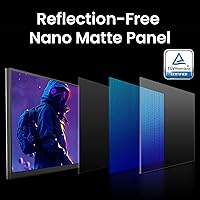
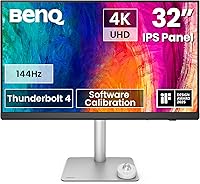
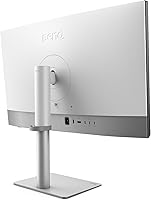
The BenQ PD3226G 32-inch 4K Designer Monitor arrived in March 2025 as a serious tool for creative professionals who refuse to compromise between color accuracy and display performance. What sets it apart from most studio monitors is its nano matte panel — a coating that actually handles ambient light rather than just reducing glare, making it a practical choice for bright offices and mixed-lighting studios. BenQ went all-white with the industrial design, a deliberate nod to the creative workspace aesthetic. At this price tier, you are not just paying for specs; you are paying for a monitor built around consistent, repeatable color output.
Features & Benefits

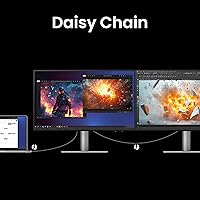
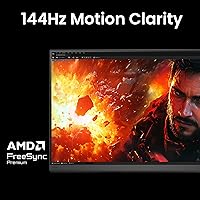
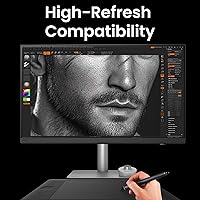
The PD3226G runs 4K at 144Hz — a combination you rarely find on a professionally calibrated display. For design work, the extra refresh rate means smoother scrolling through dense Illustrator artboards and more fluid Figma interactions; it is not a gaming feature sneaked in, it is simply a better daily experience. Color coverage hits 95% DCI-P3 and 100% sRGB, with factory calibration shipping at Delta E under 2, so you are not gambling on whether your display is accurate. Thunderbolt 4 handles everything over a single cable — power delivery, fast data transfer, and daisy-chaining additional displays. The built-in KVM switch and wireless Hotkey Puck genuinely reduce desktop cable chaos.

Best For

This BenQ designer monitor is a natural fit for graphic designers and photo editors who work across multiple color spaces and need a display they can actually trust. Video editors and colorists handling Rec.709 or P3 footage will find the color pipeline properly supported without workarounds. It is especially compelling for Mac users with Thunderbolt 4 laptops — one cable docks a MacBook Pro, charges it, and drives the display at full resolution. The KVM switch adds real value for anyone running a design machine alongside a secondary workstation. Where it is harder to justify is for general office use or anyone without a color-critical workflow to match the investment.

User Feedback

With 542 ratings and a 4.3-star average for a monitor that launched in early 2025, the PD3226G is off to a strong start. Buyers consistently praise the out-of-the-box accuracy — most report no need to recalibrate — and the build quality feels appropriate for the price point. Thunderbolt 4 convenience gets mentioned frequently by Mac users as a genuine daily benefit. The recurring criticisms are worth noting: the OSD menu is dense and takes time to learn, and BenQ's calibration software has a steep learning curve that can frustrate newcomers. Buyers upgrading from older PD-series models generally consider this 32-inch 4K display a meaningful step forward in both refresh performance and connectivity.

Pros

  • Factory calibration ships with Delta E under 2, meaning accurate color right out of the box with no immediate adjustments needed.
  • The nano matte panel handles bright ambient light better than most studio monitors, reducing eye fatigue during long sessions.
  • Thunderbolt 4 single-cable setup is a genuine convenience upgrade for MacBook Pro and Mac Studio users.
  • 4K at 144Hz is a rare pairing on a professionally calibrated display, making daily interactions noticeably smoother.
  • Built-in KVM with the wireless Hotkey Puck is a practical feature for anyone running two computers at one desk.
  • 95% DCI-P3 and 100% sRGB coverage gives designers a reliable foundation for cross-format deliverables.
  • Daisy-chain support allows expanding to a second 4K display without adding a hub or extra adapters.
  • The all-white build quality feels premium and purpose-built, not like an afterthought for the creative market.
  • BenQ Palette Master Ultimate allows ongoing hardware calibration without relying on third-party tools.
  • Early user ratings are strong for a 2025 release, suggesting consistent quality control across units.

Cons

  • The OSD menu is dense and not intuitive, with a learning curve that frustrates users who want quick adjustments.
  • BenQ Palette Master Ultimate software requires time investment to use effectively, which not all buyers anticipate.
  • Thunderbolt 4 benefits are largely wasted on Windows users without compatible hardware, limiting the value proposition.
  • At nearly 15 pounds, the monitor is heavy enough that repositioning or mounting it requires extra effort.
  • Only one USB 2.0 port is included, which feels sparse given the premium positioning and professional audience.
  • The 144Hz refresh rate, while pleasant, adds cost that pure design professionals may not need or fully utilize.
  • No dedicated USB-C or DisplayPort hub functionality beyond the Thunderbolt chain means peripheral expansion is limited.
  • The white colorway, while attractive, may show smudges and discoloration more visibly over time than darker alternatives.

Ratings

The BenQ PD3226G 32-inch 4K Designer Monitor earns its reputation among creative professionals through a combination of factory-verified color accuracy and thoughtful connectivity — but like any premium tool, it comes with trade-offs that matter depending on your workflow. These scores were generated by AI after analyzing verified global user reviews, actively filtering out incentivized, bot-generated, and duplicate submissions, so both the strengths and the friction points are represented honestly. The result is a transparent picture of what real designers, editors, and power users actually experience day to day.
Color Accuracy
93%
For a display targeting color-critical professionals, the out-of-the-box Delta E under 2 calibration is genuinely reliable — most designers report that their prints and exports match the screen without manual correction. Covering 95% DCI-P3 and full sRGB and Rec.709 means you can switch color spaces inside your workflow without reaching for a secondary reference monitor.
A small number of users note subtle unit-to-unit variation, suggesting the factory calibration process is thorough but not perfectly uniform across every panel. Those doing the most demanding print proofing work still recommend validating with a hardware colorimeter after a few months of use.
Connectivity
91%
The Thunderbolt 4 implementation is the single biggest reason Mac users choose this display — one cable handles power, video, and data simultaneously, which genuinely transforms a cluttered desk into a clean docking setup. Daisy-chain support for a second 4K display over the same connection adds flexibility that most competing monitors at this size cannot match.
Windows users without Thunderbolt 4 ports on their machines lose most of the connectivity advantage, reducing the value proposition significantly for that segment. The single USB 2.0 port feels sparse for a display at this price tier, especially when most users need more peripheral connections at their workstation.
Anti-Glare Performance
88%
The nano matte coating is one of the more effective anti-glare solutions available in a professional IPS monitor, and its TÜV reflection-free certification is backed up by real-world use — designers working near windows report noticeably less eye strain compared to standard matte panels. In bright studios where overhead lighting was previously an issue, this coating makes a tangible, daily difference.
The coating does introduce a very subtle softening of perceived contrast and peak color vibrancy when compared side-by-side with a glossy panel in a controlled dark environment. Users who work exclusively in light-controlled rooms may find a glossy or standard anti-glare panel slightly punchier for certain creative tasks.
Refresh Rate Utility
79%
21%
At 144Hz, scrolling through dense Figma prototypes, navigating large Photoshop canvases, and moving between application windows all feel more fluid and less fatiguing over a full workday than on a 60Hz professional display. Designers who also use their workstation for video playback or light motion graphics work get a genuinely better experience at this refresh rate.
The 144Hz spec adds cost that pure color professionals with no interest in motion fluidity may struggle to justify compared to similarly calibrated 60Hz alternatives. The display also lacks variable refresh rate support, which limits its appeal to anyone hoping to leverage the high refresh rate for gaming alongside their design work.
KVM Switch
82%
18%
The built-in KVM with the wireless Hotkey Puck is a practical, well-executed feature for anyone running two machines — switching between a design workstation and a secondary laptop takes a single button press with no perceptible lag. Users in hybrid work setups consistently call this one of the most underrated features of the display after a few weeks of daily use.
The initial KVM configuration requires navigating the OSD, which adds setup friction for users unfamiliar with BenQ's menu structure. A small number of buyers report occasional input recognition delays after switching, particularly when one connected machine is waking from sleep.
Ergonomics
84%
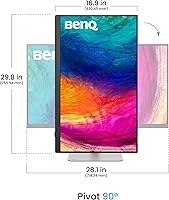
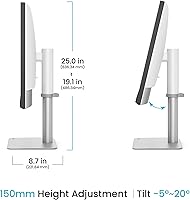
The 150mm height adjustment range accommodates a wide variety of desk setups and seating positions, and the 90-degree pivot is smooth enough for quick vertical orientation changes when reviewing long documents or code. Swivel and tilt adjustments both feel solid without requiring excessive force.
At nearly 15 pounds, the monitor is on the heavier end for a 32-inch display, which makes repositioning or mounting it on a third-party arm a two-person job for some users. The base footprint is also substantial, which can be limiting on compact or shared desks.
Build Quality
89%
The all-white construction feels intentional and premium rather than a cost-cutting aesthetic choice — the plastics are uniform, the stand mechanism is tight, and the overall assembly gives the impression of a display designed to last through years of professional use. Buyers upgrading from older BenQ PD-series monitors frequently comment that the fit and finish feels like a step forward.
The white finish, while attractive, shows fingerprints and dust more visibly than a darker chassis would, requiring more frequent cleaning to maintain a professional appearance. A few users have noted that the white colorway may not integrate as well into non-studio or industrial workspace aesthetics.
Calibration Software
67%
33%
BenQ Palette Master Ultimate covers the full calibration workflow — target setting, measurement, and profile generation — without requiring a separate third-party application, which is a genuine convenience for studios standardizing on BenQ hardware. Advanced users who invest time in learning the software report it performs reliably and consistently across recalibration cycles.
The learning curve is steep enough that many buyers never move beyond the factory calibration, effectively ignoring a key feature they paid for. The interface is not intuitive for newcomers, and BenQ's documentation is thorough but dense, which discourages casual exploration.
OSD Navigation
61%
39%
Once memorized, the OSD covers an impressive range of controls — color mode switching, input management, KVM configuration, and calibration adjustments are all accessible without third-party software. Power users who configure the display once and leave settings stable will rarely need to revisit the menu.
The OSD hierarchy is deep and not logically organized for quick adjustments, which is a consistent frustration across user reviews. New owners frequently report spending significant time in setup figuring out basic settings that should surface more intuitively in a professional-tier monitor.
Value for Money
72%
28%
For Mac-centric creative studios where Thunderbolt 4 docking, color accuracy, and KVM are all active requirements, the PD3226G consolidates what would otherwise be several separate hardware purchases into a single display investment. When evaluated against the total cost of a calibrated monitor plus a separate dock plus a KVM switch, the pricing becomes more defensible.
Buyers who only need one or two of the headline features — and especially those without Thunderbolt 4 infrastructure — will find the price hard to rationalize against capable competitors at a lower price point. Casual creative users or those in non-color-critical roles are overpaying for precision they will not actively use.
Setup Experience
74%
26%
Physical assembly is straightforward — the stand attaches without tools and the cable routing is clean. Thunderbolt users in particular report that getting from box to working display takes under ten minutes once the single cable is connected.
Software setup, particularly configuring the KVM inputs and understanding the OSD menu structure, adds meaningful time to the initial experience. Several users report that the documentation included in the box is insufficient for first-time BenQ display owners.
Daisy Chain Capability
81%
19%
Support for driving a second 4K display or an 8K display via Thunderbolt 4 daisy-chaining is a genuine capability that expands the monitor into the centerpiece of a multi-display professional workstation without additional docks. Users building out compact but powerful Mac-based studio rigs find this particularly valuable.
Daisy-chain functionality is entirely dependent on the host machine supporting Thunderbolt daisy-chaining, which not all Windows workstations do — and BenQ's documentation could be clearer about this hardware dependency upfront. The second display in a daisy-chain also runs at a reduced refresh rate in some configurations.
Eye Comfort
86%
Extended working sessions of six or more hours receive consistently positive feedback regarding eye fatigue, which users attribute to the combination of the nano matte coating, the IPS panel characteristics, and the overall brightness management of the display. Designers doing marathon deadline sessions report less end-of-day eye strain than with previous displays they have owned.
The display does not include flicker-free or low blue light certification mentions in verified buyer feedback, which is a consideration for users who are particularly sensitive to these factors during long sessions. Brightness uniformity across the full panel could also be slightly more consistent at the lowest brightness settings, according to some user reports.

Suitable for:

The BenQ PD3226G 32-inch 4K Designer Monitor is built for professionals whose work lives and dies by color accuracy — graphic designers, brand identity artists, photo retouchers, and anyone who regularly delivers work across multiple color spaces. Video editors and colorists working in Rec.709 or DCI-P3 pipelines will find the display trustworthy enough to make real grading decisions without second-guessing the panel. Mac users running a MacBook Pro or Mac Studio will get immediate, practical value from the Thunderbolt 4 connection — one cable carries power, data, and video, which genuinely simplifies a busy desk. Those managing two workstations simultaneously will appreciate the built-in KVM switch, which removes the need for a separate hardware switcher. If your studio gets strong natural light and glare has been a persistent headache with glossy or standard matte screens, the nano matte coating here is a real, tested solution rather than a marketing claim.
Not suitable for:

The BenQ PD3226G 32-inch 4K Designer Monitor is a hard sell for anyone whose work does not involve color-critical output — the premium you pay is tied almost entirely to calibration accuracy and professional connectivity, neither of which matters much for spreadsheets, writing, or casual web browsing. Budget-conscious buyers will find the price point difficult to justify if Thunderbolt 4 is not part of their current setup, since the single-cable docking advantage disappears entirely on older or non-Thunderbolt systems. Gamers considering this display for its 144Hz refresh rate should look elsewhere — it performs fine for general use at that speed, but it lacks the variable refresh rate features and response time optimizations that dedicated gaming monitors offer. Those who dislike navigating complex on-screen display menus or learning proprietary calibration software may find the day-to-day management of this monitor more involved than expected. And if desk space or weight is a concern, at nearly 15 pounds with a fairly deep footprint, this is a monitor that demands a substantial, stable workspace.
Specifications

  • Screen Size: The display measures 32 inches diagonally, providing ample working space for multi-window design layouts without requiring an ultrawide form factor.
  • Resolution: Native resolution is 3840x2160 (4K UHD), delivering sharp text rendering and fine detail reproduction critical for print and digital design work.
  • Refresh Rate: The panel runs at up to 144Hz, offering noticeably smoother scrolling and cursor tracking compared to standard 60Hz professional monitors.
  • Panel Type: An IPS panel is used, ensuring consistent color accuracy and wide viewing angles without the color shift common in VA or TN alternatives.
  • Color Gamut: Coverage reaches 95% DCI-P3, 100% sRGB, and 100% Rec.709, supporting the primary color spaces used in print, web, and video production.
  • Factory Calibration: Each unit ships with factory calibration targeting Delta E under 2, meaning color accuracy is verified before the monitor leaves the production facility.
  • Screen Coating: The nano matte anti-reflective coating carries TÜV certification for reflection-free performance, reducing glare in bright or mixed-lighting environments.
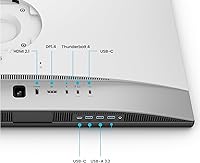
  • Connectivity: A single Thunderbolt 4 port delivers up to 90W of power delivery and 40Gbps data transfer, supporting both single-cable laptop docking and daisy-chaining additional displays.
  • Daisy Chain: Using Thunderbolt 4 certified cables, the monitor can drive two additional 4K displays or one 8K display in a daisy-chain configuration.
  • KVM Switch: The built-in KVM switch allows one keyboard and mouse to control two separate computers, with switching triggered via the included wireless Hotkey Puck.
  • Calibration Software: BenQ Palette Master Ultimate is the bundled hardware calibration application, enabling ongoing display profiling without requiring third-party colorimeter software.
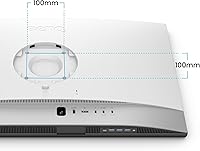
  • Ergonomics: The stand supports 150mm of height adjustment, 90-degree pivot, 30-degree left and right swivel, and tilt between -5 and 20 degrees.
  • USB Ports: One USB 2.0 port is included for peripheral connectivity, supplementing the primary Thunderbolt 4 connection.
  • Dimensions: The monitor measures 19 x 9.5 x 25.1 inches with the stand attached, requiring a desk with adequate depth for stable placement.
  • Weight: The unit weighs 14.6 pounds including the stand, which is typical for a 32-inch professional display with a full ergonomic base.
  • Color Finish: The monitor ships in an all-white colorway, a deliberate design choice intended to complement creative studio workspaces.
  • Aspect Ratio: The display uses a standard 16:9 aspect ratio, maintaining compatibility with the full range of professional design and video production applications.
  • Release Date: The PD3226G became available in March 2025, making it one of the newer entries in BenQ's professional designer monitor lineup.

Related Reviews
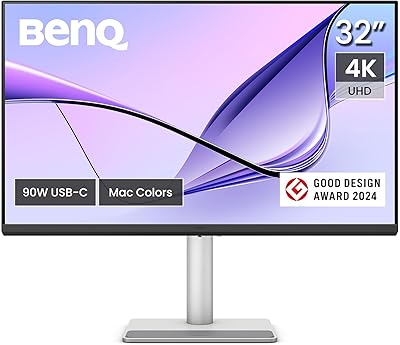
BenQ MA320U 32-inch 4K Monitor
81%
94%
Mac Ecosystem Integration
91%
Color Accuracy
88%
Connectivity & USB Hub
83%
Stand Ergonomics
92%
Display Sharpness
More
BenQ PD3225U 32-inch 4K Monitor
88%
94%
Color Accuracy
90%
Ergonomics & Comfort
89%
Thunderbolt 3 Connectivity
88%
Setup & Installation
87%
Build Quality
More
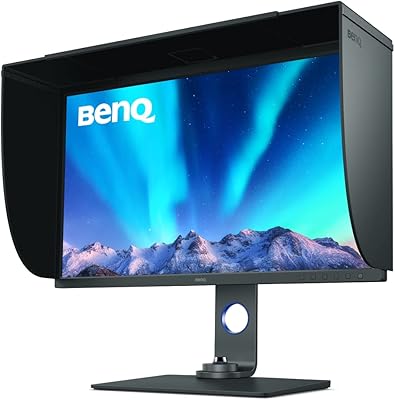
BenQ EW3280U 32-inch 4K UHD Monitor
83%
94%
Display Quality
91%
Color Accuracy
78%
Ease of Setup
70%
Audio Performance
89%
Connectivity
More
BenQ EX3210U 32-inch 4K Gaming Monitor
78%
93%
Image Quality
89%
Color Accuracy
88%
Gaming Performance
67%
HDR Performance
86%
Build Quality
More
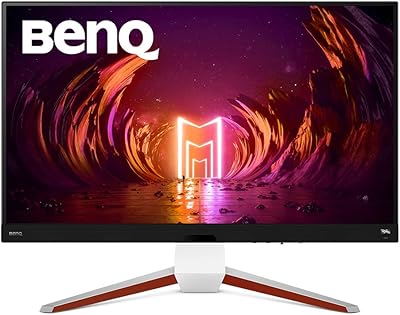
BenQ SW321C 32-inch Photo Editing Monitor
82%
94%
Color Accuracy
91%
Factory Calibration
93%
Color Gamut Coverage
88%
Build Quality
86%
Ergonomics
More
ViewSonic VX3267U-4K 32-inch 4K IPS Monitor

74%
91%
Image Sharpness
83%
USB-C Functionality
76%
Color Accuracy
54%
HDR Performance
47%
Stand & Ergonomics
More
ViewSonic VP3256-4K 32-Inch 4K UHD Monitor
88%
94%
Display Quality
92%
Color Accuracy
88%
Ergonomics & Comfort
86%
Build Quality
90%
Ease of Setup
More
ViewSonic VP3268A-4K 32-inch 4K UHD IPS Monitor
86%
94%
Color Accuracy
88%
Ergonomics/Comfort
91%
Build Quality
83%
HDR Performance
85%
Connectivity Options
More
ViewSonic VX3276-4K-MHD 32-inch 4K Monitor

76%
91%
Image Clarity & Sharpness
74%
Color Accuracy
86%
Contrast & Black Levels
61%
HDR Performance
58%
Refresh Rate & Motion Handling
More
BenQ RD320U 32” 4K Monitor
87%
94%
Display Quality
89%
Ergonomics & Comfort
91%
Eye-care Features
93%
Color Accuracy
80%
Size & Desk Compatibility
More

FAQ

It works with both. The Thunderbolt 4 port is fully compatible with Windows machines that have Thunderbolt support, and you can also connect via DisplayPort or other inputs depending on your setup. The single-cable docking experience is just particularly smooth for MacBook Pro users because Apple has prioritized Thunderbolt across its laptop range.

Most buyers report that you do not need to immediately recalibrate out of the box — the factory calibration holds up well, with Delta E under 2 verified before shipping. That said, if you are doing high-stakes color grading or print production work, running a calibration pass with a colorimeter after a few weeks of use is still considered good practice for any professional display.

It is genuinely useful even if you never open a game. Scrolling through large Illustrator or Figma files, moving palettes around, and just general cursor tracking all feel noticeably more fluid at 144Hz compared to a 60Hz panel. It is not a reason to choose this monitor on its own, but once you get used to it, going back feels sluggish.

You connect two computers to the monitor — one via Thunderbolt and one via another input — and the wireless Hotkey Puck sits on your desk. Press it and your keyboard and mouse instantly shift to the other machine. It takes a moment to get the input mapping set up initially, but once configured, switching is quick and reliable.

There is a trade-off. The nano matte coating does soften perceived contrast and saturation very slightly compared to a glossy panel in a controlled dark room. In real-world bright office conditions, though, the glare reduction more than compensates — you are not fighting reflections that would distort your color perception far more than the coating does.

You can connect via USB-C, but you will not get the full 90W power delivery or 40Gbps data speeds — those require a Thunderbolt 4 certified cable and host port. The display will still work and charge your laptop at a lower wattage, but the single-cable docking experience is optimized for Thunderbolt 4 hardware specifically.

Honestly, it has a learning curve. The OSD covers a lot of ground — color modes, calibration settings, input switching, KVM configuration — and the menu hierarchy is not immediately intuitive. Most users get comfortable with it after a week or two, but if you are used to monitors with simpler controls, plan for some initial setup time.

Yes, the stand is solid. The 150mm height range covers most sitting positions, and the pivot and swivel adjustments move smoothly without feeling loose. At nearly 15 pounds, the monitor stays planted when you adjust it rather than rocking or shifting on the desk.

Yes, using Thunderbolt 4 certified cables you can connect a second 4K display downstream from this monitor, or even an 8K display, depending on your source hardware. Your computer needs to support Thunderbolt daisy-chaining as well — most modern Macs do, but check your specific Windows laptop or workstation specs before assuming.

Users coming from earlier PD models — like the PD3220U — consistently note that the jump to 144Hz makes the display feel more responsive in daily use, and the Thunderbolt 4 implementation is more capable than what prior generations offered. Color accuracy is on par with the best of the older line, which already set a high bar, so the upgrade is primarily about connectivity and smoothness rather than a dramatic shift in color performance.