Overview

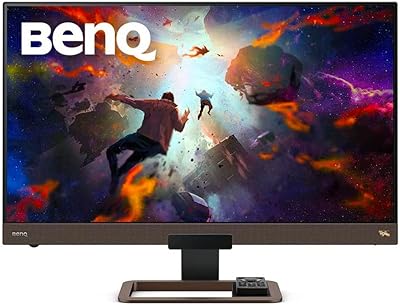
The BenQ EX3210U 32-inch 4K Gaming Monitor sits in a crowded premium tier, but it carves out a distinct identity by bridging serious gaming performance and legitimate creative work in a single package. Most monitors at this size force you to choose between fast refresh rates and accurate color — this BenQ display refuses that compromise. The included remote control is a small but genuinely welcome touch you rarely find at any price point. Factor in the built-in 2.1 audio system and noise-cancelling microphone, and the feature set starts to justify the investment for buyers who want fewer devices cluttering their desk.
Features & Benefits

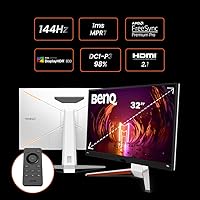
The IPS panel covers both AdobeRGB and DCI-P3 color spaces, which matters if you edit photos or footage between gaming sessions — colors look rich without the oversaturation that plagues lesser displays. At 144Hz with a 1ms MPRT response time, fast-paced games feel genuinely responsive, and FreeSync Premium Pro keeps tearing under control across a wide frame rate range. BenQ's HDRi and Brightness Intelligence technology adjusts contrast and brightness based on ambient conditions; it works better than expected for an IPS panel, though it won't rival OLED or mini-LED for deep blacks. The 2.1 speaker system, complete with a small subwoofer, punches well above the typical monitor audio bar.

Best For

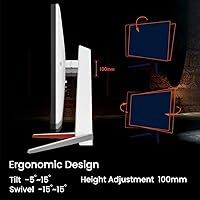
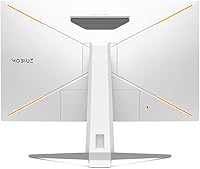
This 32-inch 4K monitor makes the most sense for PC gamers who want a large, sharp canvas without sacrificing competitive refresh rates. Console players will appreciate the HDMI 2.1 connection, which enables 4K at 120Hz on a PS5 or Xbox Series X without adapters or compromises. Photographers and video editors benefit from the wide color coverage for accurate, reliable work. It also fits naturally into a home office that doubles as a gaming space after hours — the ergonomic stand adjusts for height, swivel, and tilt, making it easy to dial in a comfortable position without buying a separate arm.

User Feedback

Buyers consistently praise the image quality and color accuracy, with many noting that out-of-the-box calibration is better than expected for a gaming-oriented screen. Build quality earns strong marks too. That said, the OSD menu navigation draws repeated criticism for being unintuitive — most users eventually adjust, but expect a learning curve. The built-in speakers impress relative to monitor standards, though dedicated desktop speakers will still outperform them. A common frustration is the microphone's USB-C-only requirement; buyers who connect via DisplayPort or HDMI cannot use it at all, which catches people off guard. Long-term reliability feedback is generally positive, with few reports of panel or backlight issues over extended use.

Pros

  • Sharp, accurate 4K IPS panel with wide color coverage suits both gaming and creative workflows
  • 144Hz refresh rate keeps fast-paced gameplay smooth without forcing a resolution compromise
  • FreeSync Premium Pro effectively eliminates screen tearing across a broad frame rate range
  • HDMI 2.1 support enables true 4K 120Hz gaming on current-generation consoles
  • Built-in 2.1 audio with a subwoofer sounds noticeably better than typical monitor speakers
  • Included remote control makes adjusting settings without touching the monitor genuinely convenient
  • Ergonomic stand offers height, swivel, and tilt adjustments that most users find sufficient
  • HDRi adapts brightness and contrast dynamically, improving watchability across different lighting conditions
  • Out-of-the-box color accuracy impresses buyers who expected more calibration effort
  • Five USB 3.0 ports add practical hub functionality to an already feature-rich package

Cons

  • OSD menu is widely criticized for being confusing and slow to navigate
  • Noise-cancelling microphone only works via USB-C, making it useless for DisplayPort or HDMI users
  • HDR performance falls short of dedicated HDR displays using OLED or mini-LED technology
  • The EX3210U's panel cannot match the deep blacks or contrast ratios of OLED alternatives
  • At nearly 24 pounds, repositioning or mounting the display is more effort than lighter competitors
  • Stand rigidity receives mixed feedback, with some users noticing minor wobble during adjustments
  • Full feature set commands a premium price that is hard to justify if you skip the audio and mic
  • 144Hz ceiling may disappoint buyers coming from higher-refresh-rate monitors in less demanding titles
  • Remote control feels redundant once initial setup is complete, adding minor desk clutter
  • Color accuracy, while strong, may still require manual calibration for professional-grade output

Ratings

The scores below reflect our AI-driven analysis of verified global buyer reviews for the BenQ EX3210U 32-inch 4K Gaming Monitor, with spam, bot-generated, and incentivized feedback actively filtered out before scoring. Each category is weighted against real ownership experiences — from first-week impressions to long-term reliability — so both the standout strengths and the recurring frustrations are represented honestly.

Image Quality
93%
Buyers consistently describe the 4K IPS panel as one of the sharpest they have used at this screen size, with colors that look accurate and balanced right out of the box. Photographers and casual gamers alike mention that fine details — texture in landscapes, skin tones in cutscenes — are noticeably more defined than on their previous displays.
A small number of users noted slight IPS glow in dark corners during nighttime use, which can be distracting in moody game environments or dark cinematic content. It is not widespread, but buyers sensitive to glow should be aware.
Color Accuracy
89%
The wide AdobeRGB and DCI-P3 coverage earns genuine praise from creative users who use this 32-inch 4K monitor for photo retouching and video grading alongside gaming. Many report that color consistency holds up across different picture modes without heavy manual adjustment.
A portion of reviewers doing serious professional color work still recommend running a hardware calibration for maximum accuracy, noting that factory calibration, while good, is not perfect at the edges of the color space. It is above average, but not a substitute for a properly profiled workflow.
Gaming Performance
88%
The 144Hz refresh rate and 1ms MPRT combination draws strong praise from users who play fast-paced titles, with motion clarity described as sharp and free of the trailing artifacts that plague slower IPS panels. FreeSync Premium Pro gets specific credit for keeping gameplay smooth even when frame rates dip below the monitor's ceiling.
Competitive players coming from 240Hz displays occasionally note that the 144Hz cap feels like a step back during twitch-reflex gaming. The EX3210U is not designed for that segment, but it is worth flagging for anyone prioritizing pure competitive edge over visual fidelity.
HDR Performance
67%
33%
BenQ's HDRi system does a reasonable job of enhancing contrast and brightness intelligently, and users watching HDR films or playing HDR-enabled titles notice a visible improvement in dynamic scenes compared to SDR mode. For casual HDR use, it holds up well.
Buyers who have used OLED or mini-LED HDR displays find the contrast and black levels disappointing by comparison — and that is a fair criticism. The IPS panel simply cannot produce the deep blacks that make HDR truly impactful, and a few reviewers felt the HDRi processing occasionally oversaturates highlights in bright outdoor game scenes.
Build Quality
86%
The overall construction earns consistent praise for feeling solid and premium, with a well-finished matte housing that does not attract fingerprints or look cheap at the desk. Most buyers describe the monitor as feeling worth the price the moment it comes out of the box.
A recurring complaint involves minor stand wobble, particularly on softer desk surfaces or when typing forcefully nearby. It is not a structural flaw, but users who share desks or work in vibration-prone environments found it mildly irritating over time.
Audio Quality
81%
19%
The 2.1 channel speaker system with its 5W subwoofer consistently surprises buyers who expected typical thin monitor audio. Users report that casual gaming, YouTube, and video calls all sound noticeably fuller and more satisfying than any monitor speaker setup they have previously owned.
Dedicated desktop speakers or quality headphones still outclass the built-in system for music listening and immersive gaming audio. A handful of buyers noted that at higher volume levels, the bass can sound slightly boomy rather than tight and controlled.
Microphone Usability
54%
46%
When connected via USB-C, the noise-cancelling microphone performs well enough for video calls and gaming chat, with background noise reduction that users on the receiving end noticed positively. For laptop users with USB-C, it genuinely reduces the need for a separate headset.
The USB-C-only restriction generates significant frustration among buyers who connect via DisplayPort or HDMI — which covers most desktop PC setups — rendering the microphone completely non-functional for them. Several reviewers felt this limitation was not clearly communicated at purchase and consider it a meaningful design shortcoming.
Ergonomics
78%
22%
Height, swivel, and tilt adjustments on the included stand cover the most common positioning needs, and users appreciate not having to immediately buy a separate arm just to get a comfortable viewing angle. The adjustment range is generous enough for most desk configurations.
A few taller users or those with very deep desks found the maximum height adjustment just short of ideal, and the stand's tilt range is adequate but not exceptional. Those with specific ergonomic requirements may still prefer a third-party VESA arm.
OSD & Controls
58%
42%
The included remote control takes the edge off navigating settings, handling the most common adjustments — input switching, brightness, volume — without requiring users to fumble with physical buttons behind the screen. Most buyers appreciate having it for day-to-day use.
The on-screen menu itself draws consistent criticism for being complex, unintuitive, and slow to navigate when deeper settings are needed. Multiple reviewers described spending considerable time figuring out features that should have been straightforward to access.
Connectivity
87%
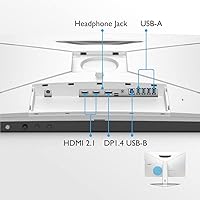
Five USB 3.0 ports effectively turn the EX3210U into a desk hub, which buyers using multiple peripherals find extremely practical for keeping cables organized. HDMI 2.1 support for 4K 120Hz console gaming is called out as a genuine differentiator in this display category.
Some users noted the absence of a Thunderbolt port as a minor gap, particularly for MacBook users who want single-cable connectivity for both video and data. DisplayPort and HDMI cover most scenarios, but the lack of Thunderbolt is a small step back for certain creative workflows.
Setup & Installation
82%
18%
Most buyers describe the unboxing and assembly process as straightforward, with the stand clicking into place without tools and the initial display configuration requiring minimal effort. The remote makes first-time input selection noticeably easier than navigating buttons on the back of the panel.
A subset of users found the initial picture mode and HDR configuration confusing, particularly when trying to optimize settings for both gaming and content creation use cases. The manual provides limited guidance, leaving some buyers reliant on online forum advice to get the most out of the display.
Value for Money
74%
26%
For buyers who actively use the full feature set — 4K gaming, color-accurate creative work, built-in audio, and HDMI 2.1 — the EX3210U justifies its premium positioning by replacing several separate purchases. Users who lean on all those capabilities tend to rate the value favorably.
Buyers who primarily game and have no interest in the audio system or microphone find the price harder to justify against competitors that offer similar panel performance at a lower cost. If half the features go unused, the value equation weakens noticeably.
Long-Term Reliability
83%
Long-term owners — those using this 32-inch 4K monitor for a year or more — generally report stable performance with no significant panel degradation, backlight issues, or firmware problems. BenQ's reputation for monitor longevity appears to hold up in real ownership experiences.
A small number of users reported dead pixels or backlight uniformity issues appearing after several months of use, which is not unique to this model but worth noting. Warranty support responses received mixed reviews, with some buyers experiencing longer-than-expected resolution times.

Suitable for:

The BenQ EX3210U 32-inch 4K Gaming Monitor is built for buyers who refuse to maintain separate setups for work and play. PC gamers who want sharp 4K visuals without dropping below competitive refresh rates will find this display hits a rare sweet spot. Console players connecting a PS5 or Xbox Series X via HDMI 2.1 get the full 4K 120Hz experience without any workarounds. Creative professionals — photographers, video editors, or designers — benefit from the wide AdobeRGB and DCI-P3 color coverage, which makes color-critical work genuinely reliable on this panel. It also suits home office users who want to trim desk clutter, since the built-in 2.1 audio and noise-cancelling microphone eliminate the need for separate speakers or a headset during calls.
Not suitable for:

The BenQ EX3210U 32-inch 4K Gaming Monitor is a harder sell for buyers whose priorities sit outside its particular strengths. Competitive esports players chasing the absolute lowest input lag and highest refresh rates — think 240Hz and above — will find this display is not optimized for that use case. Anyone expecting OLED-level contrast or truly deep blacks should look elsewhere; IPS HDR has real limitations, and BenQ's HDRi system, while useful, does not close that gap. The built-in microphone only functions over USB-C, so buyers planning to connect via DisplayPort or HDMI will get no use out of it — a genuine limitation worth knowing upfront. Budget-conscious shoppers will also want to weigh whether the full feature set justifies the premium price, especially if audio and the mic are features they would never use.
Specifications

  • Panel Type: The display uses an IPS panel, which delivers consistent colors and wide viewing angles compared to TN alternatives.
  • Screen Size: The active display area measures 31.5 inches diagonally, providing a large, immersive workspace for gaming and creative tasks.
  • Resolution: Native resolution is 3840x2160 (4K UHD), offering four times the pixel density of a standard 1080p screen.
  • Refresh Rate: The panel supports a maximum refresh rate of 144Hz, enabling smooth motion in both games and fast-scrolling content.
  • Response Time: BenQ rates the panel at 1ms MPRT, which reduces motion blur during high-speed gameplay.
  • Color Gamut: The EX3210U covers both AdobeRGB and DCI-P3 color spaces, making it suitable for color-critical photo and video work.
  • HDR Support: The monitor features BenQ HDRi with Brightness Intelligence, which dynamically adjusts contrast and brightness based on content and ambient light.
  • Adaptive Sync: FreeSync Premium Pro is supported, reducing screen tearing and stuttering across a wide variable refresh rate range.
  • Audio System: A built-in 2.1 channel speaker system includes a 5W subwoofer, providing richer low-end audio than typical stereo monitor speakers.
  • Microphone: A noise-cancelling microphone is integrated into the display but only functions when the monitor is connected via USB-C.
  • Connectivity: The monitor includes HDMI 2.1 for console 4K 120Hz output, along with five USB 3.0 ports for peripheral connectivity.
  • Aspect Ratio: The panel uses a standard 16:9 widescreen aspect ratio, compatible with virtually all gaming and productivity content.
  • Ergonomics: The included stand supports height adjustment, swivel, and tilt, allowing flexible positioning without a third-party monitor arm.
  • Remote Control: A physical remote control is included in the box, allowing users to adjust settings without reaching for the OSD buttons.
  • Weight: The monitor weighs approximately 23.4 pounds with the stand attached, which is typical for a display of this size and build quality.
  • Dimensions: Overall product dimensions are approximately 21.38 x 37.8 x 8.19 inches (H x W x D) with the stand installed.
  • Anti-Glare Coating: The screen surface features an anti-glare treatment to reduce reflections in brightly lit environments.
  • Power Input: The EX3210U operates on 240V input, and users should confirm compatibility with their local power supply if outside standard regions.

Related Reviews
BenQ MA320U 32-inch 4K Monitor
81%
94%
Mac Ecosystem Integration
91%
Color Accuracy
88%
Connectivity & USB Hub
83%
Stand Ergonomics
92%
Display Sharpness
More
BenQ PD3225U 32-inch 4K Monitor
88%
94%
Color Accuracy
90%
Ergonomics & Comfort
89%
Thunderbolt 3 Connectivity
88%
Setup & Installation
87%
Build Quality
More
BenQ PD3226G 32-inch 4K Designer Monitor
81%
93%
Color Accuracy
91%
Connectivity
88%
Anti-Glare Performance
79%
Refresh Rate Utility
82%
KVM Switch
More
BenQ EW3280U 32-inch 4K UHD Monitor
83%
94%
Display Quality
91%
Color Accuracy
78%
Ease of Setup
70%
Audio Performance
89%
Connectivity
More
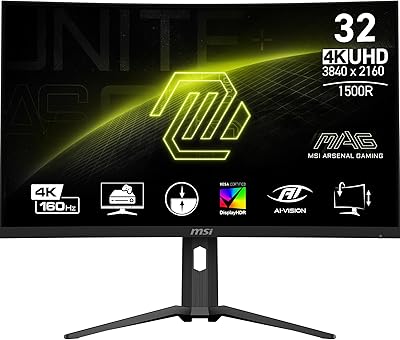
MSI MAG321CUP 32-inch 4K Gaming Monitor
86%
93%
Performance
91%
Display Quality
88%
Ergonomics
85%
Ease of Setup
60%
HDR Performance
More
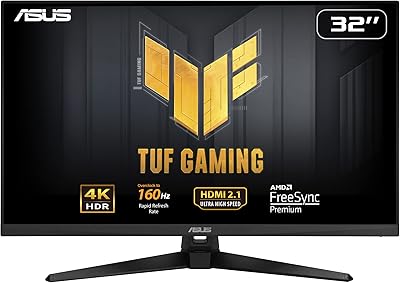
ASUS TUF Gaming VG32UQA1A 32-inch Gaming Monitor
74%
88%
Image Clarity
83%
Refresh Rate Performance
91%
Console Compatibility
54%
HDR Quality
84%
Motion Handling
More
ViewSonic XG320U 32-Inch 4K UHD Gaming Monitor
87%
93%
Display Quality
91%
Gaming Performance
95%
Color Accuracy
88%
Build Quality
89%
Ergonomics
More
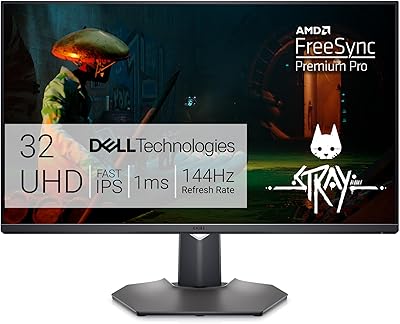
Dell G3223Q 32-inch 4K UHD Gaming Monitor
85%
92%
Display Quality
90%
Gaming Performance (144Hz, 1ms)
88%
Ergonomics & Comfort
85%
Build Quality & Design
75%
Connectivity & Ports
More
Corsair XENEON 32UHD144-A 32-Inch 4K Gaming Monitor
86%
94%
Gaming Performance
91%
Color Accuracy
89%
Visual Quality
87%
Build Quality
88%
Connectivity Options
More
BenQ SW321C 32-inch Photo Editing Monitor
82%
94%
Color Accuracy
91%
Factory Calibration
93%
Color Gamut Coverage
88%
Build Quality
86%
Ergonomics
More

FAQ

Yes, the HDMI 2.1 port supports 4K at 120Hz, which is exactly what current-generation consoles need for their highest performance modes. Just make sure you are using a certified HDMI 2.1 cable to get the full benefit.

Only if your desktop has a USB-C port and you connect the monitor using a USB-C cable. If you are using HDMI or DisplayPort, the microphone will not work at all — this is a hardware limitation, not a software setting. It is worth knowing before you buy if the mic is a key reason you are considering this display.

Honestly, there is a noticeable gap. IPS panels cannot produce the deep blacks or high contrast ratios that OLED screens achieve, so the HDRi system on this BenQ display is better described as an intelligent enhancement rather than true HDR. For most gaming and general use it looks good, but do not expect OLED-level results.

Yes, though it is certified for FreeSync Premium Pro rather than G-Sync. Most modern NVIDIA GPUs support FreeSync displays through G-Sync Compatible mode, so variable refresh rate should work fine. For complete certainty, check NVIDIA's G-Sync Compatible list for this model.

BenQ typically includes an HDMI cable, a DisplayPort cable, a USB-C cable, and a power cable in the box, though the exact bundle can vary by region. It is worth double-checking the package contents if a specific cable type is critical for your setup.

Most users find the stand adequate for everyday use, but some report minor wobble, particularly on softer desk surfaces. If you type heavily or share a desk, a VESA-compatible monitor arm might be worth considering for extra stability.

Out of the box, color accuracy is better than average for a gaming monitor, and many creative users find it usable without any adjustment. That said, for professional-grade color work, running a hardware calibration with a colorimeter will give you more confidence in the accuracy.

The remote handles most common adjustments like input switching, volume, and picture modes, which is genuinely useful day-to-day. The OSD buttons on the monitor are still there for deeper settings, but those are the ones users tend to find less intuitive.

They punch well above the average monitor speaker, especially with the subwoofer adding some body to the low end. For casual gaming and media consumption they are more than adequate, but a dedicated speaker system or quality headphones will still outperform them for serious listening.

Yes, the EX3210U supports standard VESA mounting, so any compatible arm or wall bracket should work. Just keep in mind the monitor weighs around 23 pounds, so make sure your chosen arm is rated for that load.