Overview

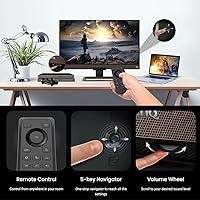
The BenQ EW3280U 32-inch 4K UHD Monitor sits in an interesting spot — it's not chasing the gaming crowd, and it's not pretending to be a professional color-grading display either. BenQ built this around people who want a single screen that handles work, streaming, and casual creative tasks without compromise. The IPS panel delivers wide viewing angles and reliable color consistency, which matters if you're frequently sharing your screen or working off-axis. What genuinely stands out is the inclusion of a remote control and built-in 2.1-channel audio — conveniences you rarely see at this price tier. Think of it as a thoughtfully assembled multimedia workstation monitor.

Features & Benefits

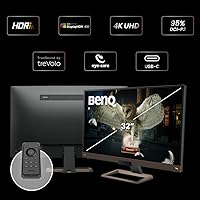
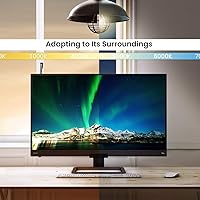
The EW3280U's full-resolution 4K IPS panel renders fine detail with impressive clarity, and the matte screen coating keeps reflections in check even in brightly lit rooms. BenQ's HDRi technology goes a step beyond standard HDR labeling — it reads scene content and adjusts tone-mapping on the fly, so highlights don't blow out and shadows retain texture. The Brightness Intelligence Plus sensor monitors ambient light and automatically tunes both brightness and color temperature, which genuinely reduces eye fatigue over long sessions. Connecting a MacBook or laptop via USB-C handles video, data, and 60W charging through a single cable — that alone makes a meaningful difference to a cluttered desk setup.

Best For

This 32-inch multimedia display is a strong fit for photo editors and designers who want solid color accuracy straight out of the box, without needing to manually calibrate before every project. Remote workers who toggle between video calls, documents, and streaming throughout the day will appreciate a single screen that handles all three without obvious weak points. MacBook users especially benefit from the USB-C connection, which keeps the desk clean and the laptop charged simultaneously. Anyone prone to eye strain during extended work hours will find BenQ's flicker-free and low blue light modes genuinely useful. The one clear exception: fast-paced gaming, where the 60Hz refresh rate simply isn't built for that audience.

User Feedback

Across close to five thousand ratings, the EW3280U holds a strong 4.4-star average, and the consistency of praise is telling. Buyers repeatedly highlight out-of-the-box color quality, USB-C convenience, and how much desk space the built-in audio system frees up — though most agree it's a welcome bonus rather than a dedicated speaker replacement. Criticism clusters around two areas: some owners find the stand feels less rigid than expected, and anyone coming from a gaming background will quickly notice the 60Hz ceiling. The HDRi feature earns a split verdict — casual users find it helpful, more particular users simply turn it off. On balance, the satisfaction rate reflects a monitor that delivers on its core promises.

Pros

  • 4K IPS panel delivers sharp, color-accurate visuals straight out of the box with no manual calibration needed.
  • USB-C with 60W power delivery lets laptop users connect, charge, and extend their display with a single cable.
  • Brightness Intelligence Plus automatically adjusts to ambient light, reducing eye strain over long work sessions.
  • HDRi dynamic tone-mapping improves contrast on HDR content without the blown-out look of basic HDR implementations.
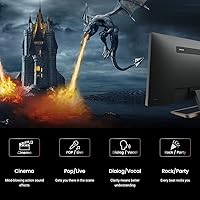
  • Built-in 2.1-channel audio with a subwoofer is a genuine space-saver for users who just want functional desk sound.
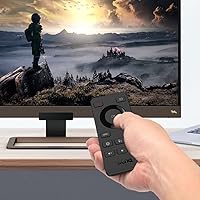
  • The included remote control makes navigating display settings far less tedious than wrestling with monitor buttons.
  • Matte screen finish handles overhead lighting and window glare well in typical home and office environments.
  • Height and tilt adjustment gives enough ergonomic flexibility for most sitting and standing desk configurations.
  • Flicker-free backlight and low blue light modes are practical features for anyone who logs long hours at a screen.
  • Wide viewing angles mean colors stay consistent whether you are sitting centered or off to the side.

Cons

  • The 60Hz refresh rate is a hard limitation — fast gaming or high frame-rate content is simply not this monitor's territory.
  • Some owners report that the stand feels less stable than expected, which can be noticeable on desks with any vibration.
  • HDRi processing can occasionally look over-cooked on certain content, and there is no simple toggle on the remote to disable it quickly.
  • Built-in speakers, while useful, lack the dynamic range and volume ceiling that even a modest external speaker pair can offer.
  • Only one USB-A port is included, which feels limiting for users who rely on the monitor as a USB hub.
  • At its weight and depth, this display is on the heavier and bulkier side compared to slimmer 4K alternatives.
  • The 60W USB-C charging is sufficient for most ultrabooks but may charge larger or more power-hungry laptops slowly under load.
  • Response time is not class-leading, so fast-moving visuals can exhibit minor trailing in some viewing conditions.

Ratings

The scores below reflect an AI-driven analysis of verified global buyer reviews for the BenQ EW3280U 32-inch 4K UHD Monitor, with spam, bot-generated, and incentivized feedback actively filtered out before scoring. Each category is evaluated on the full range of real user experiences — not just the loudest voices — so both the genuine strengths and the recurring frustrations are represented honestly in every number.

Image Quality
93%
Buyers consistently describe the picture as the strongest reason to choose this monitor, with colors appearing accurate and balanced right out of the box. Photo editors and video streamers alike note that skin tones and gradients look natural without the oversaturation common in competing displays at this size.
A small segment of users who pushed the EW3280U into HDR-heavy workloads felt that peak brightness fell short of what they expected from a true HDR display. Bright highlights in certain film scenes can look slightly constrained compared to higher-nit alternatives.
Color Accuracy
89%
For a monitor at this tier, the factory calibration impresses — most creative users reported needing little to no adjustment before it was suitable for photo editing and graphic design work. The IPS panel keeps hues consistent whether you are sitting directly in front or at a wide angle.
Power users doing color-critical commercial work, such as preparing files for print, noted that the color gamut coverage stops short of professional wide-gamut panels. Without hardware calibration support, color drift over time is also harder to correct precisely.
USB-C Connectivity
91%
Laptop users, especially MacBook owners, repeatedly call out the single-cable USB-C setup as a daily convenience they did not expect to appreciate as much as they do. Getting 4K output and enough charge to keep a laptop topped up through a single slim cable genuinely simplifies a busy desk.
The 60W power delivery ceiling can be limiting for users with larger, more power-hungry laptops — under heavy processing loads, some machines charge slowly or hold charge rather than gaining it. Users with older laptops lacking USB-C DisplayPort Alt Mode cannot use this feature at all.
Eye-Care Performance
88%
Users who spend six or more hours a day at their desk frequently mention that fatigue felt noticeably reduced compared to previous monitors, crediting both the flicker-free backlight and the automatic brightness adjustment from the ambient sensor. The low blue light mode works across multiple intensity levels, so it is easy to dial in without the screen looking unnaturally warm.
A portion of users found that the Brightness Intelligence Plus sensor reacts too aggressively in rooms with mixed or changing light sources, causing distracting automatic shifts mid-task. Those who prefer locked manual brightness settings often end up disabling the feature entirely.
HDRi Technology
74%
26%
Casual streaming users — particularly those watching movies and TV series in the evenings — found that HDRi made content look more cinematic and tonally balanced compared to leaving it off. The dynamic tone-mapping approach handles dark scenes better than static HDR modes that simply boost brightness.
A meaningful share of buyers described HDRi as over-processing certain content, particularly in scenes with complex mixed lighting where the algorithm visibly shifts contrast mid-view. More experienced users tend to disable it and treat it as an optional layer rather than a core feature.
Built-in Audio
71%
29%
The 2.1-channel configuration with a subwoofer gives the audio noticeably more body than the flat, tinny sound from typical slim-bezel monitor speakers — users watching films or taking video calls found it entirely adequate as a desk audio solution. For an office or bedroom where a separate speaker setup feels excessive, it genuinely earns its place.
Anyone who has used even a basic pair of dedicated desktop speakers will find the volume ceiling and dynamic range of the built-in system limiting, particularly for music. Dialogue clarity in crowded audio mixes can also be muddy at higher volume levels.
Stand & Build Quality
67%
33%
The overall chassis feels solid and the height adjustment range is practical enough to cover most seating positions, which buyers setting up longer-term workstations appreciated. The matte plastic finish is fingerprint-resistant and holds up well to everyday handling.
Stand wobble is the single most recurring physical complaint — users on desks with any vibration noticed the screen shaking during typing, which becomes distracting over time. Several buyers upgraded to a third-party monitor arm shortly after purchase specifically to resolve this issue.
Remote Control
86%
Buyers who moved between input sources frequently — switching from a work laptop to a personal desktop or a streaming device — found the remote saved a surprising amount of time and frustration versus reaching around to press monitor buttons. It works reliably at typical desk distances and covers all the most-used settings.
The remote is not backlit, which makes it inconvenient to use in a dark room without fumbling. A few users also noted it feels lightweight and inexpensive compared to the monitor itself, and replacement units are not easy to source if it gets lost.
Refresh Rate & Motion
52%
48%
For the productivity-and-media audience this monitor is designed for, 60Hz handles desktop work, streaming video, and casual gaming without any visible issues. Smooth scrolling through long documents and clean video playback are both well within its capabilities.
The 60Hz ceiling is a genuine dealbreaker for anyone who plays fast-paced competitive games or has previously owned a high-refresh-rate display and grown accustomed to it. There is no adaptive sync support for variable frame rate content, which adds occasional screen tearing in gaming scenarios.
Setup & Ease of Use
84%
Most buyers report a clean unboxing and a quick initial setup — plug in the cables, power on, and the image looks good immediately without hunting through dense calibration menus. The remote-driven OSD makes adjusting settings far more approachable than typical monitor button navigation.
The OSD menu structure can feel layered and non-intuitive for users who want to dig into advanced settings like response time overdrive or custom color profiles. First-time users occasionally report confusion navigating back out of submenus without the manual.
Glare & Reflections
87%
The matte anti-glare coating handles bright home environments well — buyers near windows or under overhead office lighting noted far less eye-strain caused by reflections than they experienced on glossy alternatives. The finish does not impose a noticeable haze on image clarity at typical viewing distances.
In very dark viewing environments, the matte coating can give the image a faintly diffuse quality compared to glossy panels, which some users noticed when watching dark cinematic content. It is a minor trade-off but worth knowing for primarily dark-room media users.
Connectivity Range
81%
19%
Having DisplayPort, dual HDMI, and USB-C inputs covers the realistic needs of most users with two or three connected devices, and switching between them via the remote is smooth. The inclusion of a USB-A downstream port adds a basic hub function that saves reaching around to a tower or laptop.
Only one USB-A port is included, which feels sparse for users hoping to use the monitor as a fuller hub to avoid cable clutter. There is no Thunderbolt certification, which limits bandwidth for users with high-bandwidth peripherals daisy-chained through the USB-C port.
Value for Money
83%
Buyers who compared the EW3280U against similarly priced 4K monitors consistently found the bundled features — remote control, built-in audio with a subwoofer, Brightness Intelligence Plus, and USB-C charging — harder to match in a single competing product at the same price point. For a work-and-entertainment hybrid use case, the value proposition holds up well.
Buyers who primarily wanted a fast, gaming-optimized 4K display felt the premium was misplaced — they were paying for audio and eye-care features they did not need while missing the high refresh rate they did. If your needs are narrow and gaming-focused, the money goes further elsewhere.

Suitable for:

The BenQ EW3280U 32-inch 4K UHD Monitor is built for people who want one screen to do it all without constantly making compromises. Remote workers and home office setups benefit the most — the combination of sharp 4K clarity for spreadsheets and documents, reliable color for light creative work, and a clean single-cable USB-C connection to a laptop makes daily life noticeably simpler. MacBook owners in particular get a lot of value here, since the USB-C port handles charging and display output simultaneously while macOS color profiles translate well on the IPS panel. Photo editors and designers who need honest, consistent color rendering without spending hours on manual calibration will find the out-of-box accuracy genuinely useful for most workflows. Anyone who streams a lot of content at their desk and wants decent audio without a separate soundbar will also appreciate what this 32-inch multimedia display brings to a living room or bedroom setup.

Not suitable for:

The BenQ EW3280U 32-inch 4K UHD Monitor has a clear ceiling when it comes to fast-paced gaming — the 60Hz refresh rate is simply not designed for competitive play or action-heavy titles where high frame rates matter. If your primary use case is gaming, there are purpose-built alternatives at similar price points that offer 144Hz or higher refresh rates with adaptive sync technology, and this monitor cannot compete with those specs. Buyers who expect audiophile-level sound from built-in speakers will also be disappointed — the audio system is a genuine convenience, but it is not a substitute for a proper desktop speaker setup. Power users who do color-critical professional work such as print production or broadcast post-production may want a factory-calibrated display with a wider color gamut and a hardware calibration option. Finally, users who frequently move or reposition their monitor should know the stand has drawn some complaints about rigidity, which may be a frustration in more active workstation environments.

Specifications

  • Screen Size: The display measures 32 inches diagonally, offering a generous viewing area well-suited to both productivity multitasking and casual media consumption.
  • Resolution: The panel renders at 3840x2160 pixels (4K UHD), delivering fine detail density that makes text crisp and images noticeably sharper than a standard 1080p or 1440p display.
  • Panel Type: An IPS (In-Plane Switching) panel is used, which provides consistent color reproduction and wide horizontal and vertical viewing angles without significant color shift.
  • Screen Surface: The matte anti-glare coating reduces reflections from windows and overhead lighting, making the display more comfortable to use in brightly lit rooms.
  • Refresh Rate: The panel operates at a standard 60Hz refresh rate, which is adequate for productivity, video, and casual use but is not designed for competitive or fast-paced gaming.
  • HDR Support: BenQ's proprietary HDRi technology uses scene-content analysis to dynamically adjust tone-mapping and color balance, going beyond simple static HDR flagging.
  • Brightness Tech: Brightness Intelligence Plus uses a built-in ambient light sensor to automatically adjust display brightness and color temperature based on the surrounding environment.
  • USB-C Port: The USB-C input supports full display signal, data transfer, and up to 60W of power delivery, allowing compatible laptops to connect, charge, and extend the display with a single cable.
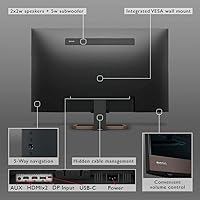
  • Connectivity: Input options include DisplayPort, two HDMI ports, USB-C, and a USB 2.0 downstream port, covering the most common connection needs for both desktop and laptop users.
  • Built-in Audio: The integrated sound system is a 2.1-channel configuration with two satellite speakers and a 5W subwoofer, providing fuller low-end response than typical thin-bezel monitor speakers.
  • Remote Control: A dedicated infrared remote control is included, allowing users to adjust brightness, volume, input source, and HDRi modes without reaching for on-monitor buttons.
  • Eye-Care Modes: The monitor includes both a flicker-free backlight and a low blue light filter mode designed to reduce visual fatigue during extended use sessions.
  • Aspect Ratio: The display uses a standard 16:9 widescreen aspect ratio, compatible with all common video formats and desktop operating system layouts.
  • Ergonomics: The stand supports both tilt and height adjustment, giving users the ability to position the screen at a comfortable viewing angle for seated or standing desk use.
  • Dimensions: The assembled unit measures approximately 28.62 inches wide, 20.59 inches tall, and 8.04 inches deep, including the stand.
  • Weight: The full unit with stand weighs approximately 18.7 pounds, which is typical for a 32-inch display with integrated audio hardware.
  • VESA Mounting: The monitor supports VESA-standard mounting, allowing users to remove the stock stand and attach a third-party monitor arm or wall mount for more flexible positioning.
  • Power Input: The display accepts up to 264V AC input, making it broadly compatible with power standards across different countries and regions.

Related Reviews
BenQ EX3210U 32-inch 4K Gaming Monitor

78%
93%
Image Quality
89%
Color Accuracy
88%
Gaming Performance
67%
HDR Performance
86%
Build Quality
More
ViewSonic VP3256-4K 32-inch 4K IPS Monitor

80%
93%
Color Accuracy
89%
Panel Clarity & Sharpness
88%
Build Quality & Stand
79%
USB-C Connectivity
86%
Ergonomics & Comfort
More
ViewSonic VX3267U-4K 32-inch 4K IPS Monitor

74%
91%
Image Sharpness
83%
USB-C Functionality
76%
Color Accuracy
54%
HDR Performance
47%
Stand & Ergonomics
More
ViewSonic VX3276-4K-MHD 32-inch 4K Monitor

76%
91%
Image Clarity & Sharpness
74%
Color Accuracy
86%
Contrast & Black Levels
61%
HDR Performance
58%
Refresh Rate & Motion Handling
More
ViewSonic VP3268A-4K 32-inch 4K Monitor
79%
93%
Color Accuracy
91%
Out-of-Box Calibration
88%
Build Quality
86%
Ergonomics & Stand
89%
Connectivity
More
CUNPU 32-inch 4K UHD Computer Monitor
64%
88%
Image Sharpness
74%
Color Accuracy
83%
Contrast & Black Levels
53%
Brightness
41%
HDR Performance
More
BenQ PD3225U 32-inch 4K Monitor
88%
94%
Color Accuracy
90%
Ergonomics & Comfort
89%
Thunderbolt 3 Connectivity
88%
Setup & Installation
87%
Build Quality
More
BenQ PD3226G 32-inch 4K Designer Monitor
81%
93%
Color Accuracy
91%
Connectivity
88%
Anti-Glare Performance
79%
Refresh Rate Utility
82%
KVM Switch
More
Gawfolk GF320F 32-Inch 4K UHD Monitor
72%
88%
Image Clarity
83%
Contrast & Color Depth
51%
Brightness
74%
Color Accuracy
81%
Viewing Angle
More
BenQ MA320U 32-inch 4K Monitor
81%
94%
Mac Ecosystem Integration
91%
Color Accuracy
88%
Connectivity & USB Hub
83%
Stand Ergonomics
92%
Display Sharpness
More

FAQ

Yes, and this is one of the EW3280U's most practical strengths for MacBook users. A single USB-C cable handles the display signal, data, and up to 60W of charging simultaneously, so you can sit down, plug in one cable, and have a full 4K workspace without a dock or extra adapters.

It depends entirely on what you play. For slower-paced games, strategy titles, RPGs, or casual gaming, 60Hz is perfectly fine. If you play competitive shooters or fast-action games where 144Hz or higher makes a meaningful difference, the EW3280U is genuinely not the right tool — the refresh rate ceiling is a real limitation, not a minor footnote.

Rather than just toggling HDR on or off, HDRi reads the content on screen and adjusts contrast and color tone dynamically. In practice, it tends to make movies and streaming content look more balanced. Some users love it; others find it over-processes certain content and prefer to switch it off. The good news is you can easily toggle it from the remote.

They're more usable than most monitor speakers, mainly because the 2.1-channel setup adds a subwoofer that gives dialogue and music some actual body. That said, they won't replace even a modest pair of desktop speakers. Think of them as a solid backup option or a space-saving convenience, not a primary audio solution.

It's a solid choice for most photo editing workflows. The IPS panel delivers good color accuracy and consistency out of the box, and the 4K resolution means you can view large images with real detail. It is not a factory-calibrated wide-gamut professional display, so for print production or color-critical commercial work, you may eventually want something more specialized — but for enthusiast and semi-professional photography, it holds up well.

The ambient light sensor reads the lighting conditions in your room and automatically adjusts both screen brightness and color warmth to match. It is genuinely useful if your environment changes throughout the day — for example, in a room that shifts from bright daylight to evening lamplight. If you prefer manual control, you can disable it through the display settings menu.

The stand handles everyday use without issues, but a noticeable portion of owners have flagged that it feels less rigid than expected, especially on desks with any vibration. If you type firmly or have a slightly uneven surface, some wobble is possible. A VESA-compatible monitor arm is a straightforward fix if stability matters to you.

The EW3280U offers DisplayPort, two HDMI inputs, and USB-C — so you can have multiple sources connected and switch between them using the remote or OSD menu. It's a practical setup if you use a desktop and a laptop, for example, without needing an external switch.

There is a slight warm shift in the lower blue light settings, which is normal — it is reducing the cooler, harsher part of the spectrum. BenQ offers multiple intensity levels, so you can find a setting that reduces eye strain without making whites look noticeably orange. Many users leave it on a moderate setting and adapt quickly after a few minutes.

That is arguably exactly what this 32-inch multimedia display was designed for. The screen size and 4K resolution give you comfortable working space for documents and video calls, while the built-in audio and HDRi make evening streaming noticeably better than a bare monitor. If you want one screen that genuinely does both jobs without feeling like a compromise in either direction, this is a strong candidate.

Where to Buy