

Overview

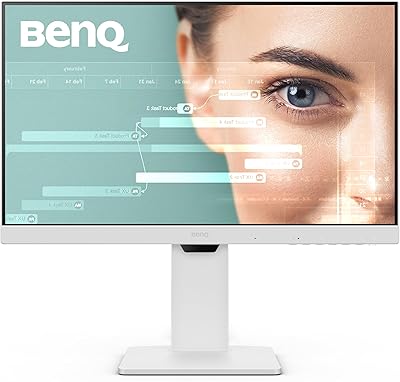
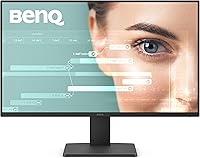
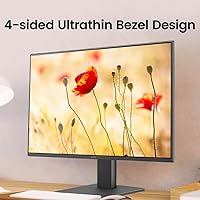
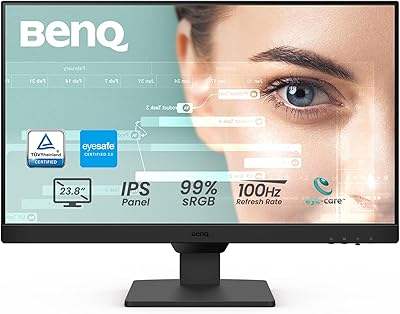
The BenQ GW2491 24-Inch IPS Monitor launched in October 2024 as a practical, no-frills option for anyone who wants a solid everyday display without overspending. It has already climbed to #97 in Computer Monitors on Amazon, backed by nearly 20,000 ratings — a strong sign it found its audience quickly. The ultra-slim bezel gives it a cleaner look than most monitors at this price point, making it a natural fit for tidy home office setups or minimal desk arrangements. Just know going in: this is a 1080p panel, not a high-resolution screen, so pixel density at 24 inches is adequate rather than exceptional.

Features & Benefits

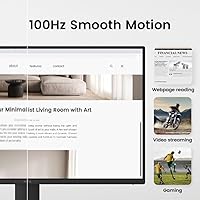
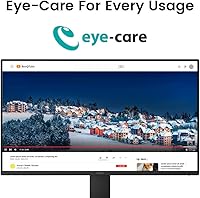
The GW2491 runs an IPS panel covering 99% sRGB, which means colors look consistent and honest whether you are editing a spreadsheet or watching a quick video. The 100Hz refresh rate is not the headline feature here, but it does make scrolling through long documents noticeably smoother than what most office-grade 60Hz displays offer. Where this eye-care display genuinely stands out is its TÜV-certified Flicker-Free and Low Blue Light credentials paired with Eyesafe 2.0 — blue light is reduced without making everything look washed out. The ePaper Mode is a thoughtful touch for heavy readers, softening the screen to ease fatigue during long sessions.

Best For

This BenQ monitor makes the most sense for people who spend a large chunk of their day staring at text — writers, coders, students, and remote workers who are tired of eye fatigue by mid-afternoon. If you are coming from an older 60Hz display, the refresh rate upgrade will feel genuinely worthwhile, even in everyday productivity tasks. The slim bezel design also makes it a practical pick for dual-monitor setups where visual continuity matters. That said, if pixel density is a priority — especially for photo editing or fine detail work — the 1080p resolution at 24 inches may leave some buyers wanting more.

User Feedback

With a 4.6-star average across nearly 20,000 reviews, the GW2491 has clearly earned broad trust. Buyers consistently praise out-of-box accuracy — colors look good from the moment you plug it in, with no fiddling required. The eye care features receive genuine appreciation from people logging long desk hours, not just as a checkbox claim. On the downside, the stand offers tilt adjustment only, which is a real limitation if you need height or pivot flexibility. A handful of reviewers also note that the 1080p resolution starts to feel modest up close. Connectivity via HDMI and DisplayPort covers most home office needs without complaint.

Pros

  • Colors look accurate straight out of the box with no manual calibration needed.
  • TÜV-certified eye care features make a real difference during long daily work sessions.
  • The 100Hz refresh rate adds genuine smoothness that 60Hz office monitors simply cannot match.
  • Ultra-slim bezels make this eye-care display a clean fit for dual-monitor arrangements.
  • The ePaper Mode is a practical, well-implemented option for document-heavy workflows.
  • Eyesafe 2.0 reduces blue light without the color distortion that plagues cheaper alternatives.
  • A matte anti-glare surface handles ambient light well in typical home office conditions.
  • Nearly 20,000 ratings averaging 4.6 stars reflects consistently positive real-world ownership.
  • HDMI and DisplayPort inputs cover the connection needs of most everyday home office setups.
  • The slim, minimal design fits tidily on smaller desks without dominating the workspace.

Cons

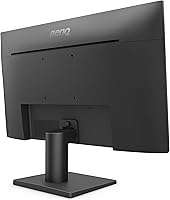
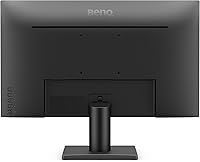
  • The stand only tilts — no height, swivel, or pivot adjustment without a third-party arm.
  • At 24 inches, 1080p resolution shows its limits for users who sit close to the screen.
  • No USB hub or extra ports means the GW2491 adds no desk connectivity beyond the display itself.
  • The 100Hz refresh rate and lack of VRR make it a weak choice for fast-paced gaming.
  • No built-in speakers, so audio requires external hardware even for casual video calls.
  • Ergonomic flexibility is effectively an afterthought compared to monitors in higher price tiers.
  • Pixel density may feel soft to anyone accustomed to a 1440p or higher resolution panel.
  • The stand base has a moderate footprint that can feel bulky relative to the slim screen design.

Ratings

The scores below reflect an AI-driven analysis of verified global user reviews for the BenQ GW2491 24-Inch IPS Monitor, with spam, bot-generated, and incentivized feedback actively filtered out before scoring. Each category is evaluated against real-world usage patterns reported by thousands of confirmed buyers, not manufacturer claims. Both the standout strengths and the genuine frustrations are weighted transparently in every score.

Eye Comfort
93%
This is where the GW2491 earns its strongest praise. Buyers who log six to eight hour workdays consistently report less end-of-day fatigue compared to their previous displays. The combination of TÜV-certified Flicker-Free, Low Blue Light Plus, and Eyesafe 2.0 is not just a spec list — real users notice the difference within the first week.
A small number of users with heightened light sensitivity found that even the lowest blue light setting was not enough without also reducing brightness manually. The eye comfort features are excellent by mainstream standards, but they are not a substitute for medical-grade solutions for those with serious photosensitivity conditions.
Color Accuracy
88%
The 99% sRGB IPS panel delivers consistent, honest colors across a wide viewing angle, and buyers frequently note they did not need to touch any settings after unboxing. For document work, web browsing, and casual photo viewing, colors look natural and well-balanced straight away.
At this price point, the panel is not factory-calibrated for professional color work, so delta E values are adequate rather than exceptional. Graphic designers or photographers who need tight color precision will likely want to calibrate with a hardware colorimeter before trusting it for critical output.
Value for Money
91%
For a 24-inch IPS monitor with multiple eye-care certifications, a 100Hz refresh rate, and a slim bezel design, the price sits comfortably in budget territory — and buyers broadly feel that the feature-to-cost ratio is strong. The sheer volume of satisfied reviews at this price tier says a lot about perceived value.
Buyers who later compare it to slightly higher-priced 1440p monitors sometimes feel the upgrade would have been worth the extra spend, particularly if they sit close to the screen. Value is excellent within its class, but the ceiling of what this monitor can offer becomes visible relatively quickly.
Image Sharpness
71%
29%
For typical home office distances — sitting roughly an arm's length away — 1080p on a 24-inch IPS panel produces clean, readable text and acceptably detailed images. Coders and writers working in standard font sizes find the clarity fully adequate for long sessions.
Users who migrate from a 1440p display, or who sit closer than average to their screen, notice the pixel density limitation fairly quickly. Fine detail in images and small UI elements can appear slightly soft, and this is one of the most commonly mentioned disappointments in critical reviews.
Refresh Rate & Smoothness
82%
18%
The jump from 60Hz to 100Hz is genuinely perceptible in everyday use — scrolling through long web pages and documents feels more fluid, and even general cursor movement appears smoother. Users upgrading from older office monitors consistently mention this as a pleasant surprise.
100Hz is not a compelling spec for anyone coming from a 144Hz or higher gaming panel. The monitor also lacks variable refresh rate support, which limits its appeal for gaming use cases where screen tearing can be a real annoyance during fast-paced sequences.
Build Quality
79%
21%
The chassis feels solid for a budget-tier monitor and the ultra-slim bezel looks noticeably more premium than the price suggests. Buyers setting up dual-monitor arrangements appreciate how the thin frame reduces the visual break between screens.
The plastic body, while sturdy, does not feel as refined as mid-range competitors when handled directly. A few buyers noted minor flex in the panel surround when adjusting the tilt, though no structural failures were widely reported.
Stand & Ergonomics
54%
46%
The stand is stable on a desk surface and the tilt range covers the most common sitting positions at a standard desk height. For buyers whose setup happens to align well with the fixed height, the included stand is perfectly serviceable without any additions.
Tilt-only adjustment is a genuine limitation that shows up in user complaints more than almost any other hardware aspect. Buyers who need to raise the display, rotate it to portrait orientation, or adjust for non-standard seating positions are forced to invest in a separate monitor arm, adding cost and complexity.
Connectivity
73%
27%
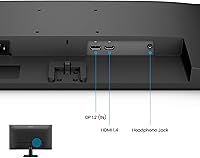
Having both HDMI and DisplayPort covered means most laptops, desktops, and mini PCs connect without needing an adapter. For a single-device home office setup, the port selection is clean and uncomplicated.
There is no USB hub, no audio jack passthrough, and only two video inputs — meaning buyers who switch between multiple devices or want to route headphone audio through the monitor will be disappointed. The connectivity feels minimal compared to monitors at a slightly higher price tier.
ePaper Mode Usability
84%
Users who spend significant time reading long-form documents, academic papers, or e-books report that ePaper Mode meaningfully reduces fatigue compared to a standard display preset. The mode is easy to toggle through the on-screen menu and works as advertised.
ePaper Mode is not suited to everyday general use — colors become desaturated and contrast drops noticeably, which makes media consumption or web browsing feel flat. Some users wished it could be assigned to a hotkey for faster switching rather than navigating the menu each time.
Setup & Ease of Use
89%
Assembly from the box takes under ten minutes for most buyers, and the monitor is ready to use accurately without any software installation or driver setup. The on-screen display menu is logically organized, which makes adjusting brightness, color modes, and input switching straightforward.
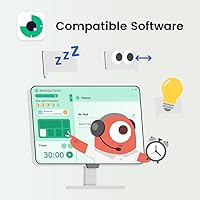
The on-screen menu navigation relies on physical buttons along the bottom edge of the panel that are not labeled on the front face, which causes brief confusion for first-time users in low-light conditions. There is no companion software for saving or switching between custom presets from the desktop.
Matte Screen Performance
83%
The anti-glare matte coating handles window reflections and overhead office lighting well, making the display genuinely usable in rooms that are not fully light-controlled. Most buyers working near windows note a significant improvement over glossy-screen alternatives.
The matte coating introduces a slight graininess to the image that is most visible against bright white backgrounds at close range. Users coming from high-quality glossy panels may find the surface texture takes some adjustment before it feels natural.
Multi-Monitor Compatibility
86%
The ultra-slim bezel design is one of the most practical aspects of this eye-care display for multi-screen setups. Buyers pairing two units side-by-side report that the visual seam between displays is minimal enough to feel nearly invisible during everyday work.
Without height or swivel adjustment on the stand, achieving a perfectly aligned dual-monitor arrangement often requires manual shimming or purchasing a dual monitor arm. The lack of ergonomic flexibility in the stand undermines an otherwise strong bezel design for multi-monitor use.
Out-of-Box Experience
87%
Nearly every aspect of unboxing and first use is well-executed — packaging protects the panel effectively, included cables cover basic connectivity needs, and the default display settings are calibrated well enough for immediate productive use. Buyers consistently praise the lack of bloatware or complex setup requirements.
The included stand-assembly instructions are minimal, and a handful of buyers reported confusion about the cable management slot during setup. The accessory bundle is lean, with no DisplayPort cable included in some regional packages, which can catch buyers off guard.

Suitable for:

The BenQ GW2491 24-Inch IPS Monitor is purpose-built for people who treat their display as a working tool rather than a showpiece. Remote workers, students, and writers who routinely log six or more hours in front of a screen will find the combination of Flicker-Free technology, Low Blue Light certification, and Eyesafe 2.0 genuinely reduces that familiar end-of-day eye fatigue. The 100Hz refresh rate is a quiet but meaningful upgrade for anyone coming from a standard 60Hz office panel, making scrolling through long documents or code feel noticeably smoother. Its ultra-slim bezel is a practical bonus for those building a dual-monitor workspace, keeping the visual gap between screens minimal. Budget-conscious buyers who want accurate, consistent color out of the box — without spending time calibrating — will also feel well served by the 99% sRGB IPS panel.

Not suitable for:

The BenQ GW2491 24-Inch IPS Monitor is not the right call for buyers whose work depends on pixel-dense visuals. At 1080p on a 24-inch screen, the pixel density is functional but not sharp enough for detailed photo retouching, high-resolution video editing, or anyone who sits close and expects crisp fine detail. Serious gamers will also find this display underwhelming — 100Hz is a floor, not a ceiling, for competitive play, and the monitor lacks variable refresh rate support or low-latency gaming modes. The stand is another sticking point: tilt adjustment only means buyers with specific ergonomic setups — those who need height, swivel, or pivot — will either need a monitor arm or should look elsewhere. If connectivity is a priority beyond the basics, the two-port setup of HDMI and DisplayPort offers no USB hub or additional outputs.

Specifications

  • Screen Size: The display measures 24 inches diagonally, offering a practical workspace footprint for home office and student desk setups.
  • Panel Type: An IPS panel is used, delivering consistent color accuracy and wide viewing angles of approximately 178 degrees both horizontally and vertically.
  • Resolution: Native resolution is 1920x1080 (Full HD), which is the standard for everyday productivity and media consumption at this screen size.
  • Refresh Rate: The panel runs at 100Hz, providing noticeably smoother motion than conventional 60Hz office displays during scrolling and general use.
  • Color Gamut: Coverage reaches 99% sRGB, ensuring colors appear accurate and consistent across typical productivity, web, and light creative applications.
  • Aspect Ratio: The screen uses a 16:9 widescreen aspect ratio, which is standard for office work, video conferencing, and media playback.
  • Surface: A matte anti-glare coating reduces reflections from ambient lighting, making the display practical in rooms without full light control.
  • Ports: Connectivity includes one HDMI port and one DisplayPort input; no USB hub or additional video outputs are included.
  • Certifications: The monitor carries TÜV Rheinland Flicker-Free and Low Blue Light certifications, along with Eyesafe 2.0 for validated blue light reduction.
  • Color Modes: Multiple display presets are available, including an ePaper Mode specifically designed to reduce eye strain during extended reading sessions.
  • Bezel Design: An ultra-slim frameless bezel surrounds the panel on three sides, minimizing visual gaps in multi-monitor arrangements.
  • Stand Adjustment: The included stand supports tilt adjustment only; height, swivel, and pivot adjustments are not available without an aftermarket monitor arm.
  • VESA Mount: The monitor is VESA mount compatible, allowing buyers to use a third-party arm or wall mount for greater ergonomic flexibility.
  • Dimensions: Physical dimensions are 16 x 7 x 21 inches (width x depth x height) with the stand attached.
  • Weight: The unit weighs 9.53 pounds with stand, which is manageable for most desk placements and standard monitor arm weight limits.
  • Display Surface: The screen uses a non-glossy matte finish that helps diffuse reflections in bright or mixed-lighting office environments.
  • Release Date: The GW2491 became available in October 2024, making it a recent addition to BenQ's GW productivity monitor lineup.
  • Brand & Series: Manufactured by BenQ, the GW2491 belongs to the GW series, which focuses on eye-care features for everyday professional use.

Related Reviews
BenQ GW2490 24-inch IPS Monitor

81%
93%
Eye Care Performance
88%
Color Accuracy
82%
Refresh Rate & Motion Clarity
96%
Value for Money
54%
Ergonomics & Stand
More
ViewSonic VG2448A 24-inch IPS Monitor

83%
93%
Ergonomic Adjustability
88%
Eye Comfort
86%
Connectivity & Port Selection
74%
Image Quality
81%
Build Quality
More
ReHisk 241KV2 24-inch Gaming Monitor
73%
91%
Refresh Rate Performance
88%
Adaptive Sync
79%
Panel & Color Quality
54%
Brightness & HDR
67%
Build Quality
More
Dell E2420H 24-inch FHD IPS Monitor
88%
88%
Display Quality
90%
Color Accuracy
87%
Viewing Angles
92%
Ease of Setup
91%
Energy Efficiency
More
KTC H24T27 24-inch QHD Gaming Monitor
68%
88%
Image Clarity
84%
Color Accuracy
74%
Gaming Performance
41%
HDR Quality
46%
Ergonomics & Adjustability
More
Dell P2419H 24-Inch IPS Monitor

84%
88%
Color Accuracy
91%
Viewing Angles
89%
Eye Comfort
93%
Stand Ergonomics
87%
Build Quality
More
BenQ GW2486TC 24-Inch 1080p Office Monitor
87%
90%
Display Quality
88%
Ergonomics & Comfort
91%
USB-C Connectivity
87%
Value for Money
89%
Brightness & Eye Care
More
BenQ GW2791 27-inch FHD IPS Monitor
80%
83%
Image Quality
91%
Eye-Care Performance
88%
Value for Money
62%
Display Sharpness
47%
Stand & Ergonomics
More
ViewSonic VP2468a 24-Inch IPS Monitor
76%
93%
Color Accuracy
89%
Connectivity
61%
Resolution & Pixel Density
86%
Build Quality
91%
Ergonomics
More
Z-Edge U24I 24-inch IPS Monitor
85%
88%
Display Quality
92%
Value for Money
85%
Build Quality
84%
Gaming Performance
80%
Ergonomics & Design
More
HP Series 5 524sf 24-inch Monitor

75%
78%
Display Quality
71%
Color Accuracy
67%
Brightness
86%
Eye Comfort
74%
Build Quality
More

FAQ

Most buyers find the default settings accurate enough to use immediately without any calibration. The IPS panel with 99% sRGB coverage is tuned well at the factory, so colors look natural from the first boot. If you do want to fine-tune brightness or color temperature, the on-screen menu is straightforward.

You can use it for casual gaming and the 100Hz refresh rate does help compared to a standard 60Hz display. That said, the GW2491 is not designed for competitive gaming — it lacks variable refresh rate support and the low-latency modes you would find on a dedicated gaming monitor. For single-player or casual titles, it works fine.

Not with Eyesafe 2.0 in place. One of the common complaints with basic blue light filters is that they cast a warm, yellowish tint over everything. BenQ specifically designed Eyesafe 2.0 to reduce harmful blue light while preserving natural color balance, so whites still look white rather than cream.

ePaper Mode adjusts the screen to mimic the lower contrast and softer appearance of printed paper, which reduces eye strain when you are reading large volumes of text. It is most useful for long reading sessions, proofreading documents, or working through research papers. It is not meant for everyday use — most people switch into it specifically for reading-heavy tasks.

The included stand is solid and stable, but it only tilts. If you work at a fixed desk height that happens to align well with the tilt range, you may never miss the extra adjustability. However, if you have ergonomic needs — especially height adjustment for neck comfort — a VESA-compatible monitor arm is worth considering since the display does support standard VESA mounting.

For most home office setups with a single laptop or desktop, one HDMI and one DisplayPort input is plenty. The limitation shows up if you want to connect two devices simultaneously and switch between them — the monitor has no USB hub, KVM functionality, or additional video inputs. Buyers with more complex multi-device setups may find that constraining.

The most tangible differences are the eye-care certifications, the 100Hz refresh rate, and the bezel design. A generic 1080p office display often lacks third-party safety certifications and runs at 60Hz. The GW2491 brings genuine, validated eye comfort features and a smoother display experience while keeping the price in budget territory.

Text will not look blurry — 1080p at 24 inches is a well-established standard and renders readable, clean text for the vast majority of tasks. Where it starts to show limits is up very close, or when comparing side-by-side with a 1440p screen of the same size. For web browsing, coding, document work, and video calls, the resolution is fully adequate.

No, the GW2491 does not include built-in speakers. If audio matters for video calls or media, you will need external speakers or headphones. This is fairly standard at this price tier for monitors focused on display quality rather than all-in-one functionality.

Yes, the anti-glare matte surface is one of the more practical aspects of this display for real-world use. In rooms with windows or overhead lighting, a glossy screen becomes a mirror; the matte coating on this eye-care display diffuses those reflections significantly without introducing excessive graininess to the image.

Where to Buy