Overview

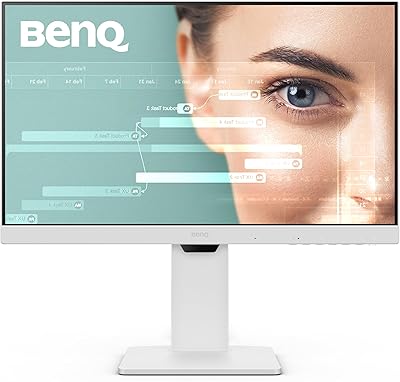
The BenQ GW2490 24-inch IPS Monitor is a straightforward, no-nonsense office display that punches above its weight in the budget category, largely because of its genuine focus on eye comfort. Most monitors at this price cap out at 60Hz — the GW2490 runs at 100Hz refresh rate, which makes scrolling and video noticeably smoother day-to-day. The thin bezel keeps your desk looking clean, and the built-in speakers plus VESA mount support mean fewer accessories to track down separately. With a 4.6-star rating spread across nearly 20,000 reviews, this BenQ monitor has earned real-world credibility that carries genuine weight.
Features & Benefits

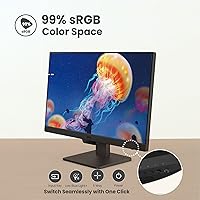
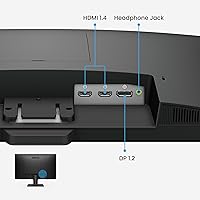
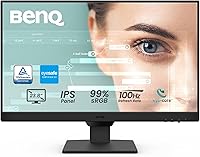
The IPS panel inside this BenQ monitor covers 99% sRGB, so colors look accurate and consistent whether you're editing photos, watching videos, or reading through long documents. Motion is visibly cleaner than on a typical office screen, thanks to the 100Hz panel. What really distinguishes the GW2490, though, is the eye-care package — the Low Blue Light Plus filter works quietly in the background, while Brightness Intelligence Gen2 auto-adjusts the screen based on your environment and on-screen content. Dual HDMI ports plus DisplayPort, paired with a one-button input hotkey, make switching between devices surprisingly painless for a monitor at this price.

Best For

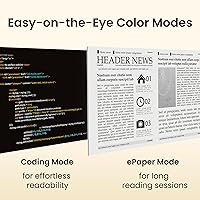
This 24-inch office display is a natural fit for remote workers and students who spend serious hours in front of a screen — the eye-care features alone justify the choice for that crowd. Writers and coders will appreciate the dedicated ePaper and Coding modes, which tone down brightness and sharpen contrast in ways that genuinely reduce fatigue over long sessions. Casual gamers who aren't chasing high frame rates will find the 100Hz refresh more than adequate for everyday titles. It's also a strong pick for anyone building a dual-monitor setup on a budget, since the thin bezel keeps things looking clean side by side.

User Feedback

Buyers consistently highlight color accuracy and eye comfort during long work days as the top reasons they recommend the GW2490 — those two points come up in review after review. Setup is quick, and most buyers report the packaging arrives in good shape. The criticism that surfaces most often is the fixed-height stand: without any height adjustment, taller users may need a monitor arm to find a comfortable angle. The 1080p resolution is worth keeping in mind too — fine for everyday office use, but limiting if detailed design work is part of your routine. The built-in speakers handle calls and casual background audio, and that's about as far as they go.

Pros

  • The eye-care feature set is genuinely effective — buyers consistently report less fatigue after long work sessions.
  • 99% sRGB color coverage on an IPS panel at this price point delivers accurate, consistent color with no obvious corner washout.
  • The 100Hz refresh rate makes everyday scrolling and video noticeably smoother compared to standard 60Hz office displays.
  • Dual HDMI ports plus DisplayPort give the GW2490 solid flexibility for connecting multiple devices simultaneously.
  • The one-button input hotkey is a small but practical feature that users who switch between a laptop and desktop genuinely appreciate.
  • Thin bezels make this 24-inch office display a clean, visually cohesive choice for side-by-side dual-monitor arrangements.
  • VESA mount support means buyers can ditch the stand entirely and mount it on an arm without any compatibility worries.
  • Out-of-box setup takes under ten minutes, and the packaging arrives protective enough that transit damage is rarely reported.
  • The matte screen coating handles mixed indoor lighting well without introducing noticeable image softness.
  • At its price, the overall feature-to-cost ratio is difficult to match — nearly 20,000 reviewers largely agree on that point.

Cons

  • The fixed-height stand offers no vertical adjustment, which is a real ergonomic problem for taller users or non-standard desks.
  • 1080p resolution starts to feel limiting on a 24-inch panel when viewing fine detail or working with dense text at distance.
  • There is no USB-C input, which creates an adapter dependency for users with modern ultrabooks or newer MacBook models.
  • The built-in speakers max out at a volume level that barely fills a small room, with no meaningful bass reproduction.
  • On-screen menu navigation relies on physical buttons rather than a joystick, which feels dated and fiddly during initial setup.
  • Peak brightness is modest, and the display can look dim in rooms with strong ambient or direct natural light.
  • A subset of long-term owners have reported minor backlight bleed developing over extended use.
  • ePaper mode color temperature runs cool and grey, which not every user finds comfortable for extended reading.
  • No adaptive sync support limits its appeal even for casual gamers who might benefit from tear-free output.
  • BenQ warranty support response times receive mixed feedback, particularly for buyers outside major markets.

Ratings

The BenQ GW2490 24-inch IPS Monitor has been scored by our AI engine after processing thousands of verified global buyer reviews, with spam, bot activity, and incentivized feedback actively filtered out. The scores below reflect a balanced picture — what real users genuinely love and where the monitor falls short — so you can make a confident, eyes-open decision.

Eye Care Performance
93%
The Low Blue Light Plus filter and Brightness Intelligence Gen2 are the features buyers mention most enthusiastically. Office workers and students frequently report that extended sessions — six, eight, even ten hours — feel noticeably less draining compared to previous monitors they've owned. That's a meaningful real-world difference.
A small number of users with particularly light-sensitive eyes found that even the lowest blue light setting wasn't enough without additional software-side adjustments. It's a minor edge case, but worth knowing if you're highly sensitive.
Color Accuracy
88%
The 99% sRGB IPS panel draws consistent praise from buyers who use the GW2490 for photo editing, content consumption, and detailed document work. Colors look natural and stable across the screen, with no obvious washed-out corners that budget IPS panels sometimes suffer from.
While sRGB coverage is strong, the monitor doesn't cover DCI-P3 or wider color spaces, which limits its appeal for professional video editors or colorists. Buyers expecting HDR-like punch will find the contrast and peak brightness fairly modest.
Refresh Rate & Motion Clarity
82%
18%
Stepping up to 100Hz from a standard 60Hz display makes a tangible difference during everyday use — scrolling through documents, streaming video, and casual gaming all look visibly smoother. Users upgrading from older office monitors consistently call it out as one of the first things they noticed.
Dedicated gamers will quickly find the ceiling here. The 100Hz cap and lack of adaptive sync make it unsuitable for fast-paced competitive titles where tearing and response time matter. It's a casual gaming bump, not a true gaming upgrade.
Value for Money
96%
Across nearly 20,000 reviews, value is the most repeated compliment. Buyers feel they're getting IPS color quality, eye-care tech, a 100Hz panel, dual HDMI, and built-in speakers in a single affordable package — a combination that would cost noticeably more from most competitors.
A handful of buyers shopping specifically for 1440p resolution or an ergonomic stand felt the value equation shifted. For those users, spending a bit more elsewhere makes more sense, and this monitor's price advantage becomes less compelling.
Ergonomics & Stand
54%
46%
The stand itself is stable and doesn't wobble during typing, which buyers appreciate. The monitor's light weight makes repositioning quick and easy. For users who already own a monitor arm, the 100x100 VESA mount makes the fixed stand a non-issue entirely.
The lack of height adjustment is the single most recurring complaint in the review pool. Taller users or anyone without a perfectly positioned desk will find themselves propping the monitor on books or buying an arm just to achieve comfortable eye-level viewing. It's a real ergonomic compromise at any price.
Build Quality & Design
79%
21%
The thin bezels give this 24-inch office display a cleaner, more modern look than its price suggests. Buyers setting up dual-monitor workstations specifically call out how well the slim borders hold up visually side by side. The matte finish handles glare competently in bright home offices.
The plastic construction is serviceable but feels lightweight in hand. A few users noted minor flex in the back panel when adjusting the tilt angle. Nothing that affects performance, but it does remind you that you're not holding a premium product.
Display Brightness & Visibility
74%
26%
For typical indoor office environments, brightness is more than adequate. The B.I. Gen2 auto-adjustment handles transitions between dimly lit evenings and brighter daytime conditions smoothly, reducing the need for manual tweaks throughout the workday.
In very bright rooms or near windows with direct sunlight, some buyers found themselves wanting more peak brightness. The matte coating helps, but the display's overall nit output is modest, and it can appear slightly dim in high-ambient-light scenarios.
Connectivity & Input Switching
87%
Two HDMI ports and a DisplayPort cover most setups comfortably, and the dedicated input hotkey gets unusually positive attention in reviews. Users who keep a laptop and desktop connected simultaneously love being able to flip between them with a single button press rather than diving into an on-screen menu.
There's no USB-C port, which is becoming a practical gap as more laptops drop traditional ports. Buyers with newer MacBooks or ultrabooks may need an adapter, which adds minor inconvenience to an otherwise clean connectivity experience.
Built-in Speakers
61%
39%
For video calls, background music, and the occasional YouTube session, the 2W speakers do the job without requiring a separate audio device. Buyers working from small apartments or secondary desks where space is tight appreciate having a functional audio option built in.
Anyone who actually listens to music or watches films seriously will want external speakers. Bass is virtually absent, and volume maxes out at a level that won't fill even a small room. They're a convenience feature, not an audio solution.
Setup & Out-of-Box Experience
91%
Reviewers consistently describe assembly as quick and intuitive — most report having the monitor up and running within ten minutes. The packaging draws repeated positive comments for being sturdy and protective, with very few reports of transit damage even across international shipments.
The on-screen menu navigation uses physical buttons rather than a joystick, which a few users found slightly fiddly when first configuring picture modes. It's a minor learning curve, not a genuine complaint, but worth flagging for first-time monitor buyers.
Special Display Modes
83%
The ePaper and Coding modes are more useful than they might sound on paper. Writers and developers who spend hours reading and typing report that the toned-down contrast and adjusted color temperature genuinely reduce the mental fatigue that accumulates over a long session.
Some users felt the color rendering in ePaper mode was too cool or grey for their taste, and switching between modes requires navigating the on-screen display each time. A dedicated physical shortcut would make these features much more accessible in daily use.
Long-Term Reliability
78%
22%
The GW2490 has a solid track record over multi-year ownership based on buyer follow-up reviews. Backlight consistency holds up well, and there are relatively few reports of dead pixels or panel degradation even after extended heavy use.
A small but noticeable subset of long-term owners reported brightness inconsistencies or minor backlight bleed developing over time. BenQ's warranty support receives mixed reviews — adequate in most regions, but slower than ideal when replacement or repair is needed.
Glare & Matte Coating
81%
19%
The anti-glare matte finish is well-suited to home office environments with mixed lighting. Buyers near windows or working under overhead lighting find it handles reflections competently without introducing the grainy texture that some aggressive matte coatings suffer from.
A small group of users found the matte coating gave the image a very slightly soft appearance compared to glossy alternatives. This is entirely subjective and mostly relevant for buyers who prioritize perceived sharpness over glare control.

Suitable for:

The BenQ GW2490 24-inch IPS Monitor is genuinely well-suited to anyone whose primary concern is spending long hours at a desk without their eyes paying the price by end of day. Remote workers, office professionals, and students who log serious screen time will find the combination of Low Blue Light filtering and automatic brightness adjustment a practical, noticeable comfort upgrade over generic budget displays. Writers and developers in particular get real mileage out of the dedicated ePaper and Coding modes, which soften the visual intensity of text-heavy work in a way that accumulates less fatigue over a long session. The thin bezels and VESA compatibility make it a natural fit for dual-monitor setups where clean aesthetics and flexible mounting matter. Casual gamers on a budget will also find the 100Hz refresh rate a meaningful step up from the 60Hz panels that dominate this price range, even if it is not a dedicated gaming screen.

Not suitable for:

The BenQ GW2490 24-inch IPS Monitor is not the right call for buyers who need ergonomic flexibility out of the box — the fixed-height stand is a genuine limitation, and taller users or those with non-standard desk heights will likely need to budget for a monitor arm to achieve a comfortable viewing position. Anyone working in professional video production, color grading, or high-end graphic design will also find the 1080p resolution and lack of wide color gamut coverage restrictive; this is an sRGB display aimed at general use, not precision creative work. Competitive gamers who care about frame rates, adaptive sync, or sub-millisecond response times should look at purpose-built gaming monitors instead. If you rely heavily on audio output at your desk, the built-in speakers will disappoint — they handle casual call audio adequately but fall short for music, film, or anything where sound quality matters. Finally, buyers with USB-C-only laptops should be aware there is no native USB-C input, which may require an adapter and adds a minor but real inconvenience.
Specifications

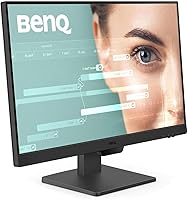
  • Screen Size: The active display area measures 23.8 inches diagonally, with a 16:9 aspect ratio and a native resolution of 1920x1080 pixels.
  • Panel Type: Uses an IPS (In-Plane Switching) panel, which delivers consistent color and contrast across a wide viewing angle compared to TN alternatives.
  • Refresh Rate: Runs at a native 100Hz refresh rate, reducing motion blur during video playback, scrolling, and casual gaming relative to standard 60Hz office displays.
  • Color Gamut: Covers 99% of the sRGB color space, ensuring accurate and consistent color reproduction for everyday productivity, media consumption, and light photo work.
  • Contrast Ratio: Native contrast ratio is rated at 1000:1, which is standard for IPS panels and adequate for office and general-use environments.
  • Surface Finish: The screen uses a matte anti-glare coating that reduces reflections from ambient light sources without introducing significant image softness.
  • Connectivity: Input options include two HDMI 1.4 ports and one DisplayPort 1.2 port, with a dedicated input hotkey for one-button switching between connected devices.
  • VESA Mount: The monitor supports a standard 100x100mm VESA pattern, allowing it to be mounted on any compatible third-party monitor arm or wall bracket.
  • Built-in Speakers: Two integrated 2W speakers are included, suitable for voice calls and casual background audio but not intended as a primary audio solution.
  • Eye Care: Features BenQ Low Blue Light Plus filtering and Brightness Intelligence Gen2 (B.I. Gen2), which automatically adjusts screen brightness based on ambient light and on-screen content.
  • Special Modes: Includes dedicated ePaper Mode for extended reading sessions and Coding Mode for developers, both tuned to reduce visual fatigue during text-intensive work.
  • Stand Adjustment: The included stand supports tilt adjustment only; there is no height, swivel, or pivot adjustment available without a third-party monitor arm.
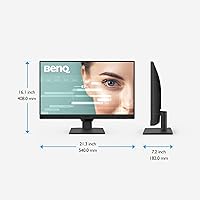
  • Dimensions: With the stand attached, the monitor measures 6.9 x 16.03 x 21.26 inches (D x W x H) and weighs approximately 8.4 pounds.
  • Voltage: The unit is rated at 220 volts; buyers in 110V regions should verify compatibility with their local power supply before purchase.
  • Backlight Type: Uses an LED backlight system, which contributes to the monitor's relatively slim profile and energy-efficient operation during extended use.
  • Response Time: BenQ rates the GW2490 with a 5ms GtG response time, which is adequate for office tasks and casual gaming but below the threshold serious competitive gamers require.

Related Reviews

ViewSonic VG2448A 24-Inch IPS Monitor
84%
88%
Value for Money
91%
Display Quality
85%
Ergonomics and Comfort
87%
Connectivity Options
90%
Ease of Setup
More
BenQ GW2486TC 24-Inch 1080p Office Monitor
87%
90%
Display Quality
88%
Ergonomics & Comfort
91%
USB-C Connectivity
87%
Value for Money
89%
Brightness & Eye Care
More
ReHisk 24 Inch FHD IPS Gaming Monitor
83%
88%
Value for Money
90%
Display Quality
87%
Gaming Performance
84%
Ease of Setup
82%
Eye Care Features
More
Dell E2420H 24-inch FHD IPS Monitor
88%
88%
Display Quality
90%
Color Accuracy
87%
Viewing Angles
92%
Ease of Setup
91%
Energy Efficiency
More
Dell P2419H 24-Inch FHD IPS Monitor
87%
91%
Display Quality
88%
Ergonomics
78%
Build Quality
94%
Color Accuracy
89%
Flicker-Free Technology
More
HP 524sf 24-inch FHD IPS Monitor
85%
88%
Display Quality
91%
Value for Money
85%
Build Quality
94%
Ease of Setup
87%
Eye Care Features
More
ViewSonic VP2468a 24-Inch IPS 1080p Monitor
84%
94%
Color Accuracy
88%
Ergonomics & Comfort
91%
Connectivity Options
89%
Value for Money
78%
Ease of Setup
More
Z-Edge U24I 24-inch IPS Monitor
85%
88%
Display Quality
92%
Value for Money
85%
Build Quality
84%
Gaming Performance
80%
Ergonomics & Design
More
BenQ GW2791 27-inch FHD IPS Monitor
84%
89%
Display Quality
91%
Eye-Care Features
85%
Design & Build
88%
Ease of Setup
90%
Color Accuracy
More
KTC 24-inch QHD IPS 100Hz Monitor
85%
92%
Display Quality
88%
Ease of Setup
91%
Color Accuracy
89%
Gaming Performance
94%
Eye Comfort Features
More

FAQ

Yes, the GW2490 connects to Macs via the DisplayPort or HDMI inputs. Keep in mind there is no USB-C port, so if your MacBook only has USB-C or Thunderbolt ports, you will need a compatible adapter or hub to make the connection.

Yes, it supports a standard 100x100mm VESA pattern, so any compatible monitor arm or wall mount bracket will work. Many buyers actually prefer going the arm route precisely because the included stand has no height adjustment.

No, and this is the most common complaint from buyers. The stand only tilts — there is no height, swivel, or pivot range. If your desk is particularly high or low, or you simply want ergonomic flexibility, budgeting for a monitor arm is worth considering upfront.

Most budget office monitors run at 60Hz, so the jump to 100Hz is a real, visible improvement. Scrolling looks smoother, video feels less choppy, and even just moving windows around the desktop has a more fluid quality. It is not a gaming-grade panel, but the upgrade is genuinely noticeable for everyday use.

They are fine for video calls, occasional YouTube, or background audio at low to moderate volume. If you listen to music seriously, watch films regularly, or share your audio with others in the room, you will want external speakers or headphones — the built-in 2W drivers simply do not have the output or range for that.

Yes, BenQ uses a flicker-free backlight on the GW2490. Combined with the Low Blue Light Plus filter, this makes a practical difference for users who are particularly sensitive to eye strain or headaches during long screen sessions.

Yes, both HDMI ports will accept a console connection without issue. Keep in mind the monitor caps at 1080p and 100Hz, so while a PS5 or Xbox Series X is capable of higher output, the display will run at its native resolution and refresh rate ceiling.

The GW2490 includes ePaper Mode, Coding Mode, and a standard Low Blue Light mode among others. ePaper Mode genuinely helps for long reading sessions by toning down the screen intensity, and Coding Mode improves readability for developers spending hours in an IDE. They are not gimmicks — regular users of text-heavy work tend to keep one of them active most of the day.

For most office tasks, video calls, and general browsing, 1080p on a 24-inch panel looks perfectly sharp at normal desk distances. Where it starts to feel limiting is when displaying fine design detail, working in dense spreadsheets at a distance, or if you previously used a 1440p display and are stepping down. For the price, most buyers find it a reasonable trade-off.

The stand attaches to the panel with a simple click mechanism — no tools required — and most buyers report being fully set up within ten minutes. The packaging is well-designed and protective, so out-of-box damage is rarely reported. You just need to connect your cable of choice and you are ready to go.

Where to Buy