Overview

The AVM FRITZ!Box 5590 Fiber Wi-Fi 6 Router is one of the few consumer-grade devices that handles fiber connectivity and Wi-Fi in a single unit — no separate modem, no extra ONT box sitting on your shelf. AVM has built a strong reputation in Germany over decades, and this all-in-one networking device reflects that pedigree. It targets households and small offices with direct fiber connections, delivering dual-band Wi-Fi 6 alongside an integrated fiber modem. At its price point, it sits firmly in premium territory — worthwhile for those who demand full control over their network, but harder to justify if your ISP's bundled equipment already gets the job done.
Features & Benefits

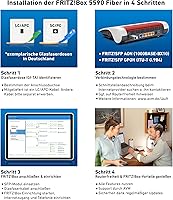
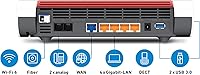
The FRITZ!Box 5590 ships with both AON and GPON SFP modules in the box — these are small plug-in adapters that let the router connect directly to different types of fiber lines, so you won't need to buy compatibility hardware separately. The 2.5 Gigabit WAN port means it's already ready for ISP speed tiers most households haven't reached yet. On the wireless side, the 4x4 MU-MIMO configuration pushes up to 2,400 Mbps on 5 GHz. The built-in DECT base station handles up to six cordless phones while also managing smart home accessories like radiator valves and switchable sockets. Four Gigabit LAN ports and two USB 3.0 connections round out a genuinely comprehensive package.

Best For

This all-in-one networking device makes the most sense for German fiber subscribers who want to ditch the ISP-supplied box and take full ownership of their network setup. It's particularly well-suited to anyone already running FRITZ! repeaters, since the mesh management tools tie everything together efficiently. Small office environments that need both solid Wi-Fi coverage and a proper phone system — handled through the DECT base — will also find real value here. One caveat worth stating clearly: this fiber router is built around German ISP infrastructure. Buyers outside Germany should verify fiber compatibility with their provider before committing, as the SFP modules are optimized for local network standards.

User Feedback

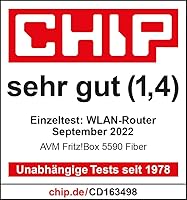
With over 2,600 ratings and a score of 4.7 out of 5, the FRITZ!Box 5590 carries unusually strong buyer sentiment for a device in this category. Most praise centers on reliable fiber performance and the quality of FRITZ!OS — AVM's router interface — which reviewers consistently describe as well-organized and regularly updated. Long-term owners highlight that AVM's firmware support track record is solid, a meaningful factor at this price. The most common complaint is blunt: it's expensive. Some buyers also flag that setup documentation isn't always available in English, which can slow things down for non-German speakers. A well-earned rating, but one that reflects a product built for committed, tech-savvy users rather than casual buyers.

Pros

  • Integrates fiber modem and Wi-Fi 6 router into one unit, removing the need for a separate ONT device.
  • Both AON and GPON SFP modules are included in the box — no extra compatibility purchases required.
  • The 2.5 Gigabit WAN port positions this fiber router well ahead of current residential ISP speed tiers.
  • 4x4 MU-MIMO Wi-Fi 6 handles multiple devices simultaneously without noticeable performance drops.
  • DECT base supports up to six cordless phones and integrates natively with AVM smart home accessories.
  • FRITZ!OS is regularly updated with new firmware, giving long-term owners a device that improves over time.
  • FRITZ!Mesh makes managing multiple access points across a home or office straightforward and centralized.
  • Two USB 3.0 ports allow shared printers and network storage without needing a separate NAS device.
  • Over 2,600 buyer ratings with a 4.7-star average reflects broad, sustained satisfaction across real users.
  • AVM's track record for multi-year software support reduces the risk of buying hardware that gets abandoned.

Cons

  • The price is steep — significantly higher than what most ISPs charge for bundled equipment with comparable basics.
  • Setup documentation is not guaranteed in English, which creates friction for non-German-speaking buyers.
  • SFP module compatibility is tuned for German fiber infrastructure; international use requires careful verification.
  • Buyers with no DECT phone needs or smart home devices are paying for built-in features they will never touch.
  • The FRITZ!OS interface, while capable, has a learning curve that can overwhelm less technical users.
  • No tri-band option — heavier wireless households with dozens of concurrent devices may hit bandwidth limits.
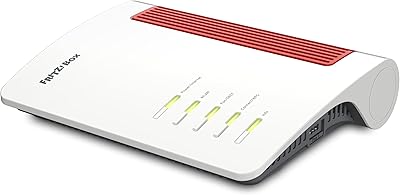
  • The white and red design is polarizing and may not suit all home or office aesthetics.
  • At this price tier, a separate premium router plus ONT could offer more flexibility for advanced networking setups.
  • The all-in-one approach means a single hardware failure affects the entire connection — modem, router, and phone system.
  • Limited value for buyers outside the FRITZ! ecosystem who cannot take advantage of the mesh management features.

Ratings

The scores below for the AVM FRITZ!Box 5590 Fiber Wi-Fi 6 Router were generated by our AI after analyzing thousands of verified global buyer reviews, actively filtering out incentivized, duplicate, and bot-generated submissions to surface only genuine ownership experiences. Both the strengths that make this all-in-one networking device a standout in its category and the real-world frustrations that have driven negative feedback are reflected transparently in every scorecard.
Wi-Fi Performance
91%
Owners consistently report strong, stable throughput across multiple rooms, with Wi-Fi 6 making a noticeable difference in households where a dozen or more devices compete for bandwidth simultaneously. The 4x4 MU-MIMO configuration handles congested environments — home offices, streaming households, mixed smart-home setups — better than most ISP-provided hardware at any tier.
A small but vocal group of users note that the 5 GHz band's effective range drops off more than expected through thick walls or across multiple floors, occasionally requiring a repeater in larger homes. A tri-band option would give power users more headroom, and its absence at this price point is a fair criticism.
Fiber Compatibility
88%
For German fiber subscribers, the inclusion of both AON and GPON SFP modules in the box is a practical and cost-saving detail that buyers genuinely appreciate — it removes a compatibility guessing game that plagues other fiber routers. The FRITZ!Box 5590 connects directly to the fiber line with no separate ONT device, which simplifies the physical installation considerably.
Outside Germany, the compatibility picture becomes murky quickly. Several international buyers report that their ISP's fiber infrastructure does not align with the included modules, and AVM's support resources are heavily oriented toward the German market, making troubleshooting harder for overseas users.
Software & Interface
93%
FRITZ!OS draws consistent praise as one of the most capable and well-organized router interfaces available in the consumer segment — owners describe it as genuinely feature-rich without feeling overwhelming once you spend time with it. Regular firmware updates, often several per year, mean the device actively improves post-purchase rather than stagnating.
The interface is available in English, but the setup documentation included in the box is not guaranteed to be, which creates unnecessary friction during initial configuration for non-German speakers. Some users also find the sheer depth of options in FRITZ!OS intimidating if they are coming from a simpler ISP-provided router.
Value for Money
63%
37%
For the specific buyer this device targets — someone who wants to own their full network stack, run a DECT phone system, and build out a FRITZ!Mesh setup — the consolidated hardware justifies the cost better than buying separate components. Long-term firmware support and robust build quality also make it easier to rationalize as a multi-year investment.
The price remains the single most common complaint across verified reviews, and it is hard to argue against that frustration for buyers with straightforward needs. If your ISP provides a functioning router at no extra cost and your requirements are basic, this all-in-one networking device simply does not deliver proportional value for most households.
Setup Experience
67%
33%
Users with prior experience in networking or with AVM's ecosystem find the setup process logical and well-structured — identifying the correct SFP module, entering ISP credentials, and getting online typically takes under 30 minutes for those who know what they are doing. AVM's online knowledge base is thorough and available in English.
First-time fiber router buyers and those without technical backgrounds report a steeper learning curve than expected, particularly around choosing between AON and GPON modules without clear guidance. The lack of a reliable English printed guide in the box is a recurring frustration that AVM has not addressed despite years of international sales.
FRITZ!Mesh Performance
89%
Buyers who already own FRITZ! repeaters describe the mesh experience as one of the most cohesive in the consumer market — device handoffs as you move around a home are smooth, and the centralized management through FRITZ!OS makes adjusting the network far less tedious than juggling separate access point apps.
The mesh benefits are largely locked to the AVM ecosystem, meaning buyers without existing FRITZ! repeaters do not get much out of this feature immediately and face additional hardware costs if they want to expand coverage. Third-party mesh integration is not a strength here.
DECT Phone System
86%
Households that still rely on landline or VoIP telephony find the DECT base a genuinely useful inclusion — up to six cordless handsets register reliably, and call quality through VoIP is consistently described as clear and stable. Having the phone system managed through the same interface as the router reduces administrative overhead noticeably.
For buyers who have no interest in a wired or cordless phone system, this is hardware they are paying for but will never use. There is no way to strip out this feature for a lower price, which is a fair frustration for mobile-only households who see DECT as irrelevant.
Smart Home Integration
74%
26%
Users who pair this fiber router with FRITZ!DECT accessories — smart plugs, radiator controllers — find the integration genuinely convenient, with device management handled entirely within FRITZ!OS rather than requiring a separate app or hub. The system is stable and does not depend on cloud connectivity for basic local control.
The smart home ecosystem is proprietary and narrow — if you are invested in Matter, HomeKit, Google Home, or Alexa-native accessories, this device adds little to your setup. Buyers looking for broad smart home platform support will find the FRITZ!DECT ecosystem limiting compared to dedicated smart home hubs.
Build Quality
84%
The physical construction feels appropriately premium for the price — solid, with no flex or cheap plastic feel, and the compact dimensions make it manageable on a shelf or wall-mounted. Long-term owners report no hardware degradation after multiple years of continuous operation, which matters for a device expected to run around the clock.
The white and red color scheme is divisive — some buyers appreciate the clean aesthetic, while others find it loud for a device typically placed in a living room or office. There is no color variant option, which is a minor but real limitation for design-conscious buyers.
Long-Term Reliability
88%
Owners who have lived with the FRITZ!Box 5590 for a year or more consistently cite stability as a standout characteristic — unplanned reboots and connection drops are rare in the verified review pool, which is exactly what you want from a device handling your entire home network. AVM's history of sustained firmware support reinforces confidence in long-term ownership.
A small proportion of users report occasional DECT connectivity issues after firmware updates, typically resolved in subsequent patches. While these cases are not common, they do surface periodically and are worth noting for buyers who rely heavily on the phone system functionality.
WAN Port Speed
82%
18%
The 2.5 Gigabit WAN port is one of this device's more forward-thinking hardware choices — for buyers in areas where multi-gigabit residential fiber is rolling out, this router will not become the bottleneck as their ISP plan scales up over the next few years.
For the majority of current users whose ISP plans cap at 1 Gbps or below, the 2.5 Gbps WAN port delivers no immediate real-world benefit and functions purely as insurance against future upgrades. It is a sensible long-term decision but does not add tangible value today for most buyers.
USB & Storage Sharing
71%
29%
Owners who use the USB 3.0 ports for shared network storage or a shared printer find it a genuinely useful convenience — speeds are respectable for basic file access across a home network, and the setup through FRITZ!OS is straightforward once the device is running.
The USB storage functionality is adequate for light use but not a replacement for a proper NAS — users with large media libraries or heavy read/write demands will hit its limits fairly quickly. Transfer speeds over Wi-Fi to USB-attached storage can also be inconsistent depending on connected device type.
International Usability
44%
56%
For buyers in countries where AON or GPON fiber is common and ISPs are flexible about third-party router registration, this all-in-one networking device can work outside Germany with some configuration effort and research. AVM's English-language online documentation does cover international setup scenarios at a basic level.
The honest picture for international buyers is poor — AVM designed this device around German ISP infrastructure, German documentation, and the German fiber rollout landscape. Compatibility issues, lack of localized support, and the risk of purchasing a device that simply cannot authenticate with your local ISP make this a high-risk buy outside its target market.
Energy Efficiency
76%
24%
Several long-term owners note that power consumption is reasonable for a device running 24 hours a day — AVM's FRITZ!OS includes energy-saving modes for WLAN and DECT that can reduce idle draw during overnight hours without disrupting connectivity for always-on devices.
Compared to simpler routers without integrated modem and DECT hardware, the baseline power draw is higher — a natural consequence of combining multiple active components in one unit. Buyers in markets with high electricity costs may find this a minor but ongoing consideration.

Suitable for:

The AVM FRITZ!Box 5590 Fiber Wi-Fi 6 Router is built for a specific kind of buyer, and for that buyer, it genuinely delivers. German households with a direct fiber connection who are tired of relying on their ISP's underpowered hardware will find this all-in-one networking device a compelling upgrade — it eliminates the need for a separate ONT modem, which alone simplifies the home network setup considerably. Small offices that need to manage both wireless coverage and a full DECT phone system from a single device will appreciate how much ground the FRITZ!Box 5590 covers without requiring additional hardware purchases. Tech-savvy users who are already building a mesh network with FRITZ! repeaters get a natural and capable master controller here. And anyone thinking five to ten years ahead — toward multi-gigabit ISP tiers — will value the 2.5 Gigabit WAN port as a genuine future-proofing measure rather than a spec sheet checkbox.
Not suitable for:

Buyers outside Germany should approach the AVM FRITZ!Box 5590 Fiber Wi-Fi 6 Router with real caution. The included SFP modules — the small hardware adapters that connect the router directly to a fiber line — are optimized for AON and GPON fiber types common in German ISP infrastructure, and compatibility with other countries' networks is far from guaranteed. Casual users who just want to plug something in and forget about it may also find FRITZ!OS more involved than expected, particularly since installation documentation is not reliably available in English. If your ISP already provides a competent router at no extra cost, the value math here is difficult to justify unless you have specific needs this device addresses. Budget-conscious shoppers will find strong Wi-Fi 6 router alternatives at a significantly lower price point that cover basic home networking just as well. Finally, households with no interest in DECT phones or smart home accessories are essentially paying for hardware they will never use.
Specifications

  • Wi-Fi Standard: This fiber router uses 802.11ax (Wi-Fi 6), the current mainstream standard offering improved throughput and better performance in environments with many connected devices.
  • Frequency Bands: Dual-band operation covers both 2.4 GHz for range and compatibility with older devices, and 5 GHz for higher-speed connections to modern hardware.
  • 5 GHz Speed: The 5 GHz band delivers a maximum theoretical throughput of 2,400 Mbps using a 4x4 MU-MIMO antenna configuration.
  • 2.4 GHz Speed: The 2.4 GHz band supports a maximum theoretical throughput of 1,200 Mbps, suitable for smart home accessories and devices farther from the router.
  • MIMO Config: The 4x4 MU-MIMO setup allows the router to communicate with multiple devices simultaneously rather than sequentially, reducing latency under load.
  • WAN Port: A single 2.5 Gigabit WAN port connects to the fiber infrastructure and is capable of handling ISP speeds well beyond current standard residential tiers.
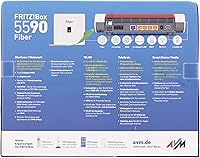
  • LAN Ports: Four Gigabit Ethernet LAN ports provide wired connectivity for computers, smart TVs, network switches, and other stationary devices.
  • USB Ports: Two USB 3.0 ports allow connection of external storage drives or printers, enabling shared network access without a dedicated NAS or print server.
  • SFP Modules: The box includes both a FRITZ!SFP AON and a FRITZ!SFP GPON module, covering the two most common fiber connection types used by German ISPs.
  • DECT Base: The integrated DECT base station registers up to six cordless handsets and doubles as a controller for compatible AVM smart home accessories.
  • Mesh Support: The FRITZ!Box 5590 acts as the master node in a FRITZ!Mesh network, coordinating connected repeaters and access points for unified wireless coverage.
  • Smart Home: Compatible smart home devices include FRITZ!DECT 200 and 210 switchable sockets, as well as FRITZ!DECT 301 and 302 radiator thermostats.
  • Fiber Cable: A 4-meter fiber optic cable with LC/APC to LC/APC connectors is supplied in the box for connecting directly to the building's fiber termination point.
  • Dimensions: The unit measures 10 x 7.52 x 2.48 inches, making it a relatively compact footprint for a device that combines modem, router, and DECT base functions.
  • Weight: At 1.38 pounds, the FRITZ!Box 5590 is light enough for wall mounting or shelf placement without requiring special structural support.
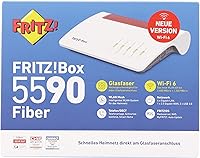
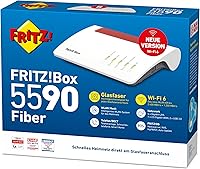
  • Color: The device ships in a white and red finish, consistent with AVM's product design language across the FRITZ! hardware family.
  • Manufacturer: Designed and manufactured by AVM GmbH, a Berlin-based networking company with over three decades of experience in the German consumer router market.
  • In The Box: Package contents include the router, FRITZ!SFP AON module, FRITZ!SFP GPON module, power supply, 4m fiber optic cable, 1.5m LAN cable, and installation instructions.

Related Reviews

AVM FRITZ!Box 4690 Wi-Fi 7 Mesh Router
79%
91%
Wireless Performance
94%
Wired Connectivity
62%
Setup & Configuration
88%
Software & Firmware
67%
Value for Money
More
AVM FRITZ!Box 7360 DSL Router
75%
89%
Connection Stability
83%
Build Quality
62%
Wireless Range
71%
Setup Experience
58%
Wi-Fi Speed Performance
More
LNN 788 Wi-Fi 6 Router
74%
91%
Ease of Setup
78%
Wi-Fi Speed Performance
67%
Coverage & Range
82%
Multi-Device Handling
79%
Gaming & Streaming Quality
More
Synology WRX560 Dual-Band Wi-Fi 6 Router
77%
91%
Network Security
88%
Software & Firmware
86%
VLAN & Network Segmentation
83%
Wired Connectivity
71%
Wireless Performance
More
ExpressVPN Aircove Wi-Fi 6 VPN Router
75%
91%
Ease of Setup
78%
VPN Performance
93%
Device Grouping
69%
Wi-Fi Coverage
54%
Value for Money
More
Cudy WR1500 AX1500 Wi-Fi 6 Router
68%
91%
Value for Money
88%
Setup & Ease of Use
76%
Wi-Fi Speed Performance
63%
Signal Range & Coverage
82%
Multi-Device Handling
More
Reyee RG-E4 Wi-Fi 6 Router
78%
78%
Wi-Fi Coverage
83%
Wi-Fi Speed
86%
Setup & Ease of Use
88%
Device Capacity
81%
Gaming Performance
More
Synology RT6600ax Tri-Band Wi-Fi 6 Router
84%
91%
Wi-Fi Performance
89%
Coverage Area
84%
Setup & Installation
90%
Security Features
86%
Reliability & Stability
More
Netgear Nighthawk AX4 RAX40 Wi-Fi 6 Router
84%
92%
Wi-Fi Speed & Performance
88%
Ease of Setup & Installation
85%
Coverage Range
78%
App Usability
90%
Stability for Gaming & Streaming
More
Ubiquiti Dream Router Wi-Fi 6 Router
79%
93%
Network Stability & Reliability
54%
Setup & Initial Configuration
78%
Wi-Fi 6 Performance
91%
UniFi Controller Integration
74%
Value for Money
More

FAQ

It depends heavily on which type of fiber your ISP uses. The included SFP modules cover AON and GPON fiber types, which are common in Germany but also used in parts of Europe and beyond. That said, AVM has optimized this device for German ISP configurations, so compatibility with non-German providers is not guaranteed and should be confirmed directly with your ISP before purchasing.

No — that is actually one of the main reasons people choose this device. The AVM FRITZ!Box 5590 Fiber Wi-Fi 6 Router has an integrated fiber modem with an SFP cage, so it connects directly to your fiber line using one of the included modules. This replaces the need for a separate ONT or media converter that many ISPs provide.

AON (Active Optical Network) and GPON (Gigabit Passive Optical Network) are two different technical approaches ISPs use to deliver fiber to your home. The simplest way to find out which one your provider uses is to check your ISP contract or call their support line. Fortunately, both SFP modules are included in the box, so you won't need to purchase anything extra once you know which type applies to your connection.

Honest answer: it is more involved than plugging in a basic ISP-provided router. FRITZ!OS — the interface that controls the device — is well-designed and logical, but there are configuration steps around fiber type and ISP credentials that require some attention. The setup guide included in the box is not guaranteed to be in English, which adds an extra layer of friction for non-German speakers. AVM's online documentation is available in English, which helps, but this is not a device that configures itself out of the box.

Yes, and this is one of the strongest arguments for choosing this all-in-one networking device if you are already in the FRITZ! ecosystem. It functions as the FRITZ!Mesh master node, which means it automatically coordinates connected repeaters, handles handoffs as you move around your home, and manages band steering centrally through the FRITZ!OS interface.

AVM has a good track record compared to many router manufacturers. FRITZ!OS updates are released regularly — often multiple times per year — and typically include both security patches and new features. Long-term owners of previous FRITZ! models report receiving updates for five or more years, which is a meaningful factor at this price tier.

The DECT base station is compatible with standard DECT handsets from most major brands, not just AVM's own lineup. Any DECT-compliant cordless phone should register and function for calls. The deeper smart home control features — like managing radiator valves or switchable sockets — are specific to AVM's FRITZ!DECT accessory range, however.

The two USB 3.0 ports support external hard drives or USB sticks that then become accessible to all devices on your network as shared storage — useful for basic media sharing or backup. You can also connect a USB printer and share it across the network without needing a dedicated print server. It is a handy feature, though it is worth noting this is not a replacement for a proper NAS if you have high-volume storage needs.

For most current home users, it is future-proofing — residential fiber plans rarely exceed 1 Gbps at this stage. That said, multi-gigabit home internet plans are expanding, and having a 2.5 Gbps-capable WAN port means this fiber router will not become a bottleneck when faster plans become available in your area. If you are buying with a five-to-ten-year horizon in mind, it is a genuine advantage.

For many households, honestly, no. If your ISP's equipment is stable and your needs are basic — browsing, streaming, and a few connected devices — the free option is hard to beat on pure value. The FRITZ!Box 5590 earns its price for specific buyers: those who want to own their network infrastructure outright, run a DECT phone system, build out a FRITZ!Mesh setup, or ensure they are ready for next-generation ISP speeds. If those scenarios apply to you, the investment makes sense. If they don't, the price premium is difficult to justify.

Where to Buy