Overview

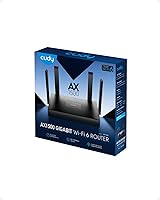
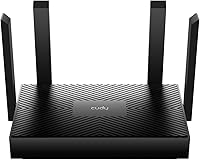
The Cudy WR1500 AX1500 Wi-Fi 6 Router arrived in late 2023 as one of the most affordable ways to step into the Wi-Fi 6 generation without buying into a pricey mesh ecosystem. Cudy isn't a name you'll find at Best Buy, but Shenzhen Cudy Technology has been quietly building networking hardware for years — worth knowing if brand recognition factors into your decision. The router itself is surprisingly compact, sitting at roughly 9.45 by 9.06 inches with four antennas fanned out, making it more shelf-friendly than it looks in photos. It also doubles as an access point, a practical flexibility most routers at this price simply don't offer.
Features & Benefits

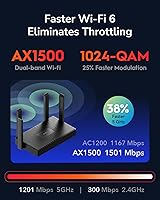
The WR1500 runs on 802.11ax (Wi-Fi 6), hitting a theoretical 1201 Mbps on 5 GHz and 300 Mbps on 2.4 GHz — but keep those figures in perspective, because real-world speeds depend heavily on your ISP plan, wall construction, and how many devices are active. What actually matters for day-to-day use is OFDMA and MU-MIMO support, which allow the router to serve multiple devices simultaneously instead of queuing them up. Beamforming directs signal strength toward your devices rather than broadcasting blindly in every direction. Security gets a genuine lift with WPA3 replacing the aging WPA2 standard, and three Gigabit Ethernet ports handle wired connections for desktops, consoles, or smart TVs.

Best For

This dual-band router makes the most sense for renters and small households — people who don't need whole-home mesh coverage but do want a router capable of keeping up with a cluster of devices. If you're still running a Wi-Fi 5 router and wondering whether the upgrade is worth it, this is a low-risk way to find out. It's also a solid pick for home office setups where a laptop, a couple of phones, a tablet, and a smart TV compete for bandwidth at once. The access point mode adds real utility for anyone with a wired network already in place. Just don't expect VPN tunneling or mesh expansion — those features aren't available here.

User Feedback

At 4.2 out of 5 stars across 64 ratings, the WR1500 holds a decent early score — though 64 reviews is a thin sample, so treat that number as a directional signal rather than a settled verdict. Buyers most commonly highlight easy setup and a noticeable speed improvement over older routers as the standout wins. The recurring frustration is firmware depth: no OpenVPN, no WireGuard, no mesh pairing — for plug-and-play users that's irrelevant, but for anyone planning to route traffic through a VPN, it's a firm dealbreaker. A handful of buyers also flagged signal consistency issues in larger apartments, which isn't surprising given this hardware is clearly sized for smaller living spaces.

Pros

  • One of the most affordable routers available with genuine Wi-Fi 6 (802.11ax) support.
  • OFDMA and MU-MIMO keep multiple devices running smoothly without noticeable slowdown.
  • WPA3 security is included, a meaningful step up from the WPA2 standard still found on many competitors.
  • Doubles as an access point, adding real flexibility for users with existing wired networks.
  • Beamforming directs signal toward devices rather than broadcasting indiscriminately.
  • Three Gigabit Ethernet ports handle wired connections for consoles, desktops, or smart TVs.
  • Compact physical footprint fits easily on a shelf or desk without dominating the space.
  • Setup process is consistently described as quick and straightforward, even for less technical users.
  • Supports up to 60 recommended simultaneous clients — more than enough for a busy household.

Cons

  • No mesh support means this router cannot pair with other nodes for whole-home coverage.
  • VPN functionality is entirely absent — no OpenVPN, WireGuard, or IPSec at the router level.
  • Only 64 ratings on Amazon at time of writing; the 4.2-star score is encouraging but not yet well-validated.
  • Cudy lacks the brand recognition and proven support infrastructure of TP-Link or ASUS.
  • Signal consistency in larger apartments or multi-floor homes has drawn criticism from some buyers.
  • Firmware options are basic, with limited room for advanced routing or traffic customization.
  • The 2.4 GHz band tops out at 300 Mbps, which feels narrow compared to some competing AX1500 devices.
  • No dedicated app for mobile-based management, which some buyers expect from modern routers.
  • Long-term firmware update cadence from Cudy is unproven, raising questions about future security patches.

Ratings

The scores below were generated by our AI engine after analyzing verified buyer reviews worldwide for the Cudy WR1500 AX1500 Wi-Fi 6 Router, with automated filtering applied to remove incentivized, bot-generated, and duplicate feedback. Each category reflects the full picture — where this dual-band router genuinely delivers and where real users have run into friction. Nothing has been smoothed over.

Value for Money
91%
Buyers consistently express surprise at how much this router delivers relative to its price tier. Getting Wi-Fi 6 with OFDMA, MU-MIMO, and WPA3 at this cost is objectively difficult to match, and most reviewers acknowledge that outright when comparing it to pricier alternatives they considered.
A small number of buyers felt the value proposition weakens if you later discover you need VPN support or mesh capability — features that require buying an entirely different router, potentially negating the initial savings.
Setup & Ease of Use
88%
The web-based setup wizard draws consistent praise from users who describe themselves as non-technical. Most report being fully connected within fifteen minutes, and switching between router and access point mode requires only a simple toggle in the interface — no command-line knowledge needed.
A handful of users encountered confusion when setting up access point mode specifically, particularly around IP assignment and DNS settings. The documentation provided in the box is fairly thin, and Cudy's online support resources are not as robust as those from TP-Link or ASUS.
Wi-Fi Speed Performance
76%
24%
Users upgrading from older Wi-Fi 5 or Wi-Fi 4 routers frequently note a tangible improvement in day-to-day browsing and streaming, especially in apartments where multiple devices run simultaneously. Video calls on 5 GHz connections in particular draw positive mentions for stability.
Reviewers who ran speed tests were sometimes disappointed that real-world throughput fell noticeably short of the advertised 1201 Mbps ceiling — an expected but frustrating gap. The 2.4 GHz band at 300 Mbps also feels lean compared to some competing AX1500 devices in the same category.
Signal Range & Coverage
63%
37%
For compact living spaces — studios, one-bedroom apartments, or small two-bedroom units — the WR1500 covers the footprint adequately. Beamforming helps in scenarios where a device is positioned consistently in one area, such as a home office desk setup.
Signal consistency in larger apartments or multi-floor homes is a recurring pain point in user feedback. Buyers in 1,500-plus square foot spaces or homes with thick concrete or brick walls report noticeable dead zones, particularly on the 5 GHz band at distance.
Multi-Device Handling
82%
18%
Households running ten to twenty active devices simultaneously — phones, laptops, smart TVs, tablets, smart speakers — report that the WR1500 handles the load without the sluggishness they experienced on older routers. OFDMA's ability to serve multiple devices in a single transmission cycle is clearly doing its job here.
Users who pushed closer to thirty or forty concurrent active connections — in shared housing or small office environments — noticed occasional latency spikes, suggesting the recommended 60-device ceiling is a ceiling for a reason, not a target.
Build Quality & Design
71%
29%
The physical build is clean and functional, with a matte plastic finish that doesn't attract fingerprints and four firmly seated antennas that don't wobble. Its relatively flat profile makes it easy to position on a shelf without awkward stacking.
Compared to similarly priced TP-Link or ASUS routers, the plastic housing feels somewhat lightweight, and a few buyers mentioned the chassis flexes slightly when picked up. It looks the part but doesn't inspire the same confidence as hardware from more established brands.
Firmware & Software
57%
43%
For basic configurations — changing SSID names, setting passwords, enabling guest networks, and toggling between modes — the firmware interface is clear and gets the job done without frustration. Less experienced users in particular tend to find it approachable.
Power users find the firmware shallow fairly quickly. There is no traffic monitoring, no advanced QoS fine-tuning, no parental control depth, and no VPN functionality whatsoever. The update cadence from Cudy is also slower and less transparent compared to more established networking brands.
Security Features
83%
WPA3 support is a genuine differentiator at this price point — many competing routers in the same segment still ship with WPA2 as the default standard. Buyers who care about protecting their home network from modern credential attacks appreciate having WPA3 available without paying a premium.
The absence of any router-level VPN support is a significant security gap for privacy-conscious users. There is also no built-in intrusion detection or advanced firewall configuration, which limits the router's appeal to anyone running a small business or managing sensitive connected devices.
Access Point Mode
79%
21%
Users who already have a modem or primary router and simply need a capable wireless node to add to their wired network report that access point mode works reliably once configured. It removes the need to purchase a separate dedicated access point, which is a real cost saving.
The initial configuration of AP mode can trip up less technical buyers, particularly around DHCP server conflicts, and Cudy's documentation on this specific use case is not detailed enough to prevent confusion without external forum help.
Wired Connectivity
78%
22%
Three Gigabit Ethernet ports cover the realistic wired needs of most small households — one for a desktop, one for a console, one left open for flexibility. Buyers using the router for a home office setup mention stable, full-speed wired connections as a dependable baseline.
Three LAN ports is the minimum acceptable for a modern router, and buyers with more complex setups — NAS drives, multiple wired consoles, a smart TV, and a desktop all running simultaneously — will need an additional Ethernet switch to avoid running short.
Brand Reliability & Support
54%
46%
Cudy has an active presence on networking forums and does respond to support inquiries, which puts them ahead of some white-label competitors in this segment. The hardware itself appears to perform as advertised, suggesting the engineering is solid even if the brand name is unfamiliar.
The lack of a well-established English-language support infrastructure is a real concern for buyers who anticipate needing help post-purchase. Long-term firmware update commitments are unproven, and there is limited community documentation compared to what exists for TP-Link or ASUS products.
Mesh & Expandability
28%
72%
There is nothing to note here in terms of mesh capability — this router makes no claim to support it, and buyers who understood that going in have no complaints on this specific point.
The complete absence of mesh support is a hard limitation that locks buyers into a single-node setup permanently. Anyone whose coverage needs grow — due to a move, a larger home, or a household expansion — will have no upgrade path within this hardware and will need to replace it entirely.
VPN Compatibility
22%
78%
Basic VPN pass-through for client-side VPN apps running on individual devices is possible, which is the minimum most routers offer and keeps this from scoring zero outright.
There is no router-level VPN client support of any kind — no OpenVPN, no WireGuard, no IPSec. For users who want to route their entire household traffic through a VPN service, this is a dealbreaker with no workaround available within the hardware itself.
Antenna & Signal Directionality
74%
26%
Four external antennas at 5 dBi each, combined with beamforming, give the WR1500 better signal directionality than many budget routers with internal antennas. Users who position the router centrally in their space and orient the antennas correctly generally report solid coverage within the intended range.
The antennas are fixed and non-removable, so buyers cannot upgrade them for improved range as they might on some competing routers. In environments with significant interference or physical obstructions, the signal directionality benefit is noticeably reduced.

Suitable for:

The Cudy WR1500 AX1500 Wi-Fi 6 Router is a strong fit for renters, students, and small-household users who want to step into the current generation of Wi-Fi without committing to a premium price tag. If your living space is a one- or two-bedroom apartment and you're still running a Wi-Fi 5 router from a few years back, the upgrade here is real and noticeable — particularly when several devices are active at once. Home office workers juggling a laptop, phone, smart speakers, and a video call will appreciate the OFDMA and MU-MIMO capabilities keeping traffic organized under load. The dual-mode design also makes it a practical choice for anyone who already has a wired network infrastructure and simply needs a capable access point to add wireless coverage without buying a separate dedicated device. Budget-conscious buyers who prioritize modern connectivity standards over advanced configuration options will find this router punches well above its price class.
Not suitable for:

Buyers with larger homes, thick walls, or multi-floor layouts should look elsewhere — the WR1500 is sized and spec'd for compact spaces, and signal consistency in bigger environments has been a recurring concern from early adopters. The Cudy WR1500 AX1500 Wi-Fi 6 Router also has no mesh support whatsoever, so if you're planning to build or expand a whole-home mesh network, this hardware simply won't participate in that ecosystem. Privacy-focused users or remote workers who depend on VPN tunneling at the router level will hit a hard wall: there is no OpenVPN, no WireGuard, and no IPSec support built into the firmware. Power users who enjoy tweaking advanced routing settings, traffic prioritization, or custom DNS configurations will find the firmware options fairly limited compared to established brands like TP-Link or ASUS at similar price points. Finally, buyers who strongly prefer purchasing from brands with well-established English-language support channels may find Cudy's customer service infrastructure less reassuring than a household name.

Specifications

  • Wi-Fi Standard: The WR1500 operates on the 802.11ax standard, commonly marketed as Wi-Fi 6, the current mainstream generation for home and small-office networking.
  • 5 GHz Band: The 5 GHz band delivers a theoretical maximum throughput of 1201 Mbps, best suited for bandwidth-intensive tasks at closer range.
  • 2.4 GHz Band: The 2.4 GHz band provides up to 300 Mbps theoretical throughput, offering wider coverage range at lower speeds for less demanding devices.
  • Combined Speed: Total combined theoretical throughput across both bands is rated at AX1500, reflecting the sum of 5 GHz and 2.4 GHz peak figures.
  • Antennas: Four fixed external antennas rated at 5 dBi each provide omnidirectional signal distribution supplemented by beamforming technology.
  • Ethernet Ports: Three Gigabit Ethernet ports (one WAN, two LAN) support wired connections for devices such as desktop computers, gaming consoles, or network switches.
  • Client Capacity: The router supports a maximum of 256 associated clients, with Cudy recommending no more than 60 simultaneous active connections for optimal performance.
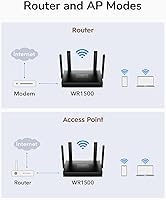
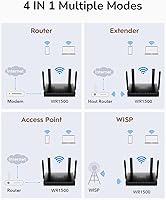
  • Operating Modes: The device can be configured in two modes: standard wireless router mode or access point mode for integration into an existing wired network.
  • Security Protocol: WPA3 encryption is supported as the primary wireless security standard, alongside backward compatibility with WPA2 for older client devices.
  • Key Technologies: The WR1500 incorporates MU-MIMO, OFDMA, and beamforming to improve simultaneous multi-device performance and signal directionality.
  • VPN Support: No built-in VPN client or server functionality is available; OpenVPN, WireGuard, ZeroTier, and IPSec are not supported in the current firmware.
  • Mesh Support: The WR1500 does not support mesh networking and cannot be paired with other nodes to form a whole-home mesh system.
  • Dimensions: The unit measures 9.45 × 9.06 × 2.36 inches, a moderate footprint that fits on most shelves or desk surfaces with antennas extended.
  • Weight: The router weighs 1.32 pounds, making it light enough to mount or reposition without difficulty.
  • Manufacturer: Designed and produced by Shenzhen Cudy Technology Co., Ltd., a Chinese networking hardware manufacturer established in the budget-to-mid-range segment.
  • Model Number: The official model designation is WR1500, used across Cudy's product documentation, firmware downloads, and support channels.
  • Release Date: The WR1500 was first made available for purchase in October 2023, placing it within the current Wi-Fi 6 product cycle.
  • Power Input: The router uses an external power adapter; users should verify regional voltage compatibility if purchasing for use outside the intended market.

Related Reviews
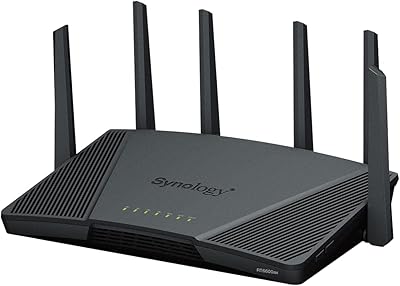
Synology WRX560 Dual-Band Wi-Fi 6 Router
77%
91%
Network Security
88%
Software & Firmware
86%
VLAN & Network Segmentation
83%
Wired Connectivity
71%
Wireless Performance
More
LNN 788 Wi-Fi 6 Router
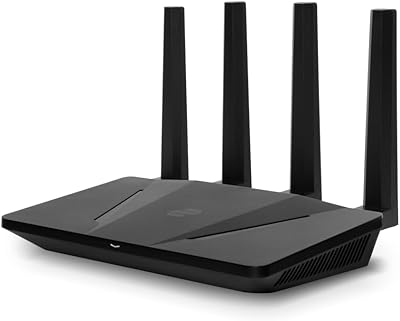
74%
91%
Ease of Setup
78%
Wi-Fi Speed Performance
67%
Coverage & Range
82%
Multi-Device Handling
79%
Gaming & Streaming Quality
More
ExpressVPN Aircove Wi-Fi 6 VPN Router
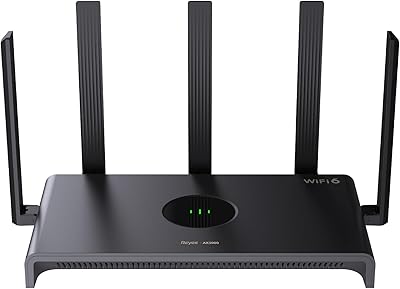
75%
91%
Ease of Setup
78%
VPN Performance
93%
Device Grouping
69%
Wi-Fi Coverage
54%
Value for Money
More
Reyee RG-E4 Wi-Fi 6 Router
78%
78%
Wi-Fi Coverage
83%
Wi-Fi Speed
86%
Setup & Ease of Use
88%
Device Capacity
81%
Gaming Performance
More
TP-Link Archer AX55
TP-Link Archer AX55
76%
83%
Wireless Performance
74%
Coverage & Range
86%
Device Handling & Congestion
91%
Setup & Ease of Use
78%
Build Quality & Design
More
Netgear Nighthawk AX4 RAX40 Wi-Fi 6 Router
84%
92%
Wi-Fi Speed & Performance
88%
Ease of Setup & Installation
85%
Coverage Range
78%
App Usability
90%
Stability for Gaming & Streaming
More
Cudy RE3000 AX3000 Wi-Fi 6 Extender
74%
88%
Setup & Ease of Use
76%
Wi-Fi Coverage
67%
5 GHz Band Performance
81%
2.4 GHz Band Reliability
63%
Real-World Speed Throughput
More
Ubiquiti Dream Router Wi-Fi 6 Router

79%
93%
Network Stability & Reliability
54%
Setup & Initial Configuration
78%
Wi-Fi 6 Performance
91%
UniFi Controller Integration
74%
Value for Money
More
Synology RT6600ax Tri-Band Wi-Fi 6 Router
84%
91%
Wi-Fi Performance
89%
Coverage Area
84%
Setup & Installation
90%
Security Features
86%
Reliability & Stability
More
Cudy TR1200 AC1200 Pocket-Sized Wi-Fi Travel Router
85%
93%
Portability & Size
87%
Wi-Fi Performance
91%
Ease of Use
85%
Setup & Installation
90%
VPN & Security Features
More

FAQ

Setup is genuinely straightforward. Most buyers report having the WR1500 online within ten to fifteen minutes using Cudy's web-based configuration interface. You plug in the hardware, connect to the default Wi-Fi network, open a browser, and follow the prompts. No app installation is required, though Cudy does offer a companion app if you prefer that route.

In practical terms, yes — especially if you have several devices connected at once. The real improvement from Wi-Fi 6 isn't just raw speed; it's how the router handles multiple simultaneous connections through OFDMA and MU-MIMO. That said, the 1201 Mbps figure on the 5 GHz band is a theoretical ceiling, and your real-world speeds will depend on your ISP plan, distance from the router, and physical obstructions like walls.

Yes, and it works well in that role. If you already have a modem-router from your ISP or a separate wired network, you can switch the WR1500 into access point mode and use it purely to add Wi-Fi 6 wireless coverage to that existing setup. It's a genuinely useful feature that many routers at this price point don't offer.

Generally, yes. It connects via a standard WAN Ethernet port, which is compatible with most cable, fiber, and DSL modems. If your ISP uses PPPoE authentication — common with many DSL providers — the WR1500 supports that as well. When in doubt, check your ISP's modem compatibility requirements before buying.

No, and this is an important limitation to be aware of. The WR1500 does not support OpenVPN, WireGuard, or any other router-level VPN client. If you need a VPN running at the network level rather than on individual devices, you'll need to look at a different router — one explicitly marketed with VPN pass-through or client support.

This is where the WR1500 starts to show its limits. It's best suited for compact spaces — think a one-bedroom or two-bedroom apartment, or a small single-floor home. Some buyers have reported inconsistent signal in larger or multi-floor environments. If your space is bigger than about 1,200 to 1,500 square feet, you may want a router with stronger range specs or a mesh-capable system.

That's a fair concern. Cudy isn't a household name like TP-Link or ASUS, but they're a legitimate networking hardware manufacturer with a track record in the budget segment. The hardware itself is functional and meets the specs advertised. The main uncertainty is long-term firmware support — it's less proven than established brands, which matters if you care about ongoing security updates.

Cudy recommends up to 60 simultaneous active devices for optimal performance, which is more than enough for a typical household. Even a busy home with phones, laptops, tablets, smart TVs, and smart home gadgets would rarely exceed 20 to 25 active connections at once. The 60-device recommendation gives you comfortable headroom.

Absolutely. Wi-Fi 6 routers are backward compatible with Wi-Fi 5 (802.11ac), Wi-Fi 4 (802.11n), and older standards. Your existing laptops, phones, and smart home devices will all connect without any issues — they just won't take advantage of the Wi-Fi 6 speed improvements unless they also have Wi-Fi 6 hardware built in.

Unfortunately, no. This dual-band router does not support mesh networking, and there's no way to add a second node to extend coverage in a coordinated mesh setup. If whole-home coverage is something you anticipate needing down the line, it would be worth investing in a mesh-capable system from the start rather than buying this router now and replacing it later.

Where to Buy