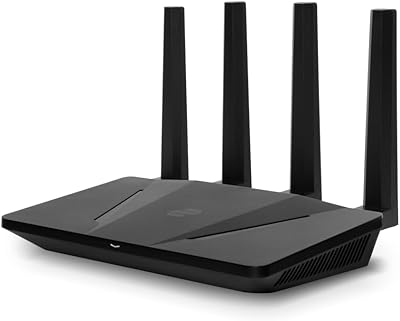

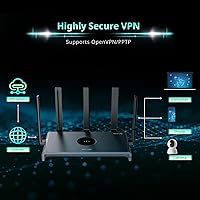
Overview

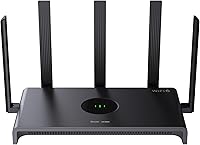
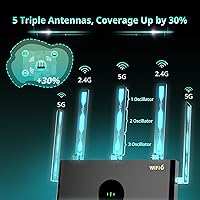
The Reyee RG-E4 Wi-Fi 6 Router comes from Reyee, a consumer networking brand under Ruijie Networks — a Chinese enterprise networking company with a genuine commercial track record across global markets. Sitting in the mid-range tier, it targets larger homes and small offices that need dependable wireless coverage without spending on flagship hardware. Five omnidirectional antennas paired with high-power FEMs help push signal through walls more effectively than most routers at this price level. One important note upfront: this is a router only, not a modem-router combo, so you will need an existing modem to get online. With over 3,000 Amazon ratings since its mid-2023 launch, there is plenty of real-world data to draw from.

Features & Benefits

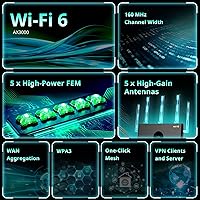
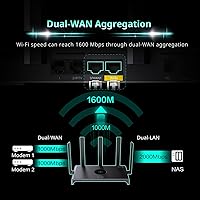
The RG-E4 runs on Wi-Fi 6 (802.11ax) across both bands — 574 Mbps on 2.4 GHz and up to 2,402 Mbps on 5 GHz — which meaningfully reduces congestion when many devices are active at once. One standout hardware feature is WAN aggregation: by combining two ethernet ports, you can pull up to 1.6 Gbps from your ISP, though this only pays off if your internet plan actually supports multi-gig speeds. Gaming traffic prioritization handles packet queuing automatically, no manual QoS tinkering required. The one-click Reyee Mesh button makes expanding coverage straightforward if one unit falls short. Security is well covered too — WPA3, guest networking, parental controls, and access point mode are all included without any upsell.

Best For

This Wi-Fi 6 router makes the most sense for homeowners dealing with dead zones across 2,000–3,000 sq. ft. spaces, though real-world coverage varies with wall materials and floor plan complexity, so treat that upper figure as optimistic in older or brick-heavy construction. Budget-conscious gamers will appreciate built-in traffic prioritization without stepping up to a pricier gaming-branded device. Households running 20 to 50-plus connected gadgets — smart speakers, security cameras, tablets, consoles — benefit from the generous device capacity. If you have a multi-gig internet plan, the WAN aggregation is a genuine differentiator at this price. And for anyone considering mesh expansion later, this dual-band router offers a practical starting point.

User Feedback

Across more than 3,000 ratings, this dual-band router holds a 4.2-star average — a score that reflects solid everyday performance rather than just early buzz. Most buyers highlight easy app-based setup and consistent signal strength, especially in single-story homes where the range claim holds up well. On the critical side, some users find the web interface less refined compared to brands like TP-Link or ASUS, and a handful have reported occasional firmware hiccups or brief app connectivity issues. The WAN aggregation feature also draws mixed reactions — buyers expecting an automatic speed boost were caught off guard when they learned their ISP plan needs to support multi-gig throughput on its end. No widespread hardware reliability concerns, but worth understanding before purchasing.

Pros

  • Wi-Fi 6 support noticeably reduces congestion when many devices are active at the same time.
  • Five high-power antennas with hardware FEMs push signal further than most routers at this price.
  • Built-in gaming traffic prioritization works without any manual setup or QoS configuration.
  • WAN port aggregation supports up to 1.6 Gbps — a rare capability in this price bracket.
  • Connects up to 128 devices simultaneously, making it practical for device-heavy smart homes.
  • One-click mesh expansion makes growing your network straightforward without buying a whole new system.
  • Setup via the Reyee app is consistently praised by buyers as quick and beginner-friendly.
  • WPA3 security, parental controls, and guest networking are all included at no extra cost.
  • The RG-E4 holds a 4.2-star average across more than 3,000 ratings — a reliable signal of real-world satisfaction.
  • Access point mode adds flexibility for users integrating this into an existing wired network.

Cons

  • This is a router only — buyers without an existing modem will need to purchase one separately.
  • The web-based management interface feels noticeably less refined than competing brands like TP-Link or ASUS.
  • WAN aggregation is only useful if your ISP plan and infrastructure actually support multi-gig bonding.
  • Some users have reported occasional firmware update issues or brief app connectivity drops.
  • The 3,000 sq. ft. coverage claim is optimistic and may not hold in multi-story or brick-construction homes.
  • Reyee is a lesser-known brand in Western markets, which can make finding community support or forums harder.
  • No tri-band option means the single 5 GHz band carries all high-speed traffic with no dedicated backhaul.
  • Long-term firmware support history is not well established compared to more mature networking brands.

Ratings

The Reyee RG-E4 Wi-Fi 6 Router has been scored below by our AI engine after analyzing thousands of verified global buyer reviews, with spam, bot activity, and incentivized feedback actively filtered out. Scores reflect how real users actually experience this dual-band router day to day — strengths and frustrations included. Where the RG-E4 genuinely delivers, the scores show it; where it falls short of expectations, that is reflected too.

Wi-Fi Coverage
78%
22%
In single-story homes and open-plan layouts, buyers consistently report strong, stable signal reaching rooms that older routers could not reliably serve. The five antennas combined with hardware-level FEMs give this router a tangible edge over similarly priced competitors when it comes to raw signal reach.
Multi-story homes and properties with thick concrete or brick walls frequently push the RG-E4 below its advertised 3,000 sq. ft. claim. Users in those environments often find one or two dead zones persist, especially on upper floors far from the router.
Wi-Fi Speed
83%
On the 5 GHz band, users running wireless transfers and 4K streaming report throughput that holds up well even with a dozen or more devices active simultaneously. Wi-Fi 6 OFDMA technology noticeably reduces the slowdowns that older routers suffer during peak household usage hours.
The 2.4 GHz band's 574 Mbps ceiling is standard for this class but still disappoints users with older smart-home devices that cannot use 5 GHz and end up congesting that band. Real-world speeds rarely hit spec maximums, particularly at longer distances from the router.
Setup & Ease of Use
86%
The Reyee app receives consistent praise for guiding first-time users through the full setup process in under ten minutes without requiring any technical knowledge. Most buyers describe the out-of-box experience as one of the smoothest they have had with a networking device.
While the app is polished, the browser-based web interface feels noticeably dated and less intuitive compared to what TP-Link and ASUS offer in the same price bracket. Advanced users who prefer web-based management over an app may find the experience a step behind expectations.
Device Capacity
88%
Households with 30, 40, or even 60 connected devices report that the RG-E4 handles the load without the slowdowns or dropped connections that plague cheaper routers. Smart-home enthusiasts with a mix of IoT sensors, cameras, consoles, and phones find this router genuinely well-suited to their setup.
While 128 devices is the theoretical ceiling, real-world performance does begin to degrade when active simultaneous usage — not just connected devices — climbs very high. The dual-band architecture has limits that a tri-band router would not face under the same heavy load.
Gaming Performance
81%
19%
The built-in gaming traffic prioritization works without any configuration, and players report that latency spikes during background downloads or family streaming are meaningfully reduced compared to routers without QoS features. For a budget-tier device, it delivers a practical improvement in competitive gaming scenarios.
Hardcore gamers who want granular latency controls, per-device traffic shaping, or a dedicated gaming dashboard will find the feature set fairly basic. The prioritization is automatic — useful, but not customizable enough for users who want fine-grained control over their network.
WAN Aggregation
62%
38%
For users who have a multi-gig ISP plan and a modem that supports port bonding, the ability to aggregate two WAN ports up to 1.6 Gbps is a genuinely valuable capability at this price point. It is a feature most competing routers in this range simply do not offer.
The majority of buyers cannot actually use this feature because their ISP plan or modem does not support it, leading to disappointment when they expect an automatic speed boost and see none. Several reviews reflect frustration at discovering this limitation only after purchase.
Mesh Expandability
76%
24%
The one-click Reyee Mesh button makes linking a second node straightforward, and users who have expanded their setup report improved whole-home coverage without needing to reconfigure devices or change network names. It is a practical upgrade path for buyers who start with a single unit.
Mesh expansion is locked to Reyee-compatible hardware, so users cannot mix in nodes from other brands. The ecosystem is also relatively small compared to established mesh platforms, which limits options if specific node form factors or features are needed.
Security Features
84%
WPA3 support, a dedicated guest network, and parental controls are all included without any subscription requirement, which stands out positively against competitors that charge for parental control features. WPA3 in particular is an important step up for households concerned about network security.
Parental controls work adequately for basic time scheduling and site blocking, but they lack the depth and reporting features found in third-party solutions or premium routers. Parents expecting a full family management suite from the built-in tools may find them underwhelming.
Firmware & Software Stability
61%
39%
For most users running standard configurations, the firmware runs quietly in the background without requiring attention. Automatic update notifications via the app help less technical users stay current without manually checking for releases.
A recurring pattern in critical reviews involves firmware updates introducing connectivity drops or causing the app to temporarily lose communication with the router. While these issues tend to resolve themselves or through a reboot, they represent a reliability gap that more established brands have largely closed.
Build Quality
72%
28%
The chassis feels solid enough for a router that will sit undisturbed on a shelf or desk, and the matte black finish does not attract visible dust or fingerprints the way glossy surfaces do. At its weight and footprint, it feels appropriately built for long-term stationary use.
The plastic construction does not convey premium durability, and a few users have noted that the antenna joints feel looser than expected after repositioning them multiple times. It is built to a price, which is fine, but do not expect the kind of robust hardware found on higher-end networking gear.
Value for Money
89%
Measured against what comparable Wi-Fi 6 routers cost from brand-name competitors, the RG-E4 delivers a feature set that would typically cost significantly more. Wi-Fi 6, WAN aggregation, gaming prioritization, WPA3, and mesh support in a single device at this price is a strong combination.
The value equation assumes buyers already own a modem — those who need to purchase one separately will find the total cost of entry somewhat higher than the sticker price suggests. The value also depends on having an ISP plan that can make use of the hardware's ceiling capabilities.
App Experience
74%
26%
Initial setup through the Reyee app is clean and well-guided, and basic network management tasks like checking connected devices or updating the password are handled without friction. The interface is visually accessible for non-technical users.
Beyond the basics, the app offers limited depth for users who want visibility into traffic usage, per-device prioritization, or detailed network diagnostics. Some buyers also report that the app occasionally struggles to reconnect to the router after a firmware update, requiring a fresh login.
Compatibility
79%
21%
The RG-E4 works with virtually any ISP and standard modem out of the box, and backward compatibility with older Wi-Fi standards means legacy devices connect without issues. Access point mode adds further flexibility for users incorporating it into an existing wired network.
WAN aggregation compatibility is the notable exception, as it depends entirely on the modem and ISP infrastructure rather than the router alone. Buyers on cable or DSL plans are almost universally unable to use that feature, narrowing its practical relevance to a minority of users.

Suitable for:

The Reyee RG-E4 Wi-Fi 6 Router is a strong fit for homeowners managing larger open-plan or single-story spaces — roughly 2,000 to 3,000 square feet — where a single older router leaves corners and back rooms underserved. Households running a dense mix of devices will find the 128-device capacity and Wi-Fi 6 congestion handling genuinely useful, especially in homes stacked with smart TVs, security cameras, consoles, and phones all competing for bandwidth simultaneously. Budget-minded gamers get a practical option here too, since traffic prioritization works automatically without needing to configure QoS rules manually. Anyone on a multi-gig internet plan will appreciate the WAN aggregation capability, which lets you squeeze up to 1.6 Gbps from your ISP connection — a rare feature at this price point. It also makes sense for buyers who want a capable standalone router today but want the option to expand into a mesh setup down the road without replacing their hardware entirely.

Not suitable for:

The Reyee RG-E4 Wi-Fi 6 Router is not the right choice for buyers expecting a modem-router combo — this is a router only, so if you do not already own a separate modem, factor that additional cost and setup into your decision. People living in older homes with thick concrete, brick, or multi-story layouts should also be cautious about the 3,000 sq. ft. coverage claim, as real-world performance in those environments often falls meaningfully short of that figure. Power users who rely on a polished web interface or advanced firmware customization will likely find the management software less capable than what TP-Link or ASUS offer at a comparable price. The WAN aggregation feature, while appealing on paper, is only useful if your ISP delivers a multi-gig plan with compatible port bonding support — most standard broadband customers will never activate it. Finally, buyers who prioritize tri-band performance or dedicated backhaul for a mesh network should look at more specialized options rather than relying on this dual-band setup.

Specifications

  • Wi-Fi Standard: This router uses 802.11ax (Wi-Fi 6), which delivers faster throughput and better handling of multiple simultaneous connections compared to Wi-Fi 5.
  • Speed Class: Rated AX3000, with a maximum of 574 Mbps on the 2.4 GHz band and up to 2,402 Mbps on the 5 GHz band.
  • Frequency Bands: Dual-band operation covers both 2.4 GHz for longer-range, lower-speed connections and 5 GHz for shorter-range, higher-speed performance.
  • Antennas: Five external omnidirectional antennas work alongside five high-power front-end modules (FEMs) to extend signal reach and wall penetration.
  • Device Capacity: Supports up to 128 simultaneously connected devices, making it practical for dense smart-home or small-office environments.
  • WAN Aggregation: Two WAN ports can be combined to support an incoming internet connection of up to 1.6 Gbps when used with a compatible multi-gig ISP plan.
  • Mesh Support: Compatible with Reyee Mesh via a dedicated one-click button, allowing users to add nodes and expand coverage without complex configuration.
  • Security Protocol: Supports WPA3 encryption, the current industry standard for wireless security, alongside legacy WPA2 compatibility.
  • Special Features: Includes gaming traffic prioritization, beamforming, guest network mode, parental controls, and access point mode as built-in functions.
  • Ethernet Ports: Equipped with Gigabit Ethernet ports for wired device connections, with WAN port aggregation supported for multi-gig ISP configurations.
  • Dimensions: The unit measures 12 x 7 x 7 inches, which is a moderately large footprint suited to open shelf or desktop placement.
  • Weight: Weighs 1.06 pounds, making it lightweight enough to reposition easily during initial setup.
  • Color: Available in black with a design intended to blend into home or office environments without drawing attention.
  • In-Box Contents: Package includes the RG-E4 router, a power adapter, and a printed quick installation guide.
  • Router Type: This is a standalone router and does not include a built-in modem, requiring a separate modem for internet connectivity.
  • Amazon Rating: Holds a 4.2 out of 5 star rating based on over 3,044 verified customer ratings as of the time of writing.
  • Release Date: First made available on Amazon in June 2023, giving it a meaningful track record of real-world performance data.
  • Manufacturer: Produced by Reyee, a consumer networking brand operating under Ruijie Networks, a Chinese enterprise networking company with global commercial deployments.

Related Reviews
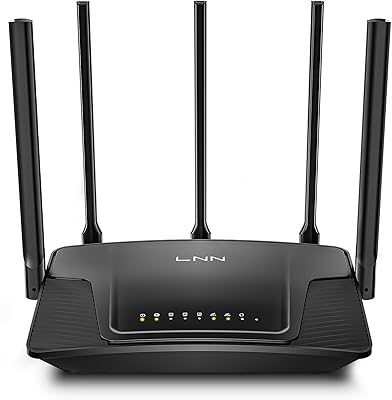
LNN 788 Wi-Fi 6 Router
74%
91%
Ease of Setup
78%
Wi-Fi Speed Performance
67%
Coverage & Range
82%
Multi-Device Handling
79%
Gaming & Streaming Quality
More
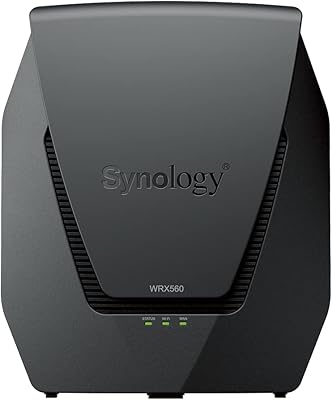
Synology WRX560 Dual-Band Wi-Fi 6 Router
77%
91%
Network Security
88%
Software & Firmware
86%
VLAN & Network Segmentation
83%
Wired Connectivity
71%
Wireless Performance
More
ExpressVPN Aircove Wi-Fi 6 VPN Router
75%
91%
Ease of Setup
78%
VPN Performance
93%
Device Grouping
69%
Wi-Fi Coverage
54%
Value for Money
More
Cudy AX1500 Wi-Fi 6 Router WR1500
83%
92%
Value for Money
88%
Wi-Fi Performance (5GHz)
79%
Wi-Fi Performance (2.4GHz)
74%
Range and Coverage
93%
Ease of Setup
More
Synology RT6600ax Tri-Band Wi-Fi 6 Router
84%
91%
Wi-Fi Performance
89%
Coverage Area
84%
Setup & Installation
90%
Security Features
86%
Reliability & Stability
More
TP-Link Archer AX55
TP-Link Archer AX55
76%
83%
Wireless Performance
74%
Coverage & Range
86%
Device Handling & Congestion
91%
Setup & Ease of Use
78%
Build Quality & Design
More
Netgear Nighthawk AX4 RAX40 Wi-Fi 6 Router

84%
92%
Wi-Fi Speed & Performance
88%
Ease of Setup & Installation
85%
Coverage Range
78%
App Usability
90%
Stability for Gaming & Streaming
More
Ubiquiti Dream Router Wi-Fi 6 Router
79%
93%
Network Stability & Reliability
54%
Setup & Initial Configuration
78%
Wi-Fi 6 Performance
91%
UniFi Controller Integration
74%
Value for Money
More
TP-Link TL-WR1502X Travel Router
81%
91%
Ease of Setup
94%
Portability & Form Factor
88%
Captive Portal Handling
79%
Wi-Fi Performance
86%
Multi-Mode Versatility
More
TP-Link TL-WR3002X Dual-Band Wi-Fi 6 Travel Router
85%
89%
Performance
91%
Ease of Setup
85%
Portability
87%
Security Features
88%
Wi-Fi Speed
More

FAQ

Yes, absolutely. The Reyee RG-E4 Wi-Fi 6 Router is a standalone router, not a modem-router combo. You will need a separate modem connected to your ISP line for it to work. If your ISP supplied you with a modem or a gateway device, you can connect this router to it directly.

That figure is possible under ideal conditions — think open floor plans, minimal walls, and no major obstructions. In practice, older homes with thick walls, brick construction, or multi-story layouts will see noticeably reduced range. Treat 3,000 sq. ft. as an optimistic upper limit rather than a guaranteed outcome for every home.

WAN aggregation lets you combine two of the router's WAN ports to accept an incoming internet connection of up to 1.6 Gbps. To actually benefit from it, your ISP needs to provide a multi-gig plan and your modem needs to support port bonding. Most standard broadband subscribers on 100–500 Mbps plans will never use this feature, and that is perfectly fine — it simply does not activate unless the conditions are there.

It is a real feature based on packet identification technology that detects gaming traffic and queues it ahead of less time-sensitive data. You do not need to configure anything manually. Whether the difference is noticeable depends on how congested your network is — households with heavy streaming or downloads happening in the background will benefit the most.

Yes. The RG-E4 includes a dedicated Reyee Mesh button that links compatible Reyee nodes with minimal setup. It is worth noting that this only works with other Reyee-compatible mesh hardware, so you cannot mix it with nodes from other brands like Eero or Google Nest.

Setup is generally straightforward. The Reyee app walks you through the process step by step, and most reviewers describe it as quick and beginner-friendly. There is also a web interface for more detailed configuration, though that UI is more functional than elegant compared to some competing brands.

Reyee is a legitimate brand, not a white-label product. It operates under Ruijie Networks, a Chinese company that has been supplying enterprise networking equipment globally for years. Consumer-grade routers like this one are a natural extension of that heritage. It is not a household name in Western markets yet, but it is backed by a real company with commercial networking experience.

Yes, parental controls are built in and accessible through the Reyee app or web interface. You can restrict access by device and schedule internet time limits. It is not the most feature-rich parental control system on the market, but it covers the basics well enough for most households.

A small number of users have reported occasional issues following firmware updates, including temporary app connectivity drops. If a firmware update causes problems, you can typically roll back via the web interface or perform a factory reset using the physical reset button on the router. Checking Reyee's support pages before applying updates is a good habit.

For standard broadband setups, yes — plug your modem into the WAN port and you are good to go regardless of your ISP. The WAN aggregation feature is the exception, since that requires multi-gig ISP support and a compatible modem. Beyond that, the this dual-band router works with any standard modem that outputs a regular ethernet connection.