Overview

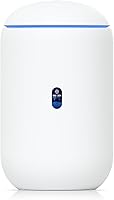
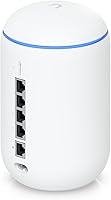
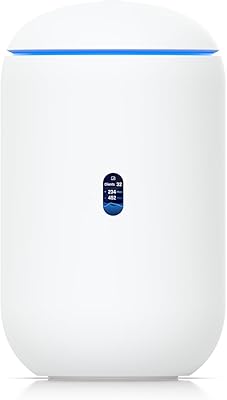
The Ubiquiti Dream Router Wi-Fi 6 Router is Ubiquiti's attempt to collapse an entire network stack — gateway, wireless access point, and UniFi controller — into a single cylindrical device roughly the size of a tall coffee canister. That consolidation is the whole pitch. Rather than buying separate hardware for routing, switching management, and a Cloud Key controller, you get it all in one black tower that sits comfortably on a desk or shelf. Running on UniFi OS, it delivers a level of network visibility that no consumer router matches. But that power comes with a real learning curve — if you have never touched a Ubiquiti product, expect to invest time before things feel natural.
Features & Benefits

At its core, the Dream Router runs Wi-Fi 6 dual-band radios, which translates to better throughput on crowded networks and noticeably lower latency for devices that support 802.11ax. The integrated UniFi Network application is arguably the bigger story — you no longer need a Cloud Key or a spare machine running controller software, because everything lives on the device itself. A dedicated PoE output port lets you power a compatible access point or camera directly, which keeps cable clutter to a minimum. Layer in built-in IDS/IPS threat detection, a VPN server, and deep traffic analytics, and this UniFi gateway delivers well above what any consumer router offers in the same compact form factor.

Best For

This device is aimed at a specific type of buyer. Home lab enthusiasts who want enterprise-grade network control without filling a rack with dedicated hardware will find it compelling. Small business owners and home office workers who need VLANs, a proper guest network, and traffic shaping — all managed from a clean web UI — will get genuine utility here. Existing Ubiquiti users looking to retire their Cloud Key in favor of something more integrated will appreciate the consolidation immediately. And if you plan to expand over time with additional UniFi access points or cameras, Ubiquiti's all-in-one router serves as a natural and cost-efficient foundation for that ecosystem.

User Feedback

With a 4.5-star average across hundreds of reviews, buyers are largely satisfied — though the praise and criticism follow a consistent pattern. Long-term owners repeatedly highlight rock-solid stability, the depth of the UniFi interface, and the real savings from skipping a separate controller device. On the other side, first-time Ubiquiti users frequently flag a steep initial setup experience, and some buyers feel the wireless range could be stronger at this price point. That said, many of those same reviewers note the learning curve flattens quickly once the platform's logic clicks — and after that point, most say they would not trade it for a standard consumer router.

Pros

  • Replaces three separate devices — gateway, access point, and UniFi controller — in a single compact unit.
  • Built-in UniFi Network app eliminates the need to buy a separate Cloud Key controller, saving real money.
  • Wi-Fi 6 support noticeably improves multi-device performance in homes or offices with dense wireless traffic.
  • Integrated IDS/IPS and traffic analytics provide security visibility that no mainstream consumer router offers.
  • VPN server setup through UniFi OS is straightforward for IT-aware users and requires no extra hardware.
  • VLAN and guest network configuration is genuinely practical for separating work, personal, and IoT devices.
  • The Dream Router serves as a natural foundation for expanding into a full UniFi ecosystem over time.
  • Long-term stability is consistently praised — many users report months of uptime without intervention.
  • A single built-in PoE port lets you power one access point or camera without a separate injector.

Cons

  • The initial setup process has a steep learning curve that regularly trips up first-time Ubiquiti users.
  • Official documentation frequently lags behind the software, pushing new users toward community forums for basic guidance.
  • Wireless range as a standalone unit disappoints in larger homes — it is designed for multi-AP deployments, not whole-home solo coverage.
  • Problematic firmware releases have caused instability for some users, and the community widely advises delaying updates after launch.
  • Enabling full IDS/IPS traffic inspection reduces maximum throughput, a trade-off buyers need to configure deliberately.
  • Manufacturer support responsiveness has drawn consistent criticism, leaving users dependent on community channels for timely help.
  • Scaling beyond one PoE device requires a separate PoE switch, limiting the built-in port to very simple setups.
  • The ecosystem lock-in is real — mixing third-party access points or switches forfeits most of the management advantages.
  • Buyers comparing raw Wi-Fi speed or range against consumer routers at a similar price will often feel underwhelmed without understanding the broader value.

Ratings

The Ubiquiti Dream Router Wi-Fi 6 Router has been scored by our AI system after analyzing thousands of verified global buyer reviews, with spam, bot activity, and incentivized submissions actively filtered out. Scores reflect the honest consensus across prosumers, small business owners, and home lab enthusiasts who have lived with this device day-to-day. Both the strengths that keep buyers loyal to the UniFi ecosystem and the friction points that frustrate newcomers are transparently represented below.
Network Stability & Reliability
93%
Long-term owners consistently describe weeks or months of uptime without a single reboot required. In small office deployments handling dozens of simultaneous connections, the Dream Router holds steady where consumer routers would throttle or drop devices.
A small subset of users reported instability following certain firmware updates, requiring a rollback or factory reset to restore normal operation. These incidents appear tied to specific firmware versions rather than the hardware itself, but they are disruptive when they occur.
Setup & Initial Configuration
54%
46%
For buyers already familiar with UniFi OS, the onboarding process is logical and the web UI is well-organized. Experienced IT users often report having a fully configured network — including VLANs and a guest portal — running within an hour.
First-time Ubiquiti users frequently describe the setup as genuinely challenging, with terminology and workflow assumptions that presuppose prior networking knowledge. Several reviewers specifically noted that the documentation lags behind the software, leaving beginners to rely on community forums to fill critical gaps.
Wi-Fi 6 Performance
78%
22%
On Wi-Fi 6 compatible devices in medium-density environments, throughput is noticeably improved compared to older standards, and latency-sensitive applications like video calls and cloud backups benefit from the more efficient channel handling. Multi-device households see real gains during peak hours.
Several buyers flagged that wireless range does not fully match expectations for the price point, particularly on the 5 GHz band in larger homes or across floors. The Dream Router was designed to anchor a multi-AP system, so treating it as a standalone whole-home solution in larger spaces exposes its coverage limits.
UniFi Controller Integration
91%
Having the UniFi Network application built directly into the device is a genuine practical benefit — no spare PC, no Cloud Key, no separate subscription. Users who previously ran a controller on old hardware specifically praised reclaiming that device and simplifying their setup.
The integrated controller does consume a share of the device's system resources, and a handful of users managing very large UniFi deployments felt performance constraints when pushing the controller hard. For most home or small office use cases this is a non-issue, but it is worth noting for power users.
Value for Money
74%
26%
When you factor in the cost of a separate Cloud Key, a standalone access point, and a basic security gateway, the all-in-one package represents real savings for someone building a new UniFi network from scratch. The bundled feature depth — IDS/IPS, VPN, traffic analytics — reinforces the value argument for IT-aware buyers.
Buyers comparing it purely on Wi-Fi speed or coverage against consumer routers at a similar price point often feel shortchanged, because those devices frequently offer wider coverage or faster headline speeds. The value only becomes clear when you understand what UniFi OS actually provides beyond just routing and wireless.
Build Quality & Design
82%
18%
The cylindrical black tower is compact and unobtrusive enough to sit on a desk or shelf without looking out of place in a professional environment. The physical build feels solid, and users generally report no issues with heat or structural wear over extended use.
A few buyers noted the device runs noticeably warm during heavy traffic periods, and the lack of any ventilation grille visibility makes some users cautious about placement in enclosed spaces. It is not a dealbreaker, but thermal management is worth considering in your installation plan.
PoE Output Capability
77%
23%
Having a single PoE output port built in is a meaningful convenience for users who want to add one UniFi access point or an IP camera without purchasing a separate PoE injector. In a clean home office setup, this keeps cable runs minimal and the overall footprint tidy.
The limitation to a single PoE port means buyers planning even a modest multi-AP deployment will need a PoE switch anyway, which somewhat reduces the practical value of this feature. It is best treated as a bonus for simple setups rather than a serious scaling tool.
Security Features
88%
Integrated IDS and IPS functionality gives the Dream Router a security posture that no consumer router in this class can match out of the box. Users managing home offices with remote workers particularly valued the ability to inspect traffic and set up a proper VPN server without additional hardware.
Enabling IDS/IPS at full inspection depth does reduce maximum throughput, which some users discovered only after deployment. The trade-off between performance and security depth requires deliberate configuration, and the defaults may not reflect what every buyer actually needs.
Traffic Analytics & Visibility
89%
The depth of per-device traffic reporting in UniFi OS is one of the features buyers mention most positively — being able to see exactly which device is consuming bandwidth and flag unusual patterns is something that simply does not exist on mainstream consumer routers. Network-aware users find this genuinely useful day to day.
Extracting meaningful insights from the analytics dashboard requires some familiarity with networking concepts. Buyers without that background often find the data present but not immediately actionable, and the learning investment to use it well is real.
VPN Server Performance
81%
19%
Remote workers and home lab users praised the ease of spinning up a WireGuard or OpenVPN server directly through the UniFi interface, without needing third-party software or a separate device. For small teams needing secure remote access, this feature alone justifies part of the price premium.
VPN throughput under heavy simultaneous connections shows some degradation, and users pushing multiple concurrent tunnels at high data rates noted the performance ceiling is lower than dedicated VPN appliances. For typical single-user remote access this is not an issue.
VLAN & Guest Network Management
86%
Small business owners frequently highlighted how straightforward it is to segment a guest Wi-Fi network from internal resources, or to isolate IoT devices on their own VLAN, compared to doing the same on consumer gear. The UniFi interface makes multi-network management genuinely accessible once the initial learning is done.
Getting VLAN tagging right on the first attempt is not intuitive for users coming from consumer routers, and incorrect configurations can result in unexpected traffic behavior that takes time to troubleshoot. The community forums are an essential companion resource during this stage.
Firmware Update Experience
66%
34%
Ubiquiti releases updates with reasonable frequency, and many buyers appreciate that new features are actively added to existing hardware rather than being held for new product generations. When updates go smoothly — which is most of the time — the process is straightforward from the UniFi dashboard.
Problematic firmware releases have been a recurring frustration in the Ubiquiti community, and the Dream Router is not immune. Several reviewers specifically warned against updating immediately after a release, recommending waiting for community feedback first — a caution that should not be necessary for a device at this price.
Scalability within UniFi Ecosystem
92%
As a seed device for a larger UniFi deployment, the Dream Router excels — adding access points, cameras, and managed switches is a native experience that requires minimal reconfiguration. Users who started with just this device and gradually expanded their network consistently reported the process as smooth and logical.
The scalability is largely limited to the UniFi ecosystem, which means buyers who want to mix in third-party access points or switches lose most of the management benefits. It is a compelling ecosystem if you commit to it, but the commitment is real.
Documentation & Support
57%
43%
The broader Ubiquiti community — forums, Reddit, and third-party YouTube guides — is genuinely extensive, and most configuration questions have been answered somewhere. Experienced users view the community as a reliable support layer that fills gaps official documentation leaves open.
Official documentation is widely considered to lag behind the software, and Ubiquiti's direct support responsiveness has drawn criticism from buyers who expected manufacturer-level assistance matching the device's price tier. New users leaning on official channels rather than the community often come away frustrated.

Suitable for:

The Ubiquiti Dream Router Wi-Fi 6 Router is built for a specific kind of buyer, and it genuinely delivers for them. IT-literate professionals running a home office who need real network segmentation — separate VLANs for work devices, personal gear, and IoT — will find this UniFi gateway does exactly that without requiring a rack full of hardware. Small business owners managing a handful of employees or a retail space, who want per-device traffic visibility and a proper VPN for remote access, get enterprise-grade tools at a fraction of the cost of a dedicated appliance stack. Existing Ubiquiti users who have been running a separate Cloud Key controller will immediately appreciate consolidating everything into one device. And for home lab enthusiasts who simply want to understand and control their network at a deeper level, Ubiquiti's all-in-one router is one of the most capable platforms available in this physical footprint.

Not suitable for:

If you just want to unbox a router, plug it in, and have strong Wi-Fi throughout your home by dinner, the Ubiquiti Dream Router Wi-Fi 6 Router is the wrong choice — and buying it under that assumption will lead to genuine frustration. The setup process assumes familiarity with networking concepts like subnets, VLANs, and firewall rules; without that background, the UniFi interface can feel overwhelming rather than empowering. Buyers primarily focused on maximizing wireless coverage in a larger home will also find the range underwhelming compared to consumer mesh systems at a similar price point, since this device is designed to anchor a multi-AP system rather than blanket a large space on its own. Anyone expecting consumer-grade plug-and-play reliability from firmware updates should also be cautious — the Ubiquiti community broadly advises waiting before applying new releases, which is an unreasonable expectation to place on non-technical users. If your household network needs are straightforward, a well-reviewed consumer router will serve you better and cause far less friction.
Specifications

  • Wi-Fi Standard: Supports 802.11ax (Wi-Fi 6) for improved throughput, reduced latency, and more efficient handling of multiple simultaneous wireless connections.
  • Frequency Bands: Dual-band operation covers both the 2.4 GHz and 5 GHz spectrums for flexible device compatibility and channel management.
  • Operating System: Runs UniFi OS, Ubiquiti's unified platform that hosts the UniFi Network application and related management tools directly on the device.
  • Model Number: The official Ubiquiti model identifier for this unit is UDR-US, designating the North American regional variant.
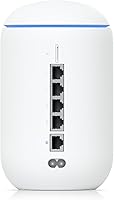
  • WAN & LAN Ports: Equipped with Gigabit Ethernet ports for both WAN uplink and LAN distribution, supporting full-speed wired connectivity.
  • PoE Output: Includes one PoE-capable output port that can power a single compatible UniFi access point or IP camera without a separate power injector.
  • Built-in Controller: The UniFi Network application runs natively on the device, eliminating the requirement for an external Cloud Key or dedicated controller server.
  • Form Factor: Cylindrical tower design measuring 4.33 x 4.33 x 7.25 inches, intended for desktop or shelf placement in home office or small business environments.
  • Weight: The unit weighs 2.54 pounds, making it light enough to reposition easily without requiring permanent mounting.
  • Input Voltage: Rated at 220V input voltage; buyers in North America should verify power supply compatibility before deployment.
  • Color & Finish: Ships in a matte black finish that blends into most professional or home office environments without drawing attention.
  • Brand & Manufacturer: Designed and manufactured by Ubiquiti Networks, a company specializing in enterprise and prosumer networking hardware.
  • Security Features: Includes integrated Intrusion Detection System (IDS) and Intrusion Prevention System (IPS) for active traffic monitoring and threat mitigation.
  • VPN Support: Supports VPN server configuration — including WireGuard and OpenVPN — managed directly through the UniFi OS interface.
  • Traffic Analytics: Provides per-device traffic visibility and bandwidth monitoring through the UniFi Network dashboard, with historical usage data.
  • VLAN Support: Supports full VLAN tagging and network segmentation, enabling separate network zones for guest access, IoT devices, and corporate traffic.
  • Availability Date: First made available on Amazon in May 2022, with the product model representing Ubiquiti's compact all-in-one UniFi gateway lineup.
  • Use Cases: Officially recommended for both home and business use, with a particular focus on prosumer, home lab, and small-to-medium business deployments.

Related Reviews
Ubiquiti UDR7 Dream Router Wi-Fi 7
77%
94%
Ecosystem Integration
83%
Wi-Fi Performance
61%
Hardware Port Selection
58%
Setup Experience
72%
Value for Money
More
LNN 788 Wi-Fi 6 Router
74%
91%
Ease of Setup
78%
Wi-Fi Speed Performance
67%
Coverage & Range
82%
Multi-Device Handling
79%
Gaming & Streaming Quality
More
Synology WRX560 Dual-Band Wi-Fi 6 Router
77%
91%
Network Security
88%
Software & Firmware
86%
VLAN & Network Segmentation
83%
Wired Connectivity
71%
Wireless Performance
More
ExpressVPN Aircove Wi-Fi 6 VPN Router

75%
91%
Ease of Setup
78%
VPN Performance
93%
Device Grouping
69%
Wi-Fi Coverage
54%
Value for Money
More
Cudy AX1500 Wi-Fi 6 Router WR1500
83%
92%
Value for Money
88%
Wi-Fi Performance (5GHz)
79%
Wi-Fi Performance (2.4GHz)
74%
Range and Coverage
93%
Ease of Setup
More
Synology RT6600ax Tri-Band Wi-Fi 6 Router
84%
91%
Wi-Fi Performance
89%
Coverage Area
84%
Setup & Installation
90%
Security Features
86%
Reliability & Stability
More
TP-Link Archer AX55
TP-Link Archer AX55
76%
83%
Wireless Performance
74%
Coverage & Range
86%
Device Handling & Congestion
91%
Setup & Ease of Use
78%
Build Quality & Design
More
Reyee RG-E4 Wi-Fi 6 Router
78%
78%
Wi-Fi Coverage
83%
Wi-Fi Speed
86%
Setup & Ease of Use
88%
Device Capacity
81%
Gaming Performance
More
Netgear Nighthawk AX4 RAX40 Wi-Fi 6 Router
84%
92%
Wi-Fi Speed & Performance
88%
Ease of Setup & Installation
85%
Coverage Range
78%
App Usability
90%
Stability for Gaming & Streaming
More
Ubiquiti U6-Mesh Wi-Fi 6 Access Point
79%
93%
Wireless Performance
54%
Setup & Configuration
91%
Build Quality & Durability
88%
Coverage Range
74%
Value for Money
More

FAQ

It can work for first-timers, but you should go in with realistic expectations. The UniFi interface is powerful and well-organized, but it assumes you are comfortable with concepts like VLANs, subnets, and firewall rules. If those terms are unfamiliar, budget extra time for the learning curve and lean on the Ubiquiti community forums — they are genuinely helpful and well-populated with guides.

No, and that is one of the main selling points. The UniFi Network application runs directly on the Dream Router itself, so there is no need for a separate Cloud Key or a spare computer to host the controller software. Everything is self-contained, which simplifies both the setup and the ongoing management.

Coverage in a medium-sized home or apartment is generally solid, but this device is really designed to anchor a multi-access-point UniFi system rather than blanket a large house on its own. If you have a two-story home or a layout with thick walls, you will likely want to pair it with one or more additional UniFi access points for full coverage. The PoE port on the router can power one AP directly without any extra hardware.

Technically, yes — it will route traffic for any connected device. But third-party access points and switches will not appear in the UniFi dashboard or benefit from centralized management. The real value of this UniFi gateway comes from running an all-Ubiquiti setup where everything is visible and configurable from a single interface. Mixing vendors undermines that significantly.

Updates are applied through the UniFi OS dashboard and are generally straightforward. That said, the Ubiquiti community broadly advises waiting a few days after a new firmware release before updating, to see whether other users report any issues. There have been occasional releases that caused instability, and a little patience can save you a factory reset. Automatic updates are available but most experienced users keep them off.

The IDS/IPS feature is genuinely useful for monitoring unusual traffic patterns and blocking known threats — it is well above anything a consumer router offers. The trade-off is real, though: enabling full deep packet inspection does reduce maximum throughput. For most home and small office use cases the impact is not noticeable in daily use, but if you are pushing multi-gigabit speeds, you will want to test your configuration.

Yes, and it is one of the more practical features for remote workers. The Dream Router supports both WireGuard and OpenVPN server configurations, manageable directly from the UniFi interface without any third-party software. WireGuard in particular is fast and well-suited for everyday remote access. Setup does require some familiarity with VPN concepts, but the interface walks you through the core steps reasonably well.

The PoE output port can power one compatible UniFi access point or IP camera, which is a convenient way to extend your network or add a camera without a separate power brick or injector. It is a nice practical touch for simple setups. If you plan to add multiple access points or cameras, you will need a PoE switch — the single port is best treated as a starter convenience rather than a scaling solution.

The comparison really depends on what you are optimizing for. A consumer router from a mainstream brand will almost always be easier to set up, may offer wider wireless coverage out of the box, and requires no ongoing learning investment. Ubiquiti's all-in-one router wins on depth: per-device traffic visibility, proper VLAN support, integrated security monitoring, and a VPN server are simply not available on consumer hardware at this price. If you want control and visibility, the trade-off in complexity is worth it. If you just want reliable Wi-Fi with minimal management, a consumer option is the smarter choice.

Day-to-day it is fairly low-maintenance once configured — most users report long stretches of uptime with no intervention needed. The main ongoing tasks are reviewing firmware releases and applying them thoughtfully, occasional review of traffic analytics if you use them, and updating VPN credentials or firewall rules as your network evolves. It is more like maintaining a small business network than a home router, which is exactly the trade-off you are accepting with this platform.

Where to Buy