
Overview

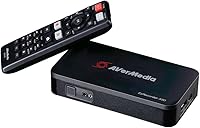
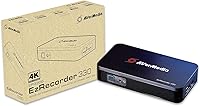
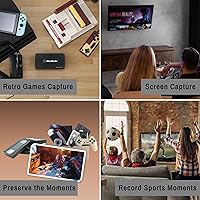
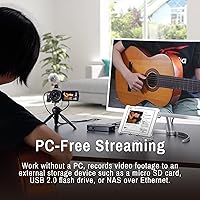
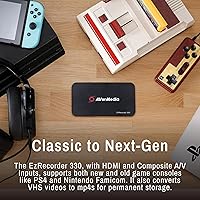
Setting up a dedicated capture station usually involves tangled cables and a powerful PC, but the AVerMedia EzRecorder 330 (ER330G) changes that dynamic entirely. This standalone capture box functions as a bridge between your console and your display, letting you record high-definition footage without needing a computer nearby. While it captures at a crisp 1080p resolution at 60 frames per second, it supports 4K pass-through so your actual gaming experience remains visually stunning and lag-free. The hardware is surprisingly versatile, featuring connections for the latest gaming consoles alongside composite inputs for your older gear. It is a compact, simple solution for anyone who wants to document their gameplay or digitize analog media without the headache of software drivers or complex desktop configurations.

Features & Benefits

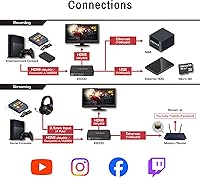
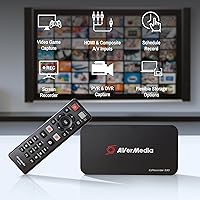
Efficiency is at the heart of how this hardware DVR operates, particularly with its use of H.265 encoding. This compression standard allows you to save high-quality video files that take up significantly less space than traditional formats. You aren't tethered to a single storage method either; the unit accepts micro SD cards, external hard drives, or even network-attached storage for more permanent archives. Beyond just saving files, the device can stream directly to platforms like Twitch or YouTube with a simple button press. For those managing set-top boxes, the included remote and IR blaster make it easy to schedule recordings for live broadcasts. Just remember that you will need to provide your own storage media, as no cards or drives are included in the box.

Best For

This device finds its footing with a few specific types of users who value simplicity above all else. Console players who want to archive their best matches but lack the space or budget for a high-end PC rig will find this standalone capture box incredibly useful. It also serves as a specialized tool for families looking to digitize VHS tapes or old camcorder footage before the magnetic tape degrades. Because it functions independently, it is a great choice for content creators who need a portable streaming setup for events or competitions. Even home theater enthusiasts can get plenty of mileage out of it by using it as a basic DVR for recording unencrypted programs from a cable box or satellite receiver without a monthly subscription fee.

User Feedback

Real-world usage highlights just how effortless the initial installation is, as the unit is essentially plug and play right out of the box. Most owners appreciate the tiny footprint, which allows the EZRecorder 330 to tuck away inside a crowded entertainment center without drawing attention. The remote-driven interface is intuitive and feels much more like a traditional consumer electronic than a technical computer peripheral. However, there is a significant hurdle regarding HDCP restrictions. You cannot record protected content from streaming apps or Blu-ray players, which can be frustrating if you aren't prepared for those digital rights management blocks. Despite that limitation, the hardware DVR receives high marks for its stability and the convenience of managing everything from a simple handheld controller instead of a mouse and keyboard.

Pros

  • Standalone operation allows you to capture high-definition video without needing a computer running nearby.
  • Support for H.265 compression ensures your video files are high-quality while taking up minimal storage space.
  • The 4K pass-through ensures you can still play in ultra-high definition while this standalone capture box records at 1080p60.
  • Integrated direct streaming to platforms like YouTube and Twitch simplifies the broadcasting process for casual creators.
  • Flexible options including micro SD, external USB drives, and NAS support offer great versatility for local and network management.
  • The included remote control and IR blaster make scheduling and managing recordings as easy as using a standard DVR.
  • Legacy composite inputs on the EZRecorder 330 allow for the easy digitization of old VHS tapes and analog footage.
  • A driver-free, plug-and-play design means you can start recording almost immediately after connecting your cables and storage.

Cons

  • You cannot record or stream HDCP-protected content from sources like Netflix, Disney+, or Blu-ray discs.
  • There is no internal storage provided, so you must factor in the additional cost of a compatible SD card or drive.
  • Recording resolution is strictly limited to 1080p even when playing and passing through a native 4K signal.
  • Lack of real-time PC integration means you cannot add webcam overlays or complex graphic transitions while using this hardware DVR.
  • Some users may find the remote-based interface a bit clunky for entering text during the initial account setup.
  • The lightweight plastic chassis can be easily tilted or pulled off a shelf by the weight of thick HDMI cables.
  • Direct streaming via Ethernet can be finicky if your router has strict security protocols or limited upload bandwidth.
  • Specific file formatting requirements mean you may need to use a computer to prepare your storage media first.

Ratings

Our team synthesized thousands of verified owner experiences to provide an objective look at the AVerMedia EzRecorder 330 (ER330G). By leveraging AI to filter out spam and incentivized feedback, we created a balanced rating schema that highlights both technical successes and common buyer frustrations. This transparent analysis ensures you understand exactly how the device handles real-world gaming and digitization tasks.

Ease of Setup
92%
Owners love that this is a driver-free experience. You simply plug in the HDMI cables, insert a storage card, and you are ready to record. It takes the intimidation out of game capture for those who are not particularly tech-savvy.
Some beginners were confused by the initial storage formatting requirements. If the drive is not formatted correctly, the device will not recognize it. This requires a bit of manual tinkering on a separate computer before the very first use.
Recording Quality
86%
The 1080p60 output is consistently sharp and smooth. It preserves the fast-paced action of modern shooters without the stuttering often seen in cheaper USB sticks. It is a reliable workhorse for archiving gameplay sessions without needing a high-end PC.
Enthusiasts noted that while the capture is great, it does not match the ultra-high bitrates of professional PC-based internal cards. There is a slight loss of fine detail in complex textures that specialized video editors might notice during post-production.
Standalone Performance
94%
The ability to record without a computer running is a significant advantage for space-constrained setups. It reduces the load on your primary hardware and makes for a very clean, distraction-free environment for focusing entirely on your gaming content.
Without a PC in the loop, you lose the ability to manage complex scene transitions or add webcam overlays in real-time. It is a trade-off between absolute operational simplicity and the creative depth offered by traditional desktop software.
Legacy Digitization
88%
The composite video input is a huge benefit for those archiving old VHS tapes. It makes the digitization process much more approachable than using cheap USB dongles that frequently drop signals or suffer from frustrating audio sync issues.
You may need additional adapters if your old VCR does not use standard RCA outputs. Some users felt the color reproduction on these analog signals was a bit muted compared to the original source when viewed on modern displays.
Value for Money
87%
Considering it replaces both a capture card and a dedicated PC for recording, the price point is very attractive. It is an all-in-one solution that effectively solves multiple problems for gamers and media archivists on a strict budget.
When you factor in the added cost of a high-speed micro SD card or a large external hard drive, the total investment creeps up. It is not quite as affordable as the base price suggests if you do not already own storage.
Storage Flexibility
83%
Support for micro SD cards, USB drives, and NAS is a major convenience. Most users appreciate being able to swap cards quickly or dump large footage files directly onto a network drive for later editing and storage management.
The lack of any built-in internal memory means you cannot use the device at all without buying your own storage first. This added expense can be an annoying surprise if you did not read the technical specifications carefully.
Remote Control Interface
79%
21%
The remote makes the EZRecorder 330 feel like a traditional DVR rather than a piece of IT equipment. Navigating menus and starting recordings from the couch is a comfortable experience that most users find very intuitive.
The IR blaster setup can be a bit finicky depending on your media cabinet layout. Some users found that the line-of-sight requirements meant they had to reposition their set-top boxes to ensure the remote commands were received reliably.
Network Stability
71%
29%
Direct streaming to Twitch or YouTube without a computer is surprisingly stable for a standalone unit. It is ideal for casual creators who want a one-button solution to go live while keeping their console lag-free via hardware pass-through.
Configuring the network settings can be a bit tedious if your home router has strict security protocols. Advanced users often find the lack of deep stream customization, like custom bitrates and overlays, to be a significant limitation.
Physical Build
84%
The unit is impressively small and lightweight, fitting easily into almost any media console. Users appreciate that it does not look like a piece of industrial gear, blending in well with other modern home theater components.
Because it is so light, thick or heavy HDMI cables can sometimes pull the unit off balance or make it slide around. You might need to use some adhesive or careful cable routing to keep it stationary on your shelf.
Compression Efficiency
91%
The move to H.265 encoding is a massive benefit for long-term storage and file management. Users report that they can fit significantly more footage onto a single SD card compared to older H.264 devices without sacrificing any visual fidelity.
While the compression is highly efficient, some older computers or basic video editing software struggle to play back H.265 files smoothly. You might find yourself needing to transcode files into a different format before you can start editing.
Scheduling Reliability
76%
24%
The scheduling feature is a standout for recording live events from unencrypted sources. It works reliably, starting and stopping exactly when instructed, making it a viable alternative to subscription-based DVRs for many home users.
Setting up the schedule is a bit clunky when using the remote and the on-screen keyboard. It lacks the modern search-and-click ease of an interactive TV guide, requiring you to manually enter specific times and channel numbers.
Thermal Stability
82%
18%
Even during long recording sessions or extended streaming marathons, the device stays remarkably cool to the touch. Users do not have to worry about thermal throttling or the unit shutting down during critical moments of a live capture.
A few owners noticed a very faint electronic hum when the device is under heavy load in a completely silent room. It is extremely minor, but it can be slightly distracting if the box is sitting right next to your seating.

Suitable for:

The AVerMedia EzRecorder 330 (ER330G) is a perfect fit for console gamers who want to capture high-quality gameplay without the complexity or cost of a dedicated PC rig. It also serves as an excellent tool for those looking to preserve family history by digitizing old VHS or camcorder tapes through its analog inputs. Content creators who travel will appreciate its portable nature and direct-to-platform streaming capabilities for YouTube and Twitch. Additionally, home theater hobbyists can use it as a simple, non-subscription DVR for recording unencrypted programs from cable or satellite boxes. Its driver-free operation makes it exceptionally approachable for non-technical users who just want things to work right out of the box.

Not suitable for:

Professional streamers and editors might find the AVerMedia EzRecorder 330 (ER330G) limiting because it lacks the advanced scene management and overlay capabilities of PC-based software. While it handles 4K pass-through, the actual recording is capped at 1080p, which may not satisfy those aiming for native 4K content creation. It is also important to note that this device cannot record HDCP-protected content, meaning you cannot use it to capture movies from streaming apps. If you are looking for a device with built-in storage, this unit will disappoint you as it requires the separate purchase of an SD card. Finally, those with restricted network security settings might find the direct-to-web streaming setup more tedious than expected.

Specifications

  • Recording Resolution: The device supports a maximum capture resolution of 1080p at 60 frames per second.
  • Video Pass-Through: Users can enjoy a lag-free 4K video signal at 60fps on their monitor while recording.
  • Video Codec: The unit utilizes H.265 high-efficiency video coding to reduce file sizes without sacrificing visual quality.
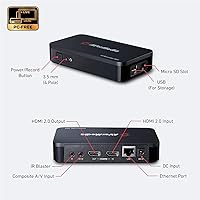
  • Storage Interface: Features a USB 2.0 port specifically for connecting external hard drives up to 4TB in capacity.
  • Expansion Slot: Includes a built-in Micro SD card slot for convenient local storage on removable media.
  • Network Connectivity: An integrated Ethernet port allows for direct streaming to web platforms and NAS storage integration.
  • Analog Input: Ships with a composite video input and a 3.5mm audio jack for digitizing legacy media.
  • Physical Dimensions: The compact physical housing measures approximately 5.31″ x 0.28″ x 1.1″.
  • Unit Weight: The total weight of the hardware is approximately 1.39 pounds.
  • Internal OS: The hardware operates on a dedicated Linux and Android based environment for standalone stability.
  • Control Method: All functions are managed via an included IR remote control and an external IR blaster.
  • Console Support: Fully compatible with modern systems like the PS5 and Nintendo Switch as well as legacy camcorders.

Related Reviews
AVerMedia PW310P Webcam
86%
91%
Video Quality
88%
Autofocus Performance
94%
Ease of Setup
72%
Microphone Quality
89%
Privacy Features
More
AVerMedia PW513 4K Webcam
87%
94%
Video Quality
89%
Ease of Setup
90%
Field of View
86%
Audio Quality
91%
Privacy Features
More
AVerMedia Live Streamer CAM 315
76%
83%
Video Quality
88%
Field of View
51%
Focus Performance
62%
Built-in Microphone
91%
Privacy Shutter
More
AVerMedia Live Streamer Cam 313 (PW313)
73%
74%
Video Quality
91%
Ease of Setup
88%
Privacy Shutter
58%
Microphone Quality
61%
Build Quality
More
AVerMedia Live Gamer 4K GC573
85%
93%
4K Video Fidelity
91%
High Frame Rate Support
88%
System Latency
86%
Build & Form Factor
72%
Setup & Installation
More
AVerMedia Live Gamer Bolt GC555
82%
91%
Video Quality
88%
Latency
75%
Compatibility with Devices
87%
Ease of Setup
89%
Streaming Software Compatibility
More
AVerMedia Live Gamer Mini GC311
84%
91%
Video Quality (1080p60)
94%
Ease of Setup
89%
Portability/Size
90%
Latency (Pass-Through)
85%
Compatibility (Consoles & PCs)
More
AVerMedia Live Streamer ULTRA HD GC571
88%
93%
Ease of Installation
91%
Pass-Through Visuals
94%
VRR Implementation
78%
Capture Performance
96%
System Latency
More
AVerMedia Live Gamer Ultra S (GC553Pro)
86%
91%
Capture Quality
94%
Ease of Setup
89%
Low Latency Performance
88%
Compatibility with Platforms
85%
Build Quality
More
AVerMedia Live Gamer HD 2 GC570
84%
91%
Video Capture Quality
93%
Latency
89%
Ease of Setup
75%
Software Compatibility
82%
Audio Input Flexibility
More

FAQ

That is correct. This standalone capture box handles all the processing and storage on its own, allowing you to record or stream while your PC remains completely powered off.

Unfortunately, you cannot use the AVerMedia EzRecorder 330 (ER330G) for that. Like most capture devices, it is prohibited from recording HDCP-protected content, which covers nearly all commercial streaming services and Blu-ray discs.

No, the unit does not ship with any internal or external storage. You will need to purchase a Micro SD card or a USB hard drive separately before you can start saving your footage.

Not at all. The EZRecorder 330 supports 4K pass-through, so you can keep playing in ultra-high definition while the device captures the video at 1080p in the background.

Yes, as long as you have a wired Ethernet connection. You can broadcast your gameplay directly to those platforms without needing any intermediate software or a computer setup.

Absolutely. This hardware DVR includes composite video inputs specifically for older gear, making it a reliable tool for archiving and preserving aging analog media.

Yes, it can be configured to save files directly to a NAS via the Ethernet port. This is a great way to manage large amounts of footage without constantly swapping out physical cards.

It is very straightforward since there are no drivers to install. You just plug in your HDMI cables, follow the on-screen prompts with the remote, and you are ready to go in minutes.

Users generally find that the unit stays quite cool. The internal design is efficient enough to handle multi-hour streaming or recording marathons without overheating or causing performance stutters.

If the device detects an HDCP-protected signal, you will typically see a blue screen or a notification stating that recording is blocked. This is a standard hardware-level security feature.