Overview

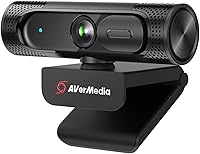
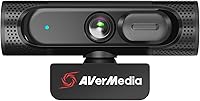
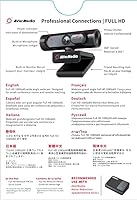
The AVerMedia Live Streamer CAM 315 sits in a comfortable middle ground — built specifically for streamers and remote workers who need more than a basic laptop camera but aren't ready to invest in a full mirrorless setup. AVerMedia has been making capture cards and streaming hardware for years, so this isn't a brand dabbling in webcams as an afterthought. It delivers 1080p at 60fps, which already puts it ahead of most entry-level options that cap at 30fps. Setup is USB plug-and-play, and it works with Zoom, Teams, Skype, and OBS without driver headaches. One honest caveat upfront: it uses fixed focus, so don't expect the lens to adjust for close-up shots.

Features & Benefits

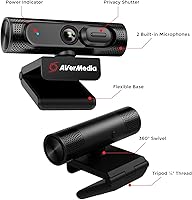
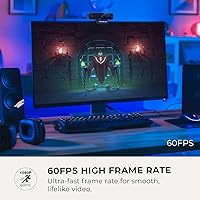
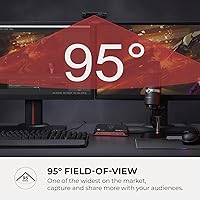
The 95° wide-angle lens is arguably the standout feature here — most webcams in this range offer 70° to 80°, so the extra coverage is noticeable whether you're on a group video call or showing off your streaming setup. At 60fps, motion looks markedly smoother than what you'd get from a standard 30fps camera, which matters for fast-moving game streams. The sliding privacy shutter is a small but practical touch — a physical cover beats any software solution when you want to be certain the lens is blocked. Built-in dual microphones handle casual voice pickup decently, though serious streamers will still want a dedicated mic. CamEngine software adds auto-framing and ePTZ controls for those who want extra flexibility.

Best For

This streaming webcam makes the most sense for solo Twitch or YouTube streamers who want plug-and-play HD video without building a complicated camera rig. It's equally at home in a home office — the wide field of view means you can capture more of the room without repositioning every time someone else joins the frame. If you're already using AVerMedia capture cards or other gear from the brand, the CAM 315 fits naturally into that ecosystem. Privacy-conscious users will appreciate the physical shutter, removing any need for a separate lens cover. Where it's less suitable: anyone who shoots close-up product content or needs autofocus for varied shooting distances will likely hit its limits quickly.

User Feedback

Buyers who use this AVerMedia cam in well-lit rooms tend to be satisfied with the image sharpness and appreciate how much the wide angle captures without cropping. The 60fps output earns specific praise from gamers who stream themselves on camera simultaneously. On the critical side, the fixed focus draws consistent complaints — users sitting very close to the lens or trying to show physical objects often find the image soft and unsatisfying. Microphone quality gets mixed marks: fine for casual calls, underwhelming if your audience expects clean audio. A handful of reviewers flag CamEngine as occasionally unstable, and the mounting clip can feel slightly loose on thinner monitor bezels.

Pros

  • Smooth 1080p/60fps output that visibly outperforms standard 30fps webcams during live streams.
  • The 95° wide-angle lens captures far more of your space than most webcams at this tier.
  • Physical sliding privacy shutter gives real, visible reassurance that the lens is covered.
  • USB plug-and-play setup works immediately with Zoom, Teams, OBS, and Skype — no drivers needed.
  • CamEngine software adds useful features like auto-framing and ePTZ for Windows users willing to explore it.
  • Compact and lightweight, so it sits comfortably on a monitor without stressing the bezel.
  • 360-degree swivel mount makes repositioning quick during or between streaming sessions.
  • Built-in dual mics are sufficient for casual video calls without reaching for extra hardware.
  • AVerMedia's streaming hardware background shows — this cam is clearly designed with content creators in mind.

Cons

  • Fixed focus becomes a real problem the moment you move closer to the lens or hold something up to the camera.
  • Low-light image quality degrades noticeably without a ring light or well-lit room to compensate.
  • CamEngine software has a history of instability, with crashes and feature regressions reported after updates.
  • The mounting clip can feel loose on thin modern monitor bezels, leading to a slightly wobbly camera.
  • Built-in microphone captures background noise easily and lacks the clarity that streaming audiences expect.
  • Mac and Linux users lose access to all software features, reducing the camera to basic plug-and-play only.
  • The USB cable length is shorter than many users would prefer for flexible desk or studio arrangements.
  • At this price point, competing options with autofocus are available, making the fixed-focus trade-off harder to justify.

Ratings

The AVerMedia Live Streamer CAM 315 has been evaluated by our AI system after analyzing thousands of verified global user reviews, with spam, bot activity, and incentivized feedback actively filtered out. The scores below reflect a balanced picture of where this streaming webcam genuinely delivers and where real buyers have run into friction. Strengths and limitations are weighted equally so you can make a confident, informed decision.

Video Quality
83%
In well-lit environments, users consistently describe the 1080p/60fps output as sharp and smooth — noticeably better than typical 30fps webcams during fast-moving game streams. The 60fps advantage is especially appreciated by streamers who appear on camera while gameplay runs in the background.
Low-light performance is where the praise drops off. Several buyers note that image quality degrades meaningfully in dim rooms, introducing noise and a washed-out look that requires additional lighting to correct.
Field of View
88%
The 95° wide-angle lens is a genuine highlight for users who want to capture more of their space without repositioning the camera. Remote workers on group calls specifically mention being able to include colleagues seated beside them without squeezing into frame.
For solo streamers with a tightly composed desk setup, the wide FOV can feel excessive and may require cropping in software. A few users also note slight edge distortion, which is common with ultra-wide lenses but occasionally distracting.
Focus Performance
51%
49%
For standard desk-to-monitor distances, the fixed focus holds up adequately. Users who sit roughly 60 to 90 centimeters from the lens typically report a clean, acceptably sharp image without any fussing with settings.
Fixed focus is the single most complained-about limitation across user reviews. Anyone who leans in close, holds up an object, or moves significantly toward or away from the camera finds the image goes noticeably soft, with no autofocus to compensate.
Built-in Microphone
62%
38%
The dual built-in mics are good enough for casual Zoom or Teams calls where audio expectations are relatively low. Users doing quick check-ins or remote meetings find them functional without needing any extra hardware.
Streamers and content creators consistently flag the microphone as the weakest link. Background noise bleeds in easily, the pickup range is limited, and the audio lacks the clarity that even a basic USB condenser mic provides — it is a convenience feature, not a performance one.
Privacy Shutter
91%
The physical sliding shutter earns near-universal praise from privacy-conscious users. Unlike software camera disabling, this gives a tangible, visible confirmation that the lens is covered — something remote workers and home-office users genuinely appreciate during off-hours.
The shutter mechanism itself is a minor friction point for a small number of users who find the sliding action slightly stiff out of the box. It loosens with use, but the initial resistance surprised a few buyers expecting a smoother action.
Software — CamEngine
67%
33%
CamEngine offers a genuinely useful feature set — ePTZ, auto-framing, and skin tone filters go well beyond what most webcam companion apps provide. Streamers who invest time in the software find it adds real flexibility to their setup without needing a separate application.
Stability is a recurring complaint. Users on certain Windows configurations report crashes, lag, and inconsistent behavior, particularly with auto-framing. The interface also feels dated, and occasional updates have broken features that previously worked fine.
Build Quality
72%
28%
The overall construction feels reasonably solid for the price tier. The unit itself is compact and lightweight without feeling hollow or fragile, and most users report no physical issues after months of regular use on a monitor or desk stand.
The mounting clip is the weakest structural element — it fits securely on thicker monitor bezels but feels loose and slightly wobbly on slim modern displays. A few users have also flagged the cable as shorter than ideal for flexible desk configurations.
Ease of Setup
93%
Plug-and-play USB connectivity means the camera is recognized instantly by Windows without any driver installation. Users switching from a built-in laptop camera to this streaming webcam report the whole swap taking under two minutes.
CamEngine software installation is optional but not always clearly communicated, leading some buyers to miss out on key features. The setup documentation is minimal, so less tech-savvy users occasionally struggle to unlock the full feature set.
Compatibility
89%
Broad out-of-the-box compatibility with Zoom, Microsoft Teams, Skype, OBS, and Twitch makes this a versatile pick across both professional and creative use cases. No manual configuration is required to get a clean feed in any of these platforms.
Mac and Linux users are effectively left out of the software ecosystem — CamEngine is Windows-only, which means ePTZ, auto-framing, and filter features are inaccessible on other operating systems. Hardware video quality still works, but the software layer does not.
Swivel Mount Flexibility
76%
24%
The 360-degree swivel design is a practical feature for streamers who reposition their camera between sessions. Being able to pan or tilt without removing the clip entirely saves time and reduces the risk of knocking the setup during adjustments.
The swivel action can be imprecise — users trying to hit a very specific angle sometimes find the mount creeps slightly under the camera's own weight, especially on monitors with a slight backward tilt. It holds position adequately but not with the firmness of a dedicated arm mount.
Value for Money
74%
26%
Compared to bare-bones webcams at lower price points, the wide-angle lens, 60fps output, and physical privacy shutter together represent a meaningful step up. For a streamer or remote professional who wants one solid camera without spending on multiple accessories, the value proposition holds up.
At its price point, the fixed focus and inconsistent low-light performance start to feel like compromises that competitors at a similar tier have addressed. Buyers who later discover autofocus options at comparable prices occasionally express post-purchase regret.
Low-Light Performance
58%
42%
With a decent ring light or well-placed room lighting, the camera produces a clean and usable image. Users who have already invested in lighting for their streaming setup generally report satisfactory results even during evening streams.
Without supplemental lighting, image quality in dim conditions is a clear weak point. Grain becomes visible, colors lose saturation, and the fixed exposure struggles to adapt — a limitation that catches first-time buyers off guard if they expect the camera to compensate automatically.
Audio-Visual Sync
84%
Users running OBS or Twitch Studio report that audio and video stay reliably in sync during typical streaming sessions. There are no widespread complaints about drift or latency, which is a basic but important requirement that this webcam meets consistently.
A small segment of users running higher-demand software stacks alongside CamEngine have reported occasional frame drops that can knock the sync slightly out of alignment. The issue appears configuration-dependent rather than a universal flaw.

Suitable for:

The AVerMedia Live Streamer CAM 315 is a strong fit for solo Twitch or YouTube streamers who want a meaningful step up from a built-in laptop camera without building a complex rig. The 95° wide-angle lens and 1080p/60fps output work particularly well for creators who sit a comfortable distance from their monitor and want smooth, detailed video with minimal setup friction. Remote professionals who participate in multi-person video calls will appreciate how much more of the room the wide FOV captures, making it easier to include a whiteboard, a colleague nearby, or simply a more natural framing. Privacy-conscious home office workers benefit from the physical shutter — there is genuine peace of mind in a lens cover you can see rather than a software toggle you have to trust. Anyone already invested in the AVerMedia ecosystem, using their capture cards or streaming accessories, will find this camera integrates naturally into that workflow.

Not suitable for:

The AVerMedia Live Streamer CAM 315 is not the right choice for anyone who needs autofocus — if your workflow involves moving toward the camera, holding up products for review, or working at a variable distance from the lens, the fixed focus will be a constant source of frustration. Dedicated content creators who rely on audio quality for their audience should budget separately for a USB condenser or XLR microphone, because the built-in mics are workable for casual calls but fall short of broadcast standards. Users on Mac or Linux will find the CamEngine software completely inaccessible, which strips out the auto-framing, ePTZ, and filter features that are part of the camera's value proposition. Buyers who need strong low-light performance — streaming from a dark room, for instance — should look at cameras with larger sensors or automatic exposure compensation, as this one struggles without supplemental lighting. If you frequently need to show physical objects close to the lens, demo products, or do any kind of hands-on content, a camera with reliable autofocus will serve you significantly better.

Specifications

  • Resolution: Records and streams at full 1080p (1920×1080) at up to 60 frames per second for smooth, detailed video output.
  • Field of View: Features a 95° ultra-wide angle lens, one of the broadest available in its class, capturing significantly more of the scene than standard webcams.
  • Focus Type: Uses fixed focus, meaning the lens is set at a predetermined distance and does not adjust automatically based on subject proximity.
  • Sensor: Equipped with a CMOS image sensor that handles color reproduction and light capture under standard indoor lighting conditions.
  • Aperture: The lens operates at a maximum aperture of f/3.5, which determines how much light reaches the sensor in varying room brightness levels.
  • Microphone: Includes dual built-in microphones designed for voice pickup during video calls and casual streaming sessions.
  • Privacy Shutter: A sliding physical shutter covers the lens entirely when closed, providing a hardware-level privacy block independent of any software setting.
  • Mount Design: Features a 360-degree swivel clip mount that attaches to monitor tops or sits flat on a desk surface, with rotational adjustment in all directions.
  • Connectivity: Connects via USB and operates as a plug-and-play device, requiring no additional drivers on Windows for basic camera functionality.
  • Software: Compatible with AVerMedia CamEngine software on Windows, which enables ePTZ, auto-framing, color filters, skin tone smoothing, and AR effects.
  • Platform Support: Works natively with Zoom, Microsoft Teams, Skype, OBS Studio, and Twitch broadcasting software without requiring manual configuration.
  • Dimensions: Measures 3.74 × 2.11 × 1.8 inches, making it compact enough to sit on a monitor bezel without obstructing the screen or surrounding workspace.
  • Weight: Weighs 4.6 ounces, light enough to mount on a standard monitor without placing stress on the display housing.
  • Video Format: Outputs video in MP4 format when recording locally through compatible software.
  • Audio Format: Supports MP3 and AAC audio formats for recorded or captured audio output through supported applications.
  • Operating System: Full software feature support is available on Windows only; basic plug-and-play video functionality works on macOS but CamEngine is not supported.
  • Manufacturer: Designed and produced by AVerMedia Technologies, a brand with an established history in video capture cards and streaming hardware.
  • Product Code: Sold under model number 40AAPW315AVV, with ASIN B08VJ48J91 for reference when purchasing or registering the product.

Related Reviews
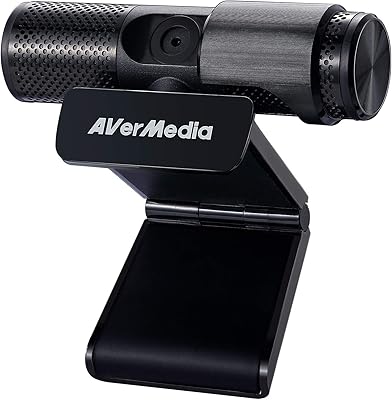
AVerMedia Live Streamer Cam 313 (PW313)
73%
74%
Video Quality
91%
Ease of Setup
88%
Privacy Shutter
58%
Microphone Quality
61%
Build Quality
More
AVerMedia Live Streamer ULTRA HD GC571
88%
93%
Ease of Installation
91%
Pass-Through Visuals
94%
VRR Implementation
78%
Capture Performance
96%
System Latency
More
AVerMedia BU113 Live Streamer Cap 4K
87%
94%
Video Fidelity
91%
Build Quality
87%
Plug-and-Play Stability
92%
Latency Performance
78%
Software Utility
More
Garmin Dash Cam Live
83%
89%
Real-Time Streaming Quality
91%
Video Quality (Day and Night)
77%
Ease of Setup
85%
Voice Control Functionality
80%
Parking Mode Effectiveness
More
AVerMedia Live Gamer 4K GC573
85%
93%
4K Video Fidelity
91%
High Frame Rate Support
88%
System Latency
86%
Build & Form Factor
72%
Setup & Installation
More
AVerMedia Live Gamer Mini GC311
84%
91%
Video Quality (1080p60)
94%
Ease of Setup
89%
Portability/Size
90%
Latency (Pass-Through)
85%
Compatibility (Consoles & PCs)
More
AVerMedia Live Gamer Bolt GC555
82%
91%
Video Quality
88%
Latency
75%
Compatibility with Devices
87%
Ease of Setup
89%
Streaming Software Compatibility
More
Creative Live! Cam Sync 1080p V2
79%
78%
Video Quality
74%
Microphone Performance
94%
Ease of Setup
61%
SmartComms Kit Features
52%
Low-Light Performance
More
AVerMedia Live Gamer HD 2 GC570
84%
91%
Video Capture Quality
93%
Latency
89%
Ease of Setup
75%
Software Compatibility
82%
Audio Input Flexibility
More
AVerMedia Live Gamer Ultra S (GC553Pro)
86%
91%
Capture Quality
94%
Ease of Setup
89%
Low Latency Performance
88%
Compatibility with Platforms
85%
Build Quality
More

FAQ

Yes, it functions as a plug-and-play USB device and is recognized automatically by Windows and macOS for basic video and audio use. You only need to install CamEngine if you want access to features like auto-framing, ePTZ controls, or the skin tone filters.

It works with OBS Studio without any special setup — just plug it in and it shows up as an available video capture source. Most streamers use it alongside OBS without any issues.

The hardware itself will work on a Mac for standard video calling, but CamEngine software is Windows-only, so you will not have access to auto-framing, ePTZ, or any of the built-in visual filters on macOS.

This is a fixed-focus camera, which means the lens is optimized for a standard desk-to-monitor distance of roughly 60 to 90 centimeters. If you sit much closer than that, or hold something up to the lens, the image will appear soft because there is no autofocus to compensate.

They are serviceable for casual use — video calls, quick streams, or voice chat — but they are not a substitute for a dedicated USB or XLR microphone if your audience expects clean, professional-sounding audio. Background noise bleeds in fairly easily, so if your room is not quiet, a separate mic is worth considering.

Yes, the sliding shutter physically covers the lens when closed, so there is no way for the camera to capture any image while it is in place. It is a hardware solution, not a software toggle, which many users prefer for genuine peace of mind.

The swivel clip fits most standard monitor tops comfortably, but users with very thin or frameless bezels have reported that it can feel a bit loose or slightly unstable. It holds well enough for everyday use, but it does not lock down with the firmness you would get from a dedicated camera arm.

You need CamEngine running if you want features like ePTZ or auto-framing to be active during a stream. Without it, the camera still outputs video normally, but those software-driven functions will not work.

At 60fps, motion in the video looks noticeably smoother — especially if you are moving around or there is action happening on screen. For a face-cam on a gaming stream, the difference is visible and generally appreciated by viewers. If you are doing static talking-head content, 30fps is often fine, but 60fps gives you more headroom.

The attached cable is on the shorter side, which has been a minor frustration for some users who want more flexibility in how they position the camera relative to their PC. If your setup requires a longer reach, a USB extension cable is an easy fix, though it adds a small point of potential signal loss.