



Overview
The AVerMedia PW513 4K Webcam arrived at an interesting moment — late 2020, when half the world suddenly needed a camera and streaming had become a serious pursuit for many. AVerMedia isn't a household name the way Logitech is, but among streamers and capture card enthusiasts, the brand carries real credibility. This webcam sits in a mid-to-premium bracket, and its headline feature — a Sony Exmor R sensor — gives it a genuine hardware advantage over similarly priced competitors. That said, the fixed focus lens and its dependency on good lighting are real limitations worth understanding before you buy.
Features & Benefits
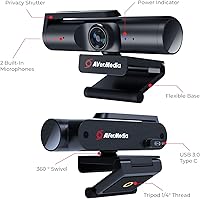
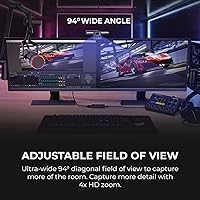
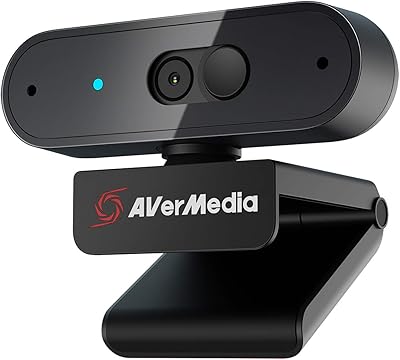
The Sony Exmor R CMOS sensor is the foundation here, capable of capturing 4K at 30fps or switching to 1080p at 60fps when smoother motion matters more than raw resolution — useful for gaming footage or fast-paced demos. The 94-degree field of view is genuinely wide without warping faces, making it practical for shared desks or multi-monitor setups. A sliding physical shutter covers the lens completely, a small but meaningful privacy feature that beats any software-only toggle. The dual stereo microphones handle quiet rooms adequately for calls. Setup is pure plug-and-play over USB, with no drivers needed for Zoom, Teams, OBS, or most major platforms.
Best For
This streaming camera hits a specific sweet spot: people who want noticeably better video than a laptop webcam but aren't ready to wire up a mirrorless camera and capture card. It particularly suits dual-use buyers — those who stream on weekends and hop on Teams meetings during the week. The zero-driver USB setup is a genuine convenience for Mac and Windows users who just want something that works without fussing with software. One firm caveat: this AVerMedia webcam rewards those with good ambient lighting. In a dim room, its fixed focus lens and sensor won't deliver the 4K sharpness the spec sheet promises.
User Feedback
Buyers who use the PW513 in well-lit setups tend to come away impressed — color accuracy and sharpness receive consistent praise, and most agree the image quality stands apart from cheaper options at this resolution. The build feels solid and compact, and the monitor clip holds reliably on standard bezels. Where feedback gets more mixed is low-light performance and distances outside the optimal range; the fixed focus has a real sweet spot, and straying beyond it shows. The built-in microphones get a pass for video calls but won't satisfy anyone who cares seriously about audio. A handful of users have flagged occasional driver hiccups on older Windows builds, though most report smooth out-of-the-box setup.
Pros
- The Sony Exmor R sensor produces genuinely sharp, color-accurate footage in well-lit conditions.
- Switching between 4K at 30fps and 1080p at 60fps gives useful flexibility depending on the use case.
- The 94-degree field of view covers wide desk setups without the distorted fisheye effect some wide-angle cameras introduce.
- A physical sliding shutter provides real privacy — no software, no LED indicator to trust, just a covered lens.
- Plug-and-play USB setup works out of the box with Zoom, Teams, OBS, and most major platforms without any driver installation.
- Build quality feels solid and purposeful for its size; the monitor clip holds firmly on standard display bezels.
- The fixed focus lens avoids the hunting or lag that autofocus cameras can exhibit during live streams or calls.
- Compatibility across both Windows and macOS makes this streaming camera a genuinely cross-platform option.
- The included USB-C to USB-A cable is a generous 1.5 meters, reducing desk cable clutter for most setups.
Cons
- Image quality drops noticeably in low-light rooms — the 4K promise is conditional on good lighting, not guaranteed.
- Fixed focus means there is no flexibility if you sit closer or farther than the 50–200cm optimal range.
- Built-in microphones are functional for calls but lack the clarity and depth serious streamers or podcasters expect.
- No autofocus makes the PW513 a weaker choice if you move around frequently during recording or streaming sessions.
- Some users on older Windows builds have reported occasional recognition or driver stability issues at first setup.
- At 30fps cap for 4K, fast motion or action-heavy content can appear less fluid compared to cameras with higher frame rate options.
- No built-in zoom or ePTZ controls in the base setup without additional software configuration.
- The cable length, while adequate for most desks, may feel short for setups where the PC sits further from the monitor.
Ratings
The scores below reflect an AI-driven analysis of verified global user reviews for the AVerMedia PW513 4K Webcam, with spam, bot-submitted, and incentivized feedback actively filtered out before scoring. Each category is rated based on the real distribution of buyer sentiment — strengths are credited where earned, and recurring frustrations are scored honestly without softening. Whether this camera suits your setup or falls short depends on factors this breakdown covers directly.
Image Quality
Low Light Performance
Focus & Sharpness
Microphone Quality
Field of View
Build Quality
Privacy Shutter
Setup & Compatibility
Value for Money
Software & Controls
Streaming Performance
Video Call Performance
Cable & Connectivity
Suitable for:
The AVerMedia PW513 4K Webcam is a strong fit for anyone who splits their screen time between casual streaming and professional video calls — and wants one device that handles both without compromise. Content creators running a modest setup will appreciate the Sony Exmor R sensor's output quality without needing a full mirrorless camera and capture card arrangement. Remote workers who have graduated past their laptop's built-in camera will notice an immediate and meaningful improvement in how they appear on Zoom or Teams calls. The 94-degree field of view is wide enough for shared desks or standing setups, and the plug-and-play USB connection means there is genuinely no configuration friction on either Mac or Windows. If your workspace gets decent natural light or you use a ring light, this AVerMedia webcam will consistently deliver sharp, color-accurate footage that holds up even in a professional context.
Not suitable for:
The AVerMedia PW513 4K Webcam is a harder sell for buyers working in dim environments or rooms with inconsistent lighting — the fixed focus lens and sensor both depend heavily on light quality, and the 4K sharpness degrades noticeably when conditions are poor. Anyone expecting autofocus to track them as they lean in or move around the frame will be disappointed; the fixed focus works well within a defined range, but it is not forgiving outside of it. Serious podcasters or streamers who prioritize audio will need to pair this camera with a dedicated microphone, as the built-in stereo mics are adequate but not impressive. Professional broadcasters or video producers who need precise focal control, manual exposure adjustments, or advanced software features will likely find the PW513 limiting compared to a proper camera setup. It is also not the right choice for anyone hoping to use it at very close distances — the minimum working range of roughly 40cm means tight desk setups can cause soft or unfocused footage.
Specifications
- Image Sensor: Uses a Sony Exmor R 4K CMOS sensor with an 8-megapixel resolution, providing strong light sensitivity and color accuracy.
- Max Resolution: Captures video at up to 3840x2160 pixels (4K) at 30fps under optimal lighting conditions.
- Secondary Mode: Supports 1080p recording at 60fps for smoother motion capture when full 4K resolution is not required.
- Field of View: Features a 94-degree diagonal field of view, wide enough for multi-monitor or shared desk setups without significant edge distortion.
- Focus Method: Uses a fixed focus lens optimized for a working distance of 50–200cm (approximately 1.6–6.6ft), with no autofocus motor.
- Privacy Cover: Includes a sliding physical shutter that fully blocks the lens, providing hardware-level privacy without relying on software.
- Microphones: Equipped with dual built-in stereo microphones suited for voice calls and casual recording in quiet environments.
- Connection: Connects via a USB 3.0 Type-C to Type-A cable with a length of 1.5m (approximately 4.9ft), requiring no driver installation.
- UVC Support: Fully UVC-compliant, enabling plug-and-play compatibility with Zoom, Microsoft Teams, Google Meet, Skype, OBS, and most major platforms.
- OS Compatibility: Supports Windows 10 or later and macOS 10.14 or later, with specific CPU and RAM requirements for 4K output on Mac.
- Body Dimensions: The camera body measures 130 x 52.6 x 29mm (approximately 5.1 x 2.1 x 1.1 inches), excluding the monitor mount base.
- Video Formats: Outputs video in MJPEG and UYVY formats, giving compatible software flexibility in how it handles the raw stream.
- Aperture: The lens has a maximum aperture of f/2, which supports reasonable light intake but is dependent on ambient lighting for best results.
- Minimum Distance: The minimum recommended subject distance is 40cm (approximately 15.7 inches) for the fixed focus lens to produce a clear image.
- Color: Available in matte black, with a compact form factor designed to sit unobtrusively on top of a monitor.
- Weight: The full unit including the mount base weighs approximately 13.8 ounces (391g), making it solid but not heavy for desk use.
- In the Box: Package includes the PW513 webcam unit, one USB 3.0 Type-C to Type-A cable (1.5m), and a printed quick-start guide.
- Energy Rating: Meets Energy Star specifications, indicating compliance with efficiency standards for USB-powered peripheral devices.
Related Reviews

PixelForge 4K Webcam

PEATOP 4K-C80CCMD Webcam

MOERTEK MT 4K Webcam

Combess XIAOJINGLING 4K Webcam

Diccik 4K HD Webcam

Lumina LX011 4K Webcam

Lusinx TW 4K Webcam
AVerMedia PW310P 1080p Webcam
EMEET C950 4K Webcam