


Overview

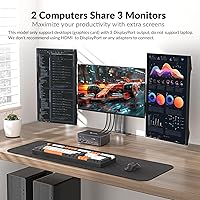
The AV Access iDock D23 occupies a specific, well-defined niche: it is built exclusively for desktop users who need to share three monitors and a full set of peripherals between two computers without touching a single cable. No HDMI, no laptop support — this is a DisplayPort-only ecosystem, and that boundary is worth understanding before purchasing. AV Access is a dedicated KVM specialist, which shows in the engineering choices here. At its price point, this triple-monitor switch competes with DIY multi-device setups that often cost more in time and frustration than the unit itself.

Features & Benefits

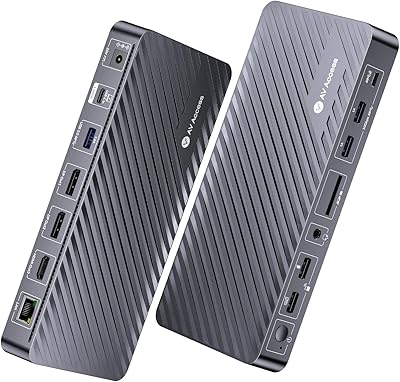
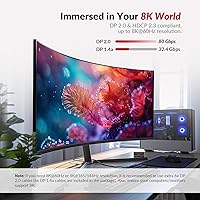
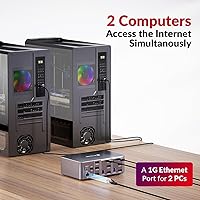
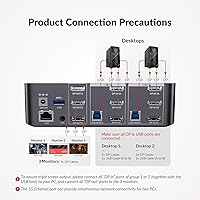
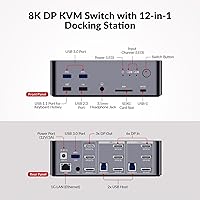
At the core is DisplayPort 2.0, supporting up to 8K@60Hz on a single screen or 4K at high refresh rates across all three displays — genuinely useful headroom for both 3D rendering workflows and competitive gaming. The six input ports use MST technology, meaning the device groups DP inputs in pairs to drive each output monitor simultaneously rather than switching them individually. The always-on Gigabit Ethernet stands out: both computers stay networked even when control switches, so background downloads and cloud syncs never stall. The 12-in-1 hub rounds things out with USB 3.0, USB-C, SD card, and audio — included cables are a practical bonus.

Best For

This KVM docking station makes the most sense for power users running two full desktop towers — think a workstation for video editing or CAD alongside a dedicated gaming PC — who refuse to compromise on display quality or desk organization. Developers managing local and test environments across two machines will also appreciate the persistent network connection. That said, the fit is narrow. Laptop users are out entirely, as are anyone relying on HDMI ports or USB-C video. You also need a GPU that natively outputs three DisplayPort signals — integrated graphics simply will not cut it here.

User Feedback

Buyers rate the iDock D23 at roughly 4.2 stars, and the praise centers on two things: how cleanly it handles the 2–3 second switch without display flickering, and how much desk clutter it eliminates. Critical feedback is real, though. First-time KVM users frequently report a steep initial setup, particularly around MST configuration on specific GPU driver versions. Several reviewers specifically flag that the remote controller costs extra — a friction point at this price tier that feels like a deliberate omission. Customer support from AV Access draws mostly positive mentions, with the brand actively responding to compatibility questions in review threads.

Pros

  • All three monitors stay active and fully driven simultaneously — no resolution trade-offs across displays.
  • Switching between two desktops takes just 2–3 seconds, with automatic wake-up for the inactive PC.
  • Always-on Gigabit Ethernet keeps both machines networked even while only one has active control.
  • The 12-in-1 hub covers USB 3.0, USB-C, SD card, and audio — most users need nothing extra.
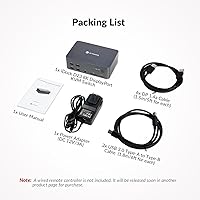
  • Six DisplayPort and two USB cables are included, so the full setup is ready out of the box.
  • DisplayPort 2.0 support means the iDock D23 handles 4K at high refresh rates without breaking a sweat.
  • AV Access customer support is technically knowledgeable and actively responds to compatibility questions.
  • Keyboard hotkey switching works reliably on standard setups, reducing reliance on the front button.
  • Build quality feels dense and stable — the unit does not shift during cable pulls or routine use.
  • HDR format support across the board means content looks consistent without manual display adjustments after switching.

Cons

  • No remote controller is included — a notable omission that requires a separate purchase at this price tier.
  • MST configuration can be genuinely confusing for first-time KVM users, and the manual does not fully bridge the gap.
  • Certain AMD GPU driver versions cause display misdetection, requiring rollbacks or firmware troubleshooting before the setup stabilizes.
  • The USB-C port lacks Power Delivery, limiting it to data transfer only — charging is not supported.
  • Included DisplayPort cables are 1.4a standard, not 2.0, so 8K output requires sourcing additional cables separately.
  • No EDID emulation means some monitor configurations take an unusually long time to stabilize after waking from sleep.
  • Hotkey combinations are fixed and cannot be reprogrammed, creating conflicts with certain gaming keyboards and macro software.
  • At nearly five pounds, mounting or positioning the unit in tight desk setups requires more planning than expected.
  • Audio output lacks per-PC volume memory, so sound levels need manual readjustment at the OS level after each switch.
  • The device must sit on an unobstructed flat surface — bottom ventilation slots make under-desk placement risky during long sessions.

Ratings

Our scores for the AV Access iDock D23 are generated by AI after analyzing verified buyer reviews from multiple global markets, with spam, bot-submitted, and incentivized feedback actively filtered out. The result is an honest, data-driven snapshot that captures both what this triple-monitor KVM docking station genuinely excels at and where real users have run into friction. Nothing is glossed over — the strengths and the pain points are weighted equally.

Display Quality & Resolution
93%
Buyers running 4K professional monitors consistently report that colors stay accurate and refresh rates hold steady after switching — no degradation, no recalibration needed. Creative professionals specifically praise the HDR handling, noting that Dolby Vision content on connected displays looks exactly as expected without manual adjustments after each switch.
A small subset of users with older 4K monitors report occasional EDID handshake delays when waking from sleep, requiring a full display power cycle. The lack of EDID emulation means some monitor configurations take longer to stabilize than buyers at this price point would reasonably expect.
KVM Switching Speed
88%
The 2–3 second switch time with automatic PC wake-up is one of the most consistently praised aspects across verified reviews. Users who toggle between a work machine and a gaming rig throughout the day find the front button responsive and the transition clean — monitors rarely flicker or lose signal during the handoff.
Keyboard hotkey switching occasionally misfires on systems running certain RGB peripheral software, requiring a button press fallback. Several reviewers note that without the separately sold remote controller, switching from across the room is simply not possible, which feels like an oversight at this price tier.
Triple Monitor Setup & MST Reliability
79%
21%
When configured correctly, all three displays run simultaneously without any performance compromise — video editors and developers with multi-panel workflows report a genuinely clean experience once everything is dialed in. The grouped MST input design means you are not sacrificing resolution on any screen to drive the others.
MST configuration trips up a meaningful portion of first-time buyers, particularly those unfamiliar with how multi-stream transport works on their specific GPU. Driver conflicts — especially on certain AMD cards — have caused one or more displays to be misdetected, requiring GPU driver rollbacks or firmware checks before the setup stabilizes.
Always-On Ethernet Performance
91%
The dual simultaneous network connection is an underappreciated feature that pays off daily in real home office use — large file syncs, cloud backups, and system updates on the inactive PC continue running uninterrupted while you work on the other machine. Users who previously ran a secondary Ethernet switch note this alone simplifies their desk setup considerably.
A handful of buyers report that the Ethernet port on one of their connected PCs occasionally drops to 100Mbps speeds rather than the full gigabit rate, typically traced back to cable quality rather than the unit itself. Still, it surfaces enough in reviews to be worth noting before assuming full gigabit throughput is guaranteed out of the box.
Hub & Peripheral Connectivity
82%
18%
Having USB 3.0, USB-C, SD card, and a 3.5mm audio jack all in one unit removes the need for a separate hub on most desks. Photographers and videographers especially appreciate being able to swap SD cards and headsets without touching the back of their tower, and USB 3.0 transfer speeds hold up well for external SSDs during the switch.
The single USB-C port lacks Power Delivery, which limits its usefulness for anything beyond data transfer. Users with more than four USB devices find themselves still reaching for an external hub, and the USB 1.1 port — reserved for hotkey keyboard input — cannot be repurposed, which feels wasteful on an otherwise capable device.
Setup & Installation Experience
61%
39%
Users who have set up KVM switches before generally find the physical installation straightforward — the included cables are long enough for most desk configurations, and the labeled ports reduce guesswork. AV Access provides a printed manual that covers the basics adequately for experienced users.
First-time KVM buyers frequently describe the setup process as frustrating, with MST mode requiring specific GPU settings that are not clearly documented in the included manual. Several reviewers spent hours troubleshooting before discovering that certain DisplayPort cables — even brand-new ones — were the root cause of instability rather than the unit itself.
Build Quality & Physical Design
74%
26%
The chassis feels solid and appropriately dense for a device managing this many simultaneous connections — it does not shift around on a desk during cable pulls, and the front button has a satisfying tactile click. Reviewers generally describe it as professional-looking rather than flashy, which suits a dual-workstation environment well.
At nearly five pounds, this triple-monitor switch is heavier than some buyers expect, making under-desk or wall-mounting more awkward without dedicated hardware. A few users also note that ventilation slots on the bottom require it to sit on a flat, unobstructed surface to avoid heat buildup during extended sessions.
Cable & Accessories Inclusion
83%
Shipping six DisplayPort 1.4a cables and two USB-B-to-A cables in the box is a genuine practical benefit — most buyers can complete the entire installation without ordering anything additional. The cable lengths at 1.5 meters cover standard desk-to-tower distances without excess slack.
The included DP cables are rated at 1.4a rather than 2.0, which means buyers wanting to push the maximum 8K resolution will need to source separate DP 2.0 certified cables independently. The remote controller, which many consider a basic convenience at this price, requires a separate purchase with no bundled option available.
Compatibility & Desktop GPU Requirements
67%
33%
On modern Nvidia RTX and recent AMD RX GPUs with three native DisplayPort outputs, compatibility is largely trouble-free once drivers are current. Users running Dell and HP workstation towers — the target audience — report generally smooth experiences after following AV Access setup guidance posted on their support pages.
The strict desktop-only, DisplayPort-only requirement has led to a notable number of returns from buyers who assumed broader compatibility. Older GPUs with mixed output configurations, or systems with only two DP ports and one HDMI, simply cannot use this device — a limitation that feels under-emphasized in broader product listings.
Audio Switching & Headset Support
71%
29%
The 3.5mm headset jack switches cleanly alongside the active PC, so users wearing headphones do not need to manually replug between machines. For users on voice calls or listening to music while working, this small detail adds up over a full workday.
The audio port does not support independent volume memory per PC, meaning audio levels need to be readjusted at the OS level after switching on some setups. Users with higher-end audio equipment also note that the analog output quality is functional but unremarkable — audiophiles will still want a dedicated DAC.
Customer Support & Brand Responsiveness
78%
22%
AV Access earns consistent credit in reviews for being accessible and technically knowledgeable — multiple buyers mention receiving firmware update links and detailed troubleshooting steps directly from the brand after posting reviews. This level of post-sale engagement is notably above average for the KVM category.
Response times vary depending on region, with some international buyers reporting longer waits for follow-up. A few users also note that while support is helpful, some compatibility issues required multiple back-and-forth exchanges before a resolution was found, which can be frustrating during a time-sensitive setup.
Value for Money
72%
28%
For users who genuinely need a triple-monitor, dual-desktop KVM with built-in docking and always-on Ethernet, the all-in-one nature justifies the investment — replicating the same functionality with separate components typically costs more and adds cable complexity. The included cable bundle adds tangible value.
For anyone needing only two monitors or occasional switching, the price-to-use ratio is harder to defend. The missing remote controller and EDID emulation — both standard on some competing units at similar or lower prices — leave buyers feeling the feature checklist has deliberate gaps that drive accessory upsells.
Hotkey & Control Usability
69%
31%
Keyboard hotkey switching works reliably on most standard USB keyboards, and the front button is positioned accessibly enough on a desk surface for users who prefer manual control. Auto PC wake-up means the inactive machine does not need to be fully awake before initiating the switch.
The hotkey combination is not user-programmable, which becomes an issue when it conflicts with gaming keyboard macros or productivity shortcuts. Users running mechanical keyboards with custom firmware have reported inconsistent hotkey recognition, reverting them to front-button switching as the only reliable method.

Suitable for:

The AV Access iDock D23 is built for a specific type of power user, and when it lands in the right hands, it genuinely earns its place on the desk. If you run two desktop towers — a dedicated workstation for video editing, CAD, or software development alongside a separate gaming PC — and you want both machines to share the same three monitors, keyboard, mouse, and peripherals without swapping a single cable, this is one of the most capable solutions available in its category. Developers who need simultaneous network connectivity on both machines will appreciate the always-on Gigabit Ethernet, which keeps background syncs and updates running on the idle PC without any intervention. Home office professionals who have outgrown two-monitor setups and demand high-refresh, high-resolution displays for color-accurate creative work will find the triple DisplayPort output genuinely useful day to day. The included cable bundle and broad peripheral hub mean most buyers can complete the full setup without ordering a single additional accessory.

Not suitable for:

The AV Access iDock D23 has a hard compatibility boundary that has caught many buyers off guard, so it is worth being direct: if your second machine is a laptop, a MacBook, or any device that outputs video over USB-C or HDMI rather than DisplayPort, this unit simply will not work for you — full stop. It also requires that both connected desktops have dedicated GPUs capable of outputting three native DisplayPort signals simultaneously, which rules out integrated graphics and many older workstation cards with mixed output configurations. Budget-conscious buyers who only need two monitors will find the investment harder to justify, since less expensive KVM options handle dual-display setups at a fraction of the cost. Users who expect a remote controller in the box will be disappointed — it is a separately purchased accessory, and that omission stings at this price point. Anyone hoping to push the maximum supported resolution will also need to source DisplayPort 2.0 certified cables independently, as the included cables are rated at the previous standard.

Specifications

  • Supported Computers: Connects exactly two desktop PCs simultaneously; laptop and MacBook connections are not supported under any configuration.
  • Monitor Outputs: Three DisplayPort output ports drive three monitors simultaneously using MST (Multi-Stream Transport) technology.
  • Video Standard: DisplayPort 2.0 with HDCP 2.3 compliance governs all video signal processing across both input and output ports.
  • Max Resolution: Supports up to 8K@60Hz on a single display, with 4K@165Hz and 2K@144Hz available across multi-monitor configurations.
  • HDR Support: Compatible with HDR10, HLG, HDR10+, and Dolby Vision formats across all connected displays.
  • DP Input Ports: Six DisplayPort input ports are arranged in two groups of three, with each group dedicated to one connected desktop PC.
  • Ethernet: A single Gigabit Ethernet port keeps both connected PCs networked simultaneously, even when active control has switched to the other machine.
  • USB Ports: Includes three USB 3.0 Type-A ports, one USB-C port, one USB 2.0 port, and one USB 1.1 port reserved for hotkey keyboard input.
  • SD Card Slot: One built-in SD card reader is included for direct file transfers without needing an external card reader.
  • Audio: A 3.5mm combined headset jack supports both headphone output and microphone input, switching alongside the active PC.
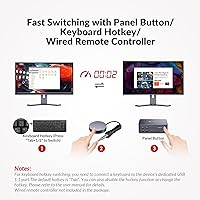
  • Switching Methods: Control can be transferred via the front panel button, a keyboard hotkey sequence, or an optional wired remote controller sold separately.
  • Switch Speed: PC switching completes in approximately 2 to 3 seconds, with an automatic wake-up signal sent to the inactive machine during the transition.
  • Included Cables: The box contains six DisplayPort 1.4a cables (1.5m each) and two USB Type-B to Type-A cables (1.8m each).
  • Power Supply: A DC 12V/3A power adapter is included in the box; the unit does not draw power from connected computers or USB ports.
  • Dimensions: The unit measures 6.3 x 4.33 x 2.17 inches, designed for desktop surface placement with bottom ventilation clearance required.
  • Weight: The device weighs 4.83 pounds, making it heavier than typical single-function docks but appropriate for its multi-port density.
  • Total Port Count: The unit provides 22 ports in total across video output, USB peripherals, audio, networking, and storage interfaces.
  • Model Identifier: The official model number is iDock-D23-NA, manufactured by AV Access, a brand specializing exclusively in KVM and display switching hardware.

Related Reviews
AV Access iDock-C10 KVM Switch with Dual Monitors
84%
89%
Performance
92%
Build Quality
80%
Ease of Setup
94%
Display Quality
78%
Compatibility
More
AV Access 4K HDMI USB KVM Extender
86%
89%
Ease of Setup
92%
Signal Range & Reliability
90%
Performance Over Long Distances
85%
USB Port Functionality
88%
Audio Support
More
AV Access 4KEX100-DP-Pro KVM Extender
89%
94%
Performance
96%
Video Quality
88%
USB Connectivity
99%
Latency
85%
Setup/Installation
More
AV Access BizEye 90 4K Conference Room Camera
88%
92%
Video Quality
89%
Audio Quality
93%
Ease of Setup
90%
Field of View
84%
Auto-Framing Accuracy
More
AV Access 4KSW21-DM Dual Monitor KVM Switch
85%
94%
Video Quality
91%
Switching Responsiveness
88%
USB Hub Functionality
85%
Build Quality
90%
Compatibility
More
AV Access HDEX80-KVM HDMI KVM USB Extender
88%
90%
Performance
95%
Ease of Setup
89%
Reliability
92%
Latency
85%
Build Quality
More
AV Access U2EX50 USB Extender Over Cat5e/6 196ft
87%
89%
Performance Over Distance
93%
Ease of Setup
84%
Build Quality
88%
Compatibility with OS
85%
Surge Protection Reliability
More
AV Access KD-S03 Triple Monitor Docking Station
77%
88%
Multi-Monitor Performance
41%
macOS Compatibility
91%
Setup & Ease of Use
74%
100W Power Delivery
86%
Data Transfer Speed
More
Marantz Professional AVS
72%
83%
Audio Quality
74%
Video Quality
81%
Built-in Ring Light
88%
All-in-One Convenience
51%
Physical Size & Desk Footprint
More
BrosTrend 1200Mbps Wireless Access Point
86%
92%
Ease of Setup
88%
Performance & Speed
80%
Signal Strength
90%
Compatibility with Devices
75%
Range
More

FAQ

No — the AV Access iDock D23 is strictly designed for two desktop PCs with native DisplayPort outputs. Laptops, MacBooks, and any device that relies on USB-C or HDMI for video output are not compatible, regardless of adapters used. This is one of the most common reasons for returns, so it is worth confirming your setup before purchasing.

The six cables included in the box are DisplayPort 1.4a, which support up to 4K at high refresh rates but fall short of the 8K@60Hz maximum the device is capable of. To reach 8K resolution, you will need to purchase DisplayPort 2.0 certified cables separately. For most 4K and 2K workflows, the included cables are perfectly adequate.

MST stands for Multi-Stream Transport — it is how the device groups multiple DisplayPort inputs from one PC to drive three monitors simultaneously without splitting resolution. In practice, you may need to enable MST mode in your GPU driver settings, and some AMD cards in particular require a specific driver version to detect all three displays correctly. The setup guide covers this, but if you hit issues, AV Access support can point you to the right firmware and driver combination for your hardware.

Both computers stay connected to the network simultaneously through the single Gigabit Ethernet port — this is one of the more practical features of this KVM docking station. The inactive PC keeps downloading, syncing, and updating in the background without any interruption when you switch control to the other machine. You do not need a separate Ethernet switch or splitter to achieve this.

The remote controller is sold separately and is not included in the box. You can switch between PCs using the front panel button or a keyboard hotkey without it, but if you want to switch from across the room — say, from your couch or a standing position away from the desk — you will need to purchase the remote add-on. At this price point, many buyers feel it should be bundled in.

In most configurations, the displays re-initialize briefly during the 2 to 3 second switching window, which is normal behavior for a KVM of this type. However, without EDID emulation, some monitors — particularly certain Dell and HP models — can take longer to re-establish the signal, occasionally requiring a display power cycle. If rock-solid instant display persistence is critical to your workflow, it is worth factoring that into your decision.

The USB-C port on this triple-monitor switch handles data transfer only — it does not support Power Delivery or device charging. If you need to charge a phone or power a USB-C peripheral simultaneously, you will need a separate charger or powered hub alongside this unit.

Your GPU needs to natively output three DisplayPort signals to use all three monitor outputs simultaneously. Most modern dedicated Nvidia and AMD graphics cards support this, but integrated graphics and older workstation GPUs with mixed output configurations typically do not. Before buying, confirm that your graphics card has at least three DisplayPort ports available and that your driver supports MST mode.

The keyboard hotkey is pre-configured and works out of the box on most standard USB keyboards — you do not need to program anything. The combination is fixed, though, which can conflict with macro-heavy gaming keyboards or custom firmware setups. If you run into hotkey conflicts, the front panel button is always a reliable fallback.

This is usually caused by one of three things: an MST mode setting that needs to be enabled in your GPU driver, a DisplayPort cable that is not fully seated or is lower quality than expected, or a driver version that has a known conflict with the MST configuration. Start by updating your GPU drivers, confirming MST is enabled, and swapping out the cable for the monitor that is not showing up. AV Access support is responsive and can walk you through GPU-specific troubleshooting if those steps do not resolve it.