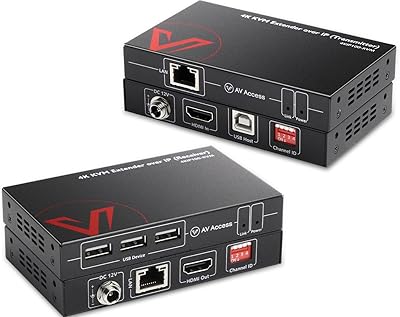

Overview

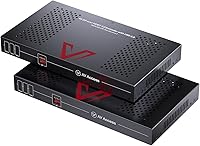
The AV Access 4KEX100-DP-Pro KVM Extender is a professional-grade unit built for anyone who needs to push a full-quality DisplayPort signal across a room — or across a building. It runs on HDBaseT 3.0, a protocol designed specifically for lossless AV transmission over standard Ethernet infrastructure, which means no compression, no visual degradation, and no perceptible delay at the display end. This DP KVM extender targets IT administrators, AV integrators, and technically demanding users who have real infrastructure to manage. At its price point, it competes in a niche where reliability and signal integrity matter far more than cost-cutting.

Features & Benefits

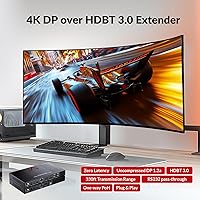
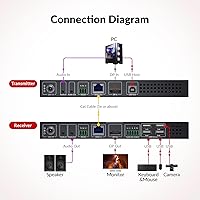
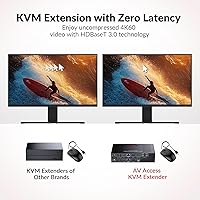
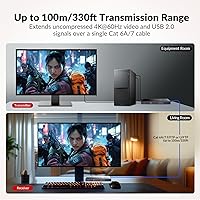
What sets this HDBaseT extender apart is its ability to carry uncompressed 4K@60Hz DisplayPort 1.2a video over a single Cat 6A or Cat 7 shielded cable — up to 100 meters without a repeater. For high-refresh workflows, it handles 1080p at 240Hz and 1440p at 144Hz, which matters when latency and frame consistency are non-negotiable. Four USB 2.0 ports on the receiver let you run a keyboard, mouse, webcam, and speakerphone remotely. A loop-out port keeps a local monitor active at the source. Power over HDBaseT means one adapter powers both units, and bidirectional audio with RS232 rounds out a well-considered feature set.

Best For

This DP KVM extender makes the most sense in environments where the PC and the display genuinely cannot share the same room. System integrators building control rooms, broadcast setups, or centralized AV infrastructure will find deployment straightforward. Educational institutions and corporate conference rooms benefit from locking compute hardware in a server room while keeping clean, cable-light user stations. Video editors who need uncompressed color fidelity at distance will also appreciate the lossless signal path. Gamers can use it effectively, though the USB 2.0 ceiling is worth noting if you plan to run capture cards or fast external drives through the receiver.

User Feedback

The AV Access extender sits at 3.9 stars, and the split in opinions is fairly predictable. Buyers who planned their installation correctly — using shielded Cat 6A or Cat 7 throughout — report solid, stable performance from day one. Those who attempted the run with unshielded or lower-grade cable encountered signal issues, which accounts for a notable portion of the critical reviews. USB 2.0 speed also draws occasional complaints from users with demanding peripherals. On the business side, the 3-year warranty is a genuine advantage; end-users receive one year, which is standard but feels less reassuring given the premium price tier.

Pros

  • Delivers a fully uncompressed 4K signal at 60Hz over a single cable run up to 100 meters.
  • HDBaseT 3.0 ensures zero perceptible latency, which matters in both professional AV and fast-paced gaming contexts.
  • High refresh rate support at 1080p@240Hz and 1440p@144Hz gives it genuine flexibility beyond standard office use.
  • One power adapter handles both transmitter and receiver units, keeping installations tidy and cost-efficient.
  • The loop-out port lets a local monitor stay active at the source without any additional switching hardware.
  • Four USB 2.0 ports on the receiver comfortably cover keyboards, mice, webcams, and speakerphones in most setups.
  • Bidirectional RS232 and audio pass-through make it a credible fit for more complex AV control systems.
  • Business buyers receive a 3-year warranty, which is meaningfully longer than most competing units offer.
  • Setup is reported as straightforward when the correct shielded cable is in place from the start.

Cons

  • USB 2.0 is the only option on the receiver, which limits throughput for capture cards or fast storage devices.
  • Requires shielded Cat 6A or Cat 7 F/FTP or U/FTP cable — standard Cat 6 or unshielded runs will cause problems.
  • End-user warranty is only one year, a notable gap compared to the 3-year coverage offered to business buyers.
  • No IR pass-through support, which rules it out for setups that rely on infrared remote control signals.
  • The 3.9-star rating suggests quality consistency is not perfect across all units shipped.
  • At its price tier, buyers expect flawless out-of-box performance, but some report needing troubleshooting on first use.
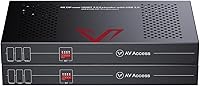
  • No dip-switch configuration means less flexibility for custom installation tuning compared to some rival extenders.

Ratings

Our AI rating system analyzed verified global buyer reviews for the AV Access 4KEX100-DP-Pro KVM Extender, actively filtering out incentivized, duplicate, and bot-generated submissions to surface what real users actually experience. Scores reflect both the genuine strengths that make this HDBaseT extender stand out in its category and the specific friction points that hold it back from a perfect recommendation. The result is an honest, balanced breakdown that cuts through the marketing and tells you exactly what you are getting.

Signal Quality
93%
Users who set up this DP KVM extender correctly consistently describe the 4K image at the remote end as indistinguishable from a direct connection. AV integrators in particular call out the lossless HDBaseT 3.0 path as the primary reason they chose it over compressed alternatives — no banding, no blocking, no color shift.
Signal quality drops sharply if the wrong cable type is used, and a handful of reviewers received units with inconsistent behavior even on properly shielded runs. While these cases appear to be outliers, they create enough doubt that some buyers feel they are rolling the dice.
Transmission Range
91%
Reaching 100 meters over a single cable is a genuine differentiator, and field reports from system integrators confirm that the unit hits that distance reliably when the cabling is correct. For large office deployments or broadcast environments where PC racks are far from operator desks, this range eliminates the need for repeaters entirely.
The 100-meter ceiling is only achievable with shielded Cat 6A or Cat 7 F/FTP or U/FTP — a constraint that catches some buyers off guard. Those who assumed standard Cat 6 would work reported degraded or failed connections, which skews perception of the range capability unfairly but still counts as a real-world frustration.
Latency Performance
94%
Zero-latency transmission is the headline claim, and users across gaming and professional AV contexts back it up. Gamers running competitive titles at 1080p@240Hz reported no perceptible input delay, and broadcast operators noted that the remote display feels live rather than relayed — a critical distinction in time-sensitive environments.
A small number of reviewers noted minor initialization delays when waking the system from sleep, which is not the same as signal latency but still caused brief confusion during presentations or live sessions. This appears to be an EDID or handshake issue rather than a core latency problem, but it surfaces enough to mention.
USB Functionality
67%
33%
For typical remote workstation use — keyboard, mouse, webcam, and a speakerphone — the four USB 2.0 ports on the receiver are more than adequate. Users in office and education deployments found day-to-day peripheral control reliable and hassle-free across the full cable run.
USB 2.0 is a genuine ceiling that frustrates buyers who expected more. Users attempting to connect USB 3.0 capture cards, fast external drives, or high-bandwidth audio interfaces found the 350Mbps limit a hard wall. This is not a defect, but it is a spec that AV Access could communicate more prominently before purchase.
Installation Experience
74%
26%
Buyers who arrived with the right shielded cable and basic AV knowledge describe installation as refreshingly straightforward — connect the cable, plug in the power at the receiver, and the signal appears. No driver installation, no software configuration, and no dip switches to navigate on this model.
The experience diverges significantly for buyers who underestimate the cable requirement. Troubleshooting an unstable signal without clear guidance on cable standards sent several users through lengthy back-and-forth with support before identifying the root cause. Better pre-purchase communication would prevent a meaningful portion of the negative reviews.
Build Quality
82%
18%
Both the transmitter and receiver units feel solid and professionally finished, with a form factor that sits comfortably in rack-adjacent installations or on a desk without looking out of place. The metal casing handles heat dissipation well during extended operation, and there are no reported failures linked to physical construction.
The units are not rack-mountable out of the box, which is a mild inconvenience for integrators building formal server room installations. A few buyers also noted that the port labeling could be clearer for first-time setup, particularly when distinguishing the loop-out from the primary display output.
High Refresh Rate Support
88%
Support for 1080p@240Hz and 1440p@144Hz is a meaningful addition that expands the use case well beyond boardrooms and conference rooms. Gamers and video editors working with high-frame-rate timelines appreciate that this HDBaseT extender does not cap their workflow at standard 60Hz.
The top-tier refresh rates require dialing in the resolution correctly, and some users found the interaction between their GPU settings and the extender required manual adjustment. At 4K, buyers are limited to 60Hz, which is still excellent but worth knowing if ultra-high refresh at maximum resolution is the goal.
Power Design
89%
Single-adapter power over HDBaseT is a genuinely practical feature in real deployments. Installers running cable to a remote desk no longer need to plan for a second power outlet at the transmitter end, which simplifies both the physical installation and the ongoing maintenance of the setup.
The power brick is fixed at the receiver end, which means the receiver must always be near a power outlet regardless of where it is physically placed. In some creative mounting scenarios this creates a constraint, though it is a minor one given how the product is designed to be used.
Audio Performance
79%
21%
Bidirectional 3.5mm audio pass-through works reliably for conferencing and monitoring use cases, and the audio de-embedding on the receiver side gives integrators flexibility in how they route sound in more complex AV systems. Users running speakerphones over the USB ports alongside the analog audio path found both channels stable simultaneously.
Audio is functional rather than audiophile-grade, and users expecting high-fidelity studio monitoring through the 3.5mm path will find it adequate at best. There is also no HDMI ARC or optical output option, which limits integration with home theater or advanced speaker systems in some edge-case deployments.
Compatibility
77%
23%
The AV Access extender works across a wide range of DisplayPort-equipped workstations and graphics cards without driver dependencies, making it broadly compatible with Windows, Linux, and macOS systems. Professional users noted that it integrated cleanly into existing AV control systems via the RS232 port.
Compatibility with certain GPU EDID implementations occasionally causes handshake delays or requires a manual resolution lock in display settings. Users with older or niche display hardware also reported that the receiver needed a forced signal re-scan in a small number of cases before the remote monitor was recognized.
Value for Money
63%
37%
For enterprise buyers and AV integrators who need lossless 4K extension at this distance, the pricing reflects the technology tier and the 3-year business warranty adds long-term cost certainty to the equation. In a commercial deployment context, the total cost of ownership compares favorably to alternatives that require repeaters or proprietary cabling.
Individual buyers and small businesses will feel the price acutely, especially given the 1-year consumer warranty and the additional cost of sourcing the correct shielded cable separately. For home users who just want to move a signal across the house, this sits well above the price point where the feature set justifies the spend.
Warranty & Support
71%
29%
The 3-year guarantee for business purchasers is one of the stronger warranty commitments in this product category, and integrators who flagged it in reviews treated it as a genuine factor in the buying decision. AV Access support responses are generally described as responsive when issues are reported through proper channels.
The gap between the 3-year business warranty and the 1-year consumer warranty is stark and creates frustration among individual buyers who feel underserved after spending a premium price. A handful of reviewers also noted that warranty tier classification was not always clearly communicated at the point of purchase.
Documentation & Setup Guidance
61%
39%
Basic setup is intuitive enough that experienced AV installers rarely need to consult the documentation at all. The included quick-start materials cover the fundamental connection sequence adequately for a professional audience already familiar with HDBaseT deployments.
The documentation falls short when it comes to edge cases, particularly around cable specification requirements and EDID troubleshooting. Many of the negative reviews in the user feedback pool trace directly to buyers who lacked clear guidance on shielded cable requirements — information that should be front and center, not buried in a footnote.

Suitable for:

The AV Access 4KEX100-DP-Pro KVM Extender is purpose-built for professionals who need to separate their computing hardware from their workspace without any compromise in signal quality. AV integrators and systems engineers deploying centralized rack setups in offices, broadcast studios, or control rooms will find it one of the most capable options in this category. IT administrators managing secure environments — where workstations must be locked in server rooms while users operate from clean, remote desks — will appreciate the reliable 100-meter reach and the ability to extend keyboards, mice, and webcams without adding a second power run. Educational institutions centralizing PCs for computer labs or lecture halls also fit squarely in this product's wheelhouse. Video editors and colorists who cannot accept any compression artifacts in their remote monitoring chain will value the lossless DisplayPort transmission above almost everything else on the spec sheet.

Not suitable for:

The AV Access 4KEX100-DP-Pro KVM Extender is a poor fit for buyers who expect plug-and-play results without investing in the right cable infrastructure. If your existing runs use unshielded Cat 5e or generic Cat 6 rather than properly shielded Cat 6A or Cat 7 F/FTP or U/FTP cable, you will likely experience signal instability and should look elsewhere or budget for recabling. Casual home users who just want to move a signal one room over for convenience will find the price point difficult to justify. Gamers who rely on high-speed USB peripherals — fast external drives, USB 3.0 capture cards, or high-polling-rate devices — should note that the four receiver ports are USB 2.0 only, which caps throughput in ways that may affect their workflow. There is also no IR support, so buyers who depend on remote control pass-through for media or AV switching will need a separate solution.

Specifications

  • Video Interface: Transmits DisplayPort 1.2a signals natively, preserving full color depth and resolution without any encoding or compression stage.
  • Max Resolution: Supports uncompressed 4K@60Hz output, delivering full-bandwidth video with no quality loss over the cable run.
  • High Refresh Rates: Also capable of 1080p@240Hz and 2560x1440@144Hz for applications that prioritize frame rate over resolution.
  • Transmission Range: Reaches up to 100m (approximately 330ft) over a single shielded Cat 6A or Cat 7 F/FTP or U/FTP cable.
  • Protocol: Built on HDBaseT 3.0, an industry-standard AV-over-Ethernet protocol designed for lossless, long-distance signal distribution.
  • USB Ports: The receiver unit provides four USB 2.0 ports for connecting keyboards, mice, webcams, and other standard peripherals remotely.
  • USB Data Rate: USB throughput is rated at up to 350Mbps, sufficient for most input devices but not for USB 3.0 storage or capture cards.
  • Power Supply: Uses uni-directional Power over HDBaseT (PoH) at 12V, requiring only one power adapter at the receiver to run both units.
  • Audio Support: Includes bidirectional 3.5mm audio pass-through and audio de-embedding on the receiver side for flexible speaker or headphone connection.
  • RS232: Provides bidirectional RS232 pass-through, enabling integration with serial-controlled AV equipment and automation systems.
  • Loop-Out: A loop-out port on the transmitter allows a local display to remain active at the source PC simultaneously.
  • IR Support: This unit does not include infrared pass-through, so remote control signals cannot be relayed between transmitter and receiver.
  • Dimensions: Each unit measures 8.46 x 4.72 x 0.98 inches, keeping the footprint compact enough for rack-adjacent or desktop placement.
  • Weight: The combined package weighs approximately 1.23 pounds, making physical installation and mounting straightforward.
  • Cable Requirement: Stable 4K@60Hz transmission specifically requires shielded Cat 6A or Cat 7 F/FTP or U/FTP cable; unshielded or lower-grade cable will degrade performance.
  • Warranty (Business): Business and integrator buyers receive a 3-year product guarantee from AV Access, covering defects and operational failures.
  • Warranty (Consumer): End-users receive a 1-year warranty plus a 30-day hassle-free return window for standard retail purchases.
  • Model Number: The official model designation is 4KEX100-DP-Pro, used to identify this specific variant within the AV Access extender lineup.

Related Reviews
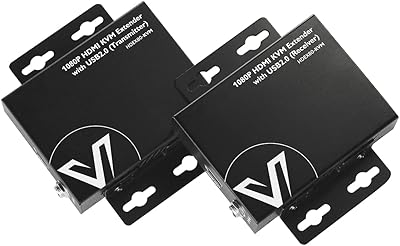
AV Access HDEX80-KVM HDMI KVM USB Extender
88%
90%
Performance
95%
Ease of Setup
89%
Reliability
92%
Latency
85%
Build Quality
More
AV Access 4KIP100-KVM HDMI KVM Extender
76%
83%
Video Signal Quality
88%
Transmission Range
79%
USB Hub Functionality
61%
Network Compatibility & Setup
67%
DIP Switch Configuration
More
AV Access 4KSW21-DM Dual Monitor KVM Switch
77%
83%
Switching Speed & Reliability
86%
EDID Emulation Performance
88%
Video Quality at 4K
74%
Dual Operating Modes (KVM vs USB Mode)
71%
USB 3.0 Hub Performance
More
AV Access iDock D23
AV Access iDock D23
78%
93%
Display Quality & Resolution
88%
KVM Switching Speed
79%
Triple Monitor Setup & MST Reliability
91%
Always-On Ethernet Performance
82%
Hub & Peripheral Connectivity
More
AV Access iDock C10 KVM Docking Station
77%
93%
Build Quality
88%
Video Performance
81%
KVM Switching
89%
EDID Emulation
84%
Ethernet Reliability
More
AV Access U2EX50 USB Extender Over Cat5e/6 196ft
87%
89%
Performance Over Distance
93%
Ease of Setup
84%
Build Quality
88%
Compatibility with OS
85%
Surge Protection Reliability
More
TESmart HKE12MMA20 HDMI KVM Extender
71%
78%
Signal Stability
74%
Video Quality
71%
Multipoint Topology Support
83%
Build Quality
63%
IR Pass-Through Reliability
More
Alxum DP 1.4 KVM Switch
87%
89%
Performance
94%
Ease of Setup
90%
Video Quality (8K Support)
88%
USB Connectivity Speed
86%
Build Quality
More
Ubiquiti UniFi 6 Pro (U6-Pro)
80%
93%
Wireless Performance
89%
Range & Coverage
54%
Setup & Installation
78%
Value for Money
88%
Build Quality & Design
More
Angelbird AV PRO SD V60 1TB Card
85%
93%
Write Speed Consistency
88%
Read Speed Performance
91%
Build Quality & Durability
94%
Storage Capacity
63%
Value for Money
More

FAQ

It is genuinely uncompressed. The AV Access 4KEX100-DP-Pro KVM Extender uses HDBaseT 3.0, which transmits the raw DisplayPort signal without encoding it into a compressed video stream. What you see at the remote display is bit-for-bit identical to what the GPU outputs, assuming you have the right cable in place.

You need shielded Cat 6A or Cat 7, specifically F/FTP or U/FTP construction. Unshielded cables, even if they are technically Cat 6A by bandwidth rating, are not reliable over longer runs with this unit. This is the single most common cause of issues reported by buyers, so it is worth getting the cabling right before installation.

Standard Cat 6 is not recommended, and unshielded Cat 6 will very likely cause signal instability at 4K over longer distances. If your existing infrastructure is shielded Cat 6A or better, you may be fine. Otherwise, budget for recabling — it is not optional if you want reliable performance.

Yes, with some caveats. The extender supports 1080p@240Hz and 1440p@144Hz, so refresh rate is not the limiting factor. The thing to watch is USB: all four receiver ports are USB 2.0, which means high-polling-rate mice or USB 3.0 devices may not behave exactly as expected. For most gaming peripherals this is fine, but check your specific gear before committing.

No, and this is one of the more practical design choices here. Power over HDBaseT means the transmitter draws power through the cable from the receiver. You only need one power adapter, plugged in at the receiver end, to run the entire system.

Yes. There is a loop-out port on the transmitter unit that keeps a local display active at the source. This is useful for monitoring or for setups where someone still occasionally works directly at the machine.

In practice, no. HDBaseT 3.0 is designed for zero-latency transmission, and users in professional AV and gaming contexts consistently report that delay is not perceptible. This is fundamentally different from extenders that compress and decompress the signal, which always introduce some lag.

Keyboards, mice, webcams, speakerphones, USB headsets, and similar low-to-mid bandwidth devices all work well. The four USB 2.0 ports handle the vast majority of standard office and studio peripherals without issue. Where you will hit limitations is with USB 3.0 storage drives, capture cards, or anything that needs sustained high throughput.

Yes, there is a real difference. Business and integrator customers get a 3-year warranty, which is strong for this category. Individual end-users receive 1 year of coverage plus a 30-day return window. If you are purchasing for a commercial deployment, it is worth clarifying your buyer status with AV Access to ensure you receive the appropriate tier.

Most of the critical reviews trace back to cable compatibility issues rather than product defects. Buyers who installed it with the wrong cable type reported instability and assumed the unit was faulty. A smaller portion of reviews mention USB speed limitations as a disappointment, usually from users who expected USB 3.0 performance. When the installation is done correctly, the feedback tends to be quite positive.

Where to Buy