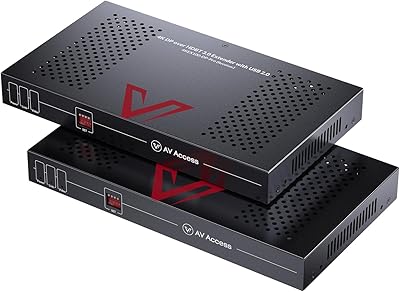
Overview

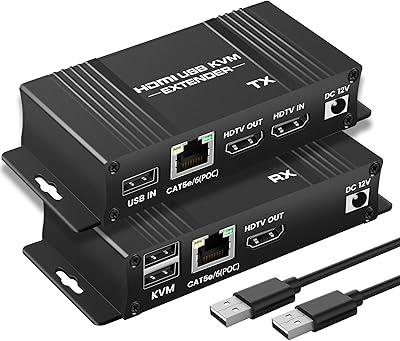
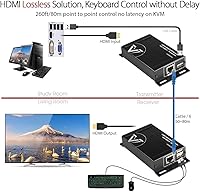
The AV Access HDEX80-KVM HDMI KVM Extender solves a very specific, practical problem: how do you control a remote computer or NVR from up to 260 feet away without running multiple cables? Priced in the mid-range for KVM extenders, it occupies a competitive spot where build quality often separates the reliable options from the throwaway ones. What distinguishes this KVM extender is its compact metal housing, tool-free setup, and a two-way PoE design that means you only need one power adapter for the entire run. For IT and AV professionals, that last point alone can cut installation time considerably.
Features & Benefits

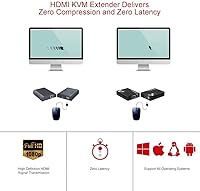
At its core, the HDEX80-KVM transmits a 1080p signal at 60Hz across up to 80 meters of Cat5e, Cat6, Cat6a, or Cat7 cable — and in practice, the image arrives without noticeable delay. Two USB 2.0 ports handle keyboard and mouse traffic at up to 480Mbps, which is more than enough for standard input devices but worth noting if you were hoping for USB 3.0 storage speeds. HDCP 1.4 support keeps it compatible with most content-protected sources. The all-metal enclosure provides meaningful shielding against EMI and ESD events, which matters in server rooms and noisy electrical environments. One practical note: cable quality makes a real difference at longer runs, so Cat6 or better is strongly recommended when approaching that 260-foot limit.

Best For

This HDMI-over-Cat6 extender is a natural fit for IT administrators who need to manage servers or NVRs tucked away in a wiring closet while keeping keyboard, mouse, and monitor at a comfortable workstation. Security installers will appreciate the single-cable deployment when connecting a control desk to a remote recording unit across a large building. Home lab users who want to tuck a noisy PC into a utility room will find the setup refreshingly straightforward. Small businesses looking for a no-fuss KVM extension without enterprise hardware costs will find it a solid match. The shielded enclosure also suits environments with heavy electrical equipment nearby, where signal interference is a genuine concern.

User Feedback

Buyers consistently highlight hassle-free installation as the standout experience — most report having everything running within minutes of unboxing. Keyboard and mouse responsiveness gets positive marks too, with very few complaints about lag during normal use. That said, a handful of users have run into compatibility issues with USB devices beyond standard input peripherals, so if you plan to connect something unusual, it is worth verifying beforehand. Some reviewers note that the build quality feels reassuringly solid compared to cheaper plastic alternatives. A few comments mention the unit can run warm during long sessions, and several installers recommend placing the power adapter at the receiver end rather than the transmitter for best results.

Pros

  • Single Cat6 cable carries both video and USB signals, dramatically reducing cable clutter during installation.
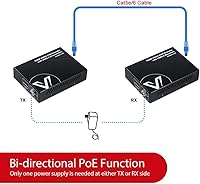
  • Two-way PoE means you only need one power adapter for the transmitter and receiver pair combined.
  • Plug-and-play setup works on Windows, Mac, and Linux without installing any drivers whatsoever.
  • The all-metal enclosure feels noticeably more solid than plastic competitors in the same price range.
  • Built-in surge and ESD protection adds a layer of safety in server rooms and industrial environments.
  • Keyboard and mouse response over the extended connection feels immediate with no detectable lag in normal use.
  • HDCP 1.4 support keeps the extender compatible with most content-protected video sources out of the box.
  • Compact dimensions make it easy to mount or tuck away at both the transmitter and receiver ends.
  • CE and FCC certifications provide baseline assurance for professional and commercial deployments.
  • Reliable 1080p signal at 60Hz holds up consistently across longer cable runs when quality cabling is used.

Cons

  • Hard ceiling of 1080p makes this HDMI-over-Cat6 extender unsuitable for anyone running a 4K display workflow.
  • USB 2.0 ports limit throughput significantly if you need to connect anything faster than a keyboard or mouse.
  • Only a single HDMI output is supported, so multi-monitor setups are completely out of scope.
  • Signal quality at distances approaching 260 feet is noticeably sensitive to the grade of cable used.
  • The units can run warm during extended continuous operation, which may concern users in poorly ventilated spaces.
  • USB device compatibility beyond standard HID peripherals is inconsistent and not guaranteed.
  • No built-in switching capability means you cannot toggle between multiple source computers.
  • Power adapter placement matters — installing it on the transmitter side rather than the receiver can cause instability.
  • Only two USB ports are available, which is limiting if your remote workstation needs more peripheral connections.
  • No support for audio extraction or 3.5mm audio passthrough, which may require a separate solution in some setups.

Ratings

The scores below for the AV Access HDEX80-KVM HDMI KVM Extender were generated by our AI engine after analyzing verified purchase reviews from buyers worldwide, with spam, bot activity, and incentivized feedback actively filtered out. We looked at both the consistent praise and the recurring frustrations to give you an honest picture of how this KVM extender performs in real installations — not just out of the box.
Ease of Setup
93%
Buyers across IT, security, and home lab setups repeatedly describe getting everything running within minutes of unboxing. There are no drivers to hunt down, no configuration menus to navigate — you connect the cables and it simply works across Windows, Mac, and Linux alike.
A small number of users report that the initial signal did not appear until they reseated the HDMI or RJ45 cable, suggesting the connectors benefit from a firm, deliberate push during installation. This is a minor friction point but catches first-timers off guard.
Video Signal Quality
84%
At 1080p and 60Hz, the picture arriving at the remote display is sharp and stable under normal operating conditions. Server room administrators and NVR operators working at standard HD resolution report no visible degradation even at cable runs of 150 to 200 feet.
Signal integrity becomes noticeably more cable-dependent as runs approach the 260-foot ceiling, with some users on older Cat5e infrastructure reporting occasional flicker. The hard 1080p cap is also a genuine limitation for anyone who has already upgraded their display to 4K.
USB Peripheral Responsiveness
88%
Keyboard and mouse input over the extended connection feels immediate to nearly all reviewers, with no perceptible delay during normal desktop use or server management tasks. This is the primary use case and the extender handles it confidently.
A subset of users trying to push the USB ports beyond keyboard and mouse — connecting barcode scanners, webcams, or audio interfaces — report inconsistent recognition. The ports are tuned for HID devices and that boundary shows fairly quickly when you test the edges.
Build Quality
86%
The all-metal enclosure earns consistent praise from buyers who have handled cheaper plastic alternatives in the same category. Installers note the units feel dense and purposeful, and the metal housing does a credible job dissipating heat during longer sessions.
The units are compact enough that some buyers find the port labeling difficult to read without good lighting, which is a minor but real annoyance during rack installation. A couple of reviewers also noted that the RJ45 port lacks a satisfying click on one of their units.
PoE Implementation
89%
The two-way PoE design genuinely simplifies wiring in the field — needing only one power adapter for both ends is a meaningful time saver for security installers and IT technicians who deal with limited outlet access in server closets and equipment racks.
AV Access recommends placing the adapter at the receiver end, and users who ignored this and powered from the transmitter side reported occasional instability. The guidance exists but it is easy to miss, and a wrong placement during a rushed installation can create unnecessary troubleshooting.
Thermal Management
71%
29%
The metal enclosure actively conducts heat away from the internals, and most users running the pair in open or ventilated environments report no heat-related issues even during all-day operation in server rooms and surveillance installations.
Units installed in tight, poorly ventilated equipment cabinets or stacked against other hardware do get notably warm after extended continuous use. A handful of reviewers expressed concern about long-term reliability in those conditions, though no failures were directly attributed to heat in the reviewed feedback.
Cable Compatibility Range
81%
19%
Supporting Cat5e through Cat7 gives installers flexibility to work with whatever Ethernet infrastructure is already in place, which is a practical advantage in retrofit installations where re-pulling cable is not an option.
Performance at the maximum range is meaningfully better on Cat6 and above, so buyers relying on existing Cat5e runs for long distances may need to manage their expectations or re-cable. The product supports Cat5e in name but it is not the recommended choice for demanding runs.
USB Device Compatibility
63%
37%
Standard keyboards, mice, and basic USB hubs work reliably and are recognized instantly on both Windows and Mac. For the intended use case of remote keyboard-and-mouse control, the compatibility story is solid.
Non-HID USB devices introduce real unpredictability — USB storage drives, webcams, and certain specialized input devices have generated a consistent stream of complaints about failed recognition or dropped connections. This is a known limitation of the USB 2.0 extension architecture used.
Value for Money
82%
18%
Against the broader field of HDMI KVM extenders, this unit offers a competitive combination of metal build, PoE, and reliable 1080p performance at a mid-range price point. Buyers who need a dependable single-cable KVM run for keyboard, mouse, and display consistently feel the price is justified.
Buyers who later discover the 1080p ceiling or USB 2.0 limitations feel the value proposition weakens if their needs evolve. There are cheaper options for basic HDMI extension without KVM, so you are paying a premium that only makes sense if you genuinely need the USB control functionality.
Transmission Reliability
83%
Day-to-day signal stability is one of the most praised aspects in verified reviews, with IT professionals describing months of continuous operation without a dropped signal in controlled cabling environments. The surge and ESD protection appears to contribute to consistent uptime in electrically noisy settings.
Edge cases involving marginal cable quality or connectors that are not fully seated can produce intermittent signal loss that is frustratingly difficult to diagnose. A small but vocal group of reviewers spent time troubleshooting what turned out to be a cable or connector issue rather than a device fault.
OS Compatibility
91%
Cross-platform support is genuinely broad — Mac, Linux, and multiple generations of Windows all work without any configuration. Home lab users mixing operating systems across different machines particularly appreciate not having to manage separate drivers or software for each host.
A small number of Linux users on less common distributions report occasional USB enumeration delays on first connection, though these typically resolve on reconnect. There is no documentation addressing niche OS configurations, which leaves those users searching for community solutions.
Port & Connector Layout
74%
26%
The compact footprint means the transmitter sits unobtrusively behind a computer or inside a rack, and the port arrangement is logical enough that most users orient the unit correctly on the first attempt without consulting the manual.
With only two USB ports available at the receiver, users who need more than a keyboard and a mouse face an immediate limitation that requires an additional hub. The physical port spacing is also tight enough that wide USB connectors on certain keyboards can partially block the adjacent port.
Documentation & Support
76%
24%
Basic installation is simple enough that most users never open the manual, and AV Access provides customer service contact options that several reviewers praised for responsive replies to technical questions.
The included documentation is thin for anything beyond the standard keyboard-and-mouse setup, and users attempting more complex configurations — multiple USB devices, integration with KVM switches, or specific NVR models — often find themselves piecing together answers from community forums rather than official resources.

Suitable for:

The AV Access HDEX80-KVM HDMI KVM Extender is purpose-built for anyone who needs to operate a computer or NVR from a distance without dealing with a tangle of long HDMI and USB runs. IT administrators are an obvious fit — if you manage servers or network equipment stored in a wiring closet, this lets you keep a clean workstation up to 260 feet away using a single Cat6 cable. Security professionals installing surveillance systems will find it equally practical, since it bridges the gap between a recording unit in one room and a control desk in another without complex software or dedicated hardware. Home lab users who want to banish a loud PC to a utility room while keeping monitor and peripherals at their desk will appreciate how little setup is involved. Small businesses on a reasonable budget, who need a dependable KVM extension without committing to enterprise-grade infrastructure, will find this KVM extender hits a practical sweet spot.
Not suitable for:

The AV Access HDEX80-KVM HDMI KVM Extender is not the right tool if your workstation or display setup demands 4K resolution — the signal tops out at 1080p, full stop. If you rely on USB 3.0 peripherals like external SSDs or high-speed capture devices, the two USB 2.0 ports will create a bottleneck that may frustrate your workflow. Users who need to extend multiple displays simultaneously will also need to look elsewhere, as this HDMI-over-Cat6 extender handles only a single video output. Anyone working in an environment with very long cable runs on older Cat5 infrastructure should temper expectations, since signal integrity at or near the 260-foot ceiling is noticeably more sensitive to cable quality. Finally, if your installation requires USB hub functionality beyond basic keyboard and mouse — connecting printers, scanners, or storage devices — real-world compatibility can be hit or miss.
Specifications

  • Model Number: The unit is identified by the model code HDEX80-KVM, manufactured by AV Access.
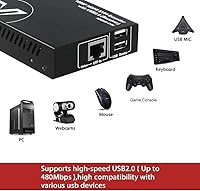
  • Max Resolution: Video output is capped at 1080p and supports refresh rates of 60Hz, 50Hz, 30Hz, and 25Hz, as well as 720p and 480p signals.
  • Transmission Range: Both the HDMI video signal and USB data signal can be extended up to 260ft (80m) over a single Ethernet cable.
  • Cable Compatibility: The extender works with Cat5e, Cat6, Cat6a, and Cat7 Ethernet cables, with higher-grade cable recommended for runs approaching the maximum distance.
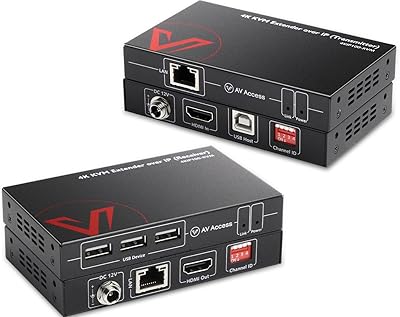
  • USB Ports: Two USB 2.0 Type-A ports are available on the receiver unit, supporting data transfer speeds up to 480Mbps.
  • Power Supply: The pair operates on 12V DC with a combined maximum draw of roughly 6.3W, using a two-way PoE design that requires only one power adapter for both units.
  • HDCP Support: The device supports HDCP 1.4 on both input and output, ensuring compatibility with most copy-protected video sources.
  • Enclosure: Both the transmitter and receiver are housed in full-metal enclosures measuring 3.87 x 0.91 x 2.95 inches each.
  • Unit Weight: Each unit — transmitter and receiver individually — weighs 0.22kg (approximately 0.48lb).
  • ESD Protection: Built-in surge and electrostatic discharge protection is integrated into both units to guard against electrical damage in demanding environments.
  • OS Compatibility: The extender works without drivers on Windows 10, 8, 7, and XP, as well as Mac OS and Linux distributions.
  • Certifications: The product carries CE and FCC certifications, meeting standard regulatory requirements for electromagnetic compatibility and safety.
  • Connector Types: The units use HDMI, USB Type-A, and RJ45 connectors for video, peripheral, and Ethernet connections respectively.
  • Operating Voltage: The extender pair is rated for 12 volts DC operation at a maximum current draw of 2 amps.
  • Driver Requirement: No software installation or driver is required; the device operates as a true plug-and-play solution across all supported operating systems.

Related Reviews

AV Access 4KIP100-KVM HDMI KVM Extender
76%
83%
Video Signal Quality
88%
Transmission Range
79%
USB Hub Functionality
61%
Network Compatibility & Setup
67%
DIP Switch Configuration
More
AV Access 4KEX100-DP-Pro KVM Extender
79%
93%
Signal Quality
91%
Transmission Range
94%
Latency Performance
67%
USB Functionality
74%
Installation Experience
More
TESmart HKE12MMA20 HDMI KVM Extender
71%
78%
Signal Stability
74%
Video Quality
71%
Multipoint Topology Support
83%
Build Quality
63%
IR Pass-Through Reliability
More
avedio links 164ft HDMI KVM USB Extender
86%
91%
Performance over Distance
88%
Setup Ease
92%
Video Quality
89%
USB Signal Stability
94%
Latency/Responsiveness
More
VPFET HDMI KVM USB Extender 394ft/120M
84%
91%
Value for Money
88%
Ease of Setup
94%
Signal Stability
89%
Video Quality
75%
USB Compatibility
More
OREI EX-230PRO-KVM 4K HDMI KVM Extender
79%
86%
4K Picture Quality at Range
78%
Maximum Distance Reliability
61%
Cable Sensitivity
84%
Setup & Installation Ease
88%
HDCP & Streaming Compatibility
More
AV Access iDock C10 KVM Docking Station
77%
93%
Build Quality
88%
Video Performance
81%
KVM Switching
89%
EDID Emulation
84%
Ethernet Reliability
More
AV Access U2EX50 4-Port USB 2.0 Extender
79%
93%
Plug-and-Play Setup
86%
Signal Range & Stability
78%
Dual Webcam Performance
81%
Build Quality
91%
Lockable Power Connector
More
AV Access 4KSW21-DM Dual Monitor KVM Switch
77%
83%
Switching Speed & Reliability
86%
EDID Emulation Performance
88%
Video Quality at 4K
74%
Dual Operating Modes (KVM vs USB Mode)
71%
USB 3.0 Hub Performance
More
AV Access iDock D23
AV Access iDock D23
78%
93%
Display Quality & Resolution
88%
KVM Switching Speed
79%
Triple Monitor Setup & MST Reliability
91%
Always-On Ethernet Performance
82%
Hub & Peripheral Connectivity
More

FAQ

No, nothing at all. The AV Access HDEX80-KVM HDMI KVM Extender is fully plug-and-play — just connect the HDMI and USB cables on the transmitter side, run your Cat6 cable to the receiver, and it starts working. Windows, Mac, and Linux all recognize it without any driver installation.
Cat6 or Cat6a is the sweet spot for most installations. Cat5e can work fine at shorter distances, but as you push toward the 260-foot maximum, signal quality becomes noticeably more dependent on cable quality. If your run is anywhere near that upper limit, do yourself a favor and use Cat6 or better.

Technically the ports are USB 2.0 and do support data devices, but results with storage drives can be inconsistent. The ports are really optimized for standard HID devices like keyboards and mice. If USB storage is a core requirement, this extender may not be the most reliable choice for that specific use case.

One power adapter is all you need, and that is by design. The two-way PoE feature passes power through the Ethernet cable from one unit to the other. AV Access recommends placing the adapter on the receiver side for the most stable operation.

Yes, this is actually one of the most common use cases for this type of extender. As long as your NVR has an HDMI output and you want to control it remotely with a keyboard and mouse, the HDEX80-KVM handles that scenario well. Many security installers use exactly this setup to separate the recording unit from the monitoring station.

For standard keyboard and mouse use, input feels essentially immediate in normal conditions. The USB signal travels the same cable path as the video, and at 480Mbps the latency for HID devices is low enough that most users do not notice it during everyday operation.

No, it cannot. The maximum supported resolution is 1080p at 60Hz. If your monitor is 4K and you connect it through this extender, it will either downscale to 1080p or not display correctly depending on your hardware. For 4K extension, you would need a different product entirely.

No — that is the point of the two-way PoE design. Power runs through the Cat cable between the two units, so a single adapter at one end powers both. Just make sure the adapter is connected to the receiver unit for the most reliable setup, as recommended by the manufacturer.

They do get warm, particularly during continuous use over several hours. The metal housing actually helps here — it conducts heat away from the internal components better than plastic would. That said, make sure both units have a bit of airflow around them and are not buried under other equipment in a tight enclosure.

It works with Mac OS without any issues. Since there are no drivers involved, the operating system does not really matter — the extender passes video and USB signals transparently, and your Mac simply sees whatever keyboard, mouse, or display is connected at the other end.