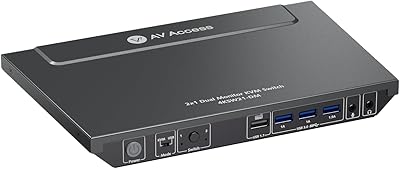
Overview

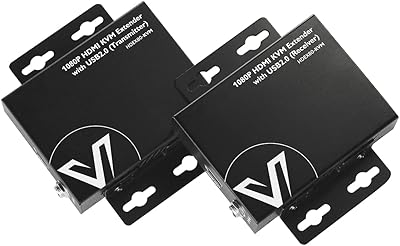
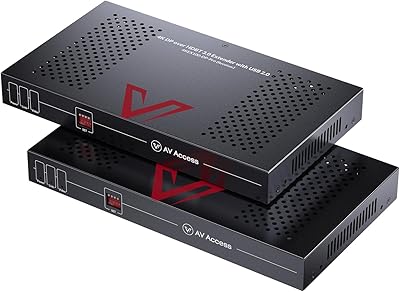
The AV Access 4KIP100-KVM HDMI KVM Extender is a mid-range IP-based extension solution that pushes 4K video, multi-channel audio, and USB peripheral control over a single Cat5e or better Ethernet cable — across distances up to 120 meters, roughly the length of a typical commercial building floor. It ships as a transmitter and receiver pair with no drivers to install, keeping deployment straightforward for IT staff and AV installers alike. One thing worth stating clearly upfront: this KVM extender is not a switch that toggles between computers. It extends a single machine to a remote display and input setup, a distinction that genuinely matters before purchasing.
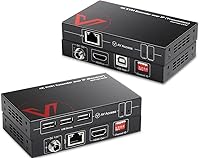
Features & Benefits

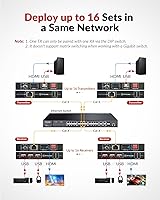
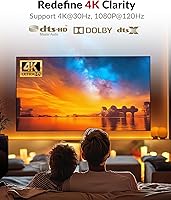
The 1080p at 120Hz capability is where this Cat6 KVM solution stands apart from most competitors — that refresh rate matters for fast-moving content like video editing previews or interactive display work. On the receiver side, a three-port USB 2.0 hub handles keyboard, mouse, and one extra peripheral simultaneously, removing the need for a separate hub at the remote end. The DIP switch system supports up to 16 pairs sharing a network, which is genuinely useful for multi-room deployments. Audio coverage extends to full 7.1-channel formats including Dolby TrueHD. One critical caveat: when routed through a network switch, it must be a Gigabit switch — a 100Mbps switch will cause signal problems.

Best For

This KVM extender fits naturally into a handful of specific scenarios. IT administrators who need a workstation tucked away in a server room while keeping a monitor and peripherals at the desk will find the range covers most commercial buildings with room to spare. The same applies to digital signage operators and classroom AV setups where the source computer needs to be physically remote. Home theater users hiding a PC behind cabinetry will appreciate the clean single-cable run. Where the AV Access IP extender falls short is point-to-multipoint distribution — one transmitter cannot feed two receivers simultaneously, so multi-display broadcast setups require a different solution entirely.

User Feedback

Consistent praise from buyers centers on signal reliability over long cable runs and the no-fuss setup experience — match the DIP switches, connect both units, and it generally works without fiddling. Build quality gets positive mentions too, particularly the locking power connector. The more mixed feedback clusters around configuration. The Gigabit switch requirement catches buyers off-guard when they attempt to route through older or budget network hardware, and a few users note the included documentation leaves gaps around initial DIP switch setup. Compared to pricier enterprise alternatives, this Cat6 KVM solution earns solid respect for its overall reliability, though video flickering reports make clear that network infrastructure quality has a bigger impact on performance than the marketing copy implies.

Pros

  • Transmits video, audio, and USB peripherals over a single Cat6 cable up to 120 meters — no secondary cable runs needed.
  • 1080p at 120Hz delivery stands out for motion-sensitive workflows where refresh rate actually matters.
  • Three-port USB hub on the receiver handles keyboard, mouse, and a third peripheral simultaneously.
  • Zero driver installation required across Windows, Mac, and Linux — works straight out of the box.
  • Supports up to 16 transmitter and receiver pairs on one network, scaling well for multi-room deployments.
  • Full 7.1-channel audio passthrough including Dolby TrueHD is genuinely uncommon at this price point.
  • Locking DC power connector prevents accidental disconnections in tight rack or behind-panel installations.
  • Solid metal enclosure holds up well in professional installation environments over extended use.
  • ESD protection tolerances make this KVM extender appropriate for industrial and high-static environments.
  • Works reliably across Cat5e, Cat6, Cat6a, and Cat7 cabling, fitting most existing infrastructure.

Cons

  • 4K is limited to 30Hz, ruling this out for smooth 4K gaming or high-frame-rate 4K video monitoring.
  • Requires a true Gigabit network switch — budget or older switches trigger persistent video flickering.
  • One transmitter cannot feed two or more receivers, making multi-display distribution impossible with a single unit.
  • Included documentation is too sparse to guide non-technical users through DIP switch setup without outside help.
  • USB 2.0 speeds make large file transfers via the hub noticeably slow compared to direct connections.
  • Power-cycling both units after every DIP switch change is a non-obvious requirement that trips up new users.
  • Some users report USB peripheral disconnections during long sessions, particularly on less stable networks.
  • Unit runs warm during extended operation, which may be a concern in enclosed or poorly ventilated equipment racks.
  • No onboard status indicators make it difficult to diagnose connection issues without external network tools.

Ratings

The AV Access 4KIP100-KVM HDMI KVM Extender has been scored across key performance and usability categories by our AI system, which analyzed verified global buyer reviews while actively filtering out incentivized, bot-generated, and spam submissions. Scores reflect the real-world spread of opinion — not just what works, but where this Cat6 KVM solution genuinely frustrates buyers. Both the consistent strengths and the recurring pain points are weighted transparently into every number below.
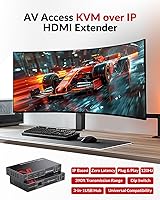
Video Signal Quality
83%
Most buyers report a clean, stable image over long cable runs — particularly impressive when pushing 1080p at 120Hz across an entire office floor. IT installers note that the picture holds up well even when the cable is routed through conduit with multiple bends, which is a real-world test that cheaper extenders often fail.
4K is capped at 30Hz, which disappoints users who expected smoother 4K motion from a unit at this price tier. A handful of buyers also report occasional color banding in high-contrast scenes, suggesting the compression applied to the IP stream is noticeable under scrutiny.
Transmission Range
88%
Hitting 120 meters reliably over Cat6 is a legitimate achievement for a single-cable solution — that covers most multi-story commercial buildings without a signal repeater. Users in warehouse and campus environments specifically praise this range as the primary reason they chose this extender over shorter-reach alternatives.
Performance approaching the maximum range becomes more sensitive to cable quality and termination precision. A few users running Cat5e rather than Cat6 noted occasional instability near the 100-meter mark, suggesting the upper range spec is best treated as a ceiling rather than a guarantee.
USB Hub Functionality
79%
21%
The three-port USB 2.0 hub on the receiver eliminates the need for a separate hub at the remote workstation, which keeps desk setups clean. Users extending to interactive displays particularly appreciate being able to run a keyboard, mouse, and a USB presentation clicker simultaneously without any additional hardware.
USB 2.0 speeds become a bottleneck if you try to use the hub for file transfers to a thumb drive — it works, but it is noticeably slow compared to a direct connection. A few users also report intermittent disconnection of USB devices during extended sessions, which appears tied to network jitter rather than the hub itself.
Network Compatibility & Setup
61%
39%
When the network infrastructure is properly matched — specifically a true Gigabit switch — installation is genuinely straightforward. IT professionals with managed network environments report that once the Gigabit requirement is met, the unit behaves predictably and holds a stable connection across business hours.
This is where the most buyer frustration accumulates. Users who connected the extender through a standard 100Mbps switch, or even a nominally Gigabit switch with insufficient backplane capacity, encountered persistent video flickering and signal dropouts. The documentation does not warn against this loudly enough, and several buyers only discovered the root cause after troubleshooting for hours.
DIP Switch Configuration
67%
33%
The DIP switch pairing system works reliably once understood — users managing multi-room deployments of 8 or more pairs report that keeping a simple labeling system makes the configuration intuitive to maintain and expand over time.
The initial learning curve is steeper than it should be. The included instructions are brief, and several buyers found that forgetting to power-cycle both units after changing switch positions caused them to believe the unit was faulty. Better documentation or an on-board indicator light would reduce this friction considerably.
Build Quality & Hardware Design
84%
The metal enclosure feels solid and appropriately dense for a unit intended for behind-panel or rack-adjacent installation. The locking DC power connector in particular draws consistent praise from installers who have dealt with accidental cable pulls in tight equipment rooms.
The unit runs noticeably warm during extended operation, which gives some users pause in enclosed equipment racks. The RJ45 port on both transmitter and receiver feels slightly loose compared to the rest of the build, and a couple of buyers mentioned they used cable clips to secure the Ethernet connection as a precaution.
Audio Performance
81%
19%
Full 7.1-channel passthrough including Dolby TrueHD and DTS-HD Master Audio is genuinely rare at this price tier, and home theater users who route a living room PC through this extender report that the audio experience is indistinguishable from a direct HDMI connection.
PCM 2.0 users in standard office environments will never stress this capability, making it feel like wasted overhead for a large portion of buyers. One niche but recurring complaint involves slight audio sync drift during very long sessions, which a power cycle consistently resolves but remains an inconvenience.
Plug-and-Play Ease
86%
No drivers, no software, no configuration utility — for users on Windows, Mac, or Linux, the zero-install experience is genuinely appreciated. System administrators deploying across mixed OS environments note that the same hardware pair works across all three platforms without any adjustment.
The plug-and-play label holds true only when network infrastructure is already correct. Buyers who hit the Gigabit switch issue or misconfigured DIP switches find themselves in a troubleshooting process that feels at odds with the simple setup promise on the box.
Multi-Unit Scalability
72%
28%
Supporting up to 16 transmitter and receiver pairs on a shared network is a practical advantage for schools, corporate campuses, and AV installations where multiple independent extension links need to coexist without interference.
The hard one-to-one pairing rule — one transmitter cannot feed two receivers — is a genuine architectural constraint that limits deployment flexibility. Users who discovered this limitation after purchase, expecting basic broadcast or matrix-switching capability, were uniformly disappointed.
Value for Money
76%
24%
For buyers who need 1080p at 120Hz over 100-plus meters with USB peripheral support, the price represents fair value given what comparable solutions from competing brands cost. Users who deploy it successfully tend to view it as money well spent relative to the alternatives they evaluated.
Buyers who run into the Gigabit switch issue or need to purchase additional network hardware to make the unit work properly find the effective cost higher than the sticker price suggests. Those comparing it to simpler point-to-point HDMI extenders at lower price points sometimes feel the complexity premium is hard to justify for basic use cases.
Documentation & Support
54%
46%
AV Access does provide some online resources and has responded to product questions in public forums, which experienced IT buyers appreciate when the included manual falls short. A subset of users who contacted support directly report reasonably helpful responses.
The printed documentation is widely described as thin and insufficiently detailed for the product's complexity. The Gigabit switch requirement, DIP switch power-cycle rule, and one-to-one pairing constraint are all underexplained in the box materials, and these are precisely the three issues that generate the most negative reviews.
ESD & Surge Protection
82%
18%
The rated electrostatic discharge protection — particularly the air-gap discharge tolerance — is a meaningful spec for users installing this extender in industrial, educational, or outdoor-adjacent environments where static buildup on cables is a real risk.
ESD protection ratings are difficult for end users to independently verify, and no buyers explicitly reported testing this capability. Its value is more of an installation confidence factor than a day-to-day performance differentiator.
Compatibility with Existing Infrastructure
73%
27%
The extender works across Cat5e, Cat6, Cat6a, and Cat7 cabling, which gives it practical flexibility in environments where cable runs were installed years apart under different standards. OS-agnostic operation also makes it a natural fit for mixed-platform organizations.
Compatibility is highly sensitive to the quality of the active network components in the chain, not just the cable standard. Users in environments with aging switches or unmanaged consumer-grade routers frequently encounter problems that the hardware specs alone do not predict.

Suitable for:

The AV Access 4KIP100-KVM HDMI KVM Extender is built for buyers who have a clear, specific problem: getting a computer's video, audio, and USB peripherals to a remote location across a meaningful distance — think a server room one floor below, an equipment closet at the far end of a school hallway, or a media PC hidden inside a cabinet across a large home theater room. IT administrators who need to keep workstations in a secure, climate-controlled space while maintaining full keyboard and mouse control at a desk will find the 120-meter range covers virtually any single-building deployment without a signal repeater. AV installers working on digital signage or interactive display projects will appreciate the no-driver setup across Windows, Mac, and Linux, which keeps deployment time low and support calls even lower. Classrooms and training facilities that run interactive displays from a teacher's PC stored backstage are another natural fit, especially where the three-port USB hub removes the need for additional hardware at the display end. If your network infrastructure already runs on a true Gigabit switch and you need a reliable, single-cable extension for one computer-to-display link, this Cat6 KVM solution is a well-matched choice at its price tier.
Not suitable for:

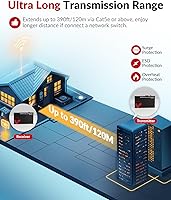
The AV Access 4KIP100-KVM HDMI KVM Extender is the wrong tool for anyone expecting to broadcast one computer's output to multiple displays simultaneously — the hardware architecture enforces a strict one transmitter to one receiver pairing, and there is no workaround short of buying additional units paired independently. Buyers who need 4K content at smooth, high frame rates will also want to look elsewhere; the 4K signal is capped at 30Hz, which is inadequate for gaming, high-motion video production monitoring, or any workflow where fluid 4K movement matters. Users operating in environments with older or budget network switches should be especially cautious: if your switch cannot sustain true Gigabit throughput, expect persistent video flickering and signal instability that no amount of cable swapping will fix. Anyone hoping for a simple point-to-point connection without involving network infrastructure at all may find the IP-based architecture more complex than a basic passive HDMI extender would be for shorter runs. Finally, buyers who rely on detailed printed documentation during setup should know that the included manual is widely considered insufficient for the product's configuration requirements, making this a harder sell for non-technical users working without IT support.
Specifications

  • Video Resolution: Supports 4K (3840x2160) at 30Hz and 1080p (1920x1080) at 120Hz over a single Ethernet cable.
  • HDMI Version: Uses HDMI 1.4b with HDCP 1.4 copy protection compliance.
  • Transmission Medium: Compatible with Cat5e, Cat6, Cat6a, and Cat7 Ethernet cabling.
  • Maximum Range: Extends signals up to 120m (approximately 390ft) over Cat5e or better cabling.
  • Network Requirement: Requires a Gigabit (1 Gbps) network switch when routed through shared network infrastructure; a 100Mbps switch is insufficient.
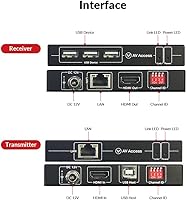
  • USB Hub Ports: Receiver unit includes 3x USB 2.0 Type-A ports supporting speeds up to 480Mbps.
  • USB Host Input: Transmitter unit accepts 1x USB Type-B host connection from the source computer.
  • Audio Support: Passes through PCM 2.0, 2.1, 5.1, and 7.1 audio, plus Dolby TrueHD, Dolby Digital Plus, DTS-HD Master Audio, and DTS-HD High Resolution Audio.
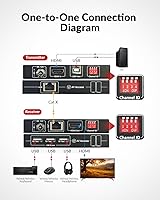
  • DIP Switch Pairs: 4-pin DIP switch system supports configuration of up to 16 independent transmitter and receiver pairs on the same network.
  • Pairing Topology: Each transmitter pairs exclusively with one receiver; one-to-many broadcasting from a single transmitter is not supported.
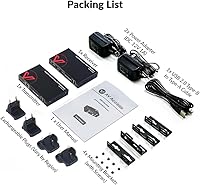
  • Power Input: Both transmitter and receiver operate on DC 12V with a locking connector to prevent accidental disconnection.
  • ESD Protection: Rated for electrostatic discharge protection at +/-8KV air-gap discharge and +/-4KV contact discharge.
  • Input Connectors: Transmitter provides 1x HDMI Type-A input, 1x USB Type-B host port, 1x RJ45, and 1x locking DC 12V jack.
  • Output Connectors: Receiver provides 1x HDMI Type-A output, 3x USB Type-A ports, 1x RJ45, and 1x locking DC 12V jack.
  • Driver Requirement: No drivers or software installation required; the unit operates as plug-and-play on all supported operating systems.
  • OS Compatibility: Compatible with Windows, macOS, and Linux operating systems without any additional configuration.
  • IP Data Rate: Operates at 1 Gbps IP data throughput between transmitter and receiver units.
  • Supported Resolutions: Full resolution support list includes 640x480 through 4096x2160 at refresh rates ranging from 60Hz to 120Hz depending on resolution.

Related Reviews

AV Access HDEX80-KVM HDMI KVM USB Extender
88%
90%
Performance
95%
Ease of Setup
89%
Reliability
92%
Latency
85%
Build Quality
More
AV Access 4KEX100-DP-Pro KVM Extender
79%
93%
Signal Quality
91%
Transmission Range
94%
Latency Performance
67%
USB Functionality
74%
Installation Experience
More
TESmart HKE12MMA20 HDMI KVM Extender
71%
78%
Signal Stability
74%
Video Quality
71%
Multipoint Topology Support
83%
Build Quality
63%
IR Pass-Through Reliability
More
OREI EX-230PRO-KVM HDMI Over Ethernet Extender
85%
92%
Video Quality
89%
Ease of Installation
85%
Reliability
77%
Compatibility
80%
USB KVM Performance
More
avedio links 164ft HDMI KVM USB Extender
86%
91%
Performance over Distance
88%
Setup Ease
92%
Video Quality
89%
USB Signal Stability
94%
Latency/Responsiveness
More
VPFET HDMI KVM USB Extender 394ft/120M
84%
91%
Value for Money
88%
Ease of Setup
94%
Signal Stability
89%
Video Quality
75%
USB Compatibility
More
AV Access iDock C10 KVM Docking Station
77%
93%
Build Quality
88%
Video Performance
81%
KVM Switching
89%
EDID Emulation
84%
Ethernet Reliability
More
AV Access 4KSW21-DM Dual Monitor KVM Switch
77%
83%
Switching Speed & Reliability
86%
EDID Emulation Performance
88%
Video Quality at 4K
74%
Dual Operating Modes (KVM vs USB Mode)
71%
USB 3.0 Hub Performance
More
AV Access iDock D23
AV Access iDock D23
78%
93%
Display Quality & Resolution
88%
KVM Switching Speed
79%
Triple Monitor Setup & MST Reliability
91%
Always-On Ethernet Performance
82%
Hub & Peripheral Connectivity
More
J-Tech Digital 4K USB KVM HDMI Extender
85%
89%
Performance
93%
Ease of Installation
88%
Long-Distance Signal Quality
60%
USB Port Compatibility
91%
Video Resolution
More

FAQ

You can connect the transmitter and receiver directly with a single Cat6 cable and it will work fine — no switch required for a simple point-to-point setup. A Gigabit switch only becomes mandatory when you are routing the signal through existing network infrastructure, such as a building's data network. If you are just running a dedicated cable between two rooms, plug straight in and you are good to go.

In the vast majority of cases, the culprit is the network switch in the signal path. This KVM extender demands true Gigabit throughput — a switch that is nominally Gigabit but has a weak backplane or insufficient processing capacity will still cause flickering. Try bypassing the switch with a direct cable connection to confirm the hardware itself is working, then upgrade to a higher-quality Gigabit switch if needed.

No, this is a strict one-to-one system. Each transmitter pairs with exactly one receiver, and there is no way to broadcast from a single transmitter to multiple receivers simultaneously. If you need one computer's output on two displays in different locations, you would need two separate transmitter and receiver pairs along with a compatible HDMI splitter before the transmitter.

The DIP switches on the transmitter and receiver need to match each other — set them to the same combination and the two units will pair up. The most common mistake is forgetting to power-cycle both units after changing the switch positions; the new pairing will not take effect until you do. A simple tip is to label each pair with its DIP switch combination using a marker on a small piece of tape — it makes future changes and troubleshooting much faster.

It works on Mac without any issues. The AV Access 4KIP100-KVM HDMI KVM Extender is completely driver-free, so the operating system is essentially irrelevant — the computer sees it as a standard HDMI output and USB hub. Mac, Windows, and Linux all work the same way out of the box.
For typical desktop work — browsing, documents, general productivity — 4K at 30Hz looks perfectly fine and the image is sharp and stable. Where you will notice the 30Hz cap is if you move windows around quickly or scroll rapidly, which can feel slightly less fluid than you are used to. For anything involving fast motion, the 1080p at 120Hz mode is genuinely the better experience on this Cat6 KVM solution.

In practice, 100 meters is the sweet spot where the signal is consistently reliable across different cable qualities and installation conditions. The rated 120-meter ceiling is achievable, but it becomes more sensitive to cable termination quality and the specific Cat rating of the cable as you approach that limit. For anything beyond 100 meters, stick to Cat6 or Cat6a rather than older Cat5e runs.

Yes, you can — the USB 2.0 hub supports storage devices. The practical caveat is that USB 2.0 limits transfer speeds to around 480Mbps theoretical, and real-world throughput over the extension link will be lower than a direct connection. For small files it is perfectly usable; for large media transfers you will notice the slower speeds and may prefer to transfer files over the network directly instead.

Under normal conditions the audio stays in sync and the passthrough is clean enough that most users cannot distinguish it from a direct HDMI connection. A small number of users have reported very slight audio drift during sessions lasting many hours, but this appears to be uncommon and a simple power cycle of both units resolves it. For home theater or professional AV use the performance is reliable in the vast majority of installations.

That is exactly what the locking DC power connector is designed to prevent. The power plug clicks and locks into the socket so that an accidental tug does not disconnect it — a detail that matters in rack installations or behind-panel setups where cables can get disturbed during other work. It is a small but genuinely useful design choice compared to units with standard friction-fit barrel connectors.

Where to Buy