Overview

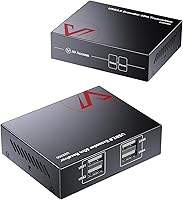
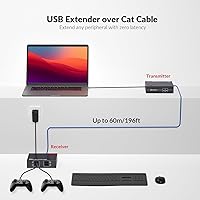
The AV Access U2EX50 4-Port USB 2.0 Extender exists to solve a problem that sounds simple but trips up a surprising number of installations: USB cables max out around 16 feet, and that is rarely enough. This Cat6 USB extension kit uses a two-unit transmitter/receiver design — one box plugs into your computer, the other sits up to 196 feet away, and a single Cat5e or Cat6 cable bridges the gap. That reach is not just a spec to brag about; it is the difference between mounting a camera at the far end of a conference room and being stuck rearranging furniture. AV Access has been selling this unit since 2016, and its 4.4-star rating across hundreds of reviews suggests it has genuinely held up.
Features & Benefits

The U2EX50 ships with four USB 2.0 ports on the receiver unit, which covers the typical desk setup — a webcam, a keyboard, a mouse, and a spare port for whatever else you need to plug in. What stands out in this category is dual webcam support: two cameras can stream simultaneously without extra hardware or any OS-level configuration. Installation is genuinely straightforward since the transmitter draws power directly from your computer's USB port, leaving the host side clean. On the receiver end, the lockable DC power connector is a small but thoughtful detail that keeps the cable from working loose in a rack or wall mount. Built-in ESD protection up to 8kV adds a layer of durability in electrically noisy environments.

Best For

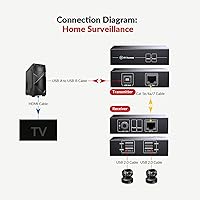
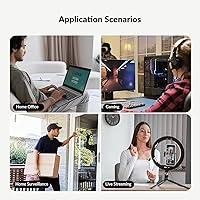
This USB extender is purpose-built for situations where distance is the real constraint. The most obvious fit is the conference room or AV closet scenario, where the computer lives in a locked rack and the peripherals need to reach a desk 50 or 60 feet away. Surveillance setups with wall- or ceiling-mounted USB cameras are another natural match. Educators and streamers running two camera angles across a large room will find the dual-camera capability useful without needing extra gear. IT staff will appreciate the driver-free setup. One thing worth stating clearly upfront: this requires a direct point-to-point Cat cable run between the two units. Routing through a network switch or patch panel will not work.

User Feedback

Buyers generally report that the U2EX50 delivers on its core promise, particularly for webcams and standard input devices. The locking power connector draws specific praise as a practical detail that prevents accidental disconnections during long sessions. On the critical side, high-bandwidth storage devices — external drives and fast flash drives — show reliability issues at longer cable runs, so this is not a universal USB extension solution. The network switch limitation also catches people off guard; if your cable route passes through a switch or patch panel, this will not function. Anyone planning to run two cameras simultaneously should also know that AV Access recommends third-party software to manage both feeds, which adds an extra configuration step not everyone expects.

Pros

  • Reaches up to 196 feet over a single Cat5e or Cat6 cable, covering most real-world installation distances comfortably.
  • Four USB ports on the receiver unit handle a full desk setup — webcam, keyboard, mouse, and a spare — without extra hardware.
  • Two webcams can stream simultaneously, a genuinely rare capability in this category.
  • No drivers to install; works out of the box on Windows, macOS, Linux, and Android.
  • The transmitter is bus-powered from the host USB port, so the PC side stays clean with no extra adapter.
  • The lockable DC power connector on the receiver prevents accidental cable pull-outs during long sessions.
  • Built-in ESD surge protection up to 8kV adds meaningful durability in electrically noisy environments like factories or AV racks.
  • Compatible with Cat5e, Cat6, Cat6a, and Cat7 cable, so it works with whatever is already run in the walls.
  • A track record dating back to 2016 with consistently strong user ratings suggests the design is stable and well-supported.
  • FCC and CE certified, which matters for professional and commercial installation contexts.

Cons

  • Network switch compatibility is completely absent — the cable must be a direct, unbroken run between the two units.
  • High-bandwidth USB storage devices are unreliable at longer cable runs; this is not a substitute for a proper file-transfer solution.
  • Total power output across all four receiver ports is capped at 2A, which can be insufficient if multiple power-hungry devices are connected.
  • Running two webcams simultaneously works best with recommended third-party software, adding an unexpected setup step for some users.
  • No built-in signal diagnostics or indicator lights to help troubleshoot when a peripheral is not being detected.
  • At 12 ounces combined, the unit pair is heavier than it looks and may require proper mounting rather than just resting on a shelf.
  • The one-year warranty is shorter than what some competing infrastructure accessories offer at a similar price.
  • Only one host computer can use the extender at a time; there is no multi-host or USB sharing functionality.

Ratings

The AV Access U2EX50 4-Port USB 2.0 Extender has been scored by our AI system after processing hundreds of verified global buyer reviews, with spam, bot activity, and incentivized submissions actively filtered out before any score was calculated. The result is an honest, balanced picture that captures both what this unit genuinely delivers and where real users have run into friction. Strengths and limitations are weighted equally so you can make a clear-eyed purchasing decision.
Plug-and-Play Setup
93%
The overwhelming majority of buyers report that setup takes under five minutes with zero software involved — plug the transmitter into the PC, run the Cat cable, connect the receiver, and the OS picks up every peripheral automatically. This works consistently across Windows, macOS, and Linux, which matters for IT environments where installing drivers on managed machines is not an option.
A small subset of users running older Linux distributions report occasional peripheral recognition delays on first boot, requiring a cable reseat to trigger detection. This is rare and inconsistent, but it is worth noting for anyone deploying this in a headless or unattended server setup.
Signal Range & Stability
86%
At cable runs under 130 feet, buyers consistently describe rock-solid USB signal with no dropouts or latency, which covers the majority of real office and home installations. Webcams, keyboards, and mice maintain a clean connection throughout long working days without any manual intervention.
At the upper end of the 196-foot rated range, some users report intermittent reconnections, particularly with more demanding peripherals. Signal quality is also heavily dependent on cable quality — cheap or poorly terminated Cat5e can introduce instability that a better cable would eliminate.
Dual Webcam Performance
78%
22%
Running two USB cameras simultaneously from one host is a capability most competing extenders at this price point simply do not offer, and buyers who need it for streaming, dual-angle recording, or video conferencing find it works reliably for standard 1080p webcam streams. It is a genuine differentiator that justifies the purchase for the right use case.
Getting stable dual-camera output requires using the third-party WebcamXP Pro software that AV Access recommends, which adds cost and a configuration step many buyers do not anticipate. Without it, some users experience one camera dropping out or refusing to initialize when both are connected at the same time.
Build Quality
81%
19%
The enclosures feel dense and utilitarian rather than flimsy, and the included mounting ears are sturdy enough for permanent rack or wall installation. The physical design has remained consistent since 2016, which suggests AV Access has not cut corners on materials to reduce costs over time.
The units are noticeably heavier than comparable extenders, which complicates clean cable management in tight spaces. A few users also note that the plastic casing shows scuff marks easily, which is a minor cosmetic issue in visible installations.
Lockable Power Connector
91%
Buyers who have dealt with barrel connectors working loose in rack mounts consistently call out the locking DC connector as one of the best practical design decisions on the receiver unit. In environments where cables get bumped — AV racks, server closets, behind reception desks — this detail prevents a frustrating and hard-to-diagnose failure mode.
The locking mechanism, while secure, makes intentional disconnection slightly awkward if you need to swap power adapters quickly. A few buyers also note that replacement 12V locking adapters are not as widely available as standard barrel connectors if the original is lost or damaged.
Peripheral Compatibility
74%
26%
Standard low-to-mid bandwidth USB devices — webcams, keyboards, mice, barcode scanners, audio interfaces, and USB speakers — work reliably in real-world deployments. The broad OS compatibility means this Cat6 USB extension kit functions consistently across diverse environments without device-specific workarounds.
High-bandwidth storage peripherals like USB hard drives and fast flash drives are genuinely unreliable, particularly at longer cable distances. Users attempting to use this as a general-purpose USB extension for storage transfers will likely encounter disconnections or failed transfers, and that limitation is not clearly flagged at the point of purchase.
Power Delivery to Peripherals
67%
33%
For low-power peripherals like webcams, mice, and keyboards, the 2A shared across four ports is more than adequate, and most standard desk setups will never hit the ceiling. The bus-powered transmitter on the host side keeps the PC connection clean and cable-light.
When users stack multiple moderately powered devices — say, two webcams plus a USB microphone and a powered scanner — they sometimes find one device failing to initialize properly due to the 2A ceiling. There is no per-port power management, so diagnosing which device is starving for power requires trial and error.
Network Infrastructure Compatibility
48%
52%
For installations where a direct cable run is feasible, the U2EX50 performs exactly as rated and requires no network configuration whatsoever. This simplicity is actually a strength in small offices or home setups where the cable can be run directly without routing through a patch panel.
The complete absence of network switch support is the single most common source of buyer frustration in the reviews. Anyone whose building cabling routes through a central patch panel — which is standard in most commercial office environments — will find this extender completely non-functional without laying a dedicated direct cable, a significant and often expensive undertaking.
Value for Money
82%
18%
Buyers who deploy this USB extender in its ideal use case — direct Cat cable runs for webcams and standard peripherals — consistently feel the price reflects genuine value, especially given the dual-camera capability and the industrial-grade ESD protection that cheaper alternatives omit entirely.
For buyers who discover after purchase that their cabling infrastructure is incompatible, or who expected it to work with external hard drives, the value perception drops sharply. The total cost also increases once you factor in the recommended third-party software for dual-webcam setups.
ESD & Surge Protection
88%
The built-in protection rated to +/-8kV on air-gap discharge is a meaningful engineering inclusion that most budget USB extenders skip entirely. Users deploying this in factory floors, broadcast environments, or older buildings with inconsistent grounding appreciate that it adds a real layer of hardware durability.
The protection specs are not independently verified by buyers in the reviews, which is expected given the nature of surge protection — you only notice it when something would have otherwise broken. There is no indicator on the unit to show whether a surge event has occurred or degraded the protection circuitry.
Installation Flexibility
76%
24%
The included mounting ears make both units genuinely rack- and wall-mountable out of the box, which is a practical inclusion for professional AV or surveillance installations. Compatibility with Cat5e through Cat7 means the extender works with whatever structured cabling is already in place.
The direct-cable-only requirement limits where this can realistically be installed in commercial buildings, and the physical size of the units means they occupy more space than competing slim-profile extenders when mounted in tight rack positions.
Long-Term Reliability
84%
The product has been on the market since 2016 with no major revision, and buyers frequently mention units running without issue for two or more years in always-on surveillance and conference room deployments. That kind of longevity in a budget-to-mid-range accessory is genuinely reassuring.
The one-year warranty is shorter than what some competing brands now offer, which is a concern for commercial buyers who want coverage aligned with typical hardware refresh cycles. A few long-term users also note that the locking power adapter can develop intermittent contact issues after extended use.
Documentation & Support
71%
29%
AV Access provides direct customer support that buyers describe as responsive compared to generic-brand alternatives in the same category. The product page comparison table is genuinely helpful for distinguishing between different models in the AV Access lineup before purchasing.
The included physical documentation is minimal, and the dual-webcam software recommendation is buried rather than prominently featured, which contributes to buyer confusion post-purchase. Users who encounter issues at the operating system level often have to find solutions through community forums rather than official resources.
OS & Cross-Platform Support
89%
Cross-platform compatibility is one of the cleaner strengths here — Android, macOS, Linux, and Windows all recognize connected peripherals without any software layer, which is not a given in this product category. Linux users in particular call this out as a differentiator since driver-dependent extenders often fail on non-Windows systems.
Some users on older macOS versions below 10.12 or legacy Ubuntu builds report partial compatibility, with certain USB device classes not initializing correctly. Support for Android is also limited to USB OTG-capable devices, which is not always made clear before purchase.

Suitable for:

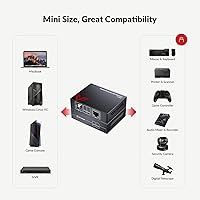
The AV Access U2EX50 4-Port USB 2.0 Extender is the right tool for anyone who needs to run USB peripherals across a room — or across a building floor — without pulling new cabling infrastructure. IT administrators and AV integrators will find it particularly practical for conference room builds where the host computer lives in a locked AV closet and the webcam, keyboard, and mouse need to sit 50 or more feet away on a meeting table. Surveillance installers benefit from the long reach when mounting USB cameras at ceiling height or across large open spaces. Educators and video creators running a two-camera setup will appreciate that both cameras can operate at the same time from a single host, which is genuinely uncommon at this price point. The driver-free operation also makes it a low-friction choice for managed IT environments where installing third-party software on endpoint machines is restricted or undesirable.
Not suitable for:

If your cable route passes through a network switch, patch panel, or any intermediary networking hardware, the U2EX50 will not work — it requires a direct, uninterrupted Cat cable run between its two units, and this catches a meaningful number of buyers off guard. Anyone expecting to extend high-bandwidth USB storage devices like external hard drives or fast thumb drives over the full 196-foot range will likely run into reliability issues, since USB 2.0 at that distance is not well-suited to sustained bulk data transfers. This is also not a solution for users who need more than 2 amps of total power distributed across the four receiver ports, as power-hungry devices may underperform or fail to initialize. Buyers who need true network-over-IP USB sharing — where multiple remote computers can access the same USB device — should look at dedicated USB-over-IP server hardware instead, since the U2EX50 is strictly a one-host-to-one-remote-cluster extender.

Specifications

  • Model Number: This unit is manufactured by AV Access and carries the model designation U2EX50.
  • USB Standard: Operates on USB 2.0 at up to 480 Mbps and is backward compatible with USB 1.1 devices.
  • Max Range: Extends USB signals up to 196ft (60m) over a single Cat5e, Cat6, Cat6a, or Cat7 cable.
  • Receiver Ports: The remote receiver unit provides four USB 2.0 Type-A ports for connecting peripherals.
  • TX Input: The transmitter connects to the host computer via a USB Type-B port, the same connector type used on most printers.
  • TX Power: The transmitter is bus-powered directly from the host USB port and requires no separate power adapter.
  • RX Power: The receiver is powered by a lockable DC 12V external adapter that clicks into place to prevent accidental disconnection.
  • USB Power Output: The receiver unit supplies a combined maximum of 2A across all four USB ports for connected peripherals.
  • Dual Camera: Two USB webcams can operate simultaneously from the receiver unit without additional configuration on the host side.
  • Network Switch: The cable run between transmitter and receiver must be a direct point-to-point connection; routing through a network switch is not supported.
  • OS Support: Compatible with Windows, macOS, Linux, and Android operating systems without requiring driver installation.
  • ESD Protection: Built-in surge protection handles up to +/-8kV on air-gap discharge and +/-4kV on contact discharge.
  • Certifications: The unit holds FCC and CE certifications, making it suitable for commercial and professional installation environments.
  • Dimensions: Each unit measures 3.54 x 2.8 x 0.98 inches, compact enough to mount in an AV rack or behind a desk panel.
  • Weight: The combined kit weighs 12.3 ounces, which is heavier than it appears and typically warrants proper mounting rather than loose placement.
  • Cable Type: Works with Cat5e, Cat6, Cat6a, and Cat7 Ethernet cable, so it is compatible with most existing structured cabling installations.
  • Warranty: AV Access provides a one-year limited warranty and direct customer support for this product.
  • Market Rank: Currently ranked #45 in the KVM Switches category on Amazon, reflecting consistent sales since its 2016 launch.
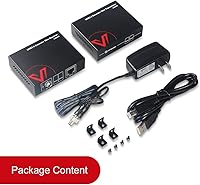
  • Mounting: Both units include mounting ears for fixed installation on walls, racks, or furniture.
  • Driver Required: No driver software is needed; the host operating system recognizes connected peripherals automatically upon plugging in.

Related Reviews

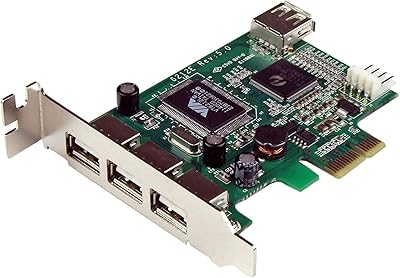
StarTech PEXUSB4DP 4-Port PCIe USB 2.0 Card
82%
92%
Ease of Installation
88%
Port Reliability
91%
Low-Profile Case Compatibility
61%
USB Transfer Speed
83%
Power Delivery per Port
More
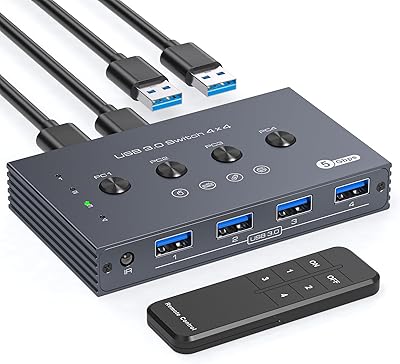
TJCXELE USB 3.0 Switch Selector 4-Port for 4 Computers
88%
94%
Ease of Use
89%
Performance
91%
Remote Control Feature
76%
Power Supply and Stability
98%
Setup and Installation
More
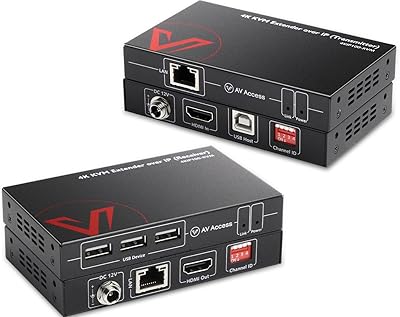
AV Access 4KIP100-KVM HDMI KVM Extender
76%
83%
Video Signal Quality
88%
Transmission Range
79%
USB Hub Functionality
61%
Network Compatibility & Setup
67%
DIP Switch Configuration
More
AV Access HDEX80-KVM HDMI KVM USB Extender
88%
90%
Performance
95%
Ease of Setup
89%
Reliability
92%
Latency
85%
Build Quality
More
MLEEDA 4-Port USB 3.0 KVM Switch
79%
93%
Ease of Setup
82%
Switching Reliability
67%
Build Quality
79%
Wired Remote Usability
88%
USB 3.0 Performance
More
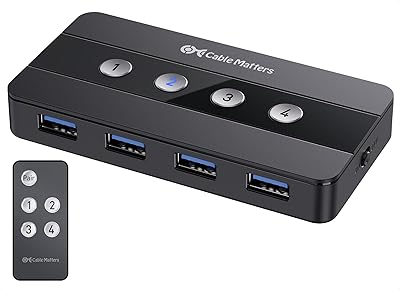
Cable Matters 4-Port USB 3.0 KVM Switch
77%
91%
Ease of Setup
78%
Switching Reliability
83%
RF Remote Control
74%
Build Quality
86%
USB 3.0 Transfer Speed
More
Steetek USB 2.0 HDMI KVM Switch 8 Port
84%
91%
Ease of Switching
87%
4K Video Quality
84%
Build Quality
93%
Setup and Installation
65%
Hotkey Functionality
More
Dorggi 10-Outlet 2-Prong USB Power Strip
81%
93%
Outlet Spacing & Layout
91%
2-Prong Compatibility
89%
Cord Length
84%
Build Quality
82%
Wall Mounting System
More
Steetek STK-S7415H 4-Port HDMI KVM Switch
74%
91%
Ease of Setup
83%
Switching Reliability
78%
Video Quality & Resolution
76%
Adaptive EDID Performance
69%
USB Peripheral Sharing
More
Masterplug 50ft Retractable Extension Cord Reel
83%
88%
Build Quality
91%
Cord Retraction Mechanism
86%
Outlet Usability
89%
Safety Features
78%
USB Charging Ports
More

FAQ

No, none at all. The AV Access U2EX50 4-Port USB 2.0 Extender is fully plug-and-play on Windows, macOS, Linux, and Android. You connect the transmitter to your computer, run the Cat cable to the receiver, plug in your peripherals, and the OS handles the rest automatically.
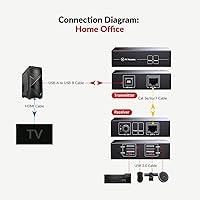
Unfortunately, no. The two units require a direct, uninterrupted cable run between them. Passing the signal through a network switch, router, or patch panel will break the connection. If your building cabling routes through a central panel, this extender will not work in that infrastructure without a dedicated direct run.

Yes, and it does work. Both cameras appear as separate USB video devices on the host machine simultaneously. That said, AV Access recommends using WebcamXP Pro software when running two cameras at once for the most stable experience, so factor in that extra step if you are planning a dual-camera setup.

It depends on the drive and the cable length you are using. Standard USB storage devices can work at shorter runs, but at the full 196-foot range, high-bandwidth devices like fast external hard drives or USB 3.0 drives operating in USB 2.0 mode often run into stability issues. If bulk storage transfer is your primary need, this extender is probably not the right tool for that job.

Any of them will work: Cat5e, Cat6, Cat6a, or Cat7 are all supported. If you are buying new cable for this install, Cat6 is a reasonable choice given its wide availability and solid signal quality at the distances involved. If you already have Cat5e in the walls, that is perfectly fine too.

The receiver end uses a DC power adapter that physically locks into the port with a twist, rather than just pushing in like a standard barrel connector. In a rack mount or wall installation, cables get bumped and shifted over time, and a regular connector would eventually work itself loose. The locking design keeps power solid without you having to check on it.

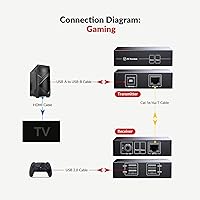
In principle, yes — controllers are low-bandwidth USB HID devices and should work fine over the extension. The main constraint is that the receiver delivers only 2A total across all four ports, so if you are stacking multiple powered devices, keep an eye on power draw.

No. The transmitter draws its power directly from your computer's USB host port, so the host side is just one USB cable and nothing else. Only the receiver at the far end needs the external 12V adapter.

It is not a hub, and it does not support device sharing between multiple hosts. The U2EX50 is a point-to-point extender: one computer on one end, four USB ports on the other end, nothing in between. If you need one USB device to be accessible from several computers, you would need a dedicated USB-over-IP server or a KVM switch instead.

Both units include mounting ears, so you can screw them directly onto a surface, rack, or wall panel for a clean permanent installation. They are compact enough to tuck behind furniture or into an AV rack slot, but at 12.3 ounces combined, just resting them on a shelf in a busy environment is not ideal for the long term.