Overview

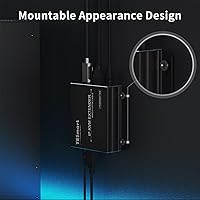
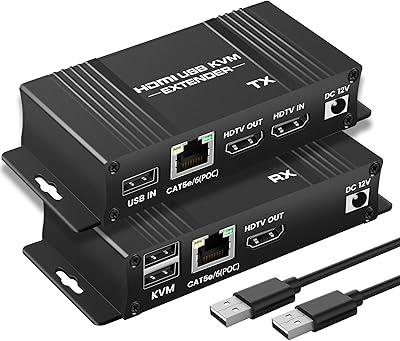
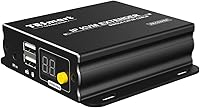
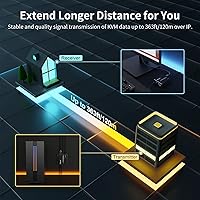
The TESmart HKE12MMA20 HDMI KVM Extender is the receiver half of a two-piece system that pushes HDMI video and USB peripheral signals across a single Cat5e, Cat6, or Cat7 Ethernet cable — up to 120 meters (roughly 393 feet) away from the source. If you're expecting a complete kit, stop: this is the RX unit only, meaning you'll need to pair it with a compatible transmitter to get anything running. The metal housing feels solid, and keyhole slots on the chassis make wall or rack mounting straightforward. It sits comfortably in the mid-range AV and small-office space, where cable runs are long but budgets aren't unlimited.
Features & Benefits

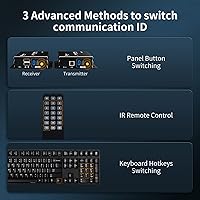
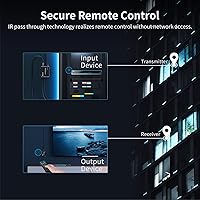
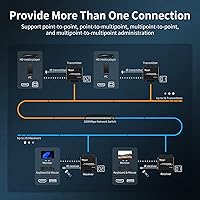
Video output tops out at 1080p at 60Hz over HDMI 1.3 — functional and clean, but not the unit to reach for if you're running 4K content. Where this KVM receiver earns its keep is in its multipoint topology support. Picture a single media PC in a server room feeding displays in three separate offices simultaneously, all routed through a standard network switch — that's exactly the kind of setup this HDMI-over-Cat6 receiver was built for. IR pass-through means you can still use a remote to control your source device from wherever the display sits, and the included remote handles on-the-fly switching. OS support covers Windows, macOS, most Linux distros, and Raspbian, so hobbyist hardware fits right in.

Best For

This KVM receiver is a natural fit for IT administrators managing thin-client or digital signage deployments, where keeping computers centralized while displays are distributed is a daily reality. Home theater users who want their media PC tucked away in a closet while the display lives across the house will find the 120-meter range more than adequate. Small businesses in fields like banking or engineering, where one workstation needs to serve multiple stations at different desks, are another clear match. Raspberry Pi users and Linux tinkerers will appreciate the broad OS flexibility. And if you already run TESmart transmitters, adding receiver units to expand is the most straightforward path forward.

User Feedback

Buyers who've put the TESmart extender unit through real installs tend to report stable, artifact-free video at shorter runs — under 60 meters — with occasional signal degradation closer to the 120-meter ceiling, particularly over older Cat5e versus newer Cat6 cabling. The IR pass-through and remote get mixed reviews: some find them reliable, others note inconsistent response depending on the room layout. Multipoint configurations through a network switch attract the most setup complaints, since getting multiple receivers talking cleanly requires some networking know-how. On the positive side, the metal enclosure earns consistent praise — it runs warm but not hot, and units in long-term deployments rarely show physical wear.

Pros

  • Metal construction feels durably built and handles sustained heat better than plastic alternatives at this price tier.
  • Multipoint-to-multipoint topology lets one source feed several displays simultaneously through a standard network switch.
  • Works natively with Linux, macOS, Raspbian, and Windows — no driver headaches for cross-platform environments.
  • Up to 120 meters over a single Cat5e or Cat6 cable eliminates the need for costly dedicated HDMI runs.
  • IR pass-through lets you control source devices from the display end of the room without physical access to the source.
  • Keyhole mounting slots make wall or rack installation quick without requiring additional brackets.
  • Clean 1080p output at 60Hz holds up well for presentations, digital signage, and remote desktop sessions.
  • Compact footprint makes it easy to tuck behind a display or inside a rack without consuming much space.
  • Broad cable compatibility — Cat5e through Cat7 — means most existing office cabling infrastructure is usable immediately.

Cons

  • This is a receiver-only unit — buyers who miss this detail will need to spend significantly more to acquire a transmitter separately.
  • Signal reliability near the 120-meter maximum is inconsistent, particularly over older Cat5e wiring.
  • Multipoint network configurations require genuine networking knowledge; the included documentation does not provide adequate guidance.
  • The included remote has limited range and inconsistent response, making it unreliable in larger or real-world room layouts.
  • HDMI 1.3 caps output at 1080p — anyone with a 4K display or modern monitor gets no benefit from their hardware.
  • IR pass-through performance varies unpredictably based on room layout, sensor placement, and ambient lighting conditions.
  • TESmart customer support has drawn criticism for slow responses and shallow technical advice on complex setups.
  • Keyhole mounting lacks the rigidity of bracket systems, and the unit can shift or tilt slightly after installation.

Ratings

The TESmart HKE12MMA20 HDMI KVM Extender has been scored below by our AI system after processing verified buyer reviews from global markets — with spam, incentivized posts, and bot activity actively filtered out. The scores reflect the full picture: what this KVM receiver genuinely does well in real-world installs, and where buyers have run into friction. Strengths and frustrations are weighted equally so you can make an informed call before purchasing.
Signal Stability
78%
22%
At short to mid-range cable runs — typically under 60 meters — buyers in digital signage and home theater setups consistently describe clean, artifact-free video with no perceptible latency. Several IT installers noted the signal held solid across extended deployments in office environments using quality Cat6 cabling.
Reliability at the upper end of the 120-meter range is less predictable, especially over older Cat5e infrastructure. A handful of users reported intermittent signal drops or slight image degradation when pushing close to the maximum distance, suggesting the 120m spec is a ceiling rather than a comfortable operating range.
Video Quality
74%
26%
For standard 1080p content — presentations, video feeds, remote desktop sessions — the image output is clean and consistent. Users running digital signage or thin-client displays in conference rooms found the picture quality more than adequate for daily professional use.
This unit tops out at 1080p via HDMI 1.3, and buyers expecting 4K or even 1440p output will be disappointed. It is a functional but dated standard, and those upgrading from newer hardware may notice the ceiling fairly quickly in media-heavy use cases.
Multipoint Topology Support
71%
29%
The ability to route one source to multiple displays through a standard network switch is the standout feature for IT and AV professionals. Users managing distributed display setups across a floor or building described it as a practical solution that eliminated the need for expensive dedicated cabling runs.
Getting multipoint configurations to work reliably requires networking know-how that many buyers underestimated. Complaints about incompatibility with certain unmanaged switches and unclear documentation on network requirements were common, making this a rough experience for less technical users attempting the setup independently.
Build Quality
83%
The all-metal enclosure is one of the most consistently praised aspects by buyers who have run units in production environments for months. It feels substantially more durable than typical plastic AV gear at this price tier, and the unit handles operating heat without issues in well-ventilated installations.
The physical size is compact, which is generally a plus, but a few users noted that the port placement makes cable management tight in rack or wall-mount scenarios. The keyhole mounting design works, though it feels slightly underengineered compared to units with dedicated bracket systems.
IR Pass-Through Reliability
63%
37%
When it works well, the IR pass-through is a genuinely useful feature — particularly for home theater users who want to control a media PC or AV receiver from the display end of the room without walking back to the source. Short-range setups with clear line of sight to the IR sensor reported solid results.
Real-world feedback on IR reliability is inconsistent. Several users found the IR receiver sensitive to room layout, ambient lighting, and the angle of the remote, leading to frustrating hit-or-miss performance. In multipoint setups with the receiver mounted behind a display, usability dropped noticeably.
Ease of Setup
61%
39%
Point-to-point installations between a single transmitter and this KVM receiver are relatively plug-and-play, and buyers running simple home office or single-display extensions reported getting up and running without consulting the manual extensively.
Multipoint configurations through a network switch represent a significantly steeper learning curve. The included documentation is thin, and several buyers flagged the lack of a clear network configuration guide as a real obstacle. Support from TESmart received mixed marks for response time and technical depth.
Remote Control Usability
58%
42%
The included remote provides a basic switching mechanism that some users found handy for quickly toggling inputs in a multi-source environment. For simple setups, it adds a layer of convenience without requiring any app or software.
The remote itself feels inexpensive, and range is limited. Users in larger rooms or those with the receiver mounted at a distance reported unreliable button response. Several buyers described it as an afterthought rather than a polished accessory, with at least a few preferring to ignore it entirely.
OS Compatibility
88%
Broad OS support is a genuine strength here. Raspberry Pi hobbyists, Ubuntu developers, and Fedora users all reported clean detection and stable operation without any driver installation, which is exactly what you want in a transparent KVM extension scenario.
A small number of users running less common Linux distributions or highly customized Raspbian builds noted occasional USB peripheral recognition issues. These were edge cases rather than widespread problems, but worth flagging for anyone running non-standard system configurations.
Cable Compatibility
76%
24%
The flexibility to use Cat5e, Cat6, Cat6a, or Cat7 cabling means most IT environments can deploy this without a full cable refresh. Buyers who already had Cat6 runs in place reported taking advantage of existing infrastructure with minimal additional cost.
Performance variance between Cat5e and Cat6 was a recurring theme in user feedback, particularly at longer distances. A few buyers assumed Cat5e would perform identically to Cat6 at 80-plus meters and were caught off guard by quality differences. The product listing could do more to set expectations here.
Heat Management
81%
19%
The metal chassis actively helps with heat dissipation, and users running the unit continuously in server rooms or AV closets reported it staying warm rather than hot. Long-term reliability in always-on environments was generally reported positively by verified installers.
In poorly ventilated enclosures or tightly packed rack installations, the unit can accumulate heat more than expected. A few users recommended leaving airspace around it in rack setups, suggesting passive cooling has limits under sustained thermal load in confined spaces.
Mounting & Installation Flexibility
72%
28%
Keyhole slots on the metal enclosure let you mount the unit to a wall or surface without special brackets, which IT installers appreciated for quick deployment in back-of-display or server room scenarios. The compact footprint also makes it easy to tuck behind monitors.
The keyhole mounting system, while functional, lacks the rigidity of screw-bracket designs. Several users noted the unit could shift or tilt slightly after installation, which is a minor but real annoyance in professional display environments where aesthetics matter.
Value for Money
69%
31%
For buyers who need the receiver unit specifically — perhaps to expand an existing TESmart transmitter setup — the price point makes reasonable sense given the metal build and multipoint capability. Expanding an established installation costs less than buying a full kit again.
As a standalone purchase for someone building from scratch, the receiver-only nature of this listing is a real trap. Buyers who missed that detail ended up spending significantly more than anticipated once they realized they still needed the transmitter, making the effective total cost less competitive than it appears.
Documentation & Support
54%
46%
Basic point-to-point setup is covered adequately in the included materials, and for straightforward installations, most buyers reported not needing to contact support at all. The product functions as advertised when used within its simplest configuration.
For anything beyond a simple one-to-one connection, the documentation falls short. TESmart support received criticism for slow response times and generic troubleshooting advice. Users attempting multipoint configurations over managed switches frequently ended up relying on community forums rather than official resources.

Suitable for:

The TESmart HKE12MMA20 HDMI KVM Extender is a strong match for IT administrators and AV integrators who need to push HDMI video and USB peripherals across long cable runs without laying expensive dedicated cabling — particularly in offices, banks, or engineering environments where a single workstation needs to serve multiple display points spread across a building. Home theater enthusiasts who want their media PC stored in a utility closet while the main display sits in another room will find the 120-meter range more than covers typical residential distances. Raspberry Pi hobbyists and Linux developers are well served here too, given the wide OS support that requires zero driver installation. Small businesses already running Cat6 infrastructure throughout their premises get the most value, since this KVM receiver slots into existing network cabling without a costly overhaul. It also makes clear sense as an expansion purchase for anyone already running TESmart transmitters — adding receiver units to an established setup is far more cost-effective than starting over with a competing ecosystem.
Not suitable for:

Buyers expecting a complete, out-of-the-box KVM extension solution should look elsewhere or budget carefully — this unit is the receiver only, and without a compatible transmitter it does nothing at all, a detail that catches a surprising number of first-time buyers off guard. Anyone whose workflow depends on 4K or 1440p output will hit a hard wall here, as the HDMI 1.3 interface caps everything at 1080p with no upgrade path. Users who are not comfortable with basic network configuration should also think twice: multipoint setups routed through a network switch require real troubleshooting patience, and the documentation does not hold your hand through it. If you are relying on Cat5e cabling for runs approaching the maximum distance, the signal reliability at that range is inconsistent enough to be a genuine risk in professional deployments. Finally, buyers who need responsive, polished IR control as a primary interaction method will likely find the included remote underwhelming in practice, especially in larger or more complex room layouts.

Specifications

  • Model Number: This unit carries the model designation HKE12MMA20-RX, identifying it as the receiver component of TESmart's multipoint KVM extender line.
  • Unit Type: This is a receiver (RX) only unit and must be paired with a compatible TESmart transmitter to function.
  • Brand: Manufactured and sold by TESmart, a brand specializing in KVM switches and AV extension hardware.
  • Max Range: Signal transmission is supported up to 120 meters (approximately 393 feet) over a single Ethernet cable.
  • Cable Compatibility: Compatible with Cat5e, Cat6, Cat6a, and Cat7 Ethernet cabling for signal transmission between transmitter and receiver.
  • Video Resolution: Maximum supported output resolution is 1080p at 60Hz via HDMI 1.3.
  • Signal Formats: Supports 480i, 480p, 720p, 1080i, and 1080p video signal formats for broad source device compatibility.
  • HDMI Version: Uses HDMI 1.3, which supports standard HD video and audio but does not accommodate 4K or HDR signals.
  • Topology: Supports point-to-point, point-to-multipoint, multipoint-to-point, and multipoint-to-multipoint configurations via a network switch or router.
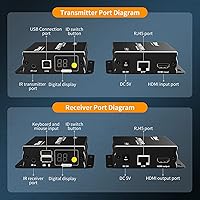
  • IR Pass-Through: Includes IR pass-through functionality, allowing remote control signals to be sent from the receiver location back to the source device.
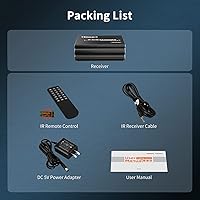
  • Remote Control: A remote control is included in the package for on-the-fly input switching and basic management tasks.
  • Chassis Material: The enclosure is constructed from metal, providing improved durability, structural rigidity, and passive heat dissipation compared to plastic housings.
  • Mounting: Keyhole slots on the unit allow wall mounting or surface installation without requiring additional mounting brackets.
  • Dimensions: The unit measures 3.66 x 4.05 x 1.18 inches (L x W x H), making it compact enough to mount behind most displays.
  • Weight: The unit weighs 13.6 ounces, reflecting the density of the metal chassis construction.
  • OS Compatibility: Compatible with Windows, macOS, Unix, Debian, Ubuntu, Fedora, Raspbian, Ubuntu for Raspberry Pi, and other Linux-based operating systems.
  • Power Input: Operates at 2 volts with a maximum current rating of 2 amps via plug-in connector type.
  • Connector Type: Uses a plug-in style connector for power input, consistent with standard low-voltage AV equipment.

Related Reviews
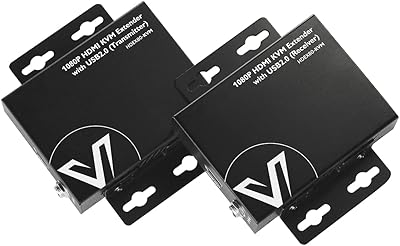
AV Access HDEX80-KVM HDMI KVM USB Extender
88%
90%
Performance
95%
Ease of Setup
89%
Reliability
92%
Latency
85%
Build Quality
More
AV Access 4KIP100-KVM HDMI KVM Extender
76%
83%
Video Signal Quality
88%
Transmission Range
79%
USB Hub Functionality
61%
Network Compatibility & Setup
67%
DIP Switch Configuration
More
VPFET HDMI KVM USB Extender 394ft/120M
84%
91%
Value for Money
88%
Ease of Setup
94%
Signal Stability
89%
Video Quality
75%
USB Compatibility
More
OREI EX-230PRO-KVM HDMI Over Ethernet Extender
85%
92%
Video Quality
89%
Ease of Installation
85%
Reliability
77%
Compatibility
80%
USB KVM Performance
More
avedio links 164ft HDMI KVM USB Extender
86%
91%
Performance over Distance
88%
Setup Ease
92%
Video Quality
89%
USB Signal Stability
94%
Latency/Responsiveness
More
J-Tech Digital 4K USB KVM HDMI Extender
85%
89%
Performance
93%
Ease of Installation
88%
Long-Distance Signal Quality
60%
USB Port Compatibility
91%
Video Resolution
More
TESmart 16 Ports HDMI KVM Switch 4K@30Hz
85%
87%
Performance
91%
Setup & Installation
75%
Switching Speed
88%
Video Quality
89%
Build Quality
More
TESmart HKS403-P23 4-Port Triple Monitor KVM Switch
69%
78%
Display Performance
72%
EDID Emulation Reliability
74%
Switching Speed & Reliability
58%
USB Hub Performance
69%
Network Sharing
More
TESmart HKS801-P23 USB 3.0 HDMI KVM Switch 8 Port 4K@60Hz
87%
91%
Ease of Setup
95%
Video Quality
88%
Switching Reliability
85%
Build Quality
92%
Value for Money
More
TESmart HKS201-P23 2-Port HDMI KVM Switch
77%
83%
Ease of Setup
88%
Video Quality & Resolution
67%
Switching Reliability
71%
Audio & Microphone Performance
79%
USB Hub Performance
More

FAQ

This listing is for the receiver unit only. You will need to purchase the transmitter separately if you do not already own one. This is one of the most common sources of confusion with this product, so double-check before ordering.

Cat6 or Cat6a will give you the most consistent results, especially if you are running longer distances. Cat5e technically works but buyers have reported more variability in signal quality at runs approaching 80 to 120 meters. If your infrastructure is already Cat6, you are in good shape.

It can work with some unmanaged switches, but results vary. Several users found that certain unmanaged switches caused connection instability in multipoint configurations. A managed switch generally gives you more reliable results and easier troubleshooting if something goes wrong.

No, it does not. The unit is built around HDMI 1.3, which caps output at 1080p at 60Hz. If your display is 4K, it will still work but will only output at 1080p resolution. There is no firmware or hardware path to enable 4K on this unit.

The IR sensor on the receiver picks up signals from your remote and sends them back to the source device via the Cat6 cable. In straightforward setups with a clear line of sight to the IR sensor, it works reasonably well. Performance can be inconsistent if the receiver is mounted behind a display or in a confined space where the sensor angle is restricted.

Yes, in most cases it works out of the box with Raspbian and Ubuntu for Raspberry Pi without requiring driver installation. A number of hobbyists have reported clean detection and stable operation across standard Pi setups, which makes this a practical option for long-distance Pi display projects.

The metal chassis handles heat reasonably well and the unit typically runs warm rather than hot during continuous operation. In well-ventilated locations it has proven reliable over long deployments. If you are installing it in a tightly enclosed rack with little airflow, leaving some clearance around it is a sensible precaution.

Yes, the unit has keyhole slots on the chassis that allow direct wall mounting without additional hardware. It is compact enough to sit behind most flat-panel displays. The mounting method is functional, though it is worth noting that the keyhole design is not as rigid as a dedicated bracket system, so position it carefully the first time.

The 120-meter spec is a ceiling, not a guaranteed comfortable operating range. At shorter distances, say under 60 to 80 meters over quality Cat6 cabling, the signal tends to be clean and stable. Closer to the maximum, some buyers have reported slight degradation or occasional drops, particularly over Cat5e. If your run is near the limit, using Cat6a is the safer choice.

Yes, this is actually one of the strongest use cases for this KVM receiver. If you already have a compatible TESmart transmitter running, you can add additional receiver units to distribute the signal to more displays without replacing any existing hardware. Just ensure your network switch can handle the additional traffic if you are running a multipoint configuration.