Overview

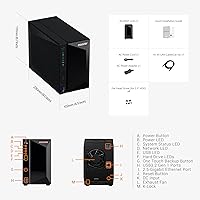
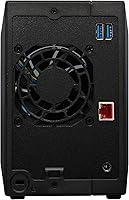
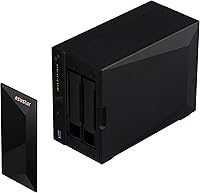
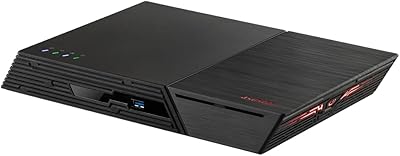
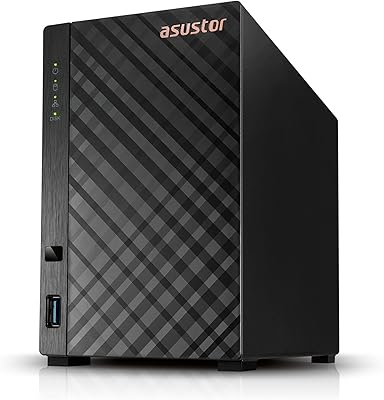
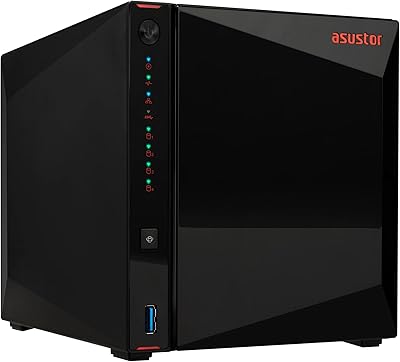
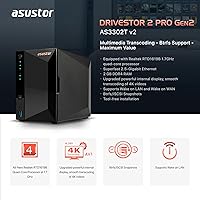
The Asustor Drivestor 2 Pro Gen2 2-Bay NAS sits comfortably in the mid-range sweet spot for home and small office storage — capable enough for serious use, without the price tag of enterprise-grade hardware. Compared to its predecessor, this Asustor 2-bay NAS brings meaningful upgrades: a faster 2.5 Gigabit Ethernet port, three USB ports instead of one, and support for both SSDs and HDDs in its drive bays. The metal chassis feels solid and stays relatively unobtrusive on a desk or shelf. One thing to flag upfront: it ships diskless, so you will need to budget for drives separately before it stores a single file.
Features & Benefits

The Realtek RTD1619B processor is the core of what makes this home NAS unit tick — a quad-core ARM64 chip running at 1.7GHz that handles 4K video transcoding reasonably well, though results will vary depending on your drive speed, network setup, and the client device doing the playback. The 2.5GbE port is a genuine practical upgrade; local transfers feel snappier compared to standard gigabit units. With 2GB DDR4 RAM, running a few ADM apps simultaneously does not bog things down. The tool-free installation is a nice touch for first-timers. Btrfs snapshot support adds a layer of protection that many buyers do not realize they need until something goes wrong.

Best For

This Asustor 2-bay NAS is a strong fit for home media server users running Plex or Jellyfin with a 4K library, provided their network can actually push 2.5GbE speeds. Photographers and video editors who move large files regularly will appreciate the faster throughput compared to older gigabit units. It also suits buyers stepping up from a single external hard drive who want redundancy and remote access. The ADM interface has a learning curve, but it is manageable for anyone willing to spend an afternoon getting familiar — this is not a plug-and-play consumer device, but it is not intimidating either. Small home offices needing always-on centralized storage will find it reliable.

User Feedback

Buyers who have lived with the Drivestor Pro Gen2 for a while tend to highlight two things most: how straightforward initial setup was, and how much difference the 2.5GbE connection makes in everyday transfers. On the flip side, fan noise during heavy workloads draws fairly consistent complaints — not loud, but noticeable in a quiet room. Some users note that Asustor's ADM app ecosystem is narrower than Synology's DSM, which matters if you rely on specific third-party integrations. Drive compatibility and heat under sustained load come up occasionally but are not widespread concerns. Long-term reliability feedback skews positive, though Asustor's customer support is described as inconsistent.

Pros

  • The 2.5GbE port delivers transfer speeds that genuinely outpace standard gigabit NAS units in everyday use.
  • Tool-free drive installation makes first-time setup accessible even without technical experience.
  • Btrfs snapshots provide a practical safety net against accidental file deletion and ransomware attacks.
  • The metal chassis feels solid and durable, not like a cheap plastic enclosure you worry about long-term.
  • Three USB 3.2 Gen 1 ports make it easy to attach external drives for backup offloading or extra storage.
  • Wake on LAN and Wake on WAN let you keep the unit powered down without sacrificing remote accessibility.
  • Both 3.5-inch HDDs and 2.5-inch SSDs fit the bays, giving flexibility to prioritize capacity or speed.
  • 4K single-stream transcoding on Plex or Jellyfin handles daily home media use reliably under normal conditions.
  • The compact footprint fits comfortably on a desk shelf next to a router without demanding much space.
  • iSCSI support opens up block-level storage options for more advanced home lab or small office setups.

Cons

  • RAM is capped at 2GB with no upgrade path, which limits how many services you can realistically run simultaneously.
  • The ADM app ecosystem is noticeably thinner than Synology DSM, especially for niche or advanced integrations.
  • Fan noise increases meaningfully under sustained workloads and becomes distracting in quiet home environments.
  • Drive costs are entirely separate — budget accordingly before assuming the listed price covers a working system.
  • Snapshot storage consumption is not clearly surfaced to new users, leading to unexpected capacity drain.
  • Customer support quality varies considerably by region and has drawn mixed feedback from long-term owners.
  • Remote access via EZ-Connect can be unreliable on certain ISPs compared to a properly configured VPN.
  • Drive compatibility with older or less common models occasionally requires pre-purchase research and firmware checks.
  • Documentation for advanced features like Docker networking and iSCSI configuration is sparse and often outdated.
  • The 2.5GbE advantage only materializes if your router or switch also supports 2.5GbE — many home setups do not.

Ratings

The Asustor Drivestor 2 Pro Gen2 2-Bay NAS earns its place as one of the more compelling options in the mid-range home NAS market, and these scores reflect exactly that — no inflation, no spin. Our AI rating engine processed verified global buyer reviews, actively filtering out incentivized posts and bot-generated feedback, to surface what real owners consistently praise and what genuinely frustrates them. Both sides of that picture are represented here.
Setup & Initial Configuration
83%
Most buyers report getting the unit up and running within an hour, even without prior NAS experience. The tool-free drive installation is a recurring highlight — pop the drives in, power it on, and ADM walks you through the rest with a reasonably clear wizard.
A handful of users hit snags during network discovery on certain router configurations, requiring manual IP entry. Those coming from zero NAS experience occasionally find the first ADM login and volume creation steps less intuitive than expected.
Network Performance (2.5GbE)
89%
The 2.5 Gigabit Ethernet port is the single most praised hardware upgrade from the previous generation. Users transferring large video libraries or multi-gigabyte RAW photo archives to compatible 2.5GbE switches report throughput that meaningfully outpaces anything a standard gigabit NAS could deliver.
The catch is that your entire network chain needs to support 2.5GbE for the benefit to materialize — buyers using older gigabit switches or routers see no real-world difference. Some users did not realize this until after purchase, which led to disappointment.
4K Transcoding Performance
71%
29%
For direct-play scenarios and light transcoding on Plex or Jellyfin, the quad-core Realtek processor handles things well enough that most home users with one or two streams report no buffering issues. Hardware-accelerated transcoding works reliably when the client and server are configured correctly.
Push it to simultaneous 4K transcode streams or pair it with slower spinning drives and the cracks show. CPU transcoding under load causes noticeable lag, and a few users report that heavily compressed 4K HEVC files tax the chip more than expected. Drive choice matters enormously here.
Software & ADM Ecosystem
67%
33%
Asustor's ADM interface is cleaner and more approachable than it was a few years ago. For core tasks — file sharing, backup scheduling, basic media serving, and snapshot management — it gets the job done without requiring a command-line detour.
Compared to Synology's DSM, the third-party app ecosystem in ADM feels noticeably thinner. Users who rely on specific Docker containers or advanced package integrations often hit dead ends or find apps that are outdated and poorly maintained. This is a real gap for power users.
Build Quality & Physical Design
86%
The all-metal chassis gives the unit a density and rigidity that plastic-bodied NAS devices in this category simply do not match. It sits firmly on a desk without flex, and the overall footprint is compact enough to tuck onto a shelf beside a router without dominating the space.
The drive bay door mechanism feels slightly less premium than the chassis itself — functional, but not confidence-inspiring under repeated use. A few users also noted the unit runs slightly warm to the touch during extended workloads, though nothing that triggered thermal concerns.
Fan Noise & Acoustics
61%
39%
At idle or under light file access loads, the fan is quiet enough to coexist in a home office or living room setup without becoming a distraction. Many users report it is unnoticeable when the unit is more than a couple of meters away.
Under sustained heavy workloads — particularly during 4K transcoding or large sequential writes — the fan ramps up to a level that multiple reviewers describe as genuinely noticeable in a quiet room. It is not loud by server standards, but by home device standards it draws attention.
Drive Compatibility
78%
22%
Most mainstream NAS-grade drives from WD Red, Seagate IronWolf, and Toshiba N300 install and initialize without issue. The bay supports both 3.5-inch and 2.5-inch drives, giving users flexibility to run SSDs for speed or HDDs for capacity.
A small but recurring subset of users report inconsistent recognition of certain older or less common drives, requiring firmware updates or drive list checks before purchasing. The compatibility list on Asustor's site is not always current, which adds a layer of pre-purchase homework.
Value for Money
82%
18%
Relative to what competing 2-bay NAS units charge for 2.5GbE networking and a capable ARM processor, this home NAS unit lands in a genuinely competitive position. The Gen2 upgrades feel like real progress rather than a cosmetic refresh, which buyers notice.
The diskless nature means the sticker price is only the starting point — add two quality NAS drives and the total investment climbs considerably. Budget-conscious buyers who did not factor this in upfront frequently express sticker shock in their reviews after adding drives.
Snapshot & Data Protection
84%
Btrfs snapshot support is a feature that buyers who understand it genuinely value. Being able to roll back to a previous file state after accidental deletion — or after a ransomware event — is not a theoretical benefit; several reviewers explicitly credit it with saving real data.
Snapshots consume additional storage space, and ADM does not make it immediately obvious how to configure retention policies efficiently. New users sometimes discover their usable capacity is being eaten by snapshots they did not realize were accumulating in the background.
Remote Access & Wake Features
76%
24%
Wake on LAN and Wake on WAN work reliably for users who want the unit powered down when idle but accessible on demand. Asustor's EZ-Connect remote access service functions without requiring complex port forwarding, which is a practical convenience for non-technical households.
Remote access speeds are naturally capped by the user's upload bandwidth rather than the NAS hardware, and a few users found EZ-Connect connectivity inconsistent on certain ISPs. VPN-based access works better but demands more setup knowledge than the average home user has.
RAM & Multitasking Capacity
69%
31%
For typical home usage — running a media server, a backup agent, and basic file sharing simultaneously — 2GB of DDR4 RAM is adequate and rarely becomes a bottleneck. Day-to-day operation feels responsive under these common workloads.
The RAM is not expandable, which is a hard ceiling. Users running Docker containers alongside Plex, or those who want to add surveillance station features on top of other services, start hitting memory pressure. There is no upgrade path; what you buy is what you keep.
USB Expandability
79%
21%
Three USB 3.2 Gen 1 ports is a meaningful upgrade over the single port on the previous generation. Users who attach external drives for backup offloading or for expanding accessible storage find the additional ports immediately practical in everyday workflow.
USB 3.2 Gen 1 tops out at 5Gbps, which is fine for most external drive use cases but not the bottleneck-free connection some power users might want for very fast external SSDs. There are no USB-C ports, which some newer external drives and hubs require.
Long-Term Reliability
77%
23%
Users who have owned the unit for a year or more largely report stable, trouble-free operation. The hardware itself does not appear to degrade noticeably, and ADM firmware updates have generally landed without breaking existing configurations for most users.
Asustor's track record on long-term ADM support is less consistent than Synology's, and a minority of long-term owners note that older units in the lineup eventually saw reduced update frequency. Customer support responsiveness is described as hit-or-miss depending on region.
Documentation & Learning Resources
63%
37%
Asustor provides official setup guides and video tutorials that are sufficient for getting through initial configuration. The community forum has grown over the years and covers most common questions a new buyer is likely to encounter during setup.
Beyond the basics, documentation quality drops off. Advanced use cases — Docker networking, custom backup scripts, iSCSI configuration — are poorly documented compared to Synology's knowledge base, leaving users dependent on scattered third-party blog posts and Reddit threads.

Suitable for:

The Asustor Drivestor 2 Pro Gen2 2-Bay NAS is a strong match for home users who want a capable, always-on personal storage hub without paying enterprise prices. If you run a Plex or Jellyfin media server and want to stream 4K content to a couple of devices simultaneously, this unit has the processing muscle for it — provided your drives and network keep pace. Photographers and video editors who move large files daily will feel the real-world difference that 2.5 Gigabit Ethernet makes over standard gigabit connections, especially when transferring multi-gigabyte RAW or ProRes files. It also suits people stepping up from a single external hard drive who want drive redundancy, scheduled backups, and the ability to access their files remotely. Tech-curious beginners who are willing to spend a few hours learning ADM and NAS fundamentals will find the barrier to entry lower here than on more complex platforms.

Not suitable for:

The Asustor Drivestor 2 Pro Gen2 2-Bay NAS is not the right call for buyers who need a deep, mature software ecosystem with robust third-party app support — Synology's DSM platform is considerably ahead in that regard, and if Docker workflows, advanced surveillance packages, or specific integrations are central to your use case, that gap will frustrate you quickly. The 2GB of RAM is fixed and cannot be upgraded, which means anyone planning to stack multiple demanding services — media transcoding, container apps, and backup agents running concurrently — will hit a ceiling sooner than they expect. It ships without drives, so buyers who have not budgeted for two quality NAS-grade HDDs or SSDs on top of the unit price will find the real cost meaningfully higher than the sticker suggests. Anyone in a noise-sensitive environment should also factor in that the fan audibly ramps up under sustained load, which some users find intrusive in a quiet room. Finally, buyers who want a completely hands-off plug-and-play experience will likely find even the initial ADM setup requires more patience than a consumer-grade cloud storage device would.

Specifications

  • Processor: Powered by a Realtek RTD1619B ARM64 quad-core CPU running at 1.7GHz, which handles 4K transcoding and multi-app workloads without a dedicated graphics chip.
  • RAM: Comes with 2GB of DDR4 memory soldered to the board; there is no expansion slot, so 2GB is the permanent ceiling regardless of future needs.
  • Drive Bays: Houses two drives simultaneously, accepting either 3.5-inch or 2.5-inch SATA hard drives and SSDs in any combination across the two bays.
  • Network Port: Equipped with a single 2.5 Gigabit Ethernet port that supports 2.5G, 1G, and 100M speeds depending on the connected switch or router.
  • USB Ports: Includes three USB 3.2 Gen 1 ports (5Gbps each) for connecting external drives, USB hubs, or peripherals directly to the unit.
  • File System: Supports Btrfs as the primary file system, enabling snapshot creation for point-in-time recovery and iSCSI block-level storage for advanced configurations.
  • Drive Installation: Uses a tool-free tray system that allows drives to be seated and secured without a screwdriver, lowering the physical setup barrier for new users.
  • Operating System: Runs Asustor Data Master (ADM), a Linux-based NAS operating system with a browser-accessible interface, app center, and remote management capabilities.
  • Wake Support: Supports both Wake on LAN and Wake on WAN, allowing the unit to be powered on remotely from within the local network or over the internet.
  • Build Material: The outer chassis is constructed from metal, providing structural rigidity and better passive heat dissipation compared to all-plastic alternatives in this category.
  • Dimensions: Measures 9.06″ deep by 4.33″ wide by 6.69″ tall, making it a compact desktop tower that fits on most shelves or beside a home router.
  • Weight: Weighs 3.52 pounds without drives installed, which is typical for a metal-chassis 2-bay unit of this form factor.
  • Ships Diskless: The unit does not include any hard drives or SSDs in the box; buyers must purchase compatible drives separately before the device can store any data.
  • iSCSI Support: Supports iSCSI target configuration, allowing the NAS to present block-level storage volumes to servers or virtual machines on the same network.
  • Snapshot Tool: Includes Asustor's Btrfs and iSCSI Snapshot Center for scheduling and managing snapshots that protect against accidental deletion or ransomware encryption.
  • Model Number: The official model designation is AS3302T v2, which identifies it as the second revision of the AS3302T line within Asustor's Drivestor Pro Gen2 series.
  • Availability Date: This unit became commercially available in September 2023, positioning it as a current-generation product with an actively maintained firmware release cycle.

Related Reviews

Asustor Flashstor 12 Pro Gen2 NAS
76%
93%
Read/Write Performance
61%
SSD Compatibility
89%
Noise & Thermal Management
47%
USB4 / Thunderbolt Connectivity
84%
Build Quality & Design
More
Asustor Drivestor 2 Lite AS1102TL NAS
76%
88%
Ease of Setup
83%
Build Quality
74%
Performance for Everyday Use
71%
Software (ADM OS) Usability
69%
4K Media Streaming
More
Asustor Drivestor 4 Pro AS3304T 4-Bay NAS
78%
88%
Network Performance
83%
Software & ADM Interface
74%
Media Playback & Transcoding
76%
App Ecosystem
57%
RAM & Multitasking
More
Asustor FLASHSTOR 6 Gen2 FS6806X 6-Bay M.2 SSD NAS
88%
94%
Performance
89%
Ease of Setup
92%
Build Quality
93%
Data Transfer Speed
88%
Storage Flexibility
More
Asustor AS5402T 2-Bay NAS Enclosure
78%
88%
Hardware Value
82%
Processing Performance
86%
Network Throughput
84%
Thermal Management
63%
Software & OS Experience
More
Asustor Lockerstor 10 Pro AS7110T 10-Bay NAS
83%
92%
Performance
96%
Storage Capacity
89%
Connectivity
62%
Setup and Installation
90%
Build Quality
More
KCMconmey NAS-812 8+2 Bay DIY NAS Case
84%
86%
Build Quality
62%
Cooling Performance
88%
Ease of Use
90%
Compatibility with PSU Types
91%
Customization Options
More
Asustor AS5404T 4-Bay NAS Enclosure
80%
88%
Build Quality
82%
Processing Performance
93%
NVMe Storage Flexibility
87%
Network Throughput
76%
Software Ecosystem (ADM OS)
More
Synology DS223
Synology DS223
77%
94%
Software & OS Experience
88%
Setup & Initial Configuration
61%
CPU & Processing Performance
67%
Network Connectivity
83%
Build Quality & Design
More
QNAP TS-233 2-Bay NAS Drive
77%
83%
Ease of Setup
78%
Software & App Ecosystem
76%
Performance for File Sharing
87%
Backup Reliability
58%
Media Streaming
More

FAQ

You do need to buy drives separately — the unit ships completely diskless. Factor in the cost of two NAS-grade HDDs or SSDs on top of the enclosure price when budgeting. Most buyers pair it with WD Red Plus, Seagate IronWolf, or Toshiba N300 drives.

It will work fine with a gigabit router — you just will not benefit from the 2.5GbE port. To actually get 2.5 Gigabit speeds, both the switch or router port and your client device's network card need to support 2.5GbE. If your current gear is all gigabit, the NAS still functions normally, just capped at 1Gbps.

Yes, and it handles the job reasonably well for a home setup with one or two streams. Direct play is your best friend here — when the Plex client can play the file natively without conversion, the CPU barely breaks a sweat. Transcoding 4K HEVC content on the fly is more demanding and depends heavily on drive speed and how many simultaneous streams you are running.

It is more approachable than many first-timers expect. You install the drives, power it on, and the ADM setup wizard walks you through creating a storage volume and basic configuration. Most people with general tech comfort get it running within an hour. Where things get more involved is setting up advanced features like remote access, Docker containers, or backup schedules — those take more reading.

At idle or light file access, it is quiet enough to sit in a home office without being noticeable. Under sustained heavy load — like a long 4K transcode session or a large backup job — the fan audibly ramps up. It is not disruptive in a normal room, but if your NAS lives in a bedroom or a very quiet study, you will hear it during those peaks.

Unfortunately, no. The 2GB of DDR4 RAM is soldered directly to the board, so there is no expansion slot and no upgrade path. What you buy is what you have for the life of the unit. If you plan to run several resource-intensive apps simultaneously, keep this ceiling in mind before purchasing.

The Asustor Drivestor 2 Pro Gen2 2-Bay NAS tends to match or beat comparable Synology units on raw hardware — the 2.5GbE port and the processor are genuine advantages at this price tier. Where Synology pulls ahead is software: DSM has a more mature app ecosystem, better third-party package support, and more comprehensive documentation. If software depth matters more to you than hardware specs, Synology is worth the consideration; if you want better networking hardware for less money, this Asustor unit is a strong case.

With two drives installed, you can configure the bays as RAID 0 (combined capacity, no redundancy), RAID 1 (mirroring for data protection), JBOD (independent volumes), or as a single-drive setup using just one bay. Most home users choose RAID 1 so that if one drive fails, no data is lost — though RAID is not a replacement for proper offsite backups.

Yes, Asustor's EZ-Connect service lets you reach your files over the internet without manually configuring port forwarding. It works for most users right out of the box. For more reliable or secure remote access, setting up a VPN through the NAS is a better long-term option, though it requires a bit more configuration upfront.

If you are running RAID 1, a single drive failure does not take your data down — the NAS keeps running on the surviving drive and ADM alerts you to replace the failed one. You swap in a new compatible drive, trigger a rebuild, and the array restores itself. The process is well-documented and does not require professional help for most home users. Outside of RAID 1, a drive failure in RAID 0 or JBOD means data on that drive is gone, which is why a proper backup strategy matters regardless of RAID configuration.

Where to Buy