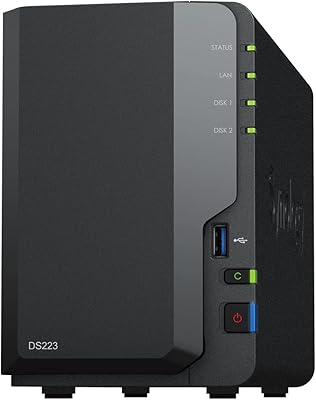
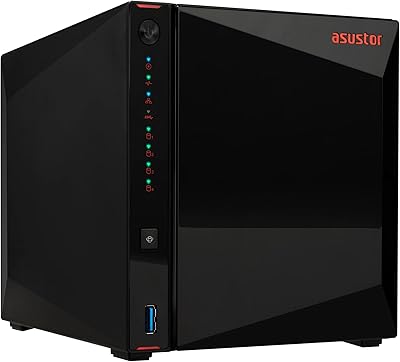
Overview

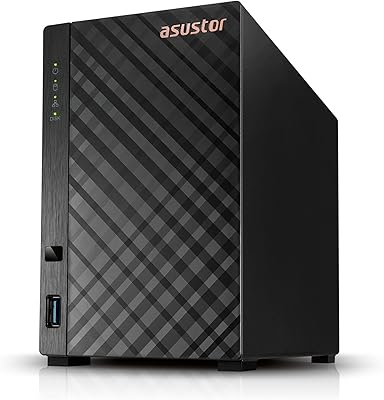
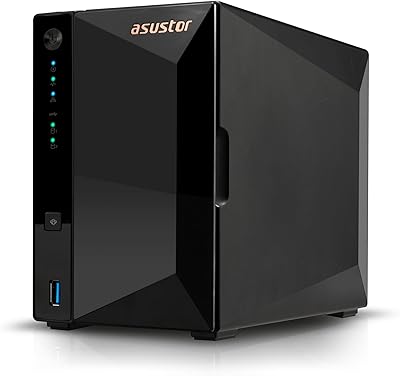
The Asustor AS5402T 2-Bay NAS Enclosure sits in an interesting spot in the market — compact enough for a home office shelf, yet packed with hardware that enthusiasts usually associate with more expensive units. Asustor has given it a gaming-inspired aesthetic, but the real story is the NVMe expansion capability crammed into a mid-range enclosure. It competes directly with Synology and QNAP at similar price points and largely holds its own on raw specs. One critical note up front: it ships diskless, meaning you need to budget for drives separately. Strong pick for prosumers; probably overkill for casual users who want plug-and-play simplicity.
Features & Benefits

The Intel Celeron N5105 quad-core processor bursts up to 2.9GHz — enough muscle for Plex transcoding, running lightweight containers, or serving multiple users without obvious slowdowns. What really separates this 2-bay enclosure from the crowd are the four M.2 NVMe slots; you can configure them as a pure SSD pool or use them as high-speed cache layered on top of traditional HDDs. Both Ethernet ports run at 2.5 gigabits, and with link aggregation, throughput gets a meaningful boost on compatible switches. RAM starts at 4GB but climbs to 16GB if needed. The HDMI output is a quiet bonus for anyone who wants to skip a dedicated media client altogether.

Best For

This Asustor NAS makes the most sense for people already comfortable navigating a NAS interface who want more performance headroom than a basic gigabit unit delivers. Home lab users running Docker or a light VM will appreciate the CPU headroom and expandable RAM. Content creators needing fast scratch storage for video work will find the NVMe slots genuinely useful, not just a spec-sheet talking point. Small offices with a 2.5GbE-capable switch will notice the throughput difference right away. Gamers centralizing a large library over the home network will find it fits well — though to be clear, this is about storing games, not streaming gameplay. Newcomers to NAS should expect a real learning curve.

User Feedback

Across nearly 230 ratings, the AS5402T holds a 4.3 out of 5 — a mostly positive picture with some honest caveats worth knowing. The four NVMe slots get praised repeatedly as a standout value at this price tier, and thermal management earns consistent marks, with buyers noting the enclosure stays cool under sustained workloads. The sticking point for some is Asustor's ADM operating system; users migrating from Synology DSM often find the interface less intuitive and the adjustment period longer than expected. Support consistency from Asustor gets flagged occasionally as hit-or-miss. A recurring thread in lower ratings is frustration over the diskless configuration catching buyers off guard — worth understanding clearly before purchasing.

Pros

  • Four M.2 NVMe slots at this price tier is genuinely rare and gives the AS5402T a meaningful edge over competing units.
  • Dual 2.5GbE ports deliver noticeably faster local transfers for anyone with a compatible switch already in place.
  • The N5105 quad-core CPU handles Plex transcoding and Docker containers without constant performance complaints from users.
  • RAM is expandable to 16GB via a standard SO-DIMM slot, making future upgrades straightforward and affordable.
  • Thermal management earns consistent praise — the unit stays cool under sustained workloads without excessive fan noise.
  • Three USB 3.2 Gen 2 ports mean you can connect multiple external drives simultaneously without juggling cables.
  • Wake on LAN and Wake on WAN support keeps idle power consumption low for always-on home deployments.
  • The HDMI 2.0b output lets you connect a display directly, skipping the need for a separate media client.
  • Build quality feels solid and appropriately dense for a mid-range enclosure that will run continuously.

Cons

  • Asustor's ADM software has a steeper learning curve than Synology DSM, particularly for users switching platforms.
  • The diskless configuration means actual storage costs are entirely separate and can push total spend significantly higher.
  • Customer support quality is inconsistent — response times and resolution quality vary enough to be a recurring complaint.
  • Only two SATA bays limit bulk spinning-disk capacity for users wanting to consolidate larger HDD collections.
  • No USB-C port is a minor but noticeable omission given how common USB-C external drives have become.
  • Link aggregation setup through ADM requires more manual effort than it should for less experienced network users.
  • Fan audibility increases under heavy simultaneous NVMe and CPU load, which matters if the unit sits on a desk.
  • The base 4GB RAM starts to feel restrictive quickly once containers and transcoding run at the same time.

Ratings

The Asustor AS5402T 2-Bay NAS Enclosure has been scored by our AI system after processing verified purchase reviews from buyers across North America, Europe, and Asia-Pacific — with spam, incentivized posts, and bot activity actively filtered out before any score was calculated. The results paint an honest picture: this 2-bay enclosure punches above its weight in hardware for the price, but it is not without friction points that real buyers have encountered. Both the genuine strengths and the recurring frustrations are reflected transparently in the category scores below.
Hardware Value
88%
Buyers consistently point out that four M.2 NVMe slots alongside two SATA bays is simply not something you find at this price tier from competing brands. For home lab users and prosumers, that hardware density translates directly into storage flexibility that would cost significantly more from Synology or QNAP.
The enclosure ships without any drives, so the sticker price can be misleading for first-time NAS buyers who forget to budget for HDDs and SSDs separately. A few reviewers felt the total cost crept well past their initial expectations once drives were added.
Processing Performance
82%
18%
The quad-core N5105 handles Plex transcoding for one or two simultaneous streams without breaking a sweat, and users running Docker containers or light services report very stable day-to-day performance. It manages multi-user file access on a home or small-office network without noticeable lag.
Power users attempting to run multiple containers alongside active transcoding occasionally bump into CPU headroom limits, particularly if they have not upgraded the RAM. It is a capable chip, but it is still a Celeron — anyone expecting workstation-class compute will need to recalibrate.
Network Throughput
86%
The dual 2.5GbE ports are a genuine differentiator for buyers who have already upgraded their home switch. Transferring large media archives or raw video files over the local network feels noticeably snappier than a standard gigabit setup, which users making the jump from older NAS devices tend to highlight immediately.
Getting full benefit requires a 2.5GbE-capable switch or router, which not everyone already owns — adding to the effective total cost. Link aggregation setup through ADM is functional but not the most intuitive process for users new to the platform.
Thermal Management
84%
The thermal vents and chassis design keep operating temperatures in a comfortable range even during extended NVMe read-write workloads. Several buyers running the unit 24/7 in home office environments report it runs notably cooler than older units they replaced.
Under very heavy simultaneous loads across multiple NVMe drives and both SATA bays, some users noted fan speed increases that made the unit audibly noticeable in a quiet room. Not a dealbreaker, but worth considering if it will sit on a desk rather than in a closet.
Software & OS Experience
63%
37%
Asustor Data Master covers the essential bases — file sharing, scheduled backups, basic Docker support, and cloud sync all work reliably once configured. Users who invest time learning the interface generally settle into a workable routine and appreciate the active app ecosystem.
The learning curve coming from Synology DSM is repeatedly flagged as steeper than expected. The interface feels less polished in places, certain advanced settings require more digging than they should, and a handful of reviewers found app stability within ADM inconsistent compared to what they were used to elsewhere.
Storage Expandability
91%
Four M.2 NVMe slots plus two traditional SATA bays gives this enclosure a storage configuration ceiling that rivals units costing considerably more. Users who want to build a tiered storage setup — fast NVMe for active projects, HDDs for archival — find the hardware fully supports that workflow out of the box.
The two SATA bays limit bulk spinning-disk capacity, which could be a constraint for users wanting to consolidate very large HDD arrays. Buyers expecting more than two drive bays for traditional storage need to look at larger enclosures.
Build Quality & Design
77%
23%
The chassis feels solid and well-assembled for a mid-range unit, and the gaming-inspired aesthetic is subtle enough that it does not look out of place in a home office setup. The thermal vent styling serves a functional purpose rather than just being decorative.
A few reviewers noted the plastic elements feel slightly less premium than comparable Synology units at a similar price, and the drive tray mechanism drew some criticism for feeling less refined. It is not flimsy, but it is not class-leading in physical construction either.
Connectivity Options
83%
Three USB 3.2 Gen 2 ports at 10Gbps each is a generous allocation, and buyers who regularly back up directly from external drives appreciate having that many ports available simultaneously. The HDMI 2.0b output is a useful bonus for anyone running the NAS near a display.
There is no USB-C port, which is a minor inconvenience for users with newer portable drives or devices. Those looking for Thunderbolt or 10GbE connectivity at this price will need to look at significantly more expensive alternatives.
Setup & Initial Configuration
67%
33%
Users with prior NAS experience — even on other platforms — generally get the unit up and running within a reasonable timeframe, and the physical hardware installation is straightforward. Drive installation is tool-friendly and the initial ADM wizard covers the basics.
Buyers with no previous NAS experience frequently describe the initial configuration as intimidating, and the documentation available does not always bridge the gap clearly. The diskless nature also means the very first step requires sourcing compatible drives independently, which adds friction before you even power it on.
Plex & Media Streaming
79%
21%
For households streaming to one or two devices at a time, the N5105 handles hardware-accelerated transcoding well enough that most users report smooth playback without buffering. Direct play scenarios work without issue across the board.
Transcoding multiple 4K streams simultaneously pushes the CPU noticeably, and buyers with a large household of concurrent Plex users may hit limitations faster than expected. It is a capable Plex server for moderate use, not a powerhouse for heavy multi-stream environments.
Noise Level
74%
26%
Under typical workloads — file sync, background backups, light streaming — the unit is quiet enough to coexist in a living space or home office without drawing attention. Many buyers running it overnight report no disruptive fan noise during idle or low-load periods.
When NVMe drives are under sustained sequential load or multiple services run simultaneously, fan ramp-up becomes perceptible. It is not loud by NAS standards, but users with noise-sensitive environments should be aware it is not whisper-quiet under pressure.
RAM & Upgrade Path
78%
22%
Starting at 4GB is functional for basic NAS duties, and the ability to expand to 16GB via a standard SO-DIMM slot makes it genuinely future-proof for users who want to grow into containers and VMs over time. The upgrade process is straightforward for anyone comfortable opening the unit.
4GB starts to feel tight once you layer on Docker containers alongside active file serving and transcoding. Users planning to maximize the hardware from day one should budget for a RAM upgrade immediately rather than treating it as an optional future purchase.
Customer Support
58%
42%
Asustor has an active user community and forum presence that often fills gaps where official documentation falls short. For common issues, community-sourced answers are generally available and practical.
Direct support from Asustor receives inconsistent marks from buyers — response times and quality of resolutions vary noticeably depending on the region and the complexity of the issue. Several reviewers who encountered firmware or compatibility problems felt the official support process was slower than acceptable for a device of this nature.
Wake on LAN & Remote Access
81%
19%
Wake on LAN and Wake on WAN both function reliably according to users who have configured them, making the unit practical for remote access scenarios without leaving it fully powered on around the clock. Power consumption in standby is competitive for the hardware tier.
Initial setup of remote access through Asustor's cloud services requires navigating ADM settings that are not always clearly documented for less experienced users. A small number of buyers reported inconsistent Wake on WAN behavior tied to specific router configurations.

Suitable for:

The Asustor AS5402T 2-Bay NAS Enclosure is a strong fit for home lab enthusiasts and prosumers who already have some familiarity with network storage and want hardware that can grow with them. If you are running Plex for a household, experimenting with Docker containers, or just tired of gigabit speeds bottlenecking large file transfers, this 2-bay enclosure delivers genuine capability at a price that undercuts many comparable options. Content creators who need fast local scratch storage for video editing — with NVMe drives handling active project files while HDDs hold the archive — will find the storage tier flexibility genuinely useful rather than a marketing gimmick. Small offices with a 2.5GbE switch already in place will notice a real throughput improvement over older gigabit NAS units. Gamers who want a centralized library accessible across multiple machines on the home network will find it handles that role comfortably, as long as expectations stay grounded in local storage access rather than any kind of game streaming function.

Not suitable for:

The Asustor AS5402T 2-Bay NAS Enclosure is not the right call for buyers who want a simple, plug-and-play storage solution with minimal configuration overhead. If your experience with NAS devices is limited or nonexistent, Asustor's ADM operating system will likely frustrate you — it lacks the hand-holding polish of Synology's DSM, and getting services configured the way you want takes patience and a willingness to dig through documentation. Users who need more than two bays for traditional spinning-disk storage will hit a ceiling quickly, since only two SATA slots are available regardless of how many NVMe drives you add. Anyone budgeting tightly should also account for the diskless design — the enclosure price is just the starting point, and drives can add substantially to the total spend. Finally, buyers who expect responsive, reliable direct support from the manufacturer when something goes wrong may find Asustor's customer service inconsistent enough to be a genuine concern.

Specifications

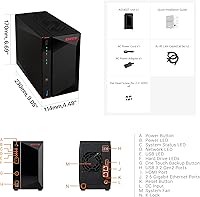
  • CPU: Intel Celeron N5105 quad-core processor with a 2.0GHz base clock that bursts up to 2.9GHz under load.
  • RAM: 4GB DDR4-2933 SO-DIMM installed in one slot, expandable to a maximum of 16GB using two 8GB modules.
  • Drive Bays: Two SATA3 6Gb/s bays compatible with both 3.5-inch and 2.5-inch HDDs or SSDs.
  • M.2 Slots: Four M.2 NVMe SSD slots operating independently from the SATA bays, usable for caching or dedicated SSD storage pools.
  • Network: Dual 2.5 Gigabit Ethernet ports supporting speeds of 2.5G, 1G, and 100M with link aggregation capability.
  • USB Ports: Three USB 3.2 Gen 2 ports each delivering up to 10Gbps transfer speeds for external drives and direct device backups.
  • Video Output: One HDMI 2.0b port supporting direct display connection for local media playback without a separate client device.
  • Write Speed: Sequential write speeds of up to 591 MB/s under optimal SSD configuration conditions.
  • Dimensions: The enclosure measures 9.06 x 4.49 x 6.69 inches (length x width x height).
  • Weight: The unit weighs 4.4 pounds without drives installed.
  • Drive Included: The enclosure ships completely diskless — no HDDs, SSDs, or M.2 drives are included in the box.
  • Operating System: Runs Asustor Data Master (ADM), Asustor's proprietary NAS operating system with app ecosystem support.
  • Power Features: Supports both Wake on LAN and Wake on WAN for remote power management and reduced idle energy consumption.
  • Encryption: Hardware-accelerated AES-NI encryption is supported via the N5105 CPU for securing stored data at the volume level.
  • Virtualization: Supports Docker containers and lightweight virtual machine workloads within ADM, subject to available RAM and CPU headroom.
  • Market Rank: Ranked #23 in the Network Attached Storage Enclosures category on Amazon based on Best Sellers Rank data.
  • User Rating: Holds an average rating of 4.3 out of 5 stars across approximately 230 verified ratings on Amazon.
  • Release Date: First made available for purchase in May 2023.
  • Manufacturer: Designed and manufactured by Asustor, a NAS-focused brand operating under the ASUSTeK Computer umbrella.

Related Reviews

Asustor Drivestor 2 Lite AS1102TL NAS
76%
88%
Ease of Setup
83%
Build Quality
74%
Performance for Everyday Use
71%
Software (ADM OS) Usability
69%
4K Media Streaming
More
Asustor Drivestor 2 Pro Gen2 2-Bay NAS
76%
83%
Setup & Initial Configuration
89%
Network Performance (2.5GbE)
71%
4K Transcoding Performance
67%
Software & ADM Ecosystem
86%
Build Quality & Physical Design
More
Asustor FLASHSTOR 6 Gen2 FS6806X 6-Bay M.2 SSD NAS
88%
94%
Performance
89%
Ease of Setup
92%
Build Quality
93%
Data Transfer Speed
88%
Storage Flexibility
More
Asustor Flashstor 12 Pro Gen2 NAS
76%
93%
Read/Write Performance
61%
SSD Compatibility
89%
Noise & Thermal Management
47%
USB4 / Thunderbolt Connectivity
84%
Build Quality & Design
More
KCMconmey NAS-812 8+2 Bay DIY NAS Case
84%
86%
Build Quality
62%
Cooling Performance
88%
Ease of Use
90%
Compatibility with PSU Types
91%
Customization Options
More
TerraMaster D4-320
TerraMaster D4-320
80%
93%
Ease of Setup
86%
Transfer Speed
71%
Build Quality
88%
Noise Level
82%
Thermal Management
More
IO CREST SY-ENC50127 USB 3.2 Type-C Dual Bay HDD + M.2 NVMe External Enclosure
83%
88%
Performance
93%
Ease of Setup
91%
Build Quality
87%
Data Transfer Speed
90%
Cooling/Heat Management
More
ICY DOCK ToughArmor MB998SP-B 8-Bay 2.5” SATA/SAS HDD/SSD Mobile Rack Enclosure for 5.25″ Bay
87%
91%
Performance
88%
Cooling Efficiency
89%
Build Quality
93%
Ease of Installation
72%
Noise Level
More
Asustor AS5404T 4-Bay NAS Enclosure
80%
88%
Build Quality
82%
Processing Performance
93%
NVMe Storage Flexibility
87%
Network Throughput
76%
Software Ecosystem (ADM OS)
More
Synology DS223
Synology DS223
77%
94%
Software & OS Experience
88%
Setup & Initial Configuration
61%
CPU & Processing Performance
67%
Network Connectivity
83%
Build Quality & Design
More

FAQ

No, it does not. The Asustor AS5402T 2-Bay NAS Enclosure ships completely diskless, meaning you need to purchase your own HDDs, SSDs, or M.2 NVMe drives separately before it can store anything. Make sure you factor that into your total budget — it is a common surprise for first-time buyers.

Both work fine. The two SATA bays accept standard 3.5-inch spinning hard drives as well as 2.5-inch SATA SSDs, so you have flexibility depending on what you already own or plan to buy.

Yes, completely separate. The four M.2 slots are dedicated NVMe slots that operate independently from the two SATA bays. You can use them as a high-speed SSD-only storage pool, as read or write cache to accelerate your HDDs, or in a combination of both — it depends on how you configure the storage in ADM.

Yes, your network equipment needs to support 2.5 Gigabit Ethernet to take advantage of those faster speeds. If your router or switch only has standard gigabit ports, the NAS will still connect and work fine — just at gigabit speeds. The 2.5GbE benefit only kicks in when both ends of the connection support it.

Honestly, it has a learning curve. ADM is a capable platform, but if you are coming in with zero NAS experience, expect to spend some time reading documentation and watching setup guides before things feel comfortable. Users who have previously used Synology DSM often find ADM slightly less intuitive. It is manageable, but this is not a plug-and-play device for complete beginners.

Yes, Plex is one of the more popular applications on this platform. The N5105 CPU handles hardware-accelerated transcoding well for one or two simultaneous streams. If you have a large household with several people streaming different things at once — especially in 4K — you may start to hit CPU limits, so it is worth being realistic about your household's streaming demands.

Yes, ADM supports Docker, and the N5105 CPU handles lightweight containers without major issues. If you plan to run multiple containers alongside active file transfers and Plex at the same time, upgrading the RAM from the base 4GB to something higher will make a real difference in stability and responsiveness.

During typical workloads like file syncing and light streaming, most users describe it as quiet enough to sit on a shelf in the same room without being bothersome. Under heavy sustained load — for example, writing large amounts of data to multiple NVMe drives simultaneously — the fan does spin up and becomes more audible. It is not unusually loud for a NAS, but it is not silent either.

The main hardware advantage this 2-bay enclosure holds over comparable Synology units is the four M.2 NVMe slots, which Synology generally reserves for higher-tier models. Synology's DSM software is widely considered more polished and beginner-friendly than Asustor's ADM, and Synology's app ecosystem is more mature. If software experience and support reliability are your top priorities, Synology is the safer choice. If you want more raw hardware for the money and are comfortable learning a new platform, the AS5402T makes a compelling case.

It is user-upgradeable and the process is fairly accessible — you will need to open the enclosure and swap or add a standard DDR4 SO-DIMM module. Asustor supports expansion up to 16GB using two 8GB modules. If you are comfortable installing RAM in a laptop, this is a similar level of difficulty. Just make sure to use compatible DDR4-2933 or DDR4-2666 SO-DIMM modules.

Where to Buy