Overview

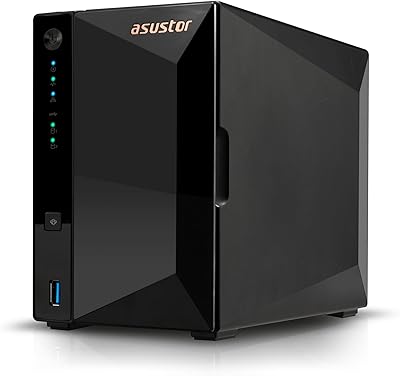
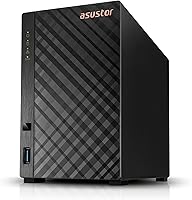
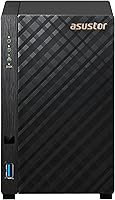
The Asustor Drivestor 2 Lite AS1102TL NAS arrived in late 2023 as a genuinely approachable entry point into personal network storage — compact, metal-bodied, and built with first-timers in mind. Unlike monthly cloud subscriptions, this 2-bay NAS puts your files on hardware sitting in your own home, giving you full control without ongoing fees. The tool-free drive installation lowers the barrier considerably; slide your drives in, power it on, and the setup wizard handles most of the rest. One thing to know upfront: it ships without drives, so your real total spend depends on which hard drives you add — factor that into your budget before clicking buy.
Features & Benefits

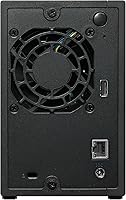
The quad-core Realtek processor inside this entry-level Asustor unit handles the workloads most home users actually care about — streaming media locally, running automatic backups, sharing files across devices. It does support 4K transcoding, though be realistic: performance depends on your drive speed, network quality, and whether anyone else is accessing the unit simultaneously. The single Gigabit Ethernet connection is sufficient for home use but won't win any speed records. A USB 3.2 port lets you attach an external drive for extra backup flexibility. Perhaps the most underrated feature is Btrfs snapshot support, which quietly protects your files from accidental overwrites. Just know that the 1GB of RAM is fixed and cannot be upgraded later.

Best For

The Drivestor 2 Lite hits the mark for anyone stepping away from chaotic external drives or expensive cloud plans for the first time. If your goal is backing up a couple of computers, streaming a personal movie library over your home network, or simply having a private place for your files without recurring costs, this 2-bay NAS covers all of it cleanly. Small offices with basic file-sharing needs will find it workable too. Where it struggles is with more demanding workloads — Docker containers, multiple simultaneous apps, or anything requiring sustained high throughput will expose the hardware limits fast. Think of it as a private cloud starter, not a production server.

User Feedback

Buyers consistently highlight the painless setup and how quietly the unit runs once it is in place. The compact footprint gets mentioned a lot too — it genuinely disappears on a desk or shelf. On the flip side, users running more than a couple of apps through ADM, Asustor's built-in operating system, bump into the RAM ceiling noticeably. A few newcomers also mention that ADM has a learning curve compared to more polished interfaces from competing brands. Firmware updates arrive on a regular schedule, and Asustor's support team draws mostly positive remarks. Most buyers feel the value is solid for light personal use, but those who pushed the hardware harder tend to wish they had started with a more capable model.

Pros

  • Tool-free drive installation makes the physical setup genuinely approachable, even for first-timers.
  • The metal chassis feels noticeably solid for a budget-tier device and sits quietly on any desk.
  • Btrfs snapshot support provides a meaningful safety net against accidental file deletion at no extra cost.
  • Wake on LAN keeps power consumption low when the unit is sitting idle between backup windows.
  • ADM includes a capable app ecosystem covering media, backup, and sync without requiring third-party software.
  • The Drivestor 2 Lite runs near-silently under typical workloads, making it comfortable to keep in a living space.
  • Asustor releases firmware updates on a consistent schedule, which matters for long-term security and reliability.
  • The diskless design lets buyers choose drives that match their budget and capacity needs at purchase time.
  • Local 4K streaming to compatible devices works reliably for single-user scenarios on a clean home network.
  • Drive compatibility covers the full range of mainstream NAS-rated HDDs from major brands without fuss.

Cons

  • The 1GB of DDR4 RAM cannot be upgraded, creating a hard ceiling for multitasking and app performance.
  • Running a media server, sync client, and download manager together will cause noticeable slowdowns.
  • Total cost of ownership is significantly higher than the device price once NAS-rated hard drives are factored in.
  • The single Gigabit Ethernet port limits network throughput for anyone on a faster modern home network.
  • ADM has a steeper learning curve than competing platforms, particularly for remote access configuration.
  • Drive trays feel plasticky and slightly flimsy relative to the otherwise solid metal chassis.
  • Remote access via EZ-Connect can be inconsistent under heavy server load, frustrating mobile users.
  • No M.2 SSD slots means the caching upgrades available on higher-tier NAS models are entirely off the table.
  • 4K transcoding on the fly is unreliable and degrades quickly with multiple simultaneous streams.
  • Some ADM app updates have introduced temporary bugs, requiring follow-up patches before stability returns.

Ratings

The Asustor Drivestor 2 Lite AS1102TL NAS has been scored using AI analysis of verified global buyer reviews, with spam, bot submissions, and incentivized feedback actively filtered out before any score was calculated. Ratings span everything from raw performance and software usability to physical build and long-term value, so both the genuine strengths and the real-world frustrations are reflected honestly. Whether you are considering this 2-bay NAS as a first home storage device or comparing it against similarly priced alternatives, these scores are designed to give you a clear, unbiased picture.
Ease of Setup
88%
First-time NAS buyers consistently describe the initial setup as far less intimidating than expected. The tool-free drive installation and Asustor's web-based setup wizard walk users through the process clearly, and most report having the unit fully operational within an hour of unboxing.
Complete beginners occasionally get stuck during network configuration, particularly when assigning static IPs or setting up remote access. A small number of users found the early steps confusing without some baseline familiarity with home networking concepts.
Build Quality
83%
The metal chassis feels noticeably more solid than what buyers expect at this price tier. Several users mention that the compact footprint and clean design let it sit unobtrusively on a desk or shelf without looking out of place in a home or small office environment.
The plastic drive trays feel somewhat cheap relative to the outer shell, and a handful of reviewers noted minor flex when inserting drives. It is not a dealbreaker, but the tray quality is a visible step down from pricier NAS options.
Performance for Everyday Use
74%
26%
For the core tasks most home users need — backing up laptops, syncing photos, and streaming files to a TV or phone — the Drivestor 2 Lite handles things competently. File transfers over a local Gigabit network feel responsive for single-user scenarios, and the quad-core processor keeps up without obvious lag during light workloads.
Performance noticeably degrades when more than one user accesses the device simultaneously or when background tasks like indexing run alongside an active transfer. The non-expandable 1GB of RAM is the root cause, and it becomes apparent quickly if you run more than one or two apps through ADM at the same time.
Software (ADM OS) Usability
71%
29%
Asustor's ADM interface is well-organized and includes a solid app ecosystem covering media servers, backup tools, and basic cloud sync. Users coming from consumer routers or external drives find the desktop-style layout approachable once they spend a couple of hours exploring it.
Compared to Synology's DSM, ADM feels less polished in places, and some third-party app integrations require more manual configuration than newcomers expect. A few buyers specifically mention that finding the right settings for remote access or user permissions took more trial and error than it should.
4K Media Streaming
69%
31%
Under the right conditions — a single user, a fast hard drive, and a clean Gigabit home network — local 4K playback through the Drivestor 2 Lite works without issues. Users running Plex or Asustor's LooksGood app for direct playback on compatible devices generally report a stable experience.
Hardware transcoding limitations surface quickly if you try to transcode 4K content on the fly for a device that cannot play the source format directly. Multiple concurrent streams, even at 1080p, can cause buffering, and the 1GB RAM ceiling constrains how much media server software can do in the background.
RAM & Multitasking
51%
49%
For a single dedicated task — running just a backup job or a basic file server — the 1GB of DDR4 RAM is technically sufficient. Users who set it up as a pure backup appliance and leave it alone report no issues with memory pressure during normal operation.
The inability to upgrade the RAM is the most frequently cited frustration in user reviews. Anyone who installs a media server, a download manager, and a sync tool simultaneously will hit the memory ceiling fast, leading to sluggish app response times and occasional service crashes that require a restart.
Network Throughput
72%
28%
Real-world read and write speeds over the Gigabit Ethernet port land in a range that feels adequate for home file sharing and backup over a typical residential network. Users backing up multiple machines overnight find the throughput perfectly workable for that use case.
The single 1GbE port is a hard ceiling, and users on faster home networks — or those who upgraded to a 2.5GbE switch — find it a frustrating bottleneck. This entry-level Asustor unit cannot match the network speeds offered by slightly pricier NAS models that include a 2.5 Gigabit port.
Value for Money
77%
23%
Buyers who enter the purchase understanding it is a diskless unit and budget accordingly tend to feel positive about the overall value. For what you get at this price tier — a metal-built private cloud device with snapshot support and a capable OS — it competes reasonably well against other entry-level options.
Once you factor in the cost of two NAS-rated hard drives, the total investment climbs considerably and starts to overlap with more capable alternatives. Buyers who discover the RAM limitation only after purchase often feel the value proposition weakens at that point.
Noise & Heat
86%
Quiet operation is one of the most consistently praised traits across user reviews. The fan runs at a low, barely audible level during typical workloads, making it comfortable to keep in a living space or a small office without it becoming a noticeable distraction.
Under sustained heavy workloads — such as a full RAID rebuild or a large batch transcode — the fan ramps up audibly and the chassis gets warm to the touch. This is within normal parameters for a device of this class, but it is worth noting for anyone planning to run intensive tasks regularly.
Power Efficiency
82%
18%
Wake on LAN support means the unit can sit in a low-power state when nobody is actively using it, which many home users appreciate on their electricity bills. Scheduled power on and off through ADM adds another layer of efficiency control that buyers find genuinely useful.
During active use with two spinning hard drives installed, power draw is not dramatically lower than competing units. Users who leave the device running continuously without using WOL or scheduled sleep will not see standout efficiency gains compared to similar 2-bay NAS hardware.
Drive Compatibility
84%
The 3.5-inch SATA bay design works with the widest range of desktop hard drives, and Asustor maintains a compatibility list that covers most major NAS-rated drives from WD, Seagate, and Toshiba. Buyers who pair it with proven NAS drives report no compatibility headaches during setup or extended use.
The bays officially support 3.5-inch HDDs only, and while some users have fit 2.5-inch drives using adapters, it is not officially sanctioned and adds friction. There are no M.2 SSD slots, so caching options available on higher-tier models are simply absent here.
Remote Access & Mobile App
67%
33%
Asustor's AiMaster mobile app and EZ-Connect remote access feature work reliably once configured correctly, letting users access their files from a phone or laptop outside the home without much ongoing maintenance. The mobile experience covers the basics well enough for personal use.
Initial remote access setup has a steeper configuration curve than the local setup experience, and a handful of users report intermittent connection drops through EZ-Connect during periods of high server load. The mobile app also lags behind competitors in terms of polish and feature depth.
Data Protection Features
81%
19%
Btrfs snapshot support is a meaningful inclusion at this price level, giving users a real safety net against accidental file deletion or minor corruption without needing additional third-party tools. Paired with a RAID 1 configuration across two drives, the basic data redundancy story is solid for home use.
More advanced data protection features — like cloud backup integration or replication to a second NAS — require additional configuration effort and, in some cases, third-party services. Users expecting enterprise-style protection out of the box will need to invest extra time in setup.
Firmware & Long-term Support
78%
22%
Asustor releases firmware updates on a reasonably consistent schedule, and the AS1102TL has received ongoing ADM version upgrades since launch. Users who follow the NAS community note that Asustor has historically supported its hardware for multiple years, which is reassuring for a long-term investment.
Update rollouts occasionally introduce minor bugs that take a subsequent patch to resolve, and a few users have reported that certain ADM app updates temporarily broke functionality. Support response times, while generally positive, can lag during peak periods or for less common configuration issues.

Suitable for:

The Asustor Drivestor 2 Lite AS1102TL NAS is a strong fit for anyone taking their first serious step away from scattered external drives or expensive cloud subscriptions. If your main goals are backing up a couple of household computers, keeping a personal photo or video archive accessible from anywhere at home, or sharing files between a few devices on the same network, this 2-bay NAS covers all of that without overwhelming you with complexity. Households where one semi-technical person sets it up and others just access it passively will get the most out of it, since day-to-day use is straightforward once the initial configuration is done. Small offices with modest shared storage needs — think a freelancer team or a micro-business storing client files — will find it workable on a tight budget. The diskless design is also a genuine advantage for buyers who already own compatible NAS-rated hard drives, since it lets you repurpose existing hardware and keep the upfront cost down.
Not suitable for:

The Asustor Drivestor 2 Lite AS1102TL NAS is the wrong tool if you are planning to run a stack of applications simultaneously, host an active Plex server with remote transcoding, or manage storage for more than a handful of concurrent users. The fixed 1GB of RAM is not a minor footnote — it is a real architectural ceiling that will frustrate anyone who wants to push the device beyond basic file serving, and because it cannot be upgraded, there is no path forward when you hit that wall. Power users who have already invested in a 2.5 Gigabit home network will also find the single 1GbE port a persistent bottleneck that undermines their faster infrastructure. If you are comparing this entry-level Asustor unit against Synology's entry-level lineup and software polish matters to you, be aware that ADM, while capable, has a less refined feel than DSM, particularly when configuring advanced features like remote access or user permissions. Anyone expecting a plug-and-play experience with zero learning curve should also temper expectations — NAS devices as a category require some willingness to read documentation and troubleshoot occasionally.
Specifications

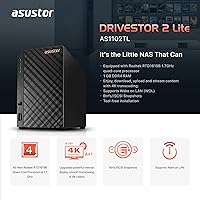
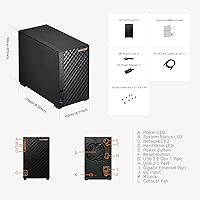
  • Processor: Powered by a Realtek RTD1619B ARM64 64-bit quad-core CPU running at 1.7GHz, providing sufficient performance for media streaming and light NAS workloads.
  • RAM: Comes with 1GB of DDR4 RAM soldered to the board, which is not expandable or upgradeable at any point after purchase.
  • Drive Bays: Accommodates two 3.5-inch SATA hard disk drives installed tool-free without any screws required for basic fitting.
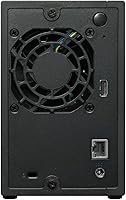
  • Network: Features a single Gigabit Ethernet port supporting 1G and 100M speeds, suitable for standard home and small office network infrastructure.
  • USB Ports: Includes one USB 3.2 Gen 1 port and one USB 2.0 port for connecting external drives or peripherals for backup and file transfer.
  • Internal Flash: Equipped with 4GB of internal flash storage dedicated to the operating system, keeping drive bay space entirely free for user data.
  • File System: Supports the Btrfs file system with snapshot capabilities, enabling point-in-time recovery and protection against accidental data loss.
  • Operating System: Runs Asustor Data Master (ADM), a Linux-based NAS operating system with a browser-based interface and a built-in app installation center.
  • 4K Transcoding: Supports 4K video transcoding for local media playback, subject to drive speed, network conditions, and the number of concurrent streams.
  • Wake on LAN: Wake on LAN (WOL) is supported, allowing the unit to be powered on remotely from a low-power sleep state over the local network.
  • Dimensions: The unit measures 8.27″ deep by 3.94″ wide by 6.3″ tall, making it compact enough to sit unobtrusively on a desk or shelf.
  • Weight: The chassis weighs 4.11 pounds without drives installed, reflecting the solid metal construction used throughout the outer enclosure.
  • Material: The outer casing is constructed from metal, providing a more durable and heat-dissipating enclosure than comparable plastic-bodied alternatives.
  • Drive Config: Ships in a diskless configuration, meaning no hard drives are included and must be purchased separately before the unit can store any data.
  • RAID Support: Supports standard RAID modes including JBOD, RAID 0, and RAID 1, giving users basic options for performance prioritization or drive redundancy.
  • Release Date: The AS1102TL was first made available in September 2023 as part of Asustor's entry-level Drivestor Lite product line.
  • Remote Access: Supports remote file access via Asustor's EZ-Connect service and the AiMaster mobile application for iOS and Android devices.
  • Power Feature: Includes scheduled power on and off functionality through ADM, allowing users to automate operating hours and reduce energy consumption.

Related Reviews

Asustor Drivestor 2 Pro Gen2 2-Bay NAS
76%
83%
Setup & Initial Configuration
89%
Network Performance (2.5GbE)
71%
4K Transcoding Performance
67%
Software & ADM Ecosystem
86%
Build Quality & Physical Design
More
Asustor AS5402T 2-Bay NAS Enclosure
78%
88%
Hardware Value
82%
Processing Performance
86%
Network Throughput
84%
Thermal Management
63%
Software & OS Experience
More
Asustor Drivestor 4 Pro AS3304T 4-Bay NAS
78%
88%
Network Performance
83%
Software & ADM Interface
74%
Media Playback & Transcoding
76%
App Ecosystem
57%
RAM & Multitasking
More
Asustor FLASHSTOR 6 Gen2 FS6806X 6-Bay M.2 SSD NAS
88%
94%
Performance
89%
Ease of Setup
92%
Build Quality
93%
Data Transfer Speed
88%
Storage Flexibility
More
Asustor Flashstor 12 Pro Gen2 NAS
76%
93%
Read/Write Performance
61%
SSD Compatibility
89%
Noise & Thermal Management
47%
USB4 / Thunderbolt Connectivity
84%
Build Quality & Design
More
KCMconmey NAS-812 8+2 Bay DIY NAS Case
84%
86%
Build Quality
62%
Cooling Performance
88%
Ease of Use
90%
Compatibility with PSU Types
91%
Customization Options
More
Patriot Transporter Lite 512GB Portable SSD
77%
78%
Transfer Speed Performance
91%
Portability & Form Factor
67%
Build Quality & Durability
86%
Cable & Connectivity
83%
Value for Money
More
Asustor AS5404T 4-Bay NAS Enclosure
80%
88%
Build Quality
82%
Processing Performance
93%
NVMe Storage Flexibility
87%
Network Throughput
76%
Software Ecosystem (ADM OS)
More
Synology DS223
Synology DS223
77%
94%
Software & OS Experience
88%
Setup & Initial Configuration
61%
CPU & Processing Performance
67%
Network Connectivity
83%
Build Quality & Design
More
Synology DS420+ 4-Bay NAS Enclosure
80%
93%
Software Experience
88%
Build Quality
84%
Thermal Management & Noise
91%
Storage Flexibility
62%
Network Performance
More

FAQ

No, the Drivestor 2 Lite ships without any drives. You will need to purchase one or two 3.5-inch SATA hard drives separately before you can store any data on it. Most buyers opt for NAS-rated drives from brands like WD Red or Seagate IronWolf, which are designed to run continuously inside a NAS enclosure.

Unfortunately, no. The 1GB of DDR4 RAM is soldered directly to the motherboard and cannot be upgraded or replaced. This is one of the most important trade-offs to understand before buying — if you anticipate running multiple apps or services simultaneously, you may hit performance limits sooner than you would like.

It is more approachable than most first-timers expect. The drives slot in without any screws, and Asustor's ADM software walks you through the initial configuration with a browser-based wizard. That said, tasks like setting up remote access or configuring user permissions do require some patience and basic networking familiarity — it is not quite as plug-and-play as a consumer router.

Yes, with some caveats. Local 4K playback to a device that can handle the file format natively works well in most single-user scenarios. If your TV or media player needs the NAS to transcode the video on the fly into a different format, performance becomes less reliable — especially if someone else is also using the device at the same time. For best results, use a player that supports direct playback of your video formats.

That depends on how you configure the drives. If you set them up in RAID 1 mode, the unit mirrors your data across both drives, so a single drive failure does not result in data loss — you simply replace the failed drive. If you use JBOD or RAID 0 for maximum storage capacity, a failed drive can mean lost data, so regular external backups become important in those configurations.

Most users describe it as very quiet under typical workloads — a low, consistent hum that is easy to ignore in a living room or home office. The fan does spin up noticeably during heavy tasks like a full drive rebuild or sustained transfers, but it returns to its quiet baseline once the workload settles down.

Yes. The Asustor Drivestor 2 Lite AS1102TL NAS includes remote access support through Asustor's EZ-Connect service, which lets you reach your files via a browser or the AiMaster mobile app from anywhere with an internet connection. Initial remote access setup takes a bit of configuration, but once it is working, day-to-day remote access is reliable for most users.
Both are capable entry-level options, but there are real differences worth considering. Synology's DSM operating system is generally regarded as more polished and beginner-friendly than Asustor's ADM, particularly for remote access setup and third-party app integration. On the hardware side, the two are closely matched at this tier, though some Synology equivalents offer slightly different port configurations. If software experience is your top priority, Synology has an edge; if you are comfortable with some configuration work, this entry-level Asustor unit offers comparable value.

In most cases, yes. The Gigabit Ethernet port connects to any standard home router or switch using a regular RJ45 cable, and ADM handles the rest during setup. If your router assigns IP addresses automatically via DHCP, the NAS will appear on your network within minutes of first boot. The only scenario where it may feel limiting is if you have already upgraded to a 2.5 Gigabit network, since this unit cannot take advantage of those faster speeds.

Asustor maintains a fairly consistent update cadence for ADM, typically pushing firmware updates every few months that include security patches, new features, and compatibility improvements. The AS1102TL has continued to receive updates since its launch, and Asustor has a reasonable track record of supporting its hardware for several years. It is always good practice to check the Asustor forum before applying major updates, as occasional bugs in new releases get flagged quickly by the community.

Where to Buy