Overview

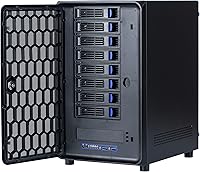
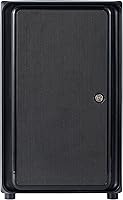
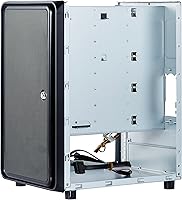
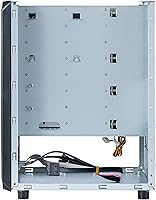
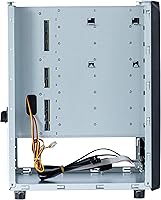
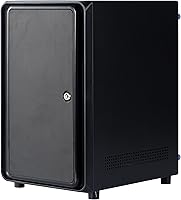
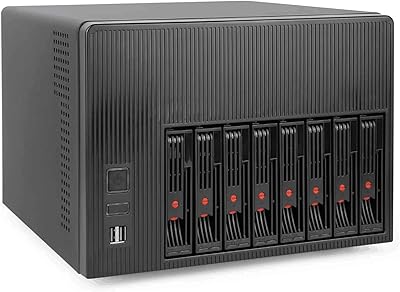
The KCMconmey NAS-812 8+2 Bay NAS Case is a DIY enclosure built for home lab enthusiasts and small office builders who want serious storage capacity without the bulk of a full tower. What separates this 8-bay enclosure from most mid-range options is the combination of a hot-swap backplane and a genuinely compact footprint, made possible by Mini-ITX motherboard support and compatibility with Flex or 1U power supplies. That said, be clear about what you’re getting: a bare steel chassis. No drives, no motherboard, no PSU included. If you’re expecting something plug-and-play, this isn’t it. It rewards builders who enjoy sourcing and assembling their own components.

Features & Benefits

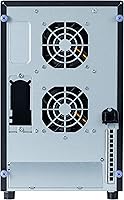
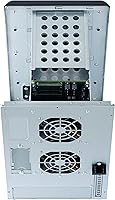
The eight hot-swap bays accept both 2.5-inch and 3.5-inch drives over a SATA 3.0 backplane, meaning you can mix SSDs and spinning hard drives without fuss. The two additional fixed 2.5-inch internal bays are ideal for a boot drive or cache SSD, keeping your main bays free for storage. A single full-height PCIe slot lets you drop in a dedicated HBA if your ITX board lacks enough SATA ports, or add a 10GbE card for faster throughput. Two 80mm fans come pre-installed, and the front panel delivers USB 3.0 ports alongside standard power and activity indicators. The 67mm CPU cooler limit is a real constraint worth planning around before you buy.

Best For

This NAS chassis is a natural fit for anyone running TrueNAS, Unraid, or OpenMediaVault on custom hardware — particularly those graduating from a 4-bay setup who need more slots but aren’t ready to commit to a full rack. Home lab builders who want a self-hosted private cloud or a Plex server with real headroom will appreciate the drive count. Small offices looking to cut ongoing subscription costs tied to commercial NAS appliances will find the price-to-bay ratio compelling. That said, this is squarely for people comfortable independently sourcing a compatible Flex PSU, ITX motherboard, and low-profile cooler. First-time builders should budget extra time for research before purchasing.

User Feedback

Across roughly 107 ratings, this 8-bay enclosure sits at 3.9 out of 5 — a score that tells a nuanced story. Experienced builders frequently praise the solid steel construction and the clean hot-swap mechanism, noting the chassis feels well-made for its price tier. Complaints follow a recognizable pattern: included documentation is thin, internal cable routing is cramped, and certain Flex PSUs exceeding the maximum supported length simply won’t fit without modification. A handful of reviewers also ran into trouble with CPU coolers taller than the 67mm clearance ceiling. The KCMconmey build tends to earn high marks from people who came in prepared; frustration correlates strongly with underestimating the assembly complexity upfront.

Pros

  • Eight hot-swap bays accept both 2.5-inch and 3.5-inch drives, giving real flexibility for mixed storage builds.
  • The alloy steel construction feels solid and well-finished for a mid-range NAS chassis.
  • A full-height PCIe slot lets you add a dedicated HBA or 10GbE card without external adapters.
  • Mini-ITX compatibility opens the door to a wide range of modern, low-power Intel and AMD platforms.
  • Two front USB 3.0 ports are a practical touch often absent on competing enclosures in this price range.
  • Hot-swap drive removal works cleanly and requires no tools once the build is complete.
  • Flex and 1U PSU support keeps the chassis footprint compact relative to its 8-bay capacity.
  • Pre-installed 80mm fans provide workable baseline airflow, and swapping them for quieter alternatives is straightforward.

Cons

  • Included documentation is sparse, leaving builders to rely on community forums and trial and error for assembly guidance.
  • Internal cable routing space is tight, making clean management a genuine challenge even for experienced builders.
  • Flex PSU length is capped at 150mm, ruling out many common units and demanding careful pre-purchase compatibility checks.
  • The 67mm CPU cooler ceiling eliminates most standard tower heatsinks and significantly narrows thermal options.
  • No drives, motherboard, or PSU are included; total build cost climbs quickly once all components are sourced separately.
  • At stock, two 80mm fans may prove insufficient airflow for a fully loaded array of spinning 3.5-inch drives.
  • First-time NAS builders report a steep learning curve that the brand offers little structured guidance to address.
  • Compatibility friction around PSU sizing and cooler clearance accounts for a notable share of the lower-star reviews.

Ratings

The KCMconmey NAS-812 8+2 Bay NAS Case has been scored by our AI rating engine after analyzing verified purchase reviews from buyers worldwide, with spam, bot activity, and incentivized feedback actively filtered out before scoring. The results reflect the full picture honestly: the genuine strengths that experienced home lab builders praise, alongside the recurring pain points that caught less-prepared assemblers off guard.

Build Quality
83%
Reviewers consistently describe the chassis as feeling solid and well-constructed for its price tier. The alloy steel panels resist flex even when fully loaded with drives, and the drive trays seat with a satisfying, secure click. For a mid-range DIY enclosure, the physical construction holds up reliably to repeated drive swaps over time.
Some buyers note minor inconsistencies in panel alignment and paint finish quality around the drive bay openings. A handful of tray latches feel slightly looser than expected after months of regular use. These are cosmetic and mechanical quibbles rather than structural failures, but they prevent the build quality from reaching a premium tier rating.
Hot-Swap Mechanism
81%
19%
The SATA backplane delivers on its hot-swap promise for builders running TrueNAS or Unraid with a capable HBA controller. Drive trays release cleanly without tools, which makes routine maintenance and middle-of-the-night drive replacements genuinely manageable for a home server running around the clock. Experienced builders frequently cite this as the case's clearest standout feature.
A portion of reviewers report that individual tray latches feel inconsistent across the bay array, with some requiring noticeably more force to seat and eject than others. The hot-swap functionality also depends entirely on the connected controller supporting it natively, meaning builders using basic onboard SATA may not realize the full benefit.
Value for Money
78%
22%
Eight hot-swap bays backed by a real SATA backplane, a full-height PCIe slot, and a compact footprint at this price point is a combination that is genuinely difficult to match from competing brands. Builders who price-compared alternatives before purchasing consistently land on this chassis as offering strong capability per dollar spent.
The chassis purchase is only the entry cost. A compatible Mini-ITX board, a correctly sized Flex or 1U PSU, drives, and a low-profile CPU cooler push the all-in build cost substantially higher than the sticker price suggests. Buyers who underestimated the total component spend account for a meaningful share of the frustrated reviews.
Compatibility & Fit
61%
39%
Builders who thoroughly verified component dimensions before ordering report that everything fits together without issues. The Mini-ITX platform provides a wide selection of modern Intel and AMD boards to choose from, and the dual PSU format support gives at least some flexibility in power supply sourcing.
Compatibility problems are the single most cited source of frustration across reviews. Flex PSUs exceeding 150mm in body length are a hard disqualifier, and the 67mm CPU cooler ceiling is stricter than most first-time builders anticipate. Discovering these conflicts after components have already shipped creates real cost and scheduling friction.
Ease of Assembly
52%
48%
Builders with prior ITX or small-form-factor PC experience generally describe the assembly process as manageable once they understand the chassis layout. The backplane wiring connections are fairly intuitive for anyone who has handled SATA power and data runs before, and the logical component zoning helps experienced hands move through the build efficiently.
For builders without a solid hardware background, the assembly experience is genuinely difficult. Documentation included in the box is thin to the point of being nearly useless, the interior is cramped, and independent research is required to source compatible components safely. This is the most consistently recurring complaint across the review base.
Cable Management
47%
53%
The chassis separates the PSU and motherboard into distinct zones, which at least provides a rational structure for planning cable routes. Builders who use fully modular PSUs and flat SATA data cables consistently report a noticeably cleaner result than those who use non-modular units with bulkier leads.
With eight drive data cables, eight backplane power runs, and a main ATX connector all competing for the same cramped interior, clean cable routing requires real effort and advance planning. Several reviewers describe the cable situation as the most frustrating part of the entire build, particularly during their first attempt.
Thermal Performance
68%
32%
The two pre-installed 80mm fans provide adequate airflow for moderately loaded builds running typical home lab workloads. Fan positions are sensibly placed for front-to-back airflow, and swapping to quieter or higher-performing 80mm alternatives requires no chassis modifications or special tools whatsoever.
A fully populated array of eight spinning 3.5-inch hard drives generates meaningful heat under sustained workloads, and at stock fan speeds some builders report drive temperatures drifting toward the upper end of acceptable ranges during large transfers. The 80mm fan size inherently limits maximum airflow volume compared to what a 120mm solution would move.
Storage Capacity
87%
Ten total drive positions, eight of which are hot-swappable, give this enclosure a genuinely strong storage ceiling for its physical footprint. Builders running Plex media libraries, multi-user file servers, or expanding backup pools have real room to grow without outgrowing the chassis for years.
The two fixed internal bays are limited to 2.5-inch drives, restricting them to SSDs or slim HDDs rather than the more affordable 3.5-inch HDDs used in the main array. Builders who had hoped for a uniform 10-bay hot-swap setup will find the two fixed positions a meaningful limitation.
PCIe Expansion
74%
26%
A single full-height PCIe slot is a practical and uncommon inclusion at this chassis size and price. Builders who need more SATA ports than their ITX board provides can add an HBA card directly, while others use the slot for a 10GbE network card to serve files faster across a local network.
One slot is the absolute limit, so builders who need both expanded SATA connectivity and a faster NIC must choose between them. As ITX boards rarely offer more than one PCIe slot themselves, there is no workaround available, making that single slot a potentially constraining decision point for more demanding builds.
Front Panel
76%
24%
Two front-mounted USB 3.0 ports are a consistently appreciated inclusion for a server chassis. Plugging in a USB drive for a quick manual backup or connecting a keyboard during initial OS setup is far more convenient than reaching around to rear I/O, especially when the system is tucked under a desk.
The front panel is functional but minimal, with no USB-C port and no audio connectivity. For builders using this chassis purely as a headless NAS, that is a non-issue, but those hoping to occasionally use it as a dual-purpose workstation will find the front panel options noticeably sparse.
Documentation
38%
62%
The physical build process follows standard PC assembly conventions well enough that experienced builders can proceed largely without instructions. Community resources like TrueNAS and Unraid forums contain builder-contributed posts and photos specific to this chassis that partially compensate for the lack of official guidance.
The documentation included in the box is widely described in reviews as inadequate: thin, vague, and in some cases poorly translated. There is no official component compatibility list, no tested PSU reference guide, and no accessible customer support channel to fall back on when the build hits an unexpected snag.
Noise Level
63%
37%
Under light workloads typical of a home NAS serving a small number of users, the stock fans operate at an acceptable noise level in most environments. The standard 80mm fan format means quiet replacements from reputable brands are inexpensive and easy to source without any chassis modification.
During sustained heavy workloads such as a RAID rebuild or large sequential file transfer, the stock fans spin up to a level that most people would notice in a quiet home office. Builders who prioritize low-noise operation should budget for aftermarket fans as part of the initial build, not as an afterthought.
Chassis Footprint
79%
21%
Fitting eight hot-swap bays into a chassis roughly 33.5 x 20 x 27cm is an efficient use of volume for a storage-focused build. Builders who compared this against full-tower alternatives frequently describe the compact footprint as a deciding factor, particularly when desk or shelf space is limited.
The compact exterior is achieved at the direct cost of a tight interior, which is why cable management is difficult and PSU size compatibility is so narrowly defined. Buyers should understand clearly that the small outer dimensions and the cramped build experience are inseparable consequences of the same core design priority.
PSU Compatibility
58%
42%
Supporting both Flex ATX and 1U PSU formats provides more sourcing options than a chassis limited to a single power supply form factor. Builders who identify a compatible unit early, verify the exact body dimensions against the spec sheet, and order accordingly report a clean and secure PSU installation.
The 150mm maximum body length for Flex PSUs is a hard constraint that disqualifies a surprising number of commonly available units on the market. Multiple reviewers purchased PSUs listed as Flex-format that physically exceeded the limit, requiring returns and replacements before assembly could proceed, adding both cost and frustration to the build.
Upgrade Path
72%
28%
The chassis accommodates a reasonably broad range of current Mini-ITX platforms, meaning builders can swap to a newer generation board without replacing the case itself. Fans, drives, and the PSU can all be upgraded within the supported size envelope as needs and budgets evolve over time.
Long-term expandability is bounded by the inherent limits of the Mini-ITX form factor: restricted CPU TDP headroom, limited RAM capacity, and a single PCIe lane for expansion cards. Builders whose compute or storage ambitions grow significantly beyond the original scope may find themselves needing a fundamentally different chassis within a few years.

Suitable for:

The KCMconmey NAS-812 8+2 Bay NAS Case is purpose-built for technically confident builders who want a compact, high-density storage enclosure without the cost premium of a branded NAS appliance. It hits a real sweet spot for home lab enthusiasts running TrueNAS, Unraid, or OpenMediaVault on a Mini-ITX platform, where 8 hot-swap bays give genuine room to grow a storage pool over time rather than hitting a ceiling after a year. Builders graduating from a 4-bay solution will find the jump to 8 active slots meaningful without requiring a move to a full tower or rack chassis. Small offices that need centralized local storage and want to avoid recurring cloud subscription fees will appreciate the value this chassis unlocks when paired with the right components. Anyone planning to add a dedicated HBA or 10GbE network card will also benefit from the full-height PCIe slot, which is a rare inclusion at this price tier.

Not suitable for:

The KCMconmey NAS-812 8+2 Bay NAS Case is a poor match for anyone expecting a ready-to-run appliance straight out of the box. This is a bare steel chassis that ships without a motherboard, power supply, or drives, and the included documentation offers little structured guidance through the assembly process. Buyers who have not already identified a compatible Flex or 1U PSU should complete that research before purchasing, since units exceeding the 150mm Flex length cap physically will not fit inside the enclosure. Anyone relying on a standard mid-tower CPU cooler should also know the 67mm clearance ceiling eliminates most common heatsinks, requiring a deliberate low-profile cooler selection. If your priority is a polished out-of-box experience, manufacturer software support, or a guided setup process, a pre-built NAS from an established appliance brand will serve you far better than this chassis ever will.

Specifications

  • Model Number: This chassis carries the official model designation NAS-812, manufactured by KCMconmey.
  • Hot-Swap Bays: Eight front-accessible hot-swap bays connect via a SATA 3.0 6Gbps backplane and accept 2.5-inch or 3.5-inch drives interchangeably.
  • Internal Bays: Two additional fixed internal bays accommodate 2.5-inch drives only, suited for a dedicated boot SSD or cache drive.
  • Backplane Interface: The hot-swap backplane runs SATA 3.0 at 6Gbps per port, delivering full-rated throughput for both spinning HDDs and solid-state drives.
  • Motherboard Support: The chassis accepts Mini-ITX motherboards only, with a maximum board footprint of 17 x 17cm (6.7 x 6.7 inches).
  • PSU Compatibility: Flex PSUs up to 81.5 x 40.5 x 150mm and 1U PSUs up to 100 x 40.5mm with a maximum body length of 190mm are supported.
  • CPU Clearance: Maximum CPU cooler height is 67mm, which requires a purpose-built low-profile heatsink rather than any standard tower cooler.
  • PCIe Expansion: One full-height PCIe expansion slot is provided, compatible with single-slot HBA, NIC, or other full-height expansion cards.
  • Front USB Ports: Two USB 3.0 ports are mounted on the front panel, enabling high-speed peripheral access without reaching around to the rear I/O.
  • Chassis Fans: Two 80 x 80 x 25mm case fans come pre-installed and use standard 80mm mounting holes, making aftermarket fan replacement straightforward.
  • Chassis Dimensions: The enclosure measures 33.5cm tall, 20cm wide, and 27cm deep (approximately 13.2 x 7.9 x 10.6 inches).
  • Net Weight: The chassis weighs approximately 6kg (13 lb) unloaded, reflecting its all-steel alloy construction.
  • Build Material: The chassis body is fabricated from alloy steel, producing a rigid frame that resists flex and helps damp drive vibration.
  • Front Panel: The front panel provides a power switch, reset switch, power activity LED, and HDD activity LED for standard operational monitoring.
  • Included Contents: The case ships as a bare enclosure with no drives, motherboard, power supply, or substantive printed assembly documentation included.

Related Reviews
KCMconmey NAS-411 4+1 Bay DIY NAS Case
84%
85%
Ease of Setup
80%
Build Quality
70%
Cooling Performance
90%
Customization Options
88%
Drive Compatibility
More
AUDHEID K7 8-Bay NAS Case
76%
83%
Build Quality
88%
Drive Bay Design
81%
Motherboard Compatibility
74%
Cooling Performance
77%
Noise Level
More
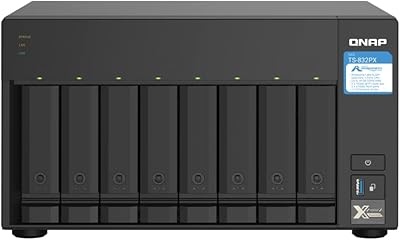
QNAP TS-832PX-4G 8-Bay NAS with 10GbE SFP+ and 2.5GbE
85%
91%
Performance
94%
Network Connectivity
89%
Ease of Setup
85%
Expandability (RAM)
88%
Data Security (Encryption)
More
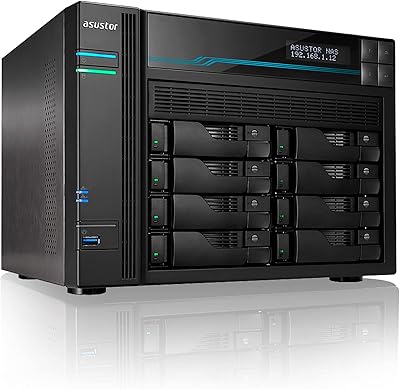
Asustor Lockerstor 8 AS6508T 8-Bay NAS
77%
91%
Network Performance
84%
Value for Money
88%
Build Quality
62%
Software (ADM)
83%
SSD Caching
More
Asustor Drivestor 2 Lite AS1102TL NAS
76%
88%
Ease of Setup
83%
Build Quality
74%
Performance for Everyday Use
71%
Software (ADM OS) Usability
69%
4K Media Streaming
More
Asustor Drivestor 2 Pro Gen2 2-Bay NAS

76%
83%
Setup & Initial Configuration
89%
Network Performance (2.5GbE)
71%
4K Transcoding Performance
67%
Software & ADM Ecosystem
86%
Build Quality & Physical Design
More
ICY DOCK ToughArmor MB998SP-B 8-Bay 2.5” SATA/SAS HDD/SSD Mobile Rack Enclosure for 5.25″ Bay
87%
91%
Performance
88%
Cooling Efficiency
89%
Build Quality
93%
Ease of Installation
72%
Noise Level
More
Synology DS223
Synology DS223
77%
94%
Software & OS Experience
88%
Setup & Initial Configuration
61%
CPU & Processing Performance
67%
Network Connectivity
83%
Build Quality & Design
More
Asustor AS5402T 2-Bay NAS Enclosure
78%
88%
Hardware Value
82%
Processing Performance
86%
Network Throughput
84%
Thermal Management
63%
Software & OS Experience
More
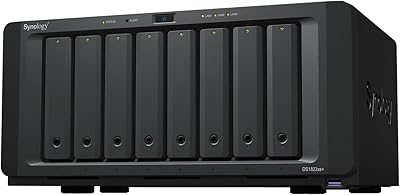
Synology DS1823xs+ 8-Bay NAS Enclosure
80%
91%
Build Quality & Chassis Durability
88%
Processor Performance
93%
Network Throughput & Connectivity
86%
Storage Expansion Flexibility
89%
DSM Software Ecosystem
More

FAQ

No, this is a bare chassis only. You will need to independently source a compatible Mini-ITX motherboard, a Flex or 1U power supply, storage drives, and a low-profile CPU cooler. Budget for all of those components separately, because the total build cost climbs considerably beyond the chassis price alone.

You need either a Flex ATX PSU with a body no larger than 81.5 x 40.5 x 150mm, or a 1U PSU measuring up to 100 x 40.5mm with a maximum length of 190mm. Before purchasing, verify the exact physical dimensions on the PSU manufacturer’s spec sheet rather than relying on the form factor label alone, since some Flex units on the market exceed the 150mm length ceiling and will not fit without modification.

No. The interior clearance for CPU cooling tops out at 67mm, which rules out virtually every standard tower heatsink. You will need a low-profile cooler specifically designed for height-constrained builds. Check the cooler’s exact installed height before ordering, not just its listed compatibility.

Yes, without any issue. This NAS chassis is purely a mechanical enclosure, so any operating system that supports your chosen Mini-ITX motherboard will run on it. TrueNAS SCALE, Unraid, and OpenMediaVault are all widely used by builders who have chosen this case.

The 8 front bays are backed by a genuine SATA backplane with a tray-and-latch mechanism, so you can pull and insert drives without shutting down the system, provided your OS and storage controller support hot-swap. Worth noting: the 2 additional internal bays are fixed and not hot-swappable.

Yes, the single full-height PCIe slot handles either job. Many builders pair this 8-bay enclosure with an HBA card when their ITX board’s native SATA port count falls short of 8, and others use the slot for a 10GbE NIC to push faster speeds over a local network. Just be aware you can only use one card at a time in that slot.

Honestly, the interior is compact by design and cable routing requires real planning. Working around the backplane, PSU, and motherboard in a constrained Mini-ITX space takes patience, and several builders have called it one of the more frustrating parts of the build. Using a fully modular PSU and flat SATA cables helps substantially, and laying out your cable runs before finalizing anything will save you a lot of grief.

Yes. Each of the 8 hot-swap bays supports either a 2.5-inch or 3.5-inch SATA drive, so you can mix drive sizes freely across the array as your storage needs change over time.

It depends on your baseline experience. If you’ve built PCs before and are simply new to NAS software, you’ll likely manage fine with some community research. If this is genuinely your first hardware build, the sparse documentation and cramped interior can make the process frustrating in ways that are avoidable. There are chassis from other brands that ship with more thorough guides and less demanding component sourcing requirements, which may suit a first-time builder better.

The stock 80mm fans are audible under load and not engineered for quiet operation. For a home lab or office setting where noise matters, swapping them for aftermarket 80mm fans from brands like Noctua is a popular and easy modification given the standard mounting size. Many builders treat the fan swap as a routine part of the initial build.