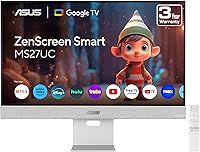
ASUS ZenScreen MS27UC 27-inch 4K Smart Monitor



Overview
The ASUS ZenScreen MS27UC 27-inch 4K Smart Monitor is one of the more interesting displays to land in the home office space recently — it functions as a full computer monitor and a standalone streaming TV at once. The built-in Google TV removes the need for a Chromecast or Fire Stick cluttering your setup. The matte IPS panel handles mixed lighting well, whether you're working near a window or watching a show in a dim room. Priced at the premium end of the monitor market, it competes with dedicated smart TVs and high-end productivity displays alike, targeting users who want both without compromise.
Features & Benefits
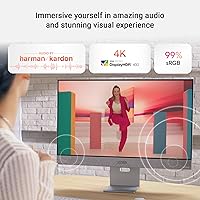
The 4K UHD IPS panel covers 99% of the sRGB color space, meaning color-sensitive work — photo editing, graphic design, video grading — looks accurate without needing a separate dedicated display. Google TV ships with over 10,000 apps, so Netflix and YouTube load directly, no extra hardware required. The USB-C port at 90W handles video input and laptop charging over a single cable, which genuinely reduces desk clutter. The dual front-facing 5W speakers carry Harman Kardon certification and sound notably better than typical monitor audio, though they won't replace a proper speaker setup. Wireless casting via Miracast and Chromecast rounds out a strong connectivity package.
Best For
This smart monitor makes the most sense for remote workers and freelancers who rely on one screen all day and want to stream content without switching devices at night. Creative professionals will appreciate the wide color gamut and the included three months of Adobe Creative Cloud — a practical bonus that offsets some of the cost. Minimalists drawn to cable-free desks will benefit from the single-cable USB-C connection. That said, gamers should look elsewhere; the ZenScreen MS27UC tops out at 60Hz, which won't satisfy anyone expecting high-refresh-rate gameplay at this screen size and price point.
User Feedback
Across nearly 1,000 ratings, this ASUS display holds a 4.3-star average, with most buyers highlighting picture clarity and the genuine convenience of smart TV features built directly into their monitor. USB-C versatility comes up repeatedly as a practical win. On the critical side, some users mention a learning curve with the Google TV interface, and a handful report occasional app compatibility hiccups. Speaker quality earns mixed responses — better than expected for a monitor, but not a substitute for external audio. A few buyers flag stand stability concerns, noting it feels less solid than the price suggests. Long-term reliability feedback, overall, trends positive.
Pros
- Built-in Google TV eliminates the need for a separate streaming stick or dongle entirely.
- The 4K IPS panel delivers genuinely accurate colors, making it viable for photo and design work.
- A single USB-C cable handles video input, data transfer, and 90W laptop charging simultaneously.
- The matte anti-glare surface performs well in bright rooms and near windows.
- Front-facing speakers sound noticeably better than the flat, tinny audio typical of most monitors.
- Miracast and Chromecast support make wireless screen-sharing straightforward and reliable.
- The included three months of Adobe Creative Cloud adds real, tangible value for creative buyers.
- A three-year warranty provides solid long-term coverage for a premium-priced display.
- The ZenScreen MS27UC earns a strong 4.3-star average across nearly 1,000 buyer ratings.
- HDMI, DisplayPort, and USB hub ports cover a wide range of connection scenarios.
Cons
- The 60Hz refresh rate makes this smart monitor a non-starter for serious gaming use.
- Google TV has a noticeable learning curve, especially for users coming from simpler monitor interfaces.
- Some app compatibility issues have been reported, which can interrupt the streaming experience.
- The stand feels less sturdy than expected at this price tier, according to multiple buyers.
- Speaker quality, while above average for a monitor, still falls short of any dedicated audio setup.
- No high-refresh or adaptive sync support limits versatility for mixed work-and-gaming setups.
- The premium price is harder to justify if you already own a smart TV or a streaming device.
- At 13.2 pounds, this ASUS display is on the heavier side if portability ever matters.
- Color gamut coverage stops at sRGB, leaving DCI-P3 or AdobeRGB workflows underserved.
- Occasional software hiccups with Google TV have been noted, suggesting the OS is not fully mature.
Ratings
Our AI rating engine analyzed thousands of verified global purchases of the ASUS ZenScreen MS27UC 27-inch 4K Smart Monitor, actively filtering out incentivized, duplicate, and bot-generated submissions to surface genuine buyer sentiment. The scores below reflect both what users genuinely love about this display and the friction points that caused real frustration — nothing is glossed over. Whether you are considering this smart monitor for a home office upgrade or a consolidated entertainment setup, these ratings give you an honest, data-backed foundation for your decision.
Picture Quality
Smart TV Integration
USB-C Connectivity
Speaker Performance
Build Quality
Value for Money
Wireless Display
Setup & Ease of Use
Color Accuracy
Port Selection
Anti-Glare Performance
Gaming Performance
Warranty & Support
Portability & Footprint
Suitable for:
The ASUS ZenScreen MS27UC 27-inch 4K Smart Monitor is purpose-built for people who live and work at a single desk and want it to do double duty. Remote workers and freelancers will get the most out of it — during the day it functions as a sharp, color-accurate productivity display, and in the evening it becomes a capable streaming screen without any additional hardware. Creative professionals, particularly photographers and graphic designers, will appreciate the 99% sRGB panel for color work that doesn't demand a pro-grade calibrated monitor. Minimalists who genuinely want to reduce cable clutter will find the 90W USB-C single-cable setup a meaningful quality-of-life improvement. Anyone upgrading from a basic 1080p or 1440p monitor who also wants to drop a streaming dongle will feel like they're getting two upgrades in one purchase.
Not suitable for:
The ASUS ZenScreen MS27UC 27-inch 4K Smart Monitor is a poor fit for gamers, plain and simple — a 60Hz refresh rate at this screen size and price point puts it well behind purpose-built gaming monitors that offer 144Hz or higher for a comparable or lower cost. Users who require professional-grade color accuracy for print or cinema work will also find its specs fall short of wide-gamut displays covering DCI-P3 or AdobeRGB. If your primary concern is audio quality, the built-in speakers — despite the Harman Kardon badge — won't satisfy anyone already used to external monitors or soundbars. Buyers expecting a rock-solid, premium-feeling physical build comparable to high-end business monitors may be disappointed by the stand, which some owners consider underbuilt for the price. Finally, anyone already invested in a separate smart TV ecosystem with preferred apps may find Google TV redundant rather than liberating.
Specifications
- Screen Size: The display measures 27 inches diagonally, offering ample workspace for multitasking and media viewing without requiring a large desk footprint.
- Resolution: The panel renders at 3840x2160 pixels (4K UHD), delivering sharp text and fine image detail at standard desktop viewing distances.
- Panel Type: An IPS panel provides wide viewing angles and consistent color reproduction across the full screen, even when viewed slightly off-center.
- Color Gamut: Coverage reaches 99% of the sRGB color space, making it suitable for digital design, photo editing, and content creation workflows.
- Surface: The matte anti-glare coating reduces reflections from ambient light sources, improving legibility in bright rooms or near windows.
- Operating System: Google TV is built directly into the display, providing access to over 10,000 streaming apps including Netflix, YouTube, and Disney+ without any external device.
- USB-C Port: The USB-C connection supports 90W power delivery, allowing a compatible laptop to charge fully while simultaneously receiving video and data signals through a single cable.
- Speakers: Two front-facing 5W speakers carry Harman Kardon certification and deliver cleaner, fuller audio than the rear-mounted or downward-firing speakers common on most monitors.
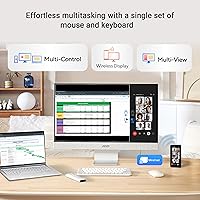
- Wireless Display: Miracast and Chromecast are both supported, enabling wireless screen mirroring from Android phones, Windows laptops, and Chromebooks without additional adapters.
- Ports: Connectivity includes USB-C, HDMI, DisplayPort, and a USB hub, covering the majority of modern laptop and desktop connection scenarios.
- Aspect Ratio: The standard 16:9 aspect ratio is compatible with all common video formats and productivity software layouts.
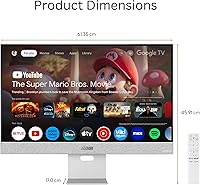
- Dimensions: The monitor body measures 24.2 x 1.8 x 20 inches (without stand), keeping the profile slim enough for most desk arrangements.
- Weight: The unit weighs 13.2 pounds, which is moderately heavy for a 27-inch display and worth considering if repositioning or mounting is planned.
- Warranty: ASUS includes a 3-year limited warranty, which is above average for the monitor category and provides meaningful long-term purchase confidence.
- Included Bonus: Each unit includes a code for 3 months of Adobe Creative Cloud, offering access to the full suite of Adobe applications at no additional cost during that period.
- Refresh Rate: The panel operates at 60Hz, which covers standard productivity and media use but does not support high-frame-rate gaming or adaptive sync technologies.
Related Reviews
ASUS ZenScreen MS32UC 32-inch 4K Smart Monitor
LG 27SR75U-W 27-inch 4K Smart Monitor
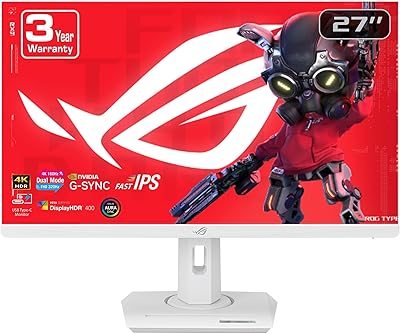
ASUS ROG Strix XG27UCG-W 27-inch Gaming Monitor

ASUS ROG Swift PG27UCDM 27-inch Gaming Monitor

ViewSonic VP2768a-4K 27-Inch 4K Monitor

ViewSonic VA2756-4K-MHD 27-inch 4K Monitor

ViewSonic VG2756-4K 27-Inch 4K Docking Monitor

ViewSonic VX2776-4K-MHDU 27-inch 4K IPS Monitor

Dell S2725QC 27-inch 4K USB-C Monitor