Overview

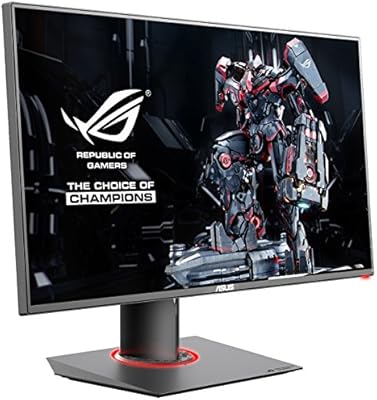
The ASUS ROG Strix XG27UCG-W 27-inch Gaming Monitor sits at the premium end of the 27-inch market, targeting players who refuse to choose between resolution and raw speed. The standout is its dual-mode capability — run the panel at 4K and 160Hz for visually rich titles, or drop to 1080p and push 320Hz for competitive play. That kind of flexibility is genuinely rare at this size. Built on Fast IPS technology, it handles color and response well enough for daily content work, not just late-night gaming. The white finish is a deliberate design statement rather than a color option. At this price tier, it competes directly with respected panels from LG and Samsung, so expectations should be calibrated accordingly.
Features & Benefits

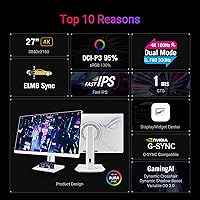
The dual-mode switching is where this ROG monitor earns its distinction. In practice, 4K at 160Hz suits open-world or strategy games where visual detail matters more than split-second timing — drop to FHD at 320Hz and you have a very different panel built for fast-twitch shooters. The Fast IPS technology delivers a 1ms GTG response, which is noticeably sharper in motion than standard IPS or VA alternatives. ELMB Sync combines motion blur reduction with variable refresh simultaneously, something most monitors force you to choose between. Add 95% DCI-P3 color coverage and USB-C with power delivery, and this display handles creative work and gaming without requiring a second screen or a cluttered cable setup.

Best For

This dual-mode display makes the most sense for players who genuinely move between game types — someone grinding ranked shooters on weekends and losing hours in a sprawling RPG the rest of the week. Content creators and streamers benefit from that color accuracy alongside the high refresh headroom without needing two separate monitors. If you're assembling a white or minimalist PC build, the aesthetic match is a real draw. Laptop users also get practical value from USB-C single-cable connectivity for both video and charging. That said, if competitive shooters are your only focus and creative work never enters the picture, a purpose-built esports panel would likely serve you better for less money.

User Feedback

Across more than 2,300 ratings, the XG27UCG-W holds a 4.4-star average — a solid result that holds up to closer inspection. Buyers repeatedly call out display clarity and color as highlights, and notably, the dual-mode feature draws real enthusiasm rather than passing novelty from people who actually toggle between modes in their daily sessions. Build quality earns consistent praise, and the white finish seems to hold up without the smudging or discoloration concerns some anticipated. Criticisms are less dramatic but worth noting: the OSD controls come up frequently as stiff or unintuitive, and a number of reviewers mention that the stand offers limited ergonomic range. Peak brightness is flagged as adequate but underwhelming for HDR use specifically.

Pros

  • Dual-mode flexibility lets you run 4K 160Hz or FHD 320Hz on a single panel depending on what you are playing.
  • Fast IPS delivers 1ms GTG response without the color trade-offs typical of TN panels.
  • ELMB Sync combines motion blur reduction and variable refresh simultaneously, which most competing displays still cannot do.
  • 95% DCI-P3 color coverage holds up well for photo editing and creative work alongside gaming.
  • USB-C with power delivery keeps desk cable management genuinely tidy for laptop users.
  • G-SYNC Compatible certification means smooth adaptive sync on both NVIDIA and AMD GPU setups.
  • The white finish is well-executed and durable based on real buyer reports, not just a paint job.
  • A three-year warranty provides meaningful long-term confidence for a premium purchase.
  • Build quality earns consistent praise across thousands of verified buyer reviews.
  • Out-of-the-box color accuracy is strong enough that most users will not need to recalibrate immediately.

Cons

  • The OSD controls are stiff and unintuitive, a recurring frustration noted by a wide range of buyers.
  • Stand ergonomics are limited — height and tilt adjustments fall short of what the price tier should offer.
  • Peak brightness is adequate for SDR gaming but underwhelming when HDR content is the use case.
  • At 27 inches, 4K pixel density is good but noticeably short of the sharpness a smaller 4K panel provides.
  • The price premium over strong 1440p competitors is hard to justify for users who never use 4K content.
  • Dual-mode switching, while useful, requires navigating the finicky OSD each time you want to change modes.
  • At 14.6 pounds, the monitor is heavier than many rivals, which can complicate arm or VESA mount setups.

Ratings

The scores below for the ASUS ROG Strix XG27UCG-W 27-inch Gaming Monitor were generated by our AI system after analyzing thousands of verified buyer reviews from global markets, with spam, bot submissions, and incentivized feedback actively filtered out. Each category score reflects the honest weight of real user sentiment — strengths and frustrations alike — so you get a clear picture of where this display genuinely delivers and where it falls short.
Display Clarity
91%
Buyers consistently describe the 4K image as crisp and immersive, particularly in open-world and cinematic titles where fine detail matters. The Fast IPS panel renders textures and color gradients with a level of precision that users upgrading from 1080p or 1440p panels find immediately striking.
At 27 inches, the pixel density — while good — does not reach the sharpness of smaller 4K panels viewed up close. A handful of users with high expectations from premium OLED monitors find the clarity impressive but not class-leading.
Dual Mode Versatility
88%
Real buyers who play across multiple genres rate this feature highly, describing it as genuinely practical rather than a novelty. Switching to FHD 320Hz for competitive shooters and back to 4K 160Hz for story-driven games on the same panel eliminates the usual compromise of owning a single-purpose display.
The mode switch requires navigating the OSD menu each time, which adds friction that a hardware shortcut or software toggle could easily solve. Users who only play one genre feel they are paying for a feature they rarely use.
Response Time & Motion
89%
The 1ms GTG Fast IPS response is noticeably cleaner in motion-heavy gameplay compared to standard IPS panels, and users report minimal trailing even in fast-paced titles. ELMB Sync running alongside variable refresh rate is something buyers specifically call out as a differentiator over competing displays.
In back-to-back comparisons with TN panels at similar refresh rates, a small number of experienced competitive players feel there is still a marginal difference in perceived motion clarity. This matters almost exclusively at the top tier of competitive play.
Color Accuracy
87%
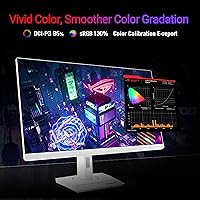
The 95% DCI-P3 coverage earns consistent praise from buyers who use this display for photo editing, video production, and streaming alongside gaming. Out-of-the-box calibration is described as surprisingly solid, with users noting they did not feel compelled to immediately reach for calibration hardware.
Professional colorists and those with hardware-calibrated reference monitors note that factory calibration, while good, is not laboratory-grade. Slight variance in uniformity across the panel is occasionally flagged in detailed reviews.
HDR Performance
61%
39%
HDR support is present and functional, and buyers report a visible improvement over SDR in compatible titles, particularly in well-lit outdoor environments within games. For casual HDR consumption, the panel delivers an acceptable experience.
Peak brightness is the limiting factor — this monitor simply cannot match the luminance output of high-end HDR-certified displays, and buyers who prioritize dramatic HDR contrast and highlights frequently express disappointment. At this price point, the HDR implementation feels like a checkbox rather than a priority.
Build Quality
84%
The overall construction earns positive remarks, with buyers describing the chassis as solid and the white finish as well-executed — more premium than plasticky. The panel itself shows no significant reports of flexing, backlight bleed, or dead pixels at scale.
The stand mechanism feels less refined than the panel it supports, with several users describing it as adequate but uninspiring relative to what rivals offer. A few buyers noted minor creaking in the stand arm over time.
Stand & Ergonomics
58%
42%
The stand provides functional tilt and height adjustment sufficient for a single-user desk setup, and the footprint is reasonably compact for a 27-inch display. Buyers who set it once and leave it tend to have fewer complaints.
For shared desks or users with specific ergonomic needs, the limited adjustment range is a real frustration that surfaces repeatedly in reviews. Height travel in particular is called out as too narrow, and the absence of pivot rotation is a notable omission at this price tier.
OSD & Controls
53%
47%
The OSD menu itself is logically organized once learned, and DisplayWidget Center software does give users a mouse-driven alternative for adjusting settings without touching the physical controls.
Physical OSD navigation buttons are widely described as stiff, small, and awkward to operate without looking directly at the back of the monitor. This is one of the most consistently mentioned pain points across the review base, particularly frustrating when switching dual modes regularly.
USB-C Connectivity
86%
Laptop users specifically highlight the USB-C port as a standout practical feature — one cable for video output and charging keeps desk setups clean and removes the need for a separate dock in many cases. The implementation works reliably across a wide range of compatible devices based on buyer reports.
Power delivery wattage is sufficient for most ultrabooks but may fall short for larger laptops with higher charging demands. Buyers with power-hungry laptops occasionally note the charging speed is slower than a dedicated charger.
Aesthetic & Design
83%
The white colorway is executed with enough care that buyers building white or monochrome rigs treat it as a genuine design asset rather than just an alternative color option. The overall silhouette is clean and modern without the aggressive styling typical of ROG products.
For buyers who do not care about build aesthetics, the white finish commands a slight premium that adds no functional value. A very small number of users in high-humidity environments raised questions about long-term finish durability, though widespread yellowing reports are absent.
Value for Money
72%
28%
For buyers who actively utilize both display modes and USB-C connectivity, the pricing feels justified relative to owning two specialized monitors. The three-year warranty adds tangible long-term value that factors into the overall cost calculation.
Single-use competitive gamers or budget-conscious buyers will find strong alternatives at meaningfully lower prices. When compared purely on a feature-per-dollar basis against LG and Samsung rivals, the XG27UCG-W requires a specific use case to justify its cost confidently.
Refresh Rate Performance
92%
320Hz in FHD mode is among the highest refresh rates available in this panel size, and buyers who play fast-paced shooters report a perceptibly smoother experience compared to their previous 144Hz or 165Hz setups. The 160Hz 4K ceiling is also competitive within the premium 4K monitor segment.
To fully saturate 320Hz in demanding titles, the GPU requirement is substantial, and buyers without top-tier graphics hardware may never see the full benefit of the panel's speed ceiling. This is a hardware ecosystem limitation rather than a monitor flaw, but it affects real-world value for many buyers.
Adaptive Sync
85%
G-SYNC Compatible certification delivers consistent, tear-free performance across both NVIDIA and AMD GPU setups based on broad buyer confirmation. Variable refresh rate operates smoothly across the supported range with no significant reports of flickering or range dropouts.
Some users note that VRR performance near the lower end of the refresh range is less smooth than monitors with wider VRR windows. G-SYNC Ultimate users accustomed to hardware module performance may notice a difference in behavior under very low frame rate conditions.
Warranty & Support
79%
21%
The three-year manufacturer warranty is one of the better coverage periods in the gaming monitor segment and gives buyers meaningful confidence for a premium purchase. Users who have engaged ASUS support report reasonably straightforward handling of panel defect claims.
A few buyers report longer-than-expected wait times for replacement panels through official support channels. Warranty service experience appears to vary by region, with some international buyers describing less responsive handling than users in core markets.

Suitable for:

The ASUS ROG Strix XG27UCG-W 27-inch Gaming Monitor is built for the kind of gamer who refuses to pigeonhole their setup into one mode of play. If your week includes both sweaty ranked matches in a fast-paced shooter and long sessions in visually dense open-world titles, the ability to flip between 4K 160Hz and FHD 320Hz on a single panel is genuinely useful rather than a marketing footnote. Content creators and part-time streamers will also find real value here — 95% DCI-P3 coverage means color work is credible, not just passable. Laptop users who want a single USB-C cable to handle both video output and charging will appreciate how clean that setup is in practice. Anyone building a white or monochrome PC aesthetic gets one of the very few high-performance monitors designed with that look as a primary consideration, not an afterthought.
Not suitable for:

Buyers with a narrow, singular focus should think carefully before committing to this ROG monitor. If competitive shooters are your only game and you never touch creative work or immersive single-player titles, there are purpose-built 1080p or 1440p esports panels that deliver comparable speed for considerably less money. The 27-inch 4K combination offers good pixel density, but it is not the razor-sharp retina-level clarity you get from a smaller 4K panel or a high-end OLED — buyers expecting that level of detail may come away underwhelmed. HDR performance is present on paper but lukewarm in practice, so if true HDR impact is a priority, this display will likely disappoint against dedicated HDR monitors. Those who need wide ergonomic adjustment for shared workspaces may also find the stand limiting based on consistent user reports.

Specifications

  • Screen Size: The panel measures 27 inches diagonally, providing a mid-sized footprint well suited to single-monitor desktop setups.
  • Resolution: Native resolution is 3840x2160 (4K UHD), delivering four times the pixel count of a standard 1080p display.
  • Dual Mode: A built-in Dual Mode allows the user to switch between 4K at 160Hz and Full HD (1920x1080) at 320Hz via the OSD menu.
  • Panel Type: ASUS Fast IPS technology provides wide viewing angles, accurate color reproduction, and a 1ms GTG response time.
  • Response Time: Gray-to-gray (GTG) response time is rated at 1ms, minimizing trailing or smearing during fast-motion gameplay.
  • Refresh Rate: Maximum refresh rate is 320Hz in FHD mode and 160Hz in 4K mode, covering both competitive and immersive gaming scenarios.
  • Color Gamut: The panel covers 95% of the DCI-P3 color space, making it suitable for color-sensitive creative and production work.
  • HDR Support: The monitor supports HDR content playback, though peak brightness levels are moderate rather than high-end HDR-tier.
  • Adaptive Sync: G-SYNC Compatible certification enables variable refresh rate support for both NVIDIA and AMD graphics cards.
  • Motion Blur Tech: ELMB Sync technology allows simultaneous activation of Extreme Low Motion Blur and variable refresh rate without conflict.
  • Connectivity: Inputs include USB-C with power delivery, making single-cable laptop connectivity practical for video output and charging together.
  • USB Ports: The monitor provides three USB 3.0 downstream ports for peripheral connectivity directly from the display hub.
  • Aspect Ratio: Standard 16:9 widescreen aspect ratio ensures compatibility with the full range of modern games and media content.
  • Screen Surface: The matte screen surface reduces reflections and glare from ambient light sources in typical room environments.
  • Color: The monitor is finished in white, designed to complement white or monochrome PC builds rather than the traditional black ROG aesthetic.
  • Dimensions: With the stand attached, the monitor measures approximately 24.2 x 20.1 x 8.6 inches (W x H x D).
  • Weight: Total weight with stand is 14.6 pounds, which is heavier than many competitors in the same size category.
  • Warranty: ASUS includes a three-year manufacturer warranty, providing solid long-term coverage for a premium-tier purchase.

Related Reviews

ASUS ROG Strix XG27ACS 27-inch Gaming Monitor
79%
91%
Image Clarity & Sharpness
89%
Motion Performance & Refresh Rate
86%
Color Accuracy & Vibrancy
47%
HDR Performance
88%
Adaptive Sync & G-Sync Compatibility
More
ASUS ROG Strix XG27AQMR 27” Gaming Monitor
87%
94%
Gaming Performance
91%
Visual Quality
88%
Build Quality
96%
Refresh Rate & Response Time
87%
Color Accuracy
More
ASUS ROG Strix XG259QNS 24.5-inch Gaming Monitor
80%
93%
Motion Clarity
91%
Input Responsiveness
78%
Refresh Rate Value
67%
Image Quality
88%
Build Quality
More
ASUS ROG Swift PG279QM 27-inch 1440p Gaming Monitor
86%
93%
Display Quality
95%
Performance for Gaming
89%
Build Quality
91%
Color Accuracy
72%
Ease of Setup
More
ASUS ROG Strix XG259CMS 24.5-inch 310Hz Gaming Monitor
87%
94%
Gaming Performance
98%
Refresh Rate
91%
Color Accuracy
86%
Build Quality
85%
Ergonomics
More
ASUS ROG Swift PG27AQDM-R 27-inch OLED Gaming Monitor
88%
94%
Display Quality
92%
Color Accuracy
91%
Refresh Rate and Response Time
88%
Build Quality
89%
Ease of Setup
More
ASUS ROG Swift PG27UCDM 27-inch Gaming Monitor
82%
96%
Image Quality
97%
Black Levels & Contrast
93%
Gaming Performance
91%
Color Accuracy
88%
Text Clarity
More
ASUS VZ279QG1R 27-inch 1080P Gaming Monitor
83%
88%
Gaming Performance
91%
Smooth Visuals (Motion Blur Reduction)
93%
Value for Money
80%
Build Quality
85%
Display Quality (Color Accuracy, Brightness)
More
ASUS VG27AQ3A 27-inch QHD Gaming Monitor
76%
91%
Image Sharpness & Clarity
88%
Refresh Rate Performance
86%
Motion Clarity & ELMB Sync
83%
Color Accuracy & Coverage
54%
HDR Performance
More
ASUS ROG Strix XG249CM 24” 1080P Gaming Monitor
86%
96%
Refresh Rate & Response Time
90%
Visual Quality & Clarity
88%
Build Quality & Durability
85%
Ergonomics & Adjustability
91%
Color Accuracy
More

FAQ

You toggle between the two modes through the monitor's OSD (on-screen display) menu. It is worth noting that the OSD controls on this display have been described by many users as stiff and a bit unintuitive to navigate, so it is not a one-button instant switch — budget a minute the first few times until you get familiar with the menu layout.

It works well with both. The XG27UCG-W carries G-SYNC Compatible certification, which means adaptive sync functions correctly with NVIDIA GPUs. AMD cards using FreeSync also work fine since the underlying technology is compatible — you are not locked into one camp.

At 27 inches, 4K gives you a solid pixel density of around 163 PPI, which looks noticeably cleaner than 1080p or 1440p at the same size. That said, it is not the razor-sharp retina-level clarity you would get from a smaller 4K screen. For most people sitting at a normal desk distance, it looks great — just do not expect it to rival a compact 24-inch 4K panel up close.

Yes, and this is one of its more practical strengths. The USB-C port supports both video output and power delivery, so a compatible laptop can run the display and charge through a single cable. It keeps the desk clean and reduces the usual tangle of adapters.

Honestly, moderate. The ASUS ROG Strix XG27UCG-W 27-inch Gaming Monitor supports HDR, but its peak brightness is not in the same league as monitors built specifically for impactful HDR output. You will see a difference compared to SDR, but if HDR immersion is a top priority, you would be better served by a panel with significantly higher nit output.

Based on buyer feedback across thousands of reviews, the white finish holds up well with normal use. There are no widespread reports of yellowing or premature wear. Smudging from fingerprints is minimal thanks to the matte surface coating, though wiping down the casing occasionally with a soft cloth is always a good habit.

The stand is functional but limited. Height adjustment and tilt are available, but the range falls short of what you might expect at this price point. Several reviewers specifically call this out as a frustration, particularly in shared spaces where multiple people use the monitor. If ergonomics matter to you, a VESA-compatible arm is worth considering — the display does support VESA mounting.

Yes, realistically you need a high-end GPU to push 4K at 160Hz in demanding titles. This is less a limitation of the monitor and more just the reality of 4K gaming. The FHD 320Hz mode is actually the easier mode to fully utilize — a mid-to-high-range card can hit those frame rates in competitive titles without much trouble. The dual-mode design makes sense partly for this reason.

Most buyers report that color accuracy out of the box is quite good and usable without immediate recalibration. The 95% DCI-P3 coverage translates into rich, consistent color in typical use. If you do color-critical professional work, a hardware calibration tool will always give you a more precise result, but for gaming and general creative use, the default profile is respectable.

Probably not the best fit, and it is worth being direct about that. If your entire library is fast-paced multiplayer games and high frame rates are your only real concern, a purpose-built esports monitor at a lower price will likely serve you just as well — or better. This dual-mode display earns its premium when you genuinely use both modes. Single-use competitive players are paying for features they would rarely touch.