Overview

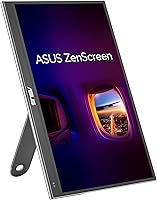
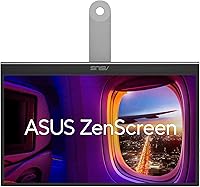
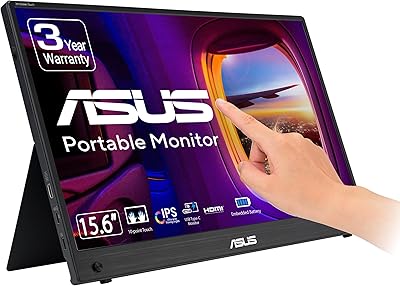
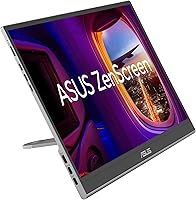
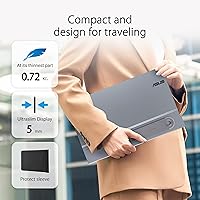
The ASUS ZenScreen 16-inch OLED Portable Monitor entered a crowded market in mid-2024 with a clear target audience in mind: mobile creatives and power users who need accurate color wherever the work takes them. What sets it apart immediately is an actual OLED panel — something most competitors at this price point can't claim. The display sits just 0.4 inches thin and slips into the included protective sleeve without drama. At just under five pounds, it's not feather-light, but manageable for regular commutes. What really builds confidence is the 3-year warranty — almost unheard of in this category, where most portable displays come with just one year of coverage.
Features & Benefits

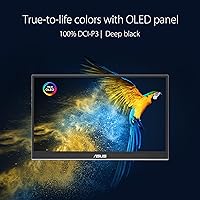
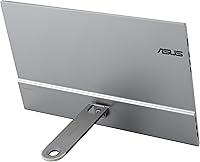
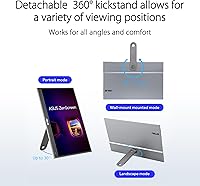
What sets the ZenScreen MQ16AHE apart on a spec sheet is the OLED technology — full stop. Most portable monitors at this price use IPS LCD, which means grayish blacks and limited contrast. Here, the 100% DCI-P3 coverage is not just a marketing checkbox; for a photographer previewing RAW edits or a video editor checking color grading away from their workstation, it's genuinely useful. The 1ms response time keeps motion looking clean during video playback and casual gaming. Connectivity is solid: dual USB-C ports let you power and connect simultaneously, with Mini HDMI rounding out older-device support. The 360-degree kickstand adds real flexibility, and the embedded tripod socket is a clever touch for studio setups. Auto-rotation works, though it requires DisplayWidget Center software — expect occasional quirks.

Best For

This portable display makes the most sense for creative professionals who need reliable color accuracy outside the studio — photographers doing on-location client reviews, colorists working remotely, and graphic designers who hot-desk between spaces. Frequent travelers and remote workers wanting a proper second screen without the bulk will also find it a practical carry. Students moving between campus setups and handheld gamers (Steam Deck connects cleanly over USB-C) round out the core audience. That said, if your workflow demands QHD or 4K resolution, this isn't it — 1080p is the ceiling. Anyone with real concern about OLED burn-in should also be mindful of leaving static taskbars or windows on screen for extended periods.

User Feedback

With over 600 ratings and a 4.1-star average, the ZenScreen MQ16AHE earns its score mostly on panel quality — buyers consistently single out color vibrancy and contrast as standout strengths relative to the asking price. Build quality also draws frequent praise; it doesn't feel flimsy in hand. The criticisms, however, are worth taking seriously. The glossy screen is a real liability in brightly lit rooms or near windows — this isn't a display you'll enjoy in direct sunlight. Some users report auto-rotation misfiring or requiring a software restart. There are also scattered notes about USB-C power delivery compatibility issues, where certain laptops fail to power the monitor correctly. Not dealbreakers, but worth knowing.

Pros

  • The OLED panel produces genuinely deep blacks and vivid color that IPS portable monitors simply cannot match.
  • Full DCI-P3 color coverage makes this a credible working tool for photographers and colorists on the go.
  • The 1ms response time keeps video playback and casual gaming looking smooth and artifact-free.
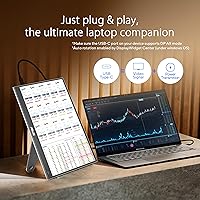
  • Two USB-C ports allow simultaneous power and data connection, so you're not hunting for a second cable.
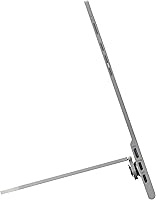
  • The 360-degree kickstand handles desk, floor, and angled-surface setups without needing a separate stand.
  • An embedded tripod socket on the rear is a thoughtful addition for photographers who already carry a tripod.
  • At just 0.4 inches thick, this portable display fits easily into any laptop bag alongside your other gear.
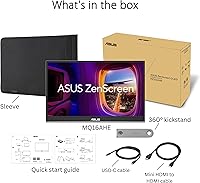
  • The included sleeve, HDMI cable, and USB-C cable mean you're ready to use it straight out of the box.
  • A 3-year warranty offers rare peace of mind in a product category where one-year coverage is the norm.
  • Eye Care certification and HDR-10 support add useful versatility for longer work sessions and media consumption.

Cons

  • The glossy screen surface picks up reflections aggressively in bright rooms or near windows, making it uncomfortable to use.
  • At 4.65 pounds, it runs heavier than several competing portable monitors, which adds up over a long travel day.
  • Auto-rotation relies entirely on DisplayWidget Center software and a proximity sensor that users report behaving inconsistently.
  • The 1080p resolution is a genuine limitation for users who need fine detail in high-density creative work.
  • USB-C power delivery compatibility is inconsistent across devices; some laptops simply fail to power the monitor reliably.
  • OLED burn-in is a real long-term consideration for anyone who frequently leaves static content on screen for hours.
  • There are no built-in speakers, so audio from connected devices requires separate headphones or an external speaker.
  • The premium asking price is harder to justify on resolution alone; buyers at this tier often expect at least QHD.

Ratings

The scores below were generated by our AI after analyzing verified buyer reviews for the ASUS ZenScreen 16-inch OLED Portable Monitor from global platforms, with automated filtering applied to remove bot-generated, incentivized, and duplicate submissions. Both the aspects buyers consistently celebrate and the friction points that generate real complaints are transparently reflected in each category score. No attribute has been polished or softened — the ratings represent an honest composite of real-world ownership experiences.
Display Quality
93%
The OLED panel is the single biggest reason buyers choose this display over cheaper portable alternatives, and the reviews consistently reflect that. True blacks and exceptional per-pixel contrast make everything from edited photos to streamed video look visually compelling. Dark scenes in particular reveal a depth that IPS portable monitors at any price simply cannot match.
Buyers with exposure to higher-resolution OLED screens occasionally note that 1080p limits how much the panel can shine for fine detail work. There is also some brightness variance at higher settings, where color tone may shift slightly under heavy display load. For most everyday tasks, though, neither issue meaningfully detracts from the overall experience.
Color Accuracy
91%
Photographers and colorists who have used this portable display for on-location client reviews consistently report that colors look true and reliable compared to their calibrated studio monitors. The full DCI-P3 coverage means this is a genuinely usable tool for color-critical workflows, not just a screen with marketing-friendly spec numbers. Out-of-box accuracy draws consistent praise from creative professionals.
Without hardware calibration, the display can skew slightly warm or saturated for the most demanding color workflows. Buyers expecting Rec.2020 or Adobe RGB coverage for broadcast or print work will also need to look elsewhere. These are niche concerns for most users, but worth knowing for professional colorists.
Portability
78%
22%
At 0.4 inches slim and packaged with a dedicated protective sleeve, this OLED portable monitor genuinely earns its travel-ready billing for most commuters and mobile workers. The included sleeve makes tossing it into a backpack alongside a laptop a straightforward affair, and the 360-degree kickstand removes the need to carry a separate stand.
At 4.65 pounds, it sits on the heavier end for portable monitors — several competing models come in noticeably lighter, which matters during full-day travel. Reviewers who fly carry-on only or cycle commute note the weight adds up alongside a laptop and charger. It is manageable, but not class-leading for ultralight users.
Build Quality
84%
Reviewers consistently describe the ZenScreen MQ16AHE as feeling premium in hand — the chassis is solid without flex, and the kickstand mechanism feels deliberate rather than cheap. For a portable monitor, this matters: users report taking it through airports, hotel rooms, and co-working spaces over months without any structural complaints or surface degradation.
A handful of reviewers mention that the glossy rear panel picks up fingerprints visibly and shows minor scuffs after extended bag use despite the sleeve. Some also note that the kickstand can feel less secure at extreme angles compared to purpose-built desktop monitor stands. Minor concerns overall, but worth noting for buyers who handle equipment roughly.
Connectivity
76%
24%
Having two USB-C ports is a meaningful practical advantage — it means you can run a data cable from your laptop and a separate power cable simultaneously without hunting for a dock. Most modern laptops, tablets, and gaming handhelds connect cleanly, and the Mini HDMI option extends compatibility to desktops and older devices that lack USB-C output.
The Mini HDMI port rather than full-size HDMI means carrying the included adapter cable at all times — a recurrent minor complaint from cable-conscious travelers. USB-C power delivery compatibility is also inconsistent, with several reviewers reporting specific laptop models failing to reliably power the display from bus power alone without the dedicated adapter.
Glare & Screen Surface
47%
53%
In dim or controlled office lighting, the glossy surface does allow the OLED's colors and contrast to pop with noticeable clarity — blacks look deeper and colors feel more saturated than they would through an anti-glare coating. Users in home office setups with controllable lighting occasionally mention the screen feels more vibrant than matte alternatives.
This is the single most complained-about aspect across verified reviews — the glossy surface reflects overhead lighting and windows aggressively, making extended use genuinely frustrating in most real-world office or cafe environments. There is no matte screen option in this product line, leaving buyers in bright or variable-light spaces with no built-in solution.
Response Time
86%
The 1ms response time is a genuine differentiator compared to most portable IPS monitors, which typically land between 5ms and 10ms — a gap that shows up in smoother motion during video playback and tighter input response during casual gaming. Steam Deck and Switch users report noticeably less motion blur compared to their previous portable monitor experiences.
Competitive gamers expecting high refresh rates will hit a wall — the display caps at 60Hz, limiting its usefulness for fast-paced gaming beyond casual play. A minority of reviewers also note occasional input lag inconsistencies when connected through USB-C hubs, though this appears more related to host device behavior than the panel itself.
Auto-Rotation
58%
42%
When the auto-rotation feature works correctly, flipping the display from landscape to portrait is genuinely useful for reading long documents, coding with a vertical layout, or reviewing portrait-format photos without manually adjusting display settings. A subset of users — particularly those on Windows — report a consistent and reliable experience when the software is properly configured.
The feature's dependence on DisplayWidget Center software is its primary weakness — it does not function as a hardware-level feature, meaning it is unavailable on Macs running certain OS versions, Linux systems, and mobile devices. Reviewers consistently flag the sensor as unreliable, with misfire events, delayed responses, and the need for periodic software restarts degrading the overall experience.
Kickstand & Ergonomics
81%
19%
The 360-degree kickstand is one of the more thoughtfully designed elements of this portable display — it handles desk use, floor setups, angled viewing in bed, and portrait mode without needing any accessories. The embedded tripod socket is an unexpectedly useful addition for photographers who already travel with a tripod, effectively turning this into a mountable field monitor.
At very shallow or very steep angles, the kickstand loses some grip stability — a few reviewers report it slipping on smooth surfaces like glass desks or laminate tables. The display also lacks a built-in cable management solution, so in portrait mode especially, dangling cables can interfere with the kickstand's footprint on a narrow desk surface.
Value for Money
73%
27%
For buyers specifically shopping for an OLED portable monitor, this portable display offers a competitive package — the panel quality, included accessories, and 3-year warranty together represent strong value within the OLED portable segment, where most alternatives cost similarly or more. Creative professionals who can genuinely use the DCI-P3 color accuracy will feel the premium is justified.
For general-purpose users who do not actively need DCI-P3 coverage, the premium price is harder to justify against capable IPS portable monitors that cost considerably less. The 1080p resolution ceiling is also the most recurring value complaint in reviews — at this price, many buyers reasonably expect at least QHD from competing options.
Eye Comfort
79%
21%
The Eye Care certification provides real-world benefit for users spending long sessions at the display — reduced flicker and lowered blue light emission are legitimately useful for late-night work sessions or extended video editing marathons. Several reviewers specifically mention less eye fatigue compared to their laptop screens during multi-hour portable monitor use.
OLED panels can exhibit PWM dimming at lower brightness settings, which some light-sensitive users find causes discomfort over long sessions even with Eye Care features active. The glossy screen surface also compounds eye strain in bright environments by layering reflective glare on top of any fatigue from extended viewing.
Software Experience
63%
37%
DisplayWidget Center does provide useful functionality beyond auto-rotation, including brightness and color mode adjustments accessible directly from the desktop without navigating physical buttons. Users who set it up correctly and keep it updated generally find it adds meaningful control over the display's behavior in multi-screen configurations.
The software is a recurring friction point — initial setup confuses new users, and auto-update behavior is inconsistent across Windows and macOS versions. Core features like auto-rotation being gated behind this proprietary application means the display loses key functionality on Linux, iPads, and other non-standard host devices.
Setup & Compatibility
67%
33%
For the majority of users connecting to a modern Windows or Mac laptop with a USB-C cable, the initial setup is quick — plug in, install DisplayWidget Center, and the monitor is ready within minutes. Broad USB-C compatibility means most users will not need additional adapters for their primary device on day one.
USB-C power delivery inconsistency is the most commonly reported setup headache — a subset of users find their laptop cannot supply enough wattage to run the display without the dedicated power adapter, undermining the single-cable convenience the monitor markets itself on. Users connecting from Chromebooks or certain Android phones also report variable and unreliable success.
HDR Performance
82%
18%
On an OLED panel, HDR-10 content looks meaningfully better than on LCD alternatives — the combination of true blacks and per-pixel control allows highlight and shadow detail to coexist in a way that static-backlit screens cannot replicate. Streaming HDR content from a connected laptop or console produces visibly richer, more dimensional images.
The display does not support Dolby Vision or higher HDR tier certifications, which limits its credentials compared to higher-end portable displays entering the market. Peak brightness, while adequate for indoor use, falls short in bright ambient conditions where HDR highlights need extra luminance to read clearly — a common constraint across most OLED portable displays at this size.
Warranty & After-Sales
88%
A 3-year manufacturer warranty is exceptional for a portable monitor — most competitors in this category offer just 12 months before additional coverage requires a paid extension. For buyers investing a meaningful sum in a portable display, this provides genuine peace of mind against panel defects, hardware failures, and manufacturing issues over the medium term.
Warranty service quality varies by region — some international buyers report slower turnaround times and limited local service center availability compared to the standard experience in ASUS's primary markets. OLED burn-in is also typically classified as user-induced damage rather than a manufacturing defect, meaning the warranty may not cover this scenario even within its active period.

Suitable for:

The ASUS ZenScreen 16-inch OLED Portable Monitor is built for people whose work depends on color accuracy, but who aren't always sitting at a fixed workstation. Photographers doing on-location client reviews, video editors traveling between sets, and graphic designers who hot-desk between offices will find the OLED panel's full DCI-P3 coverage a genuinely useful working tool rather than a compromise. Remote workers and frequent travelers who need a real second screen — not just a mirrored laptop display — will appreciate that it slips into a bag via the included sleeve without drama. Students who move between dorms, libraries, and seminar rooms will also find this a quick and painless setup with a single USB-C cable. Handheld gamers, particularly Steam Deck owners, can get meaningful visual benefits too — the fast response time and vibrant OLED contrast are a clear step up from most portable LCD alternatives at this size.
Not suitable for:

If you plan to use a portable monitor primarily in bright, sun-facing environments or outdoor settings, the ZenScreen MQ16AHE's glossy screen will be a persistent frustration — reflections are a genuine and recurring complaint among buyers, not a minor edge case. Anyone who needs QHD or 4K resolution for detailed photo retouching, high-density data work, or sharp text at larger viewing distances will hit a hard ceiling here, as the ASUS ZenScreen 16-inch OLED Portable Monitor tops out at Full HD — a real trade-off given where this sits on price. Users who routinely leave static elements on screen for many hours, such as fixed spreadsheets, locked taskbars, or persistent UI panels, should also weigh the OLED burn-in risk honestly before committing. Buyers who rely on a wide range of host devices should verify USB-C power delivery compatibility first, since some machines don't supply sufficient wattage and that has caused real headaches. Finally, anyone expecting fully plug-and-play auto-rotation should know the feature depends on proprietary software that doesn't run on every platform.

Specifications

  • Panel Type: This monitor uses an OLED panel, which produces per-pixel illumination for true blacks and high native contrast without a backlight.
  • Screen Size: The active display area measures 15.6 inches diagonally, marketed by ASUS under the 16-inch class designation.
  • Resolution: Native resolution is 1920×1080 pixels, delivering Full HD output in a standard 16:9 layout.
  • Color Gamut: The panel covers 100% of the DCI-P3 color space, the reference gamut used in professional film color grading and high-end photo workflows.
  • Response Time: Pixel response time is rated at 1ms, which is significantly faster than most IPS-based portable monitors in this size class.
  • HDR Support: The display supports the HDR-10 open standard for playback of high dynamic range video content.
  • Connectivity: Input options include two USB Type-C ports and one Mini HDMI port for flexible device connection.
  • Kickstand: A 360-degree adjustable kickstand is built into the rear of the unit, supporting both landscape and portrait orientations across a wide range of angles.
  • Tripod Socket: An embedded tripod-mount socket on the rear panel allows the monitor to be secured to any standard camera tripod.
  • Weight: The monitor weighs 4.65 pounds (approximately 2.11 kg) without accessories or cables.
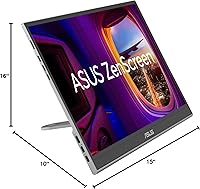
  • Dimensions: Physical dimensions measure 14.1 × 8.9 × 0.4 inches (approximately 358 × 226 × 10 mm) at its slimmest point.
  • Aspect Ratio: The display uses a standard 16:9 widescreen aspect ratio compatible with the majority of laptops, consoles, and video content.
  • Screen Surface: The screen uses a glossy, glare-type surface finish, which can reflect ambient light noticeably in bright or window-facing environments.
  • Eye Care: The monitor carries ASUS Eye Care certification, indicating compliance with low blue-light emission and flicker-reduction standards.
  • Proximity Sensor: A built-in proximity sensor detects physical orientation changes and triggers automatic screen rotation when DisplayWidget Center software is active on the host device.
  • Warranty: ASUS provides a 3-year manufacturer warranty covering defects in materials and workmanship from the date of purchase.
  • In-Box Accessories: The package includes a Mini HDMI to HDMI cable, a USB-C cable, a power adapter, and a protective sleeve.
  • Required Software: The auto-rotation feature requires installation of ASUS DisplayWidget Center software on the connected host device to function.

Related Reviews

ASUS ZenScreen Touch 16-inch Portable Monitor (MB16AMTR)
87%
94%
Portability & Weight
88%
Touchscreen Functionality
72%
Battery Life
85%
Display Quality
90%
Connectivity Options
More
ASUS ZenScreen Duo OLED 14-inch Portable Monitor
77%
93%
Display Quality
91%
Color Accuracy
88%
Dual-Screen Concept
84%
Build & Hinge Quality
71%
Portability
More
Newsoul M160B04 16″ OLED Portable Monitor
77%
93%
Image Quality
89%
Portability
86%
Color Accuracy
84%
Gaming Performance
58%
Brightness & Glare
More
ASUS ZenScreen MB229CF 22-inch Portable Monitor
79%
88%
Display Quality
63%
Portability
91%
Mounting Versatility
84%
Connectivity
67%
Built-in Audio
More
Magedok 16-inch 4K OLED Touchscreen Portable Monitor
85%
91%
Display Quality
89%
Portability
75%
Touchscreen Performance
65%
Brightness in Bright Environments
88%
Gaming Performance
More
ASUS ZenScreen MB14AC 14-inch Portable Monitor
82%
93%
Portability
91%
Setup & Compatibility
82%
Display Quality
61%
Brightness
88%
Build Quality
More
ViewSonic VP16-OLED 15.6-inch Portable OLED Monitor
80%
93%
Display Quality
91%
Color Accuracy
88%
Portability
74%
USB-C Connectivity
81%
Build Quality
More
ViewSonic VX1655-4K-OLED 15.6-inch Portable OLED Monitor
77%
93%
Display Quality
91%
Portability
84%
USB-C Connectivity
88%
Build Quality
67%
Stand Stability
More
LXU S11 16-inch Portable Screen Extender
71%
83%
Display Quality
88%
Aspect Ratio Utility
91%
Setup & Ease of Use
41%
Mac Compatibility
62%
Portability
More
WUAWE WAB160 16-inch Portable Monitor
76%
91%
Portability
83%
Build Quality
78%
Display Clarity
61%
Brightness
86%
Connectivity
More

FAQ

In most cases, yes — the ZenScreen MQ16AHE supports video and data over USB-C on MacBooks that output DisplayPort Alt Mode or Thunderbolt. That said, power delivery behavior varies by model, and some MacBooks may not supply enough wattage to run the display entirely on their own, in which case you would plug in the included power adapter alongside the USB-C data cable.

Mostly, yes — video input, touch input if supported, and general display functions all work without software. The only feature that requires ASUS DisplayWidget Center to be installed is the auto-rotation, which relies on that software to interpret signals from the proximity sensor. If you plan to use the display in landscape mode only, you can skip the software entirely.

It depends heavily on where you use it. In a controlled indoor environment away from direct overhead lighting or large windows, reflections are manageable. In brighter rooms, near windows, or in mixed-light office spaces, the glossy surface picks up reflections quite visibly, and this is the most consistently raised complaint from buyers in user reviews. If you work frequently in bright or variable lighting, it is a real limitation worth considering before purchasing.

Yes, the Steam Deck connects via USB-C and should drive this portable display without issue in most setups, though you may want a USB-C dock to handle power simultaneously. The OLED contrast and fast response time make a genuine visual difference for gaming compared to a typical portable IPS monitor. Just be mindful of ensuring the Deck or an external power source can handle both devices at once.

Burn-in is a real characteristic of OLED technology, but for most typical use patterns it is a long-term risk rather than an immediate concern. The scenarios that accelerate burn-in are leaving high-contrast static elements — a fixed taskbar, a game HUD, a locked spreadsheet header — on screen at high brightness for many consecutive hours, repeated over months or years. For users who vary their content, dim the display when idle, and power it off when not in use, burn-in is unlikely to surface in the short to medium term.

The ASUS ZenScreen 16-inch OLED Portable Monitor can run off a single USB-C port on some laptops, but this is not guaranteed across all devices since power delivery output varies widely by host machine. A meaningful number of users have reported that their laptop did not supply enough wattage to power the display reliably on its own. When in doubt, connect the included power adapter and use the USB-C cable purely for data to avoid any instability.
It works, but inconsistently enough that you should think of it as a convenience feature rather than a core function to build your workflow around. The proximity sensor detects orientation changes and hands off to DisplayWidget Center software, but users report it occasionally misfiring or requiring a software restart to re-engage. For reliable portrait mode use, manual rotation through your operating system display settings is always a fallback option.

At a typical arm's-length viewing distance, 1080p is adequate for browsing, video playback, video calls, and general productivity tasks. It starts to feel limited when you are doing close-up detailed work — fine photo retouching, small-font text in dense documents, or precision UI design — where QHD or higher resolution would give you noticeably crisper detail. It is a genuine trade-off at this price tier, and worth factoring in if resolution-sensitive work is your primary use case.

The box includes a Mini HDMI to HDMI cable, a USB-C cable, the power adapter, and a protective sleeve, so most users will have everything they need for a standard laptop or desktop connection right out of the box. The main situation where you would need something extra is if your setup involves a USB-C dock, a proprietary connector, or a device that uses a different video output standard altogether. For a straightforward laptop-to-monitor connection, nothing additional is required.

The difference is real and visible, particularly in darker content where the OLED panel produces absolute blacks that an IPS backlight simply cannot replicate. Color is also richer and more accurate out of the box thanks to the full DCI-P3 coverage, which matters most for anyone working with photos, video, or any color-critical content. Whether that gap justifies the price premium over a well-calibrated IPS alternative is a personal call, but for color-sensitive workflows the advantage is consistent and not subtle.

Where to Buy