ASUS ZenScreen MB229CF 22-inch Portable Monitor
Overview
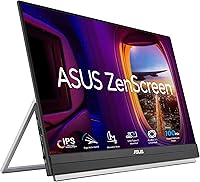
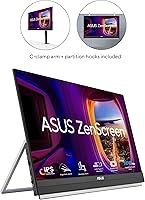
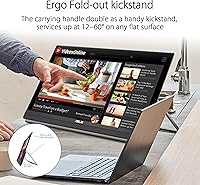
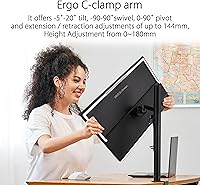
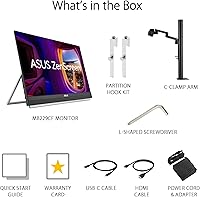
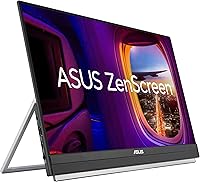
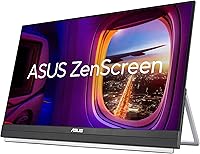
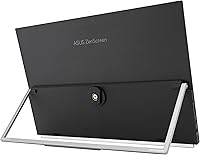
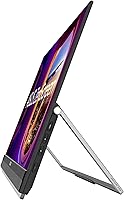
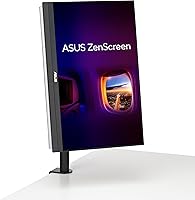
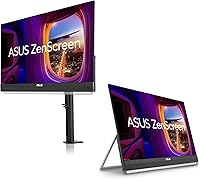
The ASUS ZenScreen MB229CF 22-inch Portable Monitor sits in an interesting position: it's bigger and more capable than most travel-oriented screens, yet genuinely designed to move with you. The integrated carrying handle, folding kickstand, C-clamp arm, and partition hook all come in the box — a complete mounting ecosystem, not an afterthought. ASUS backs this portable monitor with a 3-year warranty, rare in a category where most rivals offer just one. The honest caveat is weight: at around 8.8 lbs with accessories, this ASUS screen isn't something you'll casually toss into a daypack. It trades raw portability for a significantly richer feature set.
Features & Benefits
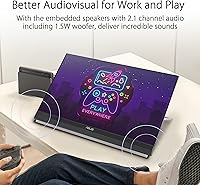
The IPS panel runs at 100Hz, which makes scrolling through documents noticeably crisper than the 60Hz panels common in this category. More practically, the USB-C port supports 60W power delivery — enough to charge many laptops while displaying content, cutting down meaningfully on desk cable clutter. The matte screen surface handles office lighting well, keeping reflections manageable in bright co-working spaces. Audio is where things get interesting: the ZenScreen MB229CF includes a 2.1-channel speaker system with a subwoofer, genuinely unusual for a portable display. The sound is better than typical monitor speakers, though don't expect it to replace a dedicated Bluetooth speaker. A bundled Adobe Creative Cloud trial rounds out a thoughtfully assembled package.
Best For
This portable monitor makes the most sense for remote and hybrid workers who bounce between home offices and client sites — they get a consistent, larger screen without needing separate gear for each location. Cubicle workers will appreciate the partition hook, which lets the ZenScreen MB229CF hang directly off a divider panel, saving desk footprint entirely. Content creators who need reliable color accuracy but can't justify a full desktop display setup will find the IPS panel a solid fit. If long-term reliability matters to you, the 3-year warranty provides meaningful peace of mind. This isn't the right pick for someone who wants a lightweight screen to stuff in a carry-on — but for disciplined commuters and office-based travelers, it earns its space.
User Feedback
Across a substantial pool of verified purchases, the ZenScreen MB229CF holds a strong 4.5-star average, and the praise is consistent: buyers appreciate the image quality, the versatility of the mounting system, and how well the USB-C connectivity simplifies their setup. That said, the weight comes up repeatedly as a genuine consideration — several users note it feels more like a portable desktop extension than a true travel screen. USB-C compatibility with certain third-party hubs has caused occasional confusion, so checking your laptop's power output before buying is worth doing. Speaker performance gets mixed notes; the audio is above average for the category but doesn't quite live up to the subwoofer billing. A handful of creative users report solid color accuracy out of the box.
Pros
- The 100Hz IPS panel produces noticeably smoother visuals than the 60Hz screens common on competing portable monitors.
- USB-C with 60W power delivery lets you charge your laptop and run the display through a single cable.
- The matte screen surface handles bright office and co-working lighting without producing distracting reflections.
- Built-in 2.1-channel audio with a subwoofer is a rare feature in this category and genuinely outperforms typical monitor speakers.
- The all-in-one accessory package — kickstand, C-clamp, and partition hook — covers nearly every real-world setup scenario.
- A 3-year warranty provides meaningful coverage that most competing portable monitors simply do not offer.
- Color accuracy on the IPS panel is strong enough for light creative work like photo review and design proofing.
- The partition hook is a clever space-saving solution that lets cubicle workers mount the screen without touching their desk.
- A bundled Adobe Creative Cloud trial adds real value for photographers, designers, and video editors.
- The strong 4.5-star rating across thousands of buyers reflects consistent real-world satisfaction, not just spec-sheet appeal.
Cons
- At around 8.8 lbs, this portable monitor is too heavy for comfortable daily commuting in a standard backpack.
- USB-C compatibility issues with certain third-party hubs have caused setup headaches for a subset of buyers.
- Speaker audio, while above average, does not fully live up to the subwoofer billing — physics still limits portable drivers.
- The premium price is harder to justify if you only need a basic second screen without the full mounting ecosystem.
- Resolution is capped at 1080p, which may feel limiting on a 22-inch panel for users accustomed to sharper displays.
- C-clamp setup can be fiddly for first-time users, particularly getting the Z-axis adjustment dialed in correctly.
- The accessory bundle, while comprehensive, adds bulk to transport and makes packing less straightforward than simpler rivals.
- HDMI input is present but the cable management story is less clean than a pure USB-C single-cable setup.
Ratings
Our AI-generated scores for the ASUS ZenScreen MB229CF 22-inch Portable Monitor were produced by systematically analyzing thousands of verified global purchase reviews, with spam, bot activity, and incentivized feedback actively filtered out before scoring. Each category reflects the full spectrum of real buyer experiences — not just the highlights — so both genuine strengths and recurring frustrations are transparently baked into every number. The result is an honest, nuanced picture of where this portable monitor earns its reputation and where it genuinely falls short.
Display Quality
Portability
Mounting Versatility
Connectivity
Built-in Audio
Refresh Rate Performance
Build Quality
Glare & Screen Usability
Setup Experience
Value for Money
Warranty & Support
Color Accuracy
Cable Management
Suitable for:
The ASUS ZenScreen MB229CF 22-inch Portable Monitor was clearly designed with a specific type of professional in mind: someone who moves between locations regularly but refuses to compromise on screen real estate or display quality. Hybrid workers who split time between a home office and a corporate desk will find it particularly practical, since the included C-clamp, kickstand, and partition hook mean it adapts to almost any workspace without extra purchases. Cubicle-based employees get a genuinely clever option in the partition hook, which frees up desk space entirely by hanging the screen off a divider panel. Content creators who need reliable color accuracy on the go — photographers reviewing shoots, designers checking layouts away from their studio — will appreciate the IPS panel without needing to invest in a bulky desktop display. The 3-year warranty and strong real-world rating from a large buyer base also make this a sensible long-term investment for anyone who depends on a second screen daily.
Not suitable for:
The ASUS ZenScreen MB229CF 22-inch Portable Monitor is not the right tool if your primary goal is a lightweight screen that disappears into a travel bag. At around 8.8 lbs with its accessories, this ASUS screen is closer in heft to a small desktop monitor than to the svelte travel displays popular with digital nomads and frequent flyers. If you are looking for something to slip into a backpack alongside a laptop for daily commuting, the weight and bulk will likely frustrate you within a week. Budget-conscious buyers may also find the price harder to justify if they only need basic extended-display functionality without the full accessory ecosystem. Gamers chasing high refresh rates or HDR performance should look elsewhere, as this is a 1080p productivity panel rather than a display built for gaming demands. Finally, buyers who rely on a tangle of USB hubs or less common laptop configurations should verify USB-C compatibility carefully before committing, as a small number of users have reported connection inconsistencies with certain third-party hubs.
Specifications
- Screen Size: The viewable display area measures 21.5 inches diagonally, offering a noticeably larger working canvas than the 15- to 17-inch portable monitors common in this category.
- Resolution: Native resolution is 1920x1080 Full HD, delivering crisp text and clear imagery for productivity, media, and light creative work.
- Panel Type: An IPS panel provides wide viewing angles and consistent color reproduction, making the display usable from off-axis positions without color shift.
- Refresh Rate: The panel runs at 100Hz, offering smoother motion during scrolling and video playback compared to the 60Hz standard found on most competing portable monitors.
- Screen Surface: A matte coating on the panel surface diffuses ambient light and reduces glare, which is practical in bright office and co-working environments.
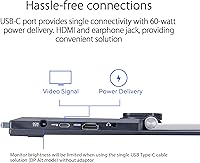
- USB-C Connectivity: The full-function USB-C port supports video input, data transfer, and up to 60W of power delivery, allowing the monitor to charge compatible laptops through a single cable.
- Video Inputs: Connectivity includes one USB-C port and one HDMI port, giving users flexibility to connect laptops, tablets, or desktop systems without an adapter in most common scenarios.
- Audio Output: A 3.5mm earphone jack is included for private listening, complementing the built-in speaker system when headphones or external speakers are preferred.
- Built-in Audio: The integrated 2.1-channel speaker system includes a subwoofer, which is uncommon in portable displays and produces fuller audio than typical stereo monitor speakers.
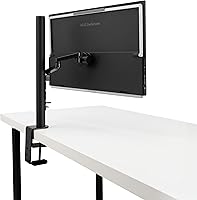
- Mounting Options: The package includes an integrated carrying handle and kickstand, a height-adjustable C-clamp arm with Z-axis adjustment, and a partition hook kit for hanging on cubicle dividers.
- Weight: Total weight with accessories is approximately 8.8 lbs (around 4kg), which positions this monitor closer to a compact desktop display than to ultra-light travel screens.
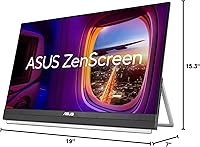
- Dimensions: Product dimensions are approximately 19 x 15.3 x 7 inches, reflecting a form factor designed for desk adaptability rather than minimal packing footprint.
- Warranty: ASUS covers this monitor with a 3-year manufacturer warranty, which is significantly longer than the one-year coverage standard among most competing portable display brands.
- Energy Certification: The monitor carries ENERGY STAR certification, confirming it meets established standards for energy-efficient operation during normal use.
- Packaging: Retail packaging uses FSC-certified paper materials, reflecting a commitment to responsibly sourced packaging throughout the supply chain.
- Bundled Software: Purchase includes complimentary access to Adobe Creative Cloud for 3 months, valid through August 31, 2026, adding practical value for photographers, designers, and video editors.
- Aspect Ratio: The display uses a standard 16:9 widescreen aspect ratio, which is compatible with the vast majority of laptop outputs, streaming content, and productivity applications.
- Color: The monitor is available in black, with a slim-profile chassis designed to maintain a professional appearance across home office and corporate environments.
Related Reviews
ASUS ZenScreen Touch MB16AMTR 16-inch Monitor
ASUS ZenScreen 16-inch OLED Portable Monitor
ASUS ZenScreen MB14AC 14-inch Portable Monitor
ASUS ZenScreen Duo OLED 14-inch Portable Monitor
ASUS ZenScreen MB16ACV 15.6-inch Portable Monitor
ASUS ZenScreen MS27UC 27-inch 4K Smart Monitor
ASUS ZenScreen MS32UC 32-inch 4K Smart Monitor
ASUS VA24DQSB 24-inch IPS Monitor
ASUS VA27EQSB 27-inch Monitor