Overview

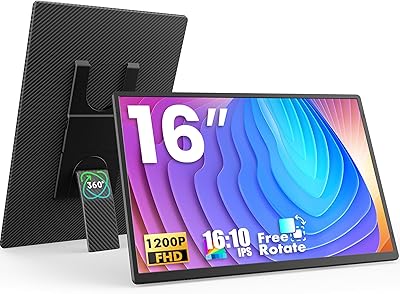
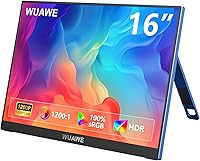
The WUAWE WAB160 16-inch Portable Monitor sits in a crowded budget category, but it earns attention with a couple of genuine differentiators. Most portable monitors in this price range stick to a standard 16:9 panel; this one ships with a 1920x1200 resolution and a 16:10 aspect ratio, giving you a noticeable sliver of extra vertical real estate. The metal chassis is genuinely thin at 0.37 inches and weighs just under 1.6 pounds. That said, keep expectations grounded — this is a solid secondary screen for students, remote workers, and casual console gamers, not a color-accurate professional display.
Features & Benefits

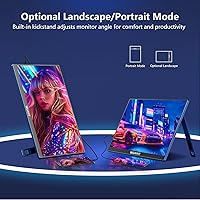
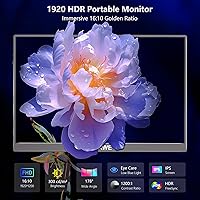
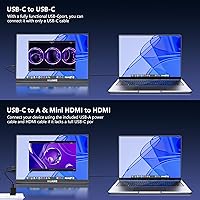
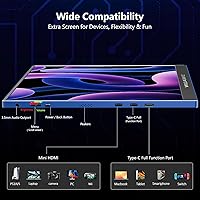
The 16:10 aspect ratio is probably the most underrated thing about this travel-friendly display — it means a bit more vertical content compared to the standard 16:9 monitors it competes with, which matters when reading documents or writing code. HDR and Freesync are present, though their impact at 60Hz is modest rather than transformative. Connectivity is genuinely flexible: two USB-C ports and a Mini-HDMI cover laptops, phones, and consoles without an adapter hunt. The built-in kickstand handles both landscape and portrait orientations, and pull-out speakers mean you are not hunting for earbuds every time you want audio on the go.

Best For

This portable monitor hits its sweet spot with students who need a second screen without the weight penalty — tuck it into a laptop bag and you barely notice it is there. Remote workers moving between hotel rooms and coffee shops will appreciate the plug-and-play setup; no drivers, no fuss. Casual gamers connecting a Nintendo Switch or PS5 will find the screen size comfortable for a bedroom or travel setup. It also makes a genuinely practical gift for anyone starting college or moving into a first apartment who needs an extended display without spending heavily.

User Feedback

Buyers consistently highlight how easy the setup process is — plug in and it works, which sounds basic but is not always guaranteed in this category. The build quality also draws frequent praise, with most owners noting the metal body feels more substantial than the price suggests. On the downside, the display can struggle in brightly lit rooms, and the built-in speakers are fine for casual use but thin on bass and volume. A recurring note worth flagging: your USB-C port must support DP Alt Mode, and not all do. Buyers upgrading from a 16:9 portable monitor often mention the taller panel as a pleasant surprise.

Pros

  • The 16:10 aspect ratio gives noticeably more vertical screen space than most competing portable monitors at this price point.
  • Plug-and-play setup via USB-C means zero driver installation headaches — just connect and start working.
  • At under 1.6 lbs and 0.37 inches thick, this travel-friendly display genuinely fits in most laptop bags without discomfort.
  • The metal chassis feels more premium than typical plastic-bodied monitors in the same budget tier.
  • Freesync and HDR support add real value for casual gaming sessions, especially on a console setup.
  • Dual USB-C ports plus a Mini-HDMI give you solid connectivity options across laptops, phones, and consoles.
  • The pull-out kickstand supports both landscape and portrait orientations without requiring a separate stand or accessory.
  • Low blue light mode is a practical feature for students and remote workers logging long hours at a screen.
  • A two-year warranty provides reasonable peace of mind for a budget-category device.
  • The 1920x1200 resolution keeps text and detail crisp enough for productivity tasks and casual media consumption.

Cons

  • Brightness tops out at 300 cd/m², which struggles to hold up in sunny or brightly lit environments.
  • USB-C connectivity requires DP Alt Mode support — older or budget laptops may not be compatible without an adapter.
  • The built-in speakers are thin and low-volume, making them impractical for anything beyond basic audio needs.
  • 60Hz refresh rate is a hard limit that rules out the monitor for competitive or fast-paced gaming genres.
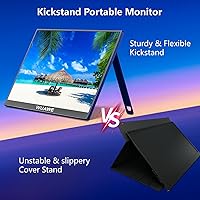
  • The kickstand, while convenient, can feel slightly wobbly on uneven surfaces or soft materials like a bed.
  • No touchscreen functionality, which some competing portable monitors at a similar price do offer.
  • Mini-HDMI requires a separate cable or adapter that is not always included, adding a small but real inconvenience.
  • Color accuracy is average at best, with limited calibration options for users who care about display precision.

Ratings

The WUAWE WAB160 16-inch Portable Monitor has been evaluated by our AI rating system after analyzing thousands of verified global buyer reviews, with spam, bot-generated, and incentivized feedback actively filtered out. The scores below reflect a balanced picture of where this travel-friendly display genuinely delivers and where real users have run into friction. Both the highlights and the honest shortcomings are represented so you can make a clear-eyed purchase decision.
Portability
91%
At 1.58 lbs and barely over a third of an inch thick, most buyers are genuinely surprised by how little space this monitor takes up in a laptop bag. Commuters and students repeatedly mention that it no longer feels like a trade-off to bring a second screen with them every day.
A small number of users note that the metal body, while slim, adds a firm rigidity that makes it slightly harder to fit into already-packed backpacks compared to more flexible soft-shell competitors. The kickstand also adds a small amount of depth when deployed.
Build Quality
83%
The metal chassis is the feature buyers mention most when exceeding expectations for the price tier. It feels noticeably more solid than plastic-bodied rivals, and most users report no flex or creaking after months of regular transport and use.
Some buyers have flagged that the hinge mechanism on the kickstand shows minor wobble after extended use, particularly when the monitor is adjusted frequently. A handful of reviews also noted that the port openings feel slightly loose around certain cable connectors.
Display Clarity
78%
22%
The 1920x1200 resolution at a 16:10 ratio consistently earns praise from users doing document-heavy work, coding, or casual browsing, where the extra vertical pixels reduce scrolling noticeably. Text rendering is sharp enough for long reading sessions without eye strain complaints being common.
Color accuracy is average at best, and users coming from IPS panels on higher-end laptops often notice the difference immediately. The display is not calibrated for creative work, and saturation can look slightly muted when viewing photos or video content side by side with a better-calibrated screen.
Brightness
61%
39%
In controlled indoor environments — offices, dorm rooms, hotel rooms with the curtains drawn — the 300 cd/m² brightness holds up reasonably well and does not cause fatigue during typical workday hours. Most buyers using it in dim or standard indoor lighting report no real issues.
In bright rooms or near windows, the image washes out noticeably, and several users describe it as a genuine daily frustration rather than an occasional nuisance. Outdoor use is effectively off the table, which limits its versatility for users who like working in open spaces or cafes with natural light.
Connectivity
86%
Having two USB-C ports alongside a Mini-HDMI means most buyers can find a setup that works for their specific device without hunting for adapters. Users connecting to MacBooks, Nintendo Switch docks, or Android phones all report the port selection covers their needs without much fuss.
The Mini-HDMI port means most people need a cable or adapter that is not universally on hand, and it is frequently absent from the box. The USB-C DP Alt Mode requirement also catches a meaningful number of buyers off guard, particularly those with budget laptops or older Windows machines.
Plug-and-Play Setup
89%
The absence of driver installation is genuinely appreciated across reviews, especially from less technical buyers who just want to plug in and get to work. Windows and macOS both recognize the monitor within seconds in most reported setups, with no configuration required.
The setup experience falls apart for users whose USB-C ports lack DP Alt Mode support, and the product listing does not make this limitation prominent enough upfront. A recurring theme in negative reviews is that buyers only discover the incompatibility after unboxing, which leads to frustration.
Gaming Performance
67%
33%
For casual console gaming — Switch titles, older PS5 games, or indie games on a laptop — the display holds its own at 60Hz, and Freesync does reduce tearing noticeably during gameplay. Users using it as a travel gaming screen consistently describe the size and image quality as more than acceptable for the use case.
Competitive gamers and anyone accustomed to 120Hz or 144Hz panels will find the 60Hz ceiling a hard stop. Fast-moving scenes in action games show motion blur that more experienced players consistently flag in their reviews, making this a screen for casual play rather than serious gaming.
Speaker Quality
48%
52%
Having any speakers at all in a portable monitor at this price is a convenience that buyers acknowledge, and for quick video calls or background YouTube content they do the basic job. Several users mention the pull-out design is a clever space-saving approach that keeps the body thin.
Audio quality is thin, tinny, and low on volume — that is the consistent verdict from buyers who actually relied on them regularly. Anyone planning to use this monitor for movies or music without external audio will likely find the speaker output genuinely disappointing rather than just modest.
Kickstand Versatility
74%
26%
Supporting both landscape and portrait orientation without an external stand is a feature users appreciate most when traveling, where carrying extra accessories is a burden. Writers and coders who use portrait mode for long-form reading particularly highlight this as a daily convenience.
Stability on flat hard surfaces is generally fine, but on softer or slightly uneven surfaces the kickstand can tilt or shift during use. Some buyers also note the range of adjustment angles is narrower than they expected, which limits comfortable ergonomic positioning in certain desk setups.
Eye Care
77%
23%
The low blue light mode is a feature that students and remote workers doing long daily sessions genuinely use and appreciate, with several noting reduced evening eye fatigue compared to their laptop screen alone. The matte coating also helps cut reflections without introducing much grain to the image.
Low blue light mode does introduce a visible warm color shift that bothers users doing any color-sensitive work. There is no granular adjustment for blue light intensity, so buyers either accept the full warm tint or turn the feature off entirely — there is no middle ground.
Portrait Mode
72%
28%
The ability to rotate and use the monitor vertically without any extra hardware is a legitimate productivity feature, especially for reading long documents, reviewing code, or using it as a phone display. Users who adopt portrait mode tend to stick with it and consider it one of the more underrated aspects of this travel-friendly display.
Switching between orientations requires manually rotating the display output in your operating system each time, which some users find tedious when they alternate frequently. The kickstand is also somewhat less stable in portrait orientation than in landscape, particularly on smooth desks.
Value for Money
84%
For buyers who go in with calibrated expectations — a secondary travel screen, not a professional display — the overall package consistently lands as good value. The metal build, 16:10 resolution, and dual USB-C connectivity are features that competing monitors at the same price often sacrifice at least one of.
Buyers who compare it against slightly pricier options with better brightness or higher refresh rates sometimes feel the gap in real-world performance is larger than the price difference suggests. If portability is less of a priority, spending a bit more opens up meaningfully better display quality.
Multi-Display Functionality
81%
19%
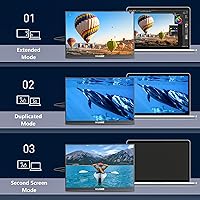
Extended and duplicate display modes both work reliably across macOS and Windows, which buyers use productively for multitasking during work-from-home setups and travel. Several remote workers mention it transformed their hotel room productivity by giving them a proper dual-screen workflow.
A few users have reported occasional signal drops or the monitor briefly going to sleep when connected through lower-quality USB-C cables, which suggests the experience can be cable-dependent. Portrait mode for extended displays also occasionally requires a system restart to register correctly on certain machines.

Suitable for:

The WUAWE WAB160 16-inch Portable Monitor is a strong fit for students who regularly move between classrooms, libraries, and dorms and want a second screen without adding serious weight to their bag. It works particularly well for remote workers who find themselves in hotels or co-working spaces and need a quick productivity boost without lugging around heavy gear. The 16:10 aspect ratio makes it a natural companion for anyone who spends a lot of time in documents, spreadsheets, or code editors, where extra vertical space genuinely reduces scrolling. Casual console gamers traveling with a Nintendo Switch or PS5 will find the screen size and plug-and-play setup refreshingly convenient. It also makes a thoughtful and practical gift for a college student or a young professional setting up their first home office on a tight budget.
Not suitable for:

The WUAWE WAB160 16-inch Portable Monitor is not the right tool for competitive gamers who need high refresh rates — 60Hz is the ceiling here, and that limitation matters if fast-paced titles are a priority. Photographers, video editors, or anyone who needs color-accurate output should look elsewhere, as this display is not designed or calibrated for professional creative work. The brightness ceiling of 300 cd/m² can be a real frustration in sunny rooms or bright outdoor environments, so buyers who primarily work in well-lit spaces may find the image washed out. Anyone expecting rich, room-filling audio from the built-in speakers will be disappointed — they are adequate for a quick video call but not much more. Finally, buyers whose laptops or phones rely on older USB-C connections without DP Alt Mode support will hit a compatibility wall immediately, which is a dealbreaker worth verifying before purchasing.
Specifications

  • Screen Size: The display measures 16 inches diagonally, offering a comfortable viewing area that balances portability with usability.
  • Resolution: Native resolution is 1920x1200 pixels at a 16:10 aspect ratio, providing slightly more vertical screen space than standard 1920x1080 panels.
  • Refresh Rate: The panel runs at a fixed 60Hz refresh rate, which is standard for productivity and casual gaming but not suited for competitive play.
  • Brightness: Peak brightness is rated at 300 cd/m², adequate for indoor use but potentially underwhelming in brightly lit or sunlit environments.
  • Contrast Ratio: The display has a 1200:1 contrast ratio, delivering reasonable depth between dark and light areas for everyday content consumption.
  • HDR Support: HDR is supported, adding some improvement to color and contrast rendering when connected to an HDR-capable source.
  • Freesync: AMD Freesync is enabled, which helps reduce screen tearing during gaming sessions at compatible frame rates.
  • Panel Surface: The screen features a matte anti-glare coating that reduces reflections in typical indoor environments.
  • Body Material: The outer chassis is constructed from metal, contributing to a more rigid and premium feel compared to all-plastic alternatives in this category.
  • Thickness: At just 0.37 inches thin, the monitor is genuinely slim and easy to slide into a laptop sleeve or backpack pocket.
  • Weight: The unit weighs 1.58 lbs, making it one of the lighter options in the 16-inch portable monitor segment.
  • Ports: Connectivity includes two USB Type-C ports and one Mini-HDMI port for flexible connection to laptops, consoles, and compatible smartphones.
  • USB-C Requirement: USB-C video output requires the host device to support Thunderbolt 3, USB 3.1, or DP Alt Mode — standard USB-C data ports will not transmit video.
  • Orientation: The built-in kickstand supports both landscape and portrait display orientations without requiring any additional stand or accessory.
  • Speakers: A pair of built-in pull-out boom speakers are included, providing basic stereo audio output suitable for casual media and video calls.
  • Eye Care: Low blue light mode is available as a built-in feature to reduce eye strain during extended use sessions.
  • Setup: The monitor is plug-and-play with no drivers required, functioning as an extended or duplicate display immediately upon connection.
  • Dimensions: Physical dimensions measure 13.9 x 9.4 x 0.36 inches, keeping the footprint compact and travel-friendly.
  • Warranty: WUAWE covers this monitor with a 2-year manufacturer warranty along with 24/7 customer service support.
  • Model Number: The official model number is WAB160, released under the WUAWE brand in July 2024.

Related Reviews

LXU S11 16-inch Portable Screen Extender
71%
83%
Display Quality
88%
Aspect Ratio Utility
91%
Setup & Ease of Use
41%
Mac Compatibility
62%
Portability
More
UPERFECT 16006DD 16″ 4K Portable Monitor
77%
83%
Brightness Performance
91%
Display Sharpness
74%
Color Accuracy
88%
Build Quality
76%
Portability
More
FLYTOCCA N3 16-Inch Portable Monitor
77%
91%
Portability & Form Factor
78%
Display Quality
63%
Brightness & Outdoor Usability
83%
Matte Screen & Glare Resistance
74%
Stand & Orientation Flexibility
More
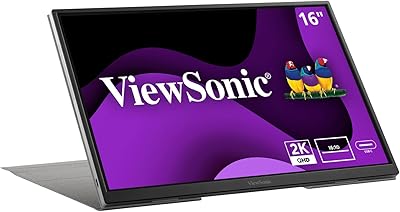
ViewSonic VG1656-2K 16-inch Portable Monitor
86%
94%
Portability & Weight
90%
Display Quality & Resolution
85%
Setup & Installation
88%
Build Quality & Durability
72%
Gaming Performance
More
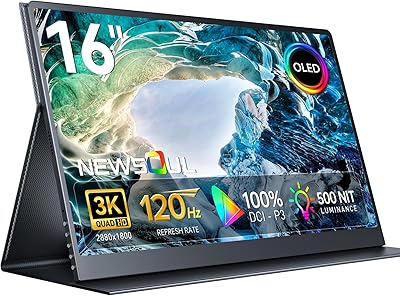
Newsoul M160B04 16″ OLED Portable Monitor
77%
93%
Image Quality
89%
Portability
86%
Color Accuracy
84%
Gaming Performance
58%
Brightness & Glare
More
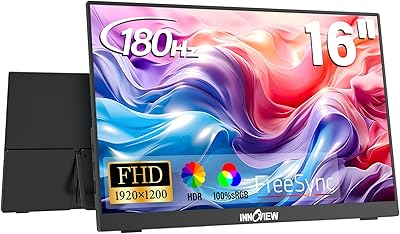
InnoView 16-inch Portable Monitor INVPM405 01B
85%
89%
Display Quality
94%
Portability and Size
90%
Gaming Performance
84%
Build Quality
88%
Color Accuracy
More
ASUS ZenScreen 16-inch OLED Portable Monitor
76%
93%
Display Quality
91%
Color Accuracy
78%
Portability
84%
Build Quality
76%
Connectivity
More
Magedok 16-inch 4K OLED Touchscreen Portable Monitor
85%
91%
Display Quality
89%
Portability
75%
Touchscreen Performance
65%
Brightness in Bright Environments
88%
Gaming Performance
More
ViewSonic TD1656-2K 16-inch Touchscreen Portable Monitor
80%
93%
Display Sharpness
74%
Touch Responsiveness
91%
USB-C Connectivity
88%
Portability
86%
Build Quality
More
ASUS ZenScreen Touch 16-inch Portable Monitor (MB16AMTR)
87%
94%
Portability & Weight
88%
Touchscreen Functionality
72%
Battery Life
85%
Display Quality
90%
Connectivity Options
More

FAQ

Yes, it does — as long as your MacBook's USB-C port supports DP Alt Mode, which all modern MacBooks do. Just plug in a USB-C cable and the display should be recognized immediately with no drivers needed. Older or budget laptops with basic USB-C ports that lack video output will not work over USB-C, so it is worth double-checking your device specs first.

Yes, the Nintendo Switch works well with this portable monitor when the Switch is in docked mode. You will connect via the Mini-HDMI port on the monitor to the HDMI output on the Switch dock. It is a popular combo for gaming in a hotel room or a friend's place where you do not want to negotiate over the TV.

It will work with a PS5 using a Mini-HDMI to HDMI cable or adapter. Keep in mind the display is capped at 60Hz, so you will not get the benefit of the PS5's higher frame rate modes, but for casual gaming or travel use it is a solid secondary option.

When connected via USB-C to a laptop, this travel-friendly display typically draws power directly from that connection, so a separate power source is not always required. That said, power delivery can vary by laptop model, and in some setups you may need a second USB-C cable connected to a power source to keep both the laptop and monitor running comfortably.

On a flat, hard surface like a desk or table it holds up well and stays where you set it. On softer or uneven surfaces — a couch cushion or a bed — it can feel a little wobbly, so a flat surface is recommended for the best experience.

Most laptop screens and portable monitors ship with a 16:9 ratio, so the 16:10 on the WUAWE WAB160 16-inch Portable Monitor gives you a slightly taller image. In practice, that extra height is most noticeable when reading long documents, browsing websites, or coding — you see more content without scrolling. It is a small but genuinely useful difference for productivity work.
They are decent for background audio or a quick YouTube video, but do not expect much bass or volume. They are better than nothing when you are traveling and forgot your earbuds, but anyone who cares about audio quality will want to pair the monitor with external speakers or headphones.

Yes, the kickstand supports portrait orientation natively. You will need to rotate the display output in your operating system settings, which takes about ten seconds, and then the monitor stands upright for a tall, narrow layout that works really well for reading long documents or writing code.

Typically a USB-C cable is included, but a Mini-HDMI cable is often not in the box, so if you plan to connect via HDMI you should have one ready or order one alongside it. It is always worth checking the included accessories list carefully before your first use.

The matte screen coating helps with reflections, but the 300 cd/m² brightness ceiling is a real limitation in very sunny environments. Indoors with controlled lighting it performs fine, but if you regularly work near a bright window or outdoors, you may find the image looks washed out and hard to read.