




Overview

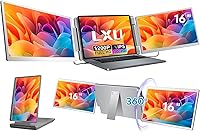
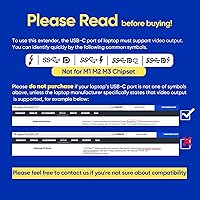
The LXU S11 16-inch Portable Screen Extender is a mid-range travel display built for professionals who constantly find themselves working off a single laptop screen in hotels, cafes, or co-working spaces. Before anything else, Mac users need to hear this clearly: this monitor does not work with M1, M2, or M3 chips — only M4 and Pro or Max series. Missing that detail is an expensive mistake. What separates this 16-inch travel monitor from the typical portable display crowd is its 1920x1200 IPS panel paired with a 16:10 aspect ratio, offering more vertical space than the standard 16:9 screens that dominate the category. It extends your laptop display — it is not a standalone monitor.

Features & Benefits

The 16:10 aspect ratio is the first thing you notice in actual use. That extra vertical real estate means keeping a terminal below your code editor, or seeing more spreadsheet rows without constant scrolling — small things that compound across a long workday. Connectivity covers both USB-C and HDMI, and triple display setups are technically possible, though whether you can pull that off depends entirely on your laptop's own output hardware, so verify before assuming. The 360-degree rotation hinge lets you flip between landscape and portrait without fuss. Power runs through USB-C with no adapter needed. At 4.4 lbs, this portable screen extender is portable in the checked-luggage sense, not the toss-it-in-a-daypack sense — that distinction matters.

Best For

This 16-inch travel monitor fits a specific kind of buyer: someone who moves between locations regularly and needs a reliable second screen without committing to a desk-bound setup. Windows users will have the smoothest experience; MacOS compatibility is solid for M4, Pro, and Max chips, but that is a firm ceiling. Developers and writers tend to extract the most value from the taller panel, since vertical screen space directly affects how much code or copy you can read in a single glance. It also suits compact home offices where a full-size external monitor simply is not practical. Anyone who switches between portrait and landscape modes throughout the day will find the rotating stand a genuinely useful daily feature.

User Feedback

The LXU S11 launched in mid-2025, and with 176 ratings so far, its 4.2-star average reflects a promising but early snapshot — not a long-established track record. Buyers frequently highlight easy plug-and-play setup and solid color reproduction from the IPS panel as genuine standouts. The 16:10 format earns particular appreciation from users coming from standard widescreen portables. On the critical side, weight draws consistent pushback from those who expected something lighter given the portability pitch. The M1 through M3 incompatibility keeps surfacing in negative reviews, almost always from buyers who overlooked the disclaimer. Long-term hinge durability under daily rotation is still largely unknown, simply because the product has not been on the market long enough to tell.

Pros

  • The 16:10 aspect ratio delivers noticeably more vertical screen space than standard widescreen portable monitors.
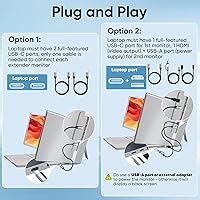
  • Plug-and-play setup via USB-C or HDMI means no driver downloads, no configuration headaches.
  • IPS panel produces accurate, consistent colors that hold up well for everyday professional work.
  • The 360-degree rotating stand genuinely earns its keep for users who switch between portrait and landscape regularly.
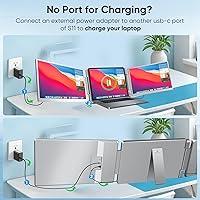
  • No external power brick required — the LXU S11 draws power directly through the USB-C cable.
  • Compatible with laptops from 12 to 18.5 inches, covering a wide range of common work machines.
  • Low blue light filtering is a thoughtful inclusion for people logging long hours in front of the screen.
  • The slim 1.56-inch profile makes it easy to slide into a laptop sleeve or bag pocket without adding bulk.

Cons

  • At 4.4 lbs, this portable screen extender is heavier than many competing options at the same screen size.
  • No compatibility with MacOS M1, M2, or M3 chips — a dealbreaker for a large portion of Mac users.
  • Triple display capability depends entirely on the host laptop hardware, which the product marketing undersells.
  • Only 176 ratings as of late 2025, making long-term build and hinge durability difficult to assess confidently.
  • The glossy screen surface picks up reflections in bright environments like windows or outdoor patios.
  • 60 Hz refresh rate makes this 16-inch travel monitor a poor fit for any gaming or fast-motion video work.
  • Hinge durability under repeated 360-degree rotation is still an open question given the short time on market.
  • Buyers on older Mac hardware have no firmware or software workaround — the chip restriction is absolute.

Ratings

The scores below for the LXU S11 16-inch Portable Screen Extender were generated by our AI after analyzing verified global buyer reviews, actively filtering out incentivized, bot-generated, and duplicate submissions to surface only authentic user experiences. Each category reflects a balanced synthesis of what real buyers praised and where they ran into friction. Both the strengths and the recurring pain points are represented transparently so you can make a genuinely informed decision.

Display Quality
83%
The IPS panel consistently earns praise for color accuracy that holds up in real work environments — reviewers using it for document editing and data analysis report that text is sharp and colors stay consistent even when viewing from an angle. The 1920x1200 resolution gives enough pixel density that prolonged reading sessions do not feel strained.
The glossy surface treatment becomes a real nuisance when working near windows or in brightly lit offices, with reflections washing out the image noticeably. A handful of buyers also noted the color profile out of the box skews slightly cool, requiring manual calibration for anything requiring accurate white balance.
Aspect Ratio Utility
88%
The 16:10 ratio is one of the most talked-about positives in user reviews, particularly from developers and writers who find the extra vertical height genuinely changes how they work — seeing more code lines or a longer document without constant scrolling is a tangible daily benefit that buyers frequently call out by name.
For users who primarily watch video content or use the screen for media consumption, the taller ratio can feel slightly awkward since most streaming content is mastered for 16:9, resulting in small black bars at the sides. This is a niche complaint, but worth noting for mixed-use buyers.
Setup & Ease of Use
91%
Plug-and-play functionality is one of the most consistently praised aspects across the review pool — Windows users in particular report the monitor being detected and ready to use within seconds of plugging in the USB-C cable, with zero driver hunting required. That kind of friction-free experience resonates strongly with professionals who move between environments frequently.
A small subset of buyers reported that their laptop did not immediately detect the display and required a restart or manual display settings adjustment before it registered correctly. This appears to be an edge case rather than a systemic issue, but it does disrupt the promised plug-and-play experience for those affected.
Mac Compatibility
41%
59%
For the specific Mac configurations this monitor does support — M4, Pro, and Max chip MacBooks — the connection is reportedly stable and the display performs without notable issues. Users on those machines describe a smooth experience comparable to Windows setups.
The M1, M2, and M3 incompatibility is the single most damaging factor in the review pool, responsible for a disproportionate share of one-star ratings from buyers who missed the disclaimer. Given that M1 and M2 MacBooks remain the most widely used Mac laptops in the market, this exclusion significantly narrows the addressable audience and creates genuine post-purchase frustration.
Portability
62%
38%
The slim 1.56-inch profile does slide into laptop sleeves and bag pockets without too much resistance, and the silver finish integrates visually with most professional laptop setups. For users who drive between client sites or carry it in a rolling bag, the form factor works reasonably well.
At 4.4 lbs, this 16-inch travel monitor is noticeably heavier than competing portable displays, many of which come in under 2 lbs. Backpack commuters and frequent flyers are the most vocal critics on this point — the weight adds up quickly over a full travel day and undercuts the portability angle the product markets itself on.
Build Quality
71%
29%
The overall construction feels solid enough for a mid-range portable monitor, with a chassis that does not flex excessively when picked up by the edges. Most buyers describe it as feeling appropriately sturdy for desk-to-desk transport.
Questions around the long-term durability of the 360-degree rotation hinge remain unanswered given the product only launched in mid-2025. A few early reviewers noted the hinge feels slightly stiff initially, and there is not enough longitudinal data yet to know how it holds up after months of daily rotation.
Connectivity Flexibility
76%
24%
Having both USB-C and HDMI inputs on the same portable monitor gives users genuine flexibility — older Windows laptops without USB-C outputs can still connect via HDMI, which meaningfully broadens the range of compatible machines beyond what a USB-C-only design would allow.
The triple display promise in the marketing creates realistic confusion: several buyers expected it to work out of the box, only to discover their laptop graphics hardware did not support a third output regardless of the monitor. The product itself is not at fault, but the framing sets expectations that the hardware reality does not always meet.
Eye Comfort
78%
22%
The built-in low blue light filtering gets genuine appreciation from users who log six or more hours a day in front of screens — several note that end-of-day eye fatigue decreased after switching to this setup, which is a meaningful quality-of-life outcome for remote workers and developers.
The low blue light mode introduces a slight warmth to the color temperature that some users find distracting when switching back to their primary laptop display, creating an inconsistent visual experience across screens. There is no reported flicker-free certification in the product specs, which is an omission that sensitive users may care about.
Portrait Mode Performance
74%
26%
Users who regularly flip to portrait orientation for reading long PDFs, reviewing pull requests, or working in tall document layouts report that the 360-degree stand handles the transition smoothly and holds the panel stable without wobble at the desired angle.
At 1920x1200 in portrait, the monitor is tall but relatively narrow, which some buyers find constraining for side-by-side document comparison. The stand also requires a flat, stable surface to hold well in portrait mode — on uneven desks or soft surfaces, it reportedly shifts more than expected.
Value for Money
67%
33%
For Windows users who want a taller-than-average IPS portable display with dual connectivity and no-fuss setup, the price sits at a reasonable point relative to the feature set. The 16:10 aspect ratio is still uncommon enough in this category that buyers who specifically need it find the value proposition defensible.
Mac users on M1 through M3 chips receive zero value since the monitor is functionally incompatible with their machines. Even for compatible buyers, competing products at a similar price point now offer lighter builds and comparable display quality, which makes the value case less clear-cut than it would have been a year ago.
Cable Management
69%
31%
The USB-C single-cable setup keeps the desk tidy for most users — one cable handles both video and power, which is a clean solution compared to monitors that require a separate power brick sitting on the floor.
When using HDMI instead of USB-C, a separate power arrangement is needed, which some buyers found inconvenient and poorly documented in the included setup guide. A few users also mentioned the USB-C port placement makes the cable drape awkwardly depending on where the laptop sits relative to the monitor.
Color Accuracy
77%
23%
For general productivity work, document creation, and video calls, the IPS panel delivers color reproduction that is consistently described as accurate and pleasing straight out of the box. Reviewers coming from TN panel laptops are particularly appreciative of the visible step up in color consistency.
Creative professionals needing verified color coverage for photo editing or design work will find no published gamut specifications, which is a meaningful gap at this price tier. Users report the display handles sRGB content well but offers no HDR support or wide-gamut mode for demanding visual workflows.
Refresh Rate & Motion
58%
42%
For the core use cases this monitor targets — spreadsheets, writing, coding, video calls — 60 Hz is entirely adequate, and the vast majority of professional users in the review pool do not cite it as a limitation for their daily workflows.
Anyone who expected to use this portable screen extender for gaming or fast-motion video editing will be disappointed; 60 Hz creates visible motion blur during fast scrolling or gameplay that competing monitors at this price now avoid with 90 or 120 Hz panels. This is a clear ceiling for mixed-use buyers.
Review Maturity
53%
47%
The early adopter feedback is largely positive and suggests a product that delivers on its core promises for compatible users, which is an encouraging baseline signal for a monitor that has only been on the market since mid-2025.
With fewer than 200 ratings accumulated since its July 2025 launch, there simply is not enough data to draw confident conclusions about long-term reliability, hinge durability, or how consistently units perform across different production batches. Buyers who prioritize a proven track record may want to revisit in six to twelve months.

Suitable for:

The LXU S11 16-inch Portable Screen Extender is a strong match for professionals who regularly work outside a fixed desk setup — consultants, analysts, developers, and writers who find themselves in hotel rooms, client offices, or co-working spaces and need a dependable second screen without hauling a full-size monitor. The 16:10 aspect ratio is a genuine productivity advantage for anyone who works heavily in code editors, long documents, or multi-row spreadsheets, since that extra vertical height reduces how often you need to scroll just to see context. Windows laptop users will have the most friction-free experience, and Mac users with M4, Pro, or Max chips are well supported too. If your home office is tight on desk space and you only occasionally need a second screen, this 16-inch travel monitor also works as a compact, stow-away solution that does not demand a permanent footprint.

Not suitable for:

The LXU S11 16-inch Portable Screen Extender is a firm pass for anyone running a MacBook with an M1, M2, or M3 chip — this is not a workaround situation, it simply will not function on those machines, and it is the single most common source of buyer regret in the review pool. Travelers who prioritize pack weight should also think carefully: at 4.4 lbs, this 16-inch travel monitor is noticeably heavier than competing ultralight options in the same category, and that difference adds up fast in a carry-on or backpack. Anyone expecting a standalone display will be disappointed, since it requires an active laptop connection to function. Buyers hoping for a high-refresh gaming monitor or a display with wide color gamut coverage for color-critical creative work will find this panel too basic for those demands. And given that the product only launched in mid-2025, anyone who needs long-term reliability data before committing should wait — the review base is still too small to draw confident conclusions about durability.

Specifications

  • Screen Size: The display measures 16 inches diagonally, fitting laptops ranging from 12 to 18.5 inches in width.
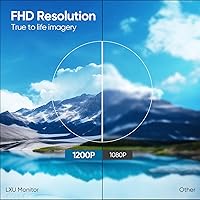
  • Resolution: Native resolution is 1920x1200 pixels, delivering a full HD 1200P image with fine detail for text and graphics.
  • Aspect Ratio: The panel uses a 16:10 aspect ratio, providing more vertical screen space than the standard 16:9 widescreen format.
  • Display Type: An IPS (In-Plane Switching) panel is used, offering consistent color reproduction and wide viewing angles.
  • Refresh Rate: The display operates at a fixed 60 Hz refresh rate, suitable for productivity tasks and general media consumption.
  • Connectivity: Input options include one USB-C port and one HDMI port, allowing connection to a broad range of laptops and desktops.
  • USB Ports: The unit includes four USB 3.0 ports, enabling peripheral connections such as keyboards, mice, or drives directly through the monitor.
  • Power Input: The screen draws power directly over the USB-C connection, eliminating the need for a separate power adapter or wall outlet.
  • Weight: The monitor weighs 4.4 lbs (approximately 2 kg), making it portable but heavier than ultralight competing models in this category.
  • Dimensions: Physical dimensions measure 15.31 x 9.69 x 1.56 inches (L x W x H), with a slim profile designed for bag or sleeve storage.
  • Rotation: The integrated stand supports 360-degree rotation, allowing the display to be used in both landscape and portrait orientations.
  • Blue Light Filter: A built-in low blue light mode is included to reduce eye fatigue during extended viewing sessions.
  • Surface Finish: The screen uses a glossy surface treatment, which enhances color vibrancy but may introduce reflections in bright environments.
  • Color: The unit is available in silver, with a brushed finish consistent with common professional laptop aesthetics.
  • Mac Compatibility: MacOS support is limited to M4 chips and all Pro or Max series; M1, M2, and M3 chips are explicitly not supported.
  • Windows Support: The monitor is fully compatible with Windows laptops across the supported size range with no driver installation required.
  • Plug and Play: No driver download or software installation is needed; the display is recognized automatically upon connection via USB-C or HDMI.
  • Model Number: The official model designation is S11, manufactured by Shenzhen E-Tech Digital Technology Co., Ltd. under the LXU brand.
  • Voltage: Operating voltage is 5 volts, delivered through the USB-C connection from the host device.
  • Launch Date: This product was first made available in July 2025, making it a relatively recent release with a still-growing user review base.

Related Reviews
Saicool 100″ Manual Pull-Down Projector Screen
74%
88%
Value for Money
81%
Image Surface Quality
79%
Installation Experience
76%
Screen Flatness
67%
Build Quality
More
Akia Screens 110-inch Fixed Frame Projector Screen
82%
91%
Image Clarity & Color Accuracy
93%
Screen Surface Flatness
88%
Build Quality & Frame Construction
71%
Installation & Setup Experience
86%
Value for Money
More
Elite Screens Pop-Up Cinema 92-inch Projector Screen
75%
91%
Setup & Assembly
88%
Portability
74%
Image Quality
58%
Wind Stability
67%
Build Quality
More
Elite Screens Yard Master Sport 110-inch Screen
78%
88%
Ease of Setup
83%
Portability & Storage
79%
Image Clarity & Screen Performance
71%
Outdoor Stability
58%
Aspect Ratio Suitability
More
Elite Screens M84UWH 84-inch Projector Screen

80%
88%
Image Quality
91%
Value for Money
74%
Build Quality
86%
Ease of Installation
83%
Auto-Lock Mechanism
More
Elite Screens T120UWH 120-inch Tripod Projector Screen
77%
91%
Ease of Setup
67%
Screen Flatness
84%
Image Quality
78%
Portability
74%
Build Quality
More
Elite Screens T72UWH 72-Inch Tripod Projector Screen
79%
91%
Ease of Setup
83%
Image Quality
74%
Build Quality
78%
Portability
67%
Screen Surface Flatness
More
Elite Screens Manual M100UWH 100-inch
78%
83%
Screen Image Quality
79%
Build Quality
76%
Auto-Lock Mechanism
81%
Screen Flatness & Tension
88%
Ease of Installation
More
Elite Screens Spectrum 2 120-inch Projector Screen
78%
88%
Image Quality
83%
Build Quality
86%
Ease of Installation
81%
Motor Performance
87%
Screen Material
More
Elite Screens M135XWH2 135-inch Projector Screen
78%
88%
Image Quality
83%
Screen Flatness & Tension
76%
Auto-Lock Mechanism
71%
Ease of Installation
84%
Value for Money
More

FAQ

No, it will not. The LXU S11 16-inch Portable Screen Extender explicitly does not support M1, M2, or M3 chips. If you are running one of those machines, this monitor simply will not function as expected, and there is no known workaround. You would need a MacBook with an M4, Pro, or Max chip for it to work on the Mac side.

No drivers or software are required. Just plug it in via USB-C or HDMI and your laptop should recognize it within a few seconds. This holds true for both Windows and compatible MacOS systems, which makes it genuinely convenient for people who move between machines or do not want to deal with driver management.

Technically yes, but with an important caveat: whether triple display actually works depends on your laptop's own graphics hardware and output capabilities, not just the monitor. Some laptops simply do not support more than two displays regardless of what you plug in. Check your laptop specs before buying with that use case in mind.

At 4.4 lbs, it is on the heavier side for a portable monitor — noticeably more than ultralight alternatives that clock in under 2 lbs. It will physically fit in most laptop backpacks, but you will feel the added weight on longer commutes or travel days. If pack weight is a priority for you, it is worth comparing against lighter competitors before deciding.

Yes, the stand supports 360-degree rotation so flipping to portrait orientation is straightforward. For developers or writers who prefer a tall, scrollable view, this works well. Just make sure your laptop is set to auto-rotate or manually adjust the display orientation in your system settings.

No separate power cable or adapter is needed. This 16-inch travel monitor draws all the power it needs through the USB-C connection from your laptop. That said, keep in mind it will consume some of your laptop battery, so longer sessions may drain your host device faster than usual.

The 16:10 ratio gives you a taller screen for the same width. In practice, that means more lines of code visible without scrolling, more rows in a spreadsheet, or more of a long email draft on screen at once. It is a modest but genuinely useful difference for productivity-focused work, and it is one of the real standout features of this particular monitor.

The screen is glossy. Colors tend to look vibrant and sharp on glossy panels, but you will notice reflections if you are working near a window or in a brightly lit room. If glare is a persistent issue in your workspace, that is worth factoring into your decision.

Honestly, it is too early to say with confidence. This portable screen extender launched in mid-2025 and has under 200 ratings at the time of writing, which is not enough data to draw firm conclusions about long-term durability — especially for the rotating hinge under daily use. The early feedback is positive, but if you need a monitor with a proven reliability track record, you may want to wait for more reviews to accumulate.

Yes, it includes an HDMI input alongside USB-C, so older laptops without USB-C outputs can still connect using a standard HDMI cable. Keep in mind that when using HDMI, you will need a separate power source for the monitor since HDMI does not carry power the way USB-C does in this setup.