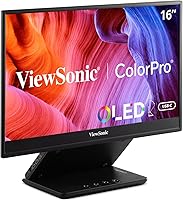
ViewSonic VP16-OLED 15.6-inch Portable OLED Monitor
ViewSonic VP16-OLED 15.6-inch Portable OLED Monitor — image 1
ViewSonic VP16-OLED 15.6-inch Portable OLED Monitor — image 2
ViewSonic VP16-OLED 15.6-inch Portable OLED Monitor — image 3
ViewSonic VP16-OLED 15.6-inch Portable OLED Monitor — image 4
ViewSonic VP16-OLED 15.6-inch Portable OLED Monitor — image 5
ViewSonic VP16-OLED 15.6-inch Portable OLED Monitor — image 6
ViewSonic VP16-OLED 15.6-inch Portable OLED Monitor — image 7
80%
20%

Overview

The ViewSonic VP16-OLED 15.6-inch Portable OLED Monitor is ViewSonic's serious push into a category that has long been dominated by IPS panels. Most portable displays at this size rely on IPS technology — decent for general use, but nowhere close to what this portable OLED display delivers in contrast and color depth. It targets designers, photographers, remote workers, and frequent travelers who refuse to compromise on screen quality between locations. Arriving factory calibrated and Pantone Validated, it earns credibility before you even plug it in. One honest caveat worth noting upfront: the 1080p resolution will feel soft to anyone coming from a high-density laptop display, though the OLED contrast and true blacks do a real job of compensating.

Features & Benefits

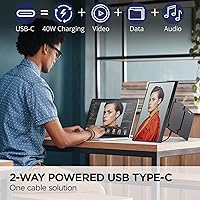
What separates the VP16-OLED from a typical portable IPS monitor starts with the panel itself. True blacks are not a marketing claim on OLED — pixels that are off are genuinely dark, which makes shadow details in photos and dark scenes in video look dramatically better. The 40W two-way USB-C connection is where day-to-day practicality kicks in: one cable handles video, data, and laptop charging at the same time, cutting out the adapter juggling that plagues most travel setups. A Micro HDMI port provides a fallback for older devices. The bundled ergonomic stand adjusts for comfortable viewing at a desk or cramped hotel table, and the monitor hood helps tame reflections — a real concern on a glossy panel. Three years of warranty coverage with US-based support rounds things out.

Best For

This portable OLED display makes the most sense for people whose work depends on accurate color away from a fixed workstation. Freelance graphic designers and photographers are the clearest match — Pantone validation means you can trust what you see without running a separate calibration tool each time. Content creators editing video on a laptop will also benefit, since most built-in laptop screens fall short for judging exposure and color grades confidently. MacBook users and anyone with a modern USB-C laptop will appreciate the single-cable workflow. That said, if pixel sharpness matters more to you than color fidelity, or if you regularly work outside in bright sunlight, this ViewSonic monitor may not check every box.

User Feedback

Among buyers who have spent time with the VP16-OLED, the most consistent praise targets OLED color quality — colors read as rich and saturated, and the black levels noticeably outclass portable IPS alternatives most users have tried before. The stand and protective cover also receive genuine appreciation; people note they feel functional rather than just bundled-in accessories. On the downside, a meaningful portion of users flag 1080p sharpness as underwhelming when placed directly beside a high-resolution MacBook display. The glossy panel surface catches overhead lighting indoors more than some expect. A smaller but recurring thread involves USB-C compatibility inconsistencies — a few users report unreliable power delivery with certain host laptops, so it is worth testing that pairing carefully early on.

Pros

  • OLED panel delivers true blacks and contrast levels that IPS portable monitors simply cannot match.
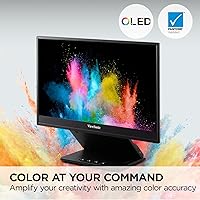
  • Arrives factory calibrated and Pantone Validated — ready for color-critical work right out of the box.
  • 40W two-way USB-C lets one cable handle video, data, and laptop charging simultaneously.
  • At roughly 2 lbs and 0.8 inches thick, it fits into a backpack without adding meaningful bulk.
  • The bundled stand, monitor hood, and screen cover are practical inclusions that most competitors charge extra for or skip entirely.
  • Micro HDMI input provides a reliable fallback for devices without USB-C video output.
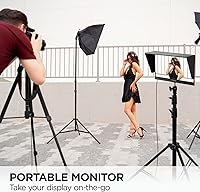
  • Tripod mount support adds unusual flexibility for studio or field setups.
  • A 3-year warranty with US-based customer service is well above average for this product category.
  • Compatible with both Windows and macOS without driver headaches for most modern laptops.

Cons

  • 1080p resolution on a 15.6-inch panel looks noticeably soft alongside high-density Retina or QHD laptop displays.
  • The glossy screen surface causes distracting reflections in bright rooms or near windows.
  • Some users report inconsistent USB-C power delivery depending on the host laptop, requiring testing before relying on it.
  • No built-in speakers, which limits its usefulness as a fully self-contained portable workstation.
  • 60Hz refresh rate makes the VP16-OLED a non-starter for anyone who also wants to use their portable monitor for gaming.
  • OLED panels carry a long-term burn-in risk with static content, which matters if you display fixed UI elements for extended periods.
  • The premium price over IPS alternatives is hard to justify for users who do not need professional-grade color accuracy.
  • Micro HDMI is a less common port, meaning most users will need an adapter cable that is not always included.
  • Reported weight in product specs varies between listings, which has caused confusion and unmet expectations for some buyers.

Ratings

The scores below for the ViewSonic VP16-OLED 15.6-inch Portable OLED Monitor were generated by AI after analyzing verified global buyer reviews, actively filtering out incentivized, bot, and duplicate submissions to surface genuine sentiment. Each category reflects real patterns across thousands of owner experiences — both the standout strengths and the friction points that came up repeatedly. Nothing has been smoothed over to make this display look better than it is.

Display Quality
93%
The OLED panel is consistently the feature buyers mention first and most enthusiastically. True blacks and punchy contrast make photo editing and video review noticeably more revealing than on comparable IPS portables — several users described it as the first portable screen that actually looked like their calibrated desktop setup.
A portion of buyers coming from high-density laptop displays find the 1080p resolution underwhelming at this screen size, with text rendering that looks soft by comparison. This is the single most common disappointment mentioned in critical reviews, and it is a real limitation for those who prioritize sharpness over color depth.
Color Accuracy
91%
Pantone Validation and factory calibration make a tangible difference for designers and photographers who depend on consistent color output. Buyers regularly report that the display matches their calibrated desktop monitors closely enough to do real client work without second-guessing what they are seeing.
A small number of users have noted slight color drift after extended use at high brightness, and some report that the out-of-box calibration profile does not always match their specific workflow ICC requirements. For truly demanding color-critical work, a personal recalibration pass is still advisable.
Portability
88%
At roughly 2 lbs and under an inch thick, this portable OLED display genuinely slips into a laptop bag without adding the kind of weight that makes you reconsider packing it. Frequent travelers consistently mention that it survives daily commutes and airport routines without feeling like a burden.
The packaged weight including the stand and accessories is noticeably higher than the panel alone, which can surprise buyers who were expecting the overall kit to feel as light as the monitor itself. A few users also wished for a sturdier carrying case rather than the soft cover included.
USB-C Connectivity
74%
26%
When it works as intended, the single-cable USB-C setup is genuinely appreciated — one cable for video, data, and 40W laptop charging makes the desk setup dramatically cleaner, especially in hotel rooms and co-working spaces where power outlets are scarce.
USB-C compatibility is the most frustrating pain point reported by a meaningful segment of buyers. Inconsistent power delivery with certain host laptops, particularly non-Apple devices, means some users cannot rely on the single-cable setup and end up needing a separate charger anyway. Testing compatibility early is strongly advisable.
Build Quality
81%
19%
The VP16-OLED feels more premium in hand than most portable monitors in this category — the chassis has a solid, consistent finish and the panel does not flex or creak under normal handling. Most buyers describe it as feeling like a considered product rather than a cost-cut accessory.
Some users have flagged that the hinge mechanism on the stand loosens with repeated adjustment over time, making it harder to hold a precise viewing angle. The glossy panel surface also picks up fingerprints and smudges easily, which can require more frequent cleaning than a matte alternative.
Included Accessories
86%
The bundled accessory set is one of the more genuinely complete packages in this segment — the stand, monitor hood, and screen cover together address real workflow needs rather than feeling like box-filler. Several users noted that the monitor hood alone justified part of the purchase price compared to buying one separately.
The stand, while functional, has a relatively limited range of height adjustment that some taller users find frustrating at standing desk height. A full-sized HDMI cable is not included, so buyers who plan to use the Micro HDMI input will need to source a Micro HDMI adapter or cable themselves.
Glare & Reflections
58%
42%
The included monitor hood does meaningfully reduce reflections in controlled indoor settings, and buyers who use it consistently report a more comfortable experience when sitting near a window or under overhead lighting. In dim or well-controlled environments, the glossy panel actually enhances perceived color saturation.
In brighter rooms or near windows, the glossy surface causes significant glare that is genuinely distracting and hard to work around without repositioning entirely. This is the second most common complaint in critical reviews, and buyers who work in open-plan offices or near natural light sources report it as a daily frustration.
Setup & Ease of Use
83%
Most buyers get this display up and running in under two minutes with a compatible USB-C laptop — no driver installation, no configuration menus required for basic use. MacBook users in particular describe the initial setup as genuinely effortless.
The OSD menu navigation is functional but not intuitive, and a few buyers report difficulty adjusting brightness and color settings without consulting the manual. Users relying on Micro HDMI connectivity sometimes need to troubleshoot input switching before the signal is detected reliably.
Brightness
69%
31%
For indoor use in typical office lighting, the peak brightness is adequate and the OLED panel makes content look punchy even at moderate brightness levels. Buyers who use it primarily in dim environments or for after-hours work report no issues with the brightness ceiling.
OLED panels tend to run at lower peak brightness than high-end IPS displays, and this one is no exception — in brightly lit rooms or any outdoor setting, the screen can look washed out even at maximum brightness. This is a known characteristic of OLED at this price tier and not unique to this model.
Value for Money
71%
29%
For designers and photographers who need a portable display that genuinely supports color-accurate work, the combination of OLED panel quality, factory calibration, and the accessory bundle represents a credible value proposition compared to assembling those components separately.
For buyers who do not have a specific need for color accuracy, the premium over high-quality IPS portable monitors is difficult to justify — you are paying significantly more for a benefit that may not matter to your workflow. Several users who bought this for general productivity use felt that the price did not match their everyday experience.
Warranty & Support
89%
Three years of warranty coverage with a US-based support team is genuinely above average for this product category, where one-year coverage is still the norm. Buyers who have contacted ViewSonic support generally report responsive and helpful interactions.
A small number of users report slower-than-expected response times during peak periods, and the warranty claim process for international buyers can be more involved. Coverage terms for OLED-specific issues like burn-in are worth reading carefully before purchase.
Compatibility
77%
23%
The VP16-OLED works reliably across macOS and Windows with USB-C video output, and the Micro HDMI input extends compatibility to a wide range of older laptops and non-USB-C devices. Most buyers with modern hardware report no compatibility issues whatsoever.
Compatibility gaps emerge mainly with older or budget Windows laptops whose USB-C ports do not support DisplayPort Alt Mode, and with some Android and Linux devices where power delivery behavior is less predictable. Buyers should verify their host device specifications before purchasing.
Ergonomics
79%
21%
The height-adjustable stand gives meaningful flexibility for desk setups and the tripod mount point opens up positioning options that most portable monitors simply do not offer. Remote workers who set up in varied environments appreciate having multiple stable configuration options.
The stand footprint can feel slightly wide on a cramped desk or small table, and the height adjustment range does not fully satisfy users who prefer a very low or very high viewing position. Those who use this on their lap or on uneven surfaces sometimes find the stand less stable than expected.

Suitable for:

The ViewSonic VP16-OLED 15.6-inch Portable OLED Monitor is purpose-built for creative professionals who genuinely depend on color accuracy when they are away from a calibrated studio setup. Freelance graphic designers, photographers, and video editors will get the most out of it — the Pantone validation and factory calibration mean you can trust the display for real work without spending time dialing it in yourself. Remote workers and frequent business travelers who carry a laptop daily will also find it compelling, since it weighs around 2 lbs and the bundled stand and cover eliminate the need to pack any extra accessories. MacBook users and anyone running a modern USB-C laptop will particularly appreciate the single-cable connection that handles both video and charging at once, keeping the desk or hotel table clean. If your work lives and dies by how accurate your colors look on screen, this portable OLED display is one of the few options at this size that takes that seriously.

Not suitable for:

The VP16-OLED is a poor fit for anyone who places pixel sharpness above all else — at 1080p on a 15.6-inch panel, text and fine detail look noticeably softer compared to a Retina or QHD laptop display, and that gap is hard to unsee once you have noticed it. Users who primarily work outdoors or near bright windows will also run into frustration quickly, as the glossy panel surface picks up reflections aggressively in high-ambient-light conditions. Gamers looking for high refresh rates or adaptive sync support should look elsewhere entirely, since this is a 60Hz display designed around color work, not motion. Anyone on a tight budget should weigh the premium carefully — the OLED panel commands a significant price over comparable IPS portables, and if color accuracy is not central to your workflow, that extra cost is hard to justify. Finally, buyers with older laptops that lack USB-C video output will depend entirely on the Micro HDMI connection, which works but does not support the convenient single-cable power-and-display setup that makes this ViewSonic monitor most appealing.

Specifications

  • Panel Type: Uses an OLED panel, which produces true blacks and significantly higher contrast than IPS alternatives at this size.
  • Screen Size: 15.6-inch diagonal display area with a 16:9 aspect ratio suited to widescreen content and productivity layouts.
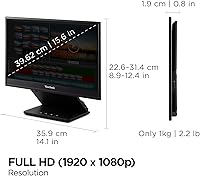
  • Resolution: Full HD 1920x1080 pixels, providing standard 1080p clarity across the panel.
  • Refresh Rate: Runs at 60Hz, which is appropriate for design work, photo editing, and general productivity use.
  • Screen Surface: Glossy panel finish that enhances color vibrancy but is more susceptible to reflections in bright environments.
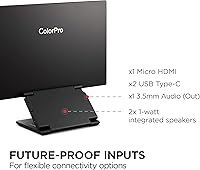
  • USB-C Power: Supports 40W two-way USB-C power delivery, allowing one cable to simultaneously carry video, data, and charging current.
  • Video Inputs: Connectivity includes one USB-C port and one Micro HDMI port, covering both modern and legacy host devices.
  • Dimensions: Measures 14.1 x 12.38 x 0.8 inches, keeping the footprint compact enough for most laptop bags and backpacks.
  • Weight: The panel itself weighs approximately 2 lbs, though total packaged weight including accessories is higher.
  • Color Certification: Carries Pantone Validated certification, confirming it can accurately reproduce Pantone Matching System colors.
  • Calibration: Factory calibrated before shipping, so color accuracy is ready for professional use without requiring manual setup.
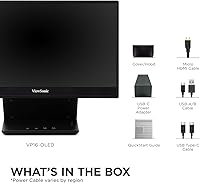
  • Included Accessories: Ships with an ergonomic height-adjustable stand, a monitor hood to reduce glare, and a protective screen cover.
  • Tripod Mount: Includes a standard tripod mount point, offering additional positioning flexibility in studio or field environments.
  • Compatibility: Works with Windows and macOS systems, as well as other platforms that support standard USB-C DisplayPort Alt Mode or HDMI output.
  • Warranty: Backed by a 3-year limited warranty with access to a US-based customer service team, which is above average for portable monitors.

Related Reviews

ViewSonic VX1655-4K-OLED 15.6-inch Portable OLED Monitor
77%
93%
Display Quality
91%
Portability
84%
USB-C Connectivity
88%
Build Quality
67%
Stand Stability
More
ViewSonic VG1655 15.6-Inch Portable Monitor
85%
91%
Portability & Design
88%
Display Quality
93%
Ease of Setup
85%
Performance for Casual Use
65%
Gaming Performance
More
ViewSonic TD1655 15.6-inch Portable Touchscreen Monitor
77%
83%
Touch Responsiveness
89%
USB-C Connectivity
78%
Display Quality
91%
Portability
57%
Stand and Ergonomics
More
ViewSonic VA1655 15.6-Inch Portable Monitor
77%
93%
Portability & Form Factor
87%
Display Quality
82%
USB-C Connectivity
74%
Build Quality
91%
Ease of Setup
More
Topmonitor P15.6/2.5K Portable Monitor 15.6-inch 2560×1680
86%
94%
Display Quality
90%
Portability/Size/Weight
91%
Color Accuracy
87%
Connectivity (USB-C, HDMI)
85%
Build Quality
More
CAPERAVE 15.6-inch Portable Monitor
85%
88%
Display Quality
92%
Portability
93%
Setup and Ease of Use
90%
Compatibility
80%
Gaming Performance
More
InnoView INVPM406 15.6-inch Portable Monitor
75%
91%
Ease of Setup
83%
Display Clarity
78%
Portability & Build
62%
USB-C Compatibility
88%
Value for Money
More
LUMIPIX 15.6-Inch Portable Monitor
84%
91%
Portability
89%
Display Quality
93%
Ease of Setup
87%
Connectivity
84%
Build Quality
More
Westinghouse 15.6 Inch Portable Monitor

82%
88%
Display Quality
92%
Portability
86%
Connectivity Options
94%
Ease of Setup
80%
Build Quality
More
HotYeah 15.6-inch Portable Monitor
86%
91%
Display Quality
95%
Portability & Weight
88%
Compatibility & Connectivity
89%
Ease of Use & Setup
60%
Speaker Quality
More

FAQ

In most cases, yes. The VP16-OLED supports USB-C DisplayPort Alt Mode, so a single USB-C cable can carry video and charge your MacBook at the same time. That said, compatibility can vary depending on which MacBook model you have and the cable you use, so it is worth confirming your laptop supports video output over USB-C before assuming the single-cable setup will work.

It depends on what you are using it for. If you sit at a normal working distance, 1080p is perfectly usable for design tools, video editing timelines, and productivity apps. Where it shows its limits is when you place it directly beside a MacBook Retina display or a QHD laptop screen — the difference in text sharpness becomes obvious. For color work, the OLED contrast and accuracy do a lot to compensate, but if pixel density is a priority for you, this is a genuine trade-off to weigh.

USB-C handles both video and power in most setups, so you do not need a separate power brick for the monitor itself. The two-way 40W USB-C means the display can actually charge your laptop while receiving video from it, or alternatively be powered by your laptop. If you are connecting via Micro HDMI instead, you will need to supply power through the USB-C port separately.

It is a real consideration. In a controlled environment with overhead lighting behind you or a window at your back, reflections are noticeable and can be distracting. The included monitor hood helps reduce this significantly, which is why it matters that ViewSonic included one in the box. If you work primarily near bright windows or in spaces where you cannot control ambient lighting, this is worth factoring into your decision.

OLED burn-in is a real long-term risk when static image elements — like a fixed taskbar, menu bar, or application UI — are displayed for many hours consistently over months or years. For typical creative and productivity workflows where content changes regularly, the risk is low in practical terms. If you plan to use this as a permanently docked secondary display showing static content for eight or more hours a day, it is something to think about.

No, the ViewSonic VP16-OLED 15.6-inch Portable OLED Monitor ships factory calibrated, so it is ready for color-accurate work out of the box. For most designers and photographers, that means you can trust it immediately without spending time with a colorimeter. If you are working in an environment with very specific ICC profile requirements, you may still want to run a calibration pass, but for the majority of users the factory calibration holds up well.

Yes, with the right cable. The Micro HDMI port accepts a standard HDMI signal, so connecting a console via a Micro HDMI to full-size HDMI cable will work. Keep in mind the panel runs at 60Hz with no adaptive sync, so it is functional for casual gaming but not optimized for it. For dedicated gaming use, there are better-suited portable options.

Based on user feedback patterns, the stand is generally well-regarded — it holds the display at a stable angle and the height adjustment works as intended. The all-in-one design, where the cover doubles as the stand, does mean there is less rigidity than a separate kickstand would offer, but most users find it reliable enough for desk use in hotels and co-working spaces.

The monitor will typically still display correctly — video and data will work at whatever wattage your laptop outputs. What changes is the charging behavior. If your host device cannot supply 40W, the monitor simply will not charge your laptop at that rate, or charging may be slower than expected. The display function itself is generally not affected by the power delivery ceiling.

The day-to-day experience is noticeably different in a few specific ways. OLED delivers significantly richer dark tones and punchy colors that make photos, video, and UI work look more vivid than an IPS panel at the same size. The trade-off is the glossy surface and the 1080p resolution ceiling, which some IPS alternatives at higher price points have begun to surpass. If color depth and contrast matter to your workflow, this portable OLED display has a genuine edge; if you mostly need a sharp secondary productivity screen, a high-resolution IPS option might serve you just as well for less.




