Overview

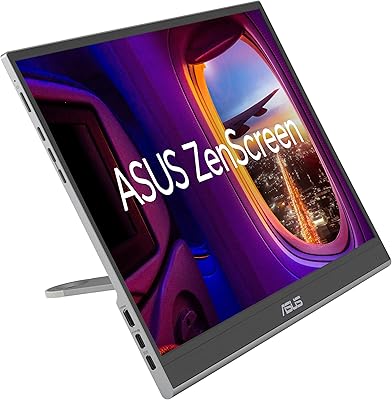
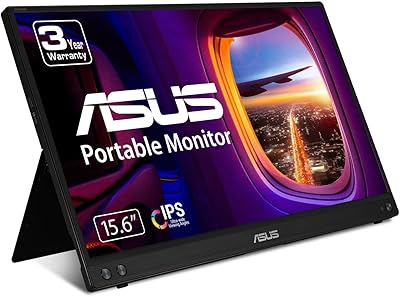
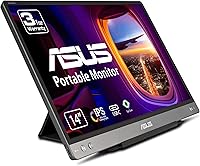
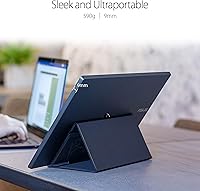
The ASUS ZenScreen MB14AC 14-inch Portable Monitor is the kind of secondary display that actually fits into a carry-on without a second thought. At just 1.3 pounds and under half an inch thick, it slips into a laptop bag like an extra folder. What makes it stand out from similar options is its USB-C and USB-A compatibility — you plug it in and it works, no driver installation required. The 14-inch IPS panel is large enough to be genuinely useful for side-by-side work, yet small enough to stay truly portable. ASUS backs it with a 3-year warranty, which is reassuring in a category where cheaper alternatives often feel disposable. Just know going in: this is a productivity companion, not a substitute for your main display.
Features & Benefits

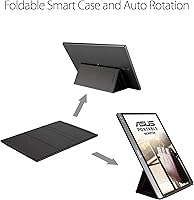
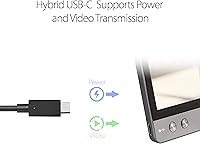
The hybrid signal solution is the feature that genuinely separates this travel display from the competition — a single USB-C cable handles both power and video, which means one less adapter rattling around your bag. For USB-A users, the compatibility extends there too, though some setups may need a powered hub for stable delivery. The IPS panel offers wide 178-degree viewing angles and accurate colors, making it practical for reviewing documents, spreadsheets, or design references while traveling. Tilt the display upright and the auto-rotate sensor kicks in immediately, switching to portrait mode without any manual fiddling — useful for long articles or scrolling through code. The matte anti-glare surface handles cafe lighting well, and the built-in eye care features make longer sessions noticeably more comfortable.

Best For

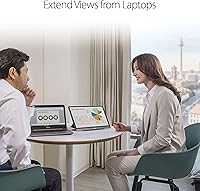
This portable monitor is a natural fit for remote workers and travelers who bounce between hotel desks, airport lounges, and co-working spaces. If you rely heavily on a laptop and find yourself constantly switching between browser tabs and documents, the extra screen real estate changes how you work — meaningfully. Developers will appreciate portrait mode for reading through long files without constant scrolling, and writers get the same benefit when drafting or editing. The ZenScreen MB14AC also holds its own as a portable reference display for photographers or designers who need reliable color accuracy on the road. Business travelers presenting during client meetings will find the simple plug-in setup far less stressful than hunting for adapters in an unfamiliar conference room.

User Feedback

Buyers consistently praise the zero-driver setup — most report it just works the moment it is connected, which matters when you are in a rush. Build quality gets frequent mentions too; the hinge and cable connectors hold up across months of daily packing and unpacking. On the critical side, the 250-nit brightness is comfortable indoors but struggles in direct sunlight or very brightly lit spaces, so honest expectations are warranted there. A handful of USB-A users mention needing a powered hub for stable output. The included stand draws some mixed comments about wobbling on uneven surfaces. Portrait mode auto-rotate, however, earns consistent praise from developers and note-takers who rely on it every day.

Pros

  • Plug-and-play setup works instantly with both USB-C and USB-A laptops, no drivers or software needed.
  • A single cable carries both power and video, cutting down on adapter clutter in your bag.
  • At 1.3 pounds and under half an inch thick, this travel display genuinely disappears into a laptop bag.
  • The IPS panel delivers accurate, consistent colors across wide viewing angles, solid for everyday productivity.
  • Auto-rotate between portrait and landscape is responsive and saves real time for developers and writers.
  • The matte anti-glare surface handles indoor cafe and office lighting without distracting reflections.
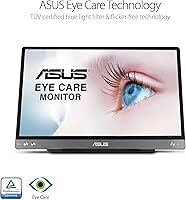
  • Flicker-free, low blue light technology makes longer working sessions noticeably more comfortable on the eyes.
  • A 3-year warranty provides real peace of mind in a category where cheaper rivals offer far less coverage.
  • Build quality holds up well over time — the hinge and connectors stay reliable through repeated packing and travel.
  • Full HD 1920x1080 resolution looks crisp and clean at 14 inches, well-suited for text-heavy work.

Cons

  • At 250 nits, brightness is adequate indoors but noticeably insufficient in sunlit or high-ambient-light spaces.
  • The included stand can wobble on uneven surfaces, which is a real annoyance on cafe tables or airplane trays.
  • USB-A users may need a separately purchased powered hub for stable, reliable power delivery.
  • No HDMI or DisplayPort input means compatibility depends entirely on USB — a dealbreaker for some setups.
  • The 14-inch screen, while portable, may feel cramped for users accustomed to larger workspaces.
  • No built-in speakers, so audio output relies entirely on the connected laptop.
  • Portrait mode auto-rotate, while useful, can occasionally lag or misfire when adjusting the display at certain angles.
  • The matte surface coating, while reducing glare, slightly softens fine text compared to a glossy IPS alternative.

Ratings

The ASUS ZenScreen MB14AC 14-inch Portable Monitor has been evaluated by our AI rating system after processing thousands of verified global buyer reviews, with spam, bot activity, and incentivized feedback actively filtered out to ensure the scores reflect genuine ownership experiences. Both the strengths that keep this travel display highly ranked in its category and the recurring pain points that real users encounter are transparently reflected in every score below.
Portability
93%
Buyers consistently describe this portable monitor as one of the easiest displays to carry daily — at 1.3 pounds and under half an inch thick, it slides into a laptop sleeve without adding meaningful bulk. Frequent flyers and commuters specifically note it survives weeks of bag life without feeling fragile.
A small number of users mention that the included protective sleeve, while helpful, feels thin for heavier travel. Those who pack aggressively alongside hard-edged accessories occasionally worry about screen pressure over long trips.
Setup & Compatibility
91%
The plug-and-play experience is one of the most praised aspects across all buyer feedback — most users report the display is recognized instantly by both Windows and macOS laptops with zero driver installation. The dual USB-C and USB-A compatibility means it works with a remarkably wide range of laptops out of the box.
A recurring minority issue involves USB-A connections on older or lower-powered laptops, where the monitor may not receive enough stable power without a separately purchased powered hub. This is not universal, but it catches some buyers off guard.
Display Quality
82%
18%
The IPS panel earns consistent praise for accurate, natural color reproduction that holds up well for document work, spreadsheet review, and casual photo reference. Wide 178-degree viewing angles mean colors stay consistent even when sharing the screen with a colleague seated beside you.
The display is not a color-grading tool, and buyers who push it for serious creative production work note it falls short of dedicated reference monitors. Some users also observe that the matte coating softens fine text slightly compared to a glossy alternative at this resolution.
Brightness
61%
39%
For typical indoor environments — offices, hotels, cafes with overhead lighting — the 250-nit brightness is workable and comfortable for extended sessions. Most buyers who use this travel display purely in controlled indoor settings report no frustration with the brightness level day to day.
This is the most consistently cited weakness in buyer feedback. In sun-lit spaces, near bright windows, or outdoors, the screen washes out noticeably and becomes hard to use. Buyers who expected outdoor usability from a portable monitor frequently feel let down by this limitation.
Build Quality
88%
Long-term owners frequently mention that the hinge mechanism and cable connectors hold up reliably after months of daily packing and unpacking — a meaningful signal for a device that gets handled far more than a typical desktop monitor. The overall chassis feels solid for its weight class.
The included stand draws the most criticism in this category, with multiple users noting it wobbles on slightly uneven surfaces like cafe tables or textured desk mats. It functions well on flat, smooth desks but feels less confidence-inspiring in the varied real-world environments this monitor is sold for.
Ease of Use
89%
The auto-rotate orientation sensor works reliably in everyday use — tilt the monitor upright and it switches to portrait mode within seconds without touching any settings. Developers and writers who work in portrait orientation specifically call this feature out as a time-saving detail they use constantly.
Occasional auto-rotate misfires are reported when the display is adjusted at shallow angles or placed at an unconventional tilt, causing it to momentarily switch modes unintentionally. It corrects itself quickly, but it can be disruptive mid-task.
Eye Comfort
84%
The flicker-free backlight combined with the low blue light mode earns genuine appreciation from buyers who log long hours in front of screens. Multiple users report noticeably less eye fatigue after switching to this portable monitor for secondary display duty compared to a standard laptop panel.
The low blue light mode introduces a warm color shift that some buyers find too yellow for precise work, and toggling between modes is not always intuitive. Users who prefer neutral color temperature without eye strain trade-offs may find the implementation a compromise.
Value for Money
76%
24%
For buyers who need a reliable, well-branded portable monitor with genuine USB-C plug-and-play functionality and a 3-year warranty, the price sits at a reasonable premium over no-name alternatives. The ASUS brand backing and warranty coverage add tangible long-term value that budget options simply do not offer.
At this price point, the brightness ceiling and stand quality feel like areas where corners were cut. Buyers comparing it directly against newer competitors at similar prices note that some rivals now offer higher brightness or better stand designs, making the value equation less clear-cut than it was at launch.
Portrait Mode
86%
Developers, coders, and writers are the most vocal fans of this feature — having a full-height portrait display for scrolling through long files or keeping a terminal visible alongside a main screen is genuinely useful, and the sensor-driven auto-rotate makes switching effortless in practice.
The portrait mode experience is only as good as the stand allows, and on uneven surfaces the monitor can tilt forward when upright, creating instability. Users who primarily bought this display for portrait use sometimes find the stand limitations more frustrating than those using it purely in landscape.
Anti-Glare Performance
79%
21%
The matte surface coating handles reflections from overhead office lights and moderate window glare reliably, which is a real-world advantage in cafes and co-working spaces where glossy screens become mirrors. Buyers who move between multiple environments during a workday appreciate this consistency.
As noted by some detail-focused users, the matte coating comes at a cost to perceived sharpness — fine text and high-contrast graphics look marginally softer than on a comparable glossy IPS panel. It is a reasonable trade-off for glare reduction, but purists will notice it.
Cable Management
83%
The single-cable setup for both power and video is one of the most practically appreciated design decisions buyers mention — traveling with one USB-C cable instead of a separate power adapter and video cable meaningfully simplifies a laptop bag setup for frequent travelers.
The reliance on USB for everything means that if your laptop has limited USB bandwidth or ports in active use, you may face conflicts. A small group of users also note the included cables feel thinner than expected, raising mild durability concerns with heavy daily use.
Warranty & Support
87%
A 3-year warranty is a genuine differentiator in the portable monitor category, where many competing products offer one year or less. Buyers who have needed to contact ASUS support generally report a straightforward process, which adds confidence when spending at this price level.
A few users report longer-than-expected response times from ASUS support during peak periods, and the warranty claim process involves shipping the unit, which means downtime for a device that is often someone's daily travel tool. Not a dealbreaker, but worth factoring in.
Auto-Rotate Reliability
74%
26%
For the majority of users the orientation sensor works smoothly and adds real convenience — particularly those who switch between landscape for video calls and portrait for reading or coding multiple times a day. When it works well, it feels like a well-considered feature rather than a marketing bullet point.
Enough users have reported intermittent auto-rotate lag or accidental mode switches that it registers as a reliability gap rather than a polish issue. On some macOS setups in particular, the feature occasionally needs a manual override through display settings, which undermines the hands-free premise.
Thermal Performance
81%
19%
The monitor runs cool under typical productivity workloads — document editing, video calls, and browser use generate no noticeable heat even after several hours of continuous use. This is a reasonable expectation at this brightness level but is still reassuring for a device used in enclosed bag environments between sessions.
A very small number of users report the monitor becoming slightly warm near the USB connector area during extended high-brightness use, though no thermal shutdown issues are widely documented. It is not a common complaint but is worth noting for buyers in warm climates.

Suitable for:

The ASUS ZenScreen MB14AC 14-inch Portable Monitor is purpose-built for professionals whose office changes daily — the hotel room one morning, a co-working space the next. Remote workers, digital nomads, and frequent business travelers will get the most out of it, particularly those who already feel the pinch of working on a single laptop screen. Developers who like to keep documentation or a terminal open in portrait mode alongside their main display will find the auto-rotate feature genuinely practical rather than a gimmick. Writers, analysts, and consultants who work across multiple documents simultaneously will appreciate the extra screen space without the burden of carrying something bulky. Creative professionals who need a reliable color reference on the road — not a color-grading suite, but honest everyday accuracy — will find the IPS panel more than adequate for the task.
Not suitable for:

The ASUS ZenScreen MB14AC 14-inch Portable Monitor is not the right tool for buyers expecting a desktop-grade experience in a portable form. If you regularly work outdoors or near sun-drenched windows, the 250-nit brightness ceiling will frustrate you quickly — it simply was not designed for high-ambient-light environments. Gamers or video editors looking for high refresh rates, HDR support, or wide color gamut coverage should look elsewhere entirely, as this display prioritizes portability and productivity over multimedia performance. Anyone hoping to use it as a primary monitor for extended daily home-office sessions will likely find the 14-inch screen and stand flexibility limiting compared to a proper desktop display. USB-A users with older or lower-powered laptops should also be cautious, as some setups require a powered hub to maintain a stable connection — an added cost and complication worth factoring in before buying.
Specifications

  • Screen Size: The display measures 14 inches diagonally, striking a practical balance between usable workspace and portability.
  • Resolution: Native resolution is 1920x1080 Full HD, delivering crisp, readable text and clear visuals at this screen size.
  • Panel Type: An IPS panel is used, providing consistent color accuracy and wide viewing angles whether the screen is shared or viewed off-axis.
  • Brightness: Peak brightness is rated at 250 cd/m², which performs well in typical indoor environments but may feel limited in direct sunlight.
  • Viewing Angle: Horizontal and vertical viewing angles both reach 178 degrees, minimizing color shift when the display is viewed from the side.
  • Aspect Ratio: The screen uses a standard 16:9 aspect ratio, compatible with full HD video and most productivity layouts.
  • Surface Finish: The anti-glare matte coating reduces reflections from overhead lighting and windows in everyday work environments.
  • Connectivity: The monitor connects via USB Type-C or USB Type-A using a hybrid signal solution that carries both video and power over a single cable.
  • Auto-Rotate: A built-in orientation sensor automatically switches the display between landscape and portrait modes without requiring manual software input.
  • Eye Care: Flicker-free technology and a low blue light mode are built in to reduce eye strain during extended viewing sessions.
  • Thickness: The monitor body measures just 0.44 inches thin, making it easy to slide into a laptop sleeve or bag pocket.
  • Weight: At 1.3 pounds, this portable monitor adds minimal load to a travel bag alongside a standard laptop.
  • Dimensions: Overall dimensions are 12.79 x 8.19 x 0.44 inches, comparable in footprint to a 14-inch laptop lid.
  • Voltage: The display supports universal voltage input from 100 to 240 volts, making it compatible with power sources in most countries.
  • Warranty: ASUS provides a 3-year warranty on this monitor, which is notably longer than many competing portable displays in this category.
  • Color: The unit is finished in gray with a clean, understated aesthetic that suits professional environments.
  • Model Number: The official model designation is MB14AC, part of the ASUS ZenScreen lineup of portable displays.
  • Date Available: This model was first made available in July 2020 and has accumulated a substantial number of verified buyer reviews since launch.

Related Reviews

ASUS ZenScreen Duo OLED 14-inch Portable Monitor
77%
93%
Display Quality
91%
Color Accuracy
88%
Dual-Screen Concept
84%
Build & Hinge Quality
71%
Portability
More
ASUS ZenScreen MB229CF 22-inch Portable Monitor
79%
88%
Display Quality
63%
Portability
91%
Mounting Versatility
84%
Connectivity
67%
Built-in Audio
More
ASUS ZenScreen 16-inch OLED Portable Monitor
76%
93%
Display Quality
91%
Color Accuracy
78%
Portability
84%
Build Quality
76%
Connectivity
More
ASUS ZenScreen Touch 16-inch Portable Monitor (MB16AMTR)
87%
94%
Portability & Weight
88%
Touchscreen Functionality
72%
Battery Life
85%
Display Quality
90%
Connectivity Options
More
Dell P1424H 14-inch Portable Monitor
79%
93%
Portability
91%
Setup & Ease of Use
88%
Display Clarity
61%
Brightness & Visibility
58%
Stand & Adjustability
More
Lrtzcbi 14-inch Portable Touchscreen Monitor
74%
88%
Value for Money
79%
Image Quality
72%
Touch Responsiveness
91%
Portability
58%
Kickstand Stability
More
Magedok 14-Inch 4K Portable Monitor
85%
93%
Display Quality
88%
Portability
90%
Ease of Setup
91%
Color Accuracy
58%
Sound Quality
More
KEEPTIME P142 14-inch Portable Monitor
75%
88%
Display Sharpness
83%
Color Accuracy
93%
Portability
86%
Connectivity
61%
Brightness & Glare
More
KYY X90A 14-inch Laptop Screen Extender
71%
58%
Setup & Installation
78%
Display Quality
72%
Build Quality
67%
Portability
74%
Ease of Daily Use
More
Magedok MG140-FT02 14-Inch Portable Touchscreen Monitor
74%
91%
Portability
74%
Display Quality
77%
Color Accuracy
63%
Touchscreen Responsiveness
79%
Connectivity & Compatibility
More

FAQ

No, it does not. The ZenScreen MB14AC draws power directly through the USB cable connected to your laptop, so there is no separate power brick or wall outlet required. This is one of its most practical advantages for travelers who are already managing enough cables.

Yes, it supports USB-A connections through its hybrid signal solution, not just USB-C. That said, some older or lower-powered USB-A ports may not supply enough power to run it stably on their own, and in those cases a powered USB hub can solve the issue reliably.

In most cases, no. The monitor is plug-and-play with Windows and macOS systems, meaning your operating system recognizes it automatically when you plug in the cable. A small number of users with older operating systems have reported needing a quick settings adjustment, but driver installation is generally not required.

It will work, but manage your expectations. The 250-nit brightness handles typical office and cafe lighting without issue, but in direct sunlight or very bright window-lit environments the screen can look washed out. If outdoor use is a regular requirement, you may want to look for a display with higher peak brightness.

The monitor has a built-in orientation sensor that detects when you tilt it upright and switches to portrait mode automatically. You do not need to go into display settings or click anything. Most users find it responsive and accurate, though occasionally it can take a second or two to register a change in orientation.

For flat, smooth surfaces like a desk or hotel table it works fine. On slightly uneven surfaces — some cafe tables, for example — a few users have found it a bit wobbly. It is not a dealbreaker, but if you work frequently on uneven surfaces it is worth being aware of.

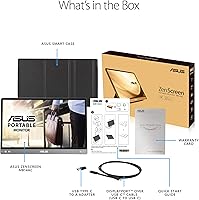
The ASUS ZenScreen MB14AC 14-inch Portable Monitor typically ships with a USB-C to USB-C cable and a USB-C to USB-A adapter cable, so most users will not need to purchase anything additional to get started. If your laptop has a Thunderbolt or USB-C port, you are likely covered right out of the box.
No, it does not include built-in speakers. Audio output will continue to come from your laptop or any external speakers you already use, which is fairly standard for portable monitors in this category.

The display uses a flicker-free backlight, which eliminates the subtle strobing that causes eye fatigue over long sessions, and it also reduces blue light output. You can toggle the low blue light mode on or off depending on your preference. Most users who work several hours a day report noticeably less eye strain compared to a typical laptop screen.

Not really. This travel display is designed as a secondary screen companion, not a primary workstation display. The 14-inch size, limited brightness, and stand flexibility are all optimized around portability rather than all-day stationary use. If you want a single home-office monitor, a larger desktop display with adjustable ergonomics will serve you much better.