Overview

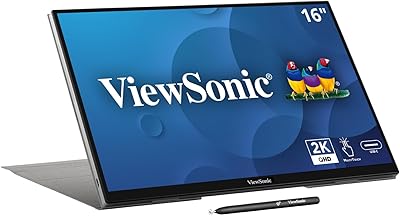
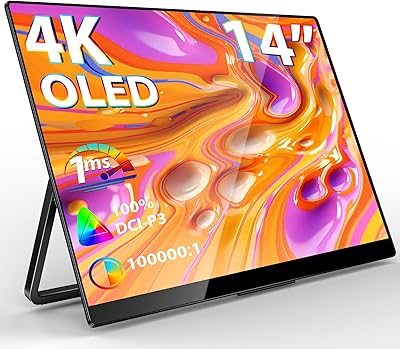
The Magedok PI-X9 16-inch 4K OLED Touchscreen Monitor is the kind of accessory you don't notice you need until you've used one on a cramped hotel desk or a coffee shop table. At its core sits a Samsung AMOLED panel, the same family of display tech you'd find in flagship phones, scaled up and packed into a 16-inch frame. Resolution comes in at a sharp 3840 x 2400, arranged in a 16:10 ratio that gives you a bit more vertical room than the usual widescreen layout. It's slim enough to slide into a backpack sleeve next to a laptop, and the build quality feels a notch above the typical budget portable display, which tracks given the panel choice alone.
Features & Benefits

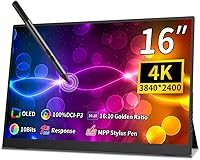
Color is where this portable monitor earns its keep. The AMOLED panel hits 100% DCI-P3 coverage with a Delta E rating under 1, which in practical terms means colors on screen line up closely with what you'd see in a properly calibrated studio monitor, useful if you're grading photos or video clips between client meetings. The touchscreen itself uses 10-point capacitive input with optical bonding, so taps and swipes feel like they're happening right on the glass rather than through a layer of air gap. Stylus support through MPP and USI protocols means sketching or annotating PDFs feels closer to pen on paper than most touch displays manage. The 16:10 aspect ratio adds extra vertical space too, and TUV-certified low blue light filtering takes some of the edge off long editing sessions.

Best For

This touchscreen display makes the most sense for people whose work depends on accurate color rather than raw brightness. Designers, photographers, and video editors who need to trust what they're seeing on a secondary screen will likely get the most value here, especially when client work travels with them between locations. Digital artists who want stylus input but don't want to carry a separate tablet around will appreciate having sketching and annotation built into the same screen they already use for everything else. It's also a solid pick for frequent travelers who need a dependable second display without hauling a full-size monitor through airports. Mac, Linux, and Windows users alike can take advantage of touch input, though the experience does shift depending on which operating system you're running.

User Feedback

Early impressions of this OLED screen tend to focus on how much the contrast and color depth stand out compared to typical portable monitors, especially for anyone coming from an LCD panel. Touch and stylus response also draws favorable comments, particularly from users who've tried cheaper portable displays with laggy or imprecise touch layers. That said, the glossy finish is a real consideration if you work near windows or under harsh overhead lighting, since glare can creep in during bright conditions. A handful of buyers weigh the cost against non-OLED alternatives and wonder if the jump is worth it for their specific use case, which is fair given how niche this category still is. Two USB ports also feels a bit tight if you're used to docking multiple peripherals at once.

Pros

  • Samsung AMOLED panel delivers deep contrast and true blacks rarely seen on portable displays.
  • 100% DCI-P3 color coverage with Delta E under 1 makes color work genuinely reliable.
  • 10-point capacitive touchscreen with optical bonding feels responsive and precise, not laggy or vague.
  • MPP and USI stylus support turns this OLED screen into a capable sketching surface.
  • 16:10 aspect ratio adds noticeably more vertical workspace than standard widescreen monitors.
  • TUV-certified low blue light filtering helps reduce eye strain during long editing sessions.
  • Lightweight build around 2 pounds makes this portable monitor easy to slip into a bag.
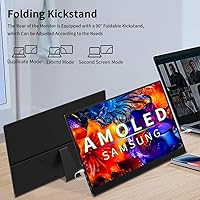
  • Integrated stand with 0-90 degree adjustment means no extra accessories needed for setup.
  • VESA mount compatibility gives flexibility for permanent desk setups down the line.

Cons

  • Only two USB ports may frustrate users who need to connect multiple peripherals at once.
  • Glossy screen surface is prone to glare under bright lights or near windows.
  • 400 lm brightness is too dim for comfortable outdoor or heavily sunlit use.
  • Touch input drops to single-touch on Mac and Linux, unlike full 10-point support on Windows.
  • As a newer, niche release, long-term reliability data and user reviews remain limited.
  • This OLED screen carries a clear cost premium over typical LCD portable monitors of similar size.
  • Buyers comparing options may find the price gap over non-OLED alternatives hard to justify for casual use.

Ratings

These scores for the Magedok PI-X9 16-inch 4K OLED Touchscreen Monitor were generated by AI after analyzing verified user reviews from buyers worldwide, with spam, bot activity, and incentivized feedback filtered out before scoring. Each category below reflects a balanced read on real-world usage, so both standout strengths and genuine pain points show up clearly rather than getting smoothed over.

Display Quality & Color Accuracy
92%
Photographers and editors consistently note how close colors on screen match their calibrated main monitor, which matters when reviewing client work on location. The 100% DCI-P3 coverage and sub-1 Delta E rating show up clearly in skin tones and gradients rather than just on a spec sheet.
A few users mention that such accurate color rendering makes flaws in poorly shot or compressed footage more obvious than they expected. It is a minor complaint, but it can be jarring the first time you notice it.
Resolution & Sharpness
89%
Text and fine details stay crisp even at close viewing distances, which makes a real difference during long document review or detailed photo retouching sessions. The pixel density holds up well whether you are zoomed into an image or reading small UI elements.
At native 4K resolution, some Windows users report needing to adjust scaling settings before icons and text feel comfortably sized. It is a quick fix, but not something everyone expects to deal with out of the box.
Touchscreen Responsiveness
87%
Users coming from non-touch portable monitors describe the 10-point capacitive touch as a genuine upgrade, with taps and swipes registering precisely thanks to the optical bonding. It feels closer to interacting with a tablet than a typical secondary display.
The experience changes noticeably depending on operating system, since Mac and Linux only get single-touch support instead of the full gesture set. Buyers who assumed universal multi-touch sometimes feel mildly misled until they check compatibility first.
Stylus & Pen Input
83%
Digital artists and note-takers appreciate that MPP and USI styluses work without hunting for a proprietary pen, making sketching and annotation feel natural rather than gimmicky. Pressure sensitivity and tracking feel close to writing on paper for most casual drawing tasks.
No stylus is guaranteed in the box on most listings, so buyers without a compatible pen already on hand face an extra purchase. Some also note a faint learning curve getting palm rejection settings dialed in correctly.
Build Quality & Portability
85%
At roughly 2.2 pounds with a slim profile, this portable monitor slides easily into a laptop sleeve without adding noticeable bulk to a daily commute or weekend trip. The narrow bezel and overall fit and finish feel solid rather than flimsy for something this light.
A handful of users wish the chassis felt slightly more rigid when carried loosely in a bag without a protective sleeve. It is not fragile, but it does not feel as overbuilt as some bulkier metal-bodied alternatives.
Brightness & Outdoor Visibility
57%
43%
Indoors, under normal office or home lighting, the brightness level is plenty comfortable and pairs well with the deep contrast of the OLED panel. Most users editing photos or writing at a desk report no issues in typical indoor conditions.
At 400 lm, this touchscreen display struggles outdoors or near sunlit windows, with the image washing out faster than expected. Anyone hoping to work on a patio or in a bright cafe will likely find it frustrating.
Screen Glare & Glossy Finish
52%
48%
The glossy coating does help colors and blacks appear richer and more saturated when lighting is controlled, which suits darker editing rooms or evening work sessions. Contrast looks noticeably deeper than on matte alternatives in the right setting.
Reflections become a real annoyance under overhead lighting or near windows, forcing frequent repositioning to avoid glare. Several buyers say this is the first thing they would change about an otherwise strong panel.
Connectivity & Ports
61%
39%
The two USB ports cover basic single-cable power and data needs well, making quick setup with a laptop straightforward for most travel scenarios. For simple one-device use, the connection feels uncomplicated and reliable.
Users running a keyboard, mouse, and external drive simultaneously find two ports limiting fast, often needing a separate hub. It is a common complaint among buyers with more demanding desk setups.
Eye Comfort & Blue Light Filtering
81%
19%
The TUV-certified low blue light filtering gets specific praise from users doing multi-hour editing or writing sessions, who report less eye fatigue than with standard LCD panels. It is a small detail that adds up over a long workday.
A few sensitive users still recommend taking regular breaks, since filtering reduces but does not eliminate eye strain entirely during extended screen time. Results vary somewhat by individual sensitivity.
Stand & Ergonomics
78%
22%
The integrated stand with 0 to 90 degree tilt gets solid marks for letting users quickly adjust viewing angle on uneven desks or tight hotel room setups. VESA compatibility adds flexibility for a more permanent desk arrangement later.
Some users note the built-in stand feels less sturdy than a dedicated metal mount when the screen is touched frequently. It works fine for casual use but shows minor wobble under firmer touchscreen interaction.
Cross-Platform Touch Compatibility
69%
31%
Windows users get the full 10-point touch experience right away, with gestures and multi-finger input working as expected for note-taking and navigation. This makes the screen genuinely useful as a touch-first secondary display on Windows machines.
Mac and Linux users are limited to single-touch, which feels like a downgrade compared to the marketing emphasis on touch. This OLED screen is clearly designed with Windows as the primary touch platform in mind.
Value for Money
66%
34%
Buyers who specifically need OLED-level color accuracy and stylus support feel the cost is justified compared to shopping for a separate monitor and drawing tablet. For professional color work, the combined feature set saves money versus buying two devices.
Casual buyers comparing this against cheaper non-OLED portable monitors often question whether the price gap is worth it for basic browsing or office tasks. Value really depends on whether color accuracy is a genuine requirement or a nice extra.

Suitable for:

The Magedok PI-X9 16-inch 4K OLED Touchscreen Monitor is built for creative professionals who need trustworthy color away from their main workstation. Photographers and video editors who travel for client shoots will appreciate having a screen that doesn't lie about color accuracy when reviewing footage on location. Digital artists who sketch or annotate regularly benefit from stylus support without needing to carry a separate drawing tablet. Remote workers and consultants who bounce between offices, co-working spaces, and hotel rooms get a real second display instead of squinting at a single laptop screen all day. It also suits anyone running a Mac, Linux machine, or Windows laptop who wants touch functionality without being locked into one ecosystem.
Not suitable for:

Buyers chasing maximum brightness for outdoor work or sunlit offices should look elsewhere, since 400 lm is on the modest side for a screen with this much color ambition. The Magedok PI-X9 16-inch 4K OLED Touchscreen Monitor also isn't ideal for anyone who needs more than basic connectivity, as two USB ports can feel limiting once you start docking a keyboard, mouse, or external drive. People who primarily use Mac or Linux machines should know touch input is limited to single-touch on those platforms, with full 10-point support reserved for Windows. The glossy screen surface can introduce glare in bright rooms or near windows, which matters if your workspace isn't easy to control. Gamers or casual users who just want a cheap second screen for streaming video probably don't need this level of color precision and would be better served by a less expensive non-OLED option.
Specifications

  • Display Panel: The screen uses a 16-inch Samsung AMOLED panel with a pixel density of 283 ppi.
  • Resolution: Native resolution is 3840 x 2400 pixels, classified as 4K UHD.
  • Aspect Ratio: The panel uses a 16:10 aspect ratio, which provides more vertical space than a standard 16:9 display.
  • Color Gamut: Color coverage reaches 100% of the DCI-P3 color space.
  • Color Accuracy: Factory calibration delivers a Delta E rating of less than 1 for accurate color reproduction.
  • Touchscreen: Touch input uses a 10-point capacitive touchscreen with optical bonding to reduce glare and parallax.
  • Stylus Support: The display supports MPP and USI stylus protocols for pen input.
  • Eye Care Certification: The panel carries TUV low blue light certification aimed at reducing eye strain.
  • Response Time: Pixel response time is rated at 1 millisecond.
  • Brightness: Maximum screen brightness is rated at 400 lm.
  • Stand: An integrated stand allows viewing angle adjustment from 0 to 90 degrees.
  • VESA Mount: The rear housing supports standard 75 x 75mm VESA mounting hardware.
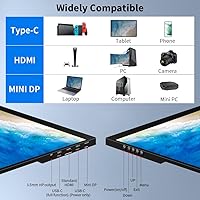
  • Connectivity: The monitor includes 2 USB ports for data and power delivery.
  • Screen Surface: The display surface has a glossy finish.
  • Weight: The monitor has a net weight of approximately 2.2 pounds.
  • Dimensions: Physical dimensions measure 0.27 x 15.5 x 9.9 inches.
  • Power Input: Operating voltage is rated at 5 volts.

Related Reviews

ViewSonic VX1655-4K-OLED 15.6-inch Portable OLED Monitor
77%
93%
Display Quality
91%
Portability
84%
USB-C Connectivity
88%
Build Quality
67%
Stand Stability
More
UPERFECT 16006DD 16″ 4K Portable Monitor
77%
83%
Brightness Performance
91%
Display Sharpness
74%
Color Accuracy
88%
Build Quality
76%
Portability
More
Magedok 14-Inch 4K Portable Monitor
85%
93%
Display Quality
88%
Portability
90%
Ease of Setup
91%
Color Accuracy
58%
Sound Quality
More
Newsoul M160B04 16″ OLED Portable Monitor
77%
93%
Image Quality
89%
Portability
86%
Color Accuracy
84%
Gaming Performance
58%
Brightness & Glare
More
Magedok MG140-FT02 14-Inch Portable Touchscreen Monitor
74%
91%
Portability
74%
Display Quality
77%
Color Accuracy
63%
Touchscreen Responsiveness
79%
Connectivity & Compatibility
More
ASUS ZenScreen 16-inch OLED Portable Monitor
76%
93%
Display Quality
91%
Color Accuracy
78%
Portability
84%
Build Quality
76%
Connectivity
More
Upperizon P156UHT-R 15.6″ 4K OLED Portable Monitor
77%
93%
Display Quality
94%
Color Accuracy
88%
Portability & Design
79%
Build Quality
61%
Touchscreen Performance
More
Wisecoco 14-inch 4K Stretched Bar Touchscreen Monitor
74%
83%
Image Quality
84%
Color Accuracy
57%
Connectivity
61%
Setup Experience
71%
Value for Money
More
InnoView 14-inch OLED Portable Monitor 4K UHD
85%
92%
Display Quality
88%
Portability
90%
Color Accuracy
94%
Response Time (Gaming)
85%
Build Quality
More
Magedok T101F 10.1-inch Portable Touchscreen Monitor
72%
88%
USB-C Connectivity
63%
Touch Accuracy
79%
Display Quality
84%
Aspect Ratio Fit
76%
Setup Experience
More

FAQ

It works fine with a MacBook over USB-C, but keep in mind touch support drops to single-touch on Mac and Linux instead of the full 10-point gesture support you get on Windows. The Magedok PI-X9 16-inch 4K OLED Touchscreen Monitor still displays the full 4K image and colors correctly regardless of OS, it is really just the touch gestures that are limited outside Windows. For most editing or reference work where you are not relying heavily on multi-touch, this is not a dealbreaker.
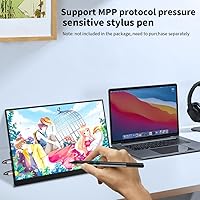
The screen supports MPP and USI stylus protocols, but listings like this typically do not guarantee a bundled pen, so it is worth checking the current box contents before assuming one is included. If you already own a compatible MPP or USI stylus from another device, there is a good chance it will work here without buying anything new.

Not really. At 400 lm, this portable monitor is tuned more for accurate color indoors than for fighting direct sunlight. You will get noticeably better results using it in a shaded space, a hotel room, or an indoor office rather than on a patio at midday.

On Windows 8, 10, and above you get full 10-point multi-touch, so pinching, zooming, and multi-finger gestures all work as expected. On Mac and Linux, support is limited to single-touch input, which still lets you tap and select things but skips the more advanced gesture set.

Based on the specs provided, there is no mention of an internal battery, so you should plan on powering it through a USB-C connection from your laptop or a wall adapter. It is worth keeping a compact USB-C cable on hand if you travel with it often.

Yes, the back of the unit supports standard 75 x 75mm VESA mounting, so it will work with most VESA-compatible arms or mounts sold separately. That said, the integrated stand already tilts from 0 to 90 degrees, so many people find they do not need an arm unless desk space is tight.

The glossy finish does reflect light more than a matte screen would, so glare becomes noticeable under bright overhead lighting or near a sunny window. Positioning the screen at a slight angle away from direct light sources usually helps quite a bit.

At around 2.2 pounds and a slim profile, it genuinely is easy to slide into a laptop bag without adding much bulk. It is not the lightest portable monitor on the market, but for an OLED panel of this resolution, the weight feels reasonable.

It can be if you are used to docking a keyboard, mouse, and external drive all at once, since two ports fill up fast. Many buyers work around this by using a small USB hub, but it is fair to expect some cable juggling if your workflow is connection-heavy.

If color accuracy genuinely matters for your work, like photo editing, video grading, or design review, the deep contrast and 100% DCI-P3 coverage make a real difference you can see. If you mainly want a basic second screen for email or browsing, a less expensive LCD option will probably serve you just as well without the added cost.