Overview

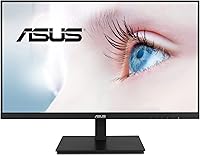
The ASUS VA24DQSB 24-inch IPS Monitor sits squarely in the mid-range sweet spot for home office and everyday desktop use, and it earns its place there largely on ergonomics alone. Where most monitors at this size cut corners with a tilt-only stand, this ASUS monitor ships with a fully adjustable stand that tilts, swivels, pivots, and raises — a genuine rarity at this price point. The IPS panel gives it a clear edge over cheaper TN alternatives, producing more consistent color whether you are sitting straight-on or at an angle. It also comes with a month of Adobe Creative Cloud access, a small but appreciated touch. Just keep expectations calibrated: 1080p at 75Hz is capable and comfortable, not cutting-edge.
Features & Benefits

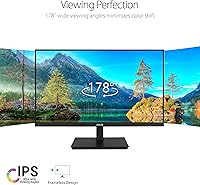
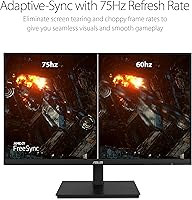
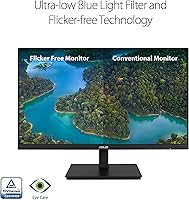
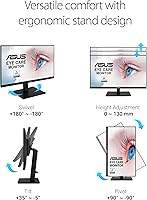
The 178° viewing angles mean colors hold up even when you shift position — helpful if you share a screen with a colleague or simply slouch in your chair. The 75Hz Adaptive-Sync keeps things smooth during casual gaming and fast-scrolling workflows, though competitive players will want something faster. Connectivity is genuinely practical: HDMI, DisplayPort, VGA, and a two-port USB hub mean fewer adapters cluttering your desk. The ergonomic stand covers tilt, swivel, full pivot for portrait mode, and 130mm of height travel. On top of that, the TÜV-certified flicker-free and low blue light settings make long screen sessions noticeably easier on the eyes.

Best For

This 24-inch IPS display makes most sense for people who spend full workdays at a desk and feel it — sore necks, hunched shoulders. The stand's range of motion alone makes it worth serious consideration for remote workers and home office setups where posture actually matters. Students building their first real workstation will find the port variety particularly useful. It also suits anyone doing casual photo editing or design work who needs reliable color without spending significantly more. Running two of these side by side is clean thanks to the slim bezel. One honest caveat: if you sit more than a meter from the screen regularly, 1080p starts to feel like enough but not generous.

User Feedback

With over 2,100 ratings averaging 4.5 out of 5, the VA24DQSB has built a genuinely positive reputation rather than a loud one. Buyers consistently point to the stand's flexibility and out-of-box color accuracy as standout qualities. Build quality also gets regular praise — it feels more substantial than the price might lead you to expect. The honest criticisms are worth noting: a handful of users find the panel dim in bright rooms, where the backlight struggles to compete with direct sunlight. The on-screen display menu draws occasional complaints for being sluggish to navigate. Long-term owners generally report that the stand stays firm after months of daily adjustments, which says something real about build consistency.

Pros

  • The full ergonomic stand — height, pivot, swivel, tilt — is rare at this price and makes a real difference for all-day comfort.
  • IPS panel delivers consistent, natural color straight out of the box with no calibration needed for typical use.
  • Connectivity is genuinely versatile, with HDMI, DisplayPort, VGA, and a USB hub covering almost any setup.
  • TÜV-certified flicker-free and low blue light modes hold up during long workdays and reduce eye fatigue noticeably.
  • The three-sided slim bezel makes dual-monitor arrangements look clean and professional without extra effort.
  • Build quality feels more solid than the price suggests, and the stand stays firm after months of regular adjustment.
  • 75Hz with Adaptive-Sync is a smooth and tear-free experience for casual gaming and everyday workflows.
  • The matte screen coating handles reflections well in moderately lit indoor environments.
  • A bundled month of Adobe Creative Cloud is a small but practical bonus for creative users.
  • At its price tier, the VA24DQSB delivers a combination of panel type, ergonomics, and connectivity that competitors rarely match.

Cons

  • Peak brightness is not sufficient for sun-facing desks or brightly lit workspaces — a persistent real-world complaint.
  • The OSD menu navigation is sluggish and requires more button presses than it should for basic adjustments.
  • USB hub ports are limited to USB 2.0 speeds, making them useful for peripherals but not file transfers.
  • No USB-C input is a notable omission for users with modern laptops that rely on it for video output.
  • Built-in speakers are thin and low-volume — adequate only as a temporary fallback, not a daily audio solution.
  • The low blue light mode introduces a warm color shift that affects color accuracy during sensitive visual tasks.
  • 1080p resolution starts to feel limited at longer viewing distances or for users already accustomed to 1440p.
  • The bottom bezel chin is thicker than the other three sides, which slightly undermines the frameless aesthetic in dual setups.
  • Cable routing through the stand is tight and makes managing thicker cables genuinely awkward.
  • The swivel base can feel stiff out of the box and takes time to loosen to a comfortable range of motion.

Ratings

The ASUS VA24DQSB 24-inch IPS Monitor earns a well-deserved reputation among home office users and students, and the scores below reflect exactly that — no inflation, no spin. Our AI analyzed thousands of verified global purchases, actively filtering out incentivized reviews and bot patterns, to surface what real long-term owners actually think. Strengths around ergonomics and panel quality score high; genuine friction points around brightness and OSD usability are scored honestly.
Ergonomic Adjustability
93%
The stand is the headline feature for a reason. Users coming from tilt-only monitors consistently describe the pivot, swivel, and 130mm height range as genuinely life-changing for their posture after full workdays. Portrait mode works reliably, and the adjustments feel firm rather than loose.
A small number of users report that the swivel base can feel slightly stiff out of the box, requiring a break-in period before movement feels smooth. Those with very specific monitor arm preferences may also find the VESA adapter process mildly fiddly.
IPS Panel Color Accuracy
88%
Out of the box, colors are well-balanced and natural — something buyers switching from TN panels notice immediately. For photo editing hobbyists and everyday content consumption, the IPS panel holds up impressively without needing manual calibration for most use cases.
Color accuracy is solid but not studio-grade. Users doing serious color-critical professional work have noted the panel lacks the Delta-E consistency of higher-end IPS displays. It covers sRGB adequately but does not approach wide-gamut territory.
Brightness & Glare Handling
61%
39%
The matte screen coating does a reasonable job of diffusing reflections in moderately lit spaces, and for most indoor office environments the brightness level is perfectly workable. Evening and dim-room use in particular draws little complaint.
This is the most frequently cited pain point. Users working near windows or in brightly lit rooms regularly report the panel struggles to compete with ambient light. The peak brightness simply is not high enough for sun-facing desks, and this comes up persistently in long-term reviews.
Eye Comfort & Fatigue
91%
The TÜV Rheinland-certified flicker-free backlight and low blue light mode make a noticeable difference for users logging eight-plus-hour workdays. Multiple reviewers specifically credit this monitor with reducing the headaches and eye strain they experienced on previous displays.
The low blue light mode does introduce a visible warm color shift that some users find distracting during color-sensitive tasks. It is adjustable, but finding the right balance between comfort and accurate color takes some experimentation in the OSD.
Build Quality & Stability
84%
The chassis feels more premium than the price tier suggests. Long-term owners — those using the monitor daily for a year or more — generally report no wobble development in the stand and no backlight bleed progression over time, which speaks to consistent manufacturing quality.
The plastic finish, while solid, does show fingerprints and light scratches around the base and adjustment mechanisms with regular use. A few users also note the back panel looks less refined than the clean front, which matters in open office or streaming setups.
Connectivity & Port Selection
86%
Having HDMI, DisplayPort, VGA, and a two-port USB hub on a monitor at this price is genuinely useful. Users with older laptops appreciate the VGA option, while the USB hub quietly becomes a favorite feature for those who plug in keyboards, mice, or USB drives throughout the day.
The USB hub is limited to USB 2.0 speeds, which makes it fine for peripherals but frustrating for anyone hoping to transfer large files quickly. There is also no USB-C input, which increasingly feels like an omission for users with modern laptops.
Refresh Rate & Gaming Performance
72%
28%
At 75Hz with Adaptive-Sync active, the display handles casual gaming, everyday video, and fast-scrolling documents without noticeable tearing. For players who game occasionally rather than competitively, the experience is smooth enough to feel like a meaningful upgrade over 60Hz.
Anyone coming from a 144Hz display or playing competitive titles will find 75Hz limiting. Input lag and motion clarity are adequate for casual use only — this is not a gaming monitor by any serious measure, and buyers expecting otherwise will be disappointed.
OSD Menu Usability
57%
43%
The on-screen display covers all expected settings including brightness, contrast, blue light filter levels, and input selection. The physical buttons are labeled clearly enough that basic adjustments are accessible without consulting the manual.
Navigation is sluggish and the button layout draws consistent criticism. Several users describe the OSD as feeling like an afterthought — multi-step adjustments require more button presses than competing monitors, and the response between presses has a noticeable lag that becomes tedious during setup.
Built-in Speakers
53%
47%
Having speakers built in at all is appreciated as a convenience, particularly for users in minimal desk setups or those who just need audio for video calls and background music without reaching for external speakers or headphones.
Audio quality is thin and lacking bass, as expected from monitor-integrated speakers. Volume headroom is also limited. Users who care about audio quality at all will connect external speakers or headphones quickly — the built-in option is really only useful in a pinch.
Value for Money
89%
At its price point, the combination of a genuine IPS panel, full ergonomic stand, and diverse port selection is hard to match from competing brands. Most users feel they received more monitor than the price implied, especially those upgrading from older or cheaper office displays.
A few buyers shopping more broadly note that some competing monitors now offer 1440p resolution at a similar price, which puts the 1080p resolution of this display under some pressure in terms of long-term value as display standards shift.
Setup & Assembly Experience
78%
22%
Assembly is largely tool-free and the stand snaps together in minutes. The included documentation is clear enough that most users have the monitor up and running within ten minutes of opening the box, with no reports of missing or confusing components in the majority of reviews.
A subset of users reports the stand attachment mechanism feels less intuitive than expected, requiring a firm push-and-click that is not immediately obvious. Cable management through the stand is functional but tight, making routing thicker cables somewhat awkward.
Viewing Angles
87%
The 178° IPS viewing angles mean color and contrast remain consistent across a wide range of positions. This is particularly appreciated in shared workspaces where a colleague might need to glance at the screen, and in living room or kitchen setups where viewing angles vary.
While the IPS panel handles angles well, there is a slight brightness falloff at extreme horizontal angles that some users notice. It is minor and unlikely to affect typical use, but it is not quite the perfectly uniform experience that premium IPS panels deliver.
Resolution Clarity
74%
26%
At a typical desk distance of 50 to 70 centimeters, 1920x1080 on a 24-inch screen looks clean and sharp for documents, web browsing, and video. Text is crisp and images render clearly for the vast majority of everyday computing tasks.
Users who sit further from the screen or who work with dense text and fine detail — particularly those coming from 1440p displays — find 1080p visibly limited. Pixel density becomes a real consideration, and some reviewers specifically wish they had opted for a higher resolution option.
Dual-Monitor Compatibility
82%
18%
The three-sided frameless design makes pairing two of these units side by side genuinely clean. The thin bezel gap between panels is minimal enough that users report it disappearing from peripheral vision within a day or two of use.
While the bezels are slim on three sides, the bottom chin is thicker, which can feel slightly mismatched in a dual-monitor arrangement if panels are at different heights. This is a minor aesthetic note rather than a functional concern for most setups.

Suitable for:

The ASUS VA24DQSB 24-inch IPS Monitor is built for people who spend real hours in front of a screen and feel the physical consequences of a poorly designed setup. Remote workers and home office users will get the most out of it — the full ergonomic stand means you can actually dial in the height and angle that works for your body rather than adapting your posture to a fixed display. Students building their first serious workstation will find it punches well above what the price typically delivers, especially given the IPS color quality and port variety. It also suits casual photographers and hobbyist designers who need honest, consistent color without paying professional display prices. Anyone running a dual-monitor setup will appreciate how cleanly the slim bezels line up side by side. And if you are upgrading from an older monitor with no height adjustment, the ergonomic difference alone will feel immediate and significant.
Not suitable for:

The ASUS VA24DQSB 24-inch IPS Monitor has real limitations that make it the wrong choice for certain buyers, and it is worth being direct about them. If your desk sits in a sun-facing room or a brightly lit studio environment, the panel's modest brightness ceiling will frustrate you daily — this is a genuine and recurring complaint from real owners, not a minor footnote. Competitive gamers who have grown accustomed to 144Hz or higher refresh rates will find 75Hz noticeably sluggish, and no amount of Adaptive-Sync fixes that fundamental gap. Users who work extensively with 1440p or 4K content — video editors, animators, or those who have already moved to a higher-resolution display — will find 1080p limiting, particularly at typical desk distances where pixel density becomes apparent. If USB-C connectivity matters for your laptop or devices, the lack of it here is a hard stop. Finally, anyone who prioritizes audio output from their monitor will want to budget for external speakers, as the built-in ones are functional at best.
Specifications

  • Screen Size: The display measures 24 inches diagonally, offering a practical workspace footprint suitable for most standard desks.
  • Panel Type: An IPS (In-Plane Switching) panel provides 178° horizontal and vertical viewing angles with consistent color reproduction across positions.
  • Resolution: Native resolution is 1920x1080 (Full HD), delivering sharp text and clear imagery at typical desktop viewing distances.
  • Refresh Rate: The panel supports up to 75Hz with Adaptive-Sync technology active, reducing screen tearing during video playback and casual gaming.
  • Connectivity: Input options include one HDMI port, one DisplayPort, one VGA (D-Sub) port, and a built-in USB hub with two USB 2.0 downstream ports.
  • Ergonomic Range: The stand supports +35° to -5° tilt, ±180° swivel, ±90° pivot for portrait mode, and 130mm of vertical height adjustment.
  • VESA Compatibility: The monitor is VESA mount compatible, allowing removal of the stock stand in favor of a third-party monitor arm or wall bracket.
  • Eye Care: Both flicker-free backlight and low blue light filter technologies carry TÜV Rheinland certification for verified eye comfort performance.
  • Screen Surface: The panel uses a matte anti-glare coating that reduces reflections in indoor environments without significantly affecting image clarity.
  • Audio: Two built-in speakers are integrated into the chassis, providing basic audio output without the need for external speakers in low-demand situations.
  • Dimensions: With the stand attached, the monitor measures approximately 2.1″ deep, 21.3″ wide, and 12.8″ tall at its lowest height position.
  • Weight: The complete unit including the stand weighs 11.71 pounds, making it manageable for single-person setup and occasional repositioning.
  • Bezel Design: Three sides of the display feature a slim frameless bezel, making it well suited for side-by-side dual-monitor configurations.
  • Power Input: The monitor operates at up to 240 volts, compatible with standard international power supplies via the included adapter.
  • Color Gamut: The IPS panel covers the sRGB color space adequately for everyday content, web use, and casual photo editing workflows.
  • Response Time: The panel is rated for standard IPS response times, appropriate for office productivity and casual media consumption rather than competitive gaming.
  • Adaptive Sync: Adaptive-Sync support works over both HDMI and DisplayPort connections to synchronize the display refresh rate with compatible GPU output.
  • Release Date: The VA24DQSB was first made available for purchase in September 2021 and remains an active product in the ASUS monitor lineup.

Related Reviews

ViewSonic VG2448A 24-Inch IPS Monitor
84%
88%
Value for Money
91%
Display Quality
85%
Ergonomics and Comfort
87%
Connectivity Options
90%
Ease of Setup
More
ASUS VZ24EHF 24-inch Eye Care Monitor
86%
91%
Value for Money
88%
Display Quality
93%
Eye Care Technology
86%
Refresh Rate & Performance
85%
Build Quality
More
Dell P2419H 24-Inch FHD IPS Monitor
87%
91%
Display Quality
88%
Ergonomics
78%
Build Quality
94%
Color Accuracy
89%
Flicker-Free Technology
More
KTC 24-inch QHD IPS 100Hz Monitor
85%
92%
Display Quality
88%
Ease of Setup
91%
Color Accuracy
89%
Gaming Performance
94%
Eye Comfort Features
More
ASUS BE24ECSBT 24-inch 1080P Touch Monitor
83%
79%
Touchscreen Accuracy
88%
Display Quality
85%
Ergonomics & Adjustability
81%
Connectivity & Ports
84%
Build Quality
More
HP 524sf 24-inch FHD IPS Monitor
85%
88%
Display Quality
91%
Value for Money
85%
Build Quality
94%
Ease of Setup
87%
Eye Care Features
More
Z-Edge U24I 24-inch IPS Monitor
85%
88%
Display Quality
92%
Value for Money
85%
Build Quality
84%
Gaming Performance
80%
Ergonomics & Design
More
ViewSonic VP2468a 24-Inch IPS 1080p Monitor
84%
94%
Color Accuracy
88%
Ergonomics & Comfort
91%
Connectivity Options
89%
Value for Money
78%
Ease of Setup
More
ReHisk 24 Inch FHD IPS Gaming Monitor
83%
88%
Value for Money
90%
Display Quality
87%
Gaming Performance
84%
Ease of Setup
82%
Eye Care Features
More
Dell E2420H 24-inch FHD IPS Monitor
88%
88%
Display Quality
90%
Color Accuracy
87%
Viewing Angles
92%
Ease of Setup
91%
Energy Efficiency
More

FAQ

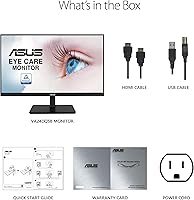
It is fully tool-free. The stand base clicks onto the column and the column slots into the back of the display with a single push-and-lock mechanism. Most people have it assembled and on their desk within ten minutes of opening the box, though the click can feel stiff the first time — just press firmly until you hear it seat.

Not directly. The VA24DQSB does not have a USB-C input, so you would need a USB-C to HDMI or USB-C to DisplayPort adapter cable to connect a modern laptop. It is a real limitation worth noting if USB-C is your primary output, but a basic adapter solves it for most users.

Honestly, yes — but modestly. Scrolling feels slightly smoother and video playback looks a touch more fluid. For casual gaming it makes a real difference in reducing tearing when Adaptive-Sync is active. That said, if you are coming from a 144Hz display, 75Hz will feel like a step down. It is best understood as a comfort upgrade over 60Hz, not a gaming-grade spec.

It depends heavily on your room. In a typical indoor environment with overhead lighting, the brightness is perfectly workable. The problem appears specifically when the monitor faces a window or sits under very strong directional lighting — in those conditions, the image can look washed out. If your desk is not in a sunlit spot, most users do not experience this as a daily issue.

They will handle video calls in a pinch — voices come through clearly enough for a Teams or Zoom call at moderate volume. For music, YouTube, or anything where audio quality matters, you will want external speakers or headphones. The built-in ones are thin and lack any real bass, so treat them as a backup rather than a solution.

This is genuinely where the ASUS VA24DQSB 24-inch IPS Monitor earns its reputation. The ability to raise, lower, tilt, and swivel the display to match your exact seated position — rather than adapting your posture to a fixed screen — makes a real physical difference over the course of a workday. If you have been using a monitor with tilt-only adjustment, the difference feels significant within the first hour.
Yes, the stock stand detaches cleanly and the monitor has standard VESA mount points on the back, so any compatible monitor arm or wall bracket will fit. This is a popular choice among users who want to free up desk space or achieve more precise positioning than the built-in stand allows.

It does introduce a warm, yellowish tint that can feel off if you are used to a neutral white display. For evening use or long document-reading sessions it is genuinely comfortable, but for photo editing or anything color-sensitive, most users turn it off or reduce the intensity. The good news is it is easy to toggle through the OSD, so you can switch it on for the end of the workday and off for creative tasks.

For hobbyist photo editing it is a solid choice. The IPS panel reproduces colors naturally and consistently, and the viewing angles mean what you see straight-on matches what you see from a slight angle — important when reviewing images. It is not a professional-grade display with hardware calibration or wide-gamut coverage, but for casual editing and sharing photos online, most users find it more than adequate without any manual calibration.

It is slow by modern standards. The physical buttons are on the underside-rear of the panel, which is fine once you memorize their positions, but navigating multi-step settings requires several presses with a noticeable delay between each response. For initial setup it is a minor annoyance rather than a dealbreaker — most users set their preferred brightness and blue light settings once and rarely touch the OSD again after that.

Where to Buy