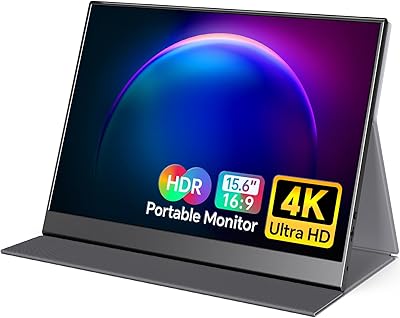
ASUS ZenScreen MB16ACV 15.6-inch Portable Monitor
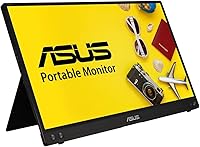
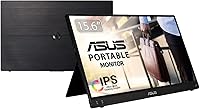

Overview
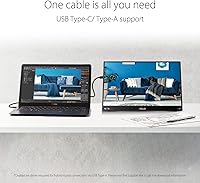
The ASUS ZenScreen MB16ACV 15.6-inch Portable Monitor sits in a sweet spot for remote workers, frequent travelers, and anyone tired of squinting at a single laptop screen all day. At just 1.83 pounds and 0.41 inches thin, it slides into a laptop bag without adding meaningful bulk — a real advantage when every ounce counts. The whole setup hinges on single-cable USB-C convenience: one connection handles both power and video, which genuinely simplifies life on the road. With a 4.4-star average across more than 1,050 reviews, this travel-friendly display has earned its reputation in a market that has gotten crowded fast. Build quality and eye care features are what separate the good options from the forgettable ones here.
Features & Benefits
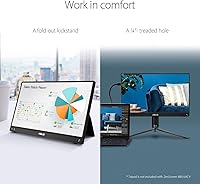
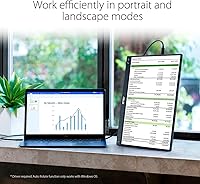
The 15.6-inch IPS panel delivers accurate, consistent color across a wide viewing angle — not reference-grade, but genuinely solid for productivity and casual media. An anti-glare coating keeps things manageable in most indoor environments, though direct sunlight will test its limits. The built-in kickstand handles both portrait and landscape orientation without any fuss, which is handier than it sounds when setting up on a hotel desk or a café table. One underrated touch: the standard 1/4-inch tripod thread, which opens up compatibility with desk clamps and travel mounts that most competing monitors ignore entirely. And for long work sessions, the TÜV Rheinland-certified flicker-free and low blue light tech makes a noticeable difference in eye comfort over several hours.
Best For
This portable monitor makes the most sense for remote workers and consultants who regularly set up in different locations — hotel rooms, co-working spaces, client offices — and need a reliable second screen without hauling heavy hardware. Laptop users looking to extend their workspace without committing to a full external monitor will find it fits naturally into an existing setup. It also works well for Steam Deck or Switch users who want a bigger display on occasion. Coders and writers who prefer reading in portrait mode get genuine value from the kickstand's flexibility. And for anyone prone to eye fatigue after long screen sessions, the certified low blue light output is more than a marketing checkbox — it is a practical consideration worth having.
User Feedback
Across the review base, ease of setup comes up repeatedly as a standout — plug in and it works, with minimal driver headaches reported whether buyers are on Mac or Windows. The single-cable workflow draws consistent praise from people who have dealt with dongle-and-adapter chaos before. That said, two common complaints are worth knowing upfront: there are no built-in speakers, which catches some buyers off guard, and brightness in direct sunlight falls noticeably short. A handful of reviewers also note that the kickstand, while functional, feels slightly plasticky compared to the polished look of the screen itself. Overall, the tone across more than 1,050 ratings is clearly positive, with most criticism aimed at omissions rather than actual performance failures.
Pros
- Single USB-C cable handles both power and video, making setup genuinely fast and clean on modern laptops.
- At 1.83 pounds and 0.41 inches thin, this portable monitor slides into any laptop bag without noticeable added bulk.
- IPS panel delivers consistent color and wide viewing angles that hold up well for productivity and everyday media.
- TÜV Rheinland-certified flicker-free and low blue light output makes a real difference during long work sessions.
- Built-in kickstand supports both portrait and landscape modes with no extra accessories required.
- Standard 1/4-inch tripod thread opens up compatibility with a wide range of third-party desk clamps and travel mounts.
- Plug-and-play experience on both Mac and Windows earns consistent praise from buyers for requiring zero driver installation.
- Anti-glare coating handles typical indoor lighting and mixed office environments reliably.
- Strong 4.4-star average across more than 1,050 verified buyers reflects a dependable track record in real-world conditions.
- USB-A adapter fallback extends compatibility to laptops without a dedicated USB-C video output port.
Cons
- No built-in speakers at all — audio relies entirely on the connected device, which surprises many buyers.
- No HDMI port locks out users with older laptops or desktops that lack USB-C video output.
- Panel brightness falls short in sunlit rooms or near uncovered windows, limiting usability in bright environments.
- The kickstand feels noticeably less premium than the display itself, with some concern about long-term hinge durability.
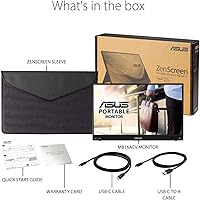
- No protective sleeve or carrying case is included despite the product being marketed around portability.
- Resolution stays at 1080p, which feels like a step down for users coming from high-DPI laptop screens.
- Kickstand angle is fixed, not freely adjustable, which limits positioning flexibility on uneven or non-standard surfaces.
- Some users report inconsistent power delivery through older USB-A ports, occasionally requiring a cable re-seat.
- Color accuracy is adequate for productivity but not reliable enough for professional photo or video grading work.
- The monitor can tip forward on smooth or slightly sloped surfaces when the kickstand is deployed without a grip pad.
Ratings
The scores below reflect an AI-driven analysis of verified global buyer reviews for the ASUS ZenScreen MB16ACV 15.6-inch Portable Monitor, with spam, bot activity, and incentivized feedback actively filtered out before scoring. Every category captures what real users praised and what genuinely frustrated them — nothing is softened to protect the product's image. The result is an honest, balanced snapshot of where this travel-friendly display excels and where it falls short of expectations.
Portability & Form Factor
Display Quality
Setup & Plug-and-Play Experience
Eye Care & Long-Session Comfort
Build Quality & Materials
Kickstand Versatility
Connectivity & Compatibility
Tripod & Mounting Flexibility
Audio
Value for Money
Weight Distribution & Handling
Resolution & Sharpness
Anti-Glare Performance
Packaging & Unboxing Experience
Suitable for:
The ASUS ZenScreen MB16ACV 15.6-inch Portable Monitor is purpose-built for people whose work does not stay in one place — remote workers, traveling consultants, and freelancers who regularly set up in hotels, co-working spaces, or client offices will get the most out of it. If your daily routine involves a laptop and you find yourself constantly wishing for a second screen to spread out your work, this travel-friendly display slots in without demanding a dedicated bag or a complicated setup ritual. Laptop users on both Mac and Windows benefit from the single USB-C cable workflow, which removes the usual adapter frustration entirely. People who log long hours in front of screens and deal with eye strain will genuinely appreciate the certified flicker-free and low blue light output — it is not a gimmick at this level of certification. Coders and writers who like reading vertically will find portrait mode via the kickstand surprisingly useful for long documents or codebases. Even compact console gamers using a Steam Deck or Nintendo Switch can put this monitor to good work when they want a larger screen away from home.
Not suitable for:
Buyers expecting a full multimedia workstation accessory should look elsewhere — the ZenScreen MB16ACV has no built-in speakers whatsoever, meaning anyone who needs audio output from the monitor itself will be immediately disappointed and scrambling for a workaround. If your laptop or desktop lacks a USB-C port capable of video output, compatibility becomes a real problem since there is no HDMI fallback, and older machines are simply locked out without a specific adapter chain that can introduce its own reliability headaches. Users who work primarily in very bright environments — outdoor patios, sunlit home offices with uncovered windows — will find the brightness ceiling frustrating, as the panel cannot compete with high-nit alternatives built for harsh lighting. Creative professionals doing serious color work, such as photo retouching or video grading, should not expect reference-grade accuracy from this IPS panel; it is honest for general use but not calibrated to professional standards. Anyone moving from a high-DPI laptop display will notice a visible drop in sharpness, since 1080p at 15.6 inches is a step down from the Retina or QHD screens many modern ultrabooks ship with. Finally, buyers hoping the box includes a protective sleeve or carrying pouch will be let down — the travel-oriented packaging does not match the travel-oriented pitch.
Specifications
- Screen Size: The display measures 15.6 inches diagonally, offering a practical workspace extension without crossing into bulky territory.
- Resolution: Native resolution is 1920x1080 Full HD, delivering sharp text and clear visuals at standard 100 percent scaling on most operating systems.
- Panel Type: An IPS panel provides accurate color reproduction and wide viewing angles, making the image consistent whether viewed straight-on or from the side.
- Aspect Ratio: The screen uses a standard 16:9 aspect ratio, compatible with virtually all video content, productivity layouts, and gaming formats.
- Surface Finish: The display surface features an anti-glare matte coating designed to diffuse reflections in typical indoor lighting conditions.
- Dimensions: The monitor measures 14.09 inches wide, 8.85 inches tall, and 0.41 inches thin, allowing it to fit inside most standard laptop sleeves and bags.
- Weight: Total unit weight is 1.83 pounds, light enough to carry alongside a laptop without meaningfully adding to bag fatigue over a full commute.
- Connectivity: Primary input is USB-C with Power Delivery and video signal combined over a single cable; a USB-A adapter is also supported for broader laptop compatibility.
- USB Ports: The monitor includes two USB 2.0 ports to support peripheral connections when the host device has limited port availability.
- Kickstand: An integrated rear kickstand supports the monitor in both landscape and portrait orientations without requiring any external stand or additional hardware.
- Tripod Mount: A standard 1/4-inch threaded tripod socket on the chassis allows compatibility with universal tripods, desk clamps, and articulating monitor arms.
- Eye Care: The display carries TÜV Rheinland certification for both Flicker-Free output and Low Blue Light emission, validated by independent laboratory testing.
- Speakers: There are no built-in speakers; all audio output must be handled by the connected host device or an external audio accessory.
- Color: The monitor is available in black, with a matte finish chassis that resists fingerprints reasonably well during daily handling.
- Brand & Model: Manufactured by ASUS under the ZenScreen line, with the specific model designation MB16ACV identifying this exact hardware configuration.
- Refresh Rate: The panel operates at a standard 60Hz refresh rate, suitable for productivity tasks, video playback, and casual gaming but not high-frame-rate competitive gaming.
- Power Source: The monitor draws power directly from the connected USB-C host device via Power Delivery, eliminating the need for a separate power brick or wall adapter.
- Availability Date: This model was first made available in June 2021, with a sustained retail presence reflecting consistent market demand since launch.
Related Reviews

Topmonitor P15.6/2.5K 15.6-inch Portable Monitor

HotYeah 15.6-inch 1080P Portable Monitor

LUMIPIX Magic-001 15.6-inch Portable Monitor

InnoView INVPM406 15.6-inch Portable Monitor

CAPERAVE CF15 15.6-inch Portable Monitor

VILVA V156F1 15.6-inch Portable Monitor

Anyuse PM1561P 15.6-inch Portable Monitor

Westinghouse 15.6 Inch Portable Monitor
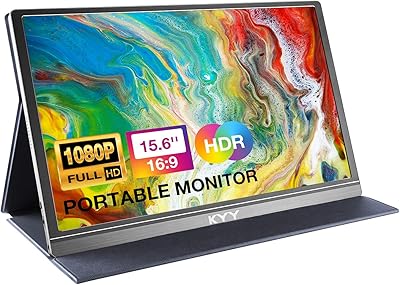
KYY K3 15.6-inch Portable Monitor