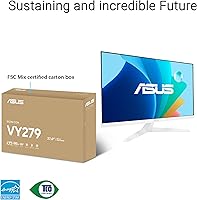
Overview

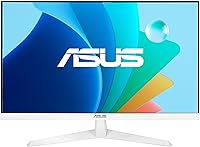
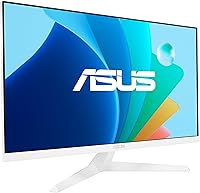
The ASUS VY279HF-W 27″ FHD IPS Monitor sits squarely in the budget end of the market, designed for home office users and light gamers who want a large, comfortable display without overspending. One thing that immediately sets it apart is the white colorway — a rare sight in a category where almost everything ships in matte black. At 27 inches with 1080p resolution, pixel density is worth thinking about honestly: text and icons look fine at normal viewing distances, but sitting close or working with dense typography may reveal some softness compared to a 1440p panel. A 3-year warranty and ASUS's solid track record add real confidence, and the bundled one-month Adobe Creative Cloud access is a modest but welcome bonus.

Features & Benefits

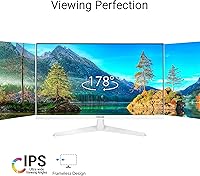
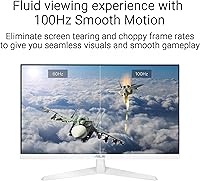
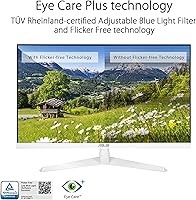
The IPS panel is the foundation everything else builds on — wide viewing angles and consistently accurate colors make extended work sessions far more pleasant than a TN display would. The 100Hz refresh rate and 1ms response time are entry-level gaming specs, so don't expect esports-level performance, but for casual titles or just smoother everyday use, the step up from 60Hz is genuinely noticeable. Adaptive-Sync helps keep things tear-free when frame rates fluctuate. The Eye Care Plus suite includes a blue light filter independently certified to reduce harmful light emissions — not just a marketing badge — paired with a flicker-free backlight and a screen-time rest reminder. A lesser-known highlight is the Color Augmentation mode, which helps people with color-vision deficiency distinguish shades more easily.

Best For

This ASUS eye care monitor makes the most sense for people who spend the better part of their day at a desk — remote workers, students, and anyone doing document or spreadsheet work where comfort matters more than pixel-perfect sharpness. Casual gamers upgrading from an aging 60Hz panel will appreciate the smoother motion without paying for a dedicated gaming display. It also holds up reasonably well for light photo editing or graphic work where decent color accuracy is enough. The white finish makes it a natural match for minimalist desk setups. One practical thing to factor in: the stand only tilts, so if ergonomic flexibility matters to you, it is worth budgeting for a monitor arm alongside this purchase.

User Feedback

With over 2,000 ratings averaging 4.5 stars, buyer sentiment for the VY279HF-W skews clearly positive. The most repeated praise is around out-of-box color accuracy — buyers are often surprised by how well-calibrated the panel arrives, with brightness described as solid for this price tier. Setup draws consistent high marks too; the included HDMI cable and simple assembly mean most people are up and running within minutes. On the critical side, some buyers flag that 1080p at 27 inches looks noticeably soft at close range, particularly for text-heavy work, and the tilt-only stand draws grumbles from users who expected height or swivel adjustment. That said, real-world feedback on the eye-care features is genuinely warm — many reviewers specifically mention reduced fatigue during long daily sessions.

Pros

  • IPS panel produces accurate, consistent colors straight out of the box with no manual calibration needed for everyday use.
  • The 100Hz refresh rate makes a noticeably smoother experience compared to any 60Hz panel, even for non-gamers.
  • Flicker-free backlight and certified blue light filter genuinely reduce eye strain during long work sessions.
  • Adaptive-Sync keeps visuals clean and tear-free when connected to a compatible GPU.
  • The white colorway stands out in a market full of identical black monitors — a real differentiator for aesthetic builds.
  • Setup is straightforward; the box includes an HDMI cable, so you are not hunting for accessories on day one.
  • Color Augmentation mode offers meaningful accessibility support for users with color-vision deficiency — rare at this price tier.
  • A 3-year warranty provides solid long-term coverage that budget alternatives rarely offer.
  • The matte screen surface handles ambient light well and reduces glare without washing out the image.
  • DisplayWidget Center lets you adjust monitor settings through software, which is more convenient than navigating physical OSD buttons.

Cons

  • At 27 inches with 1080p resolution, pixel density is noticeably lower than comparable 1440p displays — fine at a distance, softer up close.
  • The tilt-only stand offers zero height, swivel, or pivot adjustment, which is a real ergonomic gap for posture-conscious users.
  • Only a single HDMI port limits connectivity options; there is no DisplayPort, which some desktop setups require.
  • 100Hz is adequate for casual use but falls short for competitive gaming where 144Hz or higher is now the practical standard.
  • The VY279HF-W does not cover wide color gamut standards like DCI-P3 or Adobe RGB, limiting its value for color-critical creative work.
  • The rest reminder and eye-care software features require the DisplayWidget Center app installed — not universally welcomed by users who prefer minimal software footprints.
  • At 9.1 pounds, the monitor is not particularly heavy, but the base takes up a fair amount of desk depth relative to its footprint.
  • The bundled Adobe Creative Cloud access lasts only one month — useful as a trial, but easy to forget to cancel if you sign up.

Ratings

The scores below were generated by AI after analyzing thousands of verified buyer reviews for the ASUS VY279HF-W 27″ FHD IPS Monitor sourced globally, with spam, bot-submitted, and incentivized feedback actively filtered out. Each category reflects what real users experienced in day-to-day use — the genuine highlights and the honest frustrations alike. Nothing has been softened to protect the product's reputation.

Image Quality
78%
22%
For everyday productivity and casual media consumption, the IPS panel consistently impresses buyers with its color accuracy and wide viewing angles right out of the box. Colors look natural without manual calibration, and the matte surface keeps reflections from washing things out in brighter rooms.
The 1080p resolution at 27 inches is the persistent sticking point — users coming from smaller screens or sharper panels notice the lower pixel density, particularly with dense text or fine UI elements. It is a real compromise that divides opinion sharply along use-case lines.
Eye Comfort
91%
This is where the VY279HF-W earns its strongest praise. Users who spend six to ten hours a day at a desk consistently report less end-of-day fatigue compared to previous monitors, crediting both the flicker-free backlight and the adjustable blue light filter. The rest reminder feature, while simple, is mentioned positively far more often than expected.
A small number of users note that the blue light filter at its stronger settings introduces a noticeable warm color cast, which can make white backgrounds look yellowish during photo editing or color-sensitive work. It requires manual adjustment to find the right balance for each individual.
Refresh Rate & Motion
76%
24%
Buyers upgrading from 60Hz displays are almost universally positive about the step up to 100Hz — scrolling, window animations, and casual gaming all feel meaningfully smoother. For this audience, the improvement is tangible and justifies the purchase on its own.
Users who came to this monitor expecting a competitive gaming experience are disappointed. At 100Hz and with only Adaptive-Sync rather than a full G-Sync or FreeSync Premium implementation, it does not keep up with dedicated gaming panels. Fast-paced shooters still show limitations that more serious gamers will notice.
Value for Money
88%
The consensus across the buyer community is that this 27-inch IPS display punches above its price class in terms of what you actually get daily — IPS color, 100Hz, eye-care features, a bundled HDMI cable, and a 3-year warranty is a hard combination to beat at this tier. Many buyers mention it felt like a better deal than they anticipated.
A subset of buyers feel the value case weakens if you factor in the cost of a separate monitor arm to compensate for the stand's limitations, and the single HDMI port means some users needed to immediately buy an HDMI switch or adapter. Those additional costs chip away at the perceived savings.
Build Quality
73%
27%
The overall construction feels solid enough for a budget display — the panel itself has minimal flex, and the stand is stable without wobble during normal typing or desk use. The white finish looks noticeably cleaner and more premium in person than many buyers expected from spec-sheet photos.
The plastic quality of the stand base and bezel does not disguise its price tier under close inspection. Some buyers note minor creaking when adjusting the tilt angle, and the bezel, while slim on three sides, has a thicker chin that looks dated compared to more modern panel designs.
Ergonomics & Adjustability
47%
53%
The tilt range on the stand is smooth and holds its position well once set, which at least makes it easy to find a usable angle quickly. For buyers who already own a VESA-compatible monitor arm, the swap is straightforward and immediately solves most ergonomic concerns.
Tilt-only adjustment is a genuine pain point that appears in a disproportionate share of critical reviews. No height adjustment, no swivel, and no pivot means taller users, dual-monitor setups, and anyone working from a non-standard desk height will find the fixed positioning awkward without a third-party arm.
Setup & Ease of Use
93%
Out-of-box experience is one of the most consistently praised aspects of the VY279HF-W. The stand assembly takes under five minutes, the included HDMI cable means you are not hunting through drawers before getting started, and the display works well without installing any additional software. Buyers with limited technical experience specifically highlight this.
The physical OSD button placement on the underside of the panel is awkward to navigate in the dark or without looking. Most users quickly migrate to DisplayWidget Center software to avoid it, which means those who prefer not to install manufacturer software are stuck with a less convenient control method.
Connectivity
52%
48%
For users who only need to connect a single device, the included HDMI cable and port covers the basic requirement without any fuss. The HDMI 1.4 connection reliably supports the full 1920×1080 at 100Hz without issues.
A single HDMI port is the most common practical frustration among buyers. No DisplayPort, no USB-C, and no USB hub functionality means this monitor cannot grow with a more complex setup. Anyone running a laptop alongside a desktop, or using a modern monitor hub workflow, will immediately feel the constraint.
Color Accuracy
79%
21%
For general home office use, document editing, and casual photo browsing, out-of-box color accuracy is regularly described as better than expected. Skin tones and natural colors look balanced without the blue-heavy tint that budget VA panels often exhibit.
Wide color gamut coverage is limited — the panel does not reach DCI-P3 or Adobe RGB targets, which matters for anyone doing color-graded video work or professional photo retouching. Users in those workflows consistently flag that the display clips saturated colors in ways that affect their output accuracy.
Brightness & Contrast
74%
26%
Brightness levels are described as more than adequate for indoor home and office environments, with most buyers running the display at 60 to 75 percent and finding it comfortable. The matte coating handles typical overhead lighting without hotspots or distracting reflections.
IPS black levels are a known limitation of the panel technology, and buyers who previously used VA displays notice the difference immediately in dark room viewing. Contrast is acceptable for productivity but flat-looking for movies or gaming with dark scenes, where shadow detail gets murky.
Accessibility Features
86%
The Color Augmentation mode is called out repeatedly in reviews from users with color-vision deficiency as a genuinely helpful feature that they did not expect to find at this price point. It is not a cosmetic addition — buyers report it meaningfully improves their ability to distinguish interface elements and document colors in daily use.
The feature set is calibrated primarily for common forms of color-vision deficiency and may not cover every variation equally well. Some users with less common deficiency profiles report only marginal improvement, suggesting the mode works better for some conditions than others.
Software Experience
67%
33%
DisplayWidget Center is appreciated by users who engage with it — adjusting brightness, blue light intensity, and switching presets from the desktop is noticeably more convenient than digging through an on-screen display menu. The interface is clean and not resource-heavy.
Some buyers report compatibility hiccups on certain Windows configurations requiring a driver update before the software recognizes the monitor correctly. Users who prefer a minimal system software footprint also take issue with needing a background application for what they see as basic monitor controls.
Warranty & Support
84%
A 3-year warranty from ASUS is a meaningful differentiator at this price tier and is frequently cited as a deciding factor for buyers who compared the VY279HF-W against cheaper alternatives with shorter or less reliable coverage. ASUS's service network is established and broadly trusted.
A handful of users who needed to invoke the warranty report that the process required shipping the unit themselves and involved longer turnaround times than expected. Support quality appears to vary by region, with some international buyers describing a less responsive experience than domestic US customers.

Suitable for:

The ASUS VY279HF-W 27″ FHD IPS Monitor is a strong fit for remote workers and students who log long hours at a desk and genuinely feel the strain by end of day — the flicker-free backlight and adjustable blue light filter address real fatigue, not just spec-sheet checkboxes. If you are coming from a 60Hz display and want a noticeable upgrade in motion smoothness without crossing into high-end gaming monitor territory, the 100Hz panel delivers a satisfying step up for everyday use and casual gaming alike. Light creatives — think freelance designers doing mood boards, social content, or occasional photo touch-ups — will find the IPS color accuracy more than adequate for their needs. The clean white finish also makes this 27-inch IPS display a natural fit for anyone building a minimal, light-themed workspace where black monitors would look out of place. It is also worth noting that the 3-year warranty and ASUS brand backing offer a level of post-purchase reassurance that cheaper no-name alternatives simply cannot match.

Not suitable for:

The ASUS VY279HF-W 27″ FHD IPS Monitor is not the right call if pixel sharpness is a priority — at 27 inches, 1080p resolution delivers around 82 pixels per inch, and if you sit within arm's reach or work heavily with fine typography, the softness compared to a 1440p panel will be hard to ignore over time. Serious gamers chasing competitive performance will also find 100Hz and 1ms to be insufficient; monitors running at 144Hz or higher with proper variable refresh rate implementations exist at comparable price points and make a real difference in fast-paced titles. Buyers who need ergonomic flexibility should know upfront that the stand only tilts — there is no height adjustment, swivel, or pivot, which is a genuine limitation for people who dial in their posture carefully or share a desk. Professional photo editors or colorists who need wide color gamut coverage or factory calibration reports should look elsewhere, as this display is tuned for comfort and general accuracy, not color-critical output.

Specifications

  • Screen Size: 27-inch diagonal display with a 16:9 aspect ratio.
  • Resolution: 1920×1080 Full HD resolution, delivering approximately 82 pixels per inch at this screen size.
  • Panel Type: IPS (In-Plane Switching) panel with wide viewing angles and consistent color reproduction across the screen.
  • Refresh Rate: 100Hz maximum refresh rate for smoother motion compared to standard 60Hz displays.
  • Response Time: 1ms response time (MPRT), reducing motion blur during fast-moving content.
  • Adaptive Sync: Adaptive-Sync compatible, reducing screen tearing and stuttering when paired with a supported GPU.
  • Blue Light Filter: Adjustable blue light filter independently certified by TÜV Rheinland to reduce potentially harmful high-energy light emissions.
  • Flicker Free: Flicker-free backlight technology eliminates the rapid on-off cycling that can cause eye strain and headaches during extended use.
  • Surface Finish: Matte anti-glare screen coating reduces reflections from ambient light sources.
  • Connectivity: Single HDMI port; an HDMI cable is included in the box.
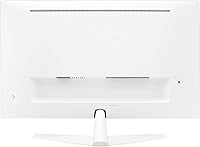
  • Stand Adjustment: Tilt-only stand adjustment; no height, swivel, or pivot movement is supported.
  • Color Finish: White exterior finish on both the panel bezel and stand base.
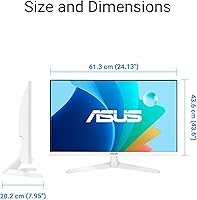
  • Dimensions: 24.1 × 17.2 × 7.9 inches (W × H × D) with stand attached.
  • Weight: 9.1 pounds (approximately 4.1 kg) including the stand.
  • Accessibility: Color Augmentation mode helps users with color-vision deficiency better distinguish between colors on screen.
  • Software: DisplayWidget Center software allows on-screen display adjustments and feature management directly from a connected PC.
  • In-Box Contents: Includes HDMI cable, power cord, L-shaped screwdriver, warranty card, and quick start guide.
  • Warranty: Backed by a 3-year limited manufacturer warranty from ASUS.

Related Reviews
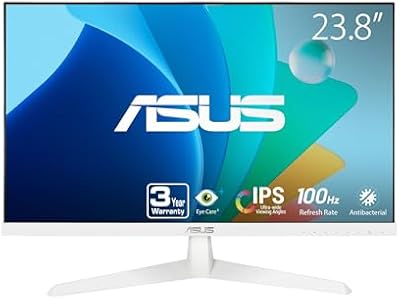
ASUS VY249HF-W 23.8-inch 1080p IPS Monitor
77%
83%
Image Quality
91%
Eye Comfort
78%
Color Accuracy
81%
Refresh Rate & Smoothness
46%
Connectivity
More
Acer SB272 27-inch FHD IPS Monitor
74%
91%
Value for Money
83%
Image Quality
54%
Brightness
78%
Refresh Rate & Smoothness
43%
Stand & Ergonomics
More
Alienware AW2724HF 27″ Gaming Monitor
78%
94%
Motion Clarity
92%
Refresh Rate Performance
88%
Adaptive Sync
74%
Panel Color Quality
53%
Resolution & Sharpness
More
BenQ GW2791 27-inch FHD IPS Monitor
80%
83%
Image Quality
91%
Eye-Care Performance
88%
Value for Money
62%
Display Sharpness
47%
Stand & Ergonomics
More
ASUS VA27ECPSN 27-inch Docking Monitor
79%
91%
USB-C Docking Performance
93%
Connectivity Range
88%
Wired LAN Integration
61%
Display Sharpness
89%
Ergonomic Stand
More
LG 27SR50F-W 27-Inch Smart Monitor
70%
88%
Smart TV Features
67%
Display Clarity
79%
AirPlay & Apple Integration
91%
Setup Experience
82%
Build Quality & Design
More
Amazon Basics 27E2UA 27-inch IPS Monitor
78%
92%
Value for Money
84%
Image & Color Quality
88%
Viewing Angles
51%
Ergonomics & Stand
87%
Connectivity & Port Selection
More
LG 27MP450 27-inch FHD IPS Monitor
77%
78%
Image Quality
71%
Color Accuracy
67%
Gaming Performance
84%
Ergonomics & Stand
83%
Eye Comfort
More
ASUS VZ279HE 27-inch IPS Monitor
75%
91%
Value for Money
88%
Eye Comfort
74%
Build Quality
72%
Display Clarity
67%
Color Accuracy
More
ASUS VG279Q 27″ Full HD IPS 144Hz Gaming Monitor
86%
93%
Display Quality
92%
Gaming Performance
88%
Ergonomics & Adjustability
89%
Eye Care Features
87%
Build Quality
More

FAQ

It depends on how close you sit and what you are doing. At a typical desk distance of 24 to 30 inches, most people find 1080p perfectly acceptable for general work, video, and casual gaming. Where it starts to show its limits is if you sit closer than that, work with small text all day, or have previously used a 1440p display — in those cases the softness becomes noticeable. It is a legitimate trade-off worth thinking about before buying.

Yes, the Adaptive-Sync technology on the VY279HF-W is compatible with both AMD FreeSync and NVIDIA G-Sync Compatible-certified setups, so you are not locked into one GPU brand. Just make sure your graphics card supports variable refresh rate output over HDMI, as that is the only port available on this display.

Yes, the monitor supports VESA mounting, which is genuinely worth considering given that the included stand only tilts and offers no height or swivel adjustment. A monitor arm gives you far more ergonomic flexibility and frees up desk space, making it a practical upgrade especially for people who care about posture during long sessions.

It is more substantive than most. The blue light filter on the ASUS VY279HF-W 27″ FHD IPS Monitor has been independently tested and certified by TÜV Rheinland, which is a third-party organization that physically measures light output — not just a self-awarded label. Combined with the flicker-free backlight, which eliminates the rapid on-off cycling common in cheaper displays, many users genuinely notice reduced eye fatigue over long workdays. The rest reminder feature also prompts you to take breaks, which is arguably as valuable as any hardware feature.

No, the VY279HF-W does not have built-in speakers. If audio is important to your setup, you will need external speakers or headphones connected to your computer or a separate audio device.

ASUS uses a hard matte plastic for the shell, which holds up reasonably well under normal use. Like any white plastic, it can show scuffs if you are rough with it during setup or repositioning, so a bit of care goes a long way. Yellowing from UV exposure is a slow process and unlikely to be noticeable in a typical indoor environment over the warranty period.

The monitor has a single HDMI port, so you cannot connect two devices simultaneously without an external HDMI switch. If you regularly switch between a laptop and a desktop, picking up a simple two-port HDMI switch is an inexpensive fix that makes the workflow much less annoying.

Color Augmentation mode adjusts how the monitor renders colors on screen to make it easier for people with red-green or blue-yellow color-vision deficiency to distinguish between shades that might otherwise look similar. It is a genuinely useful accessibility feature that most monitors at this price point do not include. If this affects you or someone in your household, it is a meaningful real-world benefit rather than a checkbox feature.

Setup is about as simple as it gets. The stand attaches to the panel with a few screws, and ASUS includes an L-shaped screwdriver in the box so you do not need to hunt for one. The HDMI cable is also included, so for most users the whole process from opening the box to having a working display takes under ten minutes.

It is optional. The monitor works out of the box without installing any software. DisplayWidget Center simply adds a more convenient way to adjust brightness, blue light levels, and other display settings from your desktop rather than using physical buttons on the monitor body. Some users appreciate it, but if you prefer a minimal software footprint, you can skip it entirely and adjust settings manually.